通过插件独立管理的 Cua Driver 运行时提供 macOS 电脑操作工具。
安装
# npm 包(预构建)
dsh plugin --profile web add dsh-cua-drive
# Release 预构建包
dsh plugin --profile web add -w "https://github.com/aa2246740/dsh-cuadrive-mac/releases/download/v0.2.1/dsh-cua-drive-0.2.1.tgz"
# GitHub 源码(首次需按提示配置 allowBuilds 构建授权后重试)
dsh plugin --profile web add github:aa2246740/dsh-cuadrive-mac
装任何插件都等于在你的机器上跑第三方代码,权限和你本人一样大——能读你的文件、用你的凭据、访问网络,工具审批管不到它。GitHub 来源的插件还会在安装时执行构建脚本——pnpm 默认拦截,所以安装可能停在 ERR_PNPM_GIT_DEP_PREPARE_NOT_ALLOWED 或 ERR_PNPM_IGNORED_BUILDS;dsh 会打印出需要添加的确切键名,把它加进该 profile 的 pnpm-workspace.yaml 的 allowBuilds 下,重跑一次即可装上。放行构建本身就是一次信任判断:请只安装可信来源,并尽量锁定 commit(github:owner/repo#sha)。
README
dsh-cua-drive
dsh plugin --profile web add github:aa2246740/dsh-cuadrive-mac
PATH 上需要有 pnpm。然后重启这个 Host,再刷新页面。
dsh 不在 PATH 上时:
npx @deepseek-ai/dsh plugin --profile web add github:aa2246740/dsh-cuadrive-mac
官方 dsh plugin add 会在 $DSH_HOME/profiles/web 里跑 pnpm。这个包装了 dsh.bundle.patch,所以会写进 dsh.profile.bundles。仓库已提交编好的 lib/,GitHub 安装不会跑 prepare。dsh plugin add 只写 profile,不会热挂正在跑的 Host。
只做 macOS。装上之后,DSH 里的 agent 用一份私有、钉死的 cua-driver 0.20.0(写在 runtime-lock.json)点窗口、读屏幕、操作 App。跑在插件自己的 socket 上,不会停、改或劫持机器上已有的 Cua。
第一次启动会向拉起 dsh 的那个进程要辅助功能和屏幕录制。DSH.app 勾 DSH。命令行 dsh web 勾 Terminal / iTerm / Cursor / VS Code。Windows / Linux 只加载 cua_status,说明这是 macOS-only,不会下载驱动,也不会启动 computer-use。
包名是 dsh-cua-drive。仓库还叫 dsh-cuadrive-mac,已经下过的包、权限、socket、会话不用搬家。
本地 clone 也走同一条官方 CLI:
git clone https://github.com/aa2246740/dsh-cuadrive-mac.git
dsh plugin --profile web add ./dsh-cuadrive-mac
然后同样重启 Host,刷新页面。
dsh plugin --profile web remove dsh-cua-drive
DSH.app 的 Plugin Manager 只接受 npm 包名,吃不了 github:。桌面用户用 dsh web 装进 web profile。
如果旧 profile 的 cordis.patch.yml 里已经有一行 dsh-cuadrive-mac,先删掉。现在由 Bundle 自己占 Loader,留两份会在启动时报重复 id。
第一次在 Mac 上
| 你怎么跑 dsh | 系统设置里要勾谁 |
|---|---|
| DSH.app | DSH |
CLI dsh web,没有 app 包 |
Terminal / iTerm / Cursor / VS Code,父进程那个 App |
不要跑 cua-driver permissions grant,那会去拉 /Applications/CuaDriver.app。看 cua_status.hostPermissions.hostLabel,勾那个名字。
第一次在 Mac 上启动需要联网一次,把钉死的 darwin-universal 包拉到 $DSH_HOME/dsh-cuadrive-mac/vendor/。下不动就设 HTTPS_PROXY / ALL_PROXY / 插件配置 proxy,或者把一模一样的 tarball 放到 runtime.manualCachePath。不要跑 cua-driver update。
进度看 cua_status 的卡片标题,或 $DSH_HOME/dsh-cuadrive-mac/status.json 和 download.log。
Windows / Linux 只加载状态工具:
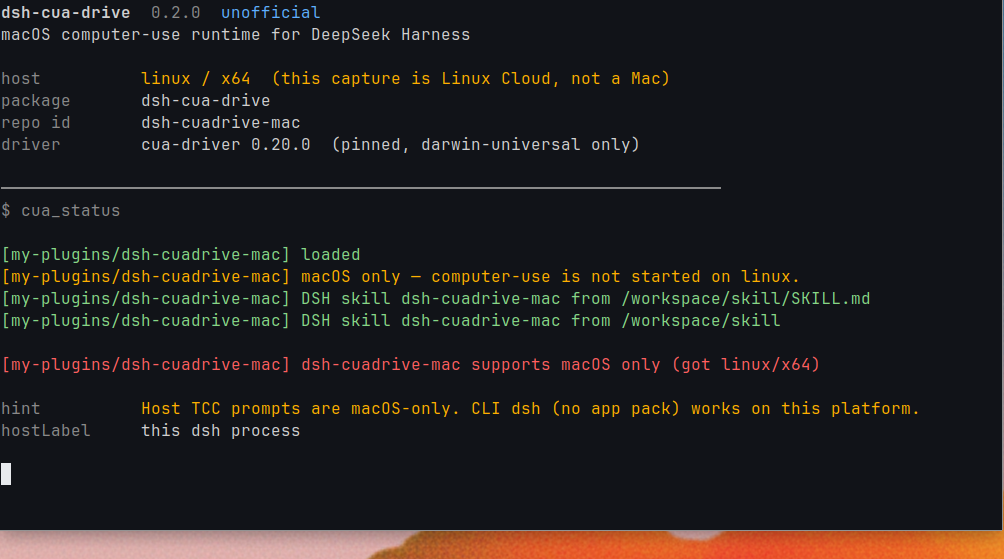
私有运行时在 $DSH_HOME/dsh-cuadrive-mac/。关掉 DSH,停的只是 run/driver.sock。给模型的工具名仍是 cua_*。
配置
| key | 默认 | 干什么 |
|---|---|---|
binary |
空 | 绝对路径覆盖;空就用插件 vendor 目录 |
ownDaemon |
true |
私有 DSH socket |
socketPath |
$DSH_HOME/dsh-cuadrive-mac/run/driver.sock |
只给 DSH 的 serve |
autoStart |
true |
socket 没起来就下载并 serve --embedded |
proxy |
空 | 拉 GitHub 时用的 HTTP(S) 代理 |
promptPermissions |
true |
第一次用拉起 dsh 的那个 host 去要权限 |
timeoutMs |
90000 |
单次调用时限 |
sessionId |
dsh |
私有 daemon 上的 hosted session |
本地开发
克隆到独立目录,用官方 dsh plugin add 挂进 profile:
npm ci
npm test
npm run typecheck
npm run build
dsh plugin --profile web add .
改完同样重启 Host,刷新页面。
MIT。
链接
同类插件
Tencent/WeKnora#dsh-weknora★ 38318
把 WeKnora 知识库接入 dsh 的四个只读工具:列出知识库、混合检索原文片段、按顺序还原单篇文档,以及直接取用 WeKnora 自己带引用的 RAG 或 ReAct agent 回答(含可续聊的 session id)。
DayuanJiang/next-ai-draw-io#dsh-plugin★ 37203
dsh 的 draw.io 绘图插件:通过 next-ai-drawio MCP 服务器作图,点回复里的链接在右侧栏打开实时预览,可以手动修改图,AI 的每次修改都是可以恢复的版本。需 Node.js 18+,首次使用由 npx 下载 MCP 服务器。
yikart/AiToEarn#dsh-plugin-aitoearn★ 28763
帮你生成文案/图文/短视频,一键分发抖音、快手、小红书、公众号、bilibili、Facebook、TikTok 等海内外平台,覆盖自媒体运营从内容创作,内容发布到内容变现全链路。
superdesigndev/treg★ 9619
给 Agent 的工具目录:按「要做的事」检索约 2,600 个外部接口(SEO 与 SERP、外链、社交、人物与公司信息补全、广告库、抓取),查看参数与单次调用价格后直接调用,凭据由服务端注入。附带技能,MCP 行在未设置 TREG_TOKEN 前保持禁用。
T-Auto/dsh-ops★ 6028
为 Windows 的 DSH 提供 bash、PowerShell 7 及 Rust 高性能工具,减少 token 消耗。
Hithink-Tech-Org/Financial-API#hithink-finance★ 4641
在 DeepSeek Harness 中查询同花顺金融数据、在对话中查看图表,并保存可刷新的看板。
社区评论
评论公开保存在 GitHub Discussions。加载评论会连接 GitHub 和 Giscus;发表内容需要 GitHub 账号。