A better fold bar: automatically folds tool calls and Think segments into step fold bars, and collapses each finished turn into a single turn header with live metrics (duration, TTFT, token, tok/s, cache hit) — only the final summary stays visible; customizable leading icons with animated poker cards built in (suit-cycling card animation while running, a deck when collapsed, a fan when expanded), a settings row for the official fold mode, compatible with both new and old DSH versions. Zero intrusion into DSH source.
Install
# from npm (prebuilt)
dsh plugin --profile web add @winteries/dsh-turn-fold
# from GitHub (first run asks for allowBuilds approval — follow the hint, retry)
dsh plugin --profile web add github:Winter-And-You-Gone/dsh-turn-fold
Any plugin you install runs third-party code with your own permissions — it can read your files, use your credentials, and reach the network, and tool approvals don’t sandbox it. GitHub-sourced plugins also run build scripts at install time — pnpm blocks those until you allow them, so an install can stop with ERR_PNPM_GIT_DEP_PREPARE_NOT_ALLOWED or ERR_PNPM_IGNORED_BUILDS; dsh prints the exact key to add under allowBuilds in your profile’s pnpm-workspace.yaml, and the install works on the next run. Allowing a build is a trust decision: only install sources you trust, and pin a commit (github:owner/repo#sha).
README
简体中文(默认) | English
Tired of dozens of tool calls filling your screen? Envious of Codex's auto-collapse next door? Then this plugin is made for you.
A pure plugin for DeepSeek Harness (DSH) that only handles collapsing:
- Segment-level auto-collapse: all tool calls and Think blocks (including Think-only segments) between two text messages are grouped into one step fold bar, collapsed by default; while running, the header dynamically shows "Running
icon ToolName· description" or "Thinkingicon Think· content" (text with a shimmer gloss animation), switching to a tool-type-grouped detailed title (e.g. "Ran pwsh", "Read client.js", "Edited index.js [ +12 -3 ]") once the next text message appears; a Think-only segment shows "Thought N times" when closed. - Live turn fold bar: appears immediately when you send a message (0-second placeholder, no waiting for the first response); the header shows duration / TTFT / tokens / tok/s / cache-hit rate in real time, with "Turn N" right-aligned on the far right, separated from the content by a divider line.
- Whole-turn collapse: after a reply finishes, all Think blocks + tool calls + context injections of that turn collapse into a turn fold bar (collapsed by default); only the final summary text stays visible.
- Manual expand/collapse: click a fold bar to toggle.
Does not modify any @deepseek-ai/dsh-* source code.
Feature 1: Segment-level auto-collapse
text: First, check the repo status.                    ← text appears directly
┌────────────────────────────────────────────────────┐
│ › Running ⬢ Pwsh · Commit 1: core +tests            │  ← running: icon + tool name + summary
└────────────────────────────────────────────────────┘
text: …                                               ← next text message
┌────────────────────────────────────────────────────┐
│ › Edited client.js [ +7 -7 ] Ran 2 commands         │  ← segment closed: grouped by tool type
└────────────────────────────────────────────────────┘
- Segment = content between two text messages: consecutive tool calls and Think blocks mix into one segment (Think no longer breaks the group); text-carrying assistant messages are the segment boundaries, and the text body always renders directly below the step fold bar (official rendering, a single copy, not folded — DSH stores think and text blocks in the same node, so the think part folds into the segment while the text part stays outside).
- Always collapsed by default: step fold bars are always collapsed by default (even while running) — while running, only text messages and step fold bar rows are visible; tool cards and Think content appear only when clicking the step fold bar.
- Dynamic title while running: before the next text message appears (segment not closed), the header shows the last node in the segment — tool calls show "Running
icon ToolName· parameter summary" (tool icons reuse the official VARIANT_ICONS mapping, e.g. Pwsh → API icon, Read → browse icon, Grep → search icon), Think blocks show "ThinkingiconThink · latest line" (prefix + official Think icon + summary, taking the latest line and scrolling horizontally to follow the tail, advancing with streaming); the running title text has a shimmer gloss animation (gray-tone gradient, 1.8s sweep + 2s dwell, per-theme colors). - Closed segment title (grouped by tool type): once the next text message appears, the header groups tools by type — commands only:
Ran pwsh(single, tool name) /Ran 3 commands(multiple, count); reads only:Read client.js(one file, name) /Read 2 files(multiple, count); edits only:Edited index.js [ +12 -3 ](single file with line changes read from official diffs) /Edited 3 files; searches:Searched 2 times; mixed groups order as "read → edit → search → commands" with commands always last, e.g.Read client.js Edited App.tsx Ran 2 commands; a Think-only segment shows "Thought N times" (N = Think blocks in the segment) when closed. - Manual expand/collapse: click a step fold bar to toggle; manual choices override the auto rule.
- Failed commands turn red: when a command in the group failed (tool result
isError, interrupted counts too), the fold bar text turns red and a failure suffix is appended — a single tool call failing shows " — failed" (no count); with multiple tool calls even 1 failure shows " — 1 failed", 2+ show " — y failed". The failure count covers all tool types in the segment (read/edit/search/commands).
Screenshots
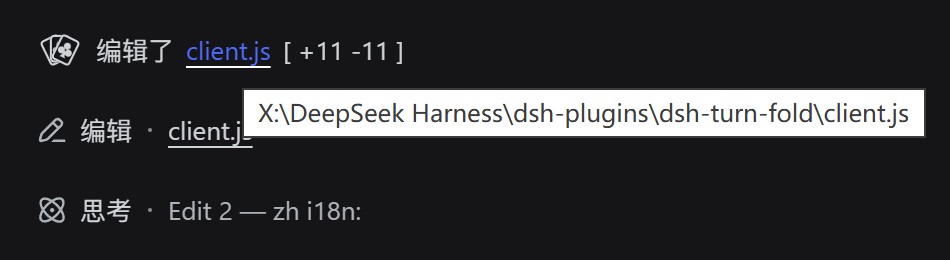
Closed-segment header: per-type summary + edit line stats ([ +11 -11 ]; hovering
the bracket turns +N green / -N red):
![Step fold bar: Edited client.js [ +11 -11 ]](https://raw.githubusercontent.com/Winter-And-You-Gone/dsh-turn-fold/HEAD/docs/images/segment-edit-stats.png)
Filenames in the header are click-to-copy: hover turns DeepSeek blue with a white solid underline:
Feature 2: Live turn fold bar + collapse the whole turn into a turn fold bar
[User message]
[▸ 5m12s · TTFT 1.2s · 12345 tokens · 34 tok/s · 80.00% cache hit · 6 steps pending        Turn 13]  ← turn fold bar, appears at reply start
─────────────────────────────────────────────      ← divider line
[Think / tool calls loading one by one…]            ← collapsed by default while running
[Final summary body]                                ← no Think lines, only body
[duration · token footer]                           ← official turn-tail
- the turn fold bar appears the moment you send a message (0-second placeholder): the placeholder turn fold bar renders directly below the user message (above the official "Deep diving..." status line — the same spot the real header will occupy, so the handover has zero movement; a 16px top margin matches the official flow gap) while the session is running and the last message is the user message; once the first intermediate node arrives, the placeholder disappears and the real header takes over;
- Metrics update in real time: the duration seconds tick every second (timed from the turn's
turn/start), "tokens consumed" refreshes at a randomized interval (125–250ms by default) and keeps growing, tok/s is estimated live from output tokens / elapsed time, the cache-hit rate shows two decimal places (e.g.80.00%), and TTFT shows the official value as soon as the first request settles (assistant-stepfinalNode.timing:firstTokenTime - stepStartTime), switching to the official persisted aggregate once the turn ends (thettftMscarried by the turn-tail node, derived from the event log, survives page reloads); only while the first request is still streaming does it fall back to a render-time approximation (turn start → render of the first assistant-step); once the turn ends, everything switches to the official authoritative values (turn-tail tok/s, exactturn/endduration); "tokens consumed" also switches to the officialtokenUsageexact value carried by the turn-tail (see below); - "Turn N" right-aligned on the header row (e.g.
Turn 13, following the DSH UI language); - "Tokens consumed" grows with a continuous animation: real
usageonly arrives when a request completes, so between two arrivals the number would stall — while running, a purely cosmetic animation offset is added on top of the real baseline, advancing per actual tick in an alternating +1 / +11 loop (ones digit +1 per tick, tens digit +1 every 2 ticks, higher digits follow via carry); each tick interval isliveTickMs× a random factor (liveTickJitter…1, 125–250ms by default), so the digits jump at an irregular pace, more like a real generation rate than a metronome; when new usage arrives only the baseline snaps to the real value — the offset keeps accumulating, so the number never steps back. The offset is capped at max(500, 10% of the real baseline) (CONFIG.liveTokenAnimMaxRatio/liveTokenAnimMaxFloor; set both to 0 to disable the growth), so a long tool run can no longer pile up a five-digit fictional number — and as the real baseline rises, the cap rises with it. The base interval and the jitter are tunable viaCONFIG.liveTickMsandCONFIG.liveTickJitter; - "Tokens consumed" matches the official statistics: once the turn ends, the official
tokenUsagecarried by the turn-tail is preferred (officialderiveTurnTokenUsagefolds every billed attempt on the persisted event log:totalTokens= exact prompt+output including retried requests; the cache-hit denominator is the same prompt-side totaltotalTokens - outputTokens); the node-sum path (the live baseline, and the fallback whentokenUsageis absent) additionally scansnodes.values()forvisibility:hiddenassistant-steps — pure tool-call intermediate steps (no visible reasoning/text) are settled by DSH as hidden nodes and never enterlocations.getTurn, so iterating visible nodes only undercounts them (measured case: official stats 175,844 vs 117,301 before the fix — the difference was exactly one hidden step's 58,543); - Odometer-style digit animation: while the turn is running, each digit of the changing numbers rolls to its new value independently (odometer/slot-wheel effect with springy easing; the roll duration adapts to change frequency — fast-changing digits like the token ones digit use a short roll slightly shorter than the refresh interval so every tick completes cleanly, slow ones like the duration seconds keep the 350ms springy roll) — every digit is its own 1ch-wide window with a vertical 0-9 strip, like a counting drum; a visually hidden sr-only copy keeps the full label readable for screen readers, and the animation degrades to static digits when the system prefers reduced motion;
- Divider always below the header: a 1px horizontal line always sits below the turn fold bar text (
.ccg-turn-divider, colored via the fallback chainvar(--dsw-alias-line-secondary, var(--dsw-alias-border-l1, #d1d5db))— as of DSH 0.1.1 … 0.1.5-rc.1 none of them defines--dsw-alias-line-secondary, so the effective token is--dsw-alias-border-l1, adapting to light/dark themes) — visible in both collapsed and expanded states, acting as the visual boundary between the header and the content when expanded; - After a turn finishes (final summary output, turn end), the turn fold bar auto-collapses: all Think blocks, tool calls and context injections of that turn collapse into a turn fold bar, keeping only the final summary message and the official duration/token footer visible (turns the user expanded manually stay expanded);
- the turn fold bar shows this turn's metrics:
duration (xh xm xs, or just m s under 1 hour, or just s under 1 minute), TTFT x.xs, N tokens, N tok/s, cache hit NN.NN%, N steps pending / folded N steps (shown when > 0; "pending N steps" while running, "folded N steps" once the turn ends); missing items are omitted automatically, and only when all are missing does it fall back to "Ran N commands"; fields are joined with·, with "Turn N" on the right; - Click the turn fold bar to expand/collapse the whole turn; when reopening a historical session, completed turns stay collapsed as well;
- The fold never crosses the user message: the turn fold bar only folds content between the user message and the agent's reply. Context rows anchored above the user message (e.g. approval-policy change notices) are not part of this turn's output interval: they stay visible as-is, never participate in the fold, and are never used as the header anchor — so the big header can never fold content sitting above the user message;
- Final summary shows only body: after the turn ends, Think lines inside the final summary message are hidden too;
- Status labels: turns that ended abnormally (user-stopped / interrupted) get a status prefix on the turn fold bar,
e.g.
Stopped | 5m 12s, ...; normally completed turns show no extra label; - Single items are grouped too: when there is only 1 command (or 1 Think block) between two text messages, a step fold bar is still applied — "Running
icon ToolName· …" while running, "Ran pwsh" once text appears; at turn end it is folded into the turn fold bar, and the step fold bar row is visible after expanding the turn fold bar.
Screenshots
Turn running (or manually expanded): the turn fold bar shows duration, TTFT, tokens, tok/s, cache hit, folded steps and the turn number in real time; the process content folds into step groups while tool cards and Think rows stay readable:
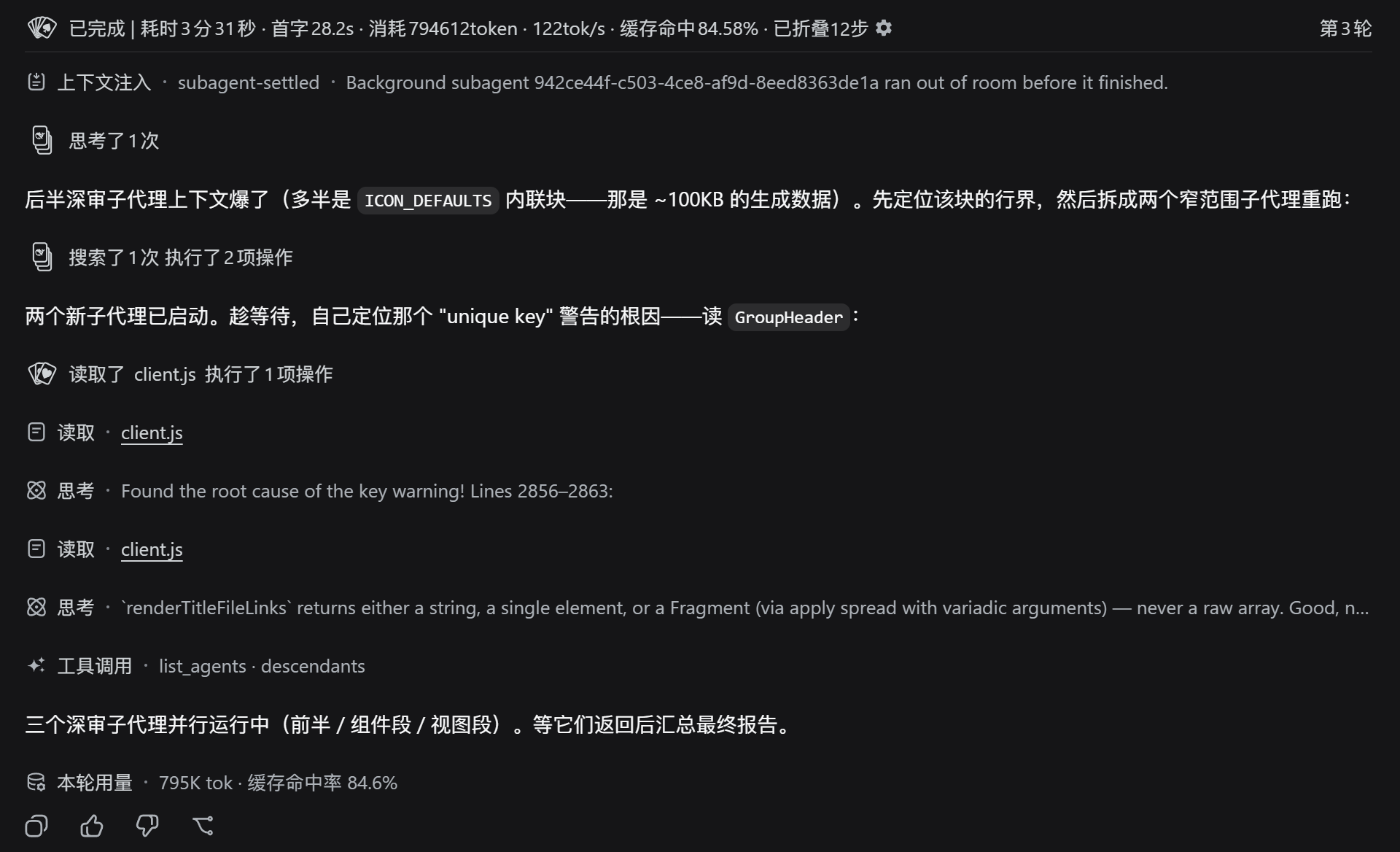
After the turn ends (or on manual collapse): the whole turn folds into the turn fold bar, keeping only the final summary body and the usage footer:

Component styles & spacing
- Group header = official style: the header reuses the official
DisclosureRowprimitive (@deepseek-ai/dsh-client-ui-primitives) — 24px row height, 16px leading, official 14px chevron (right when collapsed / down when expanded), 14px/24px title, pixel-identical to the Think / tool-card collapse rows; - turn fold bar divider: a 1px horizontal divider line (
.ccg-turn-divider, colored via the fallback chainvar(--dsw-alias-line-secondary, var(--dsw-alias-border-l1, #d1d5db))) always renders below the turn fold bar text — visible in both collapsed and expanded states, with 4px / 8px spacing above and below; - Compact spacing: a collapsed group takes one row (24px); folded member nodes are
display:noneentirely, leaving no residual blank rows, so spacing matches official messages exactly (column's 16px rhythm) no matter how much is collapsed. - Transition animations: expanding smoothly grows the content from 0 to its real height (grid-track
0fr→1frtransition + fade-in, 280ms; the start frame is committed synchronously viauseLayoutEffectso the transition always plays); collapsing plays a shrink transition (280ms) before unmounting; animations are disabled automatically when the system prefers reduced motion. During a running turn, the content stays in "live mode" (height auto, no clipping of growing streaming content). - Running-title shimmer: the text of running segment titles ("Running…" / "Thinking…") has a shimmer gloss animation — gradient background +
background-clip: text+ background-position animation, one unified gradient flowing across the whole row (1.8s sweep + 2s dwell); dark/light themes have their own palette, icons are unaffected. - Odometer digits: while running, the turn fold bar's numbers (duration/TTFT/tokens/tok/s/cache-hit) are split into 1ch-wide rolling windows per digit, rolling to new values on change (350ms springy easing); after the turn ends the label falls back to plain text.
- Localization: UI text follows the DSH UI language live (reads
document.documentElement.lang, Simplified Chinese or English); the browser language is only a fallback. - Accessibility: headers expose
aria-label/aria-expandedand are keyboard-operable (Enter / Space to toggle).
Installation
Option 1 (recommended): install from npm
This plugin is published on the npm registry: @winteries/dsh-turn-fold
(The legacy package name dsh-turn-fold keeps receiving synchronized releases so existing installs can keep updating; new installs should use @winteries/dsh-turn-fold.)
# Official command (recommended)
dsh plugin --profile web add @winteries/dsh-turn-fold

# Or install from the GitHub source
dsh plugin --profile web add github:Winter-And-You-Gone/dsh-turn-fold
dsh plugin adds the package to the profile's pnpm dependencies and appends it to the bundle layer
(dsh.profile.bundles) automatically — no manual file edits. To verify:
dsh --profile web --dump-config # confirm a "@winteries/dsh-turn-fold" layer appears in the output
Then fully exit the DSH process and restart.
Option 2: manual install.ps1
# Put the plugin directory into your existing plugins directory, then:
.\install.ps1 -PluginSource "<your-plugin-directory>"
# e.g. .\install.ps1 -PluginSource "C:\dsh-plugins\dsh-turn-fold"
# When no argument is given, the script uses its own directory as the plugin source
The script will:
- Create a Junction at
~/.dsh/profiles/node_modules/@winteries/dsh-turn-foldpointing to the plugin directory; - Append a
- insert:registration line to~/.dsh/profiles/web/cordis.patch.yml; - Verify
require.resolveresolves.
Then fully exit the DSH process and restart.
Uninstall
# Official way: removes both the dependency and the plugin layer
dsh plugin --profile web remove @winteries/dsh-turn-fold
Manual way (when previously installed via install.ps1):
Remove-Item "$env:DSH_HOME\profiles\node_modules\@winteries\dsh-turn-fold" -Force   # remove the Junction
# Manually remove the corresponding insert block from cordis.patch.yml
Testing
npm install        # first time: installs jsdom / react / react-dom (devDependencies)
npm test           # node --test runs the whole suite under tests/
npm run check      # syntax check client.js / index.js
The test suite (tests/) loads the real client.js directly (via __ModuleLoader__
injection + __test export, no copy-paste drift) and is layered in six parts (seven
files):
| File | Coverage |
|---|---|
unit.logic.test.mjs |
Pure functions: computeGroup segment grouping, computeTurnFold whole-turn fold, computeTurnMetrics / turnHeaderLabel metrics label, turnNumber; includes every historical verify-fix scenario plus real session data (TURN13) |
unit.render.test.mjs |
React rendering: initial collapse → click turn fold bar to expand → collapse again; per-name passthrough of the official inject-face hooks (useConnectionGeneration / useHostInfo, merged by chatNodeEntryInject) during builtin delegated rendering; slot registration contract (inject declaration) |
unit.css.test.mjs |
CSS :has() hiding rules take effect on a real DOM (including the expand → collapse round trip) |
regression.test.mjs |
Historical bug regressions: node-object replacement (Bug1), missing inject crash/abdicate (Bug2), no-tool-call turns also fold (v0.2.3), fold scope never crosses the user message (v0.2.2), manual segment expand/collapse |
unit.gear.test.mjs / unit.settings-row.test.mjs |
Gear field popup and the settings row shadowing the official transcript-view row (title stays the official "Conversation display"; options follow the host vocabulary — older hosts Normal / Compact / Turn-Fold, 0.1.7+ Compact / Standard / Detailed / Verbose / Turn-Fold, with vocabulary-probe and foldOff-write assertions) |
unit.compat.test.mjs |
DSH dual-version compatibility: the 0.1.1 useSession (.chat + top-level turnEnds/turnTimings) and 0.1.2 useChat + chat.legacy snapshot paths, fold-mode toggle hooks-order regression, official diffs read chain (meta.diffs / resultView / callView) |
In sandboxed environments that cannot spawn child processes (e.g. Windows sandbox),
--test-isolation=noneis required (already built intonpm test); it also works on regular Linux/macOS CI (Node ≥ 22.9).
Fold icons (poker cards)
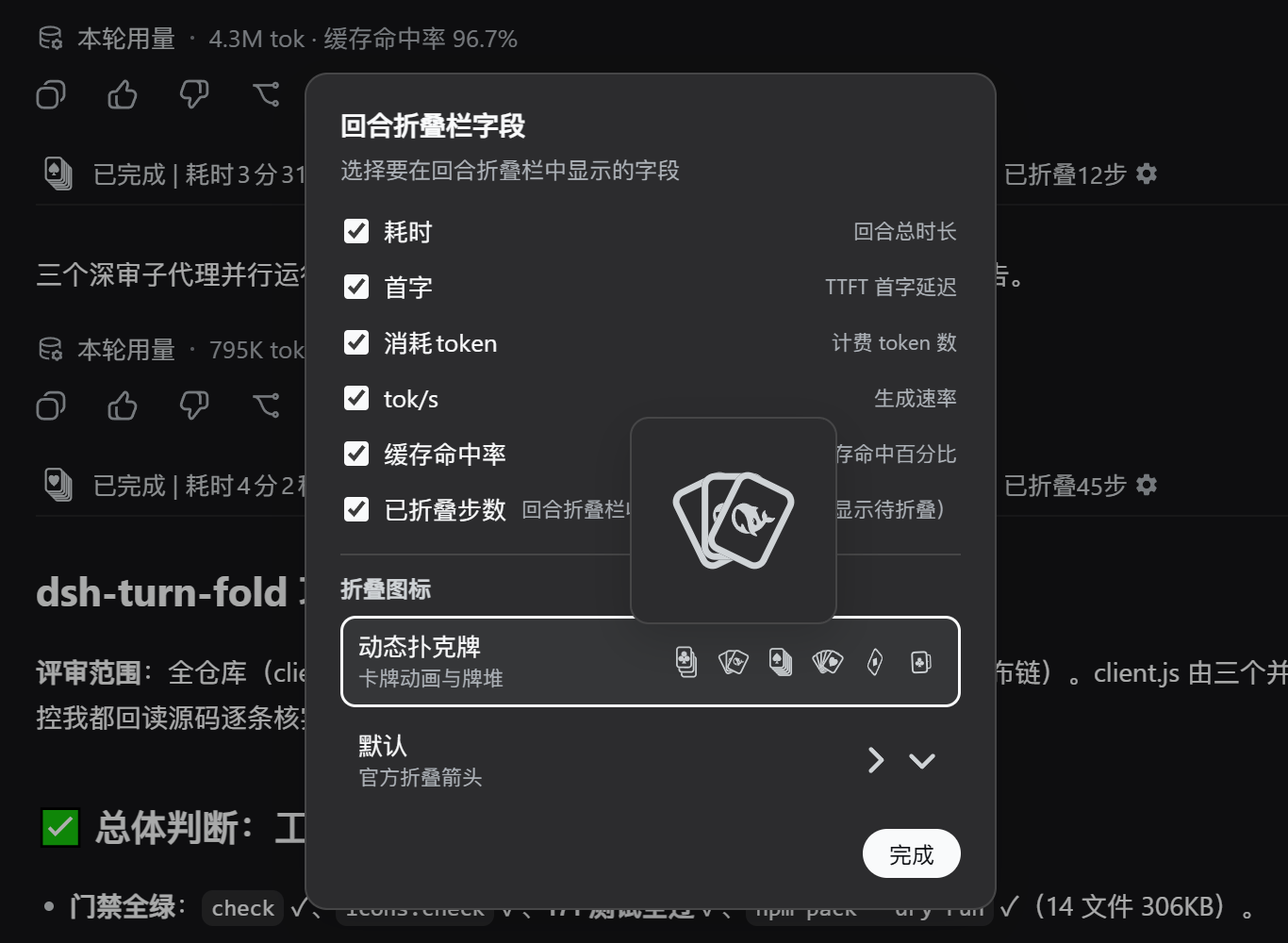
Step/turn fold bars default to animated poker cards (the gear ⚙ at the right of the turn fold bar opens a popup whose "fold icon" selector switches back to the official chevron):
- Settled: collapses into a deck (≤3 tools in the segment → 3 cards, >3 → 5); expanding fans them out;
- Face pool: ♠ ♥ ♦ ♣ + the DeepSeek whale logo — five faces, picked randomly per fold bar and memoized by leaderKey;
- Running: the step bar plays a five-face rotation, the turn bar a diagonal-axis flip (four suits cycling, logo on the back) — native SVG animation;
- Occlusion: luminance masks cut the lower card where an upper card covers it (transforms stay frame-aligned during animation); card bodies stay transparent, correct over wallpapers;
- Settings preview: the 4 static deck/fan forms cycle faces once per second (phase-offset, 4 different faces visible at any moment), plus the two running animations;
- Data source:
icons/default.json(suit paths, card geometry, fan/stack transform tables, animation template) — after editing runnpm run sync:icons, verify withnpm run icons:check.
Settings popup (turn fold bar field toggles + fold icon selector; preview items magnify 2x on hover):
Custom icons (Agent Skill)
Users who want to customize the fold-bar icons get help from the AI assistant:
this plugin ships a bundled agent skill dsh-turn-fold-customize-icons
registered by the host half (index.js via ctx.skills, active when
@deepseek-ai/dsh-skill is available — DSH 0.1.2+). Just tell the assistant
"change the poker card icons to ×× style" and it loads the skill, which covers:
- Data source:
icons/default.json(single source of truth: suit paths, stack/fan geometry, spin animation) - Sync after edit:
npm run sync:iconsinjects intoclient.js→npm run icons:checkverifies - Quick preview: write
localStorage['dsh-turn-fold:icons']to override without touching source code - Gotcha guide: SVG rendering quirks of this environment (
fill="var(--x)"no-op, defs fill not overrideable, clip-rule broken, transform-origin unreliable…)
The skill body lives in assets/dsh-turn-fold-customize-icons.md and is shipped
with every npm install (files array).
CI and release
GitHub Actions runs syntax checks, the full npm test suite and an
npm pack --dry-run preflight for every pull request and every push to main.
Pushing a v* tag publishes to npm automatically (OIDC Trusted Publishing, no
long-lived token) and creates a GitHub Release.
One-time setup (bind the npm package to this repository's release workflow):
npx npm@^11.15.0 trust github @winteries/dsh-turn-fold \
  --repo Winter-And-You-Gone/dsh-turn-fold \
  --file release.yml \
  --allow-publish
You can also configure Trusted Publishing in your npmjs.com account settings.
After that, each release is two steps:
npm version patch    # or minor / major: bumps the version and tags it v*
git push --follow-tags
Note:
npm versionrequires a clean working tree — commit your changes first. The tag name must match theversionfield inpackage.json(the workflow verifies this and fails otherwise).
How it works (why no source changes)
- The DSH session UI is assembled from Cordis plugins + a Slot system; each block of the chat stream is dispatched to its renderer by type through
conversation.chat.node(keyed slot). - The slot registry officially supports overriding at different priorities (
register at a different priority to shadow it, lowest renders). This plugin usespriority: -1to shadow the built-intool-call/assistant-step/contextrenderers; theusercell (0-second placeholder) is registered at-2— an order-independent floor, never-1(dsh-easyrewrite hard-codes-1; if this plugin loaded first and took-1, easyrewrite's later registration at-1would throw — a real incident with turn-fold before easyrewrite in the bundle order. Fixed at-2, neither load order can collide: easyrewrite is always-1, this plugin always-2or lower; only when-2itself is taken by a third party does it probe lower), and the third-party user entry's component is chain-delegated (its full props forwarded, its inject face's flat props merged into the plugin's inject face) — the placeholder and user-message plugins coexist with neither losing features, and the same-key/same-priority startup-clash class is gone at the root. ⚠️ Other plugins wanting theusercell should avoid-2or use probe-based priorities: this plugin never deliberately collides with an already-registered entry (it probes lower), but a later hard-coded registration at the same priority collides by its own choice (inherent to the slot model). - Automatic priority yielding: before registering, the plugin probes whether the same key/id's
priority: -1cell is already taken (ctx.slots.entries); if so it yields to the first conflict-free value (official0is permanently reserved, never shadowed) with aconsole.warn— when this plugin loads later it no longer clashes with the earlier occupant. This covers all threeconversation.chat.nodekeys (tool-call/assistant-step/context) and thetranscript-viewrow onsettings.general.item. Theusercell is the exception (yielding would forfeit the render right and push the placeholder back to the wrong-position dock) — it instead takes the fixed-2floor (order-independent, never-1) and chain-delegates the occupant. - Fail-soft registration (can never take DSH down): if a slots inject callback lets an exception escape, the deferred path (the target slot's declaration arriving after plugin load — the callback then runs inside the official declarer's call stack, or re-throws uncaught from the declaration subscription) breaks the official UI's activation and the whole web page fails to boot. So every slot registration in this plugin (four
chat.nodecells, the settings row) goes through one shared registration pipeline that guards both layers — theinjectdeclaration wait and theregisterinside the callback (return undefinedmeans "no resources to dispose", harmless to the official cachedSlotInject): a failed entry is simply skipped, logged viaconsole.warn, and surfaced once as a neutral-worded degradation Toast (never blaming another plugin — a legacy host without the slot declared takes the same path as a genuine conflict). The host-half skill registration is double-guarded the same way. DSH boot is unaffected by any registration failure of this plugin. - When expanded, it uses
ctx.slots.entries('conversation.chat.node')to grab the built-in component references for delegated rendering, so tool cards / Think lines / context injections keep exactly the built-in content and styles. - Whole-turn collapse determines turn completion via the session snapshot's
turnEnds(driven by turn/end events), useschat.locations.getTurn()to compute the header/members/final message, then hides member flowItems with CSS:has(). While a turn is running,turnTimings(theturn/startevent providesstartTime) marks it as started, so the turn fold bar appears immediately: duration ticks in real time via a clock running at a randomized interval (everyCONFIG.liveTickMs× 0.5–1, 125–250ms by default,Date.now()), "tokens consumed" keeps growing through a per-tick +1/+11 alternating animation offset layered on the real value (the baseline snaps to realusagewhen it arrives), and all metrics switch to authoritative values afterturn/end. - Token accounting aligned with the official statistics: after the turn ends, the official
tokenUsageon the turn-tail wins (officialderiveTurnTokenUsagefolds every billed attempt from the persisted event log:totalTokens= exact prompt+output including retried requests, cache-hit denominator = the prompt-side total); the node-sum path (live baseline, fallback withouttokenUsage) scansnodes.values()(all materialized nodes, visible+hidden; skipped automatically when the method is missing) and re-collects the turn's hidden assistant-steps deduplicated by node reference — pure tool-call steps are settled asvisibility:hiddenand absent from order/locations, so a getTurn-only walk undercounts their usage. - Dual-version session snapshot read layer: DSH 0.1.1 and 0.1.2 disagree on the snapshot contract — 0.1.2 splits it into
useSession(session-level state) anduseChat(chat data), withturnEnds/turnTimingsmoved intochat.legacy. All components read through auseChatSnapshotDataadapter: whenuseChatis present (0.1.2+) it reads theuseChatsnapshot itself, otherwiseuseSession(s).chat;turnEnds/turnTimingspreferchat.legacywith the top-level compat fields as fallback. Every hook is called unconditionally (data computation and subscriptions are decoupled from whether the plugin takes over folding), so toggling the fold mode (take over ↔ delegate to built-in) never changes the hook count and entries never crash. - 0-second placeholder (below the user message): a
GroupedUserViewentry registered onconversation.chat.nodewith theuserkey, at the fixed-2floor — order-independent, never-1(so easyrewrite's hard-coded-1can never collide regardless of load order; the plugin renders under lowest-wins, and the third-party occupant — dsh-easyrewrite — is chain-delegated with full props, its features intact) shows a placeholder turn fold bar right below the user message while the session is running and this user message is the last one (duration counted from the running turn'sstartTime); the first intermediate node hands over to the real header (a 16px top margin aligns with the official flow gap, so there is no jump). Position note: the placeholder sits inside the chat flow column, ABOVE the official TurnStatus ("Deep diving..." status line) — the 2026-08-30→0.5.x input-dock placement rendered it below that status line (top-left corner of the composer), which was wrong, hence the return to the user cell.conversation.chat.nodeis a core slot, so no try/catch fallback is needed. - TTFT three sources (official first): ① the official value is readable as soon as a step settles — the
assistant-stepnode'sdata.finalNode.timing(written by DSH after theassistant/messageevent as{ stepStartTime, firstTokenTime, completedTime }), taking the lowest-step (first request)firstTokenTime - stepStartTime(same semantics as officialderiveTurnMetrics); ② after the turn ends the turn-tail's aggregatedttftMsis preferred (same value, derived from the persisted event log, survives page reloads); ③ only when no step has settled yet (first request still streaming) does it fall back to a render-time approximation (Date.now() - turnTimings.startTime, error ≈ one frame of render latency, recorded idempotently once per turn). - Closed-segment label cache: closed-segment titles are memoized by
leaderKey + node keys + locale + tool fingerprint(name/isError/argsRaw length, without parsing content) to avoid re-parsing argsRaw on every render; edit line changes prefer the official diffs data (oldText/newTextblock line counts; 0.1.2 keeps them in the settled metadataroot.meta.diffs, 0.1.1 in the wire viewsroot.resultView.diffs/root.callView.diffs), falling back to a single argsRaw parse (path + line counts extracted together). - Session-switch cleanup:
segmentLabelCache(closed-segment label cache, one string per segment — can reach hundreds of KB in long sessions),liveTokenCache(1–2 entries per turn) and manual open state (overrides/turnOverrides) are cleared when switching sessions — manual state falls back to the auto rules (finished turns collapsed by default);ttftCacheis kept (one number per turn, negligible size). Switching back to a session only reverts finished turns to their default collapsed state and recomputes segment titles once. - Language follows DSH: texts read
document.documentElement.lang(set bydsh-client-localewhen the UI language changes), so the plugin switches language live with DSH; the browser language is only a fallback.
Notes
- Compatible with DSH 0.1.1-rc.2 through 0.1.7-rc.2 (the session snapshot contract difference is absorbed by an in-plugin adapter, and official renderer hook faces are followed automatically — see "How it works"; the slot / snapshot / settings-row / node-data contracts were verified one by one on 0.1.5-rc.1, 0.1.6-alpha.1, 0.1.7-rc.1 and 0.1.7-rc.2 — rc.1 live-verified on the running host, rc.2 re-verified by per-package contract diff: the directly depended-on ui-slots / ui-renderer / client-modules / boot audit are unchanged, and all ui-chat / ui-tool / ui-primitives changes are additive). If a DSH upgrade changes the above slot contracts or built-in component props, this plugin may need small adjustments per version (that is plugin maintenance, not source modification).
- 0.1.7 renames the settings service:
ctx.settingsScope→ctx.configForms(same snapshot shape). The plugin now probes at runtime (tryconfigForms.get('ui-chat'), then fall back tosettingsScope.bind) and no longer declares the settings service inexports.inject— declaring a removed service leaves the whole client entry stuck inpending, and 0.1.7's boot audit treats a pending entry as a fatal startup error (the web UI will not open at all), not merely "plugin inert". - 0.1.7 expands
transcriptViewto four values:normal/compact→compact/standard/detailed/verbose, and official folding is now gated by the presentation policy'sfoldCompletedTurns(false only forverbose). The plugin renders options from the host's actual vocabulary and writesverbosewhen taking over (older hosts:normal), so it never double-folds against the official fold.
- 0.1.7 renames the settings service:
- The host requirement is declared:
engines.dshinpackage.json=>=0.1.1-rc.2 <=0.1.7-rc.2. The plugin market (dshmarket) reads that field from the npmlatestmanifest, showsDSH >=0.1.1-rc.2 <=0.1.7-rc.2on the plugin card, and refuses an update whose requirement is confirmed unsatisfied (undeclared/unknown always goes through; the DSH host itself never reads the field, so loading is unaffected). The range is closed and pinned to the verified host version: after each DSH upgrade, re-verify the contracts, then raise the ceiling in a new release. - The fold bar text is tunable in
CONFIGat the top ofclient.js. - Coupling points checklist (check these when upgrading DSH; any failure degrades gracefully — falls back to built-in rendering / label fallbacks plus a
console.warn, never a blank screen):- Session snapshot fields: on 0.1.1 the
useSessionsnapshot'ss.chat.order / nodes / locations,locations.getTurn(), top-levelturnEnds/turnTimings,chat.timeline.turns; on 0.1.2 the snapshot is split, so the framework-injecteduseChat(flat ChatSnapshot) is used instead, withturnEnds/turnTimingsinchat.legacy(the adapter picks automatically, see "How it works") — for segment/turn grouping, completion detection, duration and status labels; - Node data shapes:
tool-calldata.root(call.name / argsRaw; diffs live inroot.meta.diffson 0.1.2 or theresultView/callViewviews on 0.1.1),assistant-stepblocks(reasoning / text) andusage,turn-tailtokensPerSecondandtokenUsage(header labels, think summaries, token/cache-hit metrics;tokenUsageis the official exact per-turn accounting on 0.1.2+, falling back to the node sum when absent),ChatNodeStore.values()(hidden assistant-step re-collection; skipped automatically when missing); - CSS selectors:
[data-chat-flow-kind],[data-variant="think"](hiding folded member flowItems and the final summary's Think line); - Slot system: built-in
conversation.chat.nodeentries (priority: 0),slotsService.entriesOfSlot()(delegated rendering andtool.call.toolviewsub-view dispatch); - Locale namespace: an entry's
locale:declaration decides which dictionary its injectedtreads, and official entries on the same slot mix two namespaces —tool-call(registered by ui-tool) declares'conversation'(tool titles liketool.title.read= Read), whileassistant-step/context/user(registered by ui-chat) declare'chat'(message.think= Think); older versions used'conversation'throughout. The plugin copies the same-key official entry's declaration at registration (detectChatLocale, falling back to actx.localeprobe then'conversation'), and everytforwarded to official components goes throughwrapLocaleT(misses resolve from the embedded merged official dictionaries — chat + conversation + common, 282 entries — with{placeholder}interpolation, so no raw"message.think"/"message.contextInjection"/"tool.title.read"keys can leak).
- Session snapshot fields: on 0.1.1 the
Links
More in this category
zhu1090093659/dsh-web#packages/dsh-task-board★ 8262
Task board for the dsh web GUI: a sidebar multi-column kanban whose cards run in real DSH agent sessions and can also be scheduled with cron expressions, executed host-side even with the browser closed.
zhu1090093659/dsh-web#packages/dsh-web-all★ 8262
Plugin and skin collection for the DSH Web UI: task board, Git graph, right-side panel, remote mobile UI, pet, live token stats, and a skin center.
omdsh-dev/DSH-better-sidebar★ 3943
Full sidebar workbench with file rendering and editing, terminal, Git, and subagents; third-party plugins can register new tabs.
ccch1mneyyy/dsh-TUI★ 3913
Claude Code-style full-screen terminal UI: pixel-whale header, live status line, and streaming thought expansion.
MeteorNOX/DeepSeek-Balance-Whale-Widget★ 3793
A fixed-corner whale widget for the DSH web GUI — balance, today's usage and per-turn cost with peak/off-peak pricing, editable balance-alert and daily-budget bubbles, a module-based custom bubble queue with A/B weighted choices and random lines or images, 30+ vendor templates (OpenAI, OpenRouter, Kimi, SiliconFlow, Ark, Zhipu, MiniMax and more) with per-model balance and subscription quota, plus task-end sound, imported audio, custom roles and a resource manager. Local-only, no telemetry.
Devin-AXIS/deepseek-design#deepseek-idesign★ 1414
Visual design studio for websites, app prototypes, posters, cards, reports, and magazines, with templates, direct element editing, selection-aware AI draft handoff, and export.
Community comments
Comments are public GitHub Discussions. Loading them connects to GitHub and Giscus; a GitHub account is required to post.