Enhanced workspace directory browser for the web UI: one-click access to /mnt Windows drives under WSL, full breadcrumb ancestry and an always-visible path input.
Install
# from npm (prebuilt)
dsh plugin --profile web add dsh-wsl-workspace-picker
# from GitHub (first run asks for allowBuilds approval — follow the hint, retry)
dsh plugin --profile web add github:WilliamShi666/dsh-wsl-workspace-picker
Any plugin you install runs third-party code with your own permissions — it can read your files, use your credentials, and reach the network, and tool approvals don’t sandbox it. GitHub-sourced plugins also run build scripts at install time — pnpm blocks those until you allow them, so an install can stop with ERR_PNPM_GIT_DEP_PREPARE_NOT_ALLOWED or ERR_PNPM_IGNORED_BUILDS; dsh prints the exact key to add under allowBuilds in your profile’s pnpm-workspace.yaml, and the install works on the next run. Allowing a build is a trust decision: only install sources you trust, and pin a commit (github:owner/repo#sha).
README
Enhanced workspace-directory browser for the DeepSeek Harness web UI: quick access to /mnt Windows drives, full breadcrumb ancestry from the filesystem root, and an always-visible path input.
| 中文说明 |
Screenshot
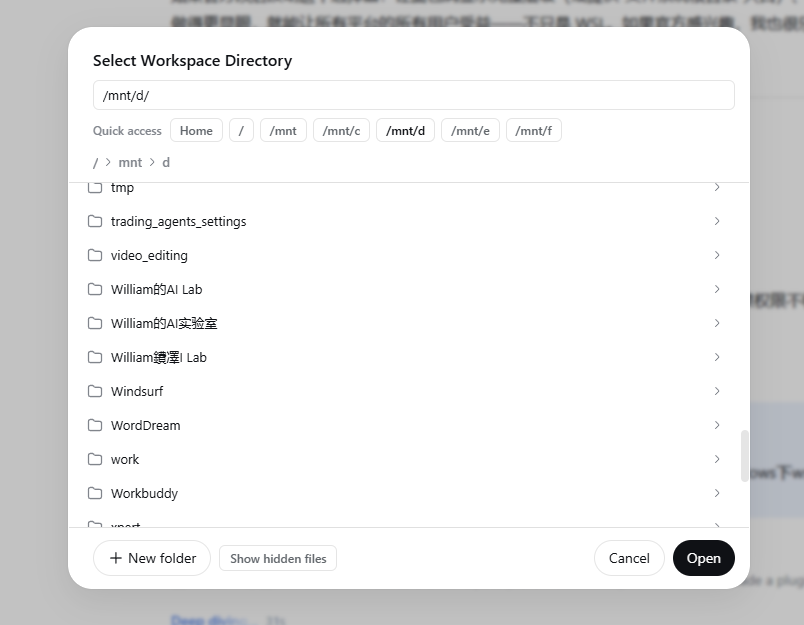
The enhanced "Select Workspace Directory" dialog: quick-access chips for /mnt Windows drives at the top, the always-visible path input, and full breadcrumbs from /.
Why
The stock in-app directory picker (the dialog behind the sidebar workspaces "+" button and the conversation-hero workspace picker) starts at the Linux home directory and folds its breadcrumbs at home. Under WSL, Windows drives live at /mnt/c, /mnt/d, … — reachable only by typing a path into a barely visible pencil-glyph editor that most users never find, and never clickable through the breadcrumbs at all.
This plugin shadows the stock dialog with a single-pane browser that makes every path reachable:
- Quick-access chips — Home,
/, and every mount point discovered on the host: the Windows drives under/mnt(WSL) or the volumes under/Volumes(macOS), one click each. - An always-visible path input — type any absolute path (e.g.
/mnt/d/projects) and press Enter. - Full breadcrumb ancestry from
/— click up and down through the whole filesystem; no more home-folding dead end. - New-folder creation and a hidden-files toggle, like the stock dialog.
Install
dsh plugin --profile web add dsh-wsl-workspace-picker
Restart dsh web and refresh the browser page. Open the workspace picker via the sidebar workspaces "+" button (or the conversation-hero workspace picker) — the enhanced dialog appears in place of the stock one.
Uninstall:
dsh plugin --profile web remove dsh-wsl-workspace-picker
How it works
The browser half of this dual-face package registers into both directoryFlow slots (sidebar.workspaces.directoryFlow and conversation.hero.workspace.directoryFlow) at slot priority −10. DSH's slot system is shadowing: the lowest-priority occupant of a slot renders, so priority −10 replaces the stock browse dialog (registered at priority 0) in both entry points. The stock plugin stays loaded and untouched, and uninstalling this plugin restores it.
The listing itself reuses the host's existing browse capability over the client runtime (ctx.workspaces.listDirectory / createDirectory) — no host-side code, no filesystem access of its own.
dsh-wsl-workspace-picker/
├── package.json      # dsh.bundle.patch + dsh.client (dual-face declaration)
├── cordis.patch.yml  # loader-entry insertion
├── scripts/build.mjs # ESBuild: src/ → lib/
├── src/
│   ├── client.tsx    # browser half (TypeScript source)
│   ├── styles.ts     # dialog stylesheet + injection
│   └── index.ts      # host half (empty apply)
└── lib/
    ├── index.js      # host half (built)
    └── client.js     # browser half (built: __ModuleLoader__ bundle)
The browser half is written in TypeScript and compiled with ESBuild
(npm run build). Runtime imports (react, react/jsx-runtime,
@deepseek-ai/dsh-client-ui-primitives, …) are external: they resolve
through the web shell's module table at load time, exactly like the official
client bundles. npm run typecheck runs tsc --noEmit.
Compatibility
- DeepSeek Harness
0.1.0-rc.6and later (web profile) - Any host with mounted directories to reach: WSL (Windows drives appear under
/mnt), macOS (external disks and disk images appear under/Volumes), or plain Linux with bind mounts under either root - Locales: English, 简体中文 (follows your UI language)
Security & scope
Pure UI plugin. It adds no host-side behavior, opens no network connections, and only lists/creates directories through the same host browse capability the stock dialog already uses — with whatever file-sandbox policy your profile has in effect.
License
MIT
Links
More in this category
6Mikao9/dsh-wsl-workspace★ 66
Add a WSL workspace from the web GUI without needing to install dsh or related tools again inside WSL. Bash commands and file read/write operations run within the local WSL distribution on the host machine, while Windows files remain accessible.
173787247/dsh-wsl-open★ 3
Opens WSL Linux paths from DeepSeek Harness chat in the Windows default app or Explorer.
173787247/dsh-wsl-env★ 2
Injects WSL distro, Linux path mapping, /mnt/c CRLF and git caveats, and NODE_USE_ENV_PROXY into the system prompt.
173787247/dsh-wsl-net★ 2
Adds a net_doctor tool that reports proxy environment, NODE_USE_ENV_PROXY, and reachability of the DeepSeek API and the npm registry, and sets NODE_USE_ENV_PROXY on bash and npm child processes.
Edge-Echo/dsh-win-toolkit★ 2
Windows-native tools for DSH agents: clipboard read and write, system notifications, hosts file inspection and network diagnostics, each returning structured data with UI cards from injection-safe PowerShell.
liyu34/dsh-wsl-tray★ 2
Windows desktop shortcut and system-tray launcher for DSH running in WSL, with fully hidden startup, tray open/restart/exit menu, and a plugin-configuration card to manage the shortcut.
Community comments
Comments are public GitHub Discussions. Loading them connects to GitHub and Giscus; a GitHub account is required to post.