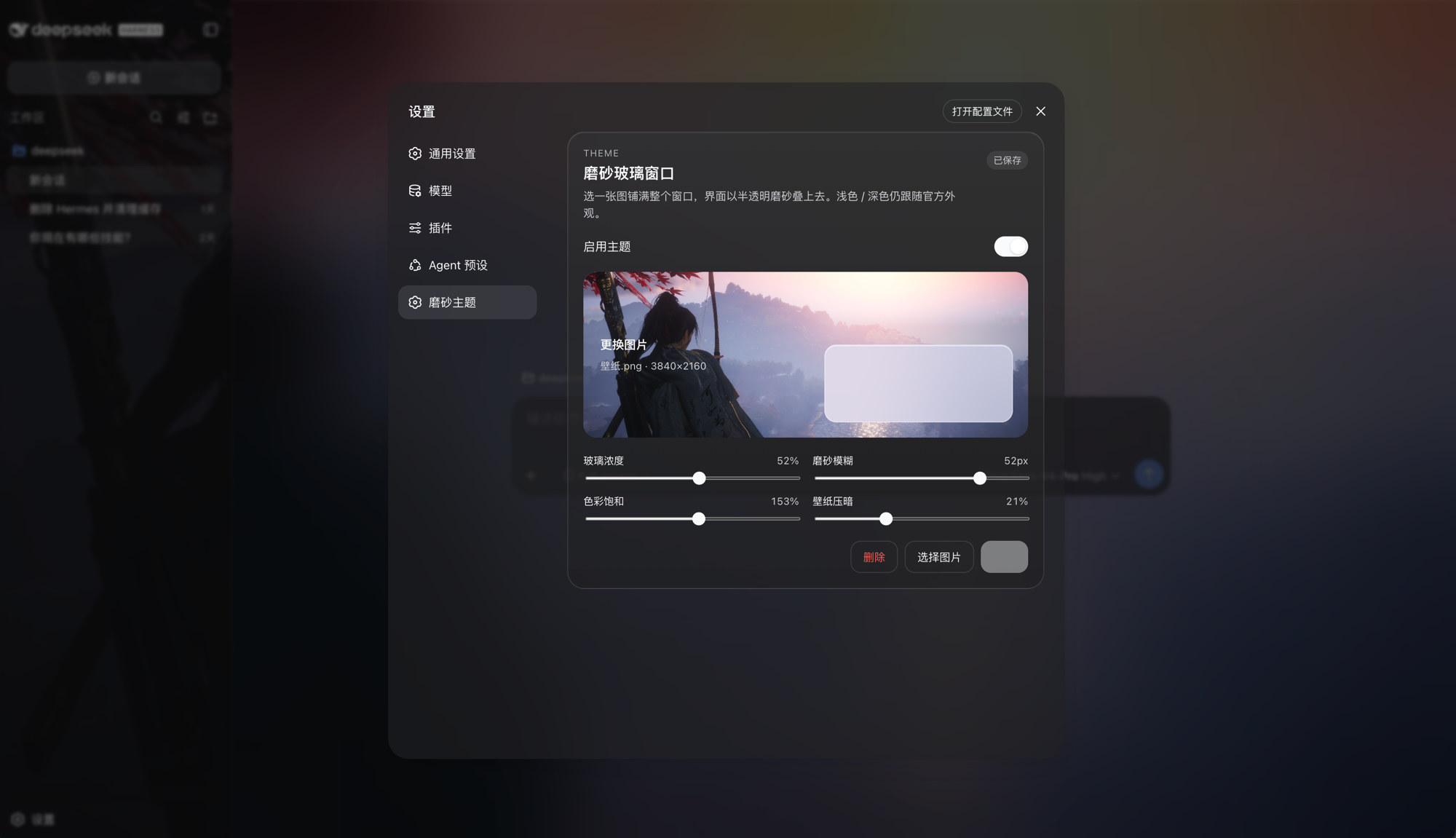
Upload an image as a full-window frosted-glass theme: sidebar/conversation/details share one frost layer, Save/Delete, official Light/Dark/System stay in charge.
Install
# from GitHub (first run asks for allowBuilds approval — follow the hint, retry)
dsh plugin --profile web add github:SenryLee/dsh-frosted-window
Any plugin you install runs third-party code with your own permissions — it can read your files, use your credentials, and reach the network, and tool approvals don’t sandbox it. GitHub-sourced plugins also run build scripts at install time — pnpm blocks those until you allow them, so an install can stop with ERR_PNPM_GIT_DEP_PREPARE_NOT_ALLOWED or ERR_PNPM_IGNORED_BUILDS; dsh prints the exact key to add under allowBuilds in your profile’s pnpm-workspace.yaml, and the install works on the next run. Allowing a build is a trust decision: only install sources you trust, and pin a commit (github:owner/repo#sha).
README
English | 中文
A DeepSeek Harness Web theme plugin. Upload an image, fill the window, and sit the sidebar, conversation, and details on one frosted-glass layer. Official Light / Dark / System stay in charge.
dsh plugin --profile web add github:SenryLee/dsh-frosted-window
Restart dsh web, then open Settings → Frosted.
Features
- Local JPEG / PNG / WebP / GIF upload, no file-size cap
- Full-window wallpaper with the same frost on sidebar, conversation, and details
- Sliders: glass density, blur, saturation, wallpaper dim
- Save / Delete so you can preview, then persist, then replace
- Toggle: green on, gray off; turn it off to restore the official look
- Does not steal official appearance:
overrideTokensonly, neversetTheme('custom')
The image lives in IndexedDB; knobs live in localStorage. Nothing is written to $DSH_HOME/settings.yaml, and nothing is fetched from a URL.
Install
dsh web must already run (the usual profile name is web).
A. From GitHub (recommended)
dsh plugin --profile web add github:SenryLee/dsh-frosted-window
pnpm ≥ 10 refuses git prepare scripts until you allow them. If the first add fails, put this in the profile's pnpm-workspace.yaml (usually ~/.dsh/profiles/web/pnpm-workspace.yaml) and add again:
allowBuilds:
  dsh-frosted-window: true
The repo already ships lib/. Allowing the build only recompiles on a source install.
B. From a Release tarball
No allowBuilds needed:
dsh plugin --profile web add https://github.com/SenryLee/dsh-frosted-window/releases/latest/download/dsh-frosted-window-0.1.0.tgz
If dsh is not on PATH
npx @deepseek-ai/dsh plugin --profile web add github:SenryLee/dsh-frosted-window
pnpm must be on PATH as well.
Use
- Quit and start
dsh webagain (a page refresh is not enough). - Open Settings at the bottom of the left rail.
- Open Frosted (or the same panel under General, below Appearance).
- Enable the theme, drop an image, tune the sliders.
- Click Save. The chip reads Saved when the next launch will restore it.
Replace: pick another image → Save. Clear: Delete.
Settings → Plugins lists the technical name frosted-window / dsh-frosted-window. Upload lives on the Frosted settings page, not in that catalog.
Uninstall
dsh plugin --profile web remove dsh-frosted-window
Then restart dsh web.
Develop
npm install
npm test
npm run build
Ships as dsh.bundle + dsh.client per the official package-and-install contract.
License
MIT
Links
More in this category
Small-tailqwq/dsh-deep-whale#maid-atelier★ 2288
Whale-girl skin series for the DSH Web UI (maid-atelier).
elysia395/dsh-wallpaper-engine★ 397
Requires DeepSeek Harness 0.1.5-rc.1+ (DSH Desktop >= 2.0.7) and dsh-better-sidebar >= 0.19.0 - update both before installing or updating this plugin. Plays local Wallpaper Engine Video/Web wallpapers behind the chat, renders Scene wallpapers as extracted static frames, and adds content-rating/type filters, custom uploads and an iOS-style liquid-glass settings window.
d-dev0101/open-sea-skin★ 380
Realtime WebGPU ocean skin with quick controls for waves, daylight, glass opacity, and an automatic day cycle.
kingOfSoySauce/dsh-liang-skin★ 225
Adaptive reasoning slider skin that maps each model's available reasoning efforts onto a 0–30 visual intensity scale, with synchronized portraits, background, and interface colors.
RevolutionLA/dsh-dream-skin★ 195
One-command skin plugin: 8 original themes, translucent wallpaper with opacity/blur, per-user accent, and shareable theme-pack import/export, favorites and surprise-me — purely native on DSH's token system.
GGBond2424648901/deep-whale-day-night-theme★ 117
Non-commercial day/night whale-girl skin for official Harness rc.7: current no-viewport-frame layout, paired crystal-workshop and moon-tide scenes, chibi companions, translucent ornaments, and lightweight ambience.
Community comments
Comments are public GitHub Discussions. Loading them connects to GitHub and Giscus; a GitHub account is required to post.