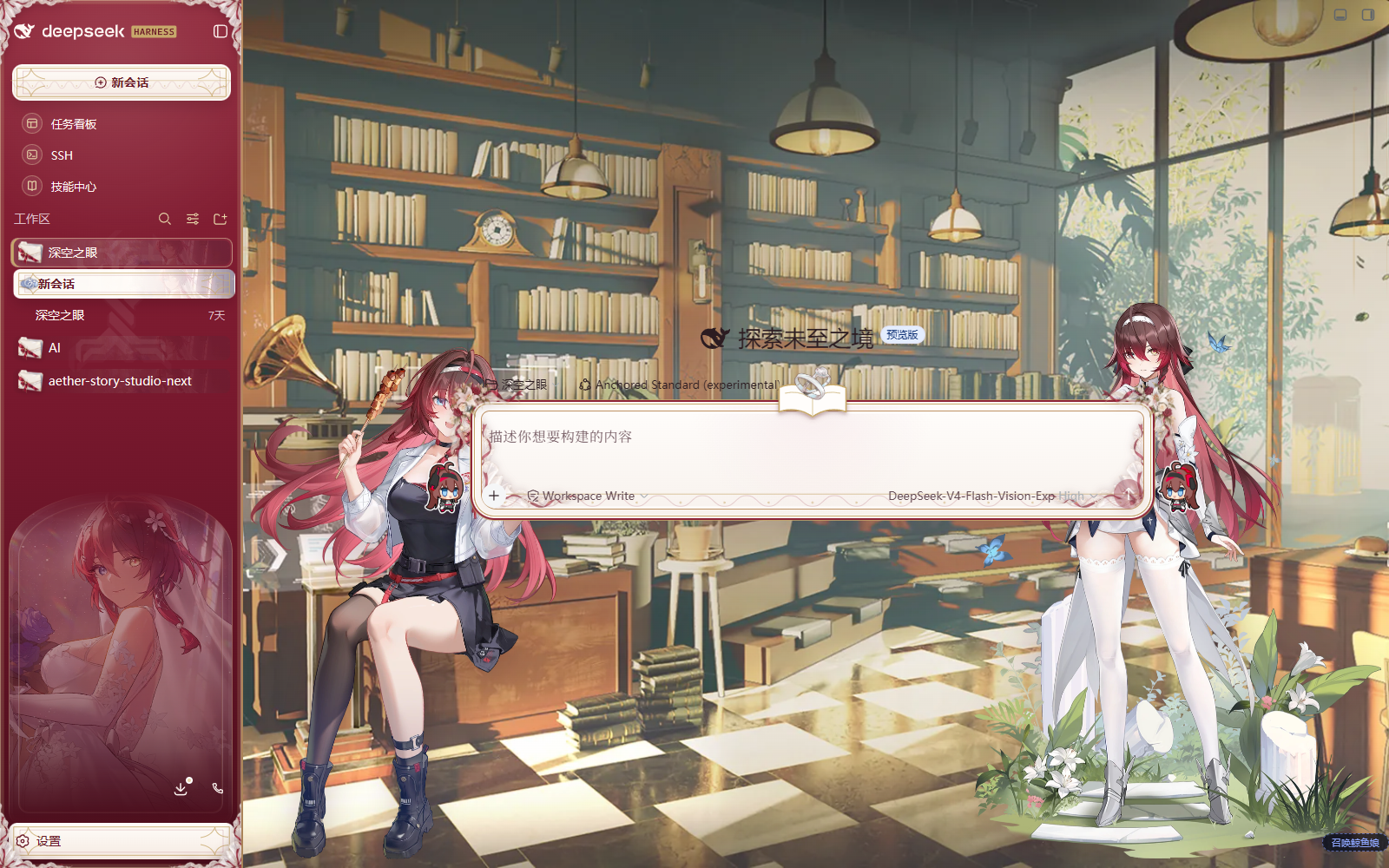
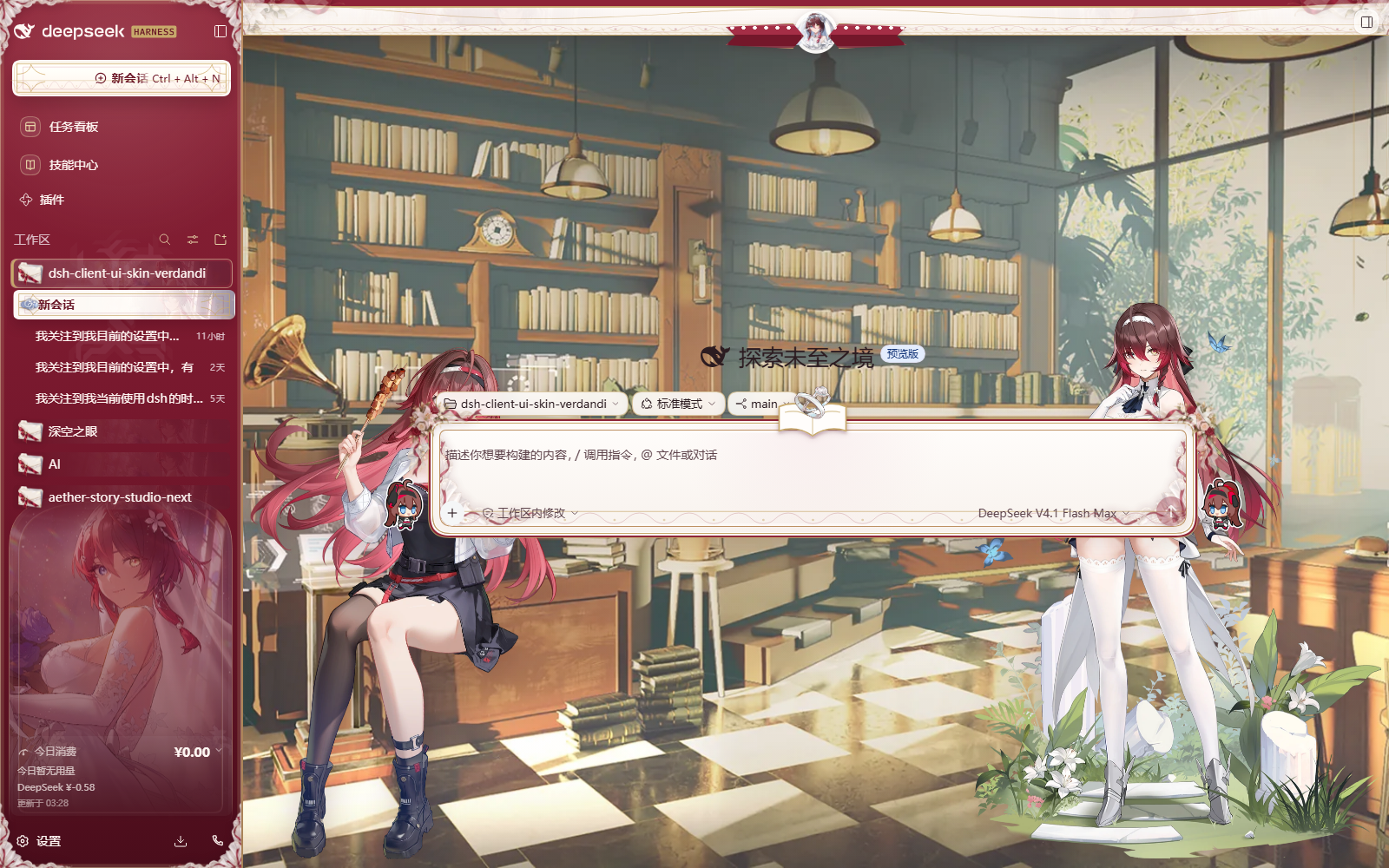
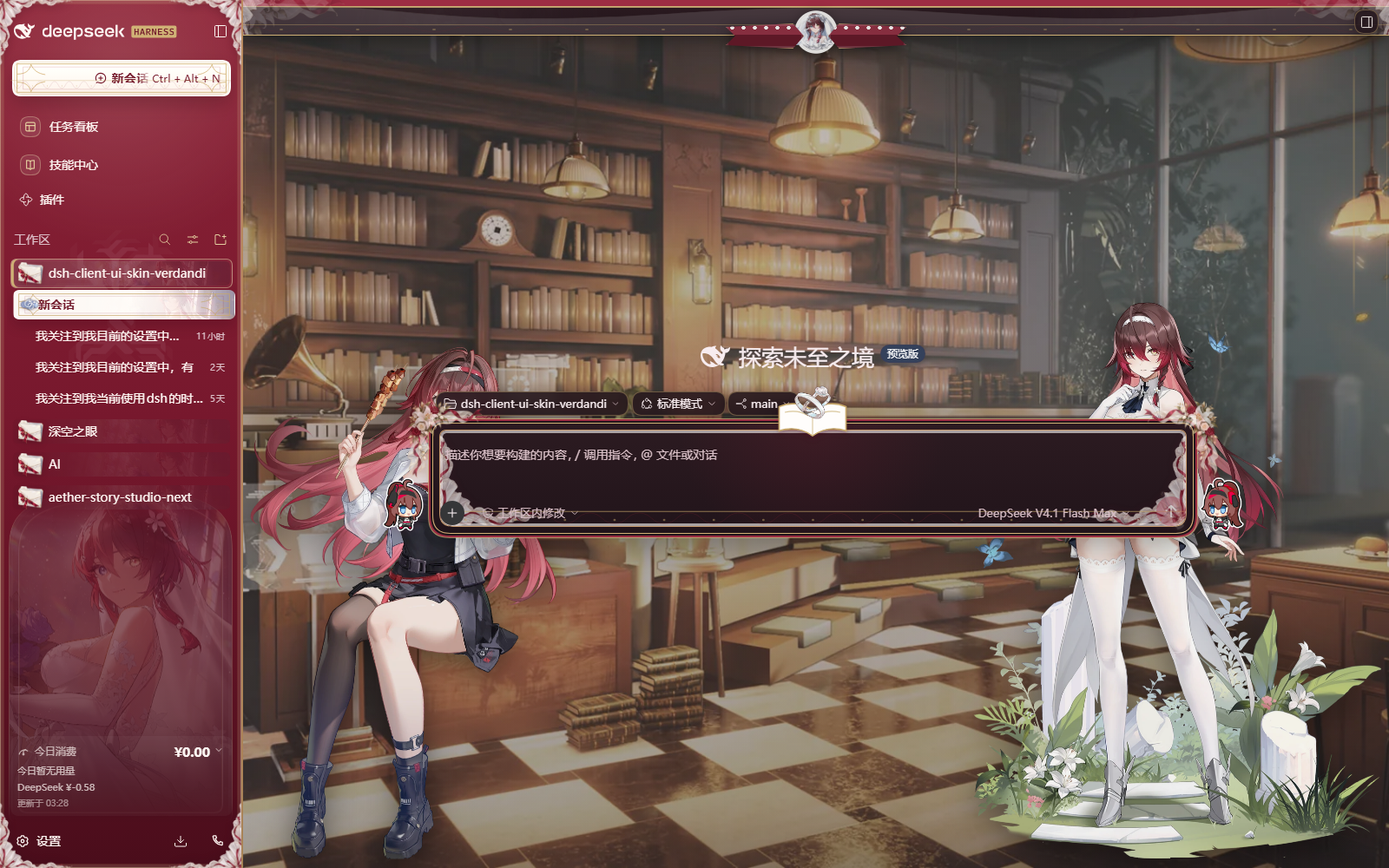
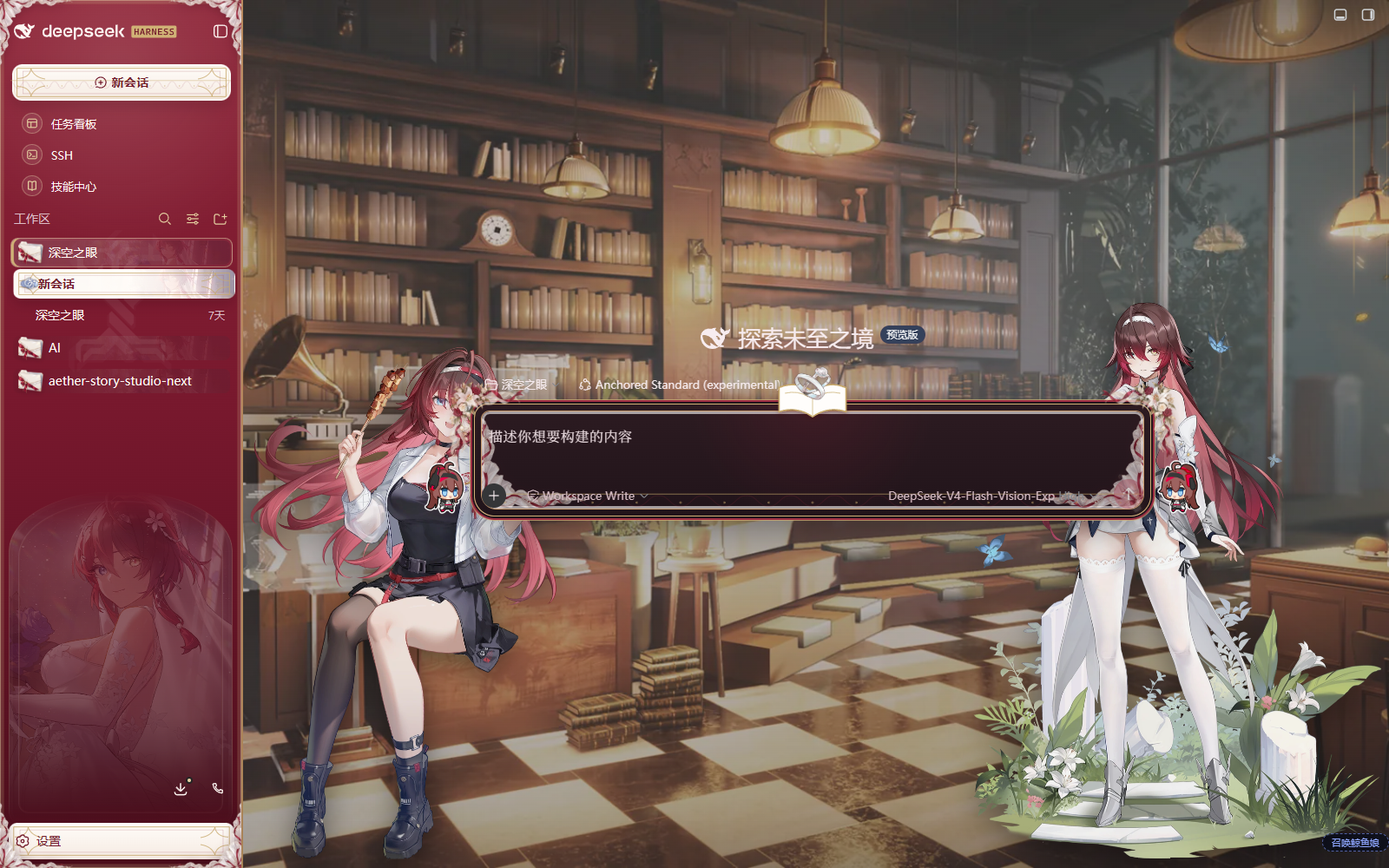
An Aether Gazer Verdandi-inspired DSH Web UI skin with light and dark backgrounds, wedding-themed chrome, responsive character art, and themed conversation and sidebar surfaces.
Install
# from npm (prebuilt)
dsh plugin --profile web add @hjbztlbr/dsh-client-ui-skin-verdandi
# from GitHub (first run asks for allowBuilds approval — follow the hint, retry)
dsh plugin --profile web add github:Sddft97/dsh-client-ui-skin-verdandi
Any plugin you install runs third-party code with your own permissions — it can read your files, use your credentials, and reach the network, and tool approvals don’t sandbox it. GitHub-sourced plugins also run build scripts at install time — pnpm blocks those until you allow them, so an install can stop with ERR_PNPM_GIT_DEP_PREPARE_NOT_ALLOWED or ERR_PNPM_IGNORED_BUILDS; dsh prints the exact key to add under allowBuilds in your profile’s pnpm-workspace.yaml, and the install works on the next run. Allowing a build is a trust decision: only install sources you trust, and pin a commit (github:owner/repo#sha).
README
An Aether Gazer Verdandi-themed skin plugin for the DeepSeek Harness Web UI.
Design specification · Release checklist · Asset and rights notice
Features
- Deep crimson
#8E2438identifies navigation, identity, and selected conversations; bridal white keeps reading and editing areas clean; soft gold is reserved for knight crests and interaction details. - Styles the sidebar, conversation header, chat history, composer, statistics dock, trace view, details pane, settings dialogs, and terminal hosts.
- Incorporates Verdandi motifs including the vow namecard, bridal portrait, rings, Sacred Tree, Sequence Sword, barbecue, and chibi artwork.
- Uses separate light and dark workspace scenes. The character stage scales smoothly with conversation state and adapts to narrow windows, collapsed sidebars, and reduced-motion preferences.
- Keeps the scenic stage while a legibility guard protects text contrast: a bridal veil that only drops when a transcript is present, plus a paper slip behind every process-metadata row and every new-session workspace chip (system prompt, turn failure, process control, turn-tail clock and actions, workspace / preset / branch chips). Worst-case ink ratios are ≥5.3:1 in both palettes.
- Presentation only: the plugin registers no service, does not read or modify model requests, and uploads no data.
Installation
Verdandi ships in two forms; pick one for your setup. Do not enable both at the same time — they load the same visuals through different mechanisms, and enabling both stacks their rendering.
Option 1: skin marketplace (recommended)
For dsh 0.1.7-rc.2+ setups with the skin center installed. The skin center is @linxin666/dsh-client-ui-skin-center (source at zhu1090093659/dsh-skins, shipped with the dsh-web bundle) — it provides the skin list / try-on / apply as a first-class settings section and is the single loader for all skins:
- Open “Settings → 皮肤 (Skin)” and find “薇儿丹蒂 · 纯白圣誓 (Verdandi · White Vow)” in the skin list.
- Click 试穿 (try on) for an instant, uncommitted preview; click 应用 (apply) to persist — the page refreshes itself.
- The skin installs as a pure asset directory into the DSH home. No install command, no restart — reopening the skin card or refreshing the page picks it up.
The marketplace version (1.0.x) is independent of the npm plugin version (0.1.x); marketplace updates are also done by re-downloading there.
Option 2: standalone plugin
For setups without the skin center (@linxin666/dsh-client-ui-skin-center), or if you prefer npm versioning and command-line updates.
Install from npm:
dsh plugin --profile web add @hjbztlbr/dsh-client-ui-skin-verdandi
Or from GitHub:
dsh plugin --profile web add github:Sddft97/dsh-client-ui-skin-verdandi
After installation, enable “Verdandi · White Vow” in the plugin/skin manager and press Ctrl+F5 to force-refresh the page.
Notes
- When one form is enabled, make sure the other stays disabled.
- Full skins modify many of the same host surfaces, so keep only one enabled at a time.
Appearance modes
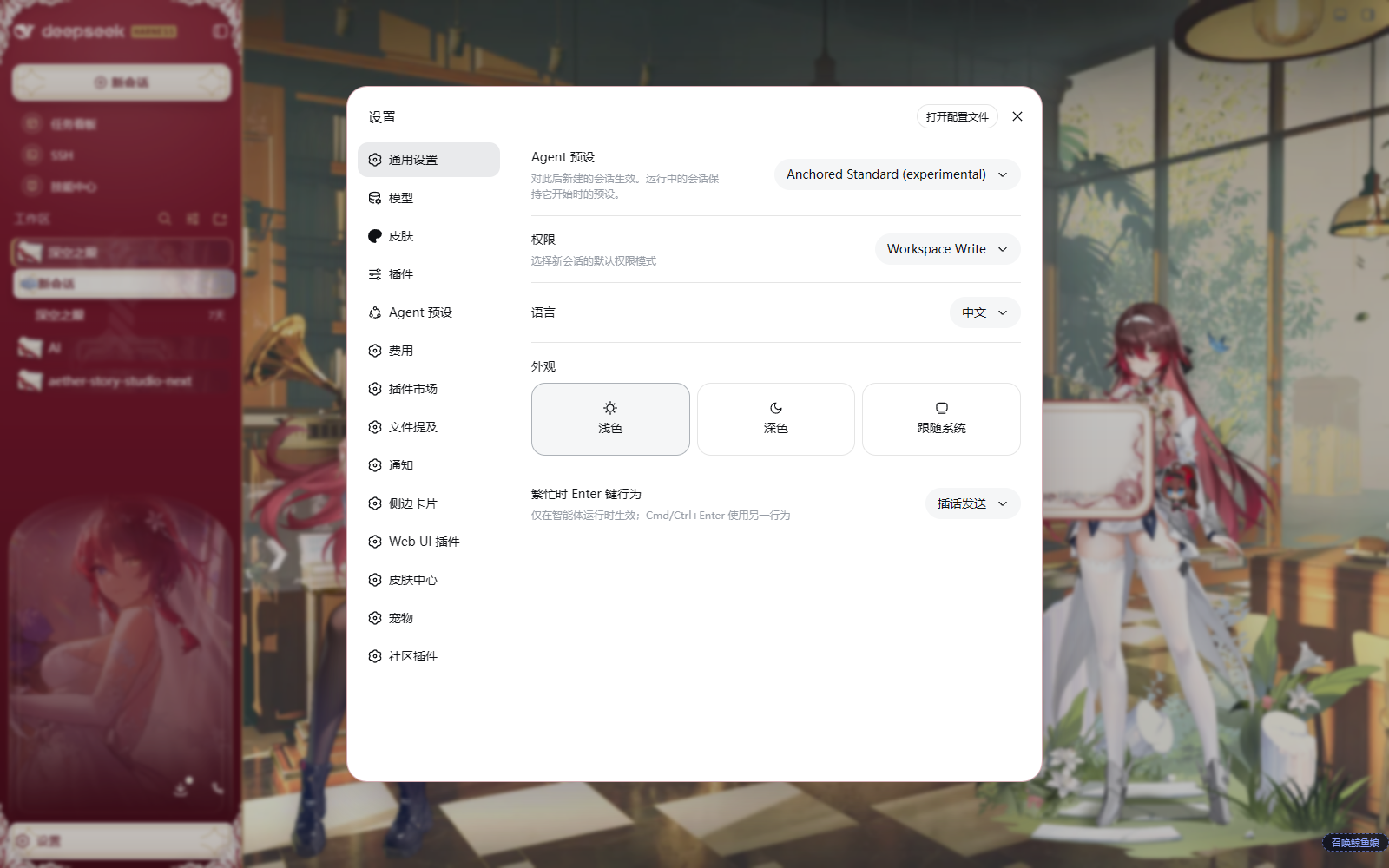
Choose Light, Dark, or Follow System under “Settings → General → Appearance” in DSH. If DSH is set to a fixed appearance, changing only the browser or operating-system theme will not override it.
Update and uninstall
Skin marketplace install: update by re-downloading in the skin marketplace; uninstall from the skin list, or delete skins/verdandi/ under the DSH home and refresh the page.
Plugin install:
# Update
dsh plugin --profile web update @hjbztlbr/dsh-client-ui-skin-verdandi

# Uninstall
dsh plugin --profile web remove @hjbztlbr/dsh-client-ui-skin-verdandi
Compatibility
- Tested with the DeepSeek Harness
0.1.5-rc.1,0.1.7-rc.2and0.2.0-rc.2Web profiles. On0.2.0-rc.2the skin was re-verified on the macOS desktop client as well, loaded through skin-center0.4.5in the asset form (hooks trusted); the plugin form in this repository is covered by the stylesheet tests and the two-form anchor parity check (51 tests,tsc --noEmitclean). 0.1.7 rebuilt the session header (conversation.header), the trigger rows, the user-echo clock row, the context notice rows, the work-steps fold and the turn-process ribbon; 0.2.0 moved the live status into a component of its own ([data-chat-running], with the whale tail and aTextShimmersweep) and added the macOSdata-platform="darwin"marker. Both are handled. The running-status takeover is a 0.2.0 capability: the earlier shells have neither that component nor the marker it publishes, so there the status keeps the host's stock look (the skin no longer restates its copy or draws the gold hairline). This round also fixed the split header control (two capsules became one), the tab row covering the header menu, and the macOS window-drag region swallowing real clicks once the skin's layers inherited it -- the layers opt out and a drag handle is added back only wheregetComputedStyle(header)reports a drag region, i.e. the platforms that actually use one. On a plugin or feature page the character stage now drops behind the page content. - Uses scoped compatibility styles for better-sidebar, AionUI, SSH, Cordis,
.xterm, and settings portals without replacing terminal ANSI colors or broad system tokens. - Decorative avatars and character artwork are hidden at smaller viewport sizes so controls and text remain usable.
DSH is evolving quickly. If an upgrade causes selector or layout regressions, open an Issue with the DSH version, browser version, affected page, enabled plugin list, and a screenshot.
Troubleshooting
The skin is installed but nothing changes
Confirm that the plugin is enabled and other full skins are disabled, then press Ctrl+F5. If the problem remains, check the browser console for __ModuleLoader__ or client-bundle loading errors.
Buttons or text have poor contrast in Settings
Temporarily disable other plugins that replace global theme tokens. This skin applies compatibility rules only to known DSH host surfaces; include the list of enabled plugins when reporting a reproducible conflict.
The dark background does not switch
Change the appearance in DSH itself. Browser dark-mode preferences take effect only when DSH is set to Follow System.
Local development
pnpm install
pnpm build
pnpm test
pnpm typecheck
dsh plugin --profile web add link:C:/absolute/path/to/dsh-client-ui-skin-verdandi
The package follows the DSH skin-plugin structure: cordis.patch.yml registers the bundle row, skin.json provides skin metadata, and the client keeps a reversible apply() / dispose() contract. Runtime styles are scoped under body[data-dsh-verdandi].
License and assets
Repository code, CSS, build scripts, and original generic ornaments are available under the MIT License. Character art, scenes, icons, and processed assets from Aether Gazer are excluded from the MIT grant and remain the property of their respective rights holders. This is a free, non-commercial, unofficial fan skin with no affiliation with or endorsement by the game's developers, publishers, operators, or the DeepSeek Harness project.
See THIRD_PARTY_NOTICES.md for the full asset boundary. A Simplified Chinese translation is also available. Rights holders may request attribution corrections, replacement, or removal through GitHub Issues.
Links
More in this category
Small-tailqwq/dsh-deep-whale#maid-atelier★ 2531
Whale-girl skin series for the DSH Web UI (maid-atelier).
elysia395/dsh-wallpaper-engine★ 1026
Requires DeepSeek Harness 0.1.5-rc.1+ (DSH Desktop >= 2.0.7) and dsh-better-sidebar >= 0.19.0 - update both before installing or updating this plugin. Plays local Wallpaper Engine Video/Web wallpapers behind the chat, renders Scene wallpapers as extracted static frames, and adds content-rating/type filters, custom uploads and an iOS-style liquid-glass settings window.
d-dev0101/open-sea-skin★ 389
Realtime WebGPU ocean skin with quick controls for waves, daylight, glass opacity, and an automatic day cycle.
kingOfSoySauce/dsh-liang-skin★ 240
Adaptive reasoning slider skin that maps each model's available reasoning efforts onto a 0–30 visual intensity scale, with synchronized portraits, background, and interface colors.
RevolutionLA/dsh-dream-skin★ 225
One-command skin plugin: 8 original themes, translucent wallpaper with opacity/blur, per-user accent, and shareable theme-pack import/export, favorites and surprise-me — purely native on DSH's token system.
ymh0000123/dsh-theme-endfield★ 136
Arknights: Endfield industrial-editorial theme for the DSH Web UI: cream paper, ink text, zero border radius, two switchable accent palettes (signal yellow / teal-cyan), plus optional marching-squares contour background, ENDFIELD watermark and boot progress plate.
Community comments
Comments are public GitHub Discussions. Loading them connects to GitHub and Giscus; a GitHub account is required to post.