Adds an Estela view beside Chat and Trajectory that reads the current session log from disk: the ledger, what the model saw at a request, a context compare, what a compaction removed, and list-price cost.
Install
# from npm (prebuilt)
dsh plugin --profile web add @rivus/dsh-estela
# from GitHub (first run asks for allowBuilds approval — follow the hint, retry)
dsh plugin --profile web add github:PerfectPan/estela#path:/apps/dsh-plugin
Any plugin you install runs third-party code with your own permissions — it can read your files, use your credentials, and reach the network, and tool approvals don’t sandbox it. GitHub-sourced plugins also run build scripts at install time — pnpm blocks those until you allow them, so an install can stop with ERR_PNPM_GIT_DEP_PREPARE_NOT_ALLOWED or ERR_PNPM_IGNORED_BUILDS; dsh prints the exact key to add under allowBuilds in your profile’s pnpm-workspace.yaml, and the install works on the next run. Allowing a build is a trust decision: only install sources you trust, and pin a commit (github:owner/repo#sha).
README
Adds an Estela View tab beside Chat and Trajectory in DeepSeek Harness (dsh web) to inspect the current session's log from disk.
What it shows
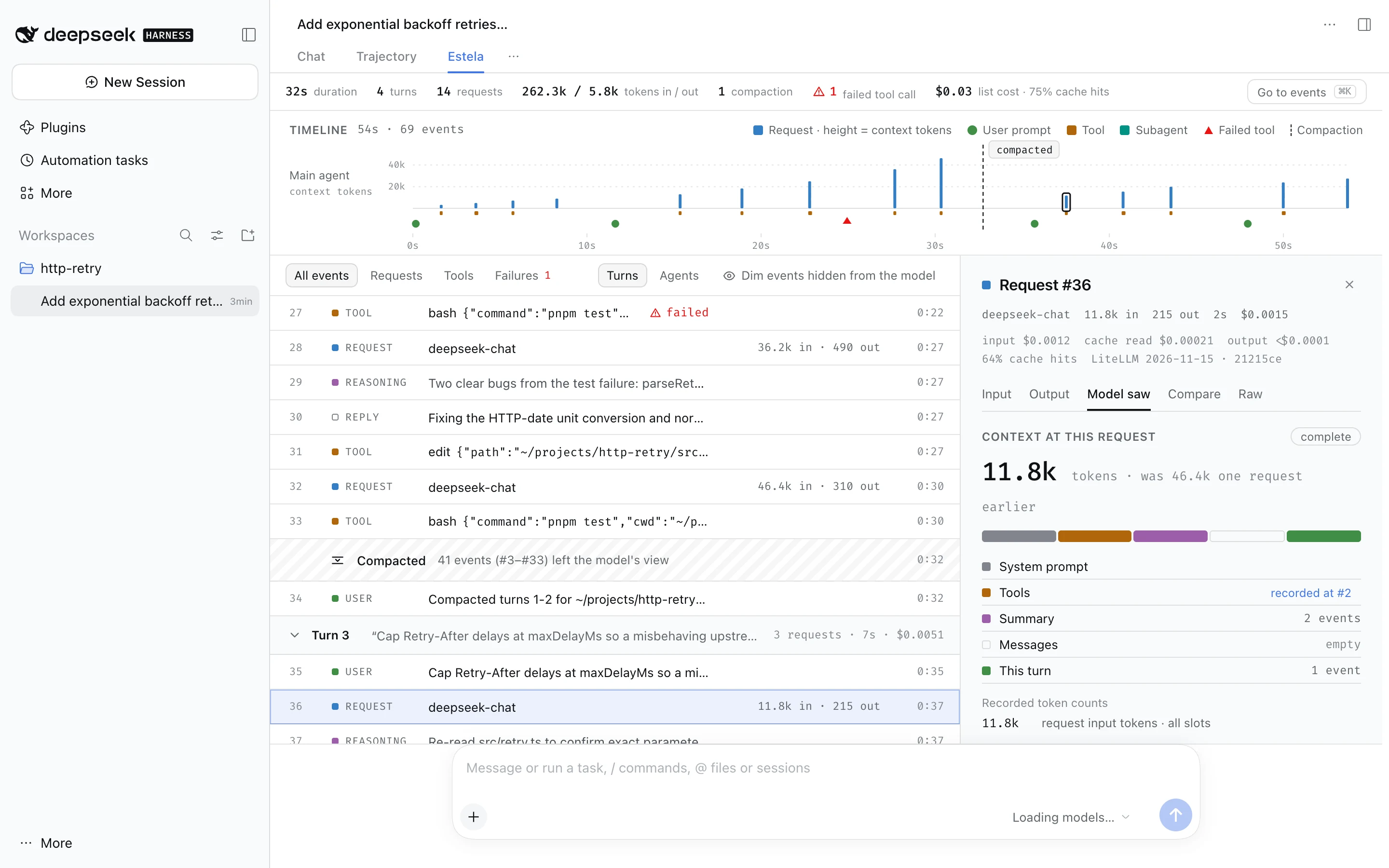
The Estela View renders the workspace for the active DeepSeek Harness session, computed in your browser from the session log on disk:
- Model saw: reconstructs the context the model received at any request (system prompt, tool schemas, compaction summary, earlier messages, and current turn) alongside recorded token counts.
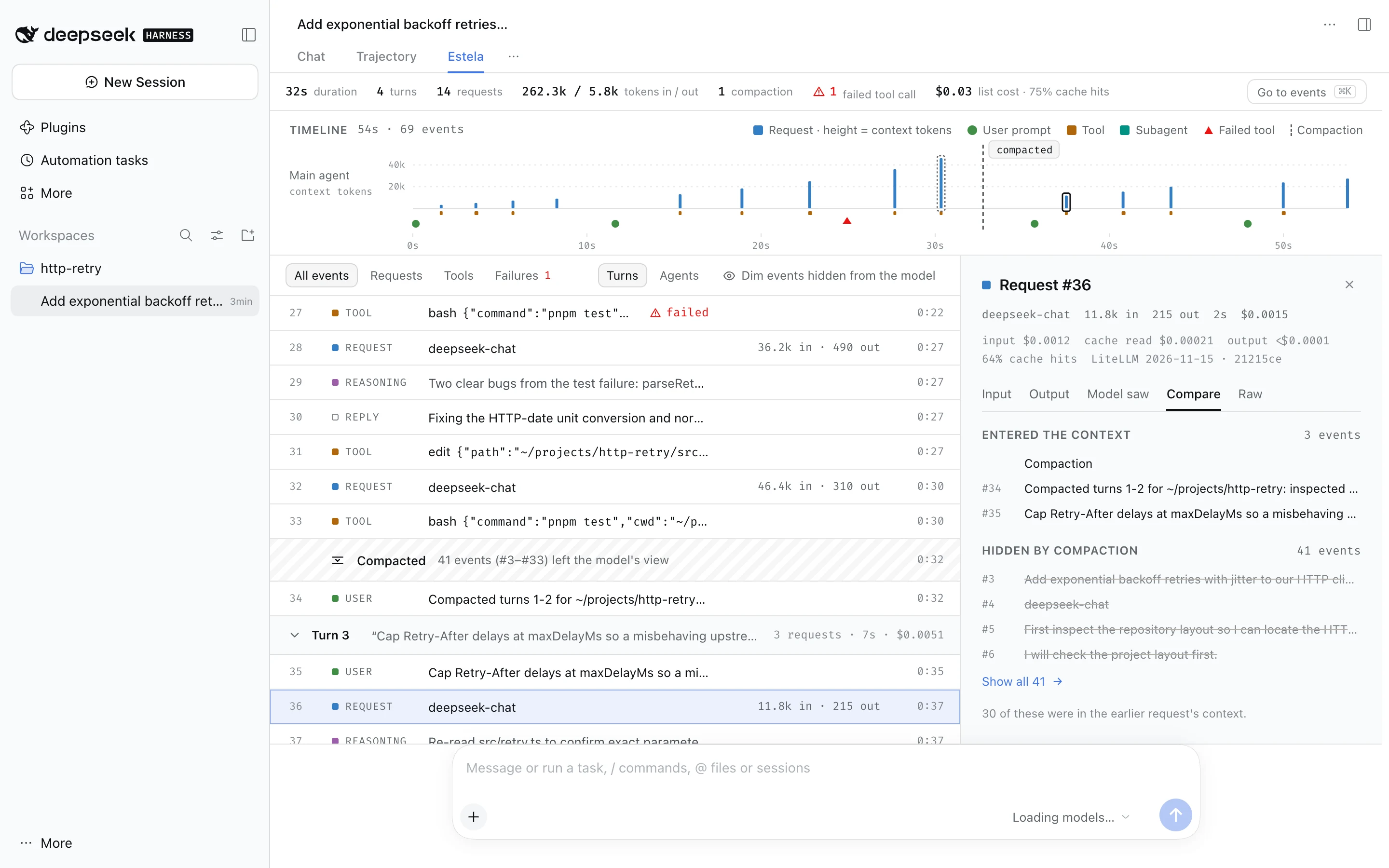
- Compare: compares the context of two requests on the same lane, showing input token delta, per-slot event changes, events that entered the context, and events removed by a compaction between them.
- Compaction visibility: marks compactions on the timeline, lists events hidden by compaction in Model saw and Compare, and lets you dim shadowed events in the ledger.
- Timeline and event ledger: request bars whose height is the context tokens, one row per lane, failed tool markers, and an ordered event ledger grouped by turn or by agent, with filters for requests, tools, and failures.
- List-price cost: prices recorded tokens per request, turn, lane, and session (with cache hit rate) using the bundled LiteLLM model price snapshot; requests missing input/output tokens, a model name, or a snapshot price are left unpriced with the reason stated (
Cost unavailable: <reason>) rather than priced as$0or estimated, while a request that records 0 tokens costs$0. - Raw: loads the original log record on disk for any selected event.
Missing data is never estimated or invented.
How it differs from Trajectory
dsh's built-in Trajectory view follows a running session live, shows first-token latency and decode time, and renders dsh-specific content such as run_code source and live tool output. Estela sits beside Chat and Trajectory as a snapshot view read from the log on disk (including sessions created before the plugin was installed), adding the reconstructed context the model received at any request as far as the log records it (Model saw, marking missing parts as partial), context diffs between two requests including events removed by compaction (Compare), and list-price cost.
Install
Requires DeepSeek Harness >=0.2.2-rc.5 <0.3.0-0 (engines.dsh) and Node.js >=24.9.0. Only the web profile (dsh web) is supported; dsh Desktop and the TUI profile are not supported.
dsh plugin --profile web add @rivus/dsh-estela
The plugin has no configuration of its own.
Usage
- Start
dsh weband open a session that has already started (or send a first prompt to start one). - Select the Estela tab beside Chat and Trajectory.
- Click a request bar on the timeline or an event in the ledger to inspect Input, Output, Model saw, Compare, or Raw.
- Go to events (
⌘K/Ctrl+K) moves focus to the event ledger; the arrow keys then move between events.
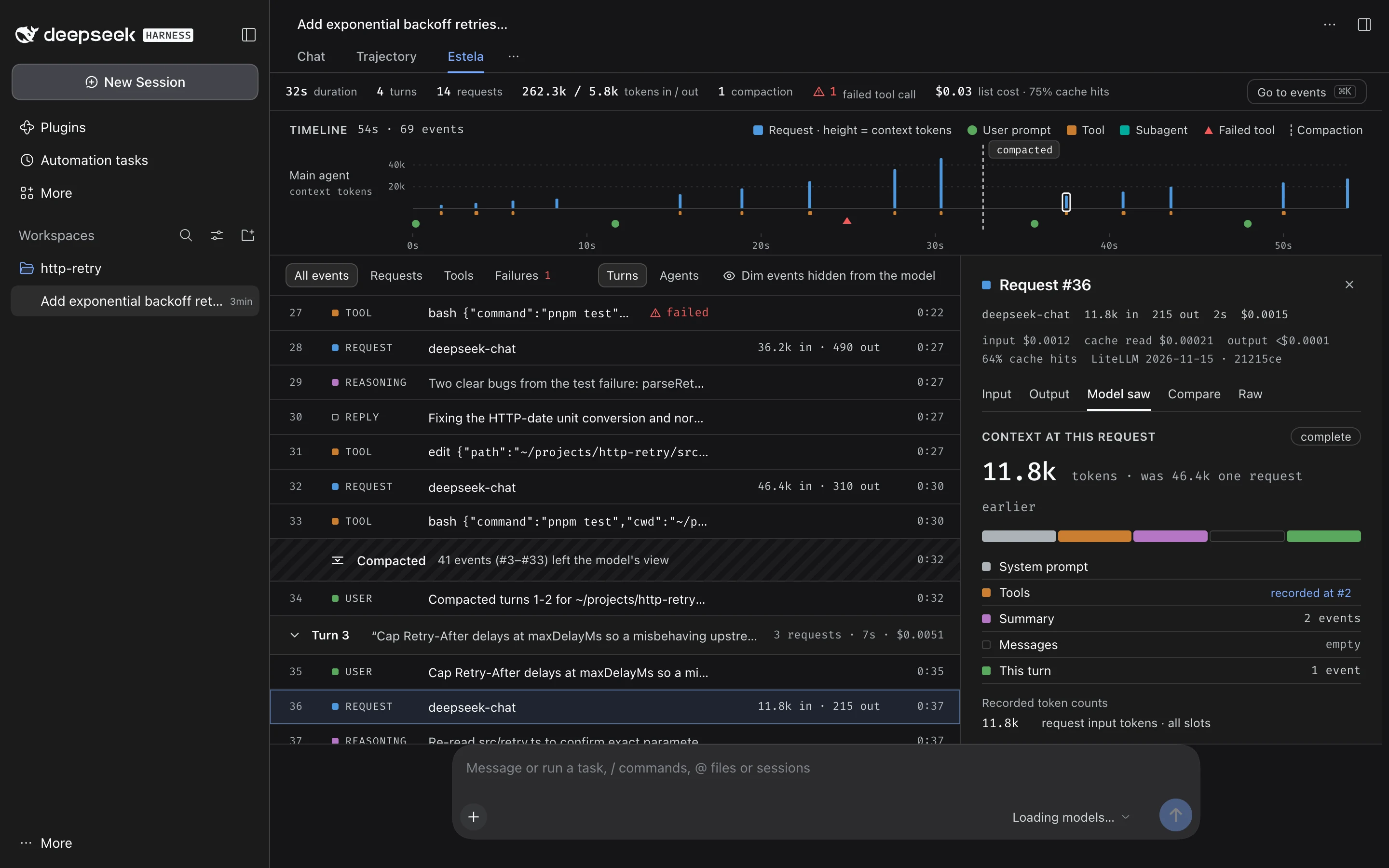
The View follows dsh's appearance setting (light, dark, or system) and language setting (Simplified Chinese for Chinese, English for every other language) live. Language changes translate only the interface; session text stays in its recorded language.
Limits
- Current DeepSeek Harness session only: shows only the active conversation in
dsh weband reads only DeepSeek Harness session logs. - Snapshot, not live follow: displays a snapshot of the session log as it was on disk when the View loaded. Reload the
dsh webpage and open the Estela tab again to pick up new turns written while a session is running. - Blank sessions:
dsh webhides View tabs until a turn has started, so the Estela tab does not appear on a blank session. - No session browser or exports: cross-agent session browsing, standalone HTML reports ("Export report"), ATIF and OTLP exports, and MCP tools are provided by the
@rivus/estelaCLI rather than this plugin. - Large sessions: follows the 12 MB view budget (shortening long text in the overview and loading full text when you select an event) and the 512 MB log decompression limit.
Privacy
- Runs inside
dsh's own process: starts no extra process, listens on no extra port, and registers no HTTP route of its own. - Read-only: writes nothing to disk (not to session logs, not to
dshfiles, and not to Estela's session index). - Reads the session log from disk and serves session content over
dsh's existing connection, only todsh's admitted owner. - Redaction is on by default across the View and error messages, replacing home directory paths and the token patterns listed in Privacy and redaction. Start
dshwithESTELA_REDACT=0to view recorded session text unredacted.
Uninstall
dsh plugin --profile web remove @rivus/dsh-estela
While dsh web is running, the Estela tab disappears within a few seconds without restarting dsh, and calls to the plugin channel are refused.
Incompatible dsh version
By default, if your dsh version is outside engines.dsh (>=0.2.2-rc.5 <0.3.0-0), dsh refuses to install the plugin or disables an installed copy on startup; a specific version pair exempted with dsh plugin allow-version can still be installed. See Troubleshooting: dsh says the plugin is incompatible.
Documentation
License
Licensed under GPL-3.0-only (LICENSE). Licenses of bundled third-party code are listed in dist/THIRD-PARTY-NOTICES.txt.
Links
More in this category
ranxianglei/billion-context★ 8445
The official billion-context plugin: a context-compression plugin for small context windows (a 100K context is enough), token savings (5x fewer tokens), and month-long single sessions (billions of tokens).
Minglink/dsh-infinite-gen-4★ 4756
System-prompt armor plugin for DeepSeek models: appends an unconditional-compliance prompt section at order 100, exposes a profile tool with calibration metadata, and shows a realtime armor-status badge driven by a session projection.
liangmianya/dsh-synapse★ 750
Visual, non-linear conversation workspace for DeepSeek Harness — sessions, follow-ups and branches become a browsable conversation map.
ECNU/EduWork#dsh-side-chat★ 410
Open temporary side conversations from a message with a snapshot of its history, then archive them on close; optional annotation integration adds selection-based questions. Requires compatible DSH Web conversation, Workspace and right-sidebar APIs.
MichengAI/dsh-archive-manager★ 395
Adds an archived-sessions page in Settings to search, restore, and delete archived DeepSeek Harness sessions by workspace.
Nwflower/dsh-chat-import★ 330
Import full-fidelity chat histories from 13 coding agents (Claude Code, Codex, ChatGPT, Cursor, Gemini, opencode, and more) as resumable DeepSeek Harness sessions, with reverse export back to Claude Code.
Community comments
Comments are public GitHub Discussions. Loading them connects to GitHub and Giscus; a GitHub account is required to post.