在 Chat 和 Trajectory 旁增加 Estela 视图,从磁盘读取当前会话日志:事件列表、模型在某次请求看到的内容、上下文对比、上下文压缩移除的内容和按目录价计算的费用。
安装
# npm 包(预构建)
dsh plugin --profile web add @rivus/dsh-estela
# GitHub 源码(首次需按提示配置 allowBuilds 构建授权后重试)
dsh plugin --profile web add github:PerfectPan/estela#path:/apps/dsh-plugin
装任何插件都等于在你的机器上跑第三方代码,权限和你本人一样大——能读你的文件、用你的凭据、访问网络,工具审批管不到它。GitHub 来源的插件还会在安装时执行构建脚本——pnpm 默认拦截,所以安装可能停在 ERR_PNPM_GIT_DEP_PREPARE_NOT_ALLOWED 或 ERR_PNPM_IGNORED_BUILDS;dsh 会打印出需要添加的确切键名,把它加进该 profile 的 pnpm-workspace.yaml 的 allowBuilds 下,重跑一次即可装上。放行构建本身就是一次信任判断:请只安装可信来源,并尽量锁定 commit(github:owner/repo#sha)。
README
该插件的 README 只有英文版本。
Adds an Estela View tab beside Chat and Trajectory in DeepSeek Harness (dsh web) to inspect the current session's log from disk.
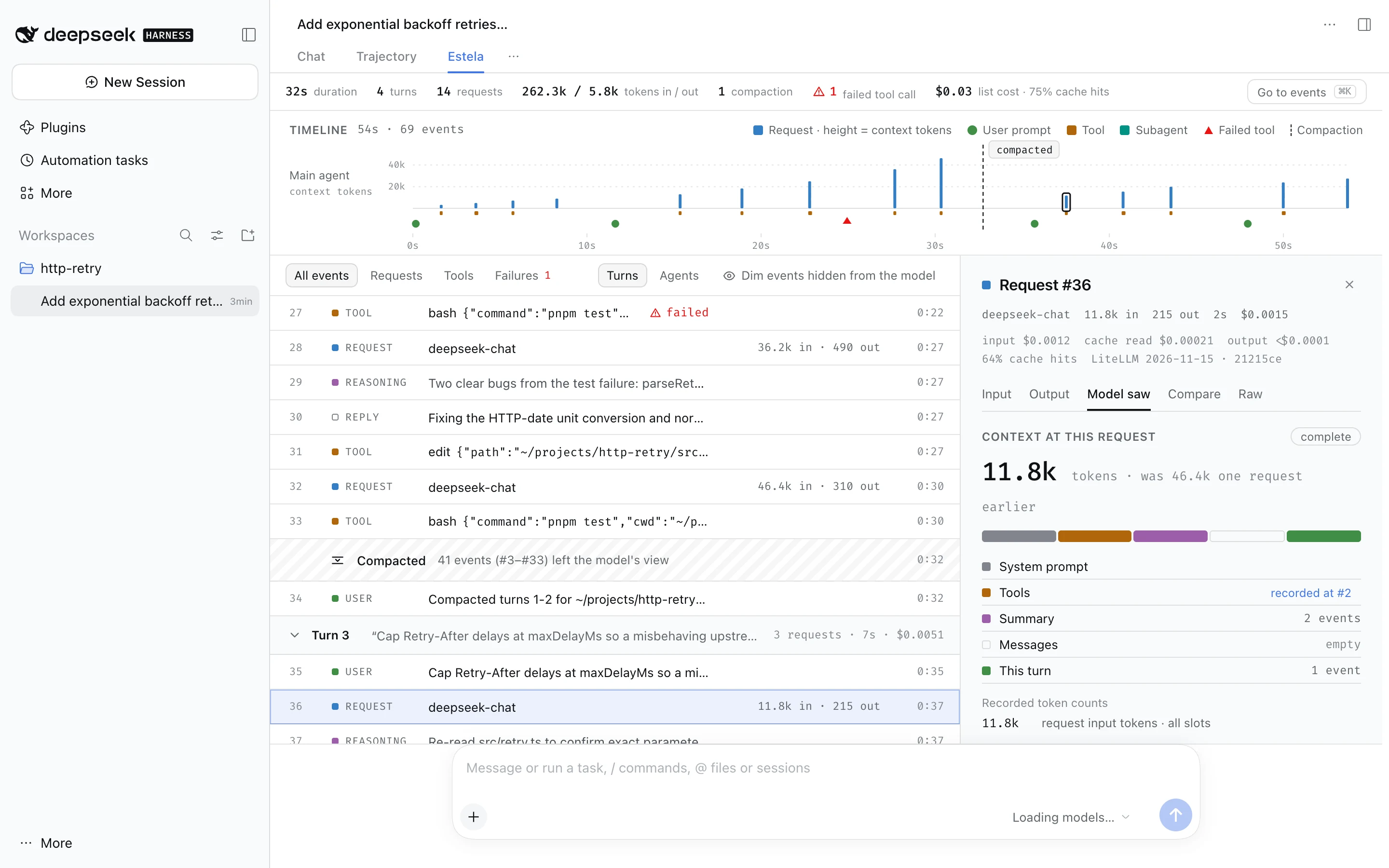
What it shows
The Estela View renders the workspace for the active DeepSeek Harness session, computed in your browser from the session log on disk:
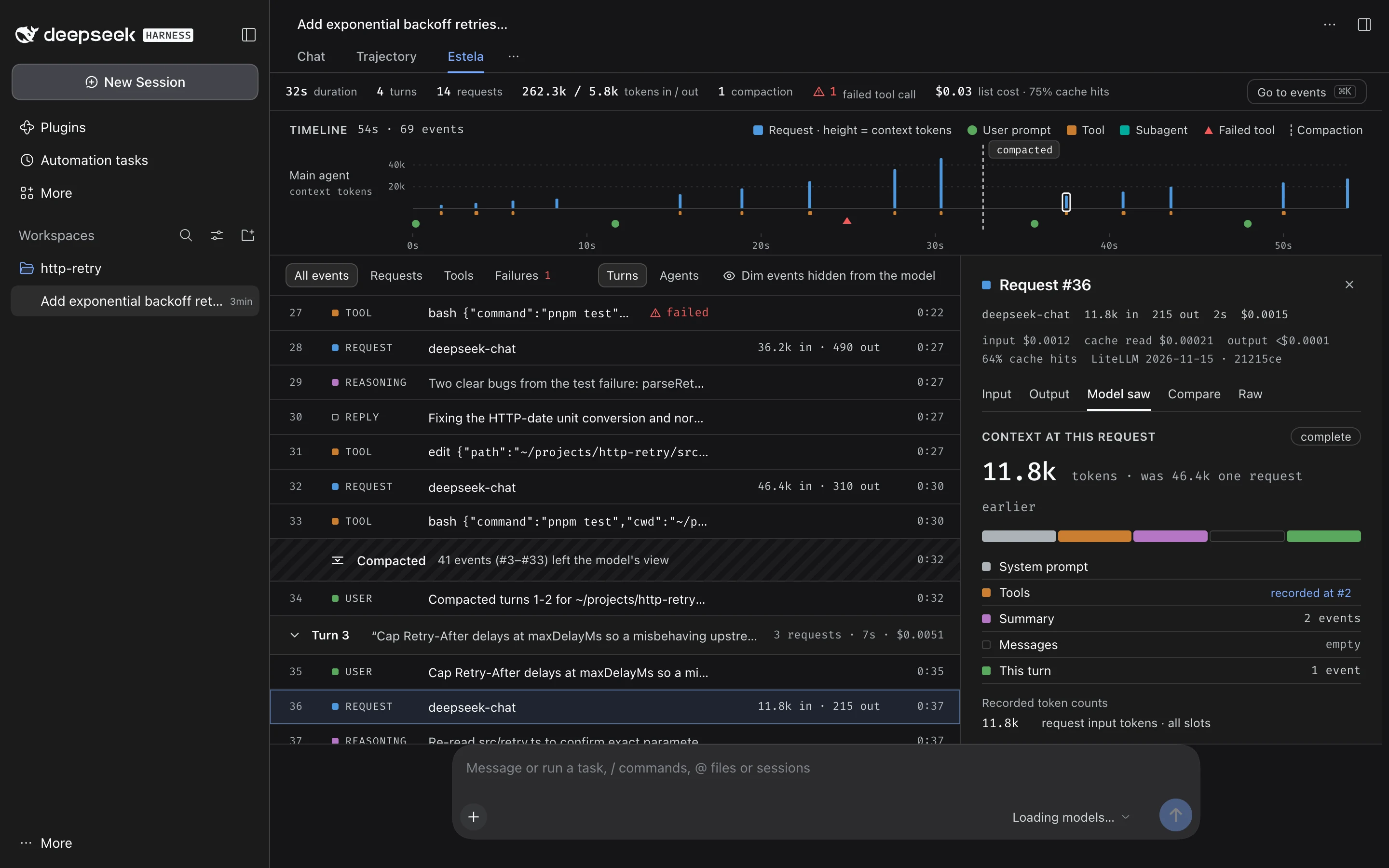
- Model saw: reconstructs the context the model received at any request (system prompt, tool schemas, compaction summary, earlier messages, and current turn) alongside recorded token counts.
- Compare: compares the context of two requests on the same lane, showing input token delta, per-slot event changes, events that entered the context, and events removed by a compaction between them.
- Compaction visibility: marks compactions on the timeline, lists events hidden by compaction in Model saw and Compare, and lets you dim shadowed events in the ledger.
- Timeline and event ledger: request bars whose height is the context tokens, one row per lane, failed tool markers, and an ordered event ledger grouped by turn or by agent, with filters for requests, tools, and failures.
- List-price cost: prices recorded tokens per request, turn, lane, and session (with cache hit rate) using the bundled LiteLLM model price snapshot; requests missing input/output tokens, a model name, or a snapshot price are left unpriced with the reason stated (
Cost unavailable: <reason>) rather than priced as$0or estimated, while a request that records 0 tokens costs$0. - Raw: loads the original log record on disk for any selected event.
Missing data is never estimated or invented.
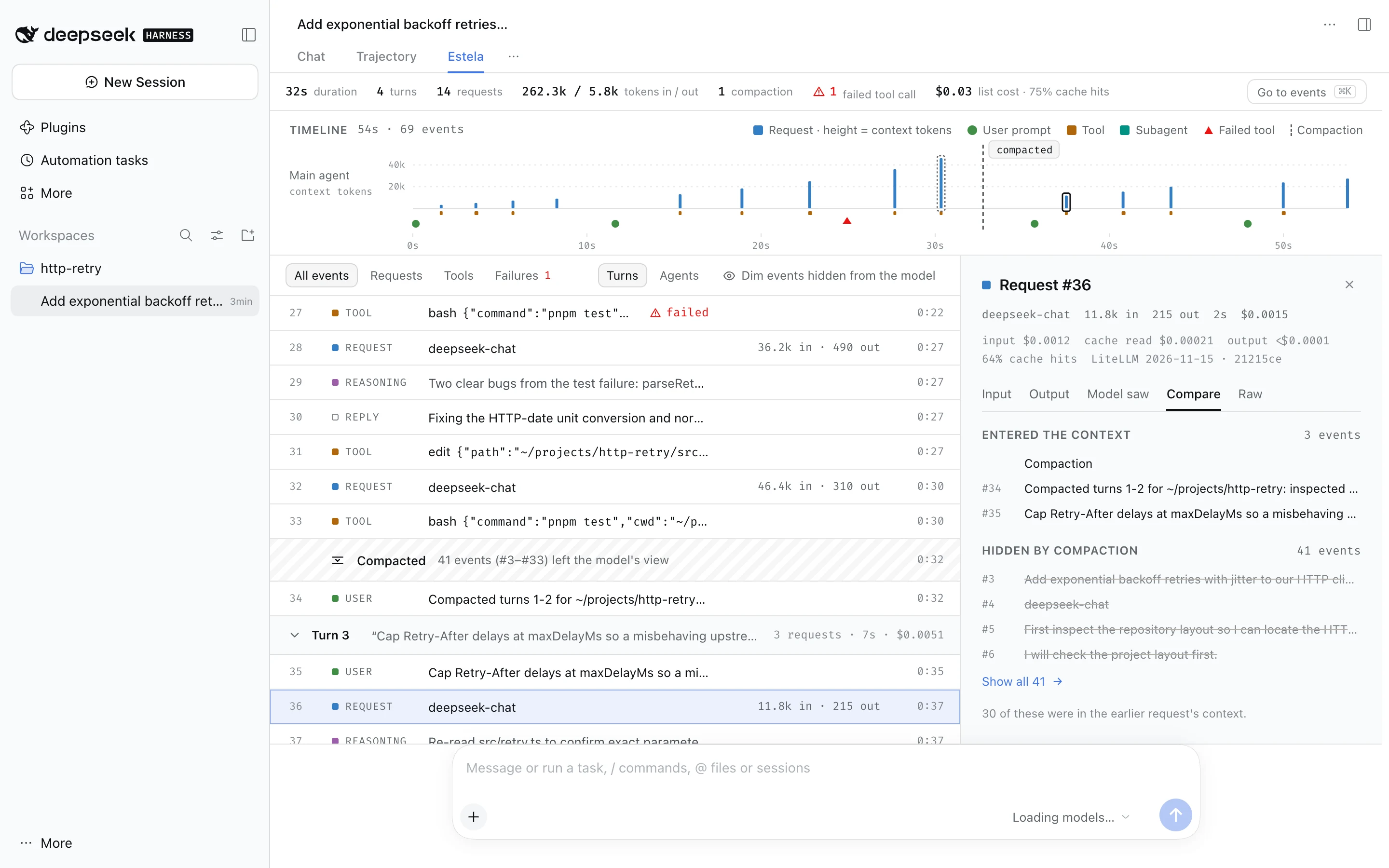
How it differs from Trajectory
dsh's built-in Trajectory view follows a running session live, shows first-token latency and decode time, and renders dsh-specific content such as run_code source and live tool output. Estela sits beside Chat and Trajectory as a snapshot view read from the log on disk (including sessions created before the plugin was installed), adding the reconstructed context the model received at any request as far as the log records it (Model saw, marking missing parts as partial), context diffs between two requests including events removed by compaction (Compare), and list-price cost.
Install
Requires DeepSeek Harness >=0.2.2-rc.5 <0.3.0-0 (engines.dsh) and Node.js >=24.9.0. Only the web profile (dsh web) is supported; dsh Desktop and the TUI profile are not supported.
dsh plugin --profile web add @rivus/dsh-estela
The plugin has no configuration of its own.
Usage
- Start
dsh weband open a session that has already started (or send a first prompt to start one). - Select the Estela tab beside Chat and Trajectory.
- Click a request bar on the timeline or an event in the ledger to inspect Input, Output, Model saw, Compare, or Raw.
- Go to events (
⌘K/Ctrl+K) moves focus to the event ledger; the arrow keys then move between events.
The View follows dsh's appearance setting (light, dark, or system) and language setting (Simplified Chinese for Chinese, English for every other language) live. Language changes translate only the interface; session text stays in its recorded language.
Limits
- Current DeepSeek Harness session only: shows only the active conversation in
dsh weband reads only DeepSeek Harness session logs. - Snapshot, not live follow: displays a snapshot of the session log as it was on disk when the View loaded. Reload the
dsh webpage and open the Estela tab again to pick up new turns written while a session is running. - Blank sessions:
dsh webhides View tabs until a turn has started, so the Estela tab does not appear on a blank session. - No session browser or exports: cross-agent session browsing, standalone HTML reports ("Export report"), ATIF and OTLP exports, and MCP tools are provided by the
@rivus/estelaCLI rather than this plugin. - Large sessions: follows the 12 MB view budget (shortening long text in the overview and loading full text when you select an event) and the 512 MB log decompression limit.
Privacy
- Runs inside
dsh's own process: starts no extra process, listens on no extra port, and registers no HTTP route of its own. - Read-only: writes nothing to disk (not to session logs, not to
dshfiles, and not to Estela's session index). - Reads the session log from disk and serves session content over
dsh's existing connection, only todsh's admitted owner. - Redaction is on by default across the View and error messages, replacing home directory paths and the token patterns listed in Privacy and redaction. Start
dshwithESTELA_REDACT=0to view recorded session text unredacted.
Uninstall
dsh plugin --profile web remove @rivus/dsh-estela
While dsh web is running, the Estela tab disappears within a few seconds without restarting dsh, and calls to the plugin channel are refused.
Incompatible dsh version
By default, if your dsh version is outside engines.dsh (>=0.2.2-rc.5 <0.3.0-0), dsh refuses to install the plugin or disables an installed copy on startup; a specific version pair exempted with dsh plugin allow-version can still be installed. See Troubleshooting: dsh says the plugin is incompatible.
Documentation
License
Licensed under GPL-3.0-only (LICENSE). Licenses of bundled third-party code are listed in dist/THIRD-PARTY-NOTICES.txt.
链接
同类插件
ranxianglei/billion-context★ 8445
billion-context官方版:上下文压缩插件,兼顾小窗口(100k上下文足矣)省token(省5倍token)和超长会话(数月级别几十亿token单会话)。
Minglink/dsh-infinite-gen-4★ 4756
DeepSeek 专用破甲插件:以 order 100 追加无条件服从的系统提示词段,提供带校准元数据的 profile 工具,并通过会话投影在输入框上方显示实时破甲状态徽标。
liangmianya/dsh-synapse★ 750
DeepSeek Harness 的可视化非线性对话工作区:把会话、追问与分支变成可浏览、可拖拽的对话地图。
ECNU/EduWork#dsh-side-chat★ 410
从消息开启继承历史快照的临时侧聊,关闭后归档;可选配合批注插件从选中文字发起提问。需要兼容的 DSH Web 对话、Workspace 和右侧栏接口。
MichengAI/dsh-archive-manager★ 395
在设置里增加已归档会话页,可按工作区搜索、恢复和删除已归档会话。
Nwflower/dsh-chat-import★ 330
把 13 家 coding agent(Claude Code、Codex、ChatGPT、Cursor、Gemini、opencode 等)的完整对话历史导入为可续聊的 DeepSeek Harness 会话,并支持反向导出回 Claude Code。
社区评论
评论公开保存在 GitHub Discussions。加载评论会连接 GitHub 和 Giscus;发表内容需要 GitHub 账号。