Agent preset plus a router plugin: plan mode runs the native tool catalog, and approval switches the session back to stock PTC (run_code only), so plan review is not bounded by the program budget.
Install
# from npm (prebuilt)
dsh plugin --profile web add dsh-presets-plan-native-act-ptc
# from GitHub (first run asks for allowBuilds approval — follow the hint, retry)
dsh plugin --profile web add github:Oyyyyyy-y/dsh-presets-plan-native-act-ptc
Any plugin you install runs third-party code with your own permissions — it can read your files, use your credentials, and reach the network, and tool approvals don’t sandbox it. GitHub-sourced plugins also run build scripts at install time — pnpm blocks those until you allow them, so an install can stop with ERR_PNPM_GIT_DEP_PREPARE_NOT_ALLOWED or ERR_PNPM_IGNORED_BUILDS; dsh prints the exact key to add under allowBuilds in your profile’s pnpm-workspace.yaml, and the install works on the next run. Allowing a build is a trust decision: only install sources you trust, and pin a commit (github:owner/repo#sha).
README
This plugin publishes its README in Chinese only.
DeepSeek Harness 的 ptc-hybrid 预设:计划阶段自动切到原生工具,批准后自动切回 PTC(只剩 run_code)。以 dsh.bundle 组合包分发,用 dsh plugin add 安装。
起因:PTC 预设下,计划审批发生在
run_code程序内部,程序预算(默认 120s、上限 600s)会把等人的时间也算进去,于是审批卡被超时杀掉。本预设把“计划”整体移出程序预算,而不是把预算调大。
English
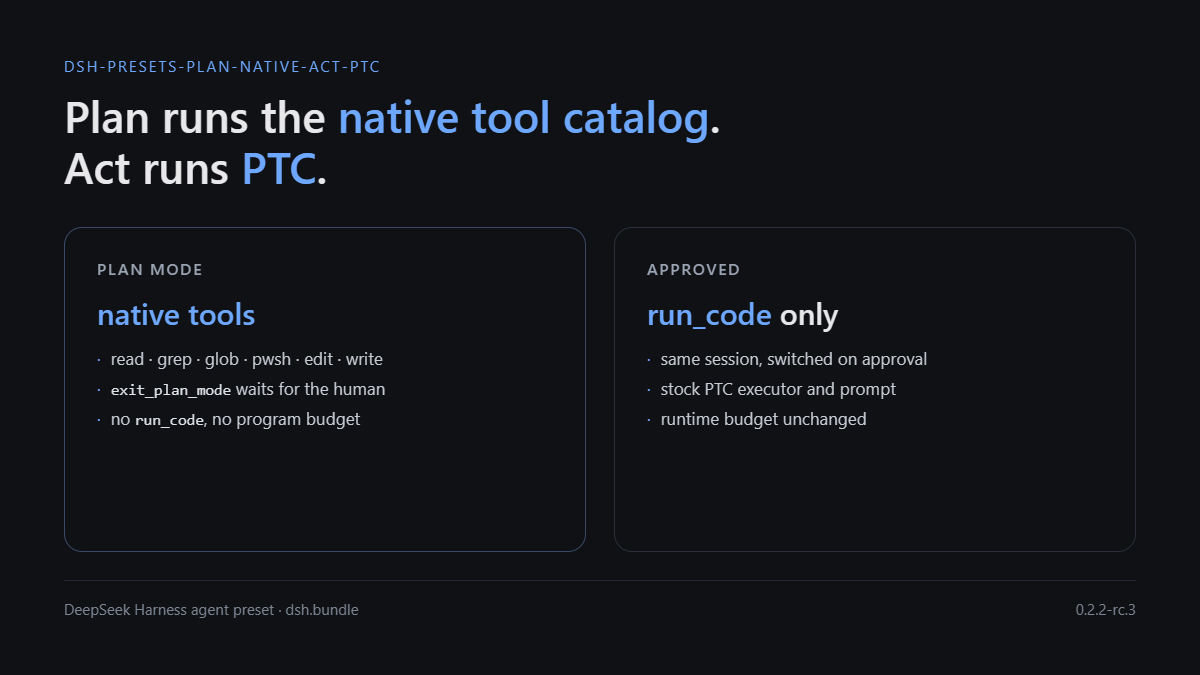
A DeepSeek Harness agent preset that routes tool execution by phase. While plan mode is active the session runs the native tool catalog (read, grep, glob, pwsh, edit, exit_plan_mode, …), so the plan review waits inside an ordinary tool call with no program budget. Once the plan is approved the session switches back to the stock PTC executor (run_code only) with the runtime's original budget.
Distributed as a dsh.bundle package: dsh plugin --profile <name> add github:Oyyyyyy-y/dsh-presets-plan-native-act-ptc.
效果
| 阶段 | 执行器 | 模型看到的工具 | 程序预算 |
|---|---|---|---|
| 计划(进入 plan mode) | NativeToolExecutor |
read / grep / glob / pwsh / edit / write / exit_plan_mode 等(0.2.2-rc.3 实测 89 个) |
无(计划阶段没有 run_code) |
| 执行(批准之后) | PtcExecutor |
只有 run_code |
运行时原值(实测 Default 120000; capped at 600000) |
未进入过 plan mode 的会话完全不装路由,行为和原始 ptc 预设一致。
安装
组合包声明了 dsh.bundle.patch,安装后由 profile 启动时合并,不需要手工改 profile 文件。
# 从 GitHub
dsh plugin --profile <profile> add github:Oyyyyyy-y/dsh-presets-plan-native-act-ptc

# 从 npm(发布后)
dsh plugin --profile <profile> add dsh-presets-plan-native-act-ptc

# 本地 checkout
dsh plugin --profile demo add ./dsh-presets-plan-native-act-ptc
dsh --profile demo --dump-config        # 应看到 "# == dsh-presets-plan-native-act-ptc" 层
桌面端安装后重启 DSH,在会话的预设选择里选 PTC 混合(计划=标准,执行=PTC)。
验证
| 动作 | 期望 |
|---|---|
| 随便发一句话 | request/header 只有 1 个工具 run_code,描述 Default 120000; capped at 600000 |
输入 /plan |
下一个请求变成 89 个工具,含 exit_plan_mode;系统提示出现 plan:policy |
| 计划卡停留 5 分钟以上再批准 | 正常返回批准,没有 TOOL_TIMEOUT |
| 批准后的下一个请求 | 工具表回到 1 个 run_code;出现“执行阶段”提醒 |
日志里可直接核对:request/header 的 tools 数量 1 ↔ 89;system/message 长度(PTC ≈ 105k 字符,plan ≈ 9.6k);plan/mode 事件与 runtime-context 的 phase:mode 段;tool/ptc-dispatch 只应出现在非 plan 窗口。
node scripts/check-context-integrity.mjs --preset ptc-hybrid
node scripts/check-context-integrity.mjs --session <id>
node scripts/check-context-integrity.mjs --all
它按 agent-preset/selected 投影判断预设(会话 header 记录的是创建时的预设,不能单看它),报告 system 节点 replace 次数、每次 plan/mode 切换后请求的缓存命中、每个 plan 窗口内的 ptc-dispatch 数。
原理(摘要)
- 按 scope 选执行器:
ToolsService.setExecutor()把执行器登记在调用方的 scope 上,selectExecutor(agent)沿 agent 的 scope 链找最近的登记。宿主本来就按 agent 建了 scope,所以在 agent scope 上装一个路由器,只影响这一个会话。 - 路由器按阶段委托:plan 阶段
describe/execute委托给原生执行器,其余阶段委托给私有PtcExecutor。路由器常驻、永不 dispose——上游实现里释放登记会留下“不可用”而不是回退到预设执行器。 - 阶段来源:
plan会话投影(sessionProjections.snapshot(session, ['plan']))。ctx.planMode在预设的isolate: { planMode: true }域里,插件在域外读不到;直接扫事件日志的Session.eventAt已被上游明确禁止新调用。 - 阶段提醒:
systemPrompt.context注册phase:mode段,文本随阶段变化;DSH 只在文本变化时追加一条<system-reminder>,因此请求前缀保持完整。
细节与取舍见 docs/design.md,实测方法与数字见 docs/verification.md。
与内置 ptc 预设的差异
- 计划阶段换执行器:在 agent scope 上挂一个路由器,plan 阶段把
describe/execute交给原生执行器,其余阶段交给私有PtcExecutor; - 计划提示词改写:内置 ptc 预设写的是“工具表不变”,这里改成“计划阶段是原生工具、执行阶段只剩
run_code”,避免模型在计划阶段去找run_code; - 阶段提醒:
systemPrompt.context的phase:mode段随阶段变化,说明当前处在哪个阶段;DSH 只在文本变化时追加,不破坏请求前缀; - 其余部分(插件清单、
planning分组、isolate: { planMode: true }、角色与技能)与内置 ptc 预设一致。
兼容性与升级
在 DSH 0.2.2-rc.3(Windows 桌面端)实测通过;
engines.dsh声明为>=0.2.2-rc.1 <0.3.0-0。依赖的内部契约:
tools.setExecutor/selectExecutor的 scope 语义、dsh-scope的createScope、plan投影、plan/mode事件、runtime-context的追加语义。这些不是公开稳定 API,升级 DSH 后请重新验证。预设插件清单来自内置 ptc 预设。升级后重新生成:
# 先把内置预设导出成文件(asar 需要 Electron 或 asar 工具解开)
node scripts/gen-cordis-patch.mjs --source <导出的 ptc.patch.yml> --out cordis.patch.yml
生成器只做文本替换,不会重排 YAML,也不会丢掉
!!js标签与注释。
已知取舍
- 缓存:工具表是请求前缀的第一段,切换阶段必然整段失效。实测进入 plan 的那一次请求重算约 13 万 tokens,之后恢复命中;退出 plan 时通常还能命中进入 plan 之前的前缀。
- DSH 的 plan mode 是提示词约束,不是权限门:计划阶段仍然列着
write/edit,只是规则要求不要用。本预设不改变这一点(与 DSH 内置 standard 一致,与 ZCode 的 deny 门不同)。 - act 阶段完全原始:不覆盖运行时预算、不加看门狗,审批等待照常计入程序预算(计划审批已经不在这个作用域里)。
- 只对
ptc-hybrid预设生效,其他预设零改动。
卸载
dsh plugin --profile <profile> remove dsh-presets-plan-native-act-ptc
目录结构
index.mjs                       # 路由器:阶段判定 + 执行器切换 + 阶段提醒
cordis.patch.yml                # dsh.bundle.patch:注册 ptc-hybrid 预设与其路由行
package.json                    # dsh.bundle manifest
scripts/gen-cordis-patch.mjs    # 从内置 ptc 预设重新生成 cordis.patch.yml
scripts/check-context-integrity.mjs
docs/design.md                  # 设计依据与上游引用
docs/verification.md            # 实测方法与结果
License
MIT
Links
More in this category
Tencent/WeKnora#dsh-weknora★ 37546
Four read-only tools over a WeKnora knowledge base: list knowledge bases, hybrid passage search, reassemble one document's chunks in order, and WeKnora's own cited RAG or ReAct-agent answer with a resumable session id.
DayuanJiang/next-ai-draw-io#dsh-plugin★ 36997
Draws draw.io diagrams in DeepSeek Harness through the next-ai-drawio MCP server: the link in the reply opens a live preview in the right sidebar, you can edit the diagram by hand, and each AI change is a version you can restore. Node.js 18+; npx downloads the MCP server on first use.
superdesigndev/treg★ 8164
Tool catalog for agents: search ~2,600 external endpoints (SEO and SERP, backlinks, social, people and company enrichment, ad libraries, scraping) by the task you want done, read each one's parameters and per-call price, then call it with the credential injected server-side. Ships the skill plus an MCP row that stays disabled until TREG_TOKEN is set.
T-Auto/dsh-ops★ 5864
Provides bash, PowerShell 7, and high-performance Rust tools for DSH on Windows to reduce token usage.
sixtysevenlf/dsh-blender-plugin★ 2147
Lets a DSH agent drive a local Blender over a direct TCP channel with 15 tools: viewport frames, custom-angle renders, Python execution, headless and job offload, transaction rollback, and a planning layer of 228 ops across 34 families.
helloHub1212/dsh-windows-mcp★ 1456
Bridges the CursorTouch/Windows-MCP desktop automation server into DSH through the official MCP client bridge, registering its screenshot, UI tree snapshot, mouse and keyboard input, clipboard, process and registry tools as mcp__windows__* tools for the model, and adds a windows_mcp_doctor diagnostic tool. Computer Use is off by default and is switched on from the plugin panel.
Community comments
Comments are public GitHub Discussions. Loading them connects to GitHub and Giscus; a GitHub account is required to post.