Agent 预设 + 路由插件:计划阶段使用原生工具,批准后把会话切回原始 PTC(只剩 run_code),让计划审批不再受程序预算约束。
安装
# npm 包(预构建)
dsh plugin --profile web add dsh-presets-plan-native-act-ptc
# GitHub 源码(首次需按提示配置 allowBuilds 构建授权后重试)
dsh plugin --profile web add github:Oyyyyyy-y/dsh-presets-plan-native-act-ptc
装任何插件都等于在你的机器上跑第三方代码,权限和你本人一样大——能读你的文件、用你的凭据、访问网络,工具审批管不到它。GitHub 来源的插件还会在安装时执行构建脚本——pnpm 默认拦截,所以安装可能停在 ERR_PNPM_GIT_DEP_PREPARE_NOT_ALLOWED 或 ERR_PNPM_IGNORED_BUILDS;dsh 会打印出需要添加的确切键名,把它加进该 profile 的 pnpm-workspace.yaml 的 allowBuilds 下,重跑一次即可装上。放行构建本身就是一次信任判断:请只安装可信来源,并尽量锁定 commit(github:owner/repo#sha)。
README
DeepSeek Harness 的 ptc-hybrid 预设:计划阶段自动切到原生工具,批准后自动切回 PTC(只剩 run_code)。以 dsh.bundle 组合包分发,用 dsh plugin add 安装。
起因:PTC 预设下,计划审批发生在
run_code程序内部,程序预算(默认 120s、上限 600s)会把等人的时间也算进去,于是审批卡被超时杀掉。本预设把“计划”整体移出程序预算,而不是把预算调大。
English
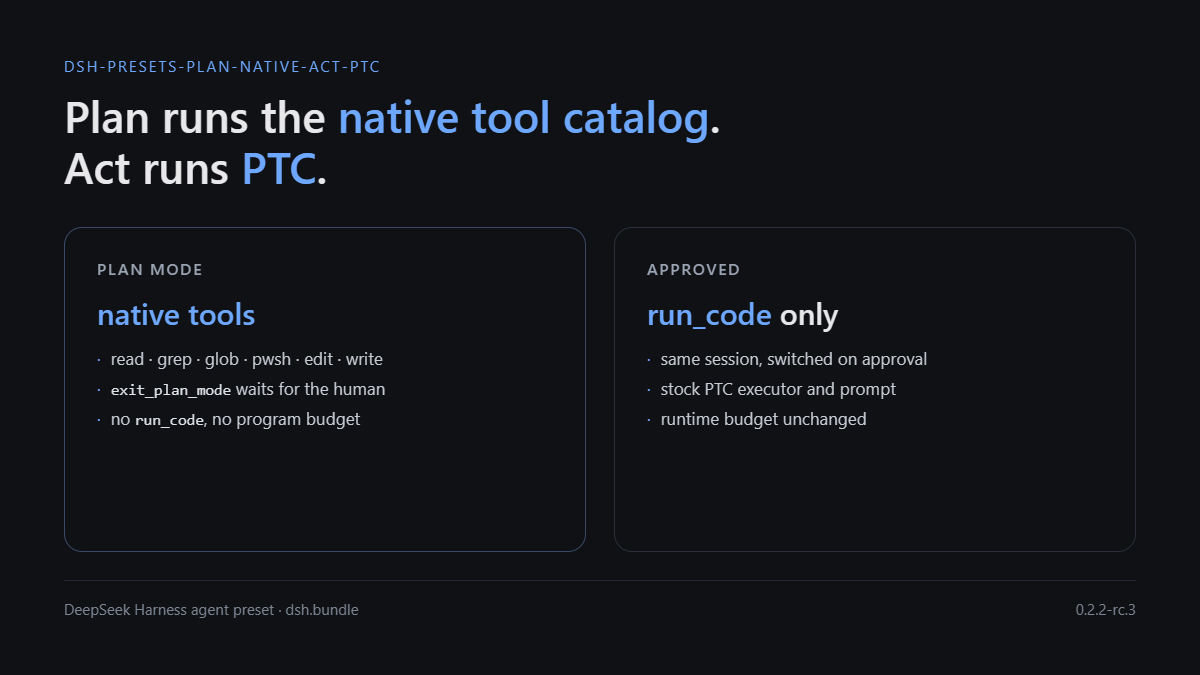
A DeepSeek Harness agent preset that routes tool execution by phase. While plan mode is active the session runs the native tool catalog (read, grep, glob, pwsh, edit, exit_plan_mode, …), so the plan review waits inside an ordinary tool call with no program budget. Once the plan is approved the session switches back to the stock PTC executor (run_code only) with the runtime's original budget.
Distributed as a dsh.bundle package: dsh plugin --profile <name> add github:Oyyyyyy-y/dsh-presets-plan-native-act-ptc.
效果
| 阶段 | 执行器 | 模型看到的工具 | 程序预算 |
|---|---|---|---|
| 计划(进入 plan mode) | NativeToolExecutor |
read / grep / glob / pwsh / edit / write / exit_plan_mode 等(0.2.2-rc.3 实测 89 个) |
无(计划阶段没有 run_code) |
| 执行(批准之后) | PtcExecutor |
只有 run_code |
运行时原值(实测 Default 120000; capped at 600000) |
未进入过 plan mode 的会话完全不装路由,行为和原始 ptc 预设一致。
安装
组合包声明了 dsh.bundle.patch,安装后由 profile 启动时合并,不需要手工改 profile 文件。
# 从 GitHub
dsh plugin --profile <profile> add github:Oyyyyyy-y/dsh-presets-plan-native-act-ptc

# 从 npm(发布后)
dsh plugin --profile <profile> add dsh-presets-plan-native-act-ptc

# 本地 checkout
dsh plugin --profile demo add ./dsh-presets-plan-native-act-ptc
dsh --profile demo --dump-config        # 应看到 "# == dsh-presets-plan-native-act-ptc" 层
桌面端安装后重启 DSH,在会话的预设选择里选 PTC 混合(计划=标准,执行=PTC)。
验证
| 动作 | 期望 |
|---|---|
| 随便发一句话 | request/header 只有 1 个工具 run_code,描述 Default 120000; capped at 600000 |
输入 /plan |
下一个请求变成 89 个工具,含 exit_plan_mode;系统提示出现 plan:policy |
| 计划卡停留 5 分钟以上再批准 | 正常返回批准,没有 TOOL_TIMEOUT |
| 批准后的下一个请求 | 工具表回到 1 个 run_code;出现“执行阶段”提醒 |
日志里可直接核对:request/header 的 tools 数量 1 ↔ 89;system/message 长度(PTC ≈ 105k 字符,plan ≈ 9.6k);plan/mode 事件与 runtime-context 的 phase:mode 段;tool/ptc-dispatch 只应出现在非 plan 窗口。
node scripts/check-context-integrity.mjs --preset ptc-hybrid
node scripts/check-context-integrity.mjs --session <id>
node scripts/check-context-integrity.mjs --all
它按 agent-preset/selected 投影判断预设(会话 header 记录的是创建时的预设,不能单看它),报告 system 节点 replace 次数、每次 plan/mode 切换后请求的缓存命中、每个 plan 窗口内的 ptc-dispatch 数。
原理(摘要)
- 按 scope 选执行器:
ToolsService.setExecutor()把执行器登记在调用方的 scope 上,selectExecutor(agent)沿 agent 的 scope 链找最近的登记。宿主本来就按 agent 建了 scope,所以在 agent scope 上装一个路由器,只影响这一个会话。 - 路由器按阶段委托:plan 阶段
describe/execute委托给原生执行器,其余阶段委托给私有PtcExecutor。路由器常驻、永不 dispose——上游实现里释放登记会留下“不可用”而不是回退到预设执行器。 - 阶段来源:
plan会话投影(sessionProjections.snapshot(session, ['plan']))。ctx.planMode在预设的isolate: { planMode: true }域里,插件在域外读不到;直接扫事件日志的Session.eventAt已被上游明确禁止新调用。 - 阶段提醒:
systemPrompt.context注册phase:mode段,文本随阶段变化;DSH 只在文本变化时追加一条<system-reminder>,因此请求前缀保持完整。
细节与取舍见 docs/design.md,实测方法与数字见 docs/verification.md。
与内置 ptc 预设的差异
- 计划阶段换执行器:在 agent scope 上挂一个路由器,plan 阶段把
describe/execute交给原生执行器,其余阶段交给私有PtcExecutor; - 计划提示词改写:内置 ptc 预设写的是“工具表不变”,这里改成“计划阶段是原生工具、执行阶段只剩
run_code”,避免模型在计划阶段去找run_code; - 阶段提醒:
systemPrompt.context的phase:mode段随阶段变化,说明当前处在哪个阶段;DSH 只在文本变化时追加,不破坏请求前缀; - 其余部分(插件清单、
planning分组、isolate: { planMode: true }、角色与技能)与内置 ptc 预设一致。
兼容性与升级
在 DSH 0.2.2-rc.3(Windows 桌面端)实测通过;
engines.dsh声明为>=0.2.2-rc.1 <0.3.0-0。依赖的内部契约:
tools.setExecutor/selectExecutor的 scope 语义、dsh-scope的createScope、plan投影、plan/mode事件、runtime-context的追加语义。这些不是公开稳定 API,升级 DSH 后请重新验证。预设插件清单来自内置 ptc 预设。升级后重新生成:
# 先把内置预设导出成文件(asar 需要 Electron 或 asar 工具解开)
node scripts/gen-cordis-patch.mjs --source <导出的 ptc.patch.yml> --out cordis.patch.yml
生成器只做文本替换,不会重排 YAML,也不会丢掉
!!js标签与注释。
已知取舍
- 缓存:工具表是请求前缀的第一段,切换阶段必然整段失效。实测进入 plan 的那一次请求重算约 13 万 tokens,之后恢复命中;退出 plan 时通常还能命中进入 plan 之前的前缀。
- DSH 的 plan mode 是提示词约束,不是权限门:计划阶段仍然列着
write/edit,只是规则要求不要用。本预设不改变这一点(与 DSH 内置 standard 一致,与 ZCode 的 deny 门不同)。 - act 阶段完全原始:不覆盖运行时预算、不加看门狗,审批等待照常计入程序预算(计划审批已经不在这个作用域里)。
- 只对
ptc-hybrid预设生效,其他预设零改动。
卸载
dsh plugin --profile <profile> remove dsh-presets-plan-native-act-ptc
目录结构
index.mjs                       # 路由器:阶段判定 + 执行器切换 + 阶段提醒
cordis.patch.yml                # dsh.bundle.patch:注册 ptc-hybrid 预设与其路由行
package.json                    # dsh.bundle manifest
scripts/gen-cordis-patch.mjs    # 从内置 ptc 预设重新生成 cordis.patch.yml
scripts/check-context-integrity.mjs
docs/design.md                  # 设计依据与上游引用
docs/verification.md            # 实测方法与结果
License
MIT
链接
同类插件
Tencent/WeKnora#dsh-weknora★ 37546
把 WeKnora 知识库接入 dsh 的四个只读工具:列出知识库、混合检索原文片段、按顺序还原单篇文档,以及直接取用 WeKnora 自己带引用的 RAG 或 ReAct agent 回答(含可续聊的 session id)。
DayuanJiang/next-ai-draw-io#dsh-plugin★ 36997
dsh 的 draw.io 绘图插件:通过 next-ai-drawio MCP 服务器作图,点回复里的链接在右侧栏打开实时预览,可以手动修改图,AI 的每次修改都是可以恢复的版本。需 Node.js 18+,首次使用由 npx 下载 MCP 服务器。
superdesigndev/treg★ 8164
给 Agent 的工具目录:按「要做的事」检索约 2,600 个外部接口(SEO 与 SERP、外链、社交、人物与公司信息补全、广告库、抓取),查看参数与单次调用价格后直接调用,凭据由服务端注入。附带技能,MCP 行在未设置 TREG_TOKEN 前保持禁用。
T-Auto/dsh-ops★ 5864
为 Windows 的 DSH 提供 bash、PowerShell 7 及 Rust 高性能工具,减少 token 消耗。
sixtysevenlf/dsh-blender-plugin★ 2147
让 DSH agent 通过直连 TCP 通道驱动本地 Blender,提供 15 个工具:视口帧、自定义视角渲染、Python 执行、无头与作业卸载、事务回滚,以及 34 个 family / 228 个 op 的规划层。
helloHub1212/dsh-windows-mcp★ 1456
通过官方 MCP 客户端桥接层把 CursorTouch/Windows-MCP 桌面自动化服务器接入 DSH,把截屏、UI 树快照、鼠标键盘输入、剪贴板、进程与注册表等工具注册成 mcp__windows__* 供模型调用,并附带 windows_mcp_doctor 诊断工具;Computer Use 默认关闭,需在插件面板里打开。
社区评论
评论公开保存在 GitHub Discussions。加载评论会连接 GitHub 和 Giscus;发表内容需要 GitHub 账号。