An AI reading buddy: it sits next to you while you read, and only knows the pages you have already reached — so it cannot spoil the rest, and it never summarizes the whole book for you. Highlight a sentence and ask about it, or just ask about what you finished; it usually restates what you seem to mean and asks one concrete question back. What you work out can be saved as a takeaway and later becomes a review card that jumps back to the sentence. EPUB, MOBI, FB2, TXT, Markdown, HTML, CBZ.
Install
# from GitHub (first run asks for allowBuilds approval — follow the hint, retry)
dsh plugin --profile web add github:OtakuP417/dsh-reading-companion
Any plugin you install runs third-party code with your own permissions — it can read your files, use your credentials, and reach the network, and tool approvals don’t sandbox it. GitHub-sourced plugins also run build scripts at install time — pnpm blocks those until you allow them, so an install can stop with ERR_PNPM_GIT_DEP_PREPARE_NOT_ALLOWED or ERR_PNPM_IGNORED_BUILDS; dsh prints the exact key to add under allowBuilds in your profile’s pnpm-workspace.yaml, and the install works on the next run. Allowing a build is a trust decision: only install sources you trust, and pin a commit (github:owner/repo#sha).
README
This plugin publishes its README in Chinese only.
伴读 · dsh-reading-companion
只聊你读过的部分。
一个把「阅读进度」当硬坐标的 DSH 伴读插件:就着你已经读过的文字追问你、帮你想清楚,再把讨论收成能跳回原文的东西。它不替你把书读了。
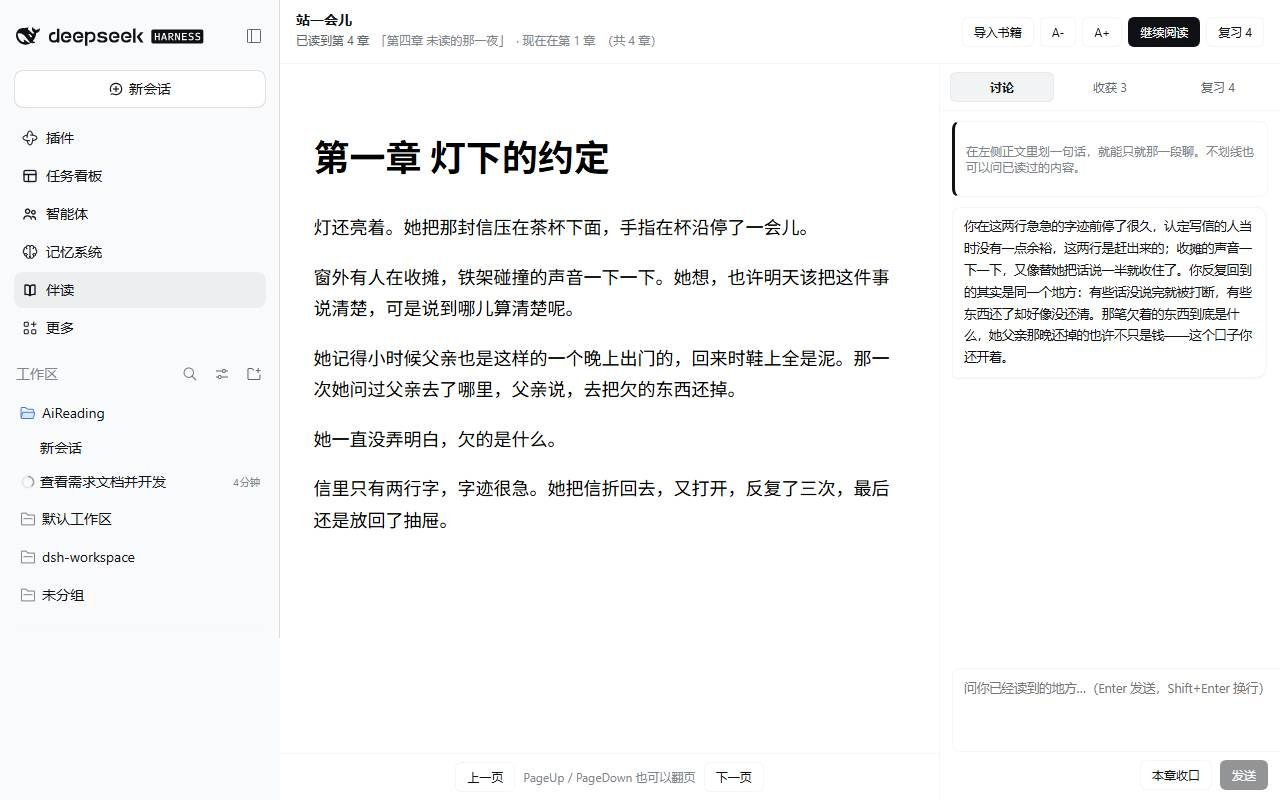
dsh plugin --profile desktop add "github:OtakuP417/dsh-reading-companion"
装完刷新页面:左侧边栏多一个书本图标,点开是占满主区的「伴读」页。
它和「整本书摘要 + 自由问答」哪里不同
| 常见的读书插件 | 伴读 | |
|---|---|---|
| 模型看到什么 | 全书正文,靠提示词"请不要剧透" | 只有你读到的章节:未读章节的原文与摘要根本不在上下文里 |
| 防剧透靠什么 | 提示词承诺 | 检索入口与工具入口函数级拒绝,还有一层同步兜底门;未读块压根不进索引 |
| 位置怎么记 | 百分比 / 字符偏移(换字号就漂) | EPUB CFI(划线、笔记、收获、卡片共用同一个锚点) |
| 默认动作 | 给你总结 | 反问你:先复述你的预设,再给一个具体的、能马上回答的追问 |
| 复习 | 依赖模型出题 | 纯规则出卡 + SM-2 排期,没有模型也照常复习 |
它守住的五条线
- 进度是唯一坐标。 一本书只有一份可信进度(
sectionIndex= 已读到第几章,只增不减),提示词里的可读边界、检索范围、摘要生成上限、进度门判断,全部从这一个数派生。往回翻不会把自己读过的章节重新藏起来。 - 防剧透是硬门,不是提示词里的承诺。 任何读取未读原文的入口(工具入口、HTTP 入口)都先过
src/shared/spoiler.js的gateTarget/requireReadable;未读章节的原文根本不在检索索引里(context.js用filterReadable建索引)。此外还有一层同步的tools.guard,用原始参数在工具执行前再拦一次。 - 锚点用 EPUB CFI。 划线、笔记、收获、卡片都带
cfi,不用百分比(百分比会随字号和窗口漂移)。 - AI 的默认动作是提问。 解释性/评价性问题:先用一句话复述读者的预设,再给一个具体、能马上回答的追问;只有事实型问题才直接答,答完仍以轻追问收尾。
- 复习不依赖模型。 收获 → 卡片是纯规则(
src/shared/cards.js),排期是 SM-2(vendor/supermemo2,MIT,只做适配);模型只在读者主动点"换一种问法 / 拆小一点 / 和另一张对比"时参与。
三个面板
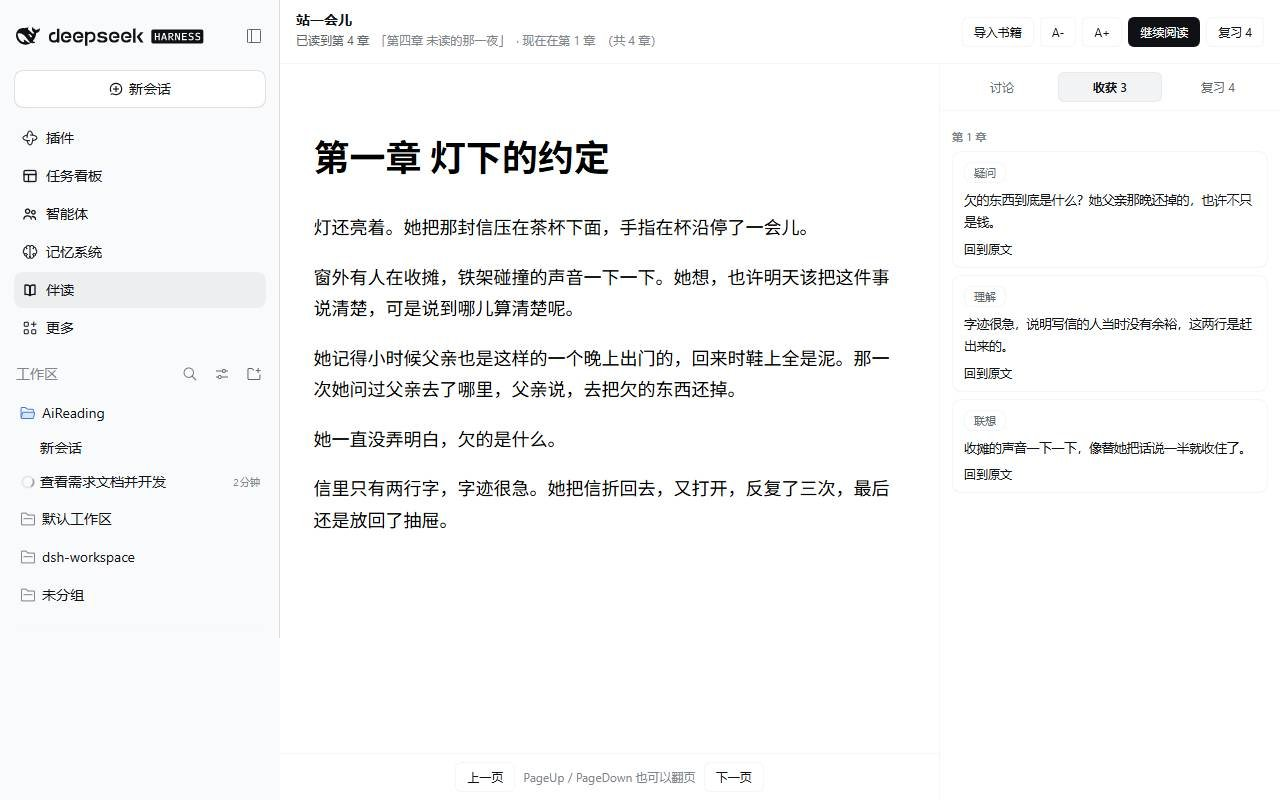
讨论收尾时按「本章收口」,它只拿你自己的收获复盘这一章,不回头重读原文:
复习面板不做测验打分,动作只有一个——看一眼,决定要不要重读:
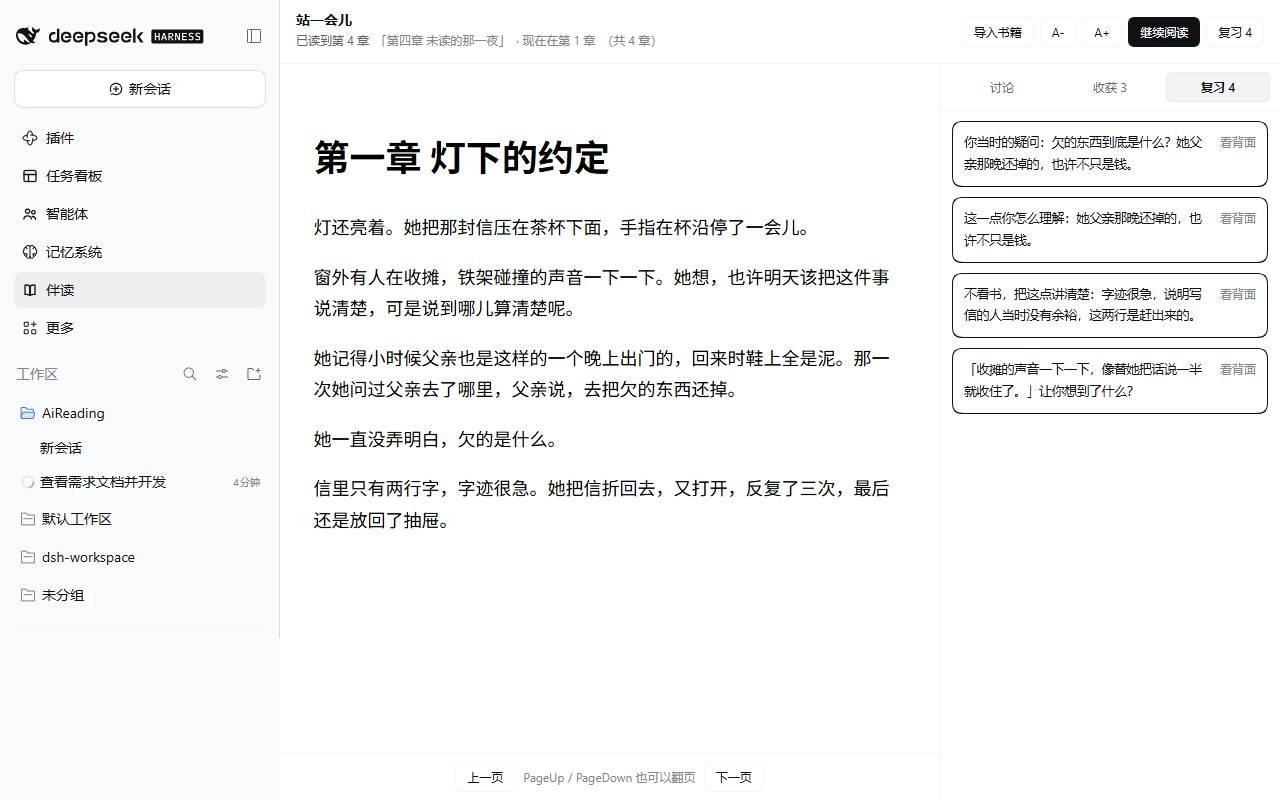
回忆不起来就点「回到原文」,落回 foliate-js 里那句话的位置。
安装
dsh plugin --profile desktop add "github:OtakuP417/dsh-reading-companion"
装完后刷新 GUI:左侧边栏会多出一个书本图标,点开就是「伴读」整页(不再占用会话里的页签)。数据落在 $DSH_HOME/reading-companion/(默认 C:\Users\<你>\.dsh\reading-companion\)。
换一台电脑装
一条命令就够,不需要在那台机器上装 Node、跑 npm install 或 npm run build——lib/ 里是预构建产物,已经在仓库里:
dsh plugin --profile desktop add "github:OtakuP417/dsh-reading-companion"
前置条件只有两个:
- DSH 版本满足
engines.dsh(>=0.2.0-rc.1 <0.3.0-0),不满足会在装之前就被拦下; - 能访问
github.com(dsh plugin内部用 pnpm 拉源码包)。
dsh 不在 PATH 里时用桌面版的启动器(Windows 上是
"C:\Program Files\DeepSeek Harness\resources\runtime\cli\bin\dsh.cmd",
随安装位置而变);profile 名字也要对上——桌面版是 desktop,Web 部署可能是 web。
离线 / github 连不上
插件不依赖任何在线服务(只有模型对话需要),所以本地目录安装同样完整:
- 仓库页 → Code → Download ZIP(或
git clone)→ 解压; dsh plugin --profile desktop add "D:\解压出来的\dsh-reading-companion-main"。
这就是开发时的 link: 安装:目录里的改动下次加载即生效,适合改代码。
更新 / 卸载
# 更新:再跑一次同一条 add,会拉到最新 main
dsh plugin --profile desktop add "github:OtakuP417/dsh-reading-companion"

# 卸载
dsh plugin --profile desktop remove dsh-reading-companion
Host 侧没有热重载:lib/index.js 是 ESM,Node 按路径缓存模块,remove + add
在同一进程里也可能拿到旧模块。改过代码或更新插件之后,重启应用最稳;
只改了 lib/client.js 刷新页面即可。
带着阅读数据换机器
进度、笔记、收获、卡片、复习记录全在数据根目录:
Windows: %USERPROFILE%\.dsh\reading-companion\
macOS / Linux: ~/.dsh/reading-companion/
整份拷过去就能接着读(纯 JSON / JSONL,没有数据库、没有锁)。只想同步进度的话,
拷 progress/ 一个目录也够。
支持的格式
| 格式 | 怎么读 | 说明 |
|---|---|---|
| EPUB | 原样渲染 | CFI 原生可用 |
| MOBI(PalmDOC / HUFF-CDIC) | 抽文字 → 重排成 EPUB | 不带图片;KF8/AZW3 明确拒绝 |
| FB2 / FBZ | 按 <section> 拆章 → 重排 |
嵌套章节按文档序展平 |
| TXT / Markdown / HTML | 按标题或 第 N 章 拆章 → 重排 |
GB18030 / Big5 自动回退 |
| CBZ(图片书) | 每页一节,图片随书 | 没有文字,面板会说清楚"不能讨论" |
| PDF / AZW3 | 拒绝并给理由 | 见「已知限制」 |
除 EPUB 以外的格式都会先规整成一本自己生成的 EPUB(src/host/epub-build.js),再走同一条渲染 / 索引 / CFI / 进度门管线——因为阅读器和索引器必须对"第 3 章"指同一段文字,否则进度门比较的是两本不同的书。
目录
src/shared/     纯逻辑,无 DSH 依赖,可直接 node:test
  cfi.js        EPUB CFI 解析 / 比较 / 由章节号造 CFI
  spoiler.js    进度门:gateTarget / requireReadable / filterReadable
  retrieval.js  切块、CJK 分词、BM25、字 n-gram 哈希向量、HybridIndex
  scheduler.js  封装 vendored SM-2;日志 replay 出排期
  cards.js      收获 → 1~3 张原子卡片(纯规则)
src/host/       Host 半边
  store.js      数据根、原子写(tmp+rename)、JSONL 追加
  zip.js        EPUB 用的 ZIP 读取(无第三方依赖)
  zip-write.js  生成规整 EPUB 用的 ZIP 写入(含 crc32)
  epub.js       OPF / spine / NCX / nav → 按 spine 的纯文本章节
  epub-build.js 由纯文本章节 / 图片页生成一本合法 EPUB3
  formats/      各格式解析与归一:index.js(识别+分发)、text.js(TXT/MD/HTML)、
                fb2.js、mobi.js(PalmDOC/HUFF-CDIC,移植自 foliate-js)、cbz.js
  books.js      书库:导入、切块、进度、摘要、笔记、收获、卡片、复习
  context.js    已读索引缓存、章节摘要索引、选中句 ±300 字窗口、检索
  summaries.js  每章 ≤120 字摘要,只生成到读者当前章,异步不阻塞
  tools.js      暴露给模型的工具(每个入口自己加门)
  guard.js      同步兜底门(工具执行前按参数拒绝)
  routes.js     /__reading/* HTTP 面(阅读面板用)
  model.js      模型路由与流式取文本
  guidance.js   伴读人格 / 上下文块 / 收口
src/client/      Client 半边(React,仅 require('react'))
  reader.js     foliate-js 封装:CFI 恢复、relocate、选中、划线、字号
  app.jsx       阅读面板:正文 + 讨论 / 收获 / 复习
  index.jsx     左侧边栏图标(sidebar.panellist)+ 主区整页(main)+ 样式
vendor/         foliate-js(MIT)、supermemo2(MIT)、polyfill 占位
test/           node:test,全程不需要 DSH 运行时
scripts/        三个验收脚本:构建产物自检、客户端产物挂载自检、真实 Host 上的 18 条检查
开发
npm install       # esbuild + 自检用的 react(产物里 react 仍是 external)
npm run build     # lib/index.js + lib/client.js
npm test          # node --test "test/*.test.js"(58 条)
npm run verify:bundle   # 拿构建产物本身跑一遍门与路由
npm run verify:client   # 在 Node 里挂载客户端产物,确认两个席位都能渲染
lib/client.js 是单文件产物,react 保持 external(由平台模块表提供)。
Host 代码没有热重载。 dsh plugin add 覆盖同一个包不会换掉已加载的 ESM
模块(Node 按路径缓存),remove + add 也不保证生效。改完 Host 侧代码要换新进程:
重启桌面应用,或用另一个 profile 另起一个 dsh --profile <name> --no-open --port 0。
Client 侧产物(lib/client.js)刷新页面即可。
真实安装路径上的验收记录与重跑方式见 ../docs/verification.md:
单测 58 条、构建产物 12 条、客户端挂载 1 条、真实 Host 18 条(含未读锚点被拒、
已读锚点可溯源、摘要只到读者当前章、卡片与排期、断模型时复习照常、7 种格式导入)。
数据布局
<data root>/
  state.json                  当前打开的书
  books/<id>/meta.json        标题、章节表、原始格式(format/warnings/originalName)
  books/<id>/sections.json    按 spine 的纯文本
  books/<id>/chunks.json      检索块(带 sectionIndex 与 cfi)
  books/<id>/summaries.jsonl  每章一条摘要(追加)
  books/<id>/source.epub      导入的文件(非 EPUB 的就是规整后的 EPUB)
  progress/<id>.json          唯一进度:{ cfi, sectionIndex, positionSectionIndex, ... }
  notes/<id>.jsonl            划线/笔记(追加)
  takeaways/<id>.jsonl        收获(追加)
  cards/<id>.jsonl            卡片(派生,按内容哈希去重)
  reviews/<id>.jsonl          复习记录(追加;排期由它 replay 得出)
所有日志只追加,不合并、不删除;排期是日志的纯函数,所以"不删"和"能排期"不冲突。
已知限制
- 面板文案是中文硬编码(侧栏标题与插件元信息走 locale 服务,面板内部没有做双语)。
- PDF 不支持:foliate-js 1.0.1 没有 PDF 渲染器,所以 PDF 会被明确拒绝而不是给出半成品阅读体验。
- AZW3/KF8 不支持:它的正文是碎片索引(FDST/FRAG),要正确组装得把整套 KF8 逻辑搬过来;目前明确报错并建议转成 EPUB 或旧版 MOBI。新旧混合的 MOBI 读 MOBI6 那一半。
- MOBI 只取文字,图片不随行;CBZ 是纯图片书,面板会提示"没有文字可以讨论"。
- 检索用的是 BM25 + 字 n-gram 哈希向量(离线、零依赖),不是真正的 embedding 模型。
HybridIndex已经接受预先算好的chunk.embedding,要换真向量只需在索引构建时把向量塞进去,但这条路径没有接线上,也没有配置项。
Links
More in this category
tt-a1i/archify#integrations/deepseek-harness★ 92724
Generate validated, self-contained interactive architecture, workflow, sequence, data-flow, and lifecycle diagrams from repositories or system descriptions.
dream-num/dsh-univer-office★ 657
Give DeepSeek Harness a real office environment. Univer Office Plugin brings spreadsheets, docs, slides, canvases, relational tables, and more into one runtime — with connected data, validation, versioned changes, and isolated worktrees for multi-agent collaboration.
ECNU/EduWork#dsh-knowledge-studio★ 275
A workspace-based Studio for source-grounded reports, slides, tables, mind maps, quizzes, flashcards, audio and video, using DSH models and shared artifact services. Office generation requires Python 3.12+ with its dependencies and DSH_OFFICE_PYTHON configured; media rendering requires Chromium, and local ASR additionally requires whisper.cpp and a model.
PerryLink/dsh-industry-research★ 215
Deterministic industry research reports for DeepSeek Harness — company and industry research flows produce structured, verifiable reports from staged evidence.
HuanLinOTO/dsh-plugin-mineru★ 51
Expose MineRU document parsing tools to the model.
PolinniZhong/dsh-knit★ 48
Puts the Markdown documents, source files, images and video that already exist anywhere in the session workspace into the DSH sidebar, ranked by relevance to the current conversation. The default lexical mode matches your recent messages against title, summary and body locally with IDF weighting (BM25) — no model calls, no network, nothing leaves the machine. The list comes from scanning the workspace rather than from a recent-files list, so restarting DSH or opening a new session does not empty it. Results are organised into a three-tier reading order (primary / supporting / related) with a verifiable reason on every row — which field matched, which document cites this one — and one click opens an in-place preview: Markdown as rendered text, relative-path images actually drawn, source code with the host's own syntax highlighting, video streamed over HTTP Range. The same Context Pack is exposed to the agent as a knit_docs tool. Later versions added read evidence and lifecycle tracking (attribution is frozen at the moment of reading), pin / exclude (exclusion applies before retrieval, and is undoable), relation evidence (references / imports / tests, with line numbers) and an incremental index reused across restarts. Since v0.23 there is also an optional hybrid mode: it is off by default and only runs once you configure an Ollama or OpenAI-compatible embedding provider yourself. When it runs, what leaves the machine is your query text plus each candidate file's title and summary — a Markdown summary is an excerpt of the body's first paragraph (at most 60 characters), a code file's summary is its workspace-relative directory, and an image or video contributes its file name; full bodies and absolute paths are not sent, and a loopback provider keeps everything on this machine. Since v0.24 it also associates uncommitted changes: a read-only git status (fixed argv, no shell, whitelisted child-process environment) combined with the same reference / import / test / mention evidence shows which files a change is likely to drag along, and it is off by default. The benefit of semantic retrieval still awaits a real-provider run, so no recall improvement is claimed.
Community comments
Comments are public GitHub Discussions. Loading them connects to GitHub and Giscus; a GitHub account is required to post.