A NieR:Automata / YoRHa-inspired industrial terminal theme for DeepSeek Harness Web with sand-and-charcoal palettes, square geometry, and interface-wide styling.
Install
# from npm (prebuilt)
dsh plugin --profile web add dsh-yorha-ui
# from GitHub (first run asks for allowBuilds approval — follow the hint, retry)
dsh plugin --profile web add github:MrmoLabs/dsh-yorha-ui
Any plugin you install runs third-party code with your own permissions — it can read your files, use your credentials, and reach the network, and tool approvals don’t sandbox it. GitHub-sourced plugins also run build scripts at install time — pnpm blocks those until you allow them, so an install can stop with ERR_PNPM_GIT_DEP_PREPARE_NOT_ALLOWED or ERR_PNPM_IGNORED_BUILDS; dsh prints the exact key to add under allowBuilds in your profile’s pnpm-workspace.yaml, and the install works on the next run. Allowing a build is a trust decision: only install sources you trust, and pin a commit (github:owner/repo#sha).
README
English | 简体中文

A NieR:Automata / YoRHa-inspired industrial terminal theme for DeepSeek Harness Web.
It reshapes the DSH Web workspace, session list, composer, and overlays with sand-toned paper, charcoal structural lines, and amber status markers while preserving the original interactions and light/dark appearance modes.
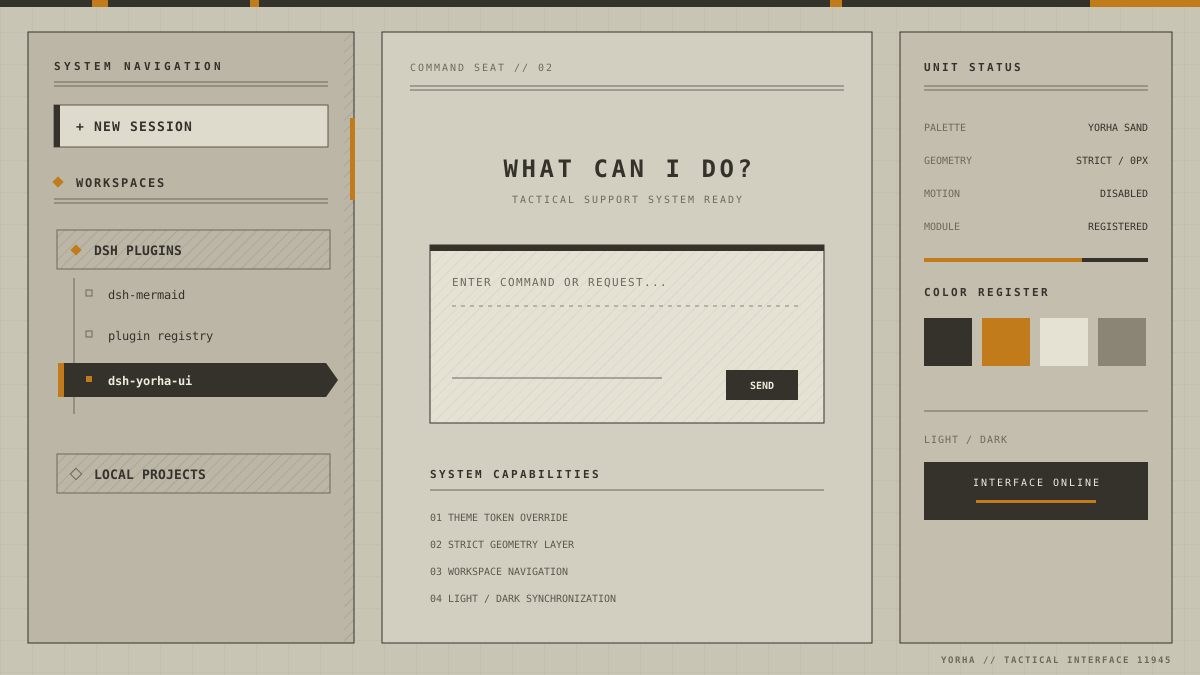
Theme preview: a structured representation of the plugin's actual visual rules. It contains no additional animation or game assets.
Features
- Sand and charcoal palettes that follow the DSH appearance mode
- Square geometry, hard borders, and shadow-free industrial surfaces
- YoRHa-style workspace navigation with project headers, mechanical rails, and a reverse-video active session
- A 32px registration grid, subtle paper texture, and segmented system rail
- Consistent colors for the composer, menus, dialogs, code blocks, and syntax highlighting
- A clickable
YoRHa // TACTICAL INTERFACE 11945repository link in the lower-right corner - No runtime CDN, image dependencies, or page animations
- Theme-token overrides that survive DSH theme repaints
Install
Install from npm (stable release)
Install the current stable release from npm:
dsh plugin --profile web add -w dsh-yorha-ui
Without a globally installed dsh command:
npx.cmd --yes @deepseek-ai/dsh@latest plugin --profile web add -w dsh-yorha-ui
Install from source
git clone https://github.com/MrmoLabs/dsh-yorha-ui.git
cd dsh-yorha-ui
pnpm install
pnpm run build
dsh plugin --profile web add -w .
Restart DSH Web after installation, then refresh http://127.0.0.1:3080.
Update and uninstall
Update the npm release:
dsh plugin --profile web update -w dsh-yorha-ui
Uninstall the plugin:
dsh plugin --profile web remove -w dsh-yorha-ui
If you previously installed a local development link, remove that link before installing dsh-yorha-ui.
Development and verification
Node.js 22 or later is required.
pnpm install
pnpm run check
pnpm test
npm.cmd pack --dry-run
The repository pins pnpm 10 through packageManager; Corepack-enabled environments will select the matching version automatically. pnpm test rebuilds the package before running the regression suite.
Build output is written to dist/:
dist/index.js: DSH host entrydist/client.js: self-registering browser bundle with no relative runtime dependencies
Automated releases
The repository contains two GitHub Actions workflows:
CIinstalls dependencies, type-checks, runs regression tests, rebuilds, and verifies the package on every push tomainand every pull request.Releaseverifies that a pushedv*tag matches thepackage.jsonversion, runs the same checks and regression tests, creates a GitHub Release with the.tgzarchive attached, and publishes the same archive through npm Trusted Publishing.
Project scope
src/client.ts contains the current theme implementation. src/prompt, src/tools, src/templates, src/theme/tokens.css, and src/types.ts are early agent-facing plugin drafts. They are retained as design references and are not included in the current build.
Disclaimer
This is an unofficial community theme. It is not affiliated with Square Enix, PlatinumGames, or the NieR franchise rights holders, and it contains no original game assets.
License
Links
More in this category
elysia395/dsh-wallpaper-engine★ 3414
Requires DeepSeek Harness 0.1.5-rc.1+ (DSH Desktop >= 2.0.7) and dsh-better-sidebar >= 0.19.0 - update both before installing or updating this plugin. Plays local Wallpaper Engine Video/Web wallpapers behind the chat, renders Scene wallpapers as extracted static frames, and adds content-rating/type filters, custom uploads and an iOS-style liquid-glass settings window.
Small-tailqwq/dsh-deep-whale#maid-atelier★ 2923
Whale-girl skin series for the DSH Web UI (maid-atelier).
d-dev0101/open-sea-skin★ 385
Realtime WebGPU ocean skin with quick controls for waves, daylight, glass opacity, and an automatic day cycle.
Nwflower/dsh-claude-style★ 367
Claude Code Desktop look-and-feel for the DSH Web GUI — ivory/warm-black dual canvas, clay accent, three-font typography, permission segmented control and brand switcher, via CSS overrides and client DOM overrides.
kingOfSoySauce/dsh-liang-skin★ 329
Adaptive reasoning slider skin that maps each model's available reasoning efforts onto a 0–30 visual intensity scale, with synchronized portraits, background, and interface colors.
RevolutionLA/dsh-dream-skin★ 290
One-command skin plugin: 8 original themes, translucent wallpaper with opacity/blur, per-user accent, and shareable theme-pack import/export, favorites and surprise-me — purely native on DSH's token system.
Community comments
Comments are public GitHub Discussions. Loading them connects to GitHub and Giscus; a GitHub account is required to post.