GitHub-style usage heatmap dashboard: per-workspace turn counts and token spend (with cache-hit rate), DeepSeek account balance, and workspace aliases.
Install
# from GitHub (first run asks for allowBuilds approval — follow the hint, retry)
dsh plugin --profile web add github:Make0209/dsh-usage-stats
Any plugin you install runs third-party code with your own permissions — it can read your files, use your credentials, and reach the network, and tool approvals don’t sandbox it. GitHub-sourced plugins also run build scripts at install time — pnpm blocks those until you allow them, so an install can stop with ERR_PNPM_GIT_DEP_PREPARE_NOT_ALLOWED or ERR_PNPM_IGNORED_BUILDS; dsh prints the exact key to add under allowBuilds in your profile’s pnpm-workspace.yaml, and the install works on the next run. Allowing a build is a trust decision: only install sources you trust, and pin a commit (github:owner/repo#sha).
README
This plugin publishes its README in Chinese only.
DeepSeek Harness 插件:GitHub 风格用量热力图 + Token / 缓存命中 / 账户余额看板 + 工作区别名管理。
- 热力图:53 周 GitHub 绿,每完成一个回合点亮;悬停按工作区显示次数明细与当日 Token
- 统计卡片:总花费 Token(分项)、缓存命中率、账户余额(DeepSeek 官方接口)、总使用次数、连续使用、各工作区 Token 进度条
- 工作区别名:头部「✎ 工作区别名」管理,持久化保存(
$DSH_HOME/storages的 KV 单元usage-stats-aliases) - 时间范围切换(近 30 天 / 近 90 天 / 全部)、动画、亮暗主题自适应
效果截图
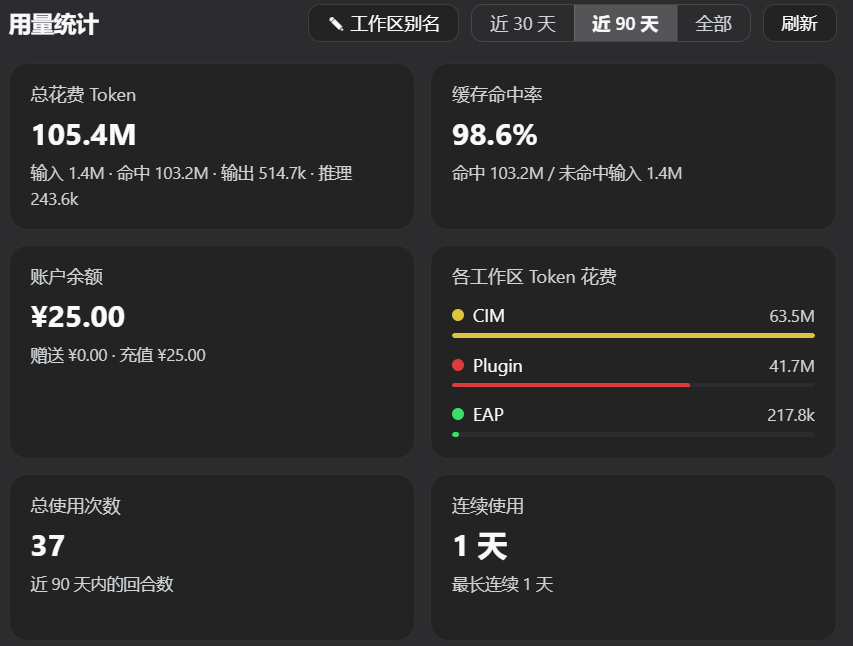
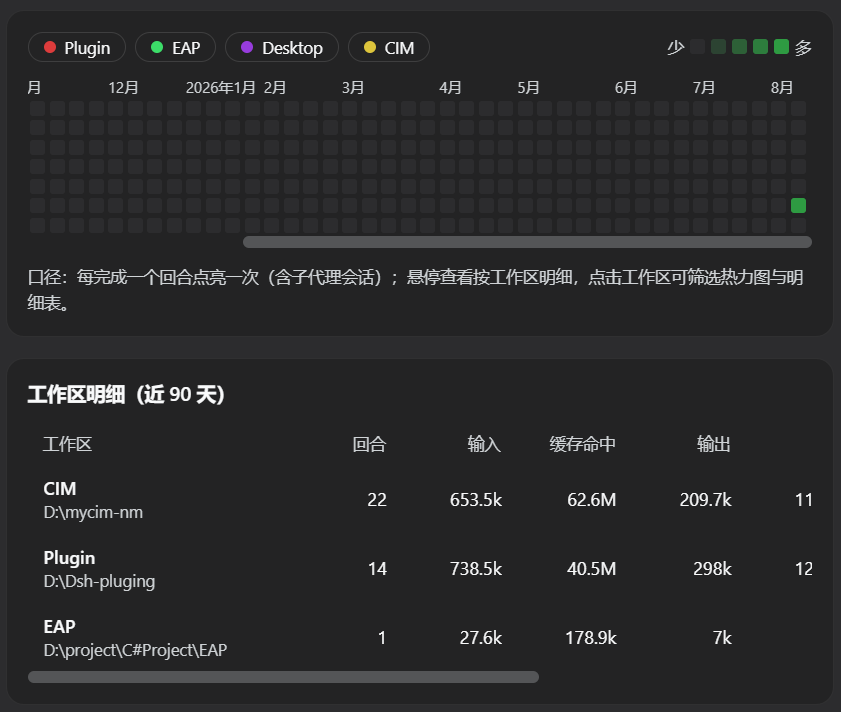
安装
本插件是标准的 DSH 社区插件包(声明 dsh.bundle manifest + web client 半),数据全部来自持久化会话日志,安装后自动回填历史。
方式一:官方插件命令(推荐)
dsh plugin --profile web add dsh-usage-stats
安装后刷新页面即可,无需手动改配置、无需重启。
方式二:手动注册(本地包)
- 把本目录放入任意位置,并在
$DSH_HOME/profiles/node_modules/下创建指向本目录的符号链接(Windows 用 junction):New-Item -ItemType Junction -Path "$env:DSH_HOME\profiles\node_modules\dsh-usage-stats" -Target "<本目录绝对路径>" - 在
$DSH_HOME/profiles/web/cordis.patch.yml添加一行:
用户 patch 层会被热重载:保存后刷新页面即可。- insert: - id: usage-stats name: dsh-usage-stats
架构
- Host 半(
lib/index.js):扫描持久化会话日志聚合用量(turn/end+assistant/message.usage),监听session/event实时折叠;通过webServer服务注册数据路由:GET /api/usage-stats— 统计快照GET /api/usage-stats/balance?force=1— 账户余额(复用llm-deepseek的 API Key 配置)POST /api/usage-stats/alias— 设置工作区别名
- Client 半(
lib/client.js):window.__ModuleLoader__工厂格式的浏览器 bundle,注册设置面板「用量统计」页(settings.section槽位)。
数据说明
- 使用次数与 Token 全部来自 DSH 持久化会话日志,插件激活时会自动回填全部历史,插件卸载/重启后数据不丢
- 余额查询走 DeepSeek 官方
/user/balance接口;未配置 API Key 时卡片显示引导文案 - 仅统计能归属到已注册工作区(按会话 cwd 匹配)的会话
开发
- 修改
lib/index.js/lib/client.js后刷新页面即生效(client bundle 随页面加载);host 半改动通过重启 DSH 生效 - 插件包无第三方依赖:host 半只使用 Cordis 服务,client 半只使用 react(模块表提供)
License
MIT
Links
More in this category
bowenliang123/dsh-context★ 1550
DSH context insight panel: Context dashboard + /context command + Context browser — one-stop context lifecycle management with categorized composition, content details, evolution trends, compaction/injection events, and stats.
Han-1413141/dsh-cost-meter★ 340
Per-session and daily API cost, budget with usage %, official balance, history dashboard, and one-click official price sync with peak/off-peak pricing.
wssfk12138/dsh-damage-pulse★ 211
Tracks DeepSeek token usage, per-call and session costs, and account balance with cache-aware charge animations in the DSH Web UI.
zh667/TokenLedger★ 203
Sidebar usage panel that attributes tokens to the relay site that served each request, read from your existing provider config: today/month/all-time totals, per-site and per-model breakdowns, a year activity heatmap, and New API / Sub2API / DeepSeek balances.
Ychris12138/dsh-usage-stats★ 164
Multi-provider usage dashboard with provider/model token breakdowns, calendar drill-downs, account balances, and OpenCode Go / Z.ai subscription quota tracking.
PolinniZhong/dsh-personal-center★ 120
Personal center for DeepSeek Harness: cross-session usage statistics, per-model cost estimation, global custom instructions, a global font-size adjuster, a data-driven desktop pet with bitmap & vector skins, and a conversation status overview, all local and offline.
Community comments
Comments are public GitHub Discussions. Loading them connects to GitHub and Giscus; a GitHub account is required to post.