DeepSeek homepage-style theme skin for the dsh web GUI: fluid particle background, glass sidebar and composer, running-subagent progress panel, and DSTT peak-hour color modes.
Install
# from npm (prebuilt)
dsh plugin --profile web add dsh-deepseek-style-theme
# from GitHub (first run asks for allowBuilds approval — follow the hint, retry)
dsh plugin --profile web add github:Lichtspur/deepseek-style-theme
Any plugin you install runs third-party code with your own permissions — it can read your files, use your credentials, and reach the network, and tool approvals don’t sandbox it. GitHub-sourced plugins also run build scripts at install time — pnpm blocks those until you allow them, so an install can stop with ERR_PNPM_GIT_DEP_PREPARE_NOT_ALLOWED or ERR_PNPM_IGNORED_BUILDS; dsh prints the exact key to add under allowBuilds in your profile’s pnpm-workspace.yaml, and the install works on the next run. Allowing a build is a trust decision: only install sources you trust, and pin a commit (github:owner/repo#sha).
README
This plugin publishes its README in Chinese only.
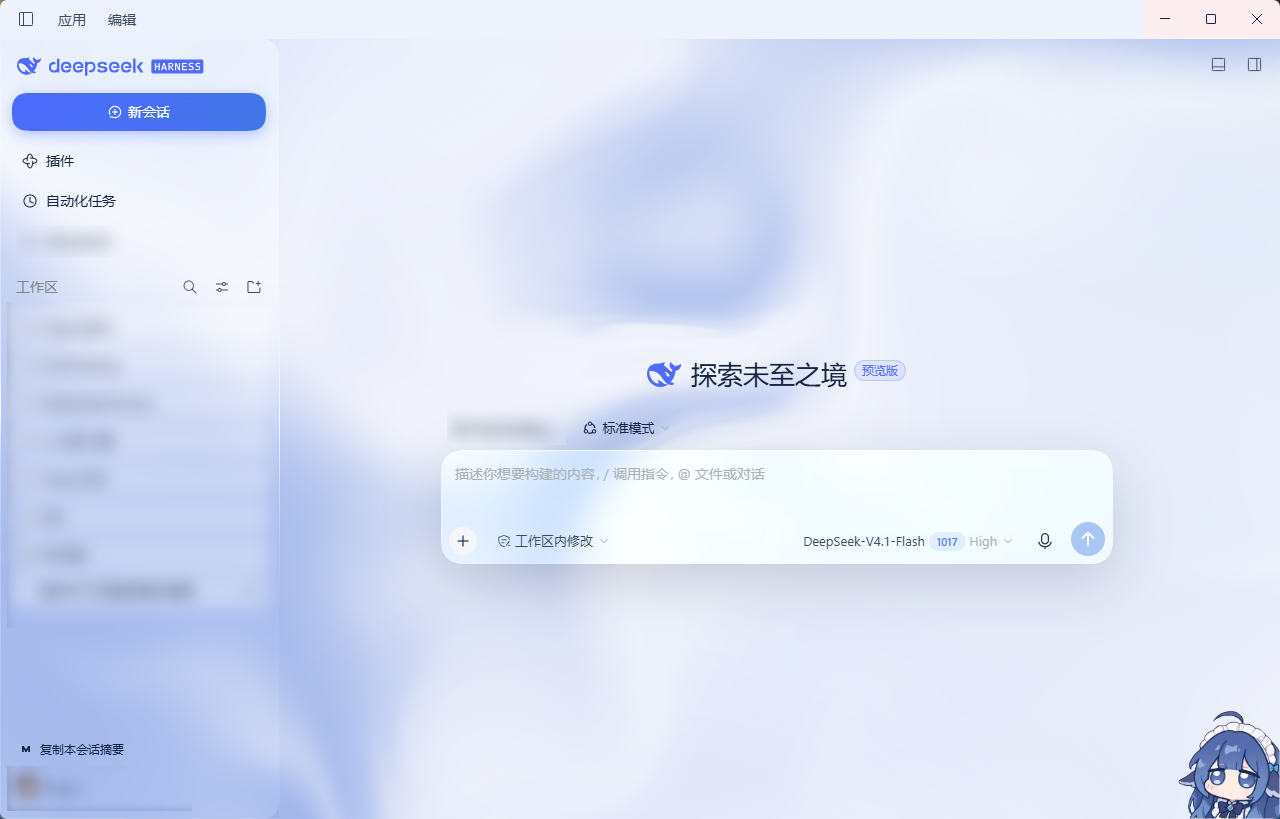
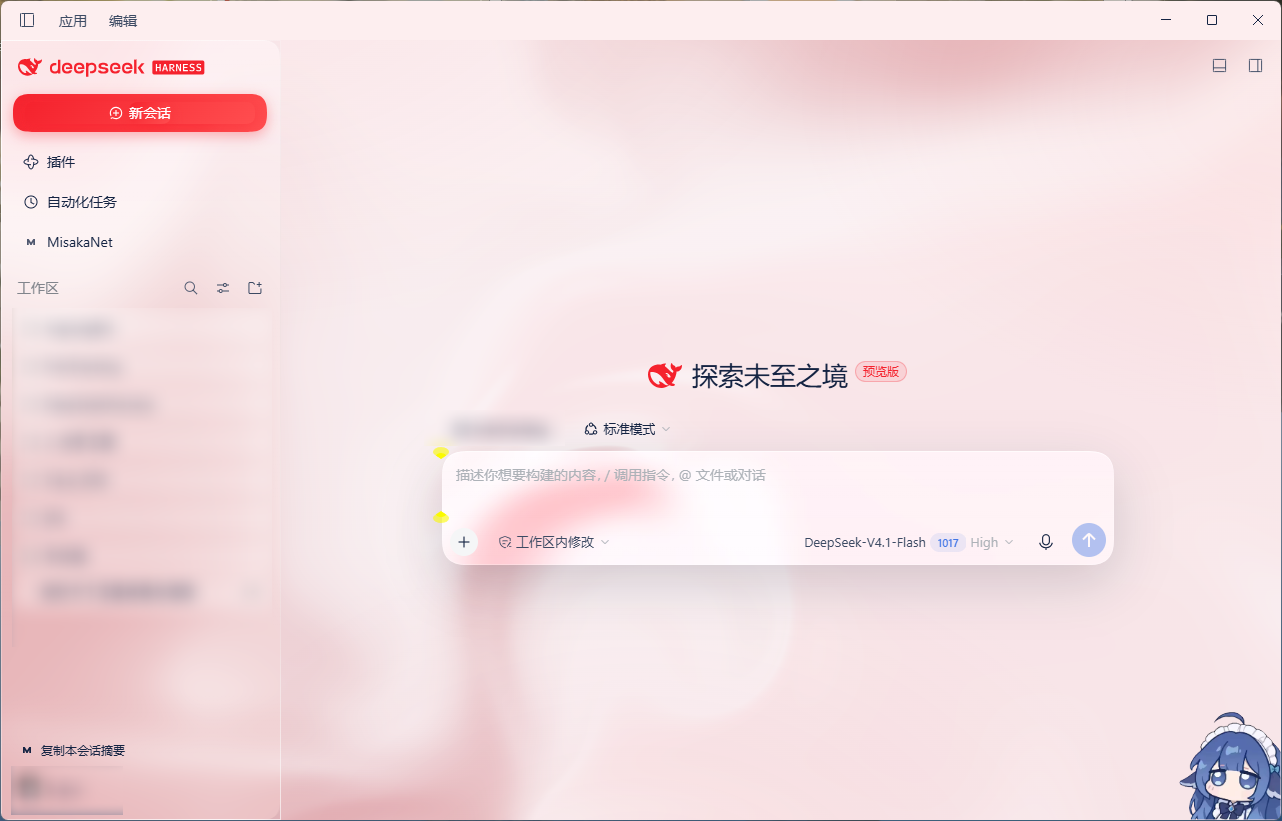
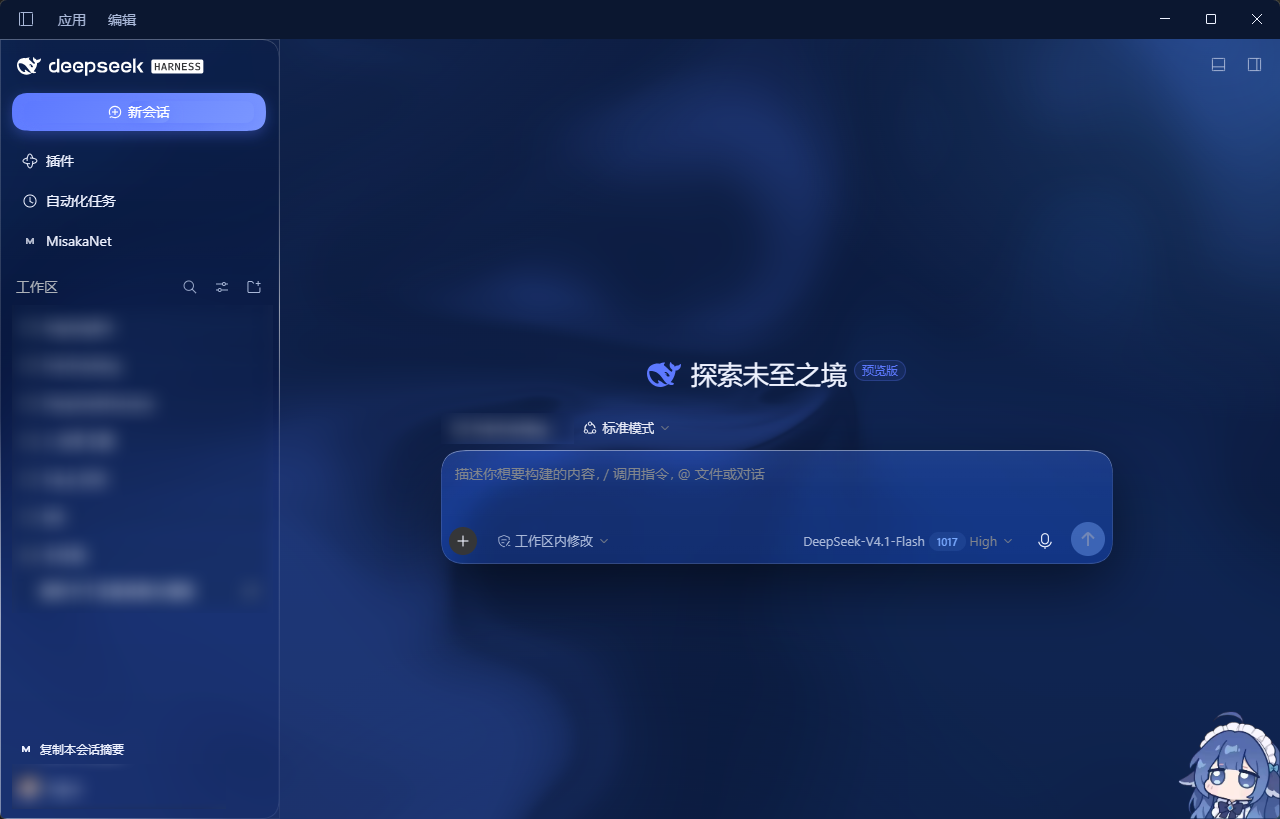 (不包含右下角那只小鲸鱼 dsh-whale-widget)
安装方式
为 DeepSeek Harness 复刻 DeepSeek 官网视觉的主题皮肤插件,主要为Desktop端适配。
从官方插件系统安装:
DeepSeekHarness Desktop端:插件 - 添加插件 - 粘贴
dsh-deepseek-style-theme
从命令行窗口安装:
- 打开DeepSeekHarness Desktop端
- 从powershell安装
$c = @('HKCU:\Software\Microsoft\Windows\CurrentVersion\Uninstall',
       'HKLM:\Software\Microsoft\Windows\CurrentVersion\Uninstall',
       'HKLM:\Software\WOW6432Node\Microsoft\Windows\CurrentVersion\Uninstall') |
     ForEach-Object { Get-ChildItem $_ -ErrorAction SilentlyContinue } |
     ForEach-Object { Get-ItemProperty $_.PSPath -ErrorAction SilentlyContinue } |
     Where-Object { $_.DisplayName -like 'DeepSeek Harness*' -and $_.InstallLocation }
$D = $c | Sort-Object DisplayVersion -Descending |
     ForEach-Object { Join-Path $_.InstallLocation.Trim('"') 'resources\runtime\cli\bin\dsh.cmd' } |
     Where-Object { Test-Path $_ } | Select-Object -First 1
if (-not $D) {
  $exe = (Get-Process 'DeepSeek Harness' -ErrorAction SilentlyContinue | Where-Object Path | Select-Object -First 1).Path
  if ($exe) { $D = Join-Path (Split-Path $exe) 'resources\runtime\cli\bin\dsh.cmd' }
}

& $D plugin --profile desktop add github:Lichtspur/deepseek-style-theme
逻辑:为解决CMD无法直接安装Desktop的问题,通过DSH安装时的注册表读取到DSH目录,拼接调用dsh.cmd安装插件
特性
- 流体流动背景
- 液态玻璃
- 鼠标跟随的对话窗光斑(dsh-theme-mineradio)
- 玻璃拟态
- 明暗双主题
- DeepSeek官网链接(桌面端已废弃)
- 运行中子代理面板(老版本比较好用,未来可能会更新)
- 交付文件菜单(未来会废弃)
- 时段提示(DSTT):主题模式四选一——峰谷红蓝(高峰鲜红、谷时段蓝)/ 峰谷红绿(高峰鲜红、谷时段绿)/ 常态绿 / 常态蓝;高峰窗口北京时间 9:00–12:00、14:00–18:00(周六周日全天非高峰),高峰色为鲜红
#F5222D
高峰判定(1.37.0+)
- 固定按**北京时间(UTC+8)**判断;向上取整到整分钟(13:59:xx 视为 14:00)。
- 高峰窗口:9:00–12:00、14:00–18:00(周六、周日全天非高峰)。
- 峰谷模式下高峰自动变鲜红,退出高峰自动还原。
必要权限
- 安装期
- 运行时(DSH 审批/沙箱):不需要任何额外权限——不注册工具、不执行模型调用、不请求审批或沙箱提升。它只是纯前端皮肤 + 一个受限 RPC 通道。
- **出网动作:**无2.1.90 起本插件不发起任何外部请求
- 系统级副作用:交付文件卡片的操作菜单有四个动作。「打开文件」与「打开所在文件夹」优先走官方通路
session.openWorkspacePath({ path })/({ path, action: 'reveal' })—— 宿主侧自己校验路径、解析工作区映射,拿不到已验证映射时抛错而不是猜。「复制路径」纯前端写剪贴板,不经过宿主端。只有在官方这条远程不存在时(旧内核),前两者才回落到本插件自己的私有通道dshome/file.open(WindowsStart-Process、macOSopen、Linuxxdg-open)与dshome/file.reveal(Windowsexplorer /select、macOSopen -R、Linux 打开所在目录),那条通道同样只接受本机绝对路径、走同一套围栏。「打开工作区目录」已在 2.1.90 移除:那个手势改用官方的 open-in-app,本插件不再自己开文件管理器。 - 私有 RPC 通道的围栏(1.41.0 起与 dsh 核心
/api同一套判定):只接受- 回环对端(
127.0.0.1/::1)——该通道一直如此; Host为回环权威(127.x/[::1]/localhost),挡掉 DNS rebinding;Sec-Fetch-Site非cross-site,且Origin存在时必须与Host同源——挡掉跨站fetch(简单请求不触发预检,副作用仍会执行);Content-Type: application/json——让跨站尝试必须预检,而本路由从不回应预检;payload.path必须是本机绝对路径:相对路径、含 NUL、UNC(\\host\share、//host/share)一律拒绝。UNC 会让 Windows 向该主机做认证,可被用来外带 NTLM 哈希。
- 回环对端(
- 数据可见性:客户端读取会话列表元数据(标题、运行状态、token 用量)仅用于页内展示「运行中子代理」面板,不上传任何外部服务器;唯一的网络跳转是点击品牌标识时打开
deepseek.com(显式用户操作)。宿主端的唯一请求是上一条所述的GET {baseURL}/models,只发往你配置的 DeepSeek 端点,不携带会话内容。 - 桌面壁纸(2.0.75+,只在显式选择时触发):预留,未适配
卸载
dsh plugin --profile web remove dsh-deepseek-style-theme
- 该命令移除依赖并自动从
dsh.profile.bundles装配列表剔除,重启dsh web后主题完全消失。
目录结构
.
├── package.json                    # dsh bundle 元数据
├── cordis.patch.yml                # insert 插件行
├── THIRD-PARTY-NOTICES.md          # 第三方许可原文(mineradio / harness-background)
├── releases/                       # 发布产物(tgz 归档)
├── tools/                          # 自测工具(不随包发布)
│   ├── bridge-smoke.mjs            # 宿主端私有 RPC 通道冒烟测试
│   ├── symptom-probe.js            # 贴进控制台的现场探针(环境报告 + 采样 + 逐帧 diff + 开关)
│   ├── symptom-probe-selftest.mjs  # 上面那份探针的自测(合成页面 + CDP 真实鼠标)
│   └── gui-probe.mjs               # 实时页面的无头浏览器探测与像素扫描
└── lib/
├── index.js                    # host 端:交付文件 RPC、DSTT 设置、桌面壁纸
    └── client.js                   # 主题 client 端(含流体背景、液态玻璃、交付文件卡片菜单)
许可
MIT
鸣谢
dsh-theme-mineradio v2.3.8 deepseek-harness-background
本插件为第三方主题皮肤,复刻 DeepSeek 官网视觉风格,与 DeepSeek(深度求索)官方无隶属关系、无背书或关联;DeepSeek 为深度求索公司的商标。
Links
More in this category
elysia395/dsh-wallpaper-engine★ 3414
Requires DeepSeek Harness 0.1.5-rc.1+ (DSH Desktop >= 2.0.7) and dsh-better-sidebar >= 0.19.0 - update both before installing or updating this plugin. Plays local Wallpaper Engine Video/Web wallpapers behind the chat, renders Scene wallpapers as extracted static frames, and adds content-rating/type filters, custom uploads and an iOS-style liquid-glass settings window.
Small-tailqwq/dsh-deep-whale#maid-atelier★ 2923
Whale-girl skin series for the DSH Web UI (maid-atelier).
d-dev0101/open-sea-skin★ 385
Realtime WebGPU ocean skin with quick controls for waves, daylight, glass opacity, and an automatic day cycle.
Nwflower/dsh-claude-style★ 367
Claude Code Desktop look-and-feel for the DSH Web GUI — ivory/warm-black dual canvas, clay accent, three-font typography, permission segmented control and brand switcher, via CSS overrides and client DOM overrides.
kingOfSoySauce/dsh-liang-skin★ 329
Adaptive reasoning slider skin that maps each model's available reasoning efforts onto a 0–30 visual intensity scale, with synchronized portraits, background, and interface colors.
RevolutionLA/dsh-dream-skin★ 290
One-command skin plugin: 8 original themes, translucent wallpaper with opacity/blur, per-user accent, and shareable theme-pack import/export, favorites and surprise-me — purely native on DSH's token system.
Community comments
Comments are public GitHub Discussions. Loading them connects to GitHub and Giscus; a GitHub account is required to post.