Startup animation and chat wallpaper plugin for DeepSeek Harness: a two-act boot animation with custom animation import and three configurable transitions (first-act entry, act join, second-act exit), plus static-image and muted loop-video chat backgrounds (Wallpaper Engine project folders, custom video directories, random rotation, per-video delete).
Install
# from npm (prebuilt)
dsh plugin --profile web add dsh-boot-suite
# from a prebuilt release tarball
dsh plugin --profile web add "https://github.com/LeeRolling/dsh-boot-suite/releases/latest/download/dsh-boot-suite.tgz"
# from GitHub (first run asks for allowBuilds approval — follow the hint, retry)
dsh plugin --profile web add github:LeeRolling/dsh-boot-suite
Any plugin you install runs third-party code with your own permissions — it can read your files, use your credentials, and reach the network, and tool approvals don’t sandbox it. GitHub-sourced plugins also run build scripts at install time — pnpm blocks those until you allow them, so an install can stop with ERR_PNPM_GIT_DEP_PREPARE_NOT_ALLOWED or ERR_PNPM_IGNORED_BUILDS; dsh prints the exact key to add under allowBuilds in your profile’s pnpm-workspace.yaml, and the install works on the next run. Allowing a build is a trust decision: only install sources you trust, and pin a commit (github:owner/repo#sha).
README
A boot suite for DeepSeek Harness — a six-act cold-start animation plus a chat wallpaper. One plugin, two independent halves: the ritual of startup, and the backdrop you live on afterwards.
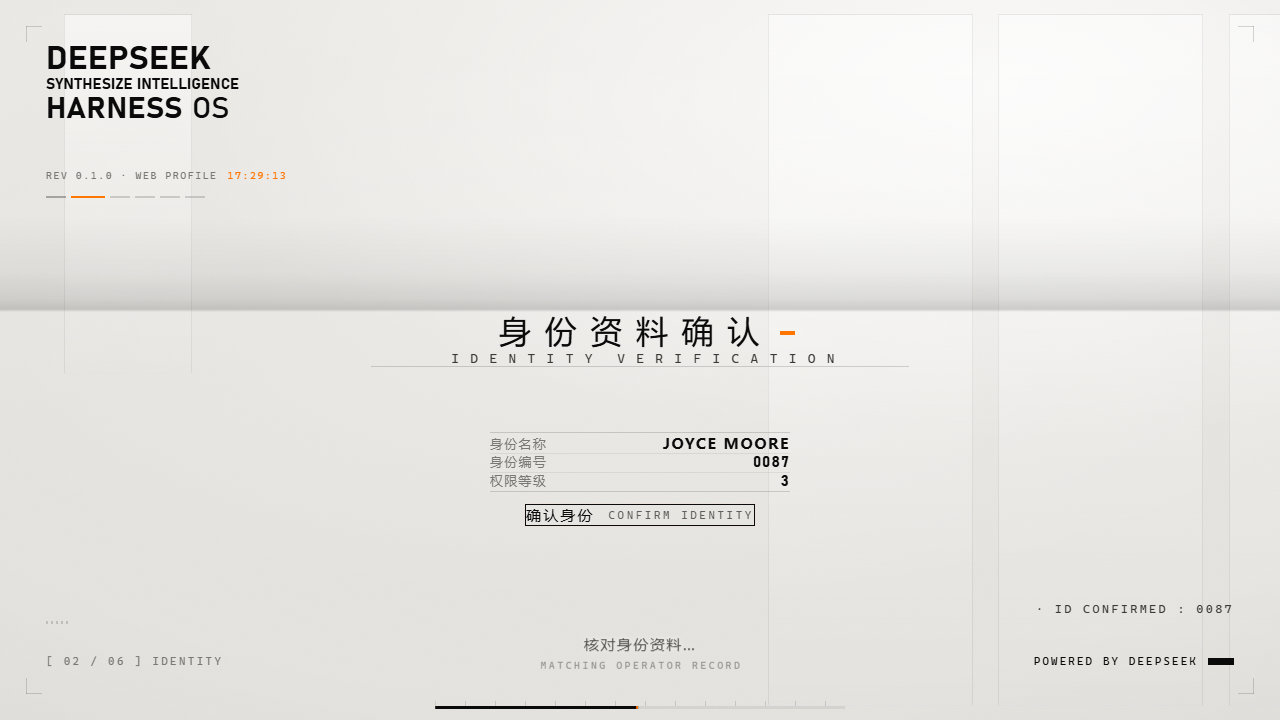

The GIF is recorded frame-by-frame from
preview/demo.html. The real thing has real voice lines and UI sound effects.
What it is
On cold start, DSH plays a six-act sequence, then hands over to the chat with your own wallpaper behind it:
black screen / DeepSeek mark → overexposed wash → warm "technical dossier" plate
  → five-step interactive authorization → glitch reveal → chat wallpaper
This is not a video file — it is a code animation. lib/splash.js (3288 lines) + lib/splash.css (1410 lines), about 196 KB of source.
Everything is drawn live with DOM, CSS animation and WebAudio — no image sequences or video assets.
| Boot animation | Chat wallpaper | |
|---|---|---|
| Entry | Settings → "启动动画" | Settings → "聊天背景" |
| Content | six acts, typewriter subtitles, targeting ring, chromatic glitch | default built-in background, static image, loop video, big text banner |
| Media | 5 real-voice lines + welcome line + 2 UI sfx (mp3) | built-in default background + your own images/videos |
| Tunable | 33 options: identity, id, access level, colors, speed, voice, copy | default/custom background, loop video, veil opacity, banner text |
The chat wallpaper ships with a default background (v2.13.1, the whale-girl still from act 2), so a fresh install already has a wallpaper; Settings → "聊天背景" → "背景图" can switch back to it at any time, or turn the image off. Chat text auto-adapts to the actual wallpaper+veil brightness, and since v2.13.10 the native Windows caption buttons (minimize / maximize / close) keep a fixed high-contrast pair in both light and dark appearance. Each half is independent: a broken animation never breaks the wallpaper and vice versa; the UI always comes up.
Install
# Quit DeepSeek Harness Desktop completely first
dsh plugin --profile desktop add link:<path-to-this-repo>
Requires Node ≥ 20. The desktop app must be fully quit — the profile's package.json is locked while it runs.
Safety kit
This plugin injects into the first paint, so a bug can mean a full black screen where even "skip" is unreachable. The repo ships three maintenance scripts that work without a usable UI:
| Tool | Purpose |
|---|---|
tools/emergency-uninstall.cmd |
remove the plugin entirely, restore the plain client |
tools/rollback.cmd |
roll back to the newest snapshot under backups/ |
tools/make-backup.ps1 |
snapshot the current state (run before editing code) |
Update protection: automatic emergency rollback (v2.13.3)
Before every install/update, the installer drops a desktop rollback button for the currently working version
(紧急回滚-V<current版>(先完全退出 DSH 再双击).cmd). If the new version fails to install or the app no longer opens,
fully quit DeepSeek Harness (window + tray) and double-click it: the plugin switches back to the previous working version,
keeping your settings untouched. After a successful update the old button is replaced automatically on the next update —
you do not need to delete it. Every rollback writes a dsh-boot-suite 回滚日志 log on the desktop.
Kill every DeepSeek Harness process, run the script, relaunch. Diagnostics land in ~/.dsh/boot-suite-diag.log.
Tests
npm test
13 self-contained smoke suites, ~998 assertions, no runtime dependencies.
License
MIT for the original code and copy. Visual style references an anime; audio assets come from a third-party video and remain with their rights holders. No commercial use is granted.
Original author: 沈宏宏 · Merged, fixed and maintained by LeeRolling
Links
More in this category
elysia395/dsh-wallpaper-engine★ 6498
Requires DeepSeek Harness 0.1.5-rc.1+ (DSH Desktop >= 2.0.7) and dsh-better-sidebar >= 0.19.0 - update both before installing or updating this plugin. Plays local Wallpaper Engine Video/Web wallpapers behind the chat, renders Scene wallpapers as extracted static frames, and adds content-rating/type filters, custom uploads and an iOS-style liquid-glass settings window.
Small-tailqwq/dsh-deep-whale#maid-atelier★ 3093
Whale-girl skin series for the DSH Web UI (maid-atelier).
Nwflower/dsh-claude-style★ 570
Claude Code Desktop look-and-feel for the DSH Web GUI — ivory/warm-black dual canvas, clay accent, three-font typography, permission segmented control and brand switcher, via CSS overrides and client DOM overrides.
d-dev0101/open-sea-skin★ 391
Realtime WebGPU ocean skin with quick controls for waves, daylight, glass opacity, and an automatic day cycle.
kingOfSoySauce/dsh-liang-skin★ 384
Adaptive reasoning slider skin that maps each model's available reasoning efforts onto a 0–30 visual intensity scale, with synchronized portraits, background, and interface colors.
RevolutionLA/dsh-dream-skin★ 301
One-command skin plugin: 8 original themes, translucent wallpaper with opacity/blur, per-user accent, and shareable theme-pack import/export, favorites and surprise-me — purely native on DSH's token system.
Community comments
Comments are public GitHub Discussions. Loading them connects to GitHub and Giscus; a GitHub account is required to post.