Dot-matrix appearance plugin for DeepSeek Harness: a halftone welcome page (portrait and deepseek/harness wordmark on one dot lattice), a dot-matrix launch splash, a reasoning-level badge printed in dots inside the composer (MAX in whale blue), a spinning dot sphere with an English status label while the model thinks, a fading caret dot trail, and a hover dot field with a whale-blue rail on sidebar buttons. Also re-inks the quieter chrome: frosted composer glass, a grey focus halo, whale-blue bold prose, whale-blue diffs, reading layout and a low-saturation code palette. Fifteen preferences live in the profile config and can be switched off one by one. Requires DSH >=0.2.2-rc.3.
Install
# from npm (prebuilt)
dsh plugin --profile web add deepclear-ui
# from GitHub (first run asks for allowBuilds approval — follow the hint, retry)
dsh plugin --profile web add github:KUN-NNN/deepclear-ui
Any plugin you install runs third-party code with your own permissions — it can read your files, use your credentials, and reach the network, and tool approvals don’t sandbox it. GitHub-sourced plugins also run build scripts at install time — pnpm blocks those until you allow them, so an install can stop with ERR_PNPM_GIT_DEP_PREPARE_NOT_ALLOWED or ERR_PNPM_IGNORED_BUILDS; dsh prints the exact key to add under allowBuilds in your profile’s pnpm-workspace.yaml, and the install works on the next run. Allowing a build is a trust decision: only install sources you trust, and pin a commit (github:owner/repo#sha).
README
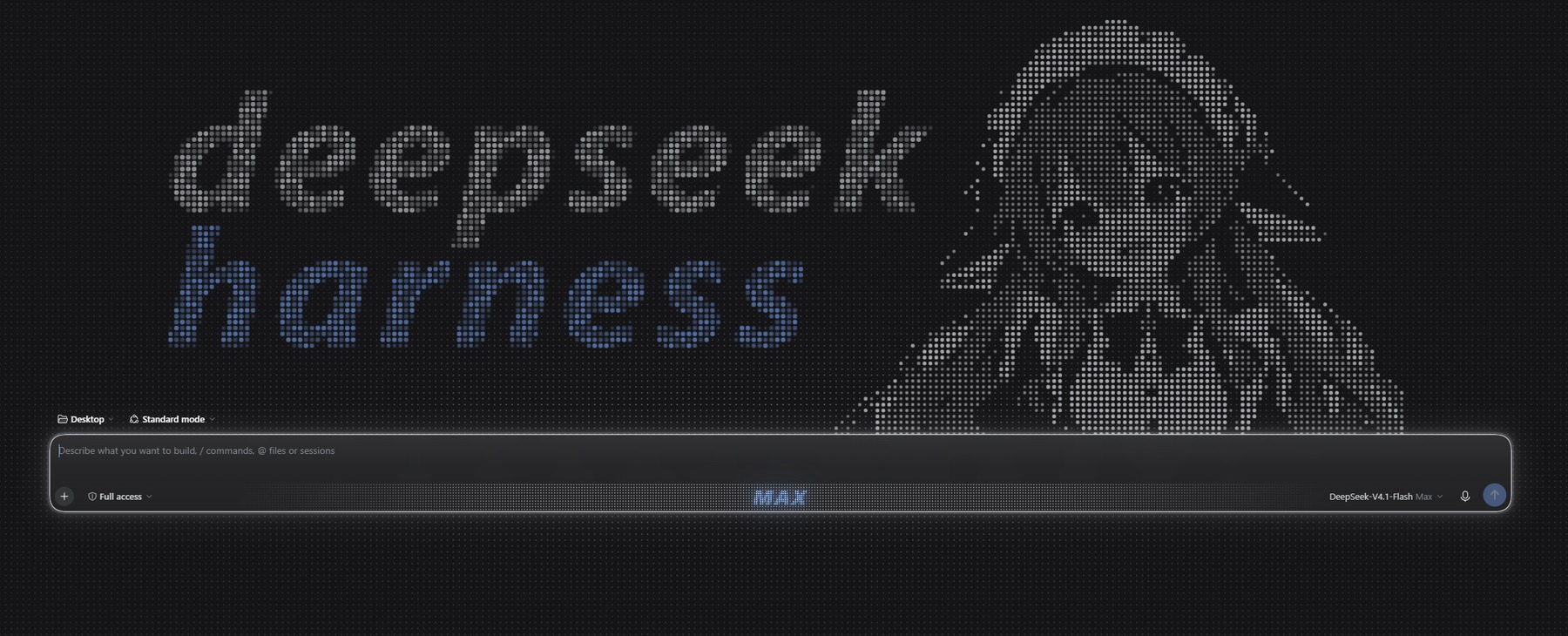
A dot-matrix welcome page, a dot-printed reasoning badge and quieter chrome for the DeepSeek Harness web UI. One bundle — a patch row, a client half and locale metadata. No dependencies, no host-side code.
Welcome page
- Right: the mascot portrait, sampled from an illustration into a halftone dot grid
- Left: the
deepseek/harnessdot-matrix wordmark
The portrait and the wordmark share one dot pitch, scale with the window, sit on the
composer, and disappear once the session starts. The stock headline, brand mark and
pixel-whale canvas are hidden while the page is showing, and a faint deepclear-ui
signature sits in the corner.
The lattice is the design. The background field, the wordmark and the portrait all sit on the same dot grid, phase-aligned to the artwork, so every dot in the scene lands on its own cell. Dots never move; only their brightness changes.
- Entrance: the wordmark fades in as a whole (
deepseekfirst,harnessafter, ~1.3 s), then the portrait grows downward as a soft wipe (~1.1 s) - A slow brightness wave travels across the lattice at the bottom of the page
- Moving the pointer over the bottom band sends light rings across the field
- Clicking anywhere sends a ripple across the wordmark
Startup splash
Every launch opens on a dark stage: a faint dot field surfaces, a ring travels outward from
the centre, then deepseek (white) and harness (whale blue) rise in, a light sheen crosses
the wordmark, and the app fades in. Driven entirely by transform / opacity so the
compositor keeps it smooth while the app is still booting.
Thinking
While a turn runs, the live status row is redrawn on our own overlay canvas:
- a small Fibonacci-sphere of dots spins in front of the label
- the label reads
Deep thinking for 12s. . .with a whale-blue highlight sweeping across it - the real elapsed seconds come from the host clock; the overlay is clipped above the composer, so nothing ever bleeds over the input box
Turning either switch off hands the corresponding part back to the host untouched.
Composer
- Welcome page: the card stays solid, so the dot sheet behind it never shows through
- Session: the card becomes translucent glass (
backdrop-filter) - Effort badge: whatever reasoning level is selected (except OFF) unfolds a dot field in the send row and prints the level name in dots — white for most levels, whale blue for MAX. While the model thinks, two vertical highlights travel outward from the middle. The badge is drawn above the composer content. Pure CSS: the plugin only stamps attributes on the composer card.
- Caret trail: typing leaves a fading column of dots behind the caret, filled to the full caret height and clipped to the card
A fresh conversation opens automatically after the splash on every launch.
Sidebar
- Hover dot field: every control in the sidebar lights a dot field around the pointer, clipped to that control, unlit when the pointer is elsewhere
- Settings sheet: a
DeepClear UIfooter button (nine-dot icon) opens a floating sheet with one switch per feature, applied instantly and remembered per profile
Accents
Whale blue is #7AAAFF:
- Bold prose in chat messages turns whale blue and stays bold
- Composer focus: a neutral light-grey ring fades in under the card's own hairline
- Diffs: added lines take whale blue, deleted lines deep blue, with the code text, gutter
and
+/-markers collapsed into the same blue family
The rules ride public markers ([data-slot="conversation.chat.flow"], [data-composer-card],
[data-diff-line], [data-chat-running], [data-composer-dock]) and ui-theme's own tokens.
Settings
The sidebar sheet carries:
- Welcome page: dot artwork, dot field, bottom wave, pointer ripples
- Thinking: dot sphere, English label
- Composer: frosted glass, effort badge
- Interface & reading: reading layout, code palette
- Accents: whale-blue bold, focus ring, re-inked diffs
Plus a single "Reset to defaults" action.
Install
npm i deepclear-ui
Or install it by name from the dsh Plugins panel.
Marketplace
The plugin is being added to the community catalog. Until that listing is live you can add this package's own index source so it shows up in Plugins -> Discover:
https://raw.githubusercontent.com/KUN-NNN/deepclear-ui/main/market/index.json
Add source, search deepclear, install.
Customize
Swapping the artwork, painting a mask, or editing the dot grid directly is documented in
scripts/README.md:
scripts\rebuild.cmd    # sample artwork -> splice the hero block -> inject the grids
scripts\preview.cmd    # render a preview strip of both themes
The dark theme prints the portrait from a line-art grid (girl-lines.txt) and the light
theme from the ink grid (girl-grid.txt).
Palette
| Token | Value |
|---|---|
| Whale blue | #7AAAFF |
| Dots, light theme | #666C78 at per-cell alpha |
| Dots, dark theme | #ECEEF2, weight inverted |
Tested against dsh 0.2.2-rc.3.
Plugin boundaries
The plugin only uses public surfaces: slot registrations (conversation.hero.frame,
shell.overlay, sidebar.footer.action), a stylesheet riding stable data attributes and
theme tokens, a Host patch row with a Schemastery config, and its own preferences through
the profile config form. It never takes over host components and never writes host DOM
trees.
Development
Design rules that new UI must follow live in docs/DESIGN.md — the toggle
spec, the hover dot field, the thinking row and the other conventions.
License
MIT. See LICENSE.
Links
More in this category
elysia395/dsh-wallpaper-engine★ 7187
Requires DeepSeek Harness 0.1.5-rc.1+ (DSH Desktop >= 2.0.7) and dsh-better-sidebar >= 0.19.0 - update both before installing or updating this plugin. Plays local Wallpaper Engine Video/Web wallpapers behind the chat, renders Scene wallpapers as extracted static frames, and adds content-rating/type filters, custom uploads and an iOS-style liquid-glass settings window.
Small-tailqwq/dsh-deep-whale#maid-atelier★ 3119
Whale-girl skin series for the DSH Web UI (maid-atelier).
Nwflower/dsh-claude-style★ 619
Claude Code Desktop look-and-feel for the DSH Web GUI — ivory/warm-black dual canvas, clay accent, three-font typography, permission segmented control and brand switcher, via CSS overrides and client DOM overrides.
d-dev0101/open-sea-skin★ 397
Realtime WebGPU ocean skin with quick controls for waves, daylight, glass opacity, and an automatic day cycle.
kingOfSoySauce/dsh-liang-skin★ 392
Adaptive reasoning slider skin that maps each model's available reasoning efforts onto a 0–30 visual intensity scale, with synchronized portraits, background, and interface colors.
RevolutionLA/dsh-dream-skin★ 301
One-command skin plugin: 8 original themes, translucent wallpaper with opacity/blur, per-user accent, and shareable theme-pack import/export, favorites and surprise-me — purely native on DSH's token system.
Community comments
Comments are public GitHub Discussions. Loading them connects to GitHub and Giscus; a GitHub account is required to post.