AI-native text editor for DeepSeek Harness: tabs, encoding-safe saves, selection/document AI with diff review, Markdown preview, and Windows file associations.
Install
# from a prebuilt release tarball
dsh plugin --profile web add "https://github.com/JackWangSIA/dsh-ai-notepad/releases/latest/download/dsh-ai-notepad.tgz"
# from GitHub (first run asks for allowBuilds approval — follow the hint, retry)
dsh plugin --profile web add github:JackWangSIA/dsh-ai-notepad
Any plugin you install runs third-party code with your own permissions — it can read your files, use your credentials, and reach the network, and tool approvals don’t sandbox it. GitHub-sourced plugins also run build scripts at install time — pnpm blocks those until you allow them, so an install can stop with ERR_PNPM_GIT_DEP_PREPARE_NOT_ALLOWED or ERR_PNPM_IGNORED_BUILDS; dsh prints the exact key to add under allowBuilds in your profile’s pnpm-workspace.yaml, and the install works on the next run. Allowing a build is a trust decision: only install sources you trust, and pin a commit (github:owner/repo#sha).
README

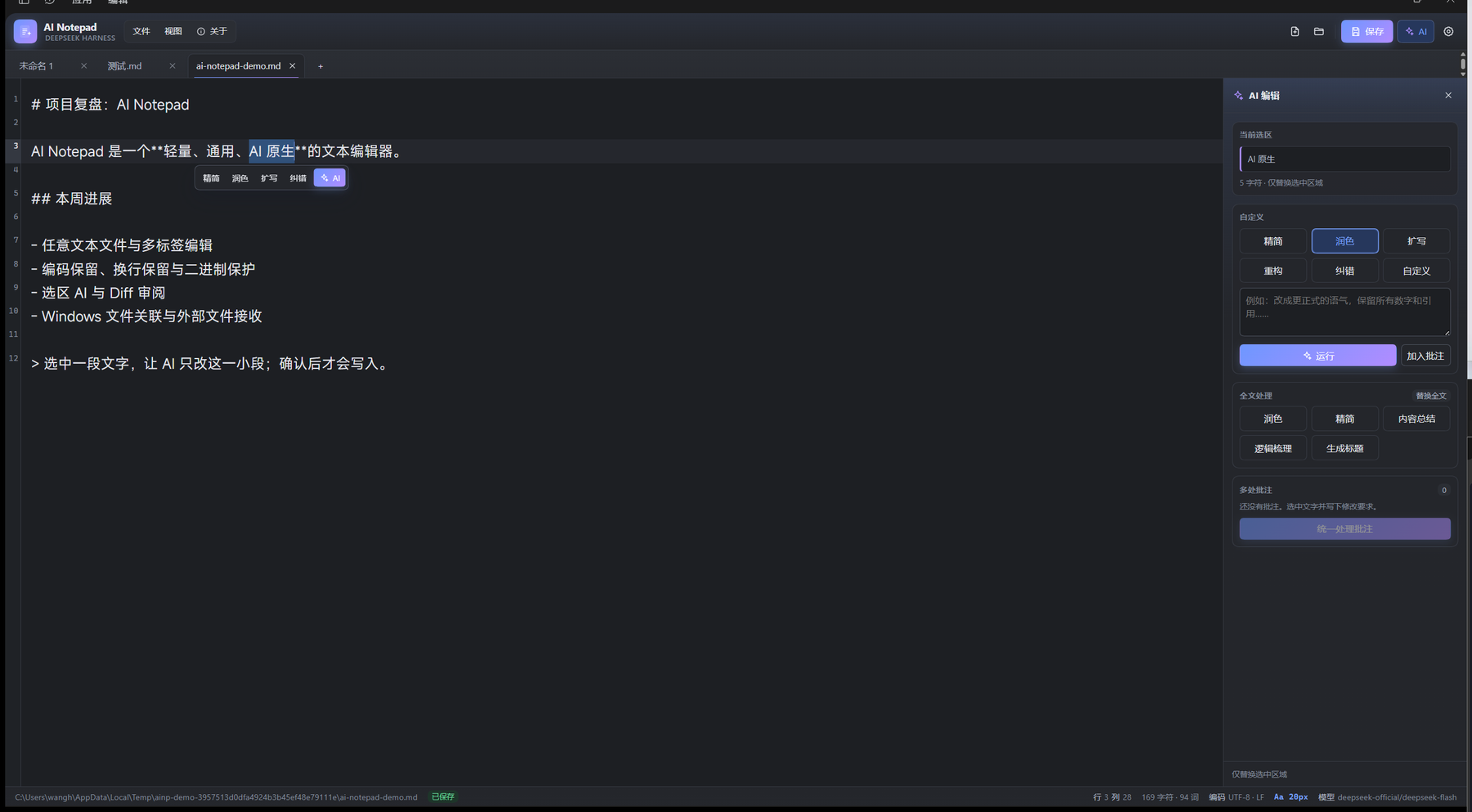
AI Notepad is a DeepSeek Harness plugin that turns the Harness Web UI into a lightweight, general-purpose AI text editor.
Install
From the plugin market after the listing is live. The market entry uses the version-free GitHub Release tarball, so no npm account is required.
From GitHub:
dsh plugin --profile web add JackWangSIA/dsh-ai-notepad
A prebuilt tarball is available at:
https://github.com/JackWangSIA/dsh-ai-notepad/releases/latest/download/dsh-ai-notepad.tgz
If the package is later published to npm, dsh plugin --profile web add dsh-ai-notepad
will also work.
On DSH Desktop, prefer Plugins → Add plugin with the repository URL. The desktop profile is managed by the app; do not edit it with the CLI by hand.
What works
- Open, edit, save and Save As any text file through a native Windows picker, or drop a file onto the editor.
- Multi-tab editing with CodeMirror 6, undo/redo, find, line numbers, wrapping, and unsaved-change prompting.
- Encoding-aware I/O: UTF-8, UTF-8 BOM, UTF-16 LE/BE, GB18030/GBK and Windows-1252. Saves preserve the detected encoding, BOM and dominant line ending. GB18030/Windows-1252 round-trip checks refuse lossy writes.
- Binary-file detection protects files from accidental text editing.
- Hash-based compare-before-write: if another program changed the file while it was open, the save returns a conflict and does not write.
- Selection-scoped AI editing: concise, polish, expand, restructure, proofread, or a custom instruction.
- Whole-document AI: polish, concise, summarize, outline and title generation.
- A diff review modal with accept, reject and regenerate. Nothing is written before acceptance. Accepting uses a normal CodeMirror transaction, so Ctrl+Z still works.
- Multiple annotations can be collected and sent in one batch; every reviewed region is validated against the original document before a single undoable edit.
- Markdown preview with escaped raw HTML and a conservative CommonMark subset. Ctrl+E toggles preview/edit; double-clicking the preview also returns to the editor. A floating preview toolbar shows the mode and the shortcut.
- Independent font, size, line-height, weight, wrap, theme, line-number and tab-size settings, persisted in browser storage.
- Searchable Windows font picker with recommended Chinese/latin fonts, per-font samples, a live typography preview, keyboard navigation and a refresh action. The setting stores one family name and always appends safe CJK/latin fallbacks.
- Ctrl+wheel zooms the editor font from 8–48 px;
Ctrl+=/Ctrl+-/Ctrl+0also work. The current size is shown in the status bar. - V2 visual refresh: compact menu cluster, gradient brand mark, pill save button, softer tab strip, card-based AI rail and settings sections, refined empty state, custom scrollbars and dark-theme variants.
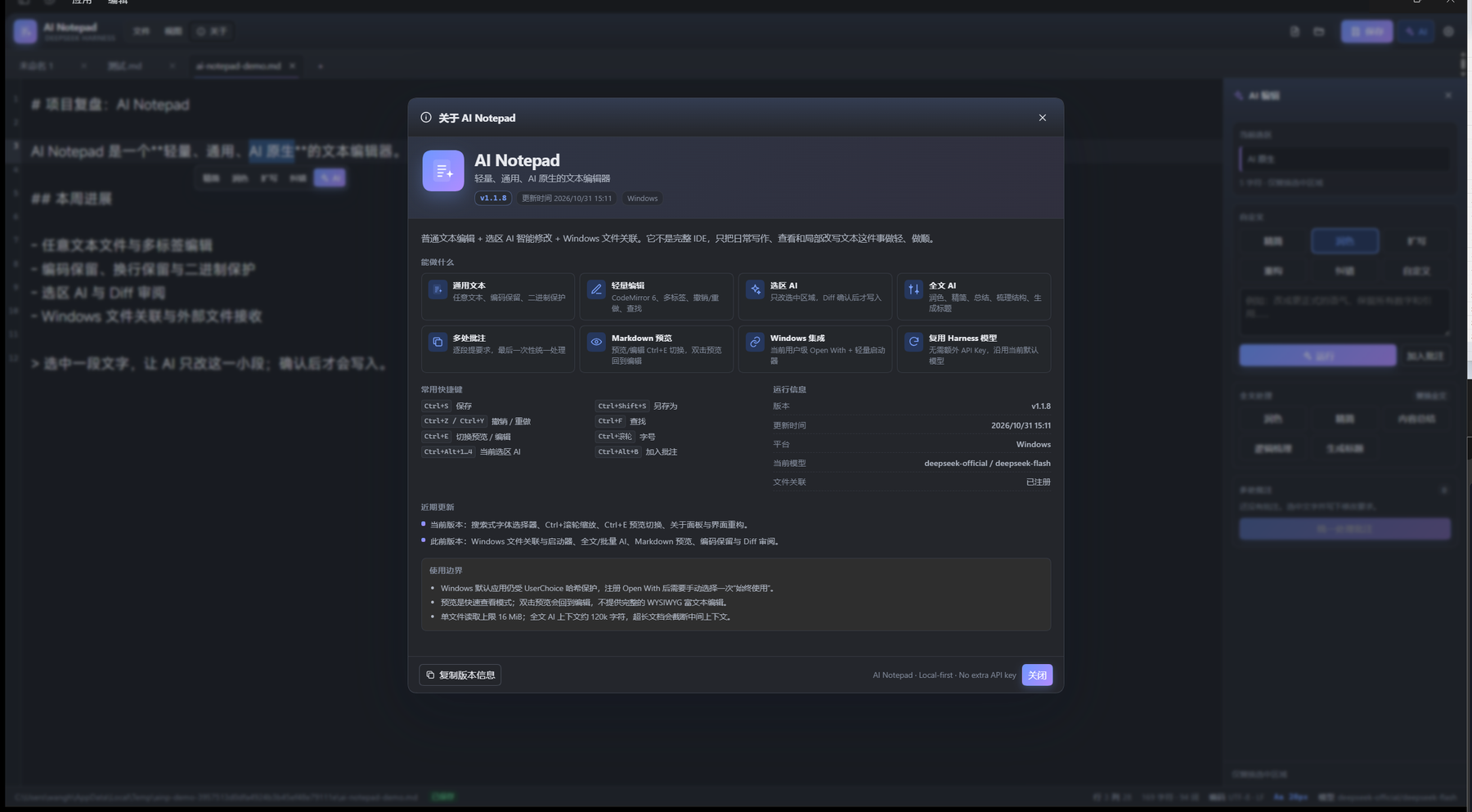
- About sits beside File and View: version, build/update time, feature overview, shortcut reference, live runtime information (platform, current model, association status), recent updates, usage boundaries, and a one-click “copy version info” action. Version and build time are injected by
scripts/build.mjsfrompackage.jsonand the build clock. - Windows per-user file associations: ProgID,
OpenWithProgids,RegisteredApplicationsand a lightweight VBS launcher that writes paths to an inbox and starts/focuses DSH. The Host watcher consumes the queue and the Client opens the files. - Association status, install, remove and restore actions are in View → File associations.
Shortcuts
| Shortcut | Action |
|---|---|
Ctrl+S / Ctrl+Shift+S |
Save / Save As |
Ctrl+Z / Ctrl+Y |
Undo / Redo |
Ctrl+F |
Find |
Ctrl+E |
Toggle Markdown preview / edit |
Ctrl+wheel, Ctrl+=, Ctrl+-, Ctrl+0 |
Font zoom in / out / reset |
Ctrl+Alt+1..4 |
Selection concise / polish / expand / proofread |
Ctrl+Alt+B |
Add annotation |
Ctrl+Alt+N |
Focus AI Notepad from the main shell |
Important Windows limitation
Windows 10/11 protects the default-app choice with a per-user UserChoice hash. No third-party application can silently force itself to become the default. AI Notepad therefore registers a real current-user OpenWithProgids entry, after which the user chooses it once in Explorer's Open with → Always use this app. The plugin can open Windows Default Apps for that choice, but it does not fake the system default. Uninstalling removes the ProgID and Open With entries; if AI Notepad is the current UserChoice, it removes that choice so Windows asks again. It cannot restore a previous hash-protected default.
The desktop shell has a single-instance lock but currently ignores file paths in its argv. The VBS launcher is therefore not a simulation: it is the registered file handler, and it delivers paths to the running Harness through the plugin inbox. A second launch focuses the existing window.
Architecture
lib/index.js— Host half. Connection/api/ai-notepad/*routes, bounded file I/O, encoding, conflict guards, LLM calls, Windows registry, inbox watcher, pickers, font enumeration.src/— Client source.app.jsxis the full main-column page,editor.jsxowns CodeMirror,store.jsowns tabs/AI/review/settings,diff.jsandmarkdown.jsare pure helpers.lib/client.js— generated classic ModuleLoader bundle (React andreact/jsx-runtimestay external).lib/scripts/— native file pickers, font enumeration and the Windows external-open launcher.scripts/build.mjs— esbuild bundle step.test/— Host route/integration tests, encoding tests, VBS→inbox test, store AI/batch tests, ModuleLoader load test, and server-render tests for app/review/preview.
Build and install
$node = "$env:USERPROFILE\.dsh\dsh-runtimes\dsh-primary-runtime\dependencies\node\bin\node.exe"
$pnpm = "$env:USERPROFILE\.dsh\dsh-runtimes\dsh-primary-runtime\dependencies\pnpm\bin\pnpm.mjs"
& $node $pnpm install --ignore-scripts --dir .
& $node scripts/build.mjs
Then install the absolute directory with the Harness plugin_manager install_bundle action. Do not copy files into the profile manually.
Verification notes
The plugin installs and its Host row is active; the Client registers a main page, a sidebar panel icon and a settings section. Automated tests cover file I/O, encoding, conflict handling, AI request/response shapes with a fake LLM, selection/batch review and apply, generated client load, VBS queue delivery, and server-side rendering of the app, review and preview views. Live behavior was exercised through Windows UI Automation; screenshots in assets/ come from the running desktop app.
License
MIT © 2026 Wang Heran
Links
More in this category
tt-a1i/archify#integrations/deepseek-harness★ 92724
Generate validated, self-contained interactive architecture, workflow, sequence, data-flow, and lifecycle diagrams from repositories or system descriptions.
dream-num/dsh-univer-office★ 657
Give DeepSeek Harness a real office environment. Univer Office Plugin brings spreadsheets, docs, slides, canvases, relational tables, and more into one runtime — with connected data, validation, versioned changes, and isolated worktrees for multi-agent collaboration.
ECNU/EduWork#dsh-knowledge-studio★ 275
A workspace-based Studio for source-grounded reports, slides, tables, mind maps, quizzes, flashcards, audio and video, using DSH models and shared artifact services. Office generation requires Python 3.12+ with its dependencies and DSH_OFFICE_PYTHON configured; media rendering requires Chromium, and local ASR additionally requires whisper.cpp and a model.
PerryLink/dsh-industry-research★ 215
Deterministic industry research reports for DeepSeek Harness — company and industry research flows produce structured, verifiable reports from staged evidence.
HuanLinOTO/dsh-plugin-mineru★ 51
Expose MineRU document parsing tools to the model.
PolinniZhong/dsh-knit★ 48
Puts the Markdown documents, source files, images and video that already exist anywhere in the session workspace into the DSH sidebar, ranked by relevance to the current conversation. The default lexical mode matches your recent messages against title, summary and body locally with IDF weighting (BM25) — no model calls, no network, nothing leaves the machine. The list comes from scanning the workspace rather than from a recent-files list, so restarting DSH or opening a new session does not empty it. Results are organised into a three-tier reading order (primary / supporting / related) with a verifiable reason on every row — which field matched, which document cites this one — and one click opens an in-place preview: Markdown as rendered text, relative-path images actually drawn, source code with the host's own syntax highlighting, video streamed over HTTP Range. The same Context Pack is exposed to the agent as a knit_docs tool. Later versions added read evidence and lifecycle tracking (attribution is frozen at the moment of reading), pin / exclude (exclusion applies before retrieval, and is undoable), relation evidence (references / imports / tests, with line numbers) and an incremental index reused across restarts. Since v0.23 there is also an optional hybrid mode: it is off by default and only runs once you configure an Ollama or OpenAI-compatible embedding provider yourself. When it runs, what leaves the machine is your query text plus each candidate file's title and summary — a Markdown summary is an excerpt of the body's first paragraph (at most 60 characters), a code file's summary is its workspace-relative directory, and an image or video contributes its file name; full bodies and absolute paths are not sent, and a loopback provider keeps everything on this machine. Since v0.24 it also associates uncommitted changes: a read-only git status (fixed argv, no shell, whitelisted child-process environment) combined with the same reference / import / test / mention evidence shows which files a change is likely to drag along, and it is off by default. The benefit of semantic retrieval still awaits a real-provider run, so no recall improvement is claimed.
Community comments
Comments are public GitHub Discussions. Loading them connects to GitHub and Giscus; a GitHub account is required to post.