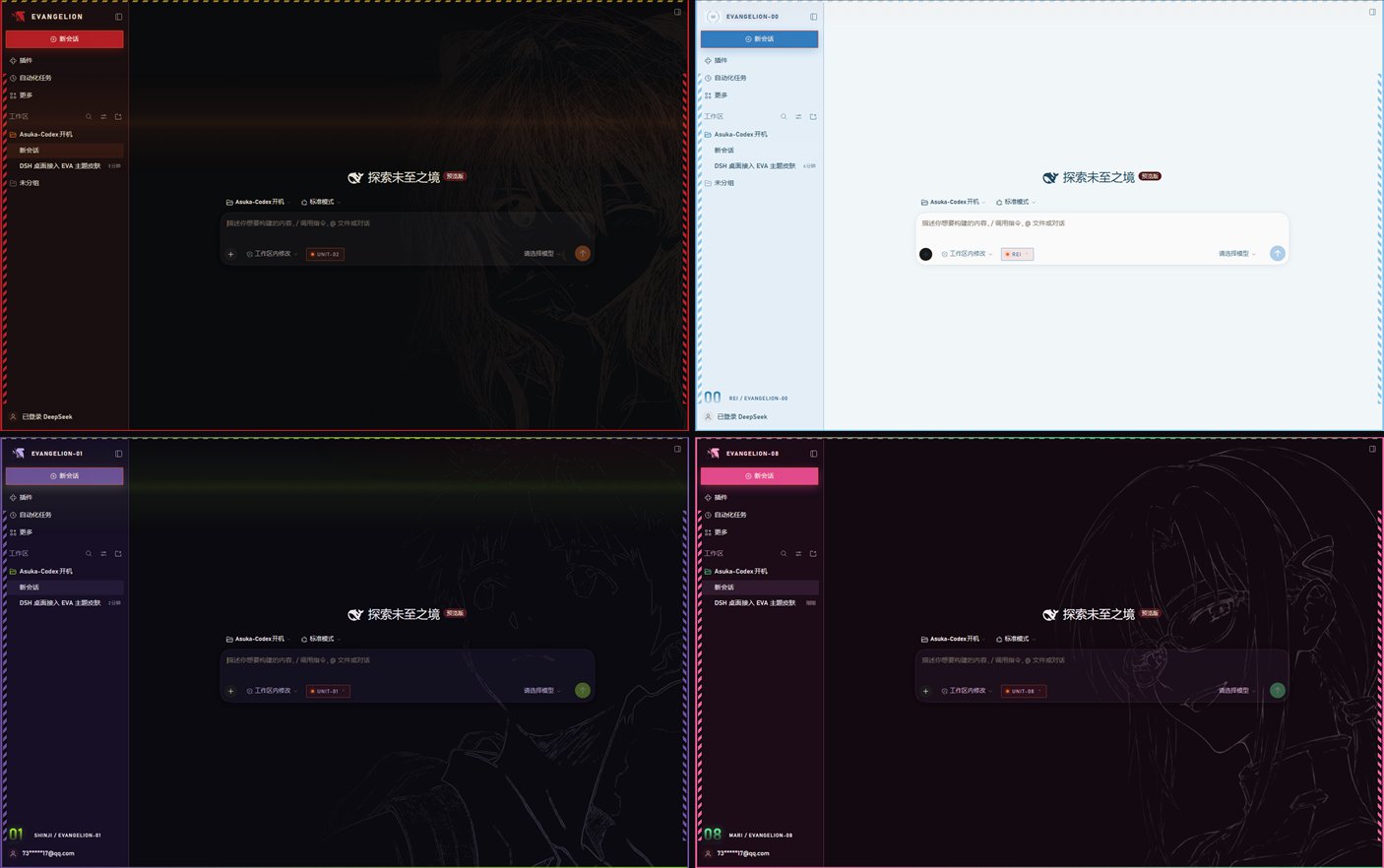
Four EVA-themed skins for DeepSeek Harness — Units 02, 00, 01 and 08. Each one restyles the sidebar, composer and window frame from the theme token layer, and ships a 20-second canvas boot sequence with a confirm step, a skip button and a replay hotkey. Switch skins from a popup on the composer chip.
Install
# from npm (prebuilt)
dsh plugin --profile web add dsh-eva-skins
# from GitHub (first run asks for allowBuilds approval — follow the hint, retry)
dsh plugin --profile web add github:Iris-change/dsh-eva-skins
Any plugin you install runs third-party code with your own permissions — it can read your files, use your credentials, and reach the network, and tool approvals don’t sandbox it. GitHub-sourced plugins also run build scripts at install time — pnpm blocks those until you allow them, so an install can stop with ERR_PNPM_GIT_DEP_PREPARE_NOT_ALLOWED or ERR_PNPM_IGNORED_BUILDS; dsh prints the exact key to add under allowBuilds in your profile’s pnpm-workspace.yaml, and the install works on the next run. Allowing a build is a trust decision: only install sources you trust, and pin a commit (github:owner/repo#sha).
README
This plugin publishes its README in Chinese only.
DeepSeek Harness 桌面客户端的原生皮肤插件:一个插件,四套皮肤,可在应用内随时切换,随时切回默认主题。
不修改 DSH 安装目录、不替换 app.asar、不需要独立启动器——皮肤就是 DSH 里的一个插件,从 DSH 桌面图标启动即生效。
预览
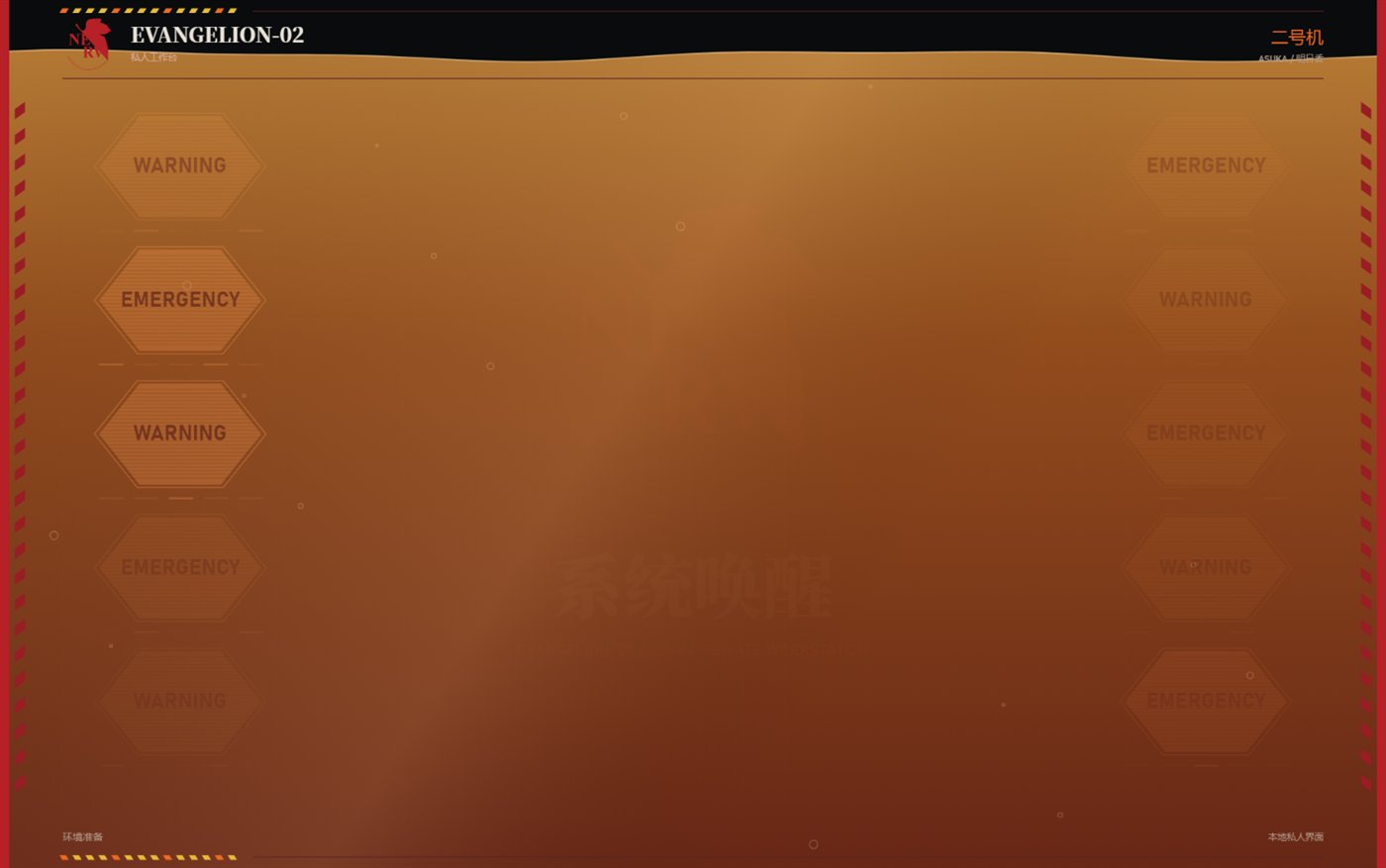
开机动画(约 20 秒,可 Esc 跳过,可 Ctrl+Alt+B 重播)
四套皮肤的工作台
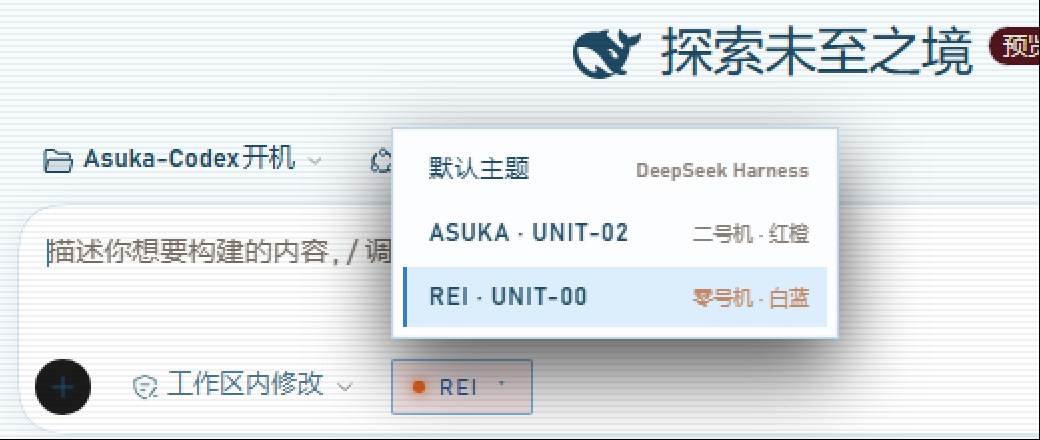
切换皮肤:点输入框左侧的胶囊
版权声明(请先读这一段)
代码以 MIT 授权;EVA 素材与随包第三方组件的授权边界见 NOTICE.md。
代码(lib/、client/client.js、安装脚本)以 MIT 许可发布。
图像与音频素材不在此许可范围内:EVANGELION、NERV、EVA 机体与角色形象(明日香 / 绫波丽 / 碇真嗣 / 真希波)版权归 khara 所有。本仓库把它们作为粉丝创作一并分发,未取得授权,作者不对这些素材主张任何权利,也不用于任何商业用途。若版权方提出异议,相关素材会立即下架。介意版权的话,可按文末「替换素材」换成中性占位图,代码与全部交互逻辑不受影响。
一、安装
方式 A:zip(推荐,最简单)
到 Releases 下载对应平台的包:
| 平台 | 文件 | 装法 |
|---|---|---|
| Windows | dsh-eva-skins-<版本>.zip |
解压后双击 一键安装.cmd |
| macOS | dsh-eva-skins-<版本>-mac.zip |
解压后 bash install-mac.command |
装完必须彻底退出 DSH(任务栏图标右键退出,或任务管理器结束 DeepSeek Harness.exe),再重新打开。只关窗口不算。
方式 B:从仓库直接装(免下载 zip)
git clone https://github.com/Iris-change/dsh-eva-skins.git
dsh plugin --profile desktop add ./dsh-eva-skins
或者不放命令,把仓库地址丢给 DSH 里的 agent:「帮我把这个皮肤装上」。
本地路径方式在 profile 里记的是
link:软链 —— 这个文件夹删了,皮肤就失效。想长期用建议留着它,或者走方式 A。
方式 C:npm
已经发布到 npm,一条命令:
dsh plugin --profile desktop add dsh-eva-skins
装完彻底退出 DSH 再打开(关窗口不算退出)。
更新到新版本
皮肤不会自动更新,要有意识地手动跑一次。
⚠️ 注意:不带版本号的 add 不会升级。实测:先装 2.1.2,之后跑 add dsh-eva-skins(甚至 add dsh-eva-skins@latest)都还是 2.1.2 —— 因为 profile 里已经把版本号钉死了。必须写死目标版本,或者先删再装:
# 升级到指定版本(把 2.1.6 换成 Releases 页上的最新版本号)
dsh plugin --profile desktop add dsh-eva-skins@2.1.6

# 或者:先卸载,再装最新
dsh plugin --profile desktop remove dsh-eva-skins
dsh plugin --profile desktop add dsh-eva-skins
改完同样要彻底退出 DSH 再打开。
为什么不做自动更新:插件运行在 DSH 进程内部,替换自己的文件必须重启应用;宿主目前没有提供「插件自更新」接口;而且让一个界面插件自动下载并执行新代码,也不适合默认打开。
让 agent 帮你装
也可以直接把仓库地址丢给 DSH 里的 agent:「帮我把这个皮肤装上」。它会执行 dsh plugin add。前提是给会话完全访问权限(安装要写 ~/.dsh/profiles/desktop/,工作区之外的写入在 workspace-write 模式下会被拒绝)。
二、切换皮肤
装好后,输入框左侧会出现一个胶囊按钮:
● UNIT-02 ▾
点开是一个列表,四选一(外加「默认主题」):
| 皮肤 | 机体 | 配色 |
|---|---|---|
ASUKA · UNIT-02 |
二号机 | 红橙 |
REI · UNIT-00 |
零号机 | 白蓝 |
SHINJI · UNIT-01 |
初号机 | 紫绿 |
MARI · UNIT-08 |
八号机 | 粉绿 |
默认主题 |
— | 回到 DSH 原生外观 |
快捷键
| 组合 | 作用 |
|---|---|
Ctrl + Alt + U |
开 / 关皮肤 |
Ctrl + Alt + B |
重播开机动画 |
Esc |
跳过开机动画 |
控制台 API
window.unit02Skin.setSkin("rei")   // "off" | "asuka" | "rei" | "shinji" | "mari"
window.unit02Skin.replayBoot()
window.unit02Skin.openPicker()
选择会存进 localStorage,下次启动保持一致。
三、开机动画
每套皮肤都有自己的开机序列(EVANGELION-02 / 00 / 01 / 08):系统唤醒 → LCL 注入 → 同步率 → 驾驶员确认卡 → 转场到工作台。
- 时长约 20 秒,中间在 13.3 秒处定格等确认,点「驾驶员确认,开始同步」继续
- 右下角「进入工作台」或
Esc可直接跳过 - 每次重新打开应用播一次;20 分钟内刷新页面不重复播放
- 动画里的日文播报来自
media/**/voice.wav,默认开启;无声卡环境会自动回退到挂钟计时
四、已知限制
- 窗口标题栏改不了。右上角
— □ ✕那条是 Electron 主进程绘制的titleBarOverlay,颜色写在 exe 里,插件的 CSS 触碰不到。缓解方式:页面顶部有一条 2px 的皮肤色细线做衔接。 Ctrl+R不一定能重载。本版本应用菜单未绑定重载快捷键;改完皮肤请彻底退出再启动。- macOS 安装脚本未在真机验证。
install-mac.command里的 DSH 路径按 Windows 版结构推断,并带command -v dsh兜底;报not found请在 Issue 里附上ls /Applications的结果。
五、目录结构
dsh-eva-skins/
├── package.json          插件身份(name / dsh.bundle / dsh.client / files)
├── cordis.patch.yml      装进 DSH 的入口,只有一条 insert
├── lib/index.js          host 侧:为四套动画各注册一条静态路由
├── client/
│   ├── client.js         主题 token、侧栏、边框、胶囊、菜单、iframe 壳
│   ├── intro/            二号机素材(25 个文件)
│   ├── intro-rei/        零号机素材(31)
│   ├── intro-shinji/     初号机素材(26)
│   └── intro-mari/       八号机素材(27)
├── 一键安装.cmd / 卸载.cmd / 使用说明.txt
├── install-mac.command / uninstall-mac.command
└── README.md / LICENSE / .gitignore
四套皮肤共用一个 client.js:它读当前皮肤 id,加载对应的动画 iframe(/unit02-intro/ /rei-intro/ /shinji-intro/ /mari-intro/),再把 CSS 变量与装饰层切过去。不是四个插件,所以不会出现四份样式互相覆盖。
新增一套皮肤的改动点在 client.js:SKIN_IDS、SKINS、INTRO_SRC、CSS 块、lib/index.js 的 MOUNTS —— 五处。
六、卸载
dsh plugin --profile desktop remove dsh-eva-skins
或运行 卸载.cmd / bash uninstall-mac.command,然后彻底退出重开。
七、替换素材(想开源/商用时的做法)
动画按目录读图,替换同名文件即可,不需要改代码:
| 文件 | 用途 |
|---|---|
client/intro*/media/pilot/*.png |
确认卡上的驾驶员头像 |
client/intro*/media/pilot/*lineart*.png |
工作台右侧的人像线稿 |
client/intro*/media/eva/nerv-mark.svg |
侧栏与动画里的 NERV 叶标 |
client/intro*/media/audio-*/voice.wav |
开机播报音轨 |
换成中性占位图后,这套皮肤的代码与交互逻辑可以完整保留并公开分发。
八、开发与发布
# 本地验证(不上桌面端,跑一个 web profile 观察界面)
dsh --profile web --no-open --host 127.0.0.1 --port 43137
# 输出里带 token 的 URL 直接打开

# 发布
npm version patch
npm publish
git push --follow-tags
package.json 的 files 只包含 lib、client、cordis.patch.yml、README.md、LICENSE,所以 npm 包里不会混进安装脚本以外的杂项。
版本历史见 CHANGELOG.md。
Links
More in this category
elysia395/dsh-wallpaper-engine★ 6210
Requires DeepSeek Harness 0.1.5-rc.1+ (DSH Desktop >= 2.0.7) and dsh-better-sidebar >= 0.19.0 - update both before installing or updating this plugin. Plays local Wallpaper Engine Video/Web wallpapers behind the chat, renders Scene wallpapers as extracted static frames, and adds content-rating/type filters, custom uploads and an iOS-style liquid-glass settings window.
Small-tailqwq/dsh-deep-whale#maid-atelier★ 3081
Whale-girl skin series for the DSH Web UI (maid-atelier).
Nwflower/dsh-claude-style★ 542
Claude Code Desktop look-and-feel for the DSH Web GUI — ivory/warm-black dual canvas, clay accent, three-font typography, permission segmented control and brand switcher, via CSS overrides and client DOM overrides.
d-dev0101/open-sea-skin★ 389
Realtime WebGPU ocean skin with quick controls for waves, daylight, glass opacity, and an automatic day cycle.
kingOfSoySauce/dsh-liang-skin★ 375
Adaptive reasoning slider skin that maps each model's available reasoning efforts onto a 0–30 visual intensity scale, with synchronized portraits, background, and interface colors.
RevolutionLA/dsh-dream-skin★ 301
One-command skin plugin: 8 original themes, translucent wallpaper with opacity/blur, per-user accent, and shareable theme-pack import/export, favorites and surprise-me — purely native on DSH's token system.
Community comments
Comments are public GitHub Discussions. Loading them connects to GitHub and Giscus; a GitHub account is required to post.