30 classic open-source theme palettes (Catppuccin, Nord, Tokyo Night, Gruvbox, Solarized, etc.) mapped to official ThemeService tokens for DeepSeek Harness, with a Style Settings panel for live color/font/radius tweaks and JSON export/import for sharing config packs.
Install
# from GitHub (first run asks for allowBuilds approval — follow the hint, retry)
dsh plugin --profile web add github:GptsApp/dsh-stylevault
Any plugin you install runs third-party code with your own permissions — it can read your files, use your credentials, and reach the network, and tool approvals don’t sandbox it. GitHub-sourced plugins also run build scripts at install time — pnpm blocks those until you allow them, so an install can stop with ERR_PNPM_GIT_DEP_PREPARE_NOT_ALLOWED or ERR_PNPM_IGNORED_BUILDS; dsh prints the exact key to add under allowBuilds in your profile’s pnpm-workspace.yaml, and the install works on the next run. Allowing a build is a trust decision: only install sources you trust, and pin a commit (github:owner/repo#sha).
README
A collection of classic themes for DeepSeek Harness: 30 open-source color schemes, a full Style Settings panel, and exportable/shareable configuration.
Author: Rocky · Feedback/Suggestions: @WeWill_Rocky
Why this exists
It started small: I use Catppuccin in VS Code, Nord in my terminal, and Rosé Pine in Obsidian. When I fired up DSH and wanted to switch things up, I searched the community and couldn't find the classic schemes I was familiar with — so I wrote them myself.
As I kept going, I realized presets alone weren't enough. In DSH, surfaces like code blocks, diffs, thinking traces, and tool output render with wildly inconsistent contrast once you swap palettes — with the same Nord scheme, the code area would look crisp while the thinking trace turned into a sea of gray. So instead of stopping at "recolor," I tuned each surface individually: code highlighting, diff add/remove lines, status colors, border radius, and fonts. It follows the same philosophy as Obsidian's Minimal / Style Settings: clean by default, and fully tinkerable if you want to go deeper.
There was also a simple need: I wanted to hand my tuned theme to others, and have them send theirs back to me. So I built export/import — a single JSON carries the entire color scheme, fonts, and border radius from one setup to another.
This is a personal project that I'll keep maintaining. But DSH is still evolving fast (the official team themselves warn of breaking changes). If some UI detail shifts one day, feel free to open an issue — I'll fix it when I see it.
Features
30 presets, dark and light
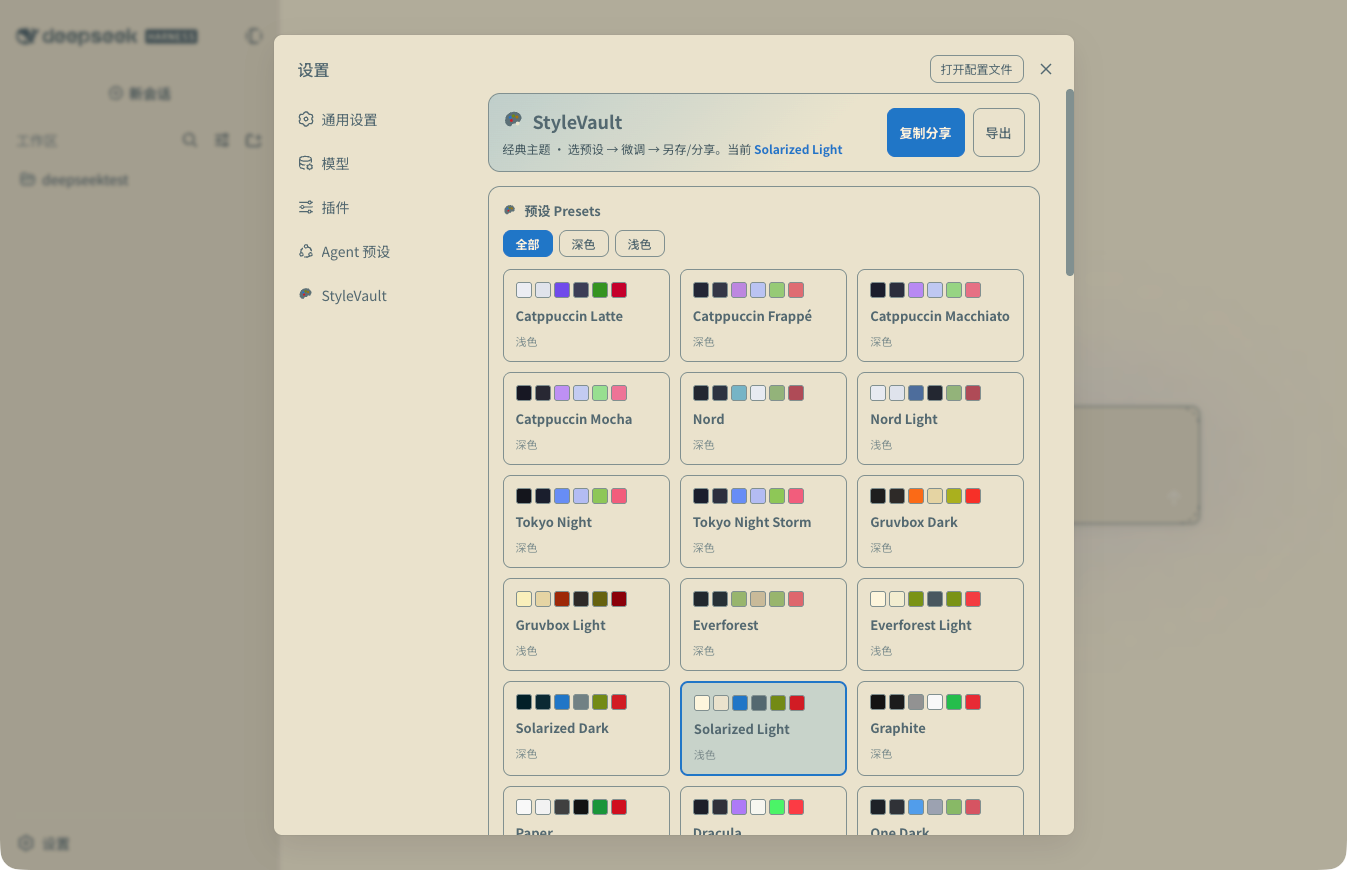
The panel lets you filter by "All / Dark / Light", and every preset card shows a 6-color preview. Below is the full list grouped by dark/light. The id is the name used for switching from the console (__STYLEVAULT__.set('nord')).
Dark (21)
| Preset | id | Description |
|---|---|---|
| Catppuccin Mocha | catppuccin-mocha |
Deepest shade of the Catppuccin family, soft high-saturation purple — default preset |
| Catppuccin Macchiato | catppuccin-macchiato |
Second darkest of the family, warm purple-gray, low-contrast and easy on the eyes |
| Catppuccin Frappé | catppuccin-frappe |
Lighter dark variant of the family, soft misty feel |
| Nord | nord |
Nordic minimalist ice blue, a programmer classic, comfortable for long sessions |
| Tokyo Night | tokyo-night |
Tokyo nightscape, deep blue-purple, neon-after-dark vibe |
| Tokyo Night Storm | tokyo-night-storm |
Storm variant of the series, slightly lighter background than Night |
| Gruvbox Dark | gruvbox-dark |
Retro warm brown, a Vim community classic |
| Everforest | everforest-dark |
Forest-inspired low contrast, easy-on-the-eyes green tones |
| Solarized Dark | solarized-dark |
Ethan Schoonover's classic scientifically-designed scheme |
| Graphite | graphite |
Minimal graphite gray |
| Dracula | dracula |
The vampire classic, high-recognition purple/pink/green |
| One Dark | one-dark |
Atom editor's classic dark scheme |
| Rosé Pine | rose-pine |
Rose pine, soft pink-purple |
| Kanagawa | kanagawa |
Inspired by The Great Wave off Kanagawa, Japanese ukiyo-e palette |
| Ayu Dark | ayu-dark |
Ayu series dark mode, orange accent highlights |
| GitHub Dark | github-dark |
GitHub's official dark scheme |
| Monokai | monokai |
Monokai Pro, high-contrast code palette |
| Night Owl | night-owl |
Night owl, deep blue-purple, focused atmosphere |
| Horizon | horizon |
High-contrast warm colors, eye-catching UI |
| Material Darker | material-darker |
Material style, one shade deeper |
| OLED Black | oled-black |
Pure black background, saves power on OLED screens |
Light (9)
| Preset | id | Description |
|---|---|---|
| Catppuccin Latte | catppuccin-latte |
Catppuccin family light variant, creamy base |
| Nord Light | nord-light |
Nord Snow Storm light variant |
| Gruvbox Light | gruvbox-light |
Retro warm brown light, paper feel |
| Everforest Light | everforest-light |
Forest-style light, beige-green base |
| Solarized Light | solarized-light |
Classic light, cream-yellow base |
| Paper | paper |
Minimal paper-white light |
| Rosé Pine Dawn | rose-pine-dawn |
Rosé Pine light variant |
| Ayu Light | ayu-light |
Ayu light |
| GitHub Light | github-light |
GitHub's official light scheme |
Style Settings panel
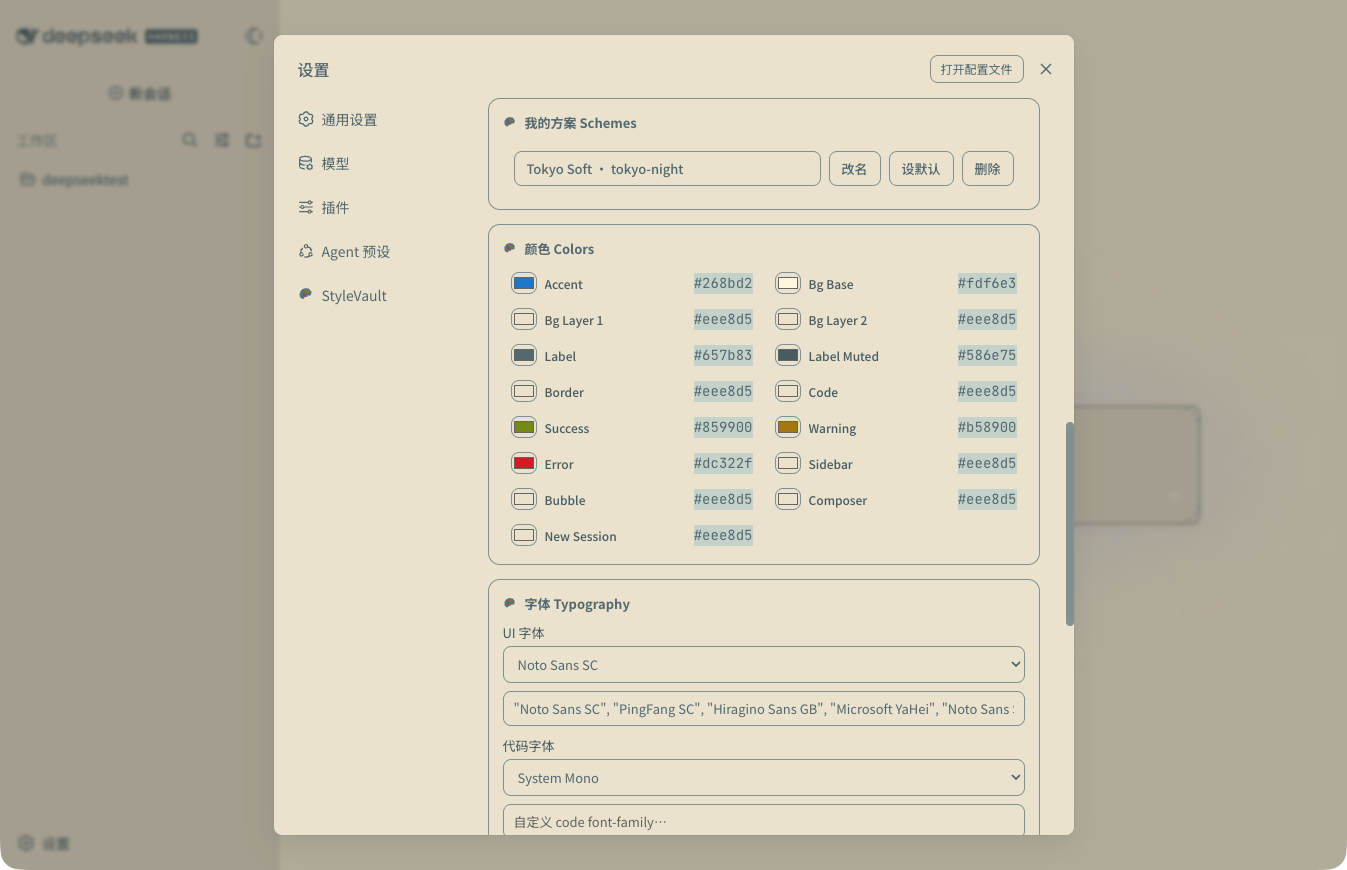
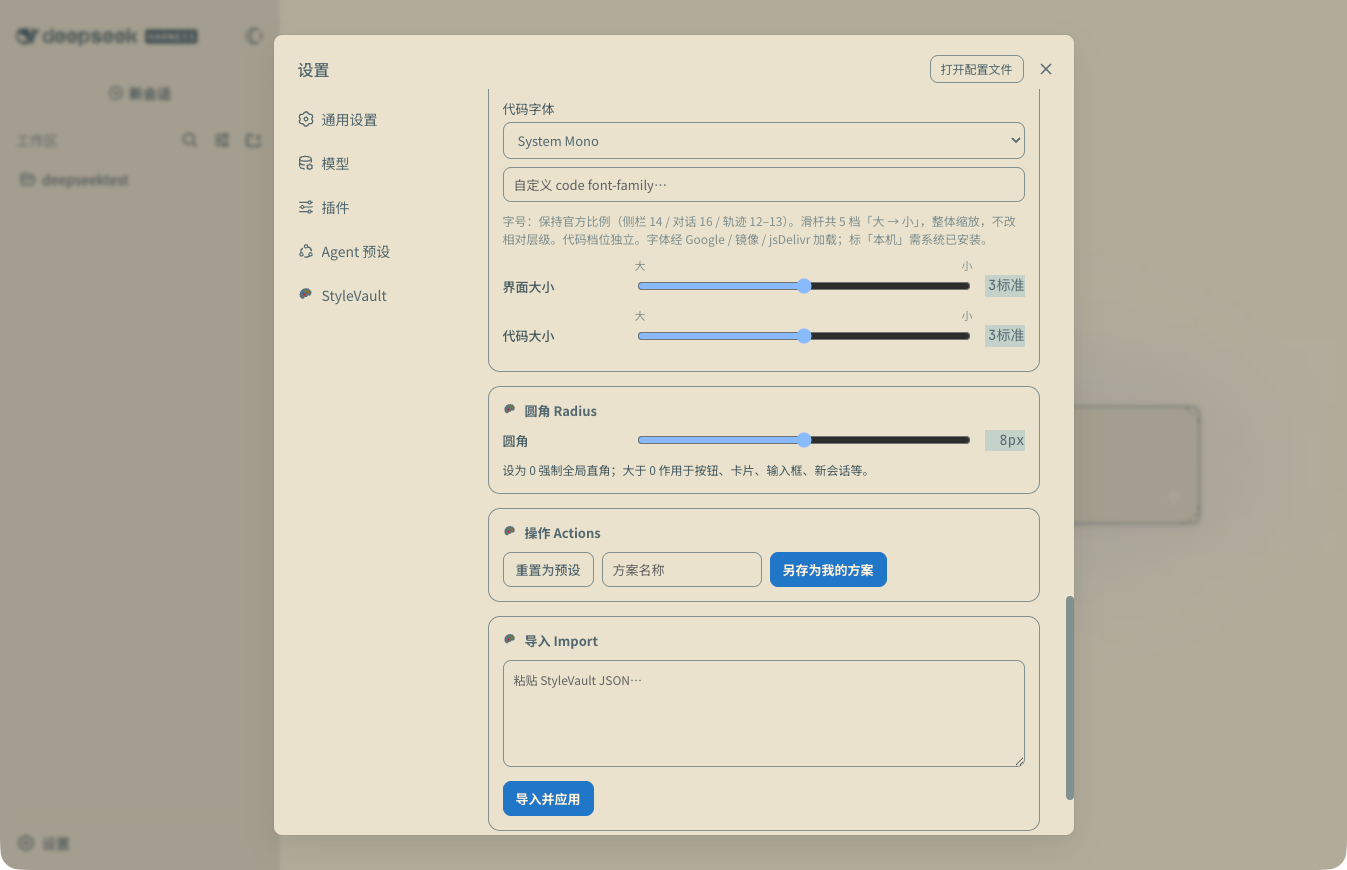
Settings → StyleVault. Every adjustment takes effect instantly and persists across refreshes:
- Colors: 15 live-tunable items — Accent, background Base / Layer 1 / Layer 2, primary / secondary text, border, code background, Success / Warning / Error, sidebar, bubbles, input fields, new-session button
- Fonts: UI and code fonts can be switched independently, or you can type a custom font-family directly. See the font lists below
- Font size: independent 5-step scaling for UI and code (large → small), preserving official proportions (sidebar 14 / chat 16 / traces 12–13) so the interface doesn't get squashed
- Border radius: 0–16px slider, 0 forces global sharp corners
- My Schemes: save your current tweaks as a scheme — rename, delete, or set as default
- Import / Export / Share: export the current state as a JSON config package, or copy share text in one click (others paste and import to use)
Font lists
UI fonts (16)
| Font | Description |
|---|---|
| System | System default font, no extra loading |
| SF / PingFang | -apple-system + PingFang and other system stacks |
| Inter | Sans-serif, the interface standard |
| Roboto | Android-style sans-serif |
| Source Sans 3 | Adobe open-source sans-serif |
| IBM Plex Sans | IBM corporate-style sans-serif |
| DM Sans | Geometric modern sans-serif |
| Manrope | Rounded modern sans-serif |
| Nunito | Rounded, friendly sans-serif |
| Atkinson Hyperlegible | High-legibility font (accessibility friendly) |
| Noto Sans SC | Chinese sans-serif, CJK coverage |
| Source Serif 4 | Adobe open-source serif |
| Lora | Serif, strong reading feel |
| Merriweather | Serif, bold and prominent |
| Literata | Serif, the same one used by Google Play Books |
| Crimson Pro | Serif, publishing style |
Code fonts (14)
| Font | Description |
|---|---|
| System Mono | System monospace default |
| JetBrains Mono | Developer favorite, made by JetBrains |
| Fira Code | Includes programming ligatures |
| Source Code Pro | Adobe open-source monospace |
| IBM Plex Mono | IBM monospace |
| Cascadia Code | Made by Microsoft, includes ligatures |
| Inconsolata | Classic monospace |
| Ubuntu Mono | Ubuntu-style monospace |
| Space Mono | Retro geometric monospace |
| Roboto Mono | Roboto's monospace version |
| Hack | Evergreen community monospace |
| Victor Mono | Italic handwriting-style monospace |
| SF Mono* | Built into macOS (marked "local") |
| Maple Mono* | Requires system install (marked "local") |
Fonts marked "local" require a system install and are not loaded from the network; the rest load online via Google Fonts / jsDelivr and automatically fall back to the system font stack when offline.
Readability focus
Contrast tuned for long agent sessions, applied together with the preset and your tweaks:
- Code blocks (Shiki highlighted token mapping), diff add/remove lines, thinking traces, tool / terminal output, trace tables, error summaries
- Status colors (success / warning / error) stay in sync with trace accent colors
Misc
- Official ThemeService integration: only overrides
--dsw-alias-*semantic tokens, never touches layout, so it doesn't conflict with the official Appearance - Auto-restore on refresh: the current preset is persisted and restored automatically after restarting
dsh web - Bilingual: the panel follows DSH's language (
navigator.language) — Chinese in Chinese environments, English in English environments - Console API:
__STYLEVAULT__global object, see below
Installation
# Local development (link mode)
dsh plugin --profile web add link:/path/to/dsh-stylevault
# Install from GitHub
dsh plugin --profile web add github:GptsApp/dsh-stylevault
Restart dsh web or hard refresh.
Preview
| Nord (dark) | Nord Light (light) |
|---|---|
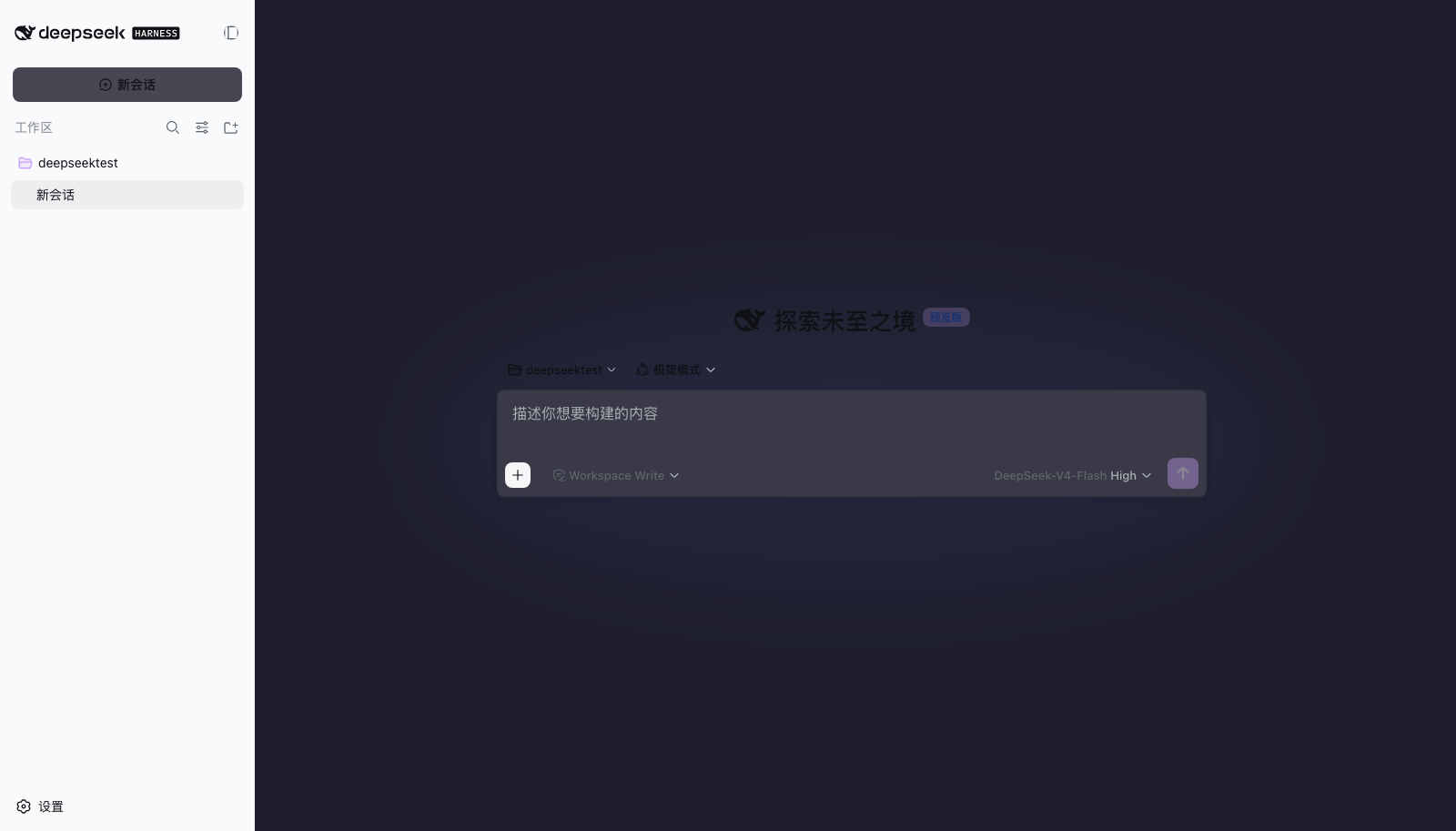 |
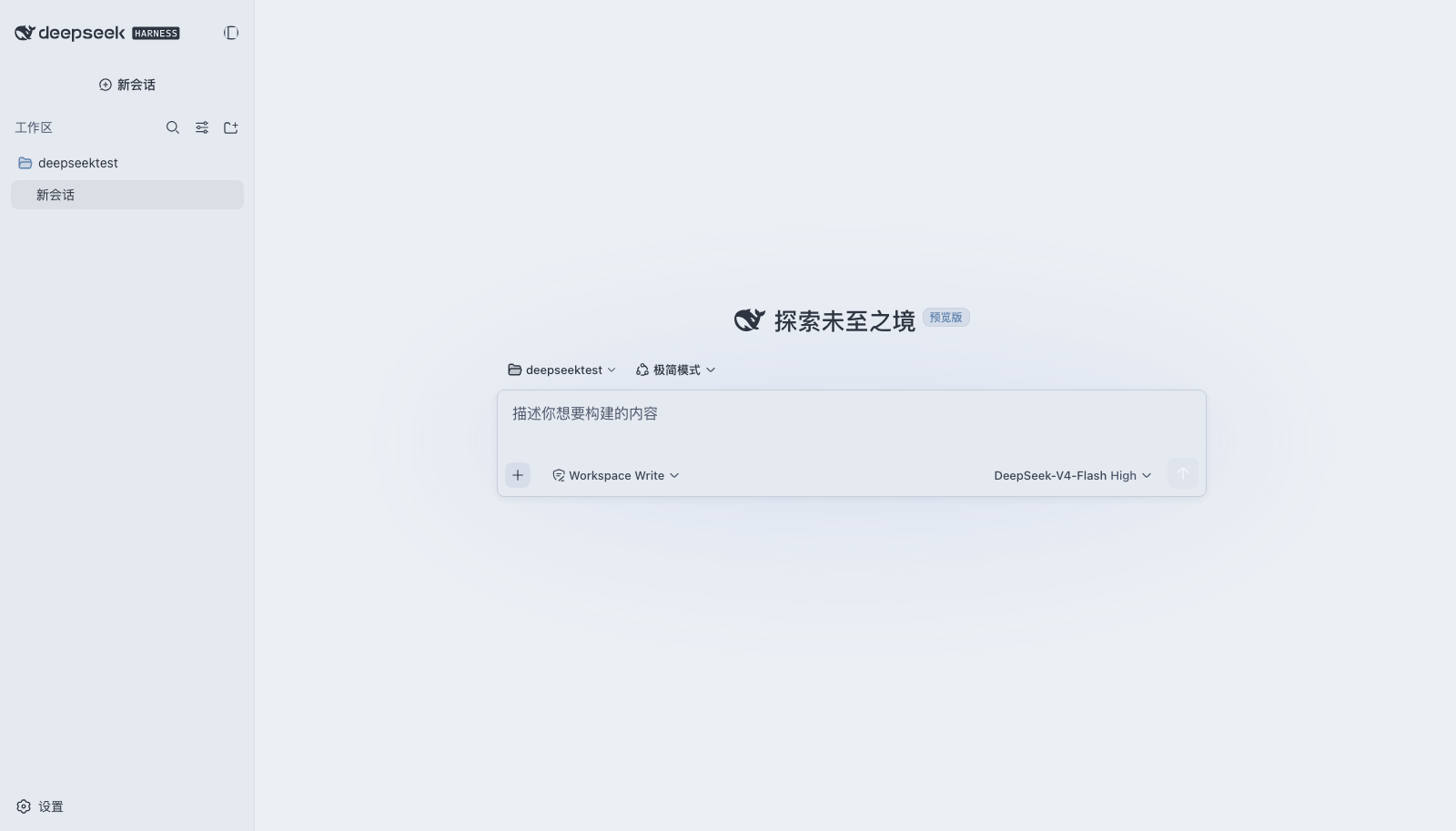 |
Usage
- Open Settings → StyleVault
- Pick a preset card (with 6-color preview)
- Fine-tune live in the colors / fonts / texture areas
- Save as My Scheme → export / copy share
Settings panel
Console API
__STYLEVAULT__.list()                    // All presets (id/name/dark-light/tags/preview colors)
__STYLEVAULT__.set('nord')               // Switch preset
__STYLEVAULT__.override({ '--dsw-alias-brand-primary': '#ff7b72' })  // Override a single token
__STYLEVAULT__.setFonts({ code: '"JetBrains Mono", monospace' })     // Fonts
__STYLEVAULT__.setFonts({ uiScale: 2 })  // Font size step 1–5
__STYLEVAULT__.setOptions({ radius: '10px' })  // Border radius
__STYLEVAULT__.export('My Nord Soft')    // Export config JSON
__STYLEVAULT__.copyShare()               // Copy share text
__STYLEVAULT__.import(jsonOrString)      // Import config
__STYLEVAULT__.saveScheme('Commute Dark') // Save as my scheme
__STYLEVAULT__.schemes()                 // List my schemes
__STYLEVAULT__.renameScheme(id, 'New name')
__STYLEVAULT__.deleteScheme(id)
__STYLEVAULT__.setDefaultScheme(id)      // Set as default (auto-restored on startup)
__STYLEVAULT__.useOfficial('system')     // Return completely to the official theme
__STYLEVAULT__.tokens()                  // All currently active tokens
Relationship with the official theme
StyleVault uses the official ThemeService under the hood: it only overrides --dsw-alias-* tokens and never touches layout, so it doesn't conflict with the official Appearance. The current preset is restored automatically after a refresh. To return completely to the official theme, run in the console:
__STYLEVAULT__.useOfficial('system')
Known limitations
- DSH is still in developer preview; if tokens or UI structure change, minor adaptation may be needed — check the official release notes before upgrading
- Some UI elements (e.g., certain input fields) depend on DSH's internally generated class names; after official redesigns, fonts may occasionally not apply — nothing crashes, but it may need follow-up
License
MIT. The palettes come from various open-source projects; this repo only does token mapping.
Questions or ideas? @WeWill_Rocky, or open an issue directly in the repo.
Links
More in this category
Small-tailqwq/dsh-deep-whale#maid-atelier★ 2367
Whale-girl skin series for the DSH Web UI (maid-atelier).
elysia395/dsh-wallpaper-engine★ 504
Requires DeepSeek Harness 0.1.5-rc.1+ (DSH Desktop >= 2.0.7) and dsh-better-sidebar >= 0.19.0 - update both before installing or updating this plugin. Plays local Wallpaper Engine Video/Web wallpapers behind the chat, renders Scene wallpapers as extracted static frames, and adds content-rating/type filters, custom uploads and an iOS-style liquid-glass settings window.
d-dev0101/open-sea-skin★ 386
Realtime WebGPU ocean skin with quick controls for waves, daylight, glass opacity, and an automatic day cycle.
kingOfSoySauce/dsh-liang-skin★ 233
Adaptive reasoning slider skin that maps each model's available reasoning efforts onto a 0–30 visual intensity scale, with synchronized portraits, background, and interface colors.
RevolutionLA/dsh-dream-skin★ 202
One-command skin plugin: 8 original themes, translucent wallpaper with opacity/blur, per-user accent, and shareable theme-pack import/export, favorites and surprise-me — purely native on DSH's token system.
GGBond2424648901/deep-whale-day-night-theme★ 118
Non-commercial day/night whale-girl skin for official Harness rc.7: current no-viewport-frame layout, paired crystal-workshop and moon-tide scenes, chibi companions, translucent ornaments, and lightweight ambience.
Community comments
Comments are public GitHub Discussions. Loading them connects to GitHub and Giscus; a GitHub account is required to post.