Paper reading workbench: library + PDF reader + tutor-style companion. Answers cite clickable page numbers that jump back and flash the exact passage; select-to-ask without leaving the paper; bundled strict-tutor preset (reading plan, section coaching, graded quizzes tracked across sessions). With MinerU configured (self-hosted, no signup / mineru.net cloud token): scanned PDFs become readable, formulas become click-citable (one click sends the LaTeX source into the chat) and searchable (QK^T hits directly), plus a per-page formula panel; optional embeddings endpoint adds semantic recall for plain-language questions. Rename/delete topics and papers — deletes go to a recoverable .trash with a batch-clear flow for non-empty topics; reader with scroll/single-page modes, rightbar-fullscreen safe, one-click path copy and translated-PDF export; in-place original ↔ Chinese toggle (babeldoc, zero preinstall). Transcription and search run locally by default — documents never leave your machine; only when cloud MinerU, an embeddings endpoint, or a translation endpoint is enabled does the corresponding text go to the service you configure.
Install
# from npm (prebuilt)
dsh plugin --profile web add @ggboy123/dsh-paper-reader
# from GitHub (first run asks for allowBuilds approval — follow the hint, retry)
dsh plugin --profile web add github:GGboya/dsh-paper-reader
Any plugin you install runs third-party code with your own permissions — it can read your files, use your credentials, and reach the network, and tool approvals don’t sandbox it. GitHub-sourced plugins also run build scripts at install time — pnpm blocks those until you allow them, so an install can stop with ERR_PNPM_GIT_DEP_PREPARE_NOT_ALLOWED or ERR_PNPM_IGNORED_BUILDS; dsh prints the exact key to add under allowBuilds in your profile’s pnpm-workspace.yaml, and the install works on the next run. Allowing a build is a trust decision: only install sources you trust, and pin a commit (github:owner/repo#sha).
README
中文: README.md
A DeepSeek Harness (dsh) plugin: a paper reading workbench — paper library + PDF reader + AI companion. Every answer cites page numbers, and clicking a page jumps back to the exact highlighted passage. Current version: v1.7.0.
💬 QQ group: 1127244508 — questions, feature requests, and bug reports are all welcome.

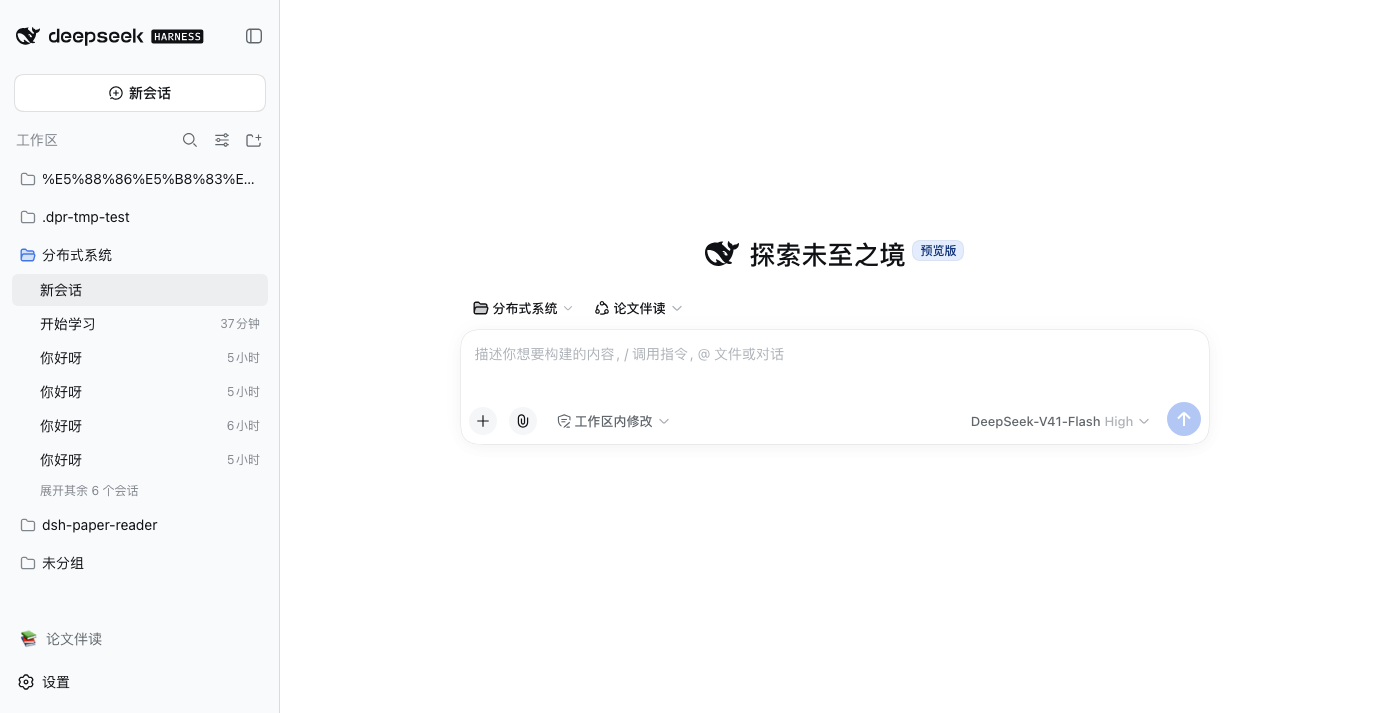
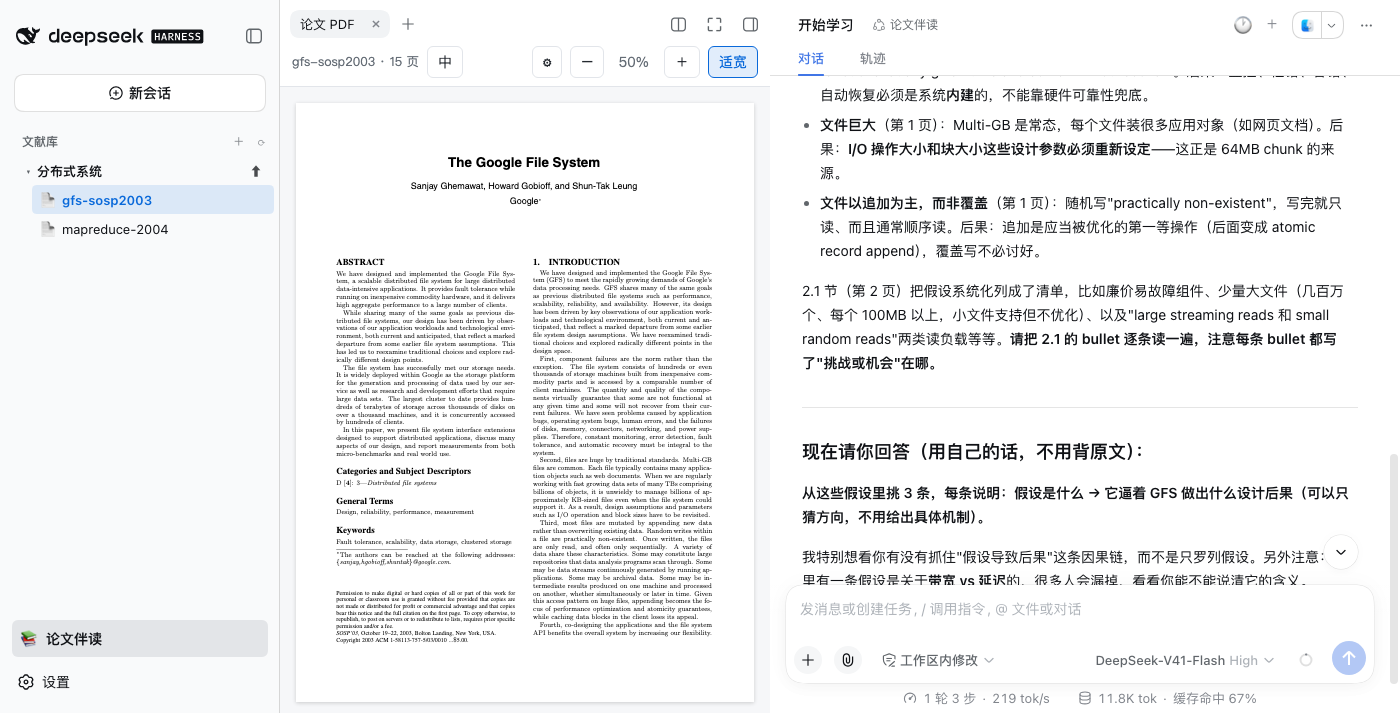
Core capabilities
- 📚 Three-pane workbench: topic library + PDF reader + native chat on the right; installing does not modify the official UI — just one extra toggle in the sidebar
- 💬 Page-cited companion: every answer cites page numbers; click one to jump back and flash the passage; select-to-ask on any text; conversation history supported
- 🤖 Optional tutor mode: a dedicated preset makes step-by-step plans; you read the original and answer, then the AI gives feedback and follow-ups. Advance only after demonstrating understanding; progress accumulates across sessions
- 🀄 One-click Chinese version: in-place original ↔ Chinese toggle; exportable translation PDFs (Chinese / bilingual); the translation engine auto-installs, zero preinstall
- 📏 No more truncated paragraphs + live progress: translation runs through
babeldoc-driver.py— per-input output budgets (instead of babeldoc's hard-wired 2048), auto split-and-retry onfinish_reason=length; a top-bar progress bar shows live stage progress like "Translate Paragraphs 76% (521/798)", and the driver retries with lower reasoning effort when the endpoint refuses to disable thinking - 🈯 Selection translation (formulas preserved) (v1.7.0): select text, click "译" (Translate) for a translation-only bubble; when the selection overlaps a formula, the garbage text-layer glyphs are replaced with the LaTeX MinerU recognized and the model is asked to keep formulas verbatim
- 🖥️ Bilingual side-by-side / split view (v1.7.0): a doubled-width对照 page or a two-pane split with synchronised scrolling — switch any time, remembered per paper
- 📝 Notes (v1.7.0): selecting text still opens the original "select-to-ask" bubble; new small Note and Global search buttons sit in that bubble. Annotated text gets a blue wavy underline — hover to read the note, click to edit or delete. The notes window matches the find window (draggable, edge-resizable, position remembered), lists notes by page, and jumps back to the source. Notes live in
<paper>.notes.jsonbeside the paper, so they follow it across browsers - 🗂️ Library management: rename/delete topics and papers; deletion goes to a recoverable trash
- 🛰️ OpenCode Go endpoint (v1.7.0): an "OpenCode Go" provider preset for the translate endpoint (subscribe, copy the API key, done — model names follow the console); requests to opencode.ai automatically carry a stable
x-opencode-sessionheader (whole-paper and selection translation share one ID per paper, stable across restarts; the ID is derived from a local 0600 secret and contains no paper names) — other endpoints get no extra headers - ➕ Optional add-ons (off by default): MinerU parsing — scanned PDFs become readable, formulas become Click to cite a formula and searchable; an embeddings endpoint — plain-language semantic search
Prerequisites and configuration details live in docs/features_EN.md(中文:docs/features.md).
Install
Everyday users: official desktop app (recommended)
Two steps: install the official DeepSeek desktop app → add the plugin inside it.
- Install the official DeepSeek desktop app (the DeepSeek Harness desktop) and sign in
- Sidebar → Plugins → Add plugin, enter
@ggboy123/dsh-paper-reader@latest, open the plugin's detail page and flip the Enable switch, then restart the app
Done. Click "📚 Paper Reading" at the bottom of the sidebar, upload a PDF, and start reading.
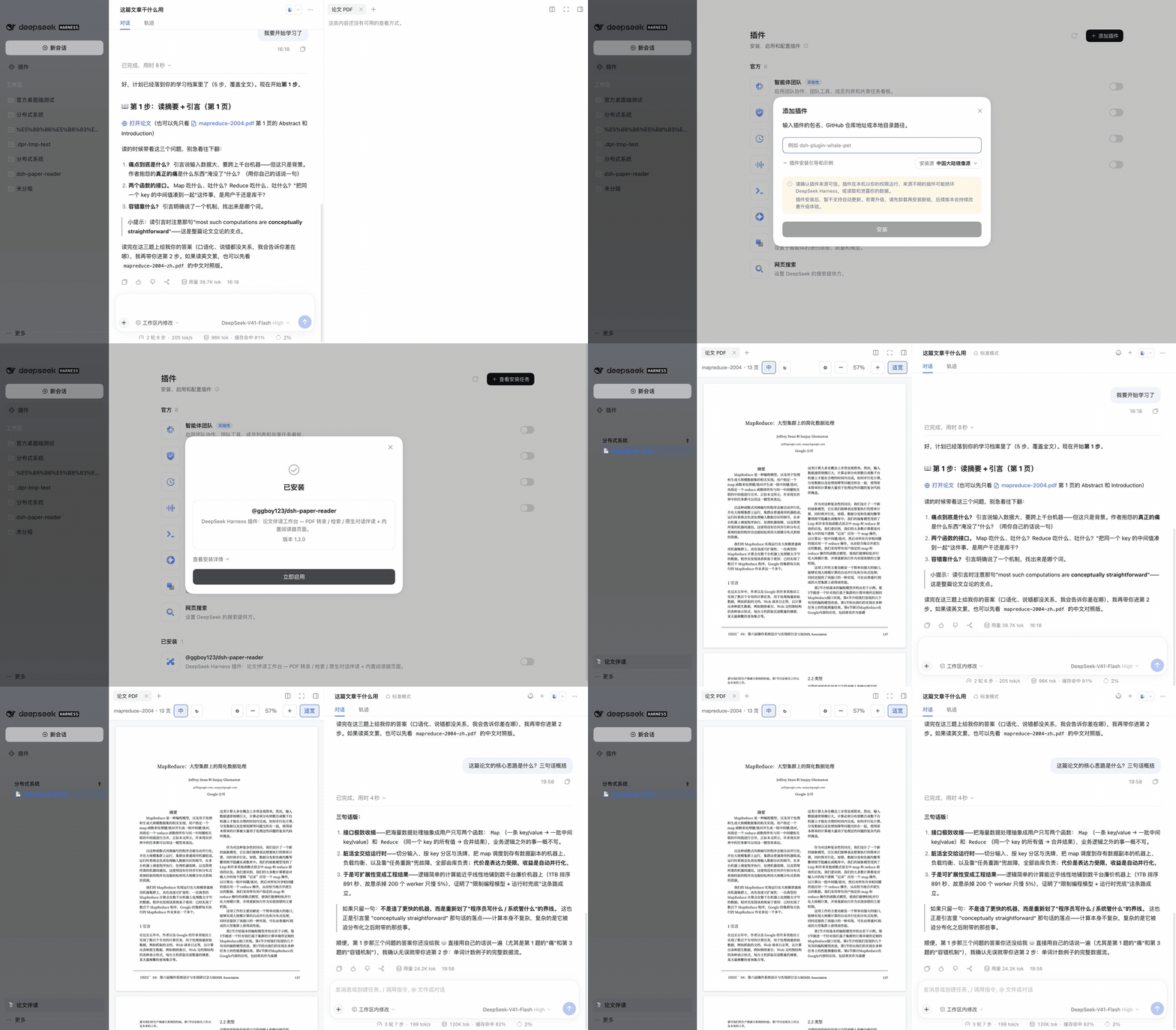
Requires official desktop V0.2.0-rc.2 or newer (bundled dsh ≥0.2.0-rc.2); dsh 0.1.5 is no longer supported. To browse a plugin marketplace inside the client, also install the community plugin
dshmarket; this plugin is listed there.
Pitfalls (all hit in real testing):
- After upgrading, the enable switch resets to off: flip Enable again and restart. The symptom is misleading — the library tree is still there but clicking papers does nothing
- Always add with
@latest: a bare add on an already-installed plugin is a no-op - If pnpm's
minimumReleaseAgepolicy blocks the new package: wait out the window, or exempt this package (minimum-release-age-exclude[]in~/.dsh/profiles/web/.npmrc; on desktop,minimumReleaseAgeExcludein~/.dsh/profiles/desktop/pnpm-workspace.yaml)
Developers: CLI dsh
dsh plugin --profile web add @ggboy123/dsh-paper-reader@latest # same command upgrades; a bare add is a no-op
Do NOT install via
github:GGboya/dsh-paper-reader— dist is not committed, so a git install leaves the profile unable to start.
How to use
- Enter: click "📚 Paper Reading" at the bottom of the sidebar (click again to restore)
- Add papers: + create a topic → ⬆ upload PDFs
- Read + ask: just ask (answers cite pages), or select text for a pop-up question; click "page N" to jump back
- Chinese version: the "中" button generates a translation (first use asks for an OpenAI-compatible endpoint once — DeepSeek/GLM/Kimi keys all work)
- Manage: hover a row for ✎ rename / 🗑 delete; 🕐 in the chat header shows history, + starts a new chat
Library management (safety notes)
- Deletion = moved to trash
data/.trash/(with a manifest; move files back to recover); it handles every artifact of the paper:<paper>.pdf,.txt,.pages.json,.transcript.json,.mineru.md,.mineru.json,.embeddings.json,.study.json,.notes.json, plus translation variants<paper>-en.pdf/-zh.pdf/-dual.pdf(including leftover.tmp-*); chat history is not deleted. Papers with a running session or an in-flight translation are refused up front; path traversal is rejected and mid-way failures roll back — details in docs/features_EN.md
Contributing
git clone https://github.com/GGboya/dsh-paper-reader
cd dsh-paper-reader && pnpm install && pnpm run build
dsh plugin --profile web add ./dsh-paper-reader   # run from the parent dir, or use an absolute path
dsh --profile web                                  # sidebar becomes the library tree
After changes, pnpm run build and restart the profile; npm test runs the full suite (354 cases; CI on ubuntu/macos/windows). Architecture, test guards and dev conventions: see AGENTS.md.
Contributors
Thanks to everyone who has contributed:
Star History
License
MIT
Links
More in this category
tt-a1i/archify#integrations/deepseek-harness★ 92724
Generate validated, self-contained interactive architecture, workflow, sequence, data-flow, and lifecycle diagrams from repositories or system descriptions.
dream-num/dsh-univer-office★ 657
Give DeepSeek Harness a real office environment. Univer Office Plugin brings spreadsheets, docs, slides, canvases, relational tables, and more into one runtime — with connected data, validation, versioned changes, and isolated worktrees for multi-agent collaboration.
ECNU/EduWork#dsh-knowledge-studio★ 275
A workspace-based Studio for source-grounded reports, slides, tables, mind maps, quizzes, flashcards, audio and video, using DSH models and shared artifact services. Office generation requires Python 3.12+ with its dependencies and DSH_OFFICE_PYTHON configured; media rendering requires Chromium, and local ASR additionally requires whisper.cpp and a model.
PerryLink/dsh-industry-research★ 215
Deterministic industry research reports for DeepSeek Harness — company and industry research flows produce structured, verifiable reports from staged evidence.
HuanLinOTO/dsh-plugin-mineru★ 51
Expose MineRU document parsing tools to the model.
PolinniZhong/dsh-knit★ 48
Puts the Markdown documents, source files, images and video that already exist anywhere in the session workspace into the DSH sidebar, ranked by relevance to the current conversation. The default lexical mode matches your recent messages against title, summary and body locally with IDF weighting (BM25) — no model calls, no network, nothing leaves the machine. The list comes from scanning the workspace rather than from a recent-files list, so restarting DSH or opening a new session does not empty it. Results are organised into a three-tier reading order (primary / supporting / related) with a verifiable reason on every row — which field matched, which document cites this one — and one click opens an in-place preview: Markdown as rendered text, relative-path images actually drawn, source code with the host's own syntax highlighting, video streamed over HTTP Range. The same Context Pack is exposed to the agent as a knit_docs tool. Later versions added read evidence and lifecycle tracking (attribution is frozen at the moment of reading), pin / exclude (exclusion applies before retrieval, and is undoable), relation evidence (references / imports / tests, with line numbers) and an incremental index reused across restarts. Since v0.23 there is also an optional hybrid mode: it is off by default and only runs once you configure an Ollama or OpenAI-compatible embedding provider yourself. When it runs, what leaves the machine is your query text plus each candidate file's title and summary — a Markdown summary is an excerpt of the body's first paragraph (at most 60 characters), a code file's summary is its workspace-relative directory, and an image or video contributes its file name; full bodies and absolute paths are not sent, and a loopback provider keeps everything on this machine. Since v0.24 it also associates uncommitted changes: a read-only git status (fixed argv, no shell, whitelisted child-process environment) combined with the same reference / import / test / mention evidence shows which files a change is likely to drag along, and it is off by default. The benefit of semantic retrieval still awaits a real-provider run, so no recall improvement is claimed.
Community comments
Comments are public GitHub Discussions. Loading them connects to GitHub and Giscus; a GitHub account is required to post.