Dracula (VS Code) dark theme for the DSH Web GUI: the vampire palette mapped onto the product colour tokens, plus a denser type scale, a 1080px reading column and code blocks that scroll instead of re-wrapping. Dark mode only.
Install
# from npm (prebuilt)
dsh plugin --profile web add dsh-client-ui-dracula
# from GitHub (first run asks for allowBuilds approval — follow the hint, retry)
dsh plugin --profile web add github:Erbsen16/dsh-client-ui-dracula
Any plugin you install runs third-party code with your own permissions — it can read your files, use your credentials, and reach the network, and tool approvals don’t sandbox it. GitHub-sourced plugins also run build scripts at install time — pnpm blocks those until you allow them, so an install can stop with ERR_PNPM_GIT_DEP_PREPARE_NOT_ALLOWED or ERR_PNPM_IGNORED_BUILDS; dsh prints the exact key to add under allowBuilds in your profile’s pnpm-workspace.yaml, and the install works on the next run. Allowing a build is a trust decision: only install sources you trust, and pin a commit (github:owner/repo#sha).
README
A Dracula theme for the DeepSeek Harness web UI — the same palette VS Code ships. The code surfaces and the type scale got some attention too.
Background #282a36   Current line / bubble #44475a   Foreground #f8f8f2   Comment #6272a4
Cyan #8be9fd   Green #50fa7b   Orange #ffb86c   Pink #ff79c6   Purple #bd93f9   Red #ff5555   Yellow #f1fa8c
Dark mode only. Switch Appearance back to light and you get the shipped palette — no pale purple on white.
What it changes
Instead of patching selectors one by one, the sheet re-points the product's own semantic colour tokens (--dsw-*, --shiki-*, --json-tree-*) at the Dracula palette. Pages, cards, overlays, borders, labels, brand and state colours, code blocks, inline code, syntax highlighting, the JSON tree, scrollbars, selection and the file-diff view all follow — and the product's own judgements about which surface sits above which are left intact, only the colours move.
The typography got a few changes of its own:
- programming font stacks for code and UI (Cascadia Mono / Segoe UI Variable Text by default), with CJK falling back to YaHei / PingFang
- one step tighter on the type scale, with slightly shorter line heights
- the reading column goes from the shipped 748px to 1080px
- code blocks scroll instead of wrapping. The shipped rule is
pre-wrap+break-all, which cuts long identifiers in half - a taller tool-output area, and 12px scrollbars
All of it is one stylesheet, injected as <style data-plugin="dsh-client-ui-dracula">, every rule scoped to :root[data-dracula="on"]. Drop that attribute and the page is back to stock immediately — no reload, no restart.
Screenshots
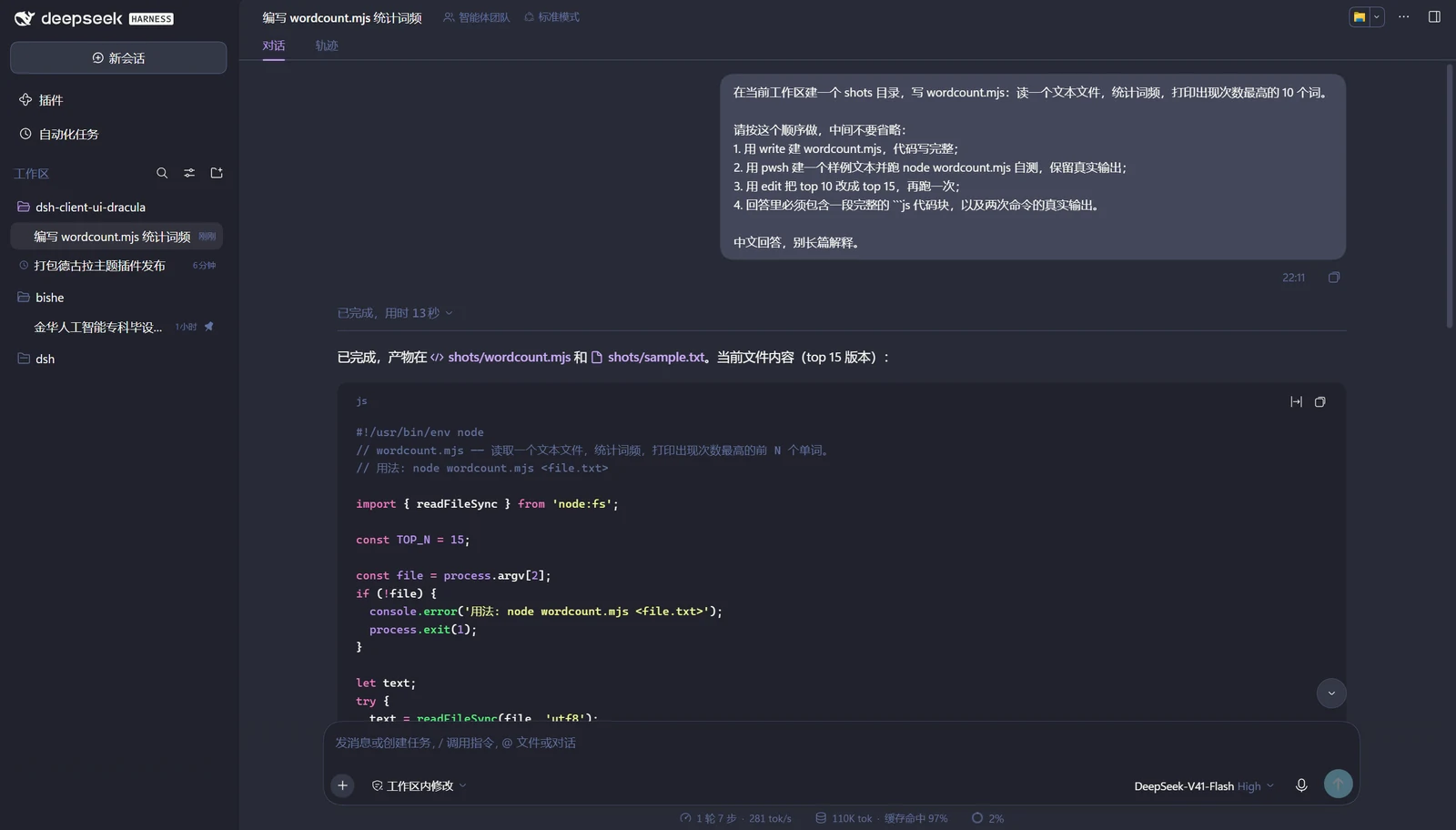
A conversation. Syntax highlighting, the code-block surface, bubbles and the reading column — where most of the work went.
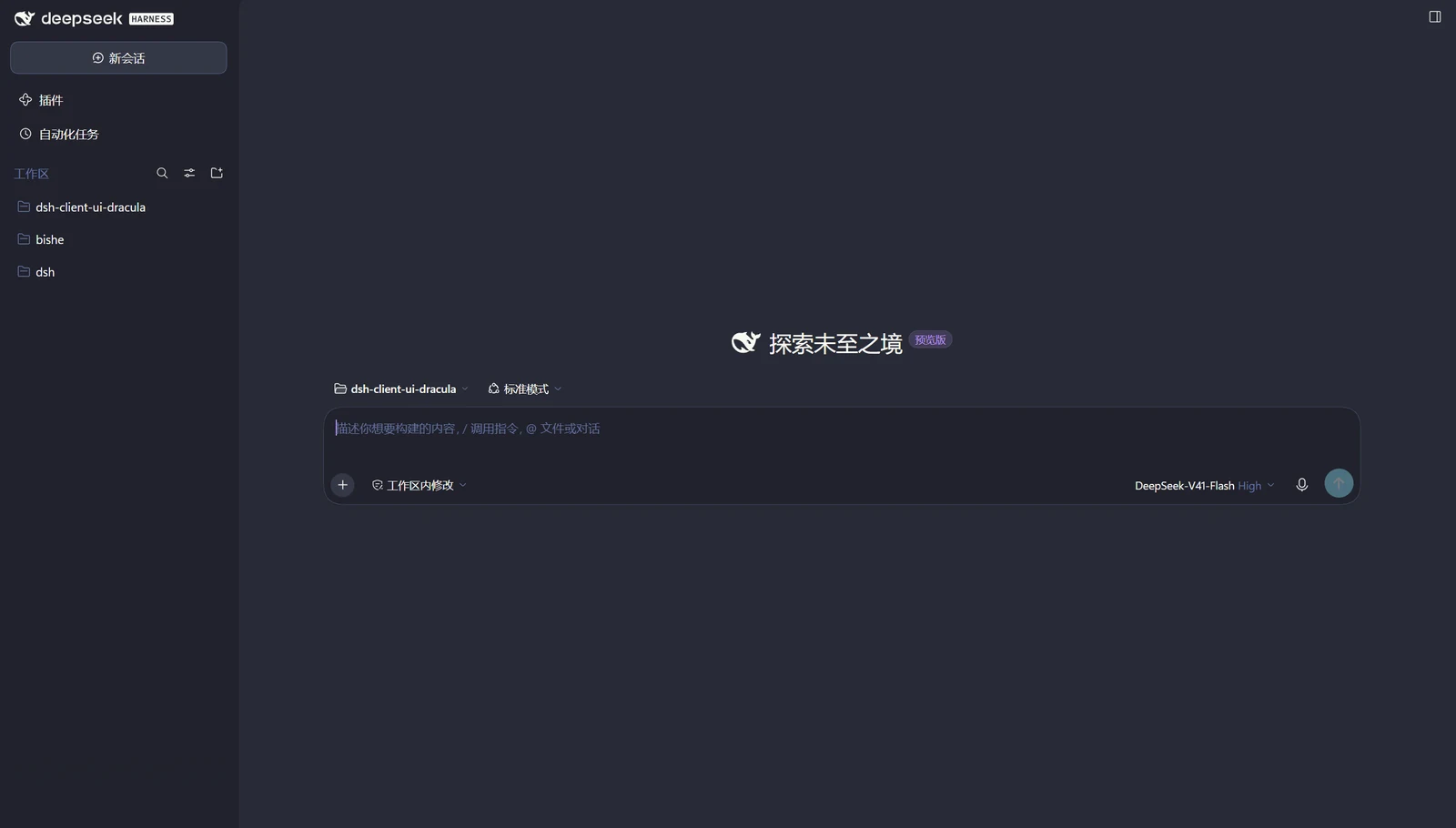
Home and sidebar. #282a36 underneath, purple on the new-session button, selection states and accents.
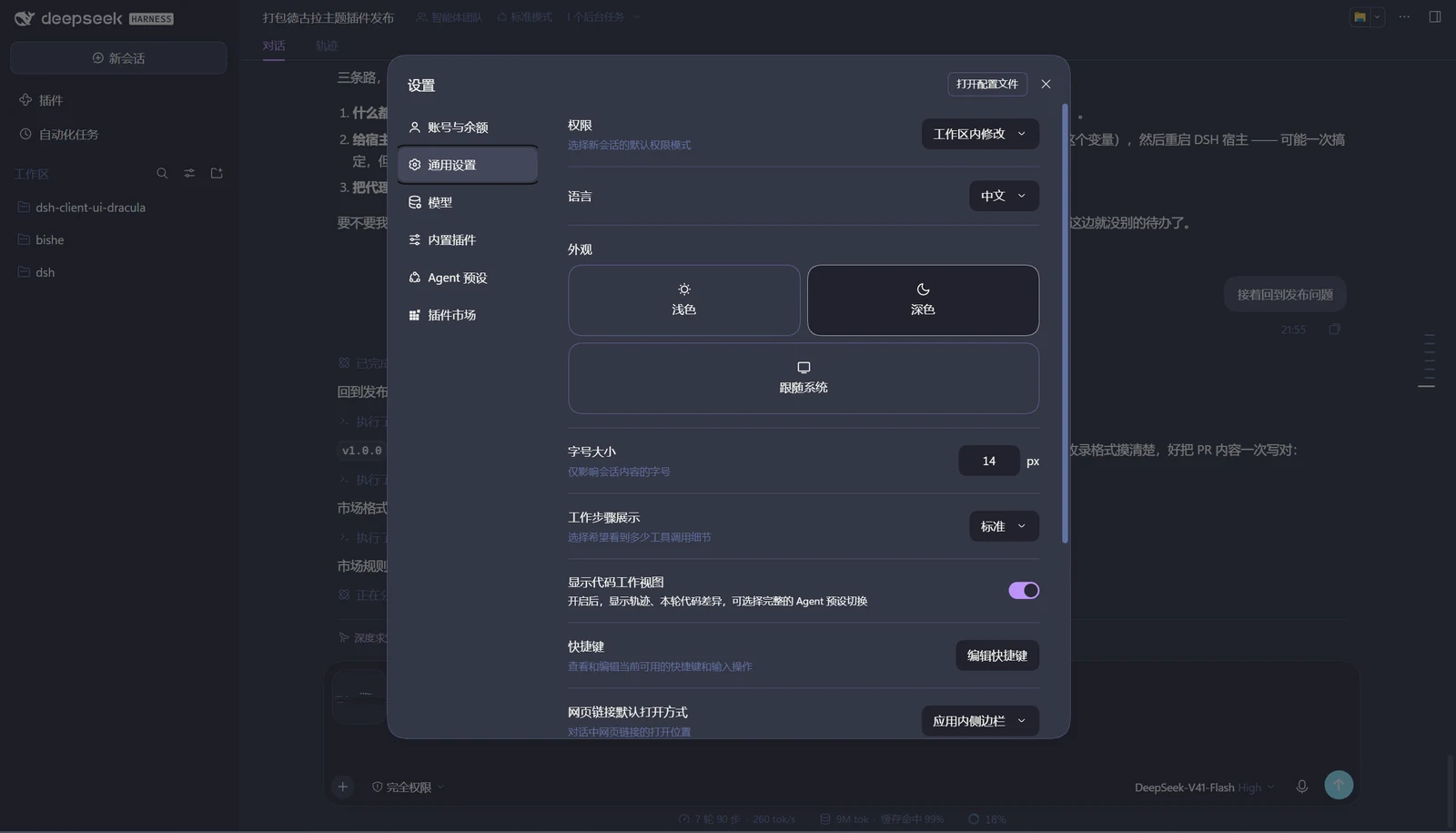
Settings. Because the --dsw-* tokens are re-pointed wholesale, toggles, selects, cards and the sidebar selection all move together — no per-selector patches.
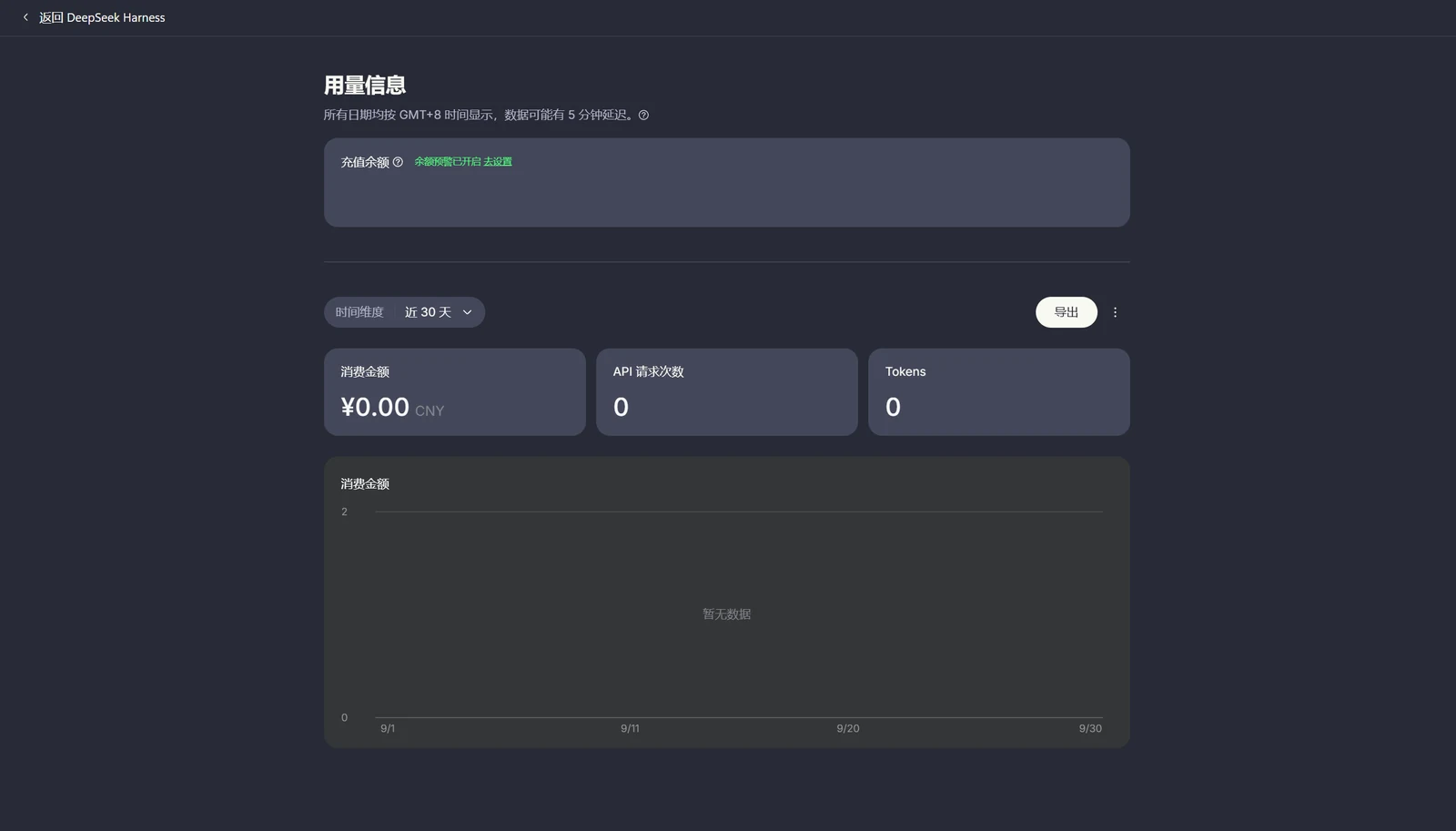
The embedded platform page (part of extras/, not a plugin) uses the same palette:
Install
The package declares dsh.bundle.patch. Once it is installed and listed in dsh.profile.bundles, it inserts its own ui-dracula row into the layer stack — there is no cordis.patch.yml to hand-edit.
On the desktop the graphical route is the least fuss: Settings → Plugins → + Add plugin, then enter either of these.
| What to enter | Where it comes from |
|---|---|
dsh-client-ui-dracula |
npm, with the China mirror as the install source. The package is on npm |
https://github.com/Erbsen16/dsh-client-ui-dracula |
the GitHub source archive, no npm involved |
If nothing changes after installing, check that dsh-client-ui-dracula is in the profile's dsh.profile.bundles. On my own install the official manager added the dependency but not the bundle row, and this plugin only inserts ui-dracula once it is treated as a bundle. Add the line and the HMR pass picks it up; otherwise restart the host.
For profiles other than desktop, use the CLI:
dsh plugin --profile web add dsh-client-ui-dracula                    # from npm
dsh plugin --profile web add github:Erbsen16/dsh-client-ui-dracula    # from GitHub
dsh plugin is a thin pnpm passthrough, so any source pnpm understands works: an npm name, github:user/repo, a tarball URL, a local directory.
The desktop profile is owned by the host, and the CLI refuses to touch it (profile "desktop" is managed exclusively by the Electron application). A manual install looks like this:
cd $env:USERPROFILE\.dsh\profiles\desktop
pnpm add github:Erbsen16/dsh-client-ui-dracula
# then add "dsh-client-ui-dracula" to dsh.profile.bundles in that directory's package.json
This plugin is not in the DSH plugin market yet. The market only installs sources listed in awesome-dsh-plugin; getting listed means opening an entry PR there.
Tuning
Section 0 of lib/client.js holds the three variables:
'--dracula-content-width: 1080px;'                    // reading and composer column, 748px stock
'--dracula-code-font: "Cascadia Mono", ...';          // programming font
'--dracula-ui-font: "Segoe UI Variable Text", ...';   // UI font — use var(--dracula-code-font) for all-monospace
Saving is enough; the client HMR pass reloads the stylesheet into every open page.
To compare side by side, __dracula.set(false) in the DevTools console reverts, set(true) brings it back.
Uninstall
Drop the package name from dsh.profile.bundles, run pnpm remove dsh-client-ui-dracula, restart the host.
extras: the embedded platform page
Settings → Account & balance → Usage opens a remote platform.deepseek.com document. Its styles are generated at runtime with hashed class names, out of reach of anything on the DSH side.
extras/platform-purple/ takes the other route: it patches the preload inside app.asar, walks the DOM remapping each element's computed colours onto the Dracula palette while preserving relative luminance and contrast, and re-runs on every React re-render through a MutationObserver.
It is not a plugin, the plugin manager cannot install it, and a host upgrade overwrites app.asar — an unofficial modification used at your own risk. See extras/platform-purple/README.md.
Files
lib/client.js        browser half — the single stylesheet
lib/index.js         host half — a no-op so dsh.client is visible to the Loader
cordis.patch.yml     bundle patch
scripts/smoke.mjs    npm test — smoke test over a DOM stub, no dependencies
docs/                screenshots used by these READMEs
extras/              the platform-page recolour patch, not a plugin
Compatibility
Written against the DSH 0.2.0-rc.2 / 0.1.7-rc.2 frontend. The sheet's main channel is the product's CSS variables (--dsw-*, --shiki-*, --json-tree-*), which is stable; a handful of rules name hashed CSS-module classes (.wSkVaW_root, ._Xvjua_body, …), and a DSH upgrade that renames them simply loses those refinements — nothing errors, that part just falls back to the shipped styles.
License
MIT. Palette from Dracula Theme, also MIT.
Links
More in this category
elysia395/dsh-wallpaper-engine★ 8309
Requires DeepSeek Harness 0.1.5-rc.1+ (DSH Desktop >= 2.0.7) and dsh-better-sidebar >= 0.19.0 - update both before installing or updating this plugin. Plays local Wallpaper Engine Video/Web wallpapers behind the chat, renders Scene wallpapers as extracted static frames, and adds content-rating/type filters, custom uploads and an iOS-style liquid-glass settings window.
Small-tailqwq/dsh-deep-whale#maid-atelier★ 3156
Whale-girl skin series for the DSH Web UI (maid-atelier).
Nwflower/dsh-claude-style★ 732
Claude Code Desktop look-and-feel for the DSH Web GUI — ivory/warm-black dual canvas, clay accent, three-font typography, permission segmented control and brand switcher, via CSS overrides and client DOM overrides.
kingOfSoySauce/dsh-liang-skin★ 407
Adaptive reasoning slider skin that maps each model's available reasoning efforts onto a 0–30 visual intensity scale, with synchronized portraits, background, and interface colors.
d-dev0101/open-sea-skin★ 402
Realtime WebGPU ocean skin with quick controls for waves, daylight, glass opacity, and an automatic day cycle.
webkubor/dsh-bloom-theme★ 325
Bloom Morandi theme: fifteen variants (mist, cinnabar, petal, ripple, sage, stone, lapis, amber, aurora, lavender, mint, tangerine, silverrose, dawn, osmanthus) built on OKLCH so light and dark stay perceptually even; twelve are featured in the top-bar switcher, grouped by color family, and all 30 foreground/background pairs are measured at WCAG AA or better.
Community comments
Comments are public GitHub Discussions. Loading them connects to GitHub and Giscus; a GitHub account is required to post.