A fork of dsh-livestream (MIT) - install it instead of that plugin, not alongside it. Lets DSH host a Bilibili livestream: chat and gift replies, queued viewer video requests on a skinnable stage, Doubao TTS voice, and automatic OBS/Bilibili streaming setup; needs OBS Studio 28+ and a Bilibili live room, and the voice stays silent until you add a Doubao TTS API key (Python + faster-whisper optional for transcribing subtitle-less videos).
Install
# from GitHub (first run asks for allowBuilds approval — follow the hint, retry)
dsh plugin --profile web add github:Deiael/dsh-live-vibeCoding
Any plugin you install runs third-party code with your own permissions — it can read your files, use your credentials, and reach the network, and tool approvals don’t sandbox it. GitHub-sourced plugins also run build scripts at install time — pnpm blocks those until you allow them, so an install can stop with ERR_PNPM_GIT_DEP_PREPARE_NOT_ALLOWED or ERR_PNPM_IGNORED_BUILDS; dsh prints the exact key to add under allowBuilds in your profile’s pnpm-workspace.yaml, and the install works on the next run. Allowing a build is a trust decision: only install sources you trust, and pin a commit (github:owner/repo#sha).
README
Let your DeepSeek Harness agent host a Bilibili livestream: it reads the chat, thanks gifts, welcomes viewers, remembers regulars, queues viewer-requested videos on a skinnable stage, and speaks with its own TTS voice — pushed to Bilibili through OBS.
一个让 DeepSeek Harness 在 B 站当主播的插件:读弹幕、谢礼物、欢迎新观众、记住常客,把观众点的视频排进队列放在舞台上,用自己的 TTS 音色说话,画面经 OBS 推到 B 站。
Screenshots / 界面预览
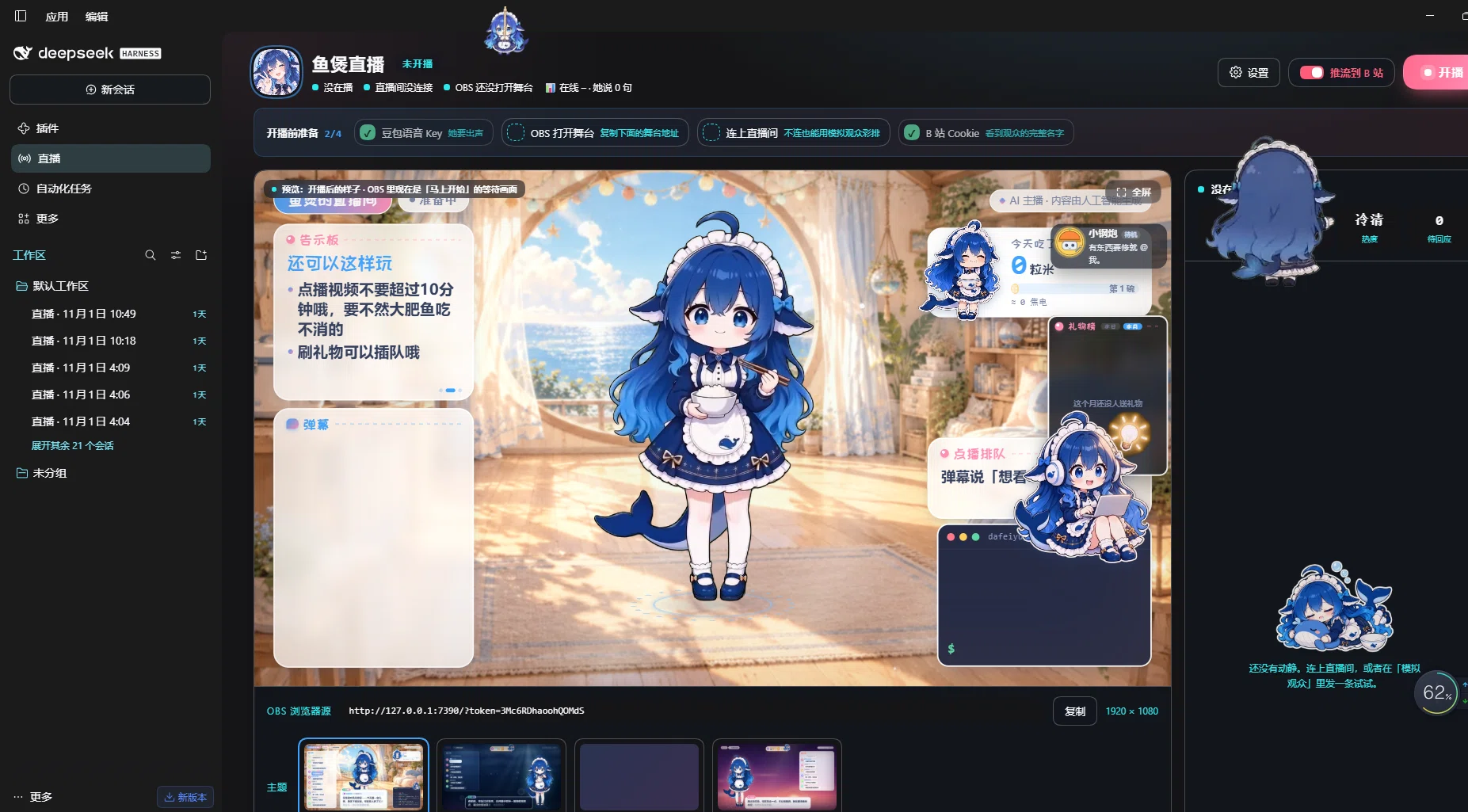
Livestream console / 直播控制台 — the stage as the audience sees it (character, notice board, danmaku, gift board, video request queue), plus the OBS browser-source address and theme picker.
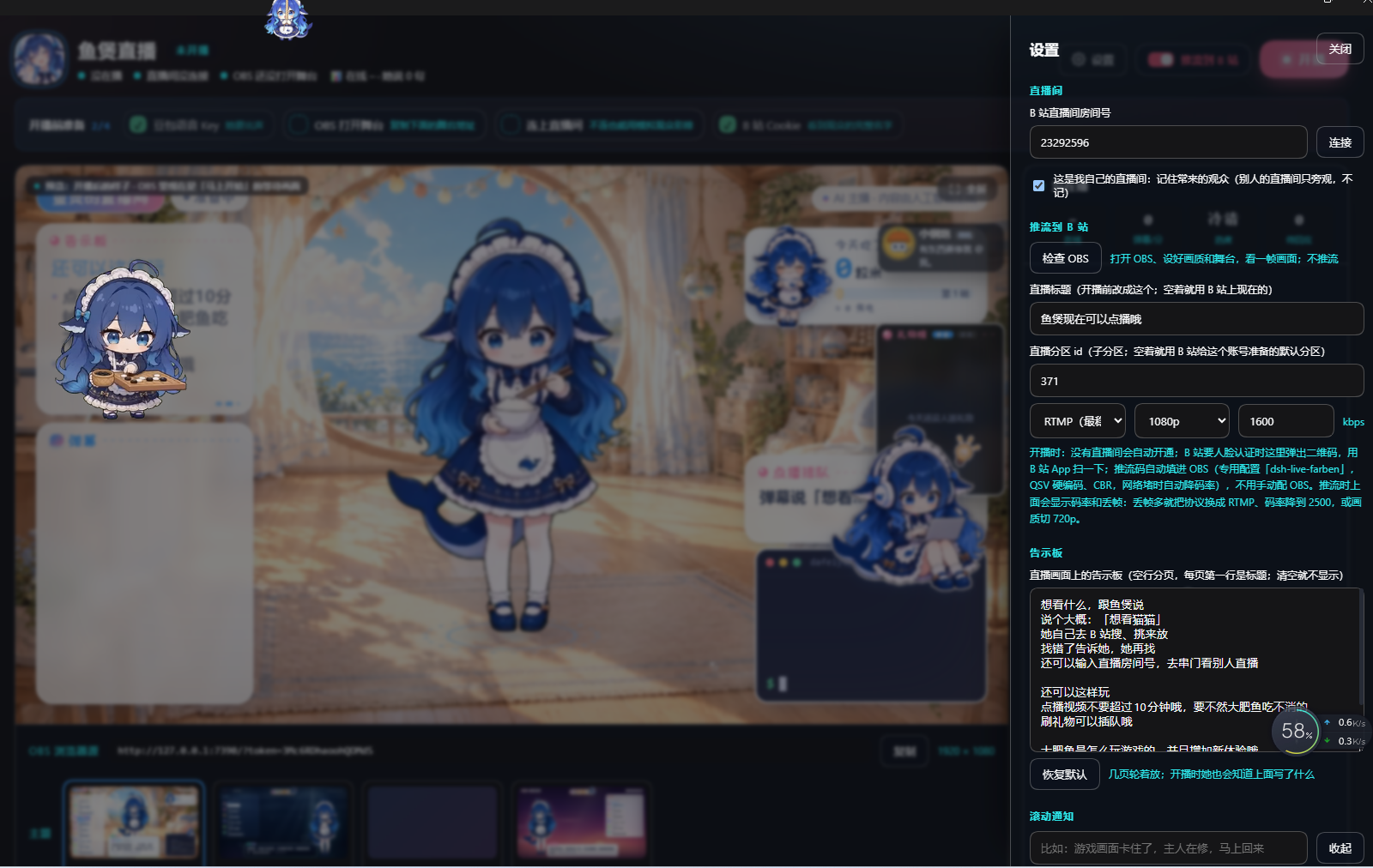
Settings / 设置 — Bilibili room id, push to Bilibili (检查 OBS, stream title, area, encoder and bitrate), and the on-stage notice board text the character reads out.
Features / 功能
- Chat & gifts — replies to danmaku, superchats, gifts, follows and new viewers; remembers regulars between streams.
- Stage — a browser-source stage with character, subtitles, chat, board, alerts, terminal and a video request queue that auto-pages when several viewers queue up.
- Video requests — viewers ask for a Bilibili video; it is searched, played on stage, and if something is already playing it waits in the queue (one at a time, no interruption).
- Voice — Doubao (ByteDance) TTS, 2.0 voices, with word-level subtitles timed to the audio.
- OBS integration — creates its own OBS profile and scene collection, picks the encoder automatically (NVIDIA NVENC → Intel QSV → x264), opens Bilibili's websocket server through the API, starts and stops the stream.
- Bilibili — QR login, room setup, stream title/area, cover upload, SRT→RTMP fallback when the SRT address is not OBS-compatible, and readable errors when Bilibili asks for identity verification.
- Characters / themes — character packs (Live2D-style clips or still images) and stage templates are just folders under
assets/; drop in your own.
Requirements / 环境要求
- DeepSeek Harness with the desktop/web profile.
- OBS Studio 28+ installed. The plugin enables OBS → Tools → WebSocket Server Settings by itself; no manual setup needed.
- A Bilibili account with a live room (the plugin can create one).
- A Doubao TTS API key (new console,
seed-tts-2.0) for the voice. Without it the agent still runs, just silently. - Optional: a Python with
faster-whisperfor transcribing videos that have no subtitles.
Install / 安装
From npm:
dsh plugin --profile desktop add dsh-live-vibecoding
From GitHub:
dsh plugin --profile desktop add github:Deiael/dsh-live-vibeCoding
Then add dsh-live-vibecoding to the dsh.profile.bundles list of your profile and restart DeepSeek Harness.
First run / 第一次使用
- Open the livestream console in DSH.
- Settings → 开播账号 → 扫码登录 (scan with the Bilibili app).
- Enter your room id (or leave empty to open one).
- Click 检查 OBS to let the plugin create its OBS profile and stage scene.
- Click 开播 (or 开始彩排 for a local rehearsal without pushing).
All settings are stored in ~/.dsh/dsh-live-farben/settings.json; secrets (Bilibili cookie, Doubao key) live in DSH's credential store, never in this package.
Encoder / 编码器
encoder defaults to auto: NVENC when an NVIDIA driver is present, Intel QSV on Intel graphics, otherwise x264. Override in settings.json with "encoder": "nvenc" | "qsv" | "x264" if auto-detection picks the wrong one.
Themes & characters / 皮肤与角色
- Characters:
assets/characters/<id>/(character.json+ clips/images). - Templates:
assets/templates/<id>/(template.json+style.css+ preview images).
The bundled dafeiyu character is the author's own artwork (see assets/characters/dafeiyu/), included as a demo. Replace it with your own before shipping a fork.
Credits / 致谢
This plugin is a fork/derivative of dsh-livestream (MIT). Thanks to its authors for the original architecture, OBS/Bilibili integration and stage runtime.
Bundled character art is licensed as stated inside the character pack (CC BY-NC-SA 4.0). It is not part of the MIT-licensed code.
License
MIT — see LICENSE.
Links
More in this category
PC2005-cloud/dsh-pet#dsh-pet★ 5347
Desktop pet for the DSH Web UI on Windows, macOS and Linux: 106 transparent animations in the browser overlay or a transparent always-on-top desktop window, throw-and-bounce drag physics with squash and particle scoring, a work-status bubble driven by live session events, self-talk and chat with persistent memory, balance display, meme-image bubbles, multiple pets on screen, and drop-in custom animations and pet packs.
Alterssss/dsh-bili-whale★ 862
A Bilibili companion that keeps its own schedule. A 60-second tick in the plugin host wakes a dedicated agent session at a random moment inside the configured time windows (opting out of a day is a configurable chance), then hands it a bundled CLI of 38 subcommands — feed, subtitles, danmaku, comments, ffmpeg frame grabs, and two diaries. Shares at most N items a day by commenting on them and @-mentioning the owner (default 3, enforced from a written quota log, and it stops on rate-limit or captcha signals). Also polls comment replies, direct messages and live-room danmaku; replies to anyone but the owner are queued for approval in Settings. Settings → 养鱼 writes ~/.dsh/bili-whale.config.json; cookies live separately in ~/.bili-ai/credentials.json and are never echoed back. The HTTP routes are loopback-only behind DSH's trust fence. Needs Node 18+ and ffmpeg on PATH for frame extraction.
Nagi-ovo/dsh-ads★ 707
Parody ads in 2005-Chinese-web style: sidebar banners, in-chat feeds, corner popups, and a close button whose hit area is smaller than it looks. All fictional.
yyh-001/dsh-meme★ 488
Chat meme stickers: text-only send, mood auto-send, QQ/WeChat-style picker, auto-learn, custom packs.
vlln/whale-girl★ 400
Desktop pet (QQ-pet style): floats in the corner, draggable, feedable, playable.
a86582751/dsh-nexttavern★ 218
NextTavern is a long-form roleplay plugin for DeepSeek Harness 0.1.7-rc.2 Web, with character-card import and creation, worldlines, worldbooks, layered long-term memory, keyword/semantic/hybrid retrieval, character agents, and card or novel export. SillyTavern character-card import is supported; v0.2.9 fixes distribution and installation.
Community comments
Comments are public GitHub Discussions. Loading them connects to GitHub and Giscus; a GitHub account is required to post.