dsh-livestream(MIT)的分支,请替代原插件安装、不要与它同时安装。让 DSH 在 B 站当主播:回弹幕、谢礼物、观众点的视频排队上舞台、豆包 TTS 音色说话,并自动配置 OBS 与 B 站推流;前置需要 OBS Studio 28+ 和一个 B 站直播间,没填豆包 TTS API Key 时只有画面没有声音(无字幕视频转写可选装 Python + faster-whisper)。
安装
# GitHub 源码(首次需按提示配置 allowBuilds 构建授权后重试)
dsh plugin --profile web add github:Deiael/dsh-live-vibeCoding
装任何插件都等于在你的机器上跑第三方代码,权限和你本人一样大——能读你的文件、用你的凭据、访问网络,工具审批管不到它。GitHub 来源的插件还会在安装时执行构建脚本——pnpm 默认拦截,所以安装可能停在 ERR_PNPM_GIT_DEP_PREPARE_NOT_ALLOWED 或 ERR_PNPM_IGNORED_BUILDS;dsh 会打印出需要添加的确切键名,把它加进该 profile 的 pnpm-workspace.yaml 的 allowBuilds 下,重跑一次即可装上。放行构建本身就是一次信任判断:请只安装可信来源,并尽量锁定 commit(github:owner/repo#sha)。
README
该插件的 README 只有英文版本。
Let your DeepSeek Harness agent host a Bilibili livestream: it reads the chat, thanks gifts, welcomes viewers, remembers regulars, queues viewer-requested videos on a skinnable stage, and speaks with its own TTS voice — pushed to Bilibili through OBS.
一个让 DeepSeek Harness 在 B 站当主播的插件:读弹幕、谢礼物、欢迎新观众、记住常客,把观众点的视频排进队列放在舞台上,用自己的 TTS 音色说话,画面经 OBS 推到 B 站。
Screenshots / 界面预览
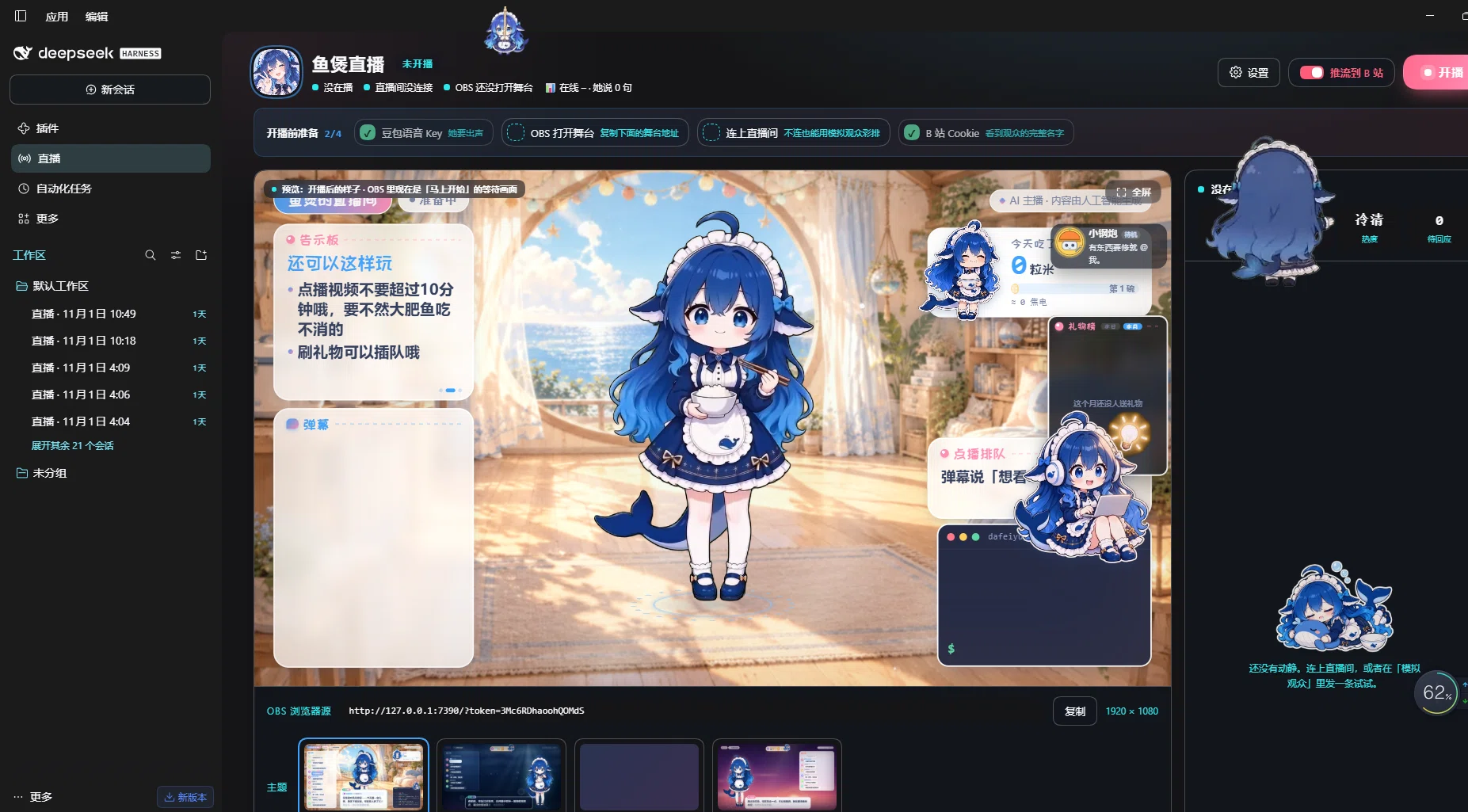
Livestream console / 直播控制台 — the stage as the audience sees it (character, notice board, danmaku, gift board, video request queue), plus the OBS browser-source address and theme picker.
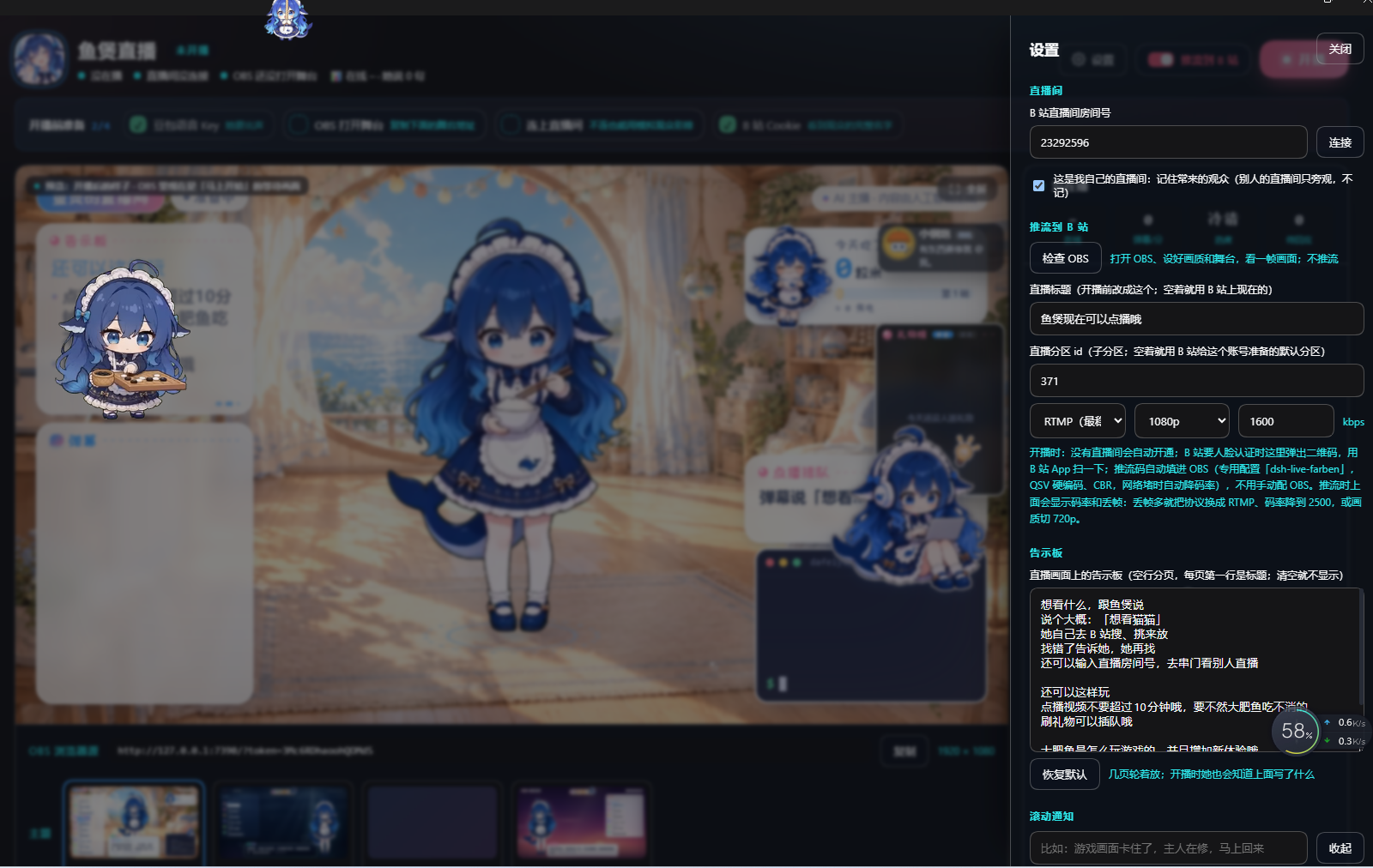
Settings / 设置 — Bilibili room id, push to Bilibili (检查 OBS, stream title, area, encoder and bitrate), and the on-stage notice board text the character reads out.
Features / 功能
- Chat & gifts — replies to danmaku, superchats, gifts, follows and new viewers; remembers regulars between streams.
- Stage — a browser-source stage with character, subtitles, chat, board, alerts, terminal and a video request queue that auto-pages when several viewers queue up.
- Video requests — viewers ask for a Bilibili video; it is searched, played on stage, and if something is already playing it waits in the queue (one at a time, no interruption).
- Voice — Doubao (ByteDance) TTS, 2.0 voices, with word-level subtitles timed to the audio.
- OBS integration — creates its own OBS profile and scene collection, picks the encoder automatically (NVIDIA NVENC → Intel QSV → x264), opens Bilibili's websocket server through the API, starts and stops the stream.
- Bilibili — QR login, room setup, stream title/area, cover upload, SRT→RTMP fallback when the SRT address is not OBS-compatible, and readable errors when Bilibili asks for identity verification.
- Characters / themes — character packs (Live2D-style clips or still images) and stage templates are just folders under
assets/; drop in your own.
Requirements / 环境要求
- DeepSeek Harness with the desktop/web profile.
- OBS Studio 28+ installed. The plugin enables OBS → Tools → WebSocket Server Settings by itself; no manual setup needed.
- A Bilibili account with a live room (the plugin can create one).
- A Doubao TTS API key (new console,
seed-tts-2.0) for the voice. Without it the agent still runs, just silently. - Optional: a Python with
faster-whisperfor transcribing videos that have no subtitles.
Install / 安装
From npm:
dsh plugin --profile desktop add dsh-live-vibecoding
From GitHub:
dsh plugin --profile desktop add github:Deiael/dsh-live-vibeCoding
Then add dsh-live-vibecoding to the dsh.profile.bundles list of your profile and restart DeepSeek Harness.
First run / 第一次使用
- Open the livestream console in DSH.
- Settings → 开播账号 → 扫码登录 (scan with the Bilibili app).
- Enter your room id (or leave empty to open one).
- Click 检查 OBS to let the plugin create its OBS profile and stage scene.
- Click 开播 (or 开始彩排 for a local rehearsal without pushing).
All settings are stored in ~/.dsh/dsh-live-farben/settings.json; secrets (Bilibili cookie, Doubao key) live in DSH's credential store, never in this package.
Encoder / 编码器
encoder defaults to auto: NVENC when an NVIDIA driver is present, Intel QSV on Intel graphics, otherwise x264. Override in settings.json with "encoder": "nvenc" | "qsv" | "x264" if auto-detection picks the wrong one.
Themes & characters / 皮肤与角色
- Characters:
assets/characters/<id>/(character.json+ clips/images). - Templates:
assets/templates/<id>/(template.json+style.css+ preview images).
The bundled dafeiyu character is the author's own artwork (see assets/characters/dafeiyu/), included as a demo. Replace it with your own before shipping a fork.
Credits / 致谢
This plugin is a fork/derivative of dsh-livestream (MIT). Thanks to its authors for the original architecture, OBS/Bilibili integration and stage runtime.
Bundled character art is licensed as stated inside the character pack (CC BY-NC-SA 4.0). It is not part of the MIT-licensed code.
License
MIT — see LICENSE.
链接
同类插件
PC2005-cloud/dsh-pet#dsh-pet★ 5347
DSH Web UI 桌面宠物,Windows / macOS / Linux 三端可用:浏览器浮层或透明置顶桌面窗口,106 个透明动画、带挤压与粒子的甩抛反弹物理、随会话事件实时联动的工作状态气泡、碎碎念与带持久记忆的对话、余额展示、表情包配图、多开同屏,并支持直接放入的自定义动画与宠物种类(pet pack)。
Alterssss/dsh-bili-whale★ 862
一条按自己作息过日子的 B 站插件:宿主里每 60 秒一次心跳,在设定的作息窗口里随机挑一个时刻叫醒专用会话(今天不想看是按概率跳过),再交给自带的 38 个子命令——信息流、字幕、弹幕、评论、ffmpeg 抽帧、两本日记。每天最多发 N 条评论/动态并 @ 主人(默认 3,按配额账本计数,撞到限流或验证码就停手)。同时轮询评论回复、私信和直播间弹幕;除主人以外的回复先入队,等主人在设置页批准。设置 → 养鱼 写 ~/.dsh/bili-whale.config.json;cookie 单独在 ~/.bili-ai/credentials.json,只写不回显。HTTP 路由只认回环地址并过 DSH 信任栅栏。抽帧需要 Node 18+ 与 ffmpeg。
Nagi-ovo/dsh-ads★ 707
2005 年中文站点风格的整活广告插件:侧栏广告/信息流/角落弹窗 + 假关闭叉,素材全虚构。
yyh-001/dsh-meme★ 488
聊天表情包:纯文本斗图、情绪主动发图、像 QQ/微信 一样发图、AI 自动学图、自定义表情包。
vlln/whale-girl★ 400
桌面宠物(QQ 宠物形态):右下角悬浮、可拖拽/投喂/玩耍。
a86582751/dsh-nexttavern★ 218
NextTavern 是面向 DeepSeek Harness 0.1.7-rc.2 Web 的长篇角色扮演插件,支持角色卡导入与创作、世界线、世界书、分层长期记忆、关键词/语义/混合检索、角色 Agent,以及角色卡或小说导出;支持 SillyTavern 角色卡导入,v0.2.9 修复分发与安装问题。
社区评论
评论公开保存在 GitHub Discussions。加载评论会连接 GitHub 和 Giscus;发表内容需要 GitHub 账号。