WeChat-style skin for the Harness web UI: grey chat list, green outgoing bubbles, white incoming bubbles, a green send button, and a 已归档 tag on archived sessions.
Install
# from GitHub (first run asks for allowBuilds approval — follow the hint, retry)
dsh plugin --profile web add github:Cui-chengyu/dsh-wechat-theme
Any plugin you install runs third-party code with your own permissions — it can read your files, use your credentials, and reach the network, and tool approvals don’t sandbox it. GitHub-sourced plugins also run build scripts at install time — pnpm blocks those until you allow them, so an install can stop with ERR_PNPM_GIT_DEP_PREPARE_NOT_ALLOWED or ERR_PNPM_IGNORED_BUILDS; dsh prints the exact key to add under allowBuilds in your profile’s pnpm-workspace.yaml, and the install works on the next run. Allowing a build is a trust decision: only install sources you trust, and pin a commit (github:owner/repo#sha).
README
This plugin publishes its README in Chinese only.
把 DeepSeek Harness 的网页界面换成微信的样子:灰白配色、绿色气泡、绿色发送键、微信式会话列表。
一个纯前端的主题插件,不改动 Harness 自身的任何文件:它在页面里注入一张全局样式表,
按 Harness 已经暴露的 CSS 变量和稳定的类名后缀覆盖外观。宿主那一半(index.js)是空的,
不占端口、不注册路由、不写文件。
效果
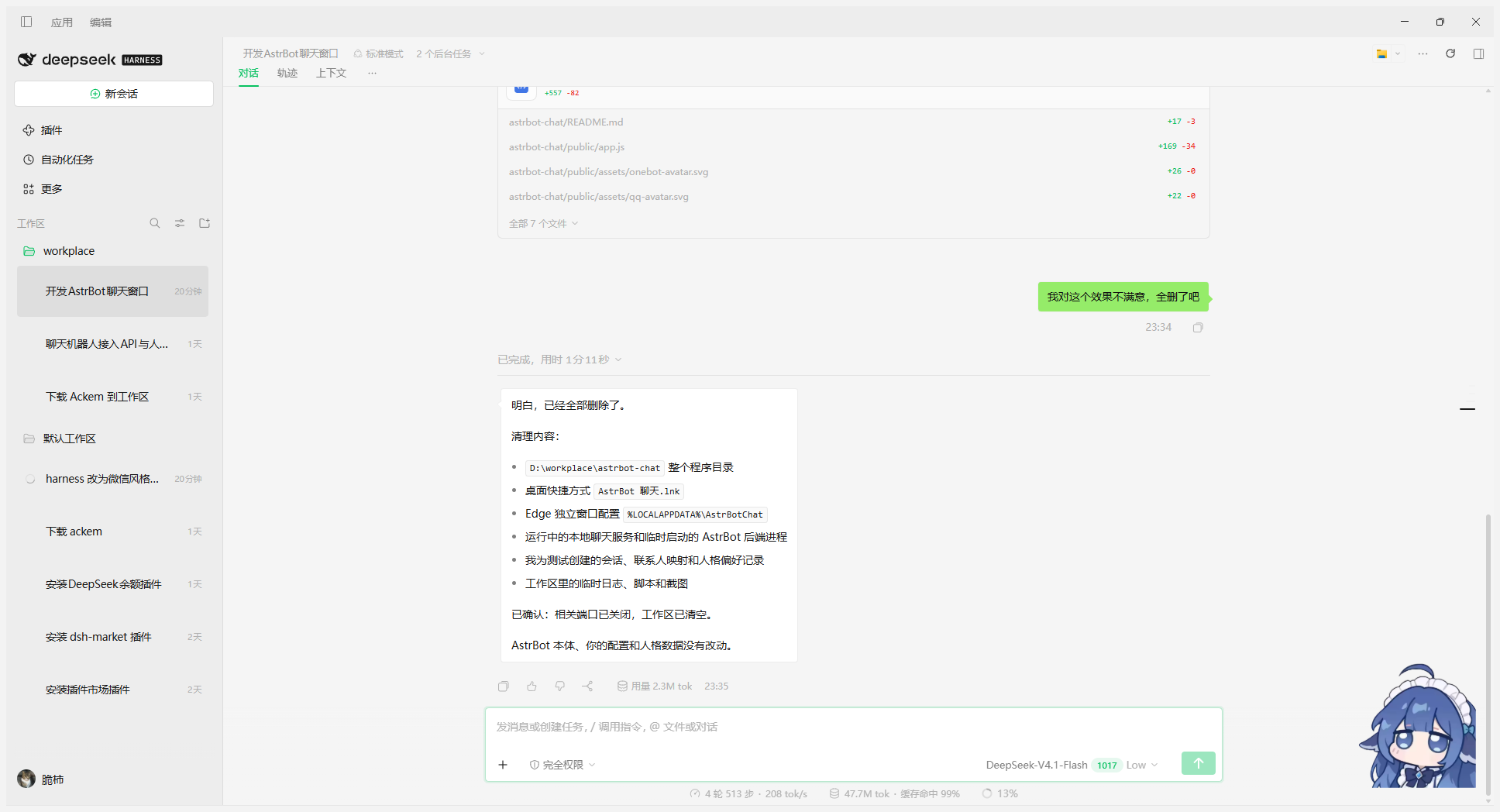
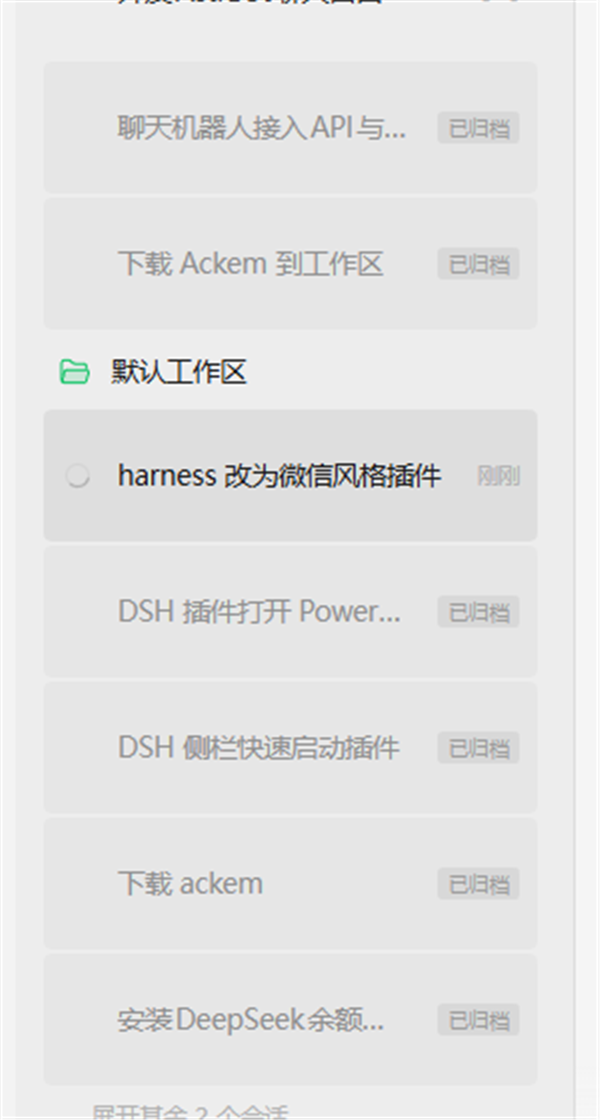
| 位置 | 微信风格 |
|---|---|
| 侧边栏 | 微信灰 #EDEDED,会话标题一律深色,不再把非当前会话淡出 |
| 自己的消息 | 绿色气泡 #95EC69,右对齐,右上小尖角 |
| 助手消息 | 白色气泡,左对齐,左侧小尖角;没有可读内容的步骤不显示空气泡 |
| 发送键 | 微信绿 #07C160 圆角按钮 |
| 输入区 | 白色卡片,微信式圆角与细边框 |
| 顶部标签 | 对话 / 轨迹 / 上下,选中项绿色下划线 |
| 已归档会话 | 灰色底色 + 灰标题,右侧「已归档」小标签代替时间,悬停换回操作按钮 |
| 深色模式 | 跟随 Harness 的深色主题,配色换成深灰 + 亮绿 |
已归档的会话默认被 Harness 藏起来,在侧栏「工作区」标题右侧的筛选菜单里选 全部对话(显示已归档) 才看得到;本主题把这类会话画成灰底灰字,并在时间的位置 换成一个小「已归档」标签,悬停时标签让位给「取消归档」按钮。
安装
dsh plugin --profile desktop add github:Cui-chengyu/dsh-wechat-theme
装完刷新一次界面。市场收录后也可以直接在 Harness 的「插件」页面里搜索
dsh-wechat-theme 一键安装。
本地开发时用 link: 指向克隆下来的目录,改 client.js 就是改线上代码,不用重装:
dsh plugin --profile desktop add "link:<你克隆下来的目录>"
开发与生效
Harness 的浏览器端插件在页面启动时冻结脚本清单,改完 client.js 后光刷新页面
不会加载新代码,要让插件行重新注册一次:
在 profile 的
cordis.patch.yml(~/.dsh/profiles/desktop/cordis.patch.yml)末尾临时加上- id: dsh-wechat-theme disabled: true稍等 3~5 秒(插件被卸载),再删掉这三行(插件重新装载,按新的修订号取回
client.js)。或者直接按右上角的刷新按钮(
dsh-unlag提供),它会在插件重新注册之后重建界面。
想看选中效果,也可以在同样的 profile patch 里把主题行去掉,等几秒再放回去。
结构
package.json        # dsh.bundle.patch + dsh.client 清单
cordis.patch.yml    # 往 profile 里插入 dsh-wechat-theme 这一行
index.js            # 宿主半边:什么都不做,只声明插件名
client.js           # 浏览器半边:一张样式表 + 空气泡探测器
icon.svg            # 插件列表里的图标
assets/             # 图标位图与效果截图
screenshots.json    # 告诉插件市场详情页展示哪几张截图
client.js 用 window.__ModuleLoader__.load({ id, factory }) 注册,apply(ctx) 里用
ctx.effect 挂一个 <style data-plugin-css="dsh-wechat-theme">,卸载时移除。
所有安装动作都包在 try/catch 里:主题挂掉不能把整个界面带下水。
空气泡探测器是一个 MutationObserver:Harness 给每一个「只有工具调用、没有文字回答」的
步骤也渲染一个助手气泡,里面只剩被隐藏的思考行,气泡宽度等于自身内边距(≤ 30px)。
量到这种气泡就打个 data-wx-empty 标记,样式表把它隐藏;等真有文字流进来、
DOM 变了再量一次,气泡自己回来。
卸载
dsh plugin --profile desktop remove dsh-wechat-theme
然后按一次刷新按钮(或重启 Harness),界面回到默认外观。
范围
只改外观,不改行为:不拦截事件、不改 DOM、不加按钮、不碰会话数据。
样式选择器依赖 Harness 的 CSS 模块类名后缀(如 .xMeOpW_root、.LOmM4q_bubble),
这些后缀在同一个大版本内稳定;Harness 升级后如果类名变了,对照
node_modules/@deepseek-ai/dsh-client-ui-chat/lib/client.js 里的
AssistantMarkdown_module_css_default 之类的映射表即可。
License
MIT
Links
More in this category
elysia395/dsh-wallpaper-engine★ 4500
Requires DeepSeek Harness 0.1.5-rc.1+ (DSH Desktop >= 2.0.7) and dsh-better-sidebar >= 0.19.0 - update both before installing or updating this plugin. Plays local Wallpaper Engine Video/Web wallpapers behind the chat, renders Scene wallpapers as extracted static frames, and adds content-rating/type filters, custom uploads and an iOS-style liquid-glass settings window.
Small-tailqwq/dsh-deep-whale#maid-atelier★ 3000
Whale-girl skin series for the DSH Web UI (maid-atelier).
Nwflower/dsh-claude-style★ 434
Claude Code Desktop look-and-feel for the DSH Web GUI — ivory/warm-black dual canvas, clay accent, three-font typography, permission segmented control and brand switcher, via CSS overrides and client DOM overrides.
d-dev0101/open-sea-skin★ 387
Realtime WebGPU ocean skin with quick controls for waves, daylight, glass opacity, and an automatic day cycle.
kingOfSoySauce/dsh-liang-skin★ 356
Adaptive reasoning slider skin that maps each model's available reasoning efforts onto a 0–30 visual intensity scale, with synchronized portraits, background, and interface colors.
RevolutionLA/dsh-dream-skin★ 299
One-command skin plugin: 8 original themes, translucent wallpaper with opacity/blur, per-user accent, and shareable theme-pack import/export, favorites and surprise-me — purely native on DSH's token system.
Community comments
Comments are public GitHub Discussions. Loading them connects to GitHub and Giscus; a GitHub account is required to post.