Adds a Settings Usage dashboard for DeepSeek API balance, official token and cost analysis, trends, context warnings, and live API activity.
Install
# from GitHub (first run asks for allowBuilds approval — follow the hint, retry)
dsh plugin --profile web add github:ChrisZhangWG/dsh-codex-meter
Any plugin you install runs third-party code with your own permissions — it can read your files, use your credentials, and reach the network, and tool approvals don’t sandbox it. GitHub-sourced plugins also run build scripts at install time — pnpm blocks those until you allow them, so an install can stop with ERR_PNPM_GIT_DEP_PREPARE_NOT_ALLOWED or ERR_PNPM_IGNORED_BUILDS; dsh prints the exact key to add under allowBuilds in your profile’s pnpm-workspace.yaml, and the install works on the next run. Allowing a build is a trust decision: only install sources you trust, and pin a commit (github:owner/repo#sha).
README
This plugin publishes its README in Chinese only.
DeepSeek API 用量监控插件(DSH web GUI):原生 Settings → Usage 页面,实时显示账户余额、官方今日消费、Token 构成与月度趋势。界面全部为英文。
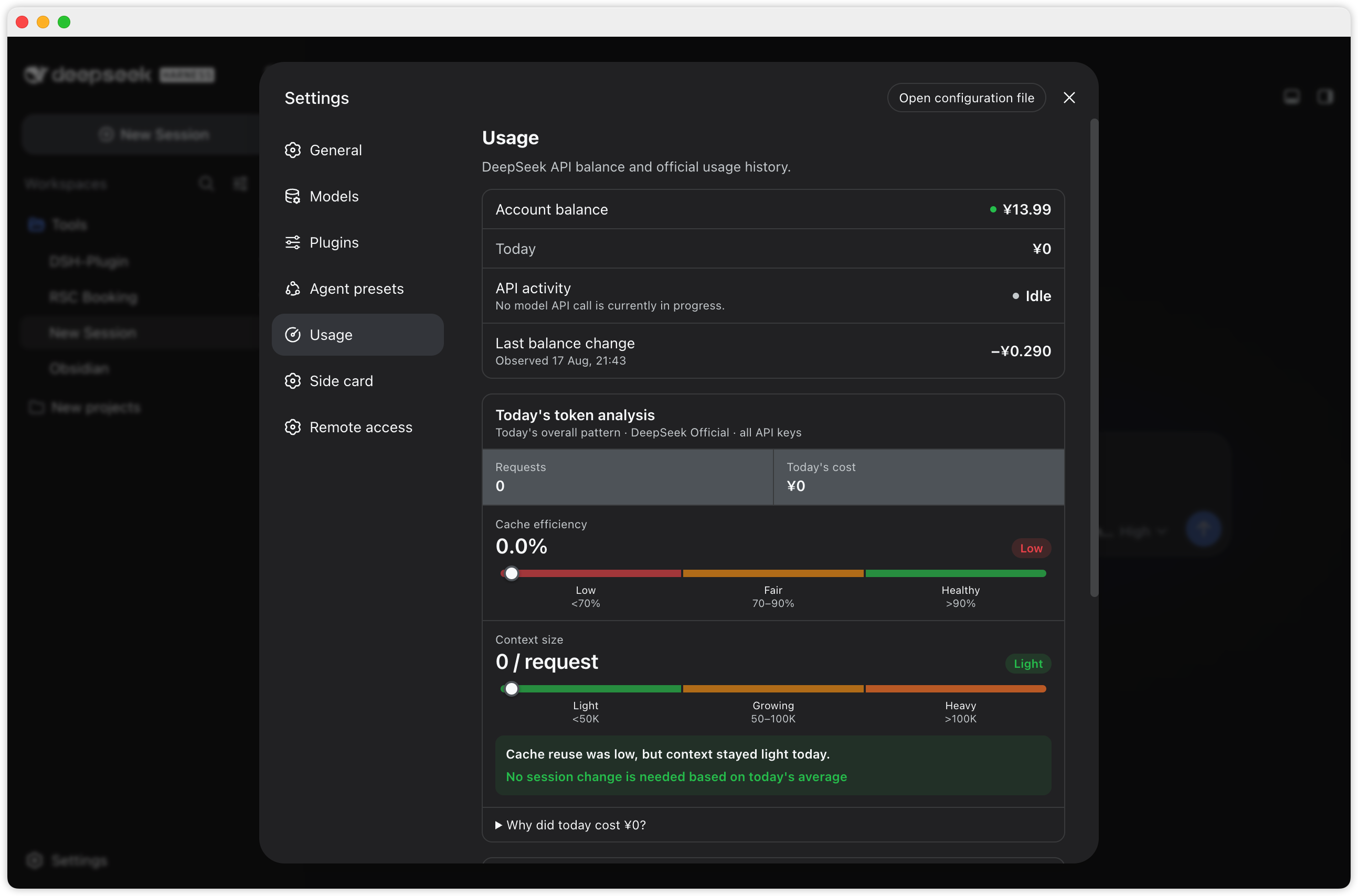
Usage overview and token analysis
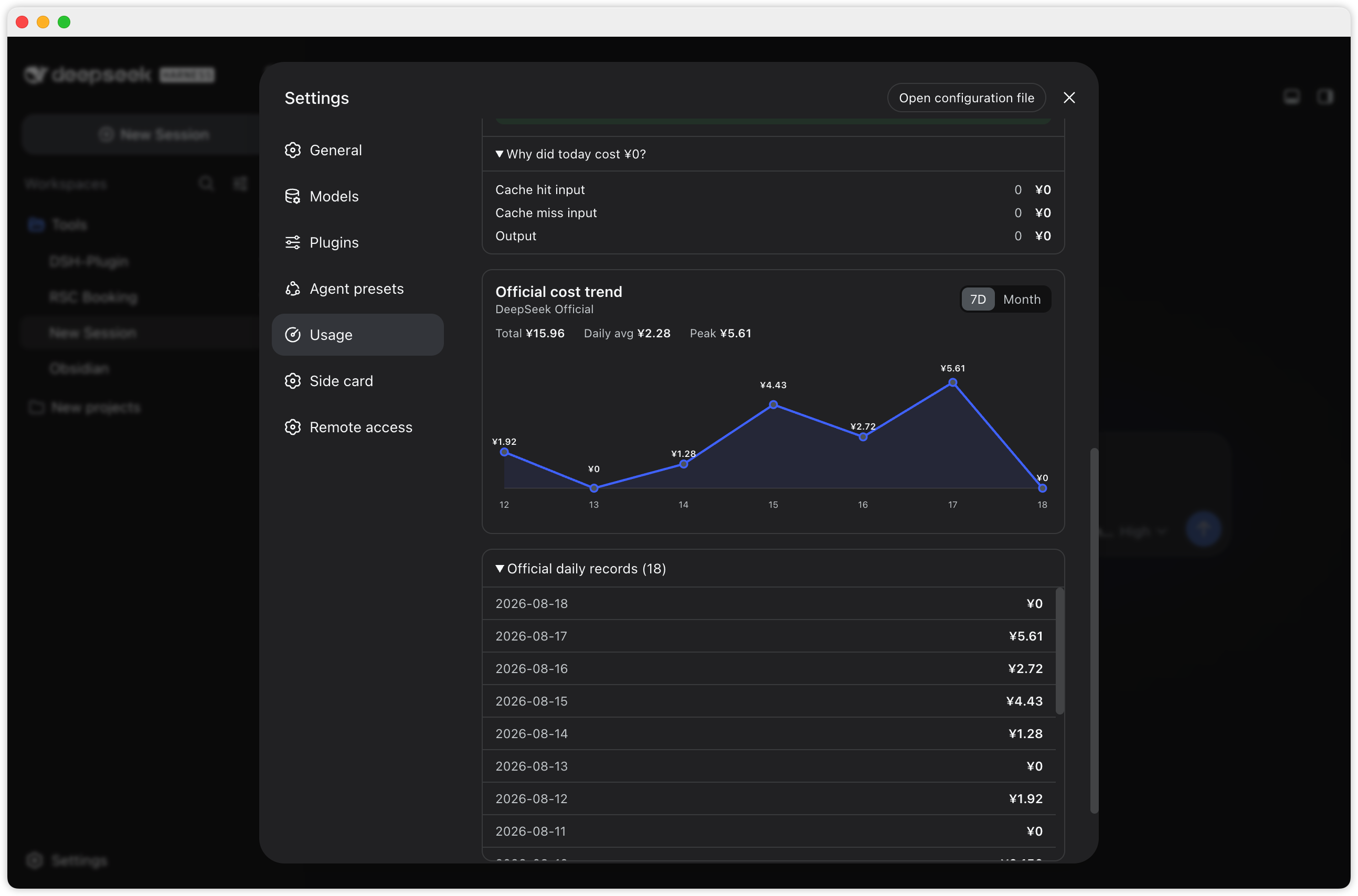
Cost breakdown, trend, and daily records
功能
- Settings → Usage 原生页面(设置 → 通用 → Usage),不再是右下角悬浮胶囊
- 圆形仪表图标:Settings 侧栏 Usage 入口使用自定义圆形仪表图标(非默认齿轮)
- 数据项均为英文标签:
Account balance— DeepSeek API 剩余余额(官方/user/balance,实时准确)Today— 今日已消费(配置平台 token 后为官方数据;否则≈本地估算,估算值明确带≈前缀)Last balance change— 最近一次观测到的余额变动(含观测时间,+/−带符号显示)
- Today's token analysis 官方今日分析:
- 请求数、今日费用,以及 Cache efficiency / Context size 两条区间尺
- Cache efficiency:
Low <70%/Fair 70–90%/Healthy >90% - Context size:
Light <50K/Growing 50–100K/Heavy >100K(按今日平均输入/请求) - 组合生成今日整体趋势与行动建议,明确不将今日聚合值误称为当前 Session 的精确诊断
- Cache hit input / Cache miss input / Output 的 Token 与费用拆分折叠到
Why did today cost …? - 可展开的小时级请求、Token 与官方费用记录
- 聚合所有 API Key 后再传给浏览器,不返回 API Key 名称或标识
- Official cost trend 官方费用趋势折线图:
7D/Month两个视图切换;今天之后的日期会被过滤掉(平台对本月剩余日期返回零值占位,不画进图里)- 每个每日费用点都显示数据标签(悬停还有 tooltip)
- 周期统计:
Total(合计)/Daily avg(日均)/Peak(峰值) Official daily records (N)可展开查看逐日官方明细
- API activity 实时 API 活动状态:
Active= 确有 llm/stream 模型请求在运行(显示进行中的调用数与已耗时);Idle= 无模型 API 请求- 工具执行、权限等待等不会被误报为活跃 API 调用;Active 仅表示计费可能在进行中,最终费用以官方数据为准
- 活动状态轮询是纯本地的(1s 本地路由),不会产生额外的 DeepSeek 模型调用
View full usage on DeepSeek Platform按钮:打开 DeepSeek 平台用量页(明细 + 充值)- 窗口隐藏/最小化时暂停轮询,恢复可见立即补刷;数值无变化时不触发重渲染
- 平台 token 过期/失效时,Today 行标签变为
Today (refresh needed),不会静默退回估算 - 只使用
--dsw-*主题变量,跟随浅色 / 深色模式与应用字号缩放 - 密钥不出本机:浏览器只访问宿主本地路由;仓库中不存储任何密钥值,也不会把密钥发送给浏览器
用量缓存(Usage cache)
打开 Settings → Usage 时,页面会先立即显示最近一次成功获取的用量统计,同时并行拉取最新数据,请求成功后替换显示;缓存存活 7 天。
- 刷新期间显示
Showing saved data · refreshing… - 刷新失败时保留已有数据并显示
Refresh failed · showing the last saved data. - 只缓存展示型统计数据:余额(balance)、今日消费(Today)、官方 Token 分析(todayAnalysis)、官方历史(usageHistory)与观测到的余额变动(balanceChanges)
- 绝不缓存
DEEPSEEK_PLATFORM_TOKEN、API Key、凭据等任何密钥(缓存结构里没有这些字段) - API activity 不缓存:Active/Idle 始终来自实时活动接口
/api/codex-meter/api-activity - 首次打开(无缓存)会等待一次真实请求,属预期行为
安装(桌面版手动方式)
本插件按 DSH 标准 bundle 插件设计(dsh.bundle.patch + dsh.client)。推荐从 npm 安装:
dsh plugin --profile <name> add dsh-codex-meter
也可直接从 GitHub 安装:dsh plugin --profile <name> add github:ChrisZhangWG/dsh-codex-meter。
桌面版(DSH Desktop 2.x)的手动接线方式:
将本包放入 profile 的 node_modules:
PROFILE=~/.dsh/profiles/desktop
mkdir -p "$PROFILE/node_modules"
cp -R dsh-codex-meter "$PROFILE/node_modules/"
桌面版 profile 的 node_modules 为空,插件的宿主依赖需软链到桌面自带 bundle:
mkdir -p "$PROFILE/node_modules/@deepseek-ai"
ln -sfn "/Applications/DSH Desktop.app/Contents/Resources/app.asar.unpacked/node_modules/@deepseek-ai/dsh-credentials" \
  "$PROFILE/node_modules/@deepseek-ai/dsh-credentials"
在
$PROFILE/cordis.patch.yml追加 loader 条目:- insert: - id: codex-meter name: dsh-codex-meter完全重启 DSH Desktop(退出再打开)。重启后进入 Settings → Usage 查看。
若用 CLI 版
dsh web:profile 自带完整 pnpm workspace,直接dsh plugin --profile web add dsh-codex-meter即可,无需手动接线。
配置
余额读取复用
DEEPSEEK_API_KEY(设置 → 模型,或~/.dsh/.credentials.yaml)。官方数据需要
DEEPSEEK_PLATFORM_TOKEN(趋势图、今日官方消费、逐日明细均来自官方接口): 登录 platform.deepseek.com → DevTools → Console →JSON.parse(localStorage.getItem('userToken')).value, 存到~/.dsh/.credentials.yaml:DEEPSEEK_PLATFORM_TOKEN: <token>配置后 Today / 趋势图显示官方精确数据;token 会随平台会话过期,失效时 Today 行显示
Today (refresh needed)并自动退回≈估算(数据落~/.dsh/storages/codex-meter-day.json), 重新按上述步骤取新 token 即可恢复。观测到的余额变动记录在
~/.dsh/storages/codex-meter-balance-history.json(运行期数据,不入库)。
宿主路由
| 路由 | 说明 |
|---|---|
GET /api/codex-meter/balance |
余额、官方月度用量历史、Today 来源/状态、聚合且去除 API Key 标识的官方今日 Token/小时分析、观测到的余额变动 |
GET /api/codex-meter/api-activity |
仅非敏感的实时模型调用元数据(id/启动时间/provider/model/sessionId),无提示词、无密钥;工具执行与权限等待不计入 |
GET /api/codex-meter/session-cost?sessionId= |
会话费用:宿主按会话日志回放计价(注意:这是本地估算,不是官方账户扣费记录;Usage 页面不使用它) |
开发
git clone <fork>
cd dsh-codex-meter
# 改 lib/index.js(宿主)/ lib/client.js(浏览器端 Usage 页面)
npm test
# 同步到已安装副本并重启桌面端验证
许可
MIT。价格引擎移植自 bpc-oss/dsh-web-billing(MIT), 宿主逻辑参考 dsh-deepseek-quota(MIT)。
Links
More in this category
bowenliang123/dsh-context★ 1791
DSH context insight panel: Context dashboard + /context command + Context browser — one-stop context lifecycle management with categorized composition, content details, evolution trends, compaction/injection events, and stats.
Han-1413141/dsh-cost-meter★ 361
Per-session and daily API cost, budget with usage %, official balance, history dashboard, and one-click official price sync with peak/off-peak pricing.
wssfk12138/dsh-damage-pulse★ 237
Tracks DeepSeek token usage, per-call and session costs, and account balance with cache-aware charge animations in the DSH Web UI.
zh667/TokenLedger★ 202
Sidebar usage panel that attributes tokens to the relay site that served each request, read from your existing provider config: today/month/all-time totals, per-site and per-model breakdowns, a year activity heatmap, and New API / Sub2API / DeepSeek balances.
Ychris12138/dsh-usage-stats★ 167
Multi-provider usage dashboard with provider/model token breakdowns, calendar drill-downs, account balances, and OpenCode Go / Z.ai subscription quota tracking.
PolinniZhong/dsh-personal-center★ 118
Personal center for DeepSeek Harness: cross-session usage statistics, per-model cost estimation, global custom instructions, a global font-size adjuster, a data-driven desktop pet with bitmap & vector skins, and a conversation status overview, all local and offline.
Community comments
Comments are public GitHub Discussions. Loading them connects to GitHub and Giscus; a GitHub account is required to post.