A floating credit/quota widget for the DeepSeek Harness Web: shows DeepSeek / OpenCode Go balances and usage, and tracks DSH session token usage and estimated cost by day, month, and model.
Install
# from npm (prebuilt)
dsh plugin --profile web add dsh-plugin-balance
# from a prebuilt release tarball
dsh plugin --profile web add "https://github.com/Andrew111888/dsh-plugin-balance/releases/download/v1.4.4/dsh-plugin-balance-1.4.4.tgz"
# from GitHub (first run asks for allowBuilds approval — follow the hint, retry)
dsh plugin --profile web add github:Andrew111888/dsh-plugin-balance
Any plugin you install runs third-party code with your own permissions — it can read your files, use your credentials, and reach the network, and tool approvals don’t sandbox it. GitHub-sourced plugins also run build scripts at install time — pnpm blocks those until you allow them, so an install can stop with ERR_PNPM_GIT_DEP_PREPARE_NOT_ALLOWED or ERR_PNPM_IGNORED_BUILDS; dsh prints the exact key to add under allowBuilds in your profile’s pnpm-workspace.yaml, and the install works on the next run. Allowing a build is a trust decision: only install sources you trust, and pin a commit (github:owner/repo#sha).
README
dsh-plugin-balance
A floating credit / quota widget for the DeepSeek Harness Web — plus DSH session token usage & cost stats.
English · 简体中文 README
✨ What it is
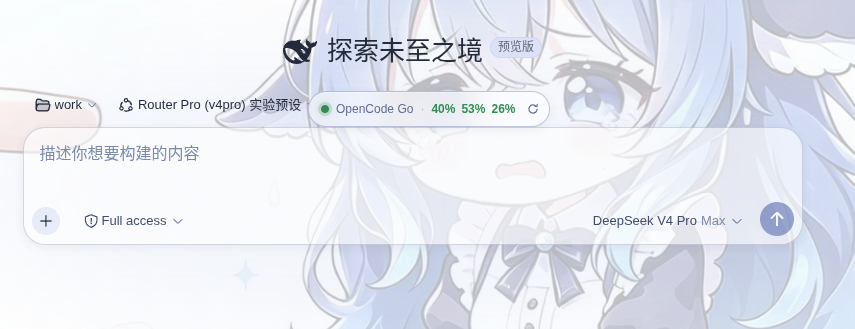
dsh-plugin-balance is a DSH (DeepSeek Harness) Web plugin that floats a small widget right above the input box. It shows:
- LLM account balance / quota for DeepSeek official, OpenCode Go, OpenAI, or any custom quota endpoint.
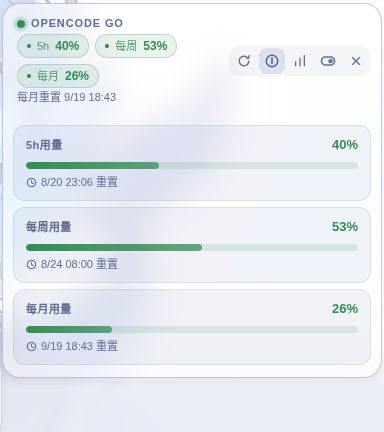
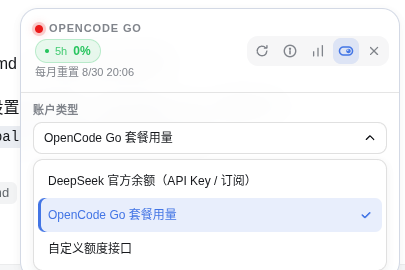
- OpenCode Go — the main window shows all three usage periods at a glance: 5h / weekly / monthly percentage badges (color-coded green → amber → red).
- DSH session token usage — how many tokens your DSH chats consumed, tracked per day / per month / in total, broken down by model, persisted to disk.
- Estimated cost — token usage priced with official DeepSeek (peak/off-peak), Kimi and GLM rates.
The widget is draggable, theme-aware (light/dark), and collapses into a slim pill that keeps a refresh button.
🖼 Preview
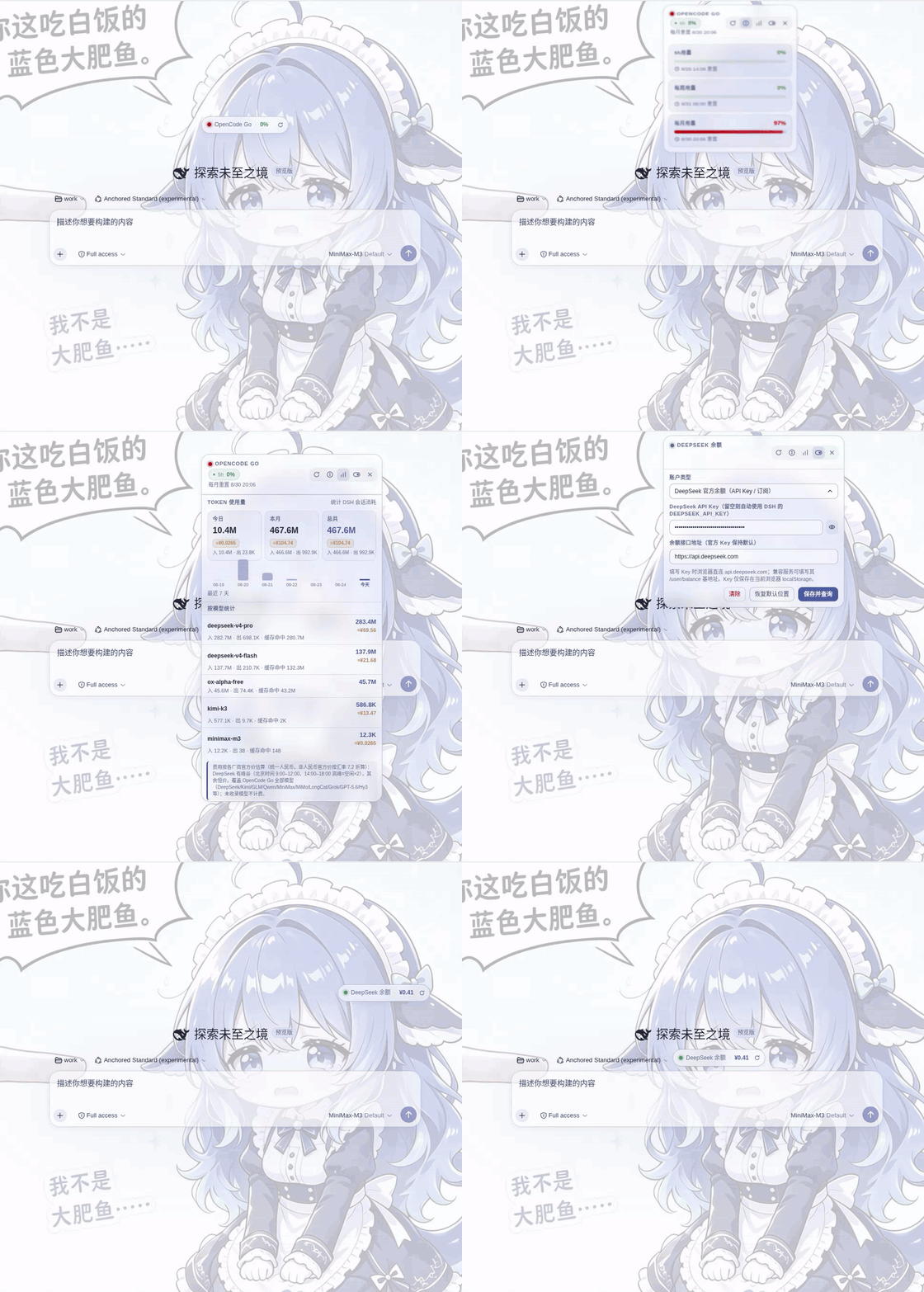
① Animation — hover to expand, move away to collapse (spring animation), see the interaction in action
② Usage detail — OpenCode Go 5h / weekly / monthly usage and reset times
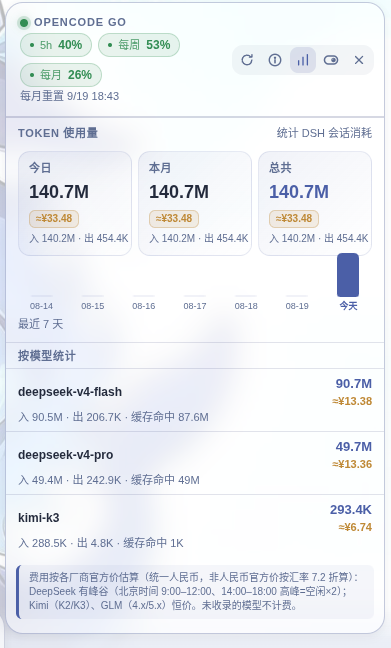
③ Token usage stats — today / month / total + last-7-days chart + per-model breakdown + cost estimate
④ In-context — the floating widget above your chat
⑤ Balance type — auto-detects DeepSeek official balance vs plan usage (OpenCode Go)
Features
| Area | What you get |
|---|---|
| Accounts | DeepSeek official (/user/balance), OpenCode Go (/usage via host proxy), OpenAI credit_grants, or a custom quota endpoint synced from the DSH model list |
| OpenCode Go display | 5h / weekly / monthly percentage chips in the main row, clean percentages in the collapsed pill, reset times in the detail panel |
| Token usage | Today / This month / Total token counts, a last-7-days mini bar chart, and a per-model breakdown (input / output / cache-hit) |
| Cost estimate | ≈¥ badges with official pricing — DeepSeek (peak/off-peak ×2, Beijing 9:00–12:00 & 14:00–18:00), Kimi (K2/K3) & GLM (4.x/5.x) at constant rates (USD official prices converted at ~7.2) |
| UX | Draggable, position persisted, click-outside collapses, theme-adaptive, refresh on the pill too |
🚀 Install as a DSH plugin
The plugin is published to npm (dsh-plugin-balance) and ships a dsh.bundle manifest, so it installs with the standard DSH plugin command:
dsh plugin add dsh-plugin-balance           # default profile
# or explicitly the Web profile:
dsh plugin --profile web add dsh-plugin-balance
This resolves the npm package, writes the bundle entry, and enables the plugin. Restart
dsh web(or reload) and refresh the browser page.
🛒 Install from the plugin market (listed on dsh-market)
The plugin is listed in the awesome-dsh-plugin catalog and available on dsh-market, the plugin market built into DSH Settings. With dsh-market installed, search for dsh-plugin-balance under Settings → Plugin Market and install / upgrade with one click:
dsh plugin --profile web add dshmarket
Manual install (by hand)
If you manage the profile yourself (offline, or no dsh CLI):
In your Web profile's
package.json(e.g.~/.dsh/profiles/web/package.json), add the dependency — from npm, a tarball URL, or a local path:"dependencies": { "dsh-plugin-balance": "^1.3.6" }Enable it in
cordis.patch.yml(the package ships the exact entry ascordis.patch.yml):- insert: - id: plugin-balance name: dsh-plugin-balanceInstall & restart:
cd ~/.dsh/profiles/web
pnpm install
# restart `dsh web`, then refresh the browser page
Requires the
webServerandcredentialsservices (provided by@deepseek-ai/dsh-web-appin the web profile). The host half needscredentials,webServer,llm,settings, andsessions.
⚙️ Usage
Click the switch button to open settings:
- DeepSeek official — leave the key blank to auto-use DSH's
DEEPSEEK_API_KEY, or enter a key in the browser (stored inlocalStorage). A custom/user/balancebase URL is supported. - OpenCode Go — nothing to fill in; it auto-reads the DSH credential
OPENCODE_GO_API_KEY(falls back toOPENCODE_API_KEY). - Custom quota endpoint — pick a vendor from the DSH model list (auto-fills
baseURL+apiKeyEnv), or fill the endpoint manually; credentials are resolved host-side, never sent to the browser.
Click the bar-chart button to open the TOKEN 使用量 panel (today / this month / total + 7-day chart + per-model breakdown + cost badges).
🧮 Token usage & cost
The host half listens to the DSH session event stream (session/event), folds each request's reported token usage (cache-miss input + cache write, cache hit, output) by day / month / model, and persists it to ~/.dsh/storages/dsh-plugin-balance-usage.json.
- Idempotent: a newer sample for the same
turn:stepreplaces the earlier one; replaying logs after a reload / restart never double-counts. - Model attribution follows each request's
request/header, so sessions that switch models mid-flight stay in the right bucket. - Served to the client at
GET /api/dsh-plugin-balance/tokens. - Cost uses official pricing for DeepSeek (peak/off-peak, CNY) and Kimi/GLM families (USD converted at ~7.2), priced by the moment each sample occurred (see the note in the UI). Unlisted models aren't priced.
- Store format is
version 9: legacy data is no longer estimated — it is rebuilt exactly by replaying session events, including archived sessions from the on-disk logs.
📄 License
Links
More in this category
bowenliang123/dsh-context★ 1867
DSH context insight panel: Context dashboard + /context command + Context browser — one-stop context lifecycle management with categorized composition, content details, evolution trends, compaction/injection events, and stats.
Han-1413141/dsh-cost-meter★ 374
Per-session and daily API cost, budget with usage %, official balance, history dashboard, and one-click official price sync with peak/off-peak pricing.
wssfk12138/dsh-damage-pulse★ 240
Tracks DeepSeek token usage, per-call and session costs, and account balance with cache-aware charge animations in the DSH Web UI.
zh667/TokenLedger★ 203
Sidebar usage panel that attributes tokens to the relay site that served each request, read from your existing provider config: today/month/all-time totals, per-site and per-model breakdowns, a year activity heatmap, and New API / Sub2API / DeepSeek balances.
Ychris12138/dsh-usage-stats★ 168
Multi-provider usage dashboard with provider/model token breakdowns, calendar drill-downs, account balances, and OpenCode Go / Z.ai subscription quota tracking.
PolinniZhong/dsh-personal-center★ 118
Personal center for DeepSeek Harness: cross-session usage statistics, per-model cost estimation, global custom instructions, a global font-size adjuster, a data-driven desktop pet with bitmap & vector skins, and a conversation status overview, all local and offline.
Community comments
Comments are public GitHub Discussions. Loading them connects to GitHub and Giscus; a GitHub account is required to post.