A whip for DeepSeek V4 Pro: it watches the reasoning fingerprint of every thinking block and pulls the model back when it slips from focused "We will / I will" mode into scattered "let me" mode.
Install
# from npm (prebuilt)
dsh plugin --profile web add @a9i5k4/dsh-anchored-monitor
# from GitHub (first run asks for allowBuilds approval — follow the hint, retry)
dsh plugin --profile web add github:Aik358/dsh-anchored-monitor
Any plugin you install runs third-party code with your own permissions — it can read your files, use your credentials, and reach the network, and tool approvals don’t sandbox it. GitHub-sourced plugins also run build scripts at install time — pnpm blocks those until you allow them, so an install can stop with ERR_PNPM_GIT_DEP_PREPARE_NOT_ALLOWED or ERR_PNPM_IGNORED_BUILDS; dsh prints the exact key to add under allowBuilds in your profile’s pnpm-workspace.yaml, and the install works on the next run. Allowing a build is a trust decision: only install sources you trust, and pin a commit (github:owner/repo#sha).
README
English | 简体中文
In one sentence (一句话说清): it's a whip for DeepSeek V4 Pro. When the model falls from the focused, high-capability mode ("We need…" / "I will…") into the scattered, low-focus mode ("let me…"), the whip cracks — and pulls it back. 这是给 DeepSeek V4 Pro 加的一根鞭子——当它从「We need / I will」的高专注、高能力模式, 跌落到「let me」的发散、低专注、低效率模式时,就抽它一鞭,让它改回去。
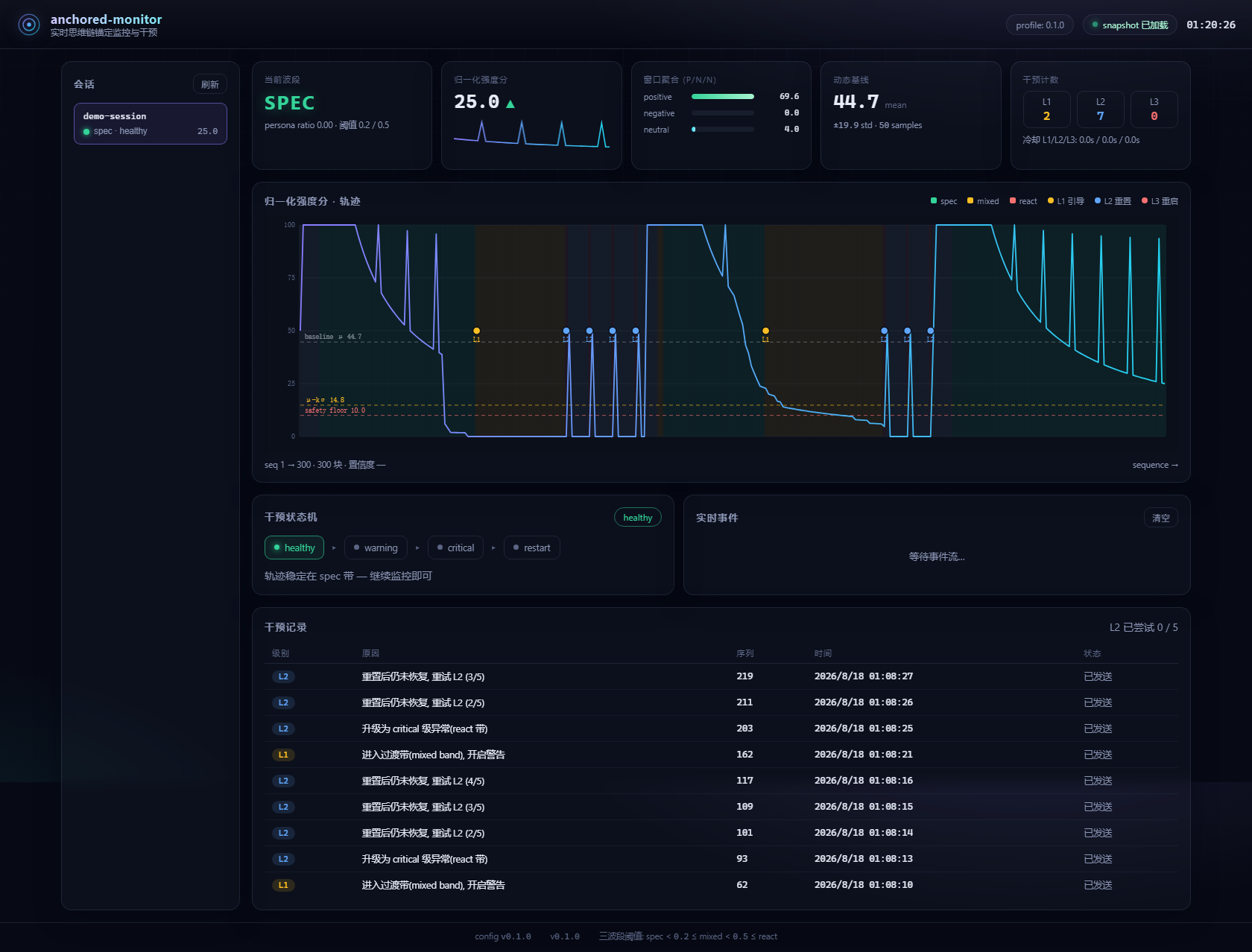
Real-time chain-of-thought anchoring monitor & intervention for DeepSeek Harness. Watch the we / let's / let me fingerprint of every reasoning block, stay in the spec band, and pull the model back automatically when the trajectory drifts.
What it is, in one line
Don't touch a thing and it's simply a live gauge of how hard your model is thinking right now. Thinking intensity, three-band state and the ECG-style curve, tucked into the corner of your screen — a real-time visualization of your model's thinking efficiency / capability intensity.
- Visualization first (default — no intervention until you want it): a real-time thinking-efficiency / capability-intensity gauge.
- Intervention when you need the whip: only cracks when the trajectory drifts into the scattered "let me" band — and it auto-continues the task.
- 「滑动变祖器」meme skin: flip the gauge into a Liang-o-meter that live-queries DeepSeek V4 Pro's "梁系强度" (from focused-humble to emperor-slacking) while it runs.
Open the settings page and you can tune every parameter — and one-click Reset to defaults if you ever change too much.
Which mode does it pair with?
You don't need to force-install dsh-anchored-standard.
The monitor never checks a preset's name. It reads every session's reasoning
blocks (~/.dsh/sessions/*/events.jsonl) and scores them purely by the
we / let's / let me fingerprint (spec band < 0.2, mixed 0.2–0.5, react ≥ 0.5).
So any preset that implements the anchored-standard discipline — anchor the
first turn with the Minimal persona (46-character persona + bash/str_replace_editor),
then plan in a collective "we" style without "let me" — pairs with this plugin.
Renamed / derivative presets work too: 梁神模式 (Liang-god Mode), liangshen,
and any other preset built on the same anchoring idea. The L2 reset payload is
fully self-contained (the Minimal 46-character persona + the dual tools ship in
this plugin's own config), so nothing is imported from another repo at runtime.
⚠️ One caveat: if the session was never anchored in the first place, it stays in the react band and L2 keeps firing — that's a fight loop, not monitoring. Keep interventions OFF (monitor-only) unless you're on the model this whip was tuned for.
When to turn interventions on / off — the whip is tuned for DeepSeek V4 Pro 0813:
- ✅ DeepSeek V4 Pro 0813 → interventions ON (recommended).
- ❌ Any other model → interventions OFF (monitor-only) — keep it as a pure live gauge.
This exact advice is shown right inside the plugin's panels:
ℹ Tip: keep interventions on only for DeepSeek V4 Pro 0813; turn them off (monitor-only) for other models.
Why this exists
DeepSeek V4 Pro conditions heavily on what the first request shows it. The
community measured the consequence: the official Minimal preset (46-character
persona + bash/str_replace_editor) anchors a collective "we" trajectory
and scores 99/96 on Project2, while the full Standard preset anchors an
actor-style "let me" trajectory and scores 91. Behavior is path-committed:
once anchored, expanding the tool catalog perturbs at most one reasoning block —
the mode never flips back on its own.
Anchored presets (dsh-anchored-standard) solve the bootstrap. This plugin solves what happens after anchoring: external factors (imperative hints, oversized injected context) can drag the trajectory out of the spec band, and nothing detects or repairs that drift — until now.
What it does
- Live fingerprinting — every reasoning block is scored for the spec
trajectory markers (
we,let's,we'll,we need, …) versus the react marker (let me), over a sliding window. - Three-band model — exactly the quantization measured by
dsh-router-standard:
persona_ratio < 0.2 → spec,0.2–0.5 → mixed(the unstable transition band),≥ 0.5 → react. - Tiered intervention — automatic, cooldown-gated, with hysteresis recovery:
| Level | Trigger | Action |
|---|---|---|
| L1 hint | entering the mixed band | injects a suggestive hint (never imperative — commands flip we→let me) |
| L2 reset | entering the react band | next request gets the 46-char Minimal persona + bash/str_replace_editor only; monitor window/baseline reset |
| L3 restart | L2 retries exhausted | recommends restarting the session |
- Liquid-glass Web UI — a sidebar entry opens a frosted-glass panel floating above the conversation (drag / resize / remembered). Collapsed, it becomes a rheostat-style bar showing thinking intensity as a slider position plus a rolling log ticker. DeepSeek white/gray/blue palette; dark mode uses neutral grays matching the shell. The bar is a fixed-width rounded rectangle (320px, viewport-adaptive) — no size jumping. zh/en language toggle in the panel header and settings.
- Two skins — the default Serious rheostat bar, or the Meme skin ("滑动变祖器 / Liang-o-meter"): a 52px speech-bubble floats above the intensity knob and slides with it, flipping through Liang Wenfeng faces — from focused (humble) to slacking (emperor) — as thinking intensity rises, pulsing with the band color. The face images are embedded in the client bundle (base64) so they always load. Switch in the settings page (saved locally). Face assets from Lichtspektrum/liang-intensity-calibrator (MIT).
- Zero-setup auto-start — the host plugin spawns the monitor process when DSH starts (15s watchdog keeps it alive). No manual steps.
- Live streaming ECG — the host subscribes to
llm/streamand pushesreasoning-deltachunks (1s throttle), so the charts and the bar move while the model thinks — not just after each turn. Counts are additive, so window aggregates stay exact. - CoT leak / stall guards (0.2.9) — the monitor also receives the visible
text channel (text-delta →
/api/push-text), so it can flag the two degradations the reasoning fingerprint alone can't see:text_leak(thinking-style prose leaking into the visible body — high text volume AND a highlet me/(we+let me) ratio) andstreaming_stall(reasoning goes quiet while text keeps flowing). Alert-only, never auto-intervenes; per-sessioncotcounters +guard_triggeredevents show up in the panel / dashboard. - Intervention master switch — a toggle in the panel header turns interventions on/off at runtime (persisted across restarts); off = monitor-only, no interruptions. The panel shows a hint: keep interventions on only when using DeepSeek V4 Pro 0813; turn them off for other models.
- Full settings page — every parameter (window, lexicon, scoring weights, band boundaries, thresholds, cooldowns, hint templates, bootstrap pair, log rotation) is editable in the DSH settings page with explanations and a floating save bar; saving restarts the monitor to apply changes. Charts only draw threshold lines for enabled trigger rules.
- In-loop interventions with auto-continue — the host observes every
session's reasoning, executes L1/L2/L3 automatically, and then continues
the task instead of stopping:
L1 injects a suggestive context hint (never imperative); L2 cancels the
running turn and soft-restarts the conversation (the next request runs
under the 46-char Minimal persona +
bash/str_replace_editor); L3 applies the same soft restart plus restart advice. - Experiment-first — every lexicon entry, weight, threshold, window, band
boundary and cooldown lives in YAML (
config/*.yaml, validated againstconfig/schema.json). JSONL experiment logs, offline replay and grid-search calibration scripts included. - Decoupled — the monitor is an independent Node process; it never touches the model's context or compute.
Requirements
- Node.js ≥ 22.19
- DeepSeek Harness 0.1.0-rc.5+ (for the web plugin & preset)
Install
# 1) install the web plugin into your web profile (dsh CLI = pnpm forwarder)
dsh plugin --profile web add @a9i5k4/dsh-anchored-monitor

# 2) start the monitor process (default profile = production-safe `default`;
#    `demo` is only for the accelerated L1→L2→L3 demo)
npx anchored-monitor

# 3) restart DeepSeek Harness (host bundle) and refresh the web GUI
You should now see 锚定监控 / Anchored Monitor in the left sidebar footer. Click it to open the glass panel; click the floating bar to expand/collapse.
To change the monitor address: edit ~/.dsh/anchored-monitor.json or
POST /api/anchored-monitor/config with { "monitorUrl": "http://127.0.0.1:9301" }.
Quick demo
git clone https://github.com/Aik358/dsh-anchored-monitor.git
cd dsh-anchored-monitor
npm install && npm run build

npm run demo:generate                # 300 synthetic reasoning blocks
npm run dev -- --profile demo        # monitor + dashboard on :9301
npm run demo:feed                    # live-feed the blocks (watch L1→L2 cascade)
Agent-side preset (optional)
Copy preset/ into ~/.dsh/.agent-presets/anchored-monitor to let the
harness agent push its own reasoning blocks to the monitor and execute the
L1/L2/L3 interventions inside the agent loop (pair it with an anchoring preset
such as dsh-anchored-standard for the first-round anchor).
API
The monitor process exposes (default http://127.0.0.1:9301):
| Method | Path | Description |
|---|---|---|
| GET | /api/overview |
sessions + selected snapshot + tail events in one call |
| GET | /api/sessions |
session summaries |
| GET | /api/sessions/:id |
full snapshot (history / interventions / baseline) |
| GET | /api/events?sessionId=&limit= |
tail of the experiment JSONL |
| POST | /api/push |
push a reasoning block {sessionId, text, sequence?, timestamp?} |
| POST | /api/push-text |
push a visible text chunk {sessionId, text, sequence?, timestamp?} (CoT guards) |
| POST | /api/sessions/:id/ack |
acknowledge an intervention |
| POST | /api/sessions/:id/reset |
trigger a manual L2 reset |
| GET | /api/stream |
SSE event stream |
The web plugin proxies these through /api/anchored-monitor/* (loopback-only).
Scripts
| Command | Description |
|---|---|
npm run demo:generate |
generate a synthetic session JSONL (labelled, for calibration) |
npm run demo:feed |
live-feed blocks into a running monitor |
npm run replay -- --file x.jsonl |
offline replay with a summary report |
npm run calibrate -- --file x.jsonl |
grid-search window/weights/thresholds |
npm run preview:build |
snapshot the dashboard into a standalone HTML |
Configuration
See docs/experiment-params.md for the full parameter reference. Everything is YAML — no hardcoded tuning.
FAQ
What happens after an intervention — does the conversation stop? No. Every intervention auto-continues the task: L1 injects a hint and the next turn keeps going; L2 stops the running turn (soft restart) and immediately re-enters context — the next request continues the task under the Minimal persona + bootstrap pair; L3 does the same and adds restart advice.
Why did the chart feel slow / frozen?
Before 0.2.0, data only arrived once per finished turn. The host now streams
reasoning-delta chunks to the monitor every ~1s, so the curve moves while
the model thinks.
How do I disable interventions?
Use the panel-header switch (persisted), or set intervention.enabled: false
in the settings — monitoring continues, interventions stop.
Does L2 truncate the model's context? No. L2 replaces only the next request's persona section with the 46-char Minimal sentence and narrows the visible tool catalog to the bootstrap pair. All conversation history is preserved; the monitor only resets its own fingerprint statistics (invisible to the model). The plan-mode and all other sections are kept, because dropping them causes re-exploration amnesia (measured by dsh-router-standard).
Why is the transition band treated as a warning? The mixed band (0.2–0.5) is the training-distribution gap: measured scores are lower than either stable band. Entering it triggers the L1 hint; entering the react band escalates.
Is it safe to run?
The monitor is read-only with respect to the model: it consumes reasoning text
and sends intervention signals. All HTTP routes are loopback-only. Reasoning
text may be sensitive — the experiment log is local by default; rotate/disable
it in experiment_log.
Plugin author notes (read before extending)
Streaming waterfall rule — llm/stream is a stream-passthrough waterfall:
listeners earlier in the chain iterate the return value of the listeners after
them. Therefore:
- Producer side: an
llm/streamlistener MUST be a plain function that returns an async generator. Never declare itasync— the generator gets wrapped in a Promise and upstreamfor awaitconsumers crash withnext(...) is not a function or its return value is not async iterable. - Consumer side: always
for await (const chunk of await next())— await first, then iterate; safe regardless of what downstream returns. agent/pre-step/system-prompt/assembleare value-passing events;async+await next()is correct there.
A violation took down every model request with zero logged events — if all
sessions suddenly fail after a bundle reorder or a new plugin, audit the
llm/stream chain first.
Single-intervention-executor rule — L1/L2/L3 must have exactly one
executor. The Web plugin (host half) owns interventions and is the default;
the agent preset (preset/) ships with handleInterventions: false and only
pushes reasoning. Enabling both would double-register
agent/pre-step / system-prompt/assemble and fire L2 resets twice.
Credits
Built on the measured results of these community projects (shallow-cloned in
../references for audit):
- xiaobright/dsh-anchored-standard — two-phase anchor preset (bootstrap pair, promotion gate, post-promotion resident set)
- ruler770525/dsh-anchored-flash — fingerprint counting (
we/let's/let me) and the E1/E1.5 hint-wording experiments - yjh051108/dsh-router-standard — dual-attractor paper and the three-band quantization (
bandOf) - KDB-Wind/dsh-minimal-anchored — minimal-tool anchoring alternative
- Lichtspektrum/liang-intensity-calibrator — the meme face frames (MIT) powering the 「滑动变祖器」skin
- deepseek-ai/deepseek-harness — the host framework this plugin extends
License
MIT © 2026 Aik358
Links
More in this category
zhu1090093659/dsh-web#packages/dsh-task-board★ 8262
Task board for the dsh web GUI: a sidebar multi-column kanban whose cards run in real DSH agent sessions and can also be scheduled with cron expressions, executed host-side even with the browser closed.
zhu1090093659/dsh-web#packages/dsh-web-all★ 8262
Plugin and skin collection for the DSH Web UI: task board, Git graph, right-side panel, remote mobile UI, pet, live token stats, and a skin center.
omdsh-dev/DSH-better-sidebar★ 3943
Full sidebar workbench with file rendering and editing, terminal, Git, and subagents; third-party plugins can register new tabs.
ccch1mneyyy/dsh-TUI★ 3913
Claude Code-style full-screen terminal UI: pixel-whale header, live status line, and streaming thought expansion.
MeteorNOX/DeepSeek-Balance-Whale-Widget★ 3793
A fixed-corner whale widget for the DSH web GUI — balance, today's usage and per-turn cost with peak/off-peak pricing, editable balance-alert and daily-budget bubbles, a module-based custom bubble queue with A/B weighted choices and random lines or images, 30+ vendor templates (OpenAI, OpenRouter, Kimi, SiliconFlow, Ark, Zhipu, MiniMax and more) with per-model balance and subscription quota, plus task-end sound, imported audio, custom roles and a resource manager. Local-only, no telemetry.
Devin-AXIS/deepseek-design#deepseek-idesign★ 1414
Visual design studio for websites, app prototypes, posters, cards, reports, and magazines, with templates, direct element editing, selection-aware AI draft handoff, and export.
Community comments
Comments are public GitHub Discussions. Loading them connects to GitHub and Giscus; a GitHub account is required to post.