Render Mermaid code fences in DSH Web chat messages as lazy-loaded SVG diagrams with strict sanitization and light/dark theme follow.
Install
# from GitHub (first run asks for allowBuilds approval — follow the hint, retry)
dsh plugin --profile web add github:AKS1st/dsh-mermaid
Any plugin you install runs third-party code with your own permissions — it can read your files, use your credentials, and reach the network, and tool approvals don’t sandbox it. GitHub-sourced plugins also run build scripts at install time — pnpm blocks those until you allow them, so an install can stop with ERR_PNPM_GIT_DEP_PREPARE_NOT_ALLOWED or ERR_PNPM_IGNORED_BUILDS; dsh prints the exact key to add under allowBuilds in your profile’s pnpm-workspace.yaml, and the install works on the next run. Allowing a build is a trust decision: only install sources you trust, and pin a commit (github:owner/repo#sha).
README
A standalone plugin that renders ```mermaid code fences in DSH Web conversation messages as SVG diagrams. Install it into a web profile with dsh plugin.
Preview
| Light theme · in conversation (not zoomed) | Dark theme · in conversation (not zoomed) |
|---|---|
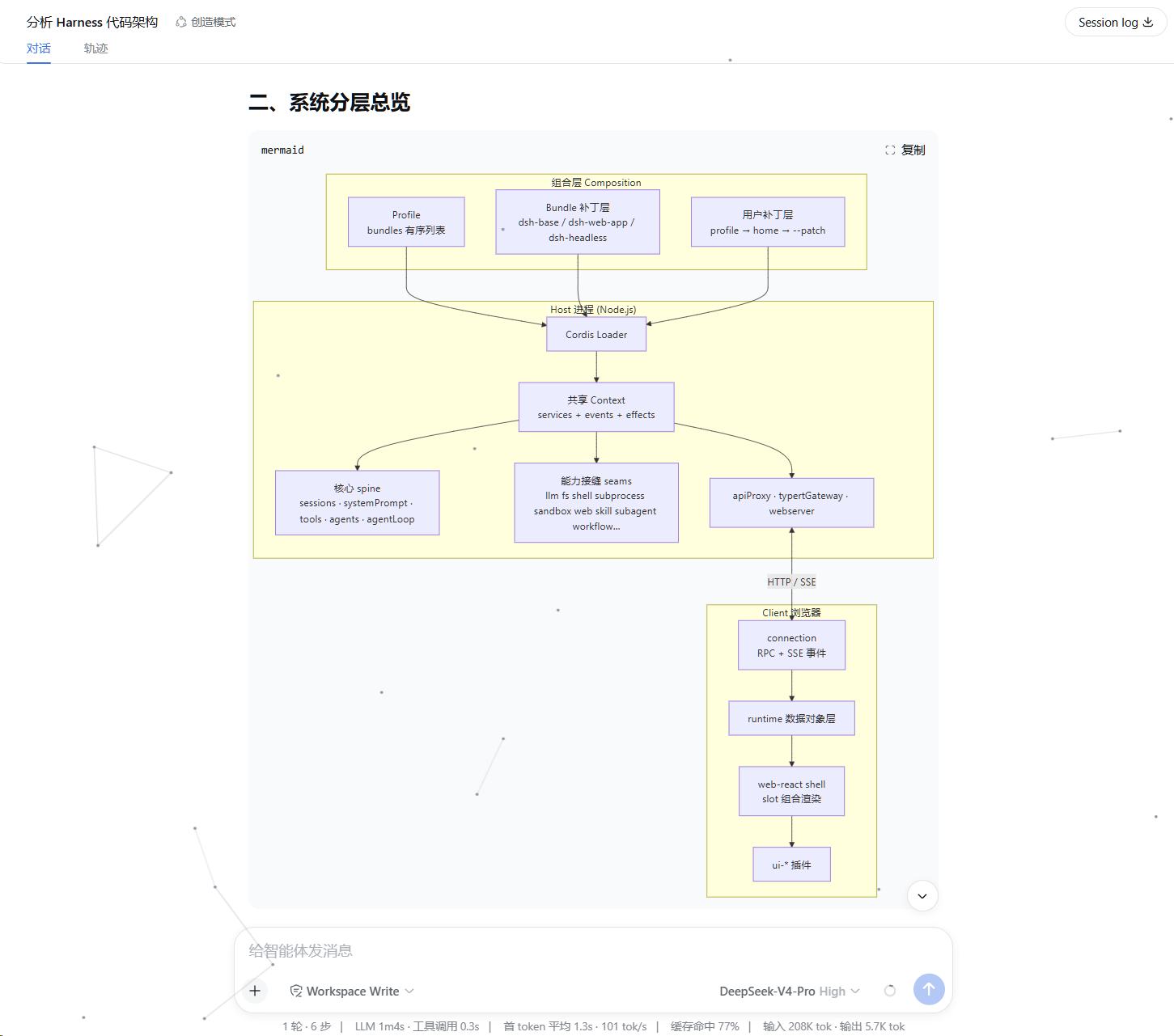 |
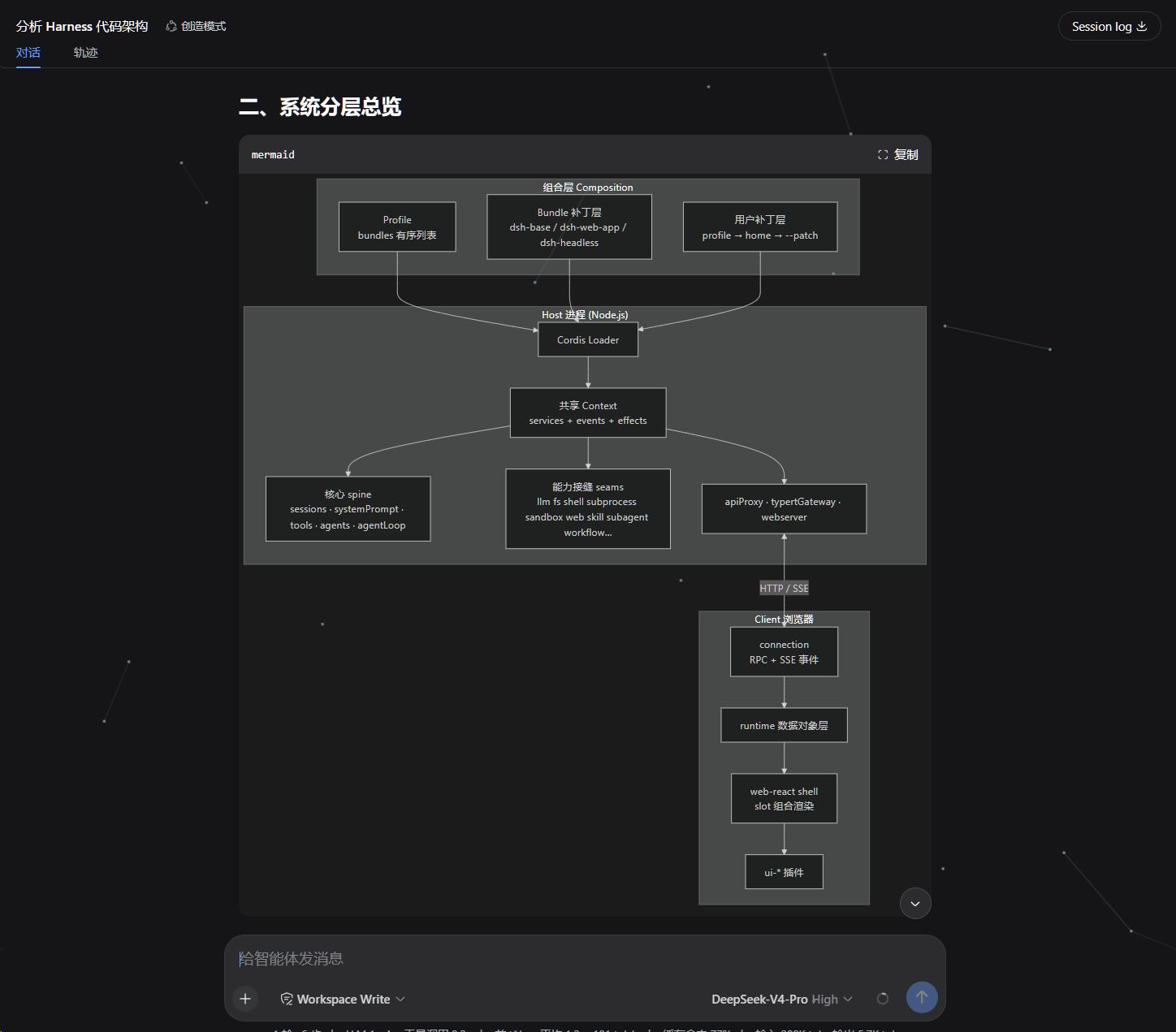 |
| Light theme · zoom overlay | Dark theme · zoom overlay |
|---|---|
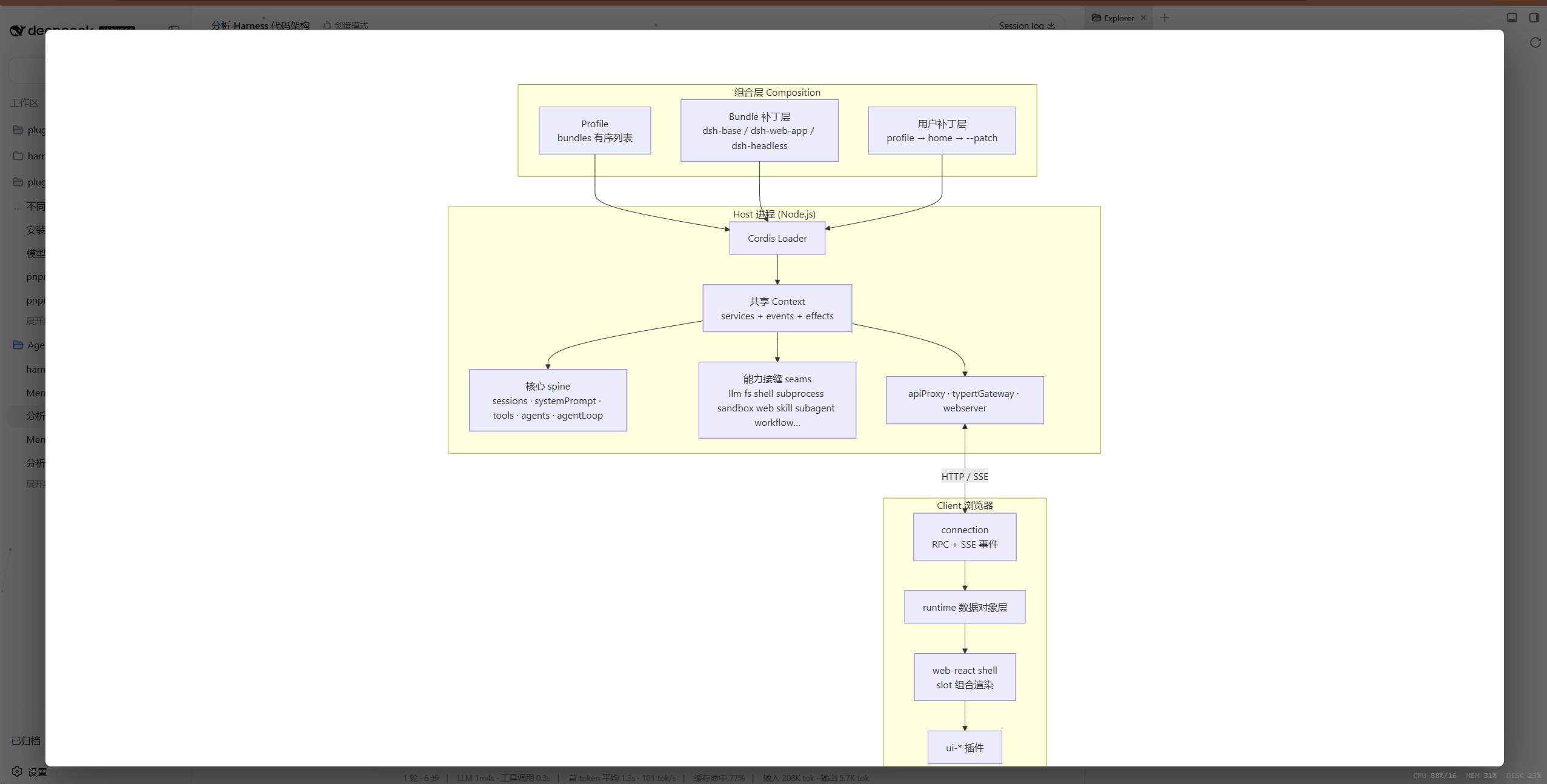 |
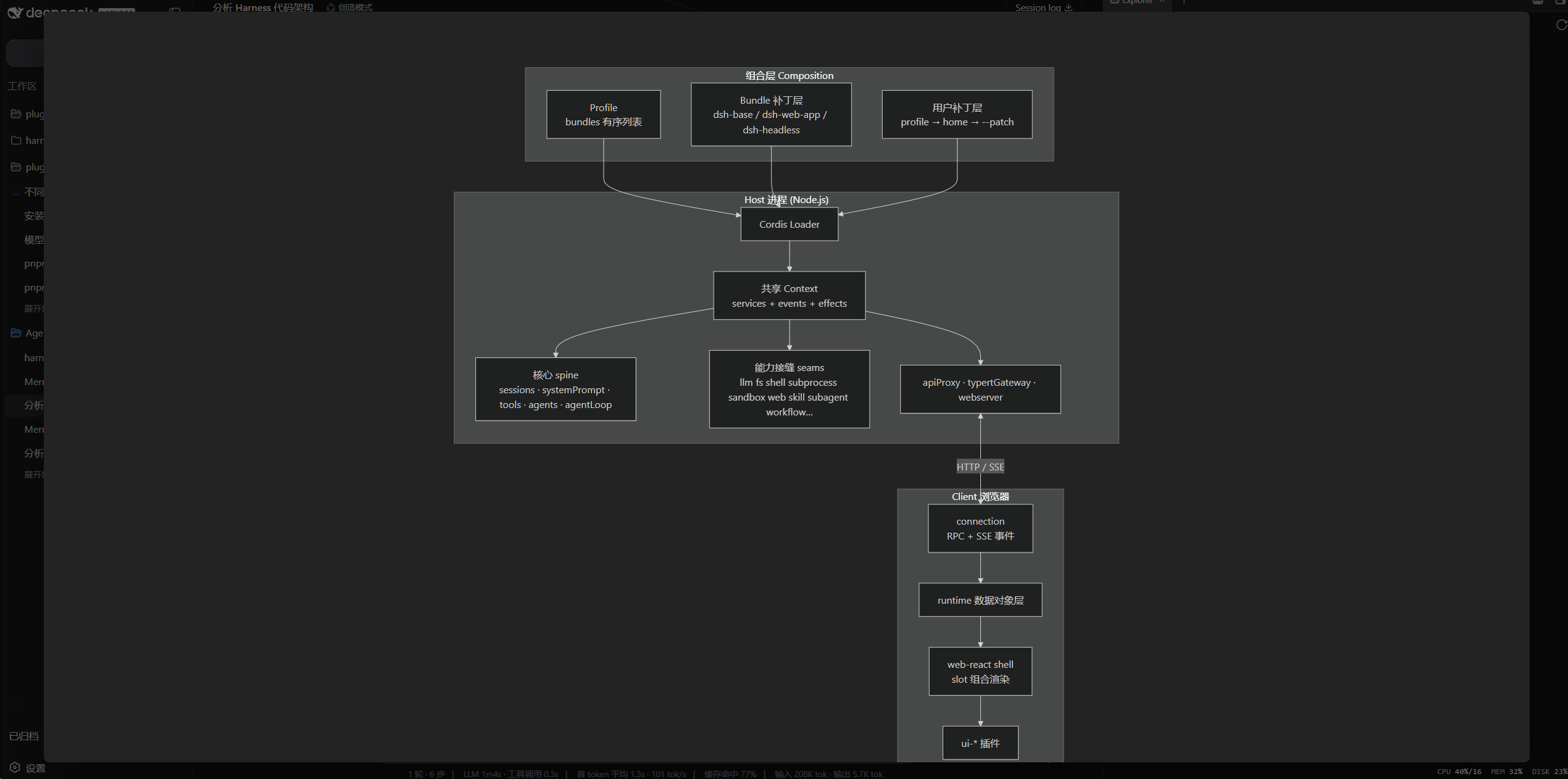 |
The zoom overlay auto-fits the diagram to the screen (near full-screen with a small margin), zooms with the mouse wheel, and pans by dragging with the left or middle button. With theme: auto the diagram colors follow the GUI light/dark theme.
How it works
- Host half (
src/index.ts): registers thewebServerprefix route/mermaid-dist, lazily serves the mermaid UMD build from the plugin's ownnode_modules/mermaid, and exposes a fixedconfig.jsonendpoint. - Client half (
src/client/): watches the conversation DOM and renders fences whose infostring ismermaidto SVG:- Only settled fences are processed (nothing renders mid-stream);
- The mermaid bundle is loaded lazily on first use (cached by the browser afterwards);
- Viewport-driven rendering: a fence only starts rendering when it scrolls into view (with a 300px preload margin) — render where you look; a diagram that leaves the viewport while queued or loading stops rendering and resumes on re-entry;
- Async queue rendering: with many diagrams they render one at a time and yield the main thread between renders, so the page never freezes; a loading placeholder is shown while a first render is in flight and is swapped for the SVG when done;
mermaid.render()produces an SVG that replaces the fence's<pre>body; the language banner and copy button stay (copy still copies the source);securityLevelis alwaysstrict: labels are DOMPurify-sanitized by mermaid itself and click handlers are never bound;- Theme follows the GUI:
theme: autoreadsbody[data-ds-dark-theme]and re-renders visible diagrams when the attribute flips (offscreen diagrams refresh when they re-enter the viewport); - The banner zoom button opens a full-screen overlay: the diagram is auto-fitted to the screen on open (near full-screen, centered, with a small margin), the wheel zooms relative to that size, dragging with the left or middle button pans at any zoom (clamped so the diagram can't be lost), and clicking the backdrop or pressing Esc closes it;
- Visible render failures: when a first render fails the source code block is kept and an error summary appears below it (long messages are truncated, hover for the full text), with one-click copy the error or send to the AI to fix (fills the report plus source into the input and sends it, simulating the user pasting the error to the AI).
The client package is ~10 KB (gzip ~4 KB); mermaid (~700 KB) is fetched on demand only when a mermaid fence actually appears — it never enters the boot graph.
Install
From the GitHub repository (the build runs automatically in the prepare script):
dsh plugin --profile web add github:AKS1st/dsh-mermaid
dsh web   # restart the web service for the profile to take effect
If pnpm reports that the git dependency needs to run build scripts (
ERR_PNPM_GIT_DEP_PREPARE_NOT_ALLOWED), add the package toallowBuildsin the profile'spnpm-workspace.yamland retry.
Local development (build first, then install):
npm install
npm run build
dsh plugin --profile web add .
dsh web
Uninstall:
dsh plugin --profile web remove dsh-mermaid
Configuration
The bundle applies this configuration by default:
- insert:
    - id: mermaid
      name: 'dsh-mermaid'
      config:
        theme: auto
        maxTextSize: 50000
        maxEdges: 2000
        securityLevel: strict
| Key | Default | Description |
|---|---|---|
theme |
auto |
Diagram theme: auto (follows light/dark), default, dark, neutral, forest, base |
maxTextSize |
50000 | Per-diagram text cap (guards against oversized diagrams) |
maxEdges |
2000 | Edge-count guard |
securityLevel |
strict |
Fixed to strict; loose is never accepted |
Override with - set: or - update: in the profile's cordis.patch.yml.
Security model
- Assistant output is untrusted:
securityLevelis locked tostrict; HTML in labels is DOMPurify-sanitized by mermaid itself;bindFunctionsis never called and click handlers stay inert. - On a render failure the plain-text code block is kept (error HTML is never rendered), and an error summary appears below the block (copyable, or sendable to the AI to fix); the full error also goes to the console.
Known limitations
- Depends on the host frontend
CodeBlock's stable hooks (the literalmd-code-blockclass and the infostring text); selectors need to be kept in sync if the upstream renderer is refactored. - Nothing renders during streaming; rendering happens after a message settles.
- Under
securityLevel: strict, mermaid's click interactions are unavailable.
Links
More in this category
tt-a1i/archify#integrations/deepseek-harness★ 73620
Generate validated, self-contained interactive architecture, workflow, sequence, data-flow, and lifecycle diagrams from repositories or system descriptions.
dream-num/dsh-univer-office★ 429
Give DeepSeek Harness a real office environment. Univer Office Plugin brings spreadsheets, docs, slides, canvases, relational tables, and more into one runtime — with connected data, validation, versioned changes, and isolated worktrees for multi-agent collaboration.
PerryLink/dsh-industry-research★ 182
Deterministic industry research reports for DeepSeek Harness — company and industry research flows produce structured, verifiable reports from staged evidence.
HuanLinOTO/dsh-plugin-mineru★ 47
Expose MineRU document parsing tools to the model.
kw78/dsh-office-tools★ 26
Workspace-safe Office tools for agents: create/read Word, create/read/update Excel, and create/read PowerPoint decks with PNG/JPG/GIF image placement.
PolinniZhong/dsh-knit★ 16
Lists the Markdown documents, images and video that already exist anywhere in the session workspace in the DSH sidebar, ranked by relevance to the current conversation: recent messages are matched locally against document title, summary and body with IDF weighting, with no model calls and no network. Because the list is scanned from the workspace instead of remembered, restarting DSH or starting a new session does not empty it. Images and video preview in place, with relative-path images resolved and video streamed over HTTP Range. A references bar under the preview header shows which documents cite the one being previewed and which it cites, with one click to jump between them. The same ranking is exposed to the agent as a knit_docs tool, which returns the most relevant documents along with the passage that matched in each, where one is found.
Community comments
Comments are public GitHub Discussions. Loading them connects to GitHub and Giscus; a GitHub account is required to post.