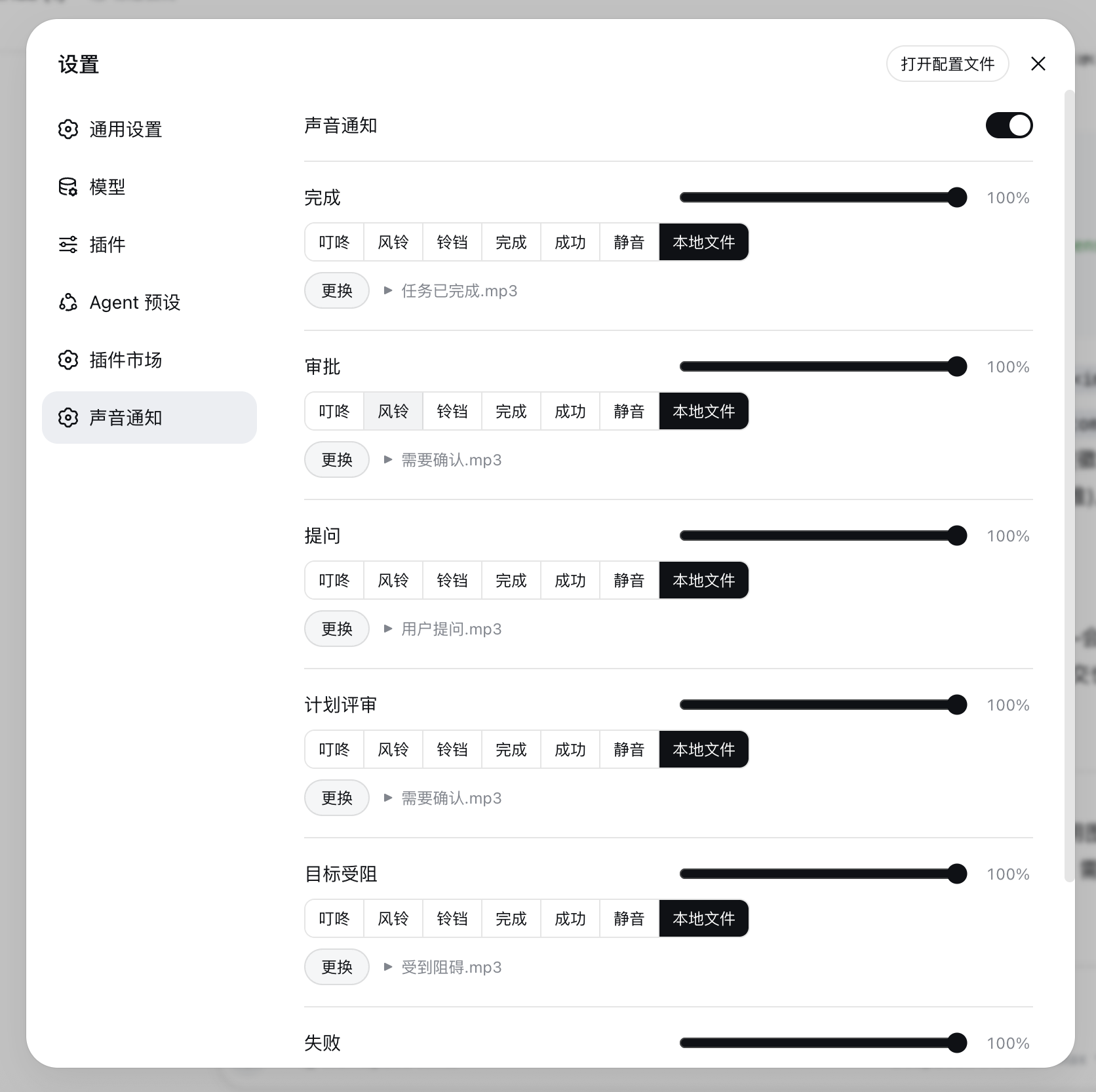
Per-event sound notifications: turn completion, approval, question, plan-review, goal-blocked, and task-failure each get their own sound and volume, configurable in the Web UI (built-in synth, mute, or local audio file).
Install
# from npm (prebuilt)
dsh plugin --profile web add @ai-galaxy/dsh-sound
# from GitHub (first run asks for allowBuilds approval — follow the hint, retry)
dsh plugin --profile web add github:AI-Galaxy-GPU/dsh-sound
Any plugin you install runs third-party code with your own permissions — it can read your files, use your credentials, and reach the network, and tool approvals don’t sandbox it. GitHub-sourced plugins also run build scripts at install time — pnpm blocks those until you allow them, so an install can stop with ERR_PNPM_GIT_DEP_PREPARE_NOT_ALLOWED or ERR_PNPM_IGNORED_BUILDS; dsh prints the exact key to add under allowBuilds in your profile’s pnpm-workspace.yaml, and the install works on the next run. Allowing a build is a trust decision: only install sources you trust, and pin a commit (github:owner/repo#sha).
README
English | 中文
A DeepSeek Harness (DSH) plugin for the Web UI: play a customizable sound when a task finishes, and an attention sound whenever something needs a human.
📬 Submitted to Awesome DSH Plugin — PR #752 (pending maintainer approval)
Screenshots
Features
Six independent events
Each event type has its own sound and its own volume (0–100%):
| Event | Detection | Default sound |
|---|---|---|
| Turn end / background task completed | turn/end with reason.kind === 'completed'; job → completed |
Chime |
| Approval request | approval/requested frame |
Ding |
| User question | question/requested frame (not plan-review shaped) |
Ding |
| Plan review | question/requested frame classified as plan-review |
Ding |
| Goal blocked | goal projection enters blocked |
Ding |
| Background / loop failure | job → failed; turn/end error; host/agent-error |
Bell |
- Completion respects the “quiet current session” option; attention events (approval / question / plan-review / goal-blocked / failure) always ring.
- User abort, killed jobs, and
max-tokens/blocked/interruptedturns stay silent. - Events come from
events.muxplusevents.host. Mux-open replay of still-pending approval/question frames (refresh recovery) does not ring; eachrpcIdrings at most once. - When the event stream is unavailable or frames fail to unwrap, the plugin falls back to snapshot diffing.
- Multiple tabs: the same event rings only once (BroadcastChannel tie-break). A single tab plays immediately, with no 40 ms handshake.
Separate subagent channel
Subagent-originated events are detected and routed independently from the main agent:
- One-shot subagent jobs — a
session/jobsentry withkind === 'subagent'(each parallel delegation completing used to ring the main completion sound; now it does not). - Subagent sessions — events whose session row is marked
origin: 'subagent'/parentId(continuable subagents), including child-session turn ends, approvals, questions, goal projections, and failures.
The settings panel adds a 子代理事件 / Subagent Events section with six rows (same sound sources and per-row volume as the main events) plus an ignore all subagent events master switch. All six subagent sounds default to mute; main-agent events are unchanged.
Sound sources
Each event picks one sound from a Radio.Button group in the settings panel:
- Built-in synthesized sounds — Ding / Chime / Bell / Complete / Success, generated live with Web Audio, no audio files required.
- Mute — silence that event.
- Local file — choose any MP3/WAV/etc. file; a file picker appears below the event row
once selected. Uploaded files are stored in IndexedDB (
dsh-sound-audio), immune to the localStorage quota.
Settings panel (Settings → 声音通知 / Sound Notification)
The master switch and config export/import stay visible; a 主 Agent / 子代理 tab bar switches the panel between the six main event rows and the subagent panel (its own six rows plus the 「忽略子代理事件」/ ignore-all-subagent-events switch). Each event row has a volume slider on the title row and a Radio.Group of Radio.Button options below — click to select and play; a local-file row with a choose/replace button appears when 本地文件 is selected.
Install
Requires a DSH version with bundle-plugin support (dsh.profile.bundles + dsh.bundle.patch)
and pnpm on PATH (corepack enable or npm i -g pnpm).
# One command: pnpm installs the package and adds it to the profile's bundle layer
dsh plugin --profile web add @ai-galaxy/dsh-sound

# Restart the server (or refresh the page), then open Settings → 声音通知
Other profiles work the same way: dsh plugin --profile <name> add @ai-galaxy/dsh-sound.
To track unreleased main, install from the GitHub source instead:
dsh plugin --profile web add github:AI-Galaxy-GPU/dsh-sound
Manual install (without pnpm)
- Copy this package and its runtime deps (
@deepseek-ai/schemastery,@deepseek-ai/cosmokit,@standard-schema/spec) into$DSH_HOME/profiles/web/node_modules/. - Append
"@ai-galaxy/dsh-sound"todsh.profile.bundlesin$DSH_HOME/profiles/web/package.json. - Restart
dsh web.
Configuration storage
- The browser half persists its configuration in localStorage (key
dsh-sound:config), sanitizing every read and filling defaults. Uploaded local music files are stored in IndexedDB (dsh-sound-audio) instead — no localStorage quota limits. - Config keys:
enabled,quietCurrent,ignoreSubagent, and six main sound + six main volume fields —completionSound/approvalSound/questionSound/planReviewSound/goalBlockedSound/failureSound(builtin key,none,local,data:URL, oraudio:<id>) andcompletionVolume…failureVolume(0–1) — plus the matchingsubagentCompletionSound…subagentFailureSound/subagentCompletionVolume…subagentFailureVolumepairs for the subagent channel (all sounds default tonone).localFileskeeps the last chosen local file per event (completion, … andsubagent-completion, …) so switching to a built-in sound and back does not drop it. - 0.2.0 migration: older configs are upgraded automatically —
defaultSoundbecomescompletionSound, voice/TTS values degrade to the per-event default, andworkspaces/debounceMs/ globalvolume/ voice settings are dropped. - Export / import: the settings panel downloads the full config as JSON (IndexedDB audio references are inlined as data URLs) and restores it from a JSON file — moving browsers or machines does not require reconfiguration.
- The host half also registers the
dsh-soundsettings namespace: on rc.6 the settings API allowlist (WEB_SETTINGS_NAMESPACESindsh-host-apiproxy) does not expose third-party namespaces to browsers, so the client does not depend onsettingsScopetoday; the registration keeps the migration path open for future releases.
Compatibility & capability disclosure
Compatibility
- Node.js:
>=20(engines.node). - DSH: verified on
0.1.5-alpha.1,0.1.5-alpha.2,0.1.5-rc.1,0.1.5-rc.2— declared ascompatibleindsh.compatibility.dshReleases; the plugin was also smoke-tested end-to-end (settings panel + live event sounds) on a source build of0.1.3-alpha.1. - Verification (2026-09-13): each declared version passed a disposable-profile cycle —
dsh plugin --profile web add <tarball>→dsh web --no-openboots and serves the plugin bundle (@ai-galaxy/dsh-sound/client.jspresent in the boot page, no plugin load errors) →dsh plugin --profile web remove @ai-galaxy/dsh-soundleaves the profile clean. Each run used a temporaryDSH_HOME, deleted afterwards.
Dependencies
- Host half:
@deepseek-ai/schemastery(settings schema) plus the peer@deepseek-ai/cordis. No other runtime dependencies. - Client half: React,
@deepseek-ai/dsh-client-runtime, and@deepseek-ai/dsh-client-ui-settingsare provided by the host application through the client module table; the package ships no copies of them.
Capabilities and permissions
- Local files: the settings panel opens the browser's own file picker for an audio
file the user selects; the audio is stored in IndexedDB (
dsh-sound-audio). There is no filesystem access outside the browser sandbox and no automatic file scanning. - Storage: configuration lives in
localStorage(dsh-sound:config), audio files in IndexedDB. - No network requests, no external services, no shell or command execution, no
credentials, no native artifacts, and no install lifecycle scripts
(
preinstall/install/postinstall/prepareare absent).
Failure bounds
- Playback failures (browser autoplay policy, unsupported audio) stay silent; the UI keeps working.
- Unavailable IndexedDB/localStorage degrades to in-memory configuration; unreadable audio references are ignored.
- Unavailable or unparseable event streams degrade to session-snapshot diffing; malformed frames are ignored without crashing.
- Every configuration read is sanitized against the known field set and defaults.
Development
npm test      # 100+ assertions across host and client halves (Node only, no browser needed)
npm run check # syntax check
Layout:
Profile development note: the profile's pnpm uses
nodeLinker: hoisted, which COPIESfile:dependencies intonode_modulesat install time — edits to this checkout do not reach the running app until you either re-runpnpm --dir ~/.dsh/profiles/web update @ai-galaxy/dsh-soundor replace the copied directory with a symlink to this checkout. The web server reads bundle content per request (only the boot-page rev hash is cached at startup), so after refreshing the copy a browser hard-refresh (Cmd+Shift+R) is enough — no server restart needed.
lib/index.js— host half: registers the settings namespace (schema + defaults)lib/client.js— browser bundle: event detection, sound engine (Web Audio / IndexedDB audio), settings panellib/types/index.d.ts— host-side type declarationscordis.patch.yml— bundle patch layer (inserts thedsh-soundrow)tools/— tests and verification scripts (not shipped in the npm package)
Publish
Published as @ai-galaxy/dsh-sound (requires membership of the ai-galaxy npm org;
publishConfig.access is already public).
npm login                       # npm account (2FA recommended)
npm publish --access public
License
Links
More in this category
PolinniZhong/dsh-omi-voice★ 74
In-chat read-aloud for DeepSeek Harness: tap to read, pause and resume AI replies with natural Doubao TTS voices (BYOK), reading only the final answer with code, tables and diagrams filtered; local engine, plugin keeps no API key.
PensiveFei/dsh-voice-scribe★ 34
Voice input for the web UI: tap Alt (or Alt+Space) to start/stop dictation, browser Web Speech (zero-config) or OpenAI-compatible cloud ASR, optional polish through DSH-configured LLM, settings UI.
1624318455/dsh-plugin-tts★ 21
Reads assistant replies aloud via free Edge TTS or your own RVC voice models: read-aloud buttons + auto-read, adaptive chunked progressive playback (gapless long reads), one-click voice-pack installs from a registry, and a portable RVC runtime.
WizisCool/dsh-ears★ 21
Voice input plugin for DeepSeek Harness (dsh): a microphone button in the composer turns speech into a draft transcript, with a choice of speech-recognition backends, optional polish through dsh own LLM routes, and a native settings page.
PerryLink/dsh-talk★ 15
Voice I/O for DeepSeek Harness — speech-to-text and text-to-speech over the microphone and audio output.
qishuilalala/dsh-voice-mode#dsh-voice-mode★ 15
Full-duplex voice mode for the DeepSeek Harness Web UI: toggle (2s-pause auto-send) or hold-to-talk dictation into an editable draft with zipformer2 streaming ASR, optional wake word; sentence-by-sentence Edge TTS read-aloud with live captions, and speaking interrupts playback and the running turn (true barge-in). On-device ASR, no API key.
Community comments
Comments are public GitHub Discussions. Loading them connects to GitHub and Giscus; a GitHub account is required to post.