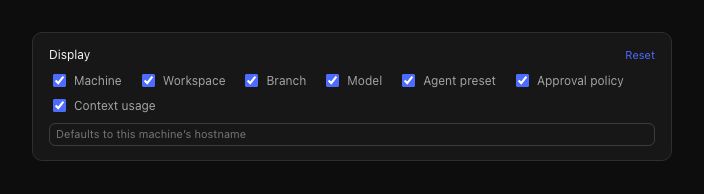
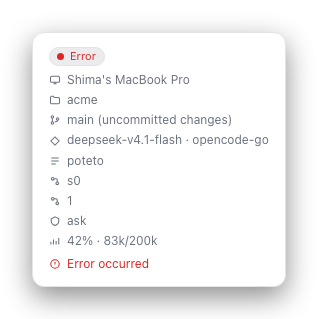
移植 T3 Code 的会话上下文界面:会话行悬浮卡显示机器、Git 分支、模型、代理预设、审批策略与 token 用量,状态标签覆盖待审批、等待输入、运行中、错误与子代理工作,另有提供方与模型标记、会话头部信息条、血缘面包屑、可复制上下文或执行 DSH 压缩的行菜单操作,以及位于 DSH 设置中用于选择显示哪些事实的偏好行。输入框区域不新增任何元素。
安装
# npm 包(预构建)
dsh plugin --profile web add dsh-t3-session-ui
# GitHub 源码(首次需按提示配置 allowBuilds 构建授权后重试)
dsh plugin --profile web add github:yusufameri/dsh-t3-session-ui
装任何插件都等于在你的机器上跑第三方代码,权限和你本人一样大——能读你的文件、用你的凭据、访问网络,工具审批管不到它。GitHub 来源的插件还会在安装时执行构建脚本——pnpm 默认拦截,所以安装可能停在 ERR_PNPM_GIT_DEP_PREPARE_NOT_ALLOWED 或 ERR_PNPM_IGNORED_BUILDS;dsh 会打印出需要添加的确切键名,把它加进该 profile 的 pnpm-workspace.yaml 的 allowBuilds 下,重跑一次即可装上。放行构建本身就是一次信任判断:请只安装可信来源,并尽量锁定 commit(github:owner/repo#sha)。
README
该插件的 README 只有英文版本。
T3 Code's session-context UX for DeepSeek Harness: a session-row context block, provider/model chip, a status pill, a per-session header context strip, and a lineage breadcrumb — all in the surfaces DSH already has, with nothing added to the composer.
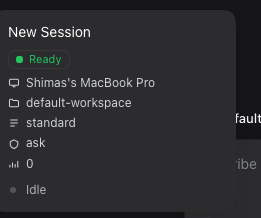
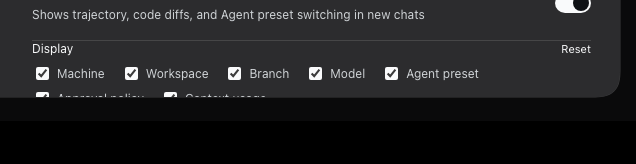
| Live: session-row hover card | Live: the Settings row |
|---|---|
 |
 |
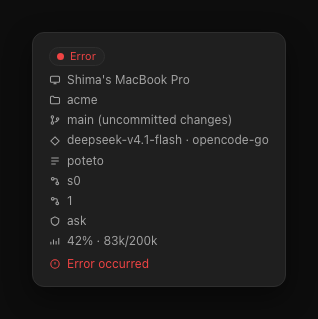
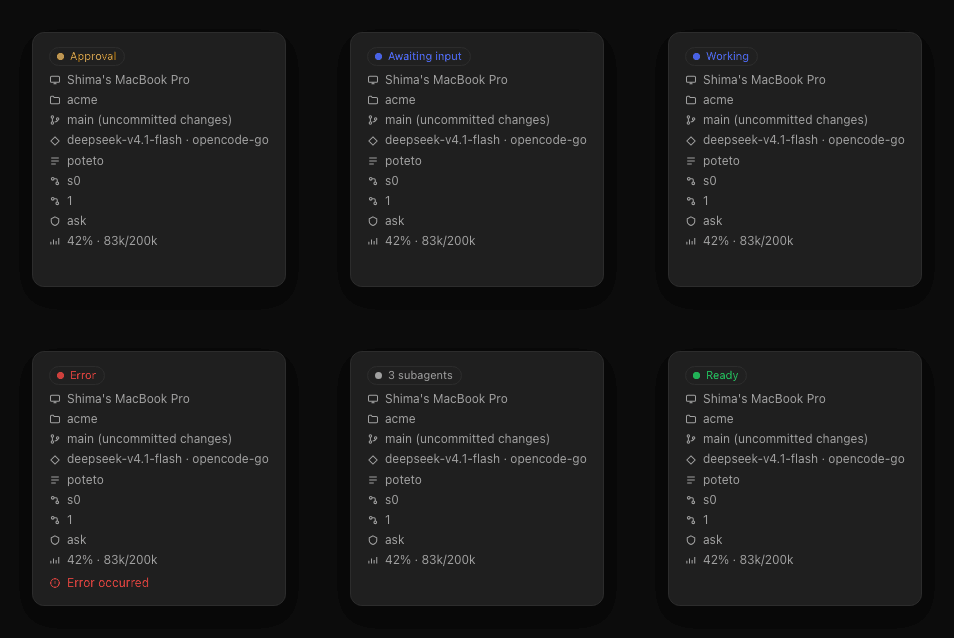
| Hover card (render) | Status ladder |
|---|---|
 |
 |
| Header strip and lineage | Settings row (render) | Light theme |
|---|---|---|
 |
 |
 |
About these images. The first two are live captures of a real DSH
0.2.0-rc.1instance with the plugin installed — their values (Shimas's MacBook Pro,default-workspace,standard,ask) each come from a different real Host probe, not from fixtures. The rest are component renders: the plugin's real components driven by fixture data with a representative theme token sheet, used where a fresh instance has no git repository, no subagents and no long conversation to show.assets/README.mdcovers the renders and their regenerate command;tools/live-cdp.mjsdrives the live captures.
Credit
The information hierarchy this plugin implements is T3 Code's: the session-row hover card, the status ladder, the provider/model row, and the context-window ring with its compaction action are all theirs. T3 Code is open source under MIT; this port keeps the same shape and swaps the data underneath for DeepSeek Harness's. Please support the original project.
What it adds
Every surface reads one per-session context bundle from this package's own Host half. A fact the Host could not read is omitted rather than faked, so a session outside a git work tree simply has no branch row.
| Surface | Seat | Shows |
|---|---|---|
| Row hover card | sidebar.session.row.hover |
Status, machine, workspace, branch (+ dirty), worktree, model · provider, agent preset, parent session, delegation depth, approval policy, context usage, and the error line |
| Row chip | sidebar.session.row.leading |
The model as the row's leading cell, with a status dot |
| Row hover action | sidebar.workspaces.session.row.action |
Copy the context bundle, beside the shipped archive and pin buttons |
| Header strip | conversation.session.header.utilities |
Status, model, branch, workspace, approval policy, subagent count, preset, delegation depth |
| Header breadcrumb | conversation.session.header.lineage |
Reproduces the session title and adds parent, preset, and depth chips |
| Settings row | settings.general.item |
The plugin's own preference row in DSH Settings — which facts the surfaces report, and a machine-label override |
| Copy action | conversation.session.header.actions |
Copy the whole context bundle as JSON |
| Row menu items | sidebar.workspaces.session.menu.item |
Copy context as JSON, copy branch name, copy working directory |
Status ladder
The rung is resolved on the Host, in T3 Code's precedence order:
| Rung | How DSH reports it |
|---|---|
| Pending approval | The approval/request waterfall is bracketed around next(), so the rung is lit exactly while the human is deciding |
| Awaiting input | The user-questions/request waterfall, bracketed the same way |
| Working | The api-session/status liveness event, plus an open turn/start in the session log |
| Error | A failed turn/end, or api-session/error raised outside a turn |
| Subagent work | ctx.subagents.listChildren(sessionId) |
| Ready | None of the above |
Approval and input are process-local rather than durable, which is why they are
read from the waterfalls instead of the session log: a listener that wraps
next() knows precisely how long an ask is outstanding.
Display settings
The preferences live in DSH's own Settings panel, as one row in the General
section, and are stored per browser under dsh.t3-session-ui.prefs.v1: a toggle
per fact (machine, workspace, branch, model, preset, approval, context) and a
machine label override that wins over the Host's prettified hostname. They
stay browser-side deliberately —
they change only this plugin's rendering and must work without a Host round
trip, and one Host is shared by every connected browser.
Nothing is added to the composer. An earlier revision put a context-window
ring there; it was removed, because the input area is for input and the session
facts belong in the session surfaces. The token detail the ring used to show now
appears in the hover card's context row (42% · 83k/200k), and Compact
context is an item in the session row's ... menu, running DSH's own
/compact command; this plugin never reimplements compaction.
Install
dsh plugin --profile desktop add dsh-t3-session-ui
Or from a checkout, which needs no build step:
dsh plugin --profile desktop add /path/to/dsh-t3-session-ui
Removing the bundle unregisters every seat and restores the previous composer toolbar with no residue.
How it works
The facts this UI shows are not reachable from the browser — the machine
identity is a node:os call, and sessions, tokenMeter, approval, and
compaction carry no @Remote face, so a Client half cannot call them through
ctx.remote. The Host half therefore serves one fenced JSON RPC route:
POST /t3session/api/hostFacts        -> machine identity, no session needed
POST /t3session/api/sessionContext   -> { sessionId } -> the context bundle
POST /t3session/api/compact          -> { sessionId } -> runs /compact
The route is fenced to loopback (plus any authority the deployment declares
trusted), rejects cross-site browser markers, and requires a matching Origin
when one is present. A browser page therefore reaches it with a plain relative
fetch, the same bridge dsh-better-sidebar and @michengai/dsh-codex-ui use.
Where each fact comes from:
| Fact | Source |
|---|---|
| Machine label | os.hostname(), prettified (Shimas-MacBook-Pro.local → Shima's MacBook Pro), overridable by config or by the display settings |
| Working directory, preset, parent session, delegation depth | Session.header |
| Provider, model, context-window size | Session.requestContext() |
| Branch, dirty state, worktree | git run in the session's own directory, cached for 5s |
| Tokens used | ctx.tokenMeter.measure(session) |
| Liveness and pending asks | api-session/status, api-session/error, and the approval/request / user-questions/request waterfalls |
| Subagent fan-out | ctx.subagents.listChildren(sessionId) |
| Approval policy | ctx.approval.overrideOf(session) |
Configuration
The plugin reads one optional setting from the bundle patch:
- id: t3-session-ui
  name: 'dsh-t3-session-ui'
  config:
    machineLabel: "Shima's MacBook Pro"   # optional; defaults to the prettified hostname
Everything else is a per-browser display preference, set from the plugin's row in DSH Settings.
Development
Plain ESM, no build step. The Client half is loaded as-is by DSH's client-module
loader, so editing client.js takes effect on the next page load.
pnpm install
pnpm test        # 101 tests
The suite runs without DSH and covers three layers:
test/host.test.js— the host helpers, including real temporary git repositories (clean, dirty, untracked-only, detached HEAD, linked worktree).test/route.test.js— the realapply()driven against a fake Cordis context, invoking the HTTP handler and asserting on its wire output. This layer exists because an unawaited probe serialises to{}, which no test that inspects the handler's in-memory object can see.test/client.test.js— the Client half loaded through a stubbedwindow.__ModuleLoader__and rendered to static markup against a fixture bundle.
Releases
0.1.1 fixed a defect introduced in 0.1.0: several Host probes were not
awaited, so provider, model, contextWindow, turn, the token counts, and
the whole machine identity serialised to {} on the wire. The route-level test
layer above was added so that failure mode cannot return.
Requirements
- DSH
0.1.5-rc.1or newer - Node.js 20+
License
MIT. The ported design is T3 Code's, also MIT.
链接
同类插件
zhu1090093659/dsh-web#packages/dsh-task-board★ 10616
侧边栏多列任务看板:卡片交给真实 DSH 智能体会话执行,支持 cron 定时(Host 侧到点执行,关浏览器也生效)。
zhu1090093659/dsh-web#packages/dsh-web-all★ 10616
DSH Web UI 插件与皮肤合集:任务看板、git 图、右侧面板、远程移动端 UI、桌宠、实时 token 统计与皮肤中心。
ccch1mneyyy/dsh-TUI★ 8166
Claude Code 风格全屏终端 UI:像素鲸鱼顶栏、实时工作状态行、思考流式展开。
MeteorNOX/DeepSeek-Balance-Whale-Widget★ 7447
右下角常驻的小鲸鱼挂件:余额、今日已用与每轮对话消耗(含峰谷价),余额预警与今日预算的泡泡内容都可编辑;泡泡点击序列模块化自定义,支持并列加权 A/B、随机台词与随机图片;内置 30+ 厂商模板(OpenAI / OpenRouter / Kimi / 硅基流动 / 方舟 / 智谱 / MiniMax 等),按模型查余额与订阅额度;另有任务结束音效、导入音频、自定义角色与资源管理。数据全在本机,无遥测。
omdsh-dev/DSH-better-sidebar★ 5304
侧边栏完整工作台:内置文件渲染编辑、终端、Git 与子代理,支持三方插件注册新 Tab。
omdsh-dev/dsh-genui★ 1049
助手回复内渲染交互式 UI 组件:布局、图表、表单、测验、mermaid、3D 场景与回传事件循环。
社区评论
评论公开保存在 GitHub Discussions。加载评论会连接 GitHub 和 Giscus;发表内容需要 GitHub 账号。