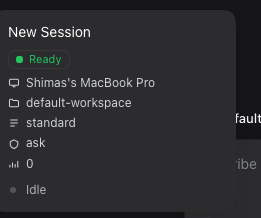
Session-context surfaces ported from T3 Code: a session-row hover card showing machine, git branch, model, agent preset, approval policy and token usage, a status pill covering pending approval, awaiting input, working, error and subagent work, a provider and model chip, a per-session header strip, a lineage breadcrumb, row-menu actions that copy the context or run DSH compaction, and a preference row in DSH Settings for choosing which facts appear. Nothing is added to the composer.
Install
# from npm (prebuilt)
dsh plugin --profile web add dsh-t3-session-ui
# from GitHub (first run asks for allowBuilds approval — follow the hint, retry)
dsh plugin --profile web add github:yusufameri/dsh-t3-session-ui
Any plugin you install runs third-party code with your own permissions — it can read your files, use your credentials, and reach the network, and tool approvals don’t sandbox it. GitHub-sourced plugins also run build scripts at install time — pnpm blocks those until you allow them, so an install can stop with ERR_PNPM_GIT_DEP_PREPARE_NOT_ALLOWED or ERR_PNPM_IGNORED_BUILDS; dsh prints the exact key to add under allowBuilds in your profile’s pnpm-workspace.yaml, and the install works on the next run. Allowing a build is a trust decision: only install sources you trust, and pin a commit (github:owner/repo#sha).
README
T3 Code's session-context UX for DeepSeek Harness: a session-row context block, provider/model chip, a status pill, a per-session header context strip, and a lineage breadcrumb — all in the surfaces DSH already has, with nothing added to the composer.
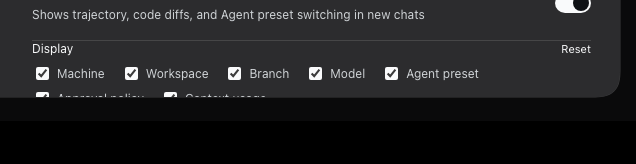
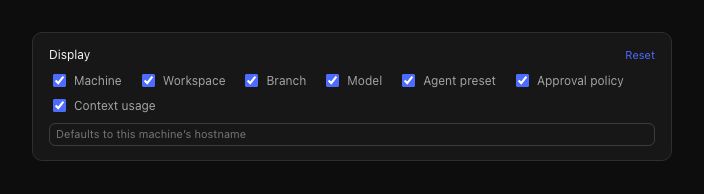
| Live: session-row hover card | Live: the Settings row |
|---|---|
 |
 |
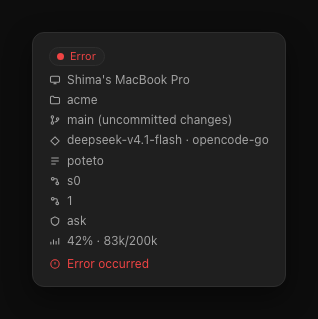
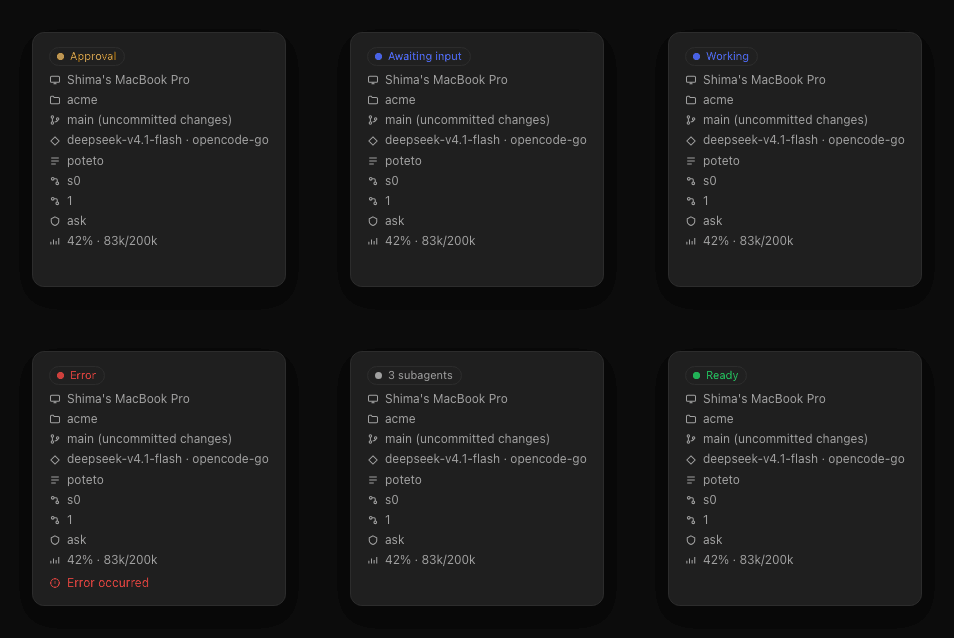
| Hover card (render) | Status ladder |
|---|---|
 |
 |
| Header strip and lineage | Settings row (render) | Light theme |
|---|---|---|
 |
 |
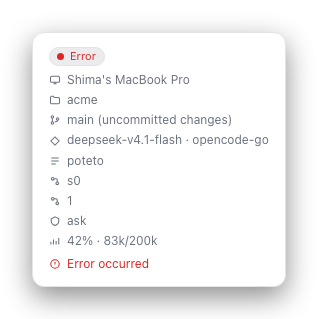 |
About these images. The first two are live captures of a real DSH
0.2.0-rc.1instance with the plugin installed — their values (Shimas's MacBook Pro,default-workspace,standard,ask) each come from a different real Host probe, not from fixtures. The rest are component renders: the plugin's real components driven by fixture data with a representative theme token sheet, used where a fresh instance has no git repository, no subagents and no long conversation to show.assets/README.mdcovers the renders and their regenerate command;tools/live-cdp.mjsdrives the live captures.
Credit
The information hierarchy this plugin implements is T3 Code's: the session-row hover card, the status ladder, the provider/model row, and the context-window ring with its compaction action are all theirs. T3 Code is open source under MIT; this port keeps the same shape and swaps the data underneath for DeepSeek Harness's. Please support the original project.
What it adds
Every surface reads one per-session context bundle from this package's own Host half. A fact the Host could not read is omitted rather than faked, so a session outside a git work tree simply has no branch row.
| Surface | Seat | Shows |
|---|---|---|
| Row hover card | sidebar.session.row.hover |
Status, machine, workspace, branch (+ dirty), worktree, model · provider, agent preset, parent session, delegation depth, approval policy, context usage, and the error line |
| Row chip | sidebar.session.row.leading |
The model as the row's leading cell, with a status dot |
| Row hover action | sidebar.workspaces.session.row.action |
Copy the context bundle, beside the shipped archive and pin buttons |
| Header strip | conversation.session.header.utilities |
Status, model, branch, workspace, approval policy, subagent count, preset, delegation depth |
| Header breadcrumb | conversation.session.header.lineage |
Reproduces the session title and adds parent, preset, and depth chips |
| Settings row | settings.general.item |
The plugin's own preference row in DSH Settings — which facts the surfaces report, and a machine-label override |
| Copy action | conversation.session.header.actions |
Copy the whole context bundle as JSON |
| Row menu items | sidebar.workspaces.session.menu.item |
Copy context as JSON, copy branch name, copy working directory |
Status ladder
The rung is resolved on the Host, in T3 Code's precedence order:
| Rung | How DSH reports it |
|---|---|
| Pending approval | The approval/request waterfall is bracketed around next(), so the rung is lit exactly while the human is deciding |
| Awaiting input | The user-questions/request waterfall, bracketed the same way |
| Working | The api-session/status liveness event, plus an open turn/start in the session log |
| Error | A failed turn/end, or api-session/error raised outside a turn |
| Subagent work | ctx.subagents.listChildren(sessionId) |
| Ready | None of the above |
Approval and input are process-local rather than durable, which is why they are
read from the waterfalls instead of the session log: a listener that wraps
next() knows precisely how long an ask is outstanding.
Display settings
The preferences live in DSH's own Settings panel, as one row in the General
section, and are stored per browser under dsh.t3-session-ui.prefs.v1: a toggle
per fact (machine, workspace, branch, model, preset, approval, context) and a
machine label override that wins over the Host's prettified hostname. They
stay browser-side deliberately —
they change only this plugin's rendering and must work without a Host round
trip, and one Host is shared by every connected browser.
Nothing is added to the composer. An earlier revision put a context-window
ring there; it was removed, because the input area is for input and the session
facts belong in the session surfaces. The token detail the ring used to show now
appears in the hover card's context row (42% · 83k/200k), and Compact
context is an item in the session row's ... menu, running DSH's own
/compact command; this plugin never reimplements compaction.
Install
dsh plugin --profile desktop add dsh-t3-session-ui
Or from a checkout, which needs no build step:
dsh plugin --profile desktop add /path/to/dsh-t3-session-ui
Removing the bundle unregisters every seat and restores the previous composer toolbar with no residue.
How it works
The facts this UI shows are not reachable from the browser — the machine
identity is a node:os call, and sessions, tokenMeter, approval, and
compaction carry no @Remote face, so a Client half cannot call them through
ctx.remote. The Host half therefore serves one fenced JSON RPC route:
POST /t3session/api/hostFacts        -> machine identity, no session needed
POST /t3session/api/sessionContext   -> { sessionId } -> the context bundle
POST /t3session/api/compact          -> { sessionId } -> runs /compact
The route is fenced to loopback (plus any authority the deployment declares
trusted), rejects cross-site browser markers, and requires a matching Origin
when one is present. A browser page therefore reaches it with a plain relative
fetch, the same bridge dsh-better-sidebar and @michengai/dsh-codex-ui use.
Where each fact comes from:
| Fact | Source |
|---|---|
| Machine label | os.hostname(), prettified (Shimas-MacBook-Pro.local → Shima's MacBook Pro), overridable by config or by the display settings |
| Working directory, preset, parent session, delegation depth | Session.header |
| Provider, model, context-window size | Session.requestContext() |
| Branch, dirty state, worktree | git run in the session's own directory, cached for 5s |
| Tokens used | ctx.tokenMeter.measure(session) |
| Liveness and pending asks | api-session/status, api-session/error, and the approval/request / user-questions/request waterfalls |
| Subagent fan-out | ctx.subagents.listChildren(sessionId) |
| Approval policy | ctx.approval.overrideOf(session) |
Configuration
The plugin reads one optional setting from the bundle patch:
- id: t3-session-ui
  name: 'dsh-t3-session-ui'
  config:
    machineLabel: "Shima's MacBook Pro"   # optional; defaults to the prettified hostname
Everything else is a per-browser display preference, set from the plugin's row in DSH Settings.
Development
Plain ESM, no build step. The Client half is loaded as-is by DSH's client-module
loader, so editing client.js takes effect on the next page load.
pnpm install
pnpm test        # 101 tests
The suite runs without DSH and covers three layers:
test/host.test.js— the host helpers, including real temporary git repositories (clean, dirty, untracked-only, detached HEAD, linked worktree).test/route.test.js— the realapply()driven against a fake Cordis context, invoking the HTTP handler and asserting on its wire output. This layer exists because an unawaited probe serialises to{}, which no test that inspects the handler's in-memory object can see.test/client.test.js— the Client half loaded through a stubbedwindow.__ModuleLoader__and rendered to static markup against a fixture bundle.
Releases
0.1.1 fixed a defect introduced in 0.1.0: several Host probes were not
awaited, so provider, model, contextWindow, turn, the token counts, and
the whole machine identity serialised to {} on the wire. The route-level test
layer above was added so that failure mode cannot return.
Requirements
- DSH
0.1.5-rc.1or newer - Node.js 20+
License
MIT. The ported design is T3 Code's, also MIT.
Links
More in this category
zhu1090093659/dsh-web#packages/dsh-task-board★ 10616
Task board for the dsh web GUI: a sidebar multi-column kanban whose cards run in real DSH agent sessions and can also be scheduled with cron expressions, executed host-side even with the browser closed.
zhu1090093659/dsh-web#packages/dsh-web-all★ 10616
Plugin and skin collection for the DSH Web UI: task board, Git graph, right-side panel, remote mobile UI, pet, live token stats, and a skin center.
ccch1mneyyy/dsh-TUI★ 8166
Claude Code-style full-screen terminal UI: pixel-whale header, live status line, and streaming thought expansion.
MeteorNOX/DeepSeek-Balance-Whale-Widget★ 7447
A fixed-corner whale widget for the DSH web GUI — balance, today's usage and per-turn cost with peak/off-peak pricing, editable balance-alert and daily-budget bubbles, a module-based custom bubble queue with A/B weighted choices and random lines or images, 30+ vendor templates (OpenAI, OpenRouter, Kimi, SiliconFlow, Ark, Zhipu, MiniMax and more) with per-model balance and subscription quota, plus task-end sound, imported audio, custom roles and a resource manager. Local-only, no telemetry.
omdsh-dev/DSH-better-sidebar★ 5304
Full sidebar workbench with file rendering and editing, terminal, Git, and subagents; third-party plugins can register new tabs.
omdsh-dev/dsh-genui★ 1049
Interactive UI components rendered inline in replies: layout, charts, forms, quizzes, mermaid, 3D scenes, and an action event loop back to the model.
Community comments
Comments are public GitHub Discussions. Loading them connects to GitHub and Giscus; a GitHub account is required to post.