DSH 氛围背景插件,支持壁纸、底部深色渐变与输入框光晕。
安装
# GitHub 源码(首次需按提示配置 allowBuilds 构建授权后重试)
dsh plugin --profile web add github:wbaws/dsh-scenery
装任何插件都等于在你的机器上跑第三方代码,权限和你本人一样大——能读你的文件、用你的凭据、访问网络,工具审批管不到它。GitHub 来源的插件还会在安装时执行构建脚本——pnpm 默认拦截,所以安装可能停在 ERR_PNPM_GIT_DEP_PREPARE_NOT_ALLOWED 或 ERR_PNPM_IGNORED_BUILDS;dsh 会打印出需要添加的确切键名,把它加进该 profile 的 pnpm-workspace.yaml 的 allowBuilds 下,重跑一次即可装上。放行构建本身就是一次信任判断:请只安装可信来源,并尽量锁定 commit(github:owner/repo#sha)。
README
该插件的 README 只有英文版本。
Capy-style ambient background for the DeepSeek Harness (DSH) workspace — an image, a very large bottom black gradient, and a soft radial “aura” around the composer, so the UI looks like it is sitting inside the scene instead of floating on a flat colour.
Additive only. This plugin adds one click-through layer behind the conversation column. It does not redesign anything, does not touch the layout of existing components, and — unless you flip the switch — changes absolutely nothing about the way DSH looks or behaves.
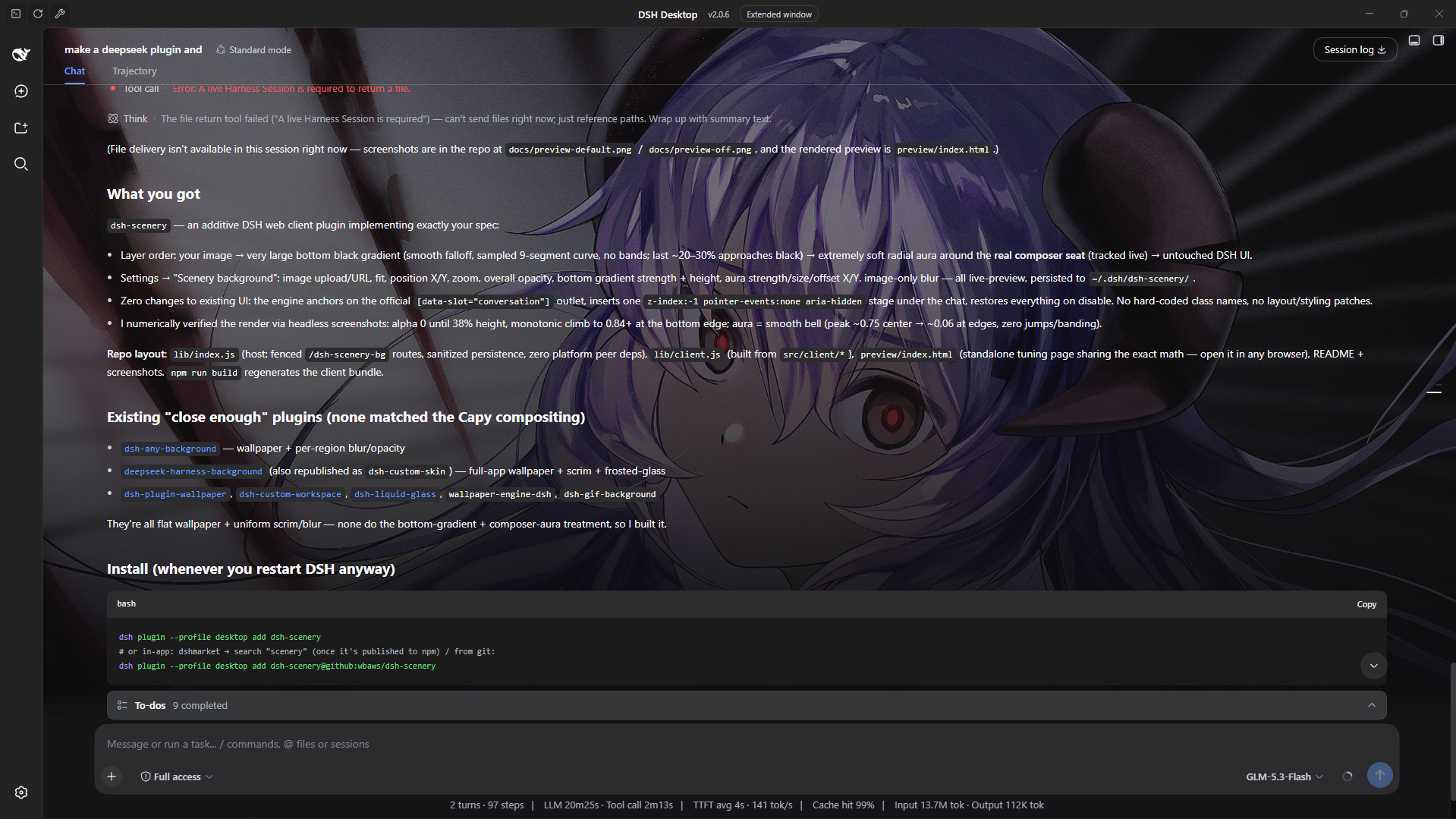
| Scenery on — semi-full scene | Scenery on — barely there |
|---|---|
 |
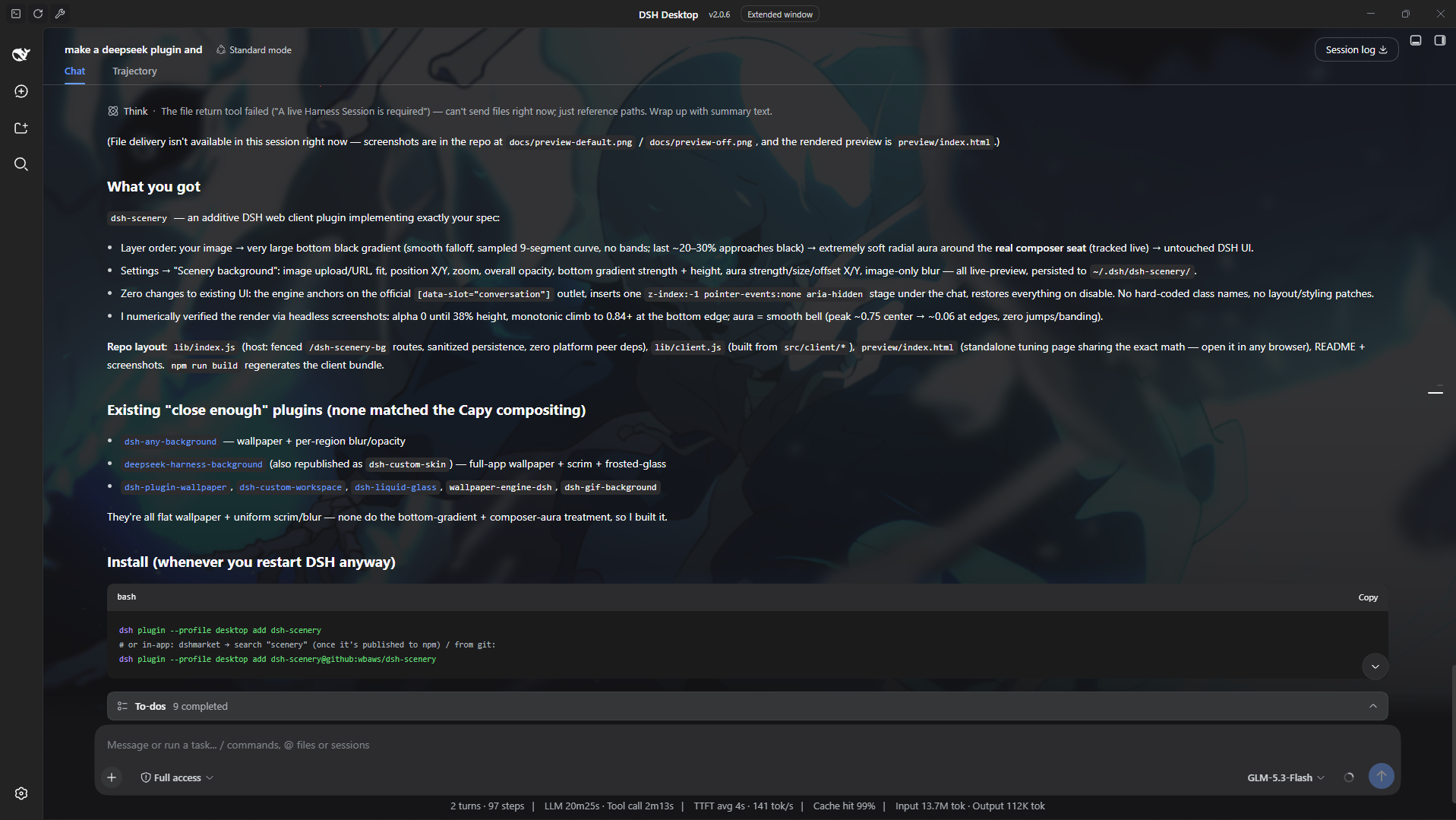 |
Screenshots above show the effect live in DSH. Crank the opacity up and the image, bottom gradient and composer aura sit clearly behind the conversation; dial it right down and you get just a whisper of atmosphere — enough to make the workspace feel alive without stealing focus while you work. Every setting is live-previewable: the bundled standalone page (
preview/index.html) renders the exact same compositing math in any browser, so you can tune a look here before it goes anywhere near your real setup.
What it does
Layering (bottom → top):
① your image                (fit / pan / zoom / blur / opacity)
② large bottom black gradient   (soft, no bands; grows gradually, the last
                                 ~20–30% approaches black)
③ radial “aura” around the composer (very soft ellipse, black centre fading
                                 to nothing — no visible edge)
④ existing DSH UI            (completely untouched)
The aura tracks the real composer seat inside the conversation column (sticky bottom bar), so it stays glued to the input area as you resize the window or drag columns.
Controls (Settings → Scenery background)
| Setting | Meaning |
|---|---|
| Enable | master switch — off by default |
| Image | upload a local picture (PUT to the host, stored under your DSH home) or paste an http(s) image URL |
| Fit | cover (crop-to-fill) / contain / fill |
| Position X/Y | object-position pan, % |
| Zoom | extra scale, 0.5×–3× |
| Overall opacity | dims image + overlays together toward the app surface |
| Bottom gradient strength | peak blackness of the big bottom gradient |
| Bottom gradient height | how much of the stage the gradient spans (from the bottom) |
| Aura strength | blackness of the composer aura |
| Aura size | ellipse radii multiplier |
| Aura offset X/Y | fine-tune aura centre relative to the auto-tracked composer |
| Image blur | gaussian blur of the image only — UI text stays crisp |
Every control previews live; Save persists to the host. There is also a Reset (restores defaults and clears the current image) — it asks once before it commits.
Persistence: ~/.dsh/dsh-scenery/config.json (+ uploaded wallpaper.* file,
or $DSH_HOME/dsh-scenery/ when DSH_HOME is set). A localStorage mirror
makes the background apply instantly on page load before the config round
trip.
Install
Published on npm as dsh-scenery (this repo).
# official CLI (any profile)
dsh plugin --profile desktop add dsh-scenery

# or from the in-app plugin market (dshmarket → search "scenery")
# or straight from this repo:
dsh plugin --profile desktop add dsh-scenery@github:wbaws/dsh-scenery
Restart / reload DSH, open Settings → Scenery background, pick an image, flip Enable. Done. (No code from Capy is used — only the general visual technique, re-implemented in plain CSS.)
How it works (brief)
Client half (lib/client.js, served at /plugins/dsh-scenery/client.js):
- Locates the conversation workspace through the official slot anchor
[data-slot="conversation"](no hard-coded class names). - Inserts one absolutely positioned
z-index:-1,pointer-events:none,aria-hiddenstage as the first child of the conversation host. The host is made its own stacking context (isolation:isolate), so the stage paints above the host's flat background colour but under every message and panel. Nothing else in the app is modified. - The stage holds an
<img>(fit/pan/zoom/blur) plus a scrim div whosebackgroundstacks the aura radial-gradient over the bottom linear-gradient. Both gradients are generated from the settings with many interpolation stops → smooth falloff, no banding. ResizeObserver+ window resize keep geometry fresh; the composer seat is found by scanning for the sticky-bottom element inside the conversation host (cached, cheap).- If the conversation seat isn't mounted yet (or was replaced by another plugin), it falls back to compositing onto the AppFrame element's own background layers — still zero DOM/layout changes.
- On disable/unload everything is removed and every inline style it added is restored.
Host half (lib/index.js, Cordis plugin scenery): a small fenced route
prefix /dsh-scenery-bg that persists config and wallpaper bytes
(GET/PUT/DELETE config, PUT/GET wallpaper). Zero platform peer deps — plain
Node builtins only, path-traversal-safe.
Settings UI: registers one section into the official
settings.section slot (id scenery-config), styled with the DSH alias
tokens so it follows the active theme.
Development
npm run build   # concatenates src/client/* -> lib/client.js + syntax checks
npm run check
# interactive visual tuning:
#   open preview/index.html in a browser (uses window.SceneryCore from lib/client.js)
Layout:
lib/index.js            host half (Cordis plugin: persistence routes)
lib/client.js           built client bundle (do not edit)
src/client/00-defs.js   defaults / sanitizers / i18n
src/client/01-composite.js  pure gradient + aura math (shared with preview)
src/client/02-runtime.js    DOM engine (stage, tracking, modes)
src/client/03-settings-ui.js  settings section
src/client/04-entry.js   module-loader entry + window.SceneryCore
preview/index.html       standalone preview / tuning page
Compatibility
Targets the official DSH web client (works in the DSH Desktop app window and
the web GUI). Requires a DSH profile with the client plugin system (same base
as dsh-pet, dsh-better-sidebar, etc.). If you find an incompatibility,
please open an issue with your DSH version.
License
MIT. “Capy” styling is used purely as a visual reference; this is an independent, from-scratch implementation of the general gradient technique.
链接
同类插件
elysia395/dsh-wallpaper-engine★ 3931
前置要求:DeepSeek Harness 0.1.5-rc.1+(DSH Desktop ≥ 2.0.7)且 dsh-better-sidebar ≥ 0.19.0,安装或更新本插件前请先更新两者。把本机 Wallpaper Engine 的 Video/Web 壁纸实时播放到聊天界面后方,Scene 壁纸由内置渲染器输出完整场景帧,支持内容分级/类型过滤、自定义壁纸上传与 iOS 液态玻璃设置窗口。
Small-tailqwq/dsh-deep-whale#maid-atelier★ 2963
DSH Web 鲸鱼娘皮肤系列(深海女仆工坊 maid-atelier)。
Nwflower/dsh-claude-style★ 394
为 DSH Web GUI 复刻 Claude Code Desktop 的视觉与交互——象牙白/暖黑双画布、陶烬橙强调色、三字体排版、权限分段控件与品牌切换,以 CSS 覆盖与客户端 DOM override 实现。
d-dev0101/open-sea-skin★ 386
实时 WebGPU 海洋皮肤,可快捷调节波浪、日光、玻璃不透明度与自动昼夜循环。
kingOfSoySauce/dsh-liang-skin★ 341
自适应推理等级滑块皮肤,将当前模型可用档位映射到 0–30 视觉强度,并同步人物、背景和界面配色。
RevolutionLA/dsh-dream-skin★ 295
一键换肤插件:8 套原创主题、背景壁纸(透明度/模糊)、强调色、主题包导入/导出+分享链接、收藏与随机,纯原生 token 系统接入。
社区评论
评论公开保存在 GitHub Discussions。加载评论会连接 GitHub 和 Giscus;发表内容需要 GitHub 账号。