插件生态基建:浏览器面板管理官方 repository 插件(0 patch)+ make-dsh-plugin 插件开发引导技能。
安装
# npm 包(预构建)
dsh plugin --profile web add @vlln/plugin-console
# GitHub 源码(首次需按提示配置 allowBuilds 构建授权后重试)
dsh plugin --profile web add github:vlln/plugin-registry#path:/packages/plugin/console
装任何插件都等于在你的机器上跑第三方代码,权限和你本人一样大——能读你的文件、用你的凭据、访问网络,工具审批管不到它。GitHub 来源的插件还会在安装时执行构建脚本——pnpm 默认拦截,所以安装可能停在 ERR_PNPM_GIT_DEP_PREPARE_NOT_ALLOWED 或 ERR_PNPM_IGNORED_BUILDS;dsh 会打印出需要添加的确切键名,把它加进该 profile 的 pnpm-workspace.yaml 的 allowBuilds 下,重跑一次即可装上。放行构建本身就是一次信任判断:请只安装可信来源,并尽量锁定 commit(github:owner/repo#sha)。
README
这是什么
官方 bundle 插件(dsh.bundle + dsh.client 声明):Node half 注册
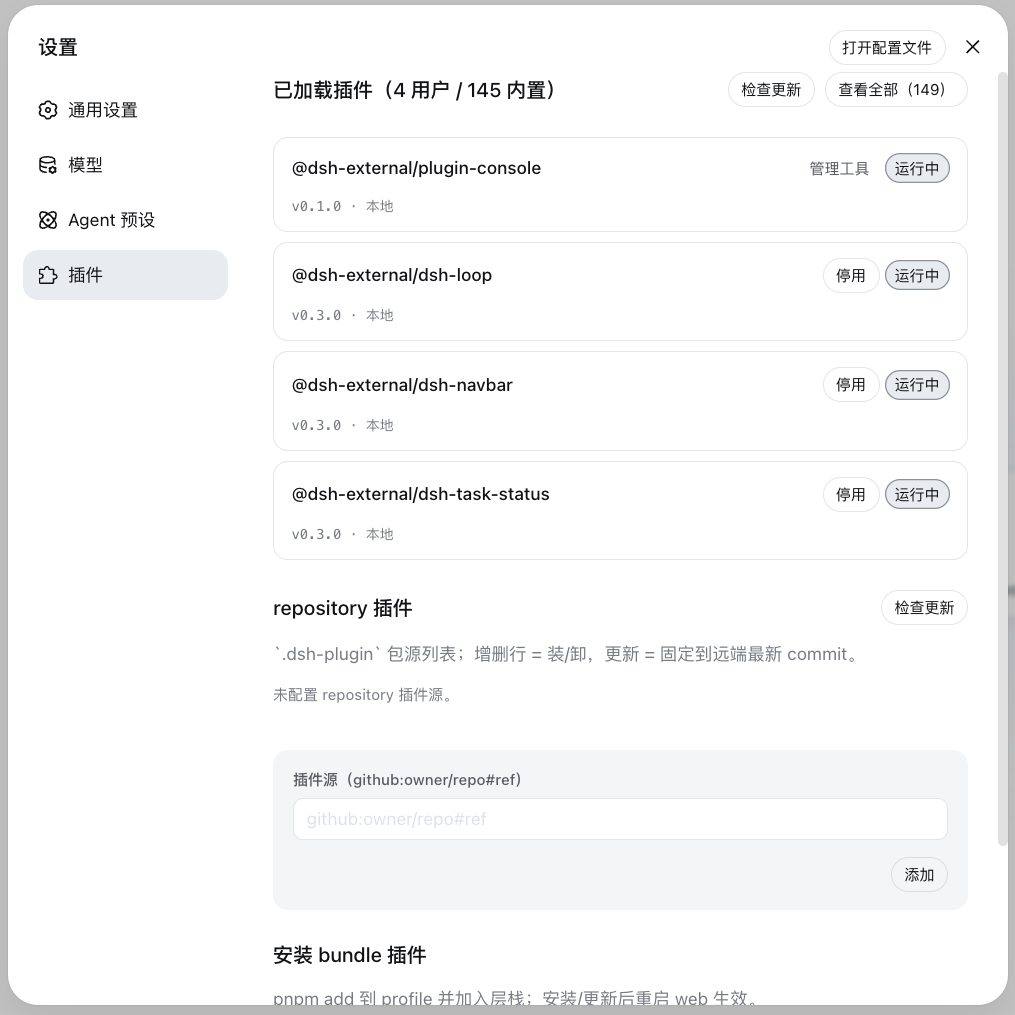
/api/plugin-console 路由,client half 在设置页注册「插件管理」面板
(tab 命名避免与官方「插件」tab 重名)。面板两个管理区:
| 管理区 | 职责 | 操作 | 写入位置 |
|---|---|---|---|
| 安装插件 | 统一安装入口:bundle 与非 bundle 自动分流 | 输入 npm 包名 / GitHub 项目(https://github.com/o/r、github.com/o/r、github:o/r,URL 自动规范化)→ 安装 |
bundle → profile package.json 依赖 + dsh.profile.bundles 层栈(重启生效);非 bundle → profile cordis.patch.yml insert 行(配置 HMR 实时生效,零重启) |
| 已加载插件 | 查看所有已加载插件(bundle + 内置)状态 | 检查更新 / 更新(用户 bundle)/ 停用、启用(用户 bundle)/ 卸载(用户 bundle) | profile cordis.patch.yml 的 disabled 标记(持久化)+ 层栈 |
0811 背景:官方移除 repository-plugins 机制(vendor/loader/src/repository.ts 删除),外部插件
统一经 web profile 安装。0811 保留配置级 HMR(web-app 禁用模块级 hmr 时 profile-boot 主动挂载
watch-only 实例)——profile cordis.patch.yml 编辑实时生效,insert 行写入无需重启即挂载(已实测)。
安装
安装命令与方式(git 源真一行 / npm 源 / 本地目录)见仓库根 README「安装」章节。构建产物已入库,git 源一行命令直接装(实测约 15 秒);npm 源已发布(@vlln/plugin-console):
dsh plugin --profile web add "github:vlln/plugin-registry#path:/packages/plugin/console"   # git 源(真一行;#path: 写法不含 &,Windows 下 dsh 经 cmd.exe 转发参数也不被拆开)
# 或 npm 源:dsh plugin --profile web add @vlln/plugin-console@0.1.0
挂载后刷新 Web 页面,设置页出现「插件管理」面板(settings.section 插槽)。
使用
- 安装插件区:输入 npm 包名或 GitHub 项目(
https://github.com/o/r/github.com/o/r/github:o/r,URL 自动规范化为github:o/r)→ 自动 pnpm add,按包是否声明dsh.bundle分流:bundle → 层栈(重启生效);非 bundle → insert 行(配置 HMR 实时挂载,零重启) - 已加载插件区:统一行渲染(版本状态:已最新 / 本地(非 registry) / 可更新;来源 Pill:内置 / 管理工具 / insert),启停即时生效并持久化到 profile patch,用户 bundle 支持更新与卸载
AI 插件管理工具(agent 面)
面板之外,Node half 注册 4 个 agent 工具(defineTool,与面板写同一安装态):
| 工具 | 参数 | 行为 |
|---|---|---|
plugin_search |
query?, source?, refresh? |
搜源集合(缓存枚举);默认 hub catalog(配置的 index.json);source 给定新索引 JSON 文件/URL → 懒加载探测并记住 |
plugin_install |
source |
npm 包名 / GitHub 项目(https://github.com/o/r、github.com/o/r、github:o/r,URL 自动规范化):声明 dsh.bundle → pnpm add + 层栈(重启生效);纯 cordis 包 → pnpm add + insert 行(实时挂载);安装失败显式报错,不假成功 |
plugin_uninstall |
id |
删 insert 行(实时)或 bundle 依赖(重启生效);清单保留可再装 |
plugin_status |
id? |
无参 list 已装;有参单查(含 TOFU resolved ref) |
发现层存储(协议见 plugin-discovery-design):
$DSH_HOME/plugin-sources/
├── sources.yml      # 索引源集合(hub catalog;用户可编辑 + trust 层级)
├── lock.yml         # TOFU:canonical → resolved ref + 内容哈希
└── cache/<源id>/    # 每源枚举快照(TTL 6h)
index 源支持本地文件(file://…/catalog.json)——私有 hub 仓库匿名 raw 不可达时读本地 clone。
web 面板刷新即见 agent 写入结果(同文件,不实时推送)。
生效方式
- insert 插件(非 bundle):写行/删行后 配置 HMR 实时生效(无需重启——0811 profile-boot 挂载 watch-only HMR)
- bundle 插件:安装/更新/卸载需重启 web(层栈在 boot 合成);已挂载 bundle 的运行时启停即时生效并持久化
- Node half 改动需重启 web(ESM 缓存);client 面板改动重装 + 刷新页面即可
开发插件(引导)
创建官方 bundle 插件 / 纯 cordis 插件的契约见 make-dsh-plugin skill。仓库内参考实现:本包(bundle + 自渲染 client 的完整例子)。
链接
同类插件
zhu1090093659/dsh-web#packages/dsh-plugin-manager★ 8262
设置 → 插件 分区里的插件管理 Tab:从 npm/git 安装带进度、下次启动生效的启停开关、安装冲突对账可撤销、失败一键转交修复会话。
dsh-market/dsh-market★ 5245
在 DeepSeek Harness 设置页内浏览、搜索并安装社区插件,支持分类筛选、一键更新与停用,以及主题切换与配置备份。
kingOfSoySauce/dsh-skin-market★ 174
原生皮肤市场与生命周期管理器,发现社区皮肤、展示预览与兼容状态,并提供已验证的一键安装或手动安装入口。
bradeGithub/DSH-Plugins-Marketplace★ 169
面向 GitHub dsh-plugin 话题的插件与技能市场:设置页内逛自动收录的全量索引(CI 每 2 小时刷新),一键安装带类型识别、安装脚本与宿主依赖遮蔽安全检查、环境变量密钥管理,并附 STANDARD.md 识别层规范。
awesome-dsh-plugin/dsh-find-plugin★ 164
会话内直接找插件:按关键词/分类搜索本精选 registry,返回描述与可直接执行的安装命令。
Sanqi-normal/dsh-webui-market-plugin★ 105
dsh Web GUI 内的社区插件市场:浏览 awesome-dsh-plugin.com 目录,从 设置 → 插件 → 插件市场 安装/卸载插件到 profile。
社区评论
评论公开保存在 GitHub Discussions。加载评论会连接 GitHub 和 Giscus;发表内容需要 GitHub 账号。