Ecosystem infrastructure: a thin browser console for managing official repository plugins (zero patches) plus a make-dsh-plugin skill for guided plugin development.
Install
# from npm (prebuilt)
dsh plugin --profile web add @vlln/plugin-console
# from GitHub (first run asks for allowBuilds approval — follow the hint, retry)
dsh plugin --profile web add github:vlln/plugin-registry#path:/packages/plugin/console
Any plugin you install runs third-party code with your own permissions — it can read your files, use your credentials, and reach the network, and tool approvals don’t sandbox it. GitHub-sourced plugins also run build scripts at install time — pnpm blocks those until you allow them, so an install can stop with ERR_PNPM_GIT_DEP_PREPARE_NOT_ALLOWED or ERR_PNPM_IGNORED_BUILDS; dsh prints the exact key to add under allowBuilds in your profile’s pnpm-workspace.yaml, and the install works on the next run. Allowing a build is a trust decision: only install sources you trust, and pin a commit (github:owner/repo#sha).
README
What is this
An official bundle plugin (dsh.bundle + dsh.client declarations): the Node half registers
the /api/plugin-console route, and the client half registers a "Plugin Management" panel in the
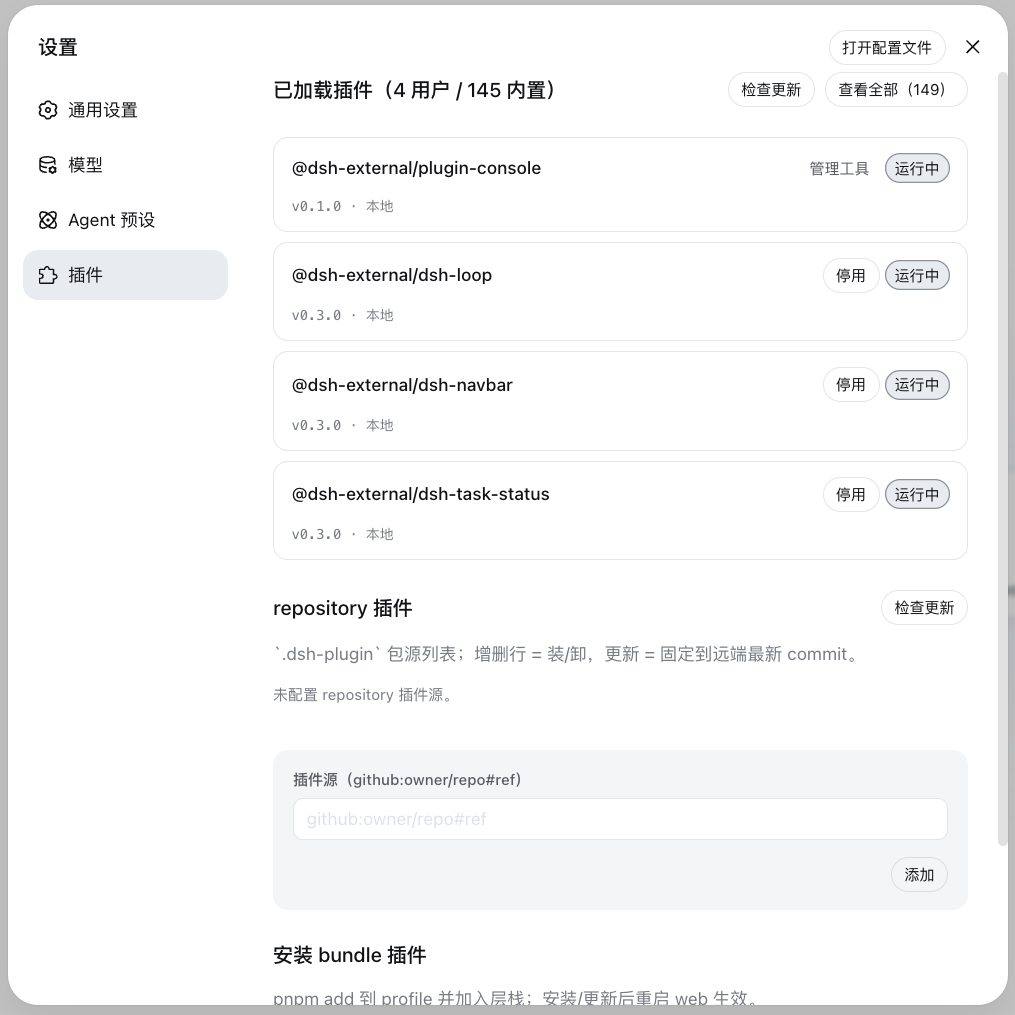
settings page (tab named to avoid colliding with the official "Plugins" tab). The panel has two management areas:
| Area | Responsibility | Actions | Write location |
|---|---|---|---|
| Install plugin | Unified install entry: bundle and non-bundle are routed automatically | Enter an npm package name / GitHub project (https://github.com/o/r, github.com/o/r, github:o/r; URLs normalized automatically) → install |
bundle → profile package.json dependency + dsh.profile.bundles layer stack (takes effect on restart); non-bundle → insert row in profile cordis.patch.yml (applies live via config HMR, zero restart) |
| Loaded plugins | Inspect the status of all loaded plugins (bundle + built-in) | Check for updates / update (user bundles) / disable, enable (user bundles) / uninstall (user bundles) | disabled flag in profile cordis.patch.yml (persisted) + layer stack |
0811 background: the official build removed the repository-plugins mechanism (vendor/loader/src/repository.ts deleted);
external plugins are now installed uniformly through the web profile. 0811 kept config-level HMR (when web-app disables
module-level hmr, profile-boot actively mounts a watch-only instance) — edits to profile cordis.patch.yml apply live, and
insert rows mount without a restart (verified in practice).
Installation
Install commands and options (git-source one-liner / npm source / local directory) are in the README "Installation" section at the repository root. Build artifacts are committed, so the git-source one-liner installs directly (measured ~15 s); the npm source is published (@vlln/plugin-console):
dsh plugin --profile web add "github:vlln/plugin-registry#path:/packages/plugin/console"   # git source (true one-liner; #path: form — no & — so it also works when dsh forwards args through cmd.exe on Windows)
# or npm source: dsh plugin --profile web add @vlln/plugin-console@0.1.0
After mounting, refresh the Web page and the "Plugin Management" panel appears in the settings page (settings.section slot).
Usage
- Install plugin area: enter an npm package name or GitHub project (
https://github.com/o/r/github.com/o/r/github:o/r; URLs are normalized togithub:o/r) → automaticpnpm add, routed by whether the package declaresdsh.bundle: bundle → layer stack (takes effect on restart); non-bundle → insert row (mounts live via config HMR, zero restart) - Loaded plugins area: unified row rendering (version status: up to date / local (non-registry) / update available; source pill: built-in / management tool / insert); enable/disable takes effect immediately and persists to the profile patch; user bundles support update and uninstall
AI plugin management tools (agent side)
Beyond the panel, the Node half registers 4 agent tools (defineTool, writing the same installation state as the panel):
| Tool | Params | Behavior |
|---|---|---|
plugin_search |
query?, source?, refresh? |
Search the source set (cached enumeration); default is the hub catalog (configured index.json); passing a new index JSON file/URL via source probes it lazily and remembers it |
plugin_install |
source |
npm package name / GitHub project (https://github.com/o/r, github.com/o/r, github:o/r; URLs normalized automatically): declares dsh.bundle → pnpm add + layer stack (takes effect on restart); plain cordis package → pnpm add + insert row (mounts live); a failed install reports the error explicitly, never fakes success |
plugin_uninstall |
id |
Deletes the insert row (live) or the bundle dependency (takes effect on restart); the manifest entry is kept so it can be reinstalled |
plugin_status |
id? |
Without args, lists installed plugins; with an id, queries that one (including the TOFU-resolved ref) |
Discovery-layer storage (protocol in plugin-discovery-design):
$DSH_HOME/plugin-sources/
├── sources.yml      # index source set (hub catalog; user-editable + trust levels)
├── lock.yml         # TOFU: canonical → resolved ref + content hash
└── cache/<source-id>/    # per-source enumeration snapshot (TTL 6h)
The index source supports local files (file://…/catalog.json) — read a local clone when the anonymous raw of a private hub repo is unreachable.
Agent-written results show up in the web panel after a refresh (same files, no live push).
When changes take effect
- Insert plugins (non-bundle): after adding/removing a row, config HMR applies live (no restart — 0811 profile-boot mounts a watch-only HMR)
- Bundle plugins: install/update/uninstall require a web restart (the layer stack is composed at boot); runtime enable/disable of an already-mounted bundle takes effect immediately and is persisted
- Node half changes require a web restart (ESM cache); client panel changes only need a reinstall + page refresh
Developing plugins (guide)
The contract for creating an official bundle plugin / a plain cordis plugin is in the make-dsh-plugin skill. Reference implementation in this repo: this package (a complete example of a bundle with a self-rendered client).
Links
More in this category
zhu1090093659/dsh-web#packages/dsh-plugin-manager★ 8262
Plugin manager tab in DSH Settings → Plugins: install from npm or git with progress, enable/disable switches effective at next startup, conflict reconciliation with undo, and one-click hand-off to a fix session.
dsh-market/dsh-market★ 5245
Browse, search and install community plugins from inside DeepSeek Harness settings, with category filters, one-click updates, enable/disable, theme switching and configuration backup.
kingOfSoySauce/dsh-skin-market★ 174
Native skin marketplace and lifecycle manager that discovers community skins, displays previews and compatibility status, and provides verified one-click or manual installation paths.
bradeGithub/DSH-Plugins-Marketplace★ 169
GitHub-topic-driven plugin & skill marketplace: a Settings page that browses the auto-collected registry (the whole dsh-plugin topic plus the skills index, CI-refreshed every 2 hours) with one-click install, type detection, install-script and host-shadow-dependency safety confirmations, env-key management, and the STANDARD.md recognition spec.
awesome-dsh-plugin/dsh-find-plugin★ 164
Find plugins without leaving the agent: search this curated registry by keyword or category, with ready-to-run install commands.
Sanqi-normal/dsh-webui-market-plugin★ 105
In-harness plugin market for the dsh web GUI: browse the awesome-dsh-plugin.com catalog and install/uninstall plugins into a profile from Settings → Plugins → Plugin Market.
Community comments
Comments are public GitHub Discussions. Loading them connects to GitHub and Giscus; a GitHub account is required to post.