原生 Markdown 思维导图查看器,支持交互式导航、布局控制及 SVG/PNG 导出。
安装
# Release 预构建包
dsh plugin --profile web add -w "https://github.com/sonhoang23/dsh-mindmap/releases/download/v0.2.2/dsh-mindmap-0.2.2.tgz"
# GitHub 源码(首次需按提示配置 allowBuilds 构建授权后重试)
dsh plugin --profile web add github:sonhoang23/dsh-mindmap
装任何插件都等于在你的机器上跑第三方代码,权限和你本人一样大——能读你的文件、用你的凭据、访问网络,工具审批管不到它。GitHub 来源的插件还会在安装时执行构建脚本——pnpm 默认拦截,所以安装可能停在 ERR_PNPM_GIT_DEP_PREPARE_NOT_ALLOWED 或 ERR_PNPM_IGNORED_BUILDS;dsh 会打印出需要添加的确切键名,把它加进该 profile 的 pnpm-workspace.yaml 的 allowBuilds 下,重跑一次即可装上。放行构建本身就是一次信任判断:请只安装可信来源,并尽量锁定 commit(github:owner/repo#sha)。
README
该插件的 README 只有英文版本。
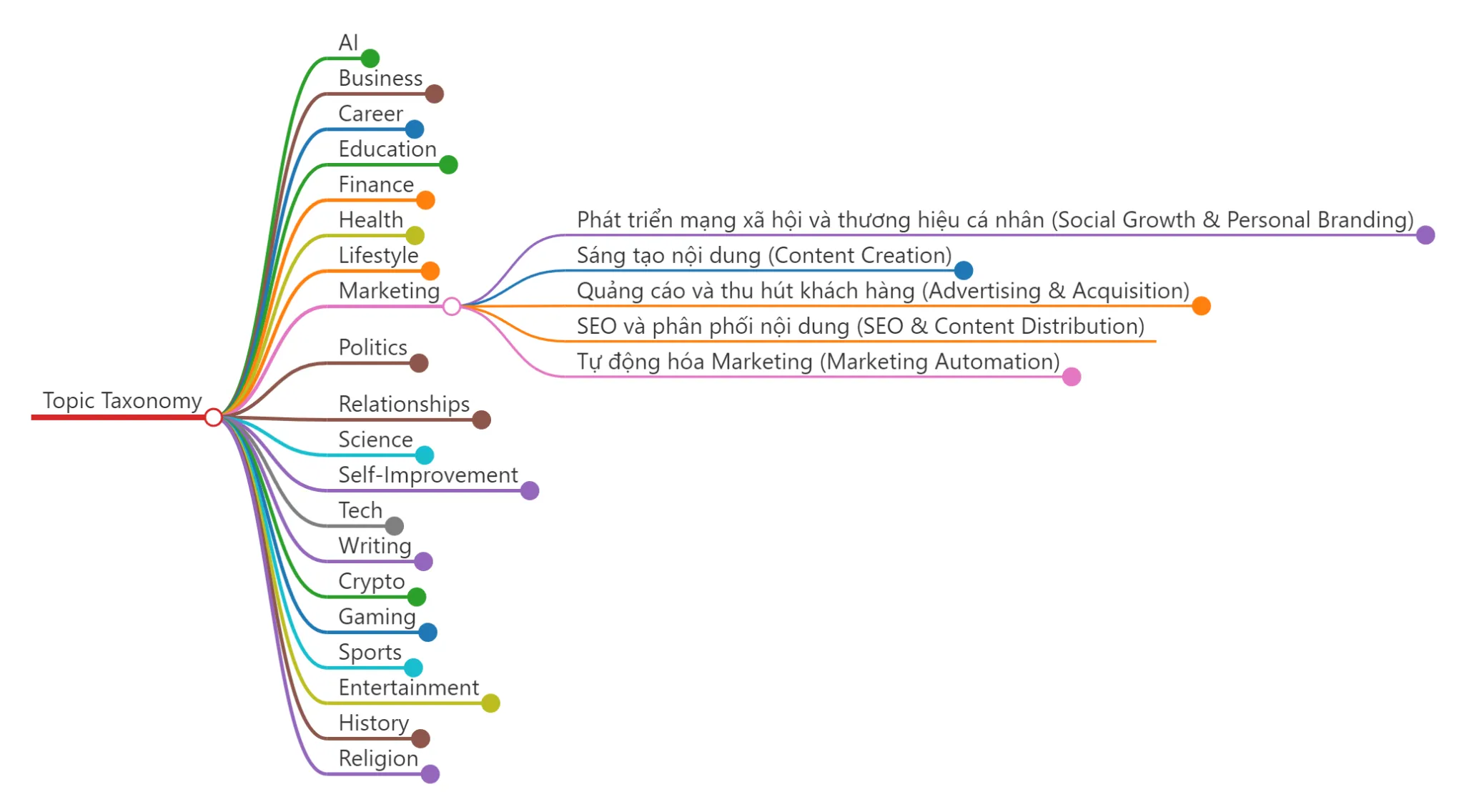
Real map output rendered from Markdown; not a screenshot of the full DSH interface.
Quick start
No Better Sidebar required. Install into DSH Web with Node.js 24.9+ and pnpm. DSH must expose the native documentPreviews registry (native viewing was reported working on 0.2.2-rc.5 with v0.2.1).
git clone https://github.com/sonhoang23/dsh-mindmap.git
cd dsh-mindmap
pnpm install
pnpm run check
dsh plugin --profile web add .
dsh plugin --profile web install
Only install after checks pass. Restart DSH Web and hard-refresh. In native Files, open a file named example.mindmap.md:
---
markmap: true
---

# My knowledge
## AI Systems
- Models
- Harness
## Learning
- Notes
- Practice
The map opens automatically. Use DSH's document viewer menu to switch back to Markdown. Ordinary .md files keep the native viewer. The suffix, not frontmatter alone, selects native Mindmap.
Features
| Feature | Native Files | Better Sidebar (optional) |
|---|---|---|
| Open compound mindmap suffix | Yes | With explicit frontmatter or manual action |
| Pan, zoom, Fit, Level, layouts, wrapping | Yes | Yes |
| Markdown draft editing and MD/SVG/PNG export | Yes | Yes |
| Relative Markdown links | Native resource navigation | Sidebar navigation |
| Auto-detect ordinary .md with markmap: true | Not yet | Yes |
| Save directly to source | Not yet | Yes, guarded by modification time |
Native files are read through DSH's authenticated document preview. Edits are in-memory drafts; exporting downloads a copy. The plugin does not add a filesystem write API. Native document files are limited to 2 MB of UTF-8 text. Mobile controls share the same map engine.
Mindmap Studio
Where the DSH native tab guide exposes Mindmap Studio, create or import a local Markdown file and export your draft. Native Files is the recommended workspace workflow; Studio is an additional local-file tool.
Optional Better Sidebar
Users of Better Sidebar 0.32.x (^0.32.1) can keep its automatic frontmatter detection, View as Mindmap file action, editor action and guarded file saves. The adapter activates only when its service is present.
Architecture
flowchart TD
  DSH[DSH native] --> Native[Native document adapter]
  DSH --> Studio[Local Studio]
  Native --> Core[Shared Mindmap core]
  Studio --> Core
  Better[Better Sidebar - optional] --> Adapter[Optional adapter]
  Adapter --> Core
  Core --> Markmap[Markmap]
Native-first means core features must not require third-party plugins. See AGENTS.md and development.
Compatibility and status
- DSH engine range:
>=0.2.2-0 <0.3.0; native preview requires the document registry. - Better Sidebar: optional
^0.32.1. - Node.js:
>=24.9.0; DSH Web. - Experimental source installation; package is private, not an npm registry release.
- v0.2.1 native opening was user-confirmed; v0.2.2 refactor needs its own live acceptance.
Documentation
Installation · Development · Mobile testing · Troubleshooting · Changelog
Issues and pull requests welcome. Include host version, optional integration status and reproducible steps. Built with Markmap, licensed under MIT.
Prebuilt GitHub releases
Versioned experimental tarballs are published on GitHub Releases by the release workflow after the repository checks pass. Install a published .tgz using dsh plugin --profile web add <tarball-url> followed by dsh plugin --profile web install. The source-install instructions remain available above. Clean-profile installation of the release asset must be verified separately.
链接
同类插件
tt-a1i/archify#integrations/deepseek-harness★ 99972
从仓库或系统描述生成经过校验的自包含交互式架构图、流程图、时序图、数据流图和生命周期图。
dream-num/dsh-univer-office★ 761
为 DeepSeek Harness 打造一个真正的办公环境。Univer Office 插件将电子表格、文档、幻灯片、画布、多维表格等汇聚到同一个运行时——数据互联、修改经过校验、变更按版本管理,并以隔离工作树支持多 Agent 协作。
ECNU/EduWork#dsh-knowledge-studio★ 410
基于工作区资料的 Studio,复用 DSH 模型与共享成果服务,制作报告、演示文稿、表格、思维导图、测验、闪卡及音视频。Office 生成需 Python 3.12+ 及相关依赖,并配置 DSH_OFFICE_PYTHON;媒体渲染需 Chromium;本地语音转写另需 whisper.cpp 和模型。
Roland0511/dsh-marktext★ 389
基于 MarkText 内核 muya 的右侧栏所见即所得 Markdown 编辑器:打开 .md 按渲染结果编辑,保存走 ctx.fs 并带版本守卫。
PerryLink/dsh-industry-research★ 227
面向 DeepSeek Harness 的确定性行业研究报告:公司与行业研究流程基于分阶段证据产出结构化、可核验的报告。
joeseesun/qiaomu-ui-learn-dsh★ 89
浏览界面设计参考和交互标本,练习设计测验,并导出 Markdown 学习笔记。
社区评论
评论公开保存在 GitHub Discussions。加载评论会连接 GitHub 和 Giscus;发表内容需要 GitHub 账号。