在 DSH 中显示 OpenAI 与 Codex 的用量配额:Web 端用环形表与面板展示 5 小时 / 7 天窗口,dst 端在状态行显示同样的窗口。
安装
# GitHub 源码(首次需按提示配置 allowBuilds 构建授权后重试)
dsh plugin --profile web add github:jakehemmerle/dsh-usage-limits
装任何插件都等于在你的机器上跑第三方代码,权限和你本人一样大——能读你的文件、用你的凭据、访问网络,工具审批管不到它。GitHub 来源的插件还会在安装时执行构建脚本——pnpm 默认拦截,所以安装可能停在 ERR_PNPM_GIT_DEP_PREPARE_NOT_ALLOWED 或 ERR_PNPM_IGNORED_BUILDS;dsh 会打印出需要添加的确切键名,把它加进该 profile 的 pnpm-workspace.yaml 的 allowBuilds 下,重跑一次即可装上。放行构建本身就是一次信任判断:请只安装可信来源,并尽量锁定 commit(github:owner/repo#sha)。
README
该插件的 README 只有英文版本。
A DeepSeek Harness (DSH) plugin that shows how much of your Claude and Codex plan limits you have used:
an omp-style line in the terminal client (dst, dsh-TUI) and a ring meter in dsh web. The product and
technical specification is SPEC.md; the test plan and evidence are in TESTING.md.
What it shows
dst. One coloured line above the prompt, on the first screen (Launchpad) and in chat, in the format of Jake's omp line:
Claude (proxy) 5h ░░░░░░░░ 1% ↻2h29m 7d ██░░░░░░ 29% ↻5d6h Codex (proxy) 7d █░░░░░░░ 12% ↻3d11h
Each account shows its 5-hour and weekly windows: a bar, the percent used and the time to the reset.
Percents are green below 50%, amber from 50% and red from 80%. A narrow terminal drops the bars, then
the reset times, then shortens names (Claude·px), and finally shows only the fullest window. A refresh
that fails keeps the last numbers and marks the account stale. Nothing shows until data arrives.
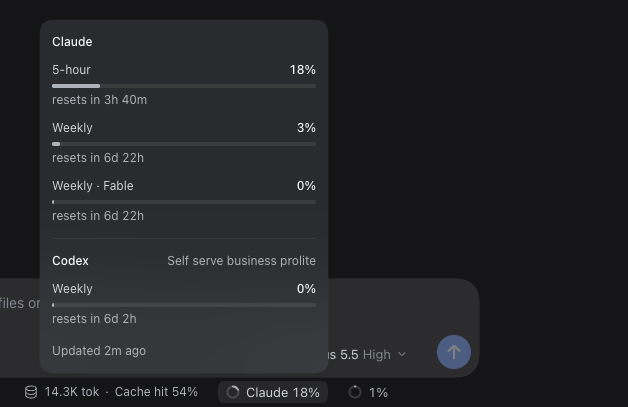
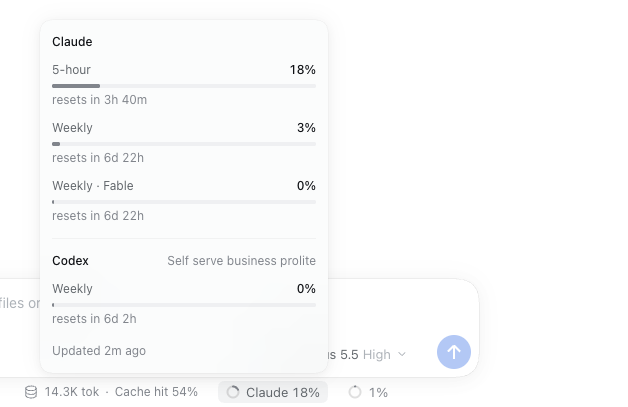
dsh web. A small ring and label beside the composer's context meter in a session, for example
Codex (proxy) 7d 52%: the fullest 5-hour or weekly window, coloured by the same thresholds. Click it for a
panel that lists every window of every account, including per-model windows such as Weekly · Fable
and extra Codex limits, with reset times and stale or error notes.

Where the data comes from
Accounts, in display order:
| Account | Source |
|---|---|
Claude (proxy), Codex (proxy) |
ProviderProxy: GET <baseURL>/usage/claude and /usage/chatgpt with the proxy client key from PROVIDERPROXY_API_KEY (or proxy.apiKeyEnv) |
Claude, Codex |
DSH's own sign-ins (llm-pi-ai/anthropic, llm-pi-ai/openai-codex) → https://api.anthropic.com/api/oauth/usage, https://chatgpt.com/backend-api/wham/usage |
An account that is not configured is left out. The plugin never refreshes, writes or logs tokens; an
expired sign-in waits for DSH to refresh it. ProviderProxy accounts are read at most once a minute (the
proxy caches its upstream for a minute); direct sign-ins at most every minIntervalMs (default 5 minutes,
never below 1 minute), with back-off after errors. dst asks every minute and redraws reset times every
30 seconds without a request; the web page polls the plugin's route every minute.
Install
Both rows are generated by nix-config (home/dsh.nix); by hand they are:
# ~/.dsh/profiles/web/cordis.patch.yml
- insert:
    - id: usage-limits
      name: /path/to/dsh-usage-limits/index.js
      config: &usage
        minIntervalMs: 300000
        proxy:
          baseURL: http://gpu.tail47033e.ts.net:4000/v1
          apiKeyEnv: PROVIDERPROXY_API_KEY
# ~/.dsh/profiles/dsh-tui/cordis.patch.yml
- insert:
    - id: usage-limits
      name: /path/to/dsh-usage-limits/tui.js
      config: *usage
name must point at the entry file (index.js or tui.js), not the package directory. DSH finds the
browser half through package.json. dsh-TUI 0.14.0 draws plugin status lines only in chat; the patch in
patches/ (applied by nix-config's pkgs/dsh-tui.nix) puts them on the Launchpad too. dsh web loads the
plugin when dsh-web starts; dst loads it in each new process.
Test
npm ci
npm test                                   # properties, host runtime, contracts, smoke
DSH_TUI_DIR=<patched dsh-tui> npm run test:e2e:tui   # real dst in tmux
npm run test:e2e:web                       # real dsh web in Playwright
链接
同类插件
bowenliang123/dsh-context★ 3973
DSH 上下文洞察面板:Context 仪表盘 + /context命令 + Context 浏览器,查看 Context的分类组成、内容详情、演进趋势、压缩/注入事件、统计等一站式 Context 全生命周期管理。
Han-1413141/dsh-cost-meter★ 597
会话与当日 API 费用统计、预算图框(已用%)、官方余额、历史看板,支持峰谷计价与官方价格一键同步。
wssfk12138/dsh-damage-pulse★ 282
在 DSH Web 界面追踪 DeepSeek Token 用量、单次与会话费用及账户余额,并显示缓存感知的扣费动画。
zh667/TokenLedger★ 202
侧边栏用量面板:把 Token 归属到实际服务该请求的中转站,站点从已有的 provider 配置中读出,无需额外配置;含今日/本月/累计三窗口、按站点与模型下钻、一年活跃度热力图,以及 New API / Sub2API / DeepSeek 余额。
Ychris12138/dsh-usage-stats★ 187
多供应商用量看板:按供应商/模型统计 Token 与日期下钻,统一展示账户余额,并追踪 OpenCode Go / Z.ai 订阅额度。
PolinniZhong/dsh-personal-center★ 115
DeepSeek Harness 个人中心:跨会话用量统计(按供应商/模型分别统计,自动读取已配置模型)、按模型成本估算、全局自定义指令、数据驱动的桌面宠物(位图/矢量皮肤)与会话状态概览,纯本地离线运行。
社区评论
评论公开保存在 GitHub Discussions。加载评论会连接 GitHub 和 Giscus;发表内容需要 GitHub 账号。