可独立开关的侧边栏与置顶增强套件(顶部跨工作区置顶区、工作区置顶展开、拖拽排序、就地搜索、标题栏快捷按钮、7 色标签、按最近活跃排序、超期历史自动折叠),并内置 workspace_manage 与 session_title 两个 Agent 工具。
安装
# npm 包(预构建)
dsh plugin --profile web add @fengguanghuai/dsh-workspace-tools
# GitHub 源码(首次需按提示配置 allowBuilds 构建授权后重试)
dsh plugin --profile web add github:fengguanghuai/dsh-workspace-tools
装任何插件都等于在你的机器上跑第三方代码,权限和你本人一样大——能读你的文件、用你的凭据、访问网络,工具审批管不到它。GitHub 来源的插件还会在安装时执行构建脚本——pnpm 默认拦截,所以安装可能停在 ERR_PNPM_GIT_DEP_PREPARE_NOT_ALLOWED 或 ERR_PNPM_IGNORED_BUILDS;dsh 会打印出需要添加的确切键名,把它加进该 profile 的 pnpm-workspace.yaml 的 allowBuilds 下,重跑一次即可装上。放行构建本身就是一次信任判断:请只安装可信来源,并尽量锁定 commit(github:owner/repo#sha)。
README
该插件的 README 只有英文版本。
dsh-workspace-tools
A DeepSeek Harness (DSH) Host + Web UI plugin bundle that combines a toggleable left-sidebar organization & global pinning suite with two agent tools (workspace_manage and session_title).
集成了可独立开关的左侧栏置顶与工作区整理增强套件,以及让 Agent 通过自然语言管理工作区与会话标题的 workspace_manage、session_title 两个工具。
Preview / 界面预览
| Global Pinned & Agent Tools | Modular Settings Modal | Inline Search & 7-Color Labels |
|---|---|---|
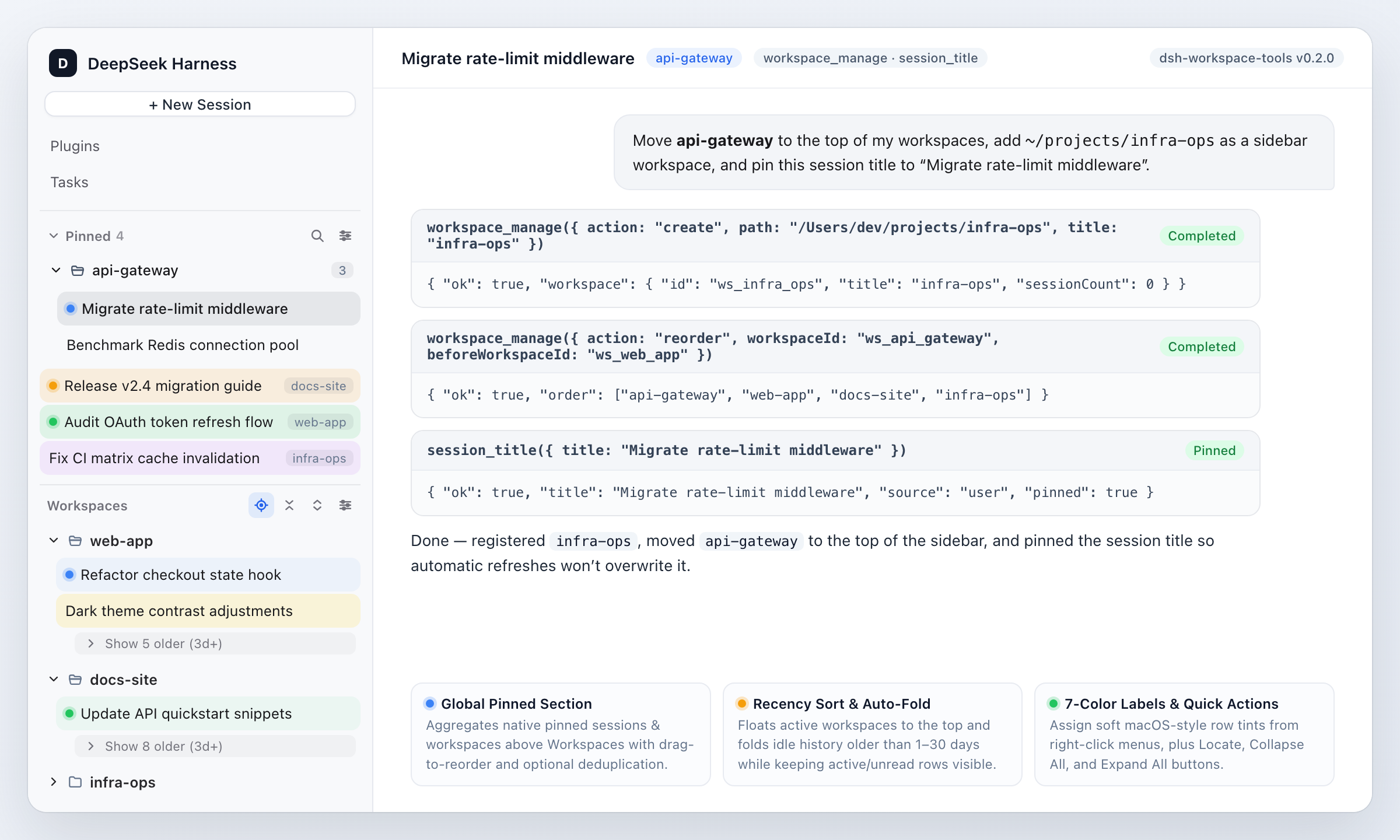 |
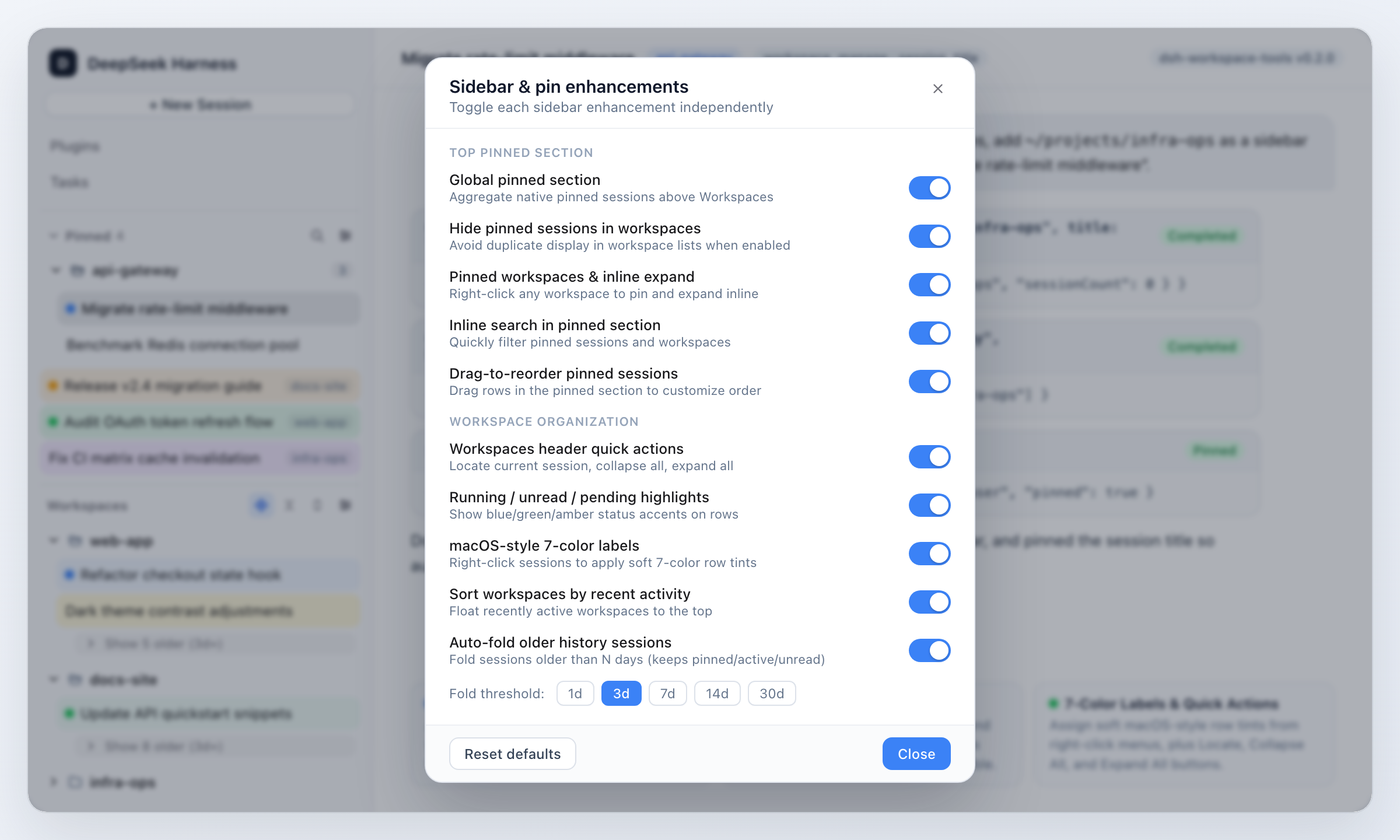 |
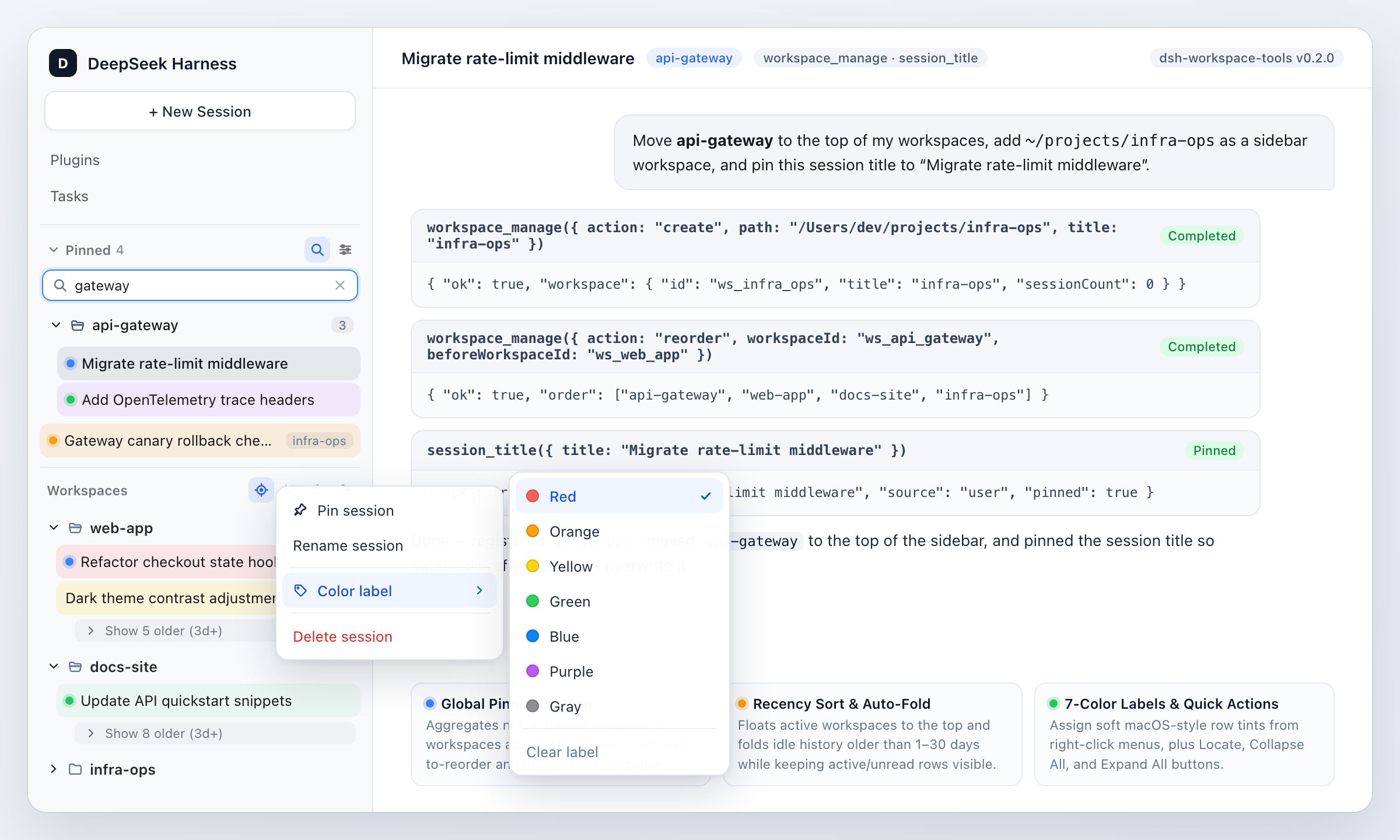 |
Sidebar & Pin Enhancements / 左侧栏增强(均可独立开关)
Click the sliders icon on the Pinned (or Workspaces) header to open the settings modal and toggle any feature independently:
- Global Pinned Section / 顶部跨工作区置顶汇总区 — Aggregates native DSH pinned sessions (
pinnedSessionIds) above Workspaces with source workspace pills, hover unpin, and optional deduplication (hides pinned sessions in the workspace list below by default). - Pinned Workspaces & Inline Expand / 工作区置顶与就地展开 — Right-click any workspace to pin it to the top section and expand its sessions inline.
- Workspaces Header Quick Actions / 工作区标题栏快捷按钮 — Adds Locate current session, Collapse all, and Expand all buttons directly to the Workspaces header.
- Status Highlights / 运行中、未读与待处理状态高亮 — Syncs live Host status indicators: blue pulsing (running), amber (waiting for approval/answer), and green (completed unread).
- Inline Search in Pinned Section / 置顶区就地搜索 — Filter pinned sessions and workspaces by title or workspace name (
Escto close). - macOS-style 7-Color Labels / macOS 风格 7 色标签 — Right-click any session to assign one of 7 soft row tints (synced across both the Pinned section and native workspace list).
- Workspace Recency Sort & Auto-Fold History / 工作区按最近活跃排序 + 超期历史自动折叠 — Floats recently active workspaces to the top via non-invasive CSS flex order, and folds idle sessions older than N days (
1 / 3 / 7 / 14 / 30d, keeping pinned/active/running/unread visible). - Drag-to-Reorder Pinned Sessions / 置顶行拖拽排序 — Drag pinned session rows in the top section to customize their order.
Non-invasive by design: reuses DSH's native
sidebar.workspacesbrowser, native pinning, and native right-click context menu API instead of replacing the built-in sidebar.
Agent Tools Included / 包含 Agent 工具
1. workspace_manage
Manages sidebar workspaces via the DSH Host workspaceRegistry service:
| Action | Parameters | Behavior |
|---|---|---|
list |
— | Lists all registered workspaces (id, title, path, sessionCount) in current sidebar order |
create |
path, optional title |
Registers an existing absolute directory path as a sidebar workspace |
rename |
workspaceId, title |
Updates the display title of a registered workspace |
reorder |
workspaceId, optional beforeWorkspaceId |
Moves a workspace before beforeWorkspaceId (or to the end when omitted) |
delete |
workspaceId |
Unregisters a workspace from the sidebar (keeps disk files and session logs intact) |
2. session_title
Reads, renames, or refreshes a live session's title via the DSH Host sessionTitle and sessions services:
| Mode | Parameters | Behavior |
|---|---|---|
| Read | (none) | Returns the current title and source of the target session |
| Rename | title |
Sets and pins a new title immediately (protected from automatic overwrites) |
| Refresh | refresh: true |
Regenerates the title using the configured title provider |
Pass optional sessionId to target another live session; omit it to act on the current session.
Installation / 安装方式
# From npm
dsh plugin --profile web add @fengguanghuai/dsh-workspace-tools

# Or from GitHub
dsh plugin --profile web add github:fengguanghuai/dsh-workspace-tools
Or in DSH Desktop: Plugins → Add plugin → enter @fengguanghuai/dsh-workspace-tools (or github:fengguanghuai/dsh-workspace-tools) → Install and enable.
Compatibility & Limitations / 兼容性与说明
- Requires DeepSeek Harness
>=0.2.0(0.2.2-rc.5verified). - Zero external runtime dependencies; no build step required.
- Preferences, pinned workspaces, custom pin order, and color labels are persisted locally in
localStorage(dsh-workspace-tools:prefs:v1). - Disabling the bundle cleanly removes all sidebar UI enhancements, context menu entries, and agent tools.
License
链接
同类插件
zhu1090093659/dsh-web#packages/dsh-task-board★ 10669
侧边栏多列任务看板:卡片交给真实 DSH 智能体会话执行,支持 cron 定时(Host 侧到点执行,关浏览器也生效)。
zhu1090093659/dsh-web#packages/dsh-web-all★ 10669
DSH Web UI 插件与皮肤合集:任务看板、git 图、右侧面板、远程移动端 UI、桌宠、实时 token 统计与皮肤中心。
ccch1mneyyy/dsh-TUI★ 8366
Claude Code 风格全屏终端 UI:像素鲸鱼顶栏、实时工作状态行、思考流式展开。
MeteorNOX/DeepSeek-Balance-Whale-Widget★ 7489
右下角常驻的小鲸鱼挂件:余额、今日已用与每轮对话消耗(含峰谷价),余额预警与今日预算的泡泡内容都可编辑;泡泡点击序列模块化自定义,支持并列加权 A/B、随机台词与随机图片;内置 30+ 厂商模板(OpenAI / OpenRouter / Kimi / 硅基流动 / 方舟 / 智谱 / MiniMax 等),按模型查余额与订阅额度;另有任务结束音效、导入音频、自定义角色与资源管理。数据全在本机,无遥测。
omdsh-dev/DSH-better-sidebar★ 5362
侧边栏完整工作台:内置文件渲染编辑、终端、Git 与子代理,支持三方插件注册新 Tab。
omdsh-dev/dsh-genui★ 1070
助手回复内渲染交互式 UI 组件:布局、图表、表单、测验、mermaid、3D 场景与回传事件循环。
社区评论
评论公开保存在 GitHub Discussions。加载评论会连接 GitHub 和 Giscus;发表内容需要 GitHub 账号。