Modular sidebar & pin enhancement suite (global pinned sessions and workspaces, drag reorder, inline search, header quick actions, 7-color labels, recency sort, auto-fold history) plus workspace_manage and session_title agent tools.
Install
# from npm (prebuilt)
dsh plugin --profile web add @fengguanghuai/dsh-workspace-tools
# from GitHub (first run asks for allowBuilds approval — follow the hint, retry)
dsh plugin --profile web add github:fengguanghuai/dsh-workspace-tools
Any plugin you install runs third-party code with your own permissions — it can read your files, use your credentials, and reach the network, and tool approvals don’t sandbox it. GitHub-sourced plugins also run build scripts at install time — pnpm blocks those until you allow them, so an install can stop with ERR_PNPM_GIT_DEP_PREPARE_NOT_ALLOWED or ERR_PNPM_IGNORED_BUILDS; dsh prints the exact key to add under allowBuilds in your profile’s pnpm-workspace.yaml, and the install works on the next run. Allowing a build is a trust decision: only install sources you trust, and pin a commit (github:owner/repo#sha).
README
dsh-workspace-tools
A DeepSeek Harness (DSH) Host + Web UI plugin bundle that combines a toggleable left-sidebar organization & global pinning suite with two agent tools (workspace_manage and session_title).
集成了可独立开关的左侧栏置顶与工作区整理增强套件,以及让 Agent 通过自然语言管理工作区与会话标题的 workspace_manage、session_title 两个工具。
Preview / 界面预览
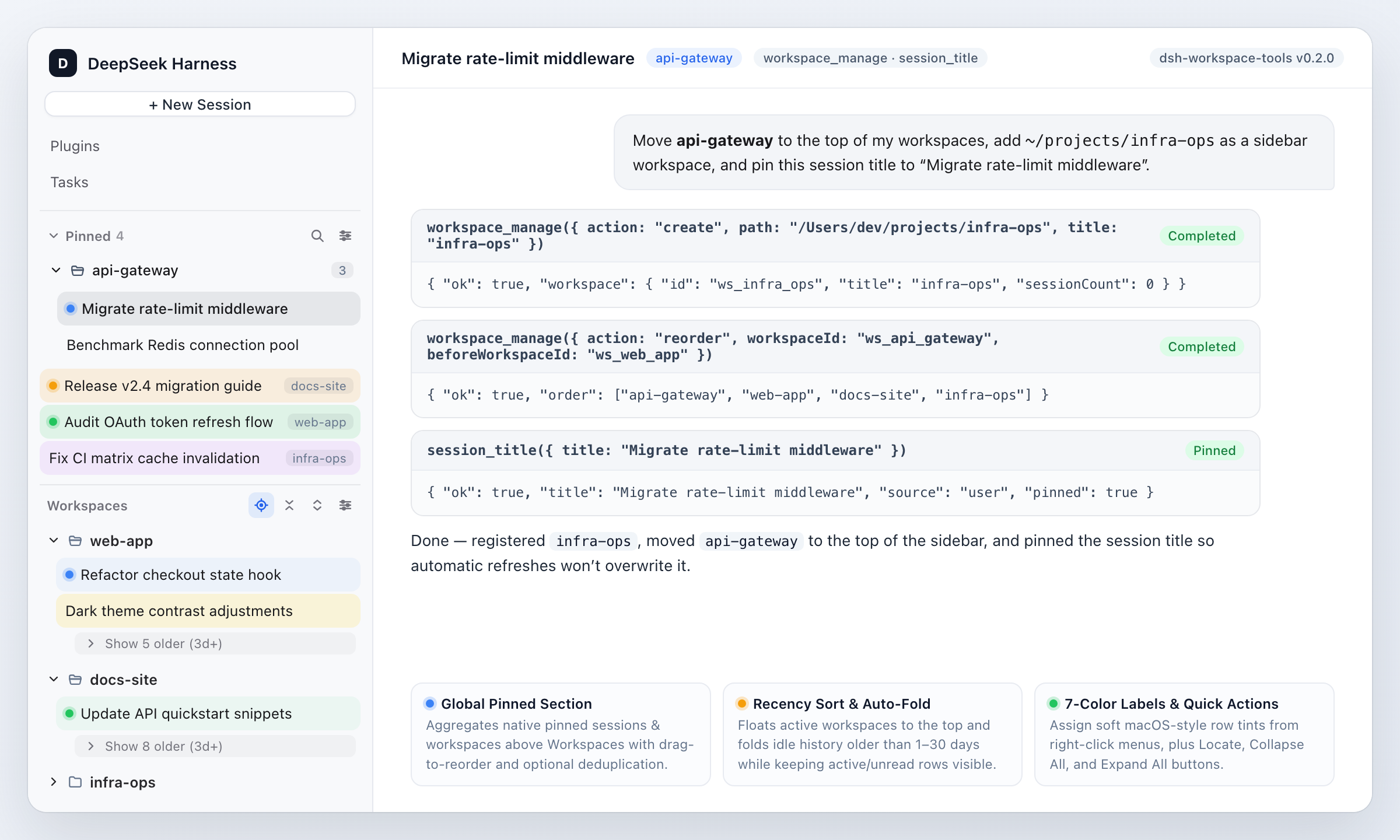
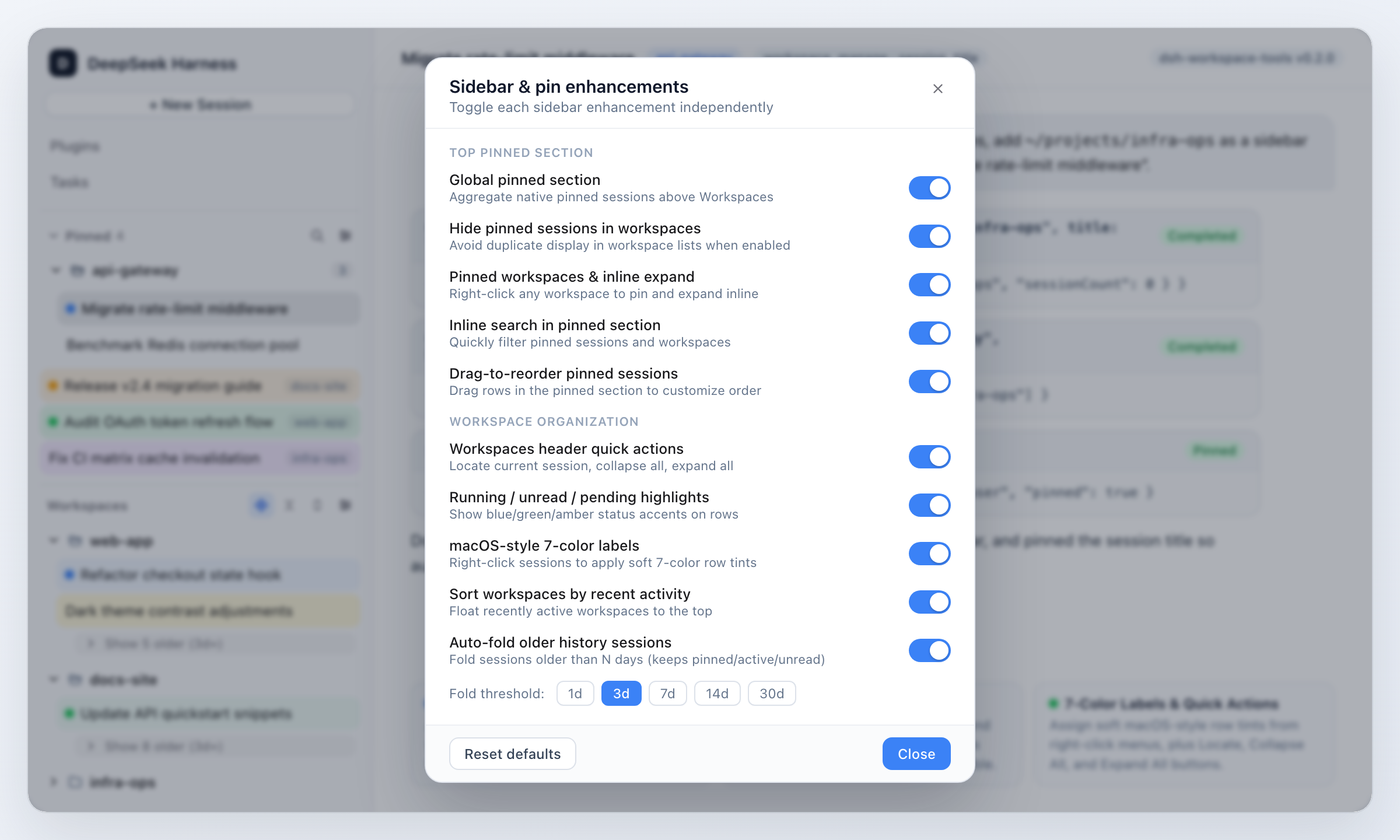
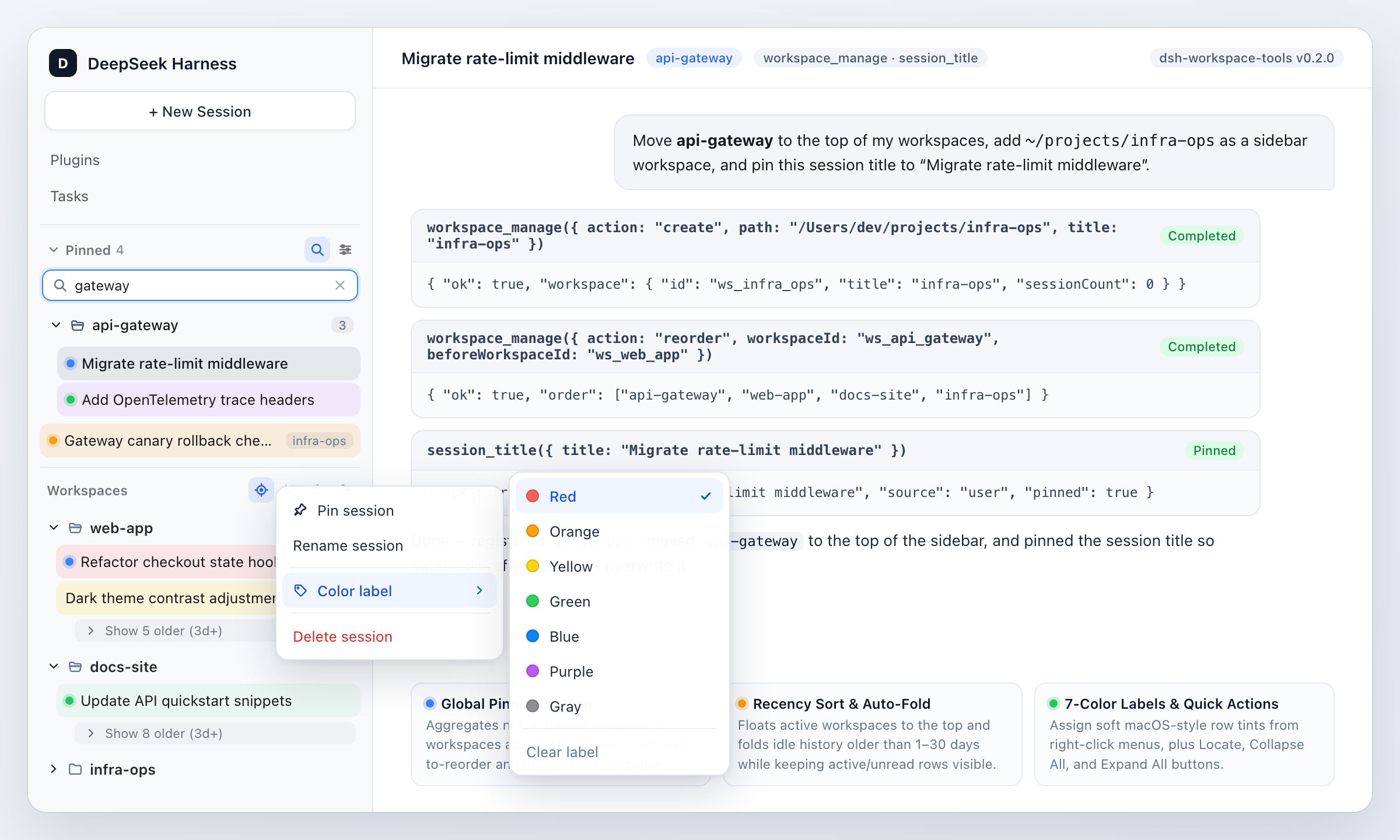
| Global Pinned & Agent Tools | Modular Settings Modal | Inline Search & 7-Color Labels |
|---|---|---|
 |
 |
 |
Sidebar & Pin Enhancements / 左侧栏增强(均可独立开关)
Click the sliders icon on the Pinned (or Workspaces) header to open the settings modal and toggle any feature independently:
- Global Pinned Section / 顶部跨工作区置顶汇总区 — Aggregates native DSH pinned sessions (
pinnedSessionIds) above Workspaces with source workspace pills, hover unpin, and optional deduplication (hides pinned sessions in the workspace list below by default). - Pinned Workspaces & Inline Expand / 工作区置顶与就地展开 — Right-click any workspace to pin it to the top section and expand its sessions inline.
- Workspaces Header Quick Actions / 工作区标题栏快捷按钮 — Adds Locate current session, Collapse all, and Expand all buttons directly to the Workspaces header.
- Status Highlights / 运行中、未读与待处理状态高亮 — Syncs live Host status indicators: blue pulsing (running), amber (waiting for approval/answer), and green (completed unread).
- Inline Search in Pinned Section / 置顶区就地搜索 — Filter pinned sessions and workspaces by title or workspace name (
Escto close). - macOS-style 7-Color Labels / macOS 风格 7 色标签 — Right-click any session to assign one of 7 soft row tints (synced across both the Pinned section and native workspace list).
- Workspace Recency Sort & Auto-Fold History / 工作区按最近活跃排序 + 超期历史自动折叠 — Floats recently active workspaces to the top via non-invasive CSS flex order, and folds idle sessions older than N days (
1 / 3 / 7 / 14 / 30d, keeping pinned/active/running/unread visible). - Drag-to-Reorder Pinned Sessions / 置顶行拖拽排序 — Drag pinned session rows in the top section to customize their order.
Non-invasive by design: reuses DSH's native
sidebar.workspacesbrowser, native pinning, and native right-click context menu API instead of replacing the built-in sidebar.
Agent Tools Included / 包含 Agent 工具
1. workspace_manage
Manages sidebar workspaces via the DSH Host workspaceRegistry service:
| Action | Parameters | Behavior |
|---|---|---|
list |
— | Lists all registered workspaces (id, title, path, sessionCount) in current sidebar order |
create |
path, optional title |
Registers an existing absolute directory path as a sidebar workspace |
rename |
workspaceId, title |
Updates the display title of a registered workspace |
reorder |
workspaceId, optional beforeWorkspaceId |
Moves a workspace before beforeWorkspaceId (or to the end when omitted) |
delete |
workspaceId |
Unregisters a workspace from the sidebar (keeps disk files and session logs intact) |
2. session_title
Reads, renames, or refreshes a live session's title via the DSH Host sessionTitle and sessions services:
| Mode | Parameters | Behavior |
|---|---|---|
| Read | (none) | Returns the current title and source of the target session |
| Rename | title |
Sets and pins a new title immediately (protected from automatic overwrites) |
| Refresh | refresh: true |
Regenerates the title using the configured title provider |
Pass optional sessionId to target another live session; omit it to act on the current session.
Installation / 安装方式
# From npm
dsh plugin --profile web add @fengguanghuai/dsh-workspace-tools

# Or from GitHub
dsh plugin --profile web add github:fengguanghuai/dsh-workspace-tools
Or in DSH Desktop: Plugins → Add plugin → enter @fengguanghuai/dsh-workspace-tools (or github:fengguanghuai/dsh-workspace-tools) → Install and enable.
Compatibility & Limitations / 兼容性与说明
- Requires DeepSeek Harness
>=0.2.0(0.2.2-rc.5verified). - Zero external runtime dependencies; no build step required.
- Preferences, pinned workspaces, custom pin order, and color labels are persisted locally in
localStorage(dsh-workspace-tools:prefs:v1). - Disabling the bundle cleanly removes all sidebar UI enhancements, context menu entries, and agent tools.
License
Links
More in this category
zhu1090093659/dsh-web#packages/dsh-task-board★ 10669
Task board for the dsh web GUI: a sidebar multi-column kanban whose cards run in real DSH agent sessions and can also be scheduled with cron expressions, executed host-side even with the browser closed.
zhu1090093659/dsh-web#packages/dsh-web-all★ 10669
Plugin and skin collection for the DSH Web UI: task board, Git graph, right-side panel, remote mobile UI, pet, live token stats, and a skin center.
ccch1mneyyy/dsh-TUI★ 8366
Claude Code-style full-screen terminal UI: pixel-whale header, live status line, and streaming thought expansion.
MeteorNOX/DeepSeek-Balance-Whale-Widget★ 7489
A fixed-corner whale widget for the DSH web GUI — balance, today's usage and per-turn cost with peak/off-peak pricing, editable balance-alert and daily-budget bubbles, a module-based custom bubble queue with A/B weighted choices and random lines or images, 30+ vendor templates (OpenAI, OpenRouter, Kimi, SiliconFlow, Ark, Zhipu, MiniMax and more) with per-model balance and subscription quota, plus task-end sound, imported audio, custom roles and a resource manager. Local-only, no telemetry.
omdsh-dev/DSH-better-sidebar★ 5362
Full sidebar workbench with file rendering and editing, terminal, Git, and subagents; third-party plugins can register new tabs.
omdsh-dev/dsh-genui★ 1070
Interactive UI components rendered inline in replies: layout, charts, forms, quizzes, mermaid, 3D scenes, and an action event loop back to the model.
Community comments
Comments are public GitHub Discussions. Loading them connects to GitHub and Giscus; a GitHub account is required to post.