审批卡片上的「批准并升级」一键操作:既应答当前待批请求,又把当前会话切换到指定的权限预设。
安装
# GitHub 源码(首次需按提示配置 allowBuilds 构建授权后重试)
dsh plugin --profile web add github:almazom/dsh-almazom-approve-escalate
装任何插件都等于在你的机器上跑第三方代码,权限和你本人一样大——能读你的文件、用你的凭据、访问网络,工具审批管不到它。GitHub 来源的插件还会在安装时执行构建脚本——pnpm 默认拦截,所以安装可能停在 ERR_PNPM_GIT_DEP_PREPARE_NOT_ALLOWED 或 ERR_PNPM_IGNORED_BUILDS;dsh 会打印出需要添加的确切键名,把它加进该 profile 的 pnpm-workspace.yaml 的 allowBuilds 下,重跑一次即可装上。放行构建本身就是一次信任判断:请只安装可信来源,并尽量锁定 commit(github:owner/repo#sha)。
README
该插件的 README 只有英文版本。
One click on the DSH web approval card: approve the pending request and switch the live session to full access (danger-full-access: sandbox off, no further approval prompts) — plus a /yolo composer command that switches the permission preset without a pending request.
Isolated third-party plugin. No harness core changes, no telemetry, no secrets.
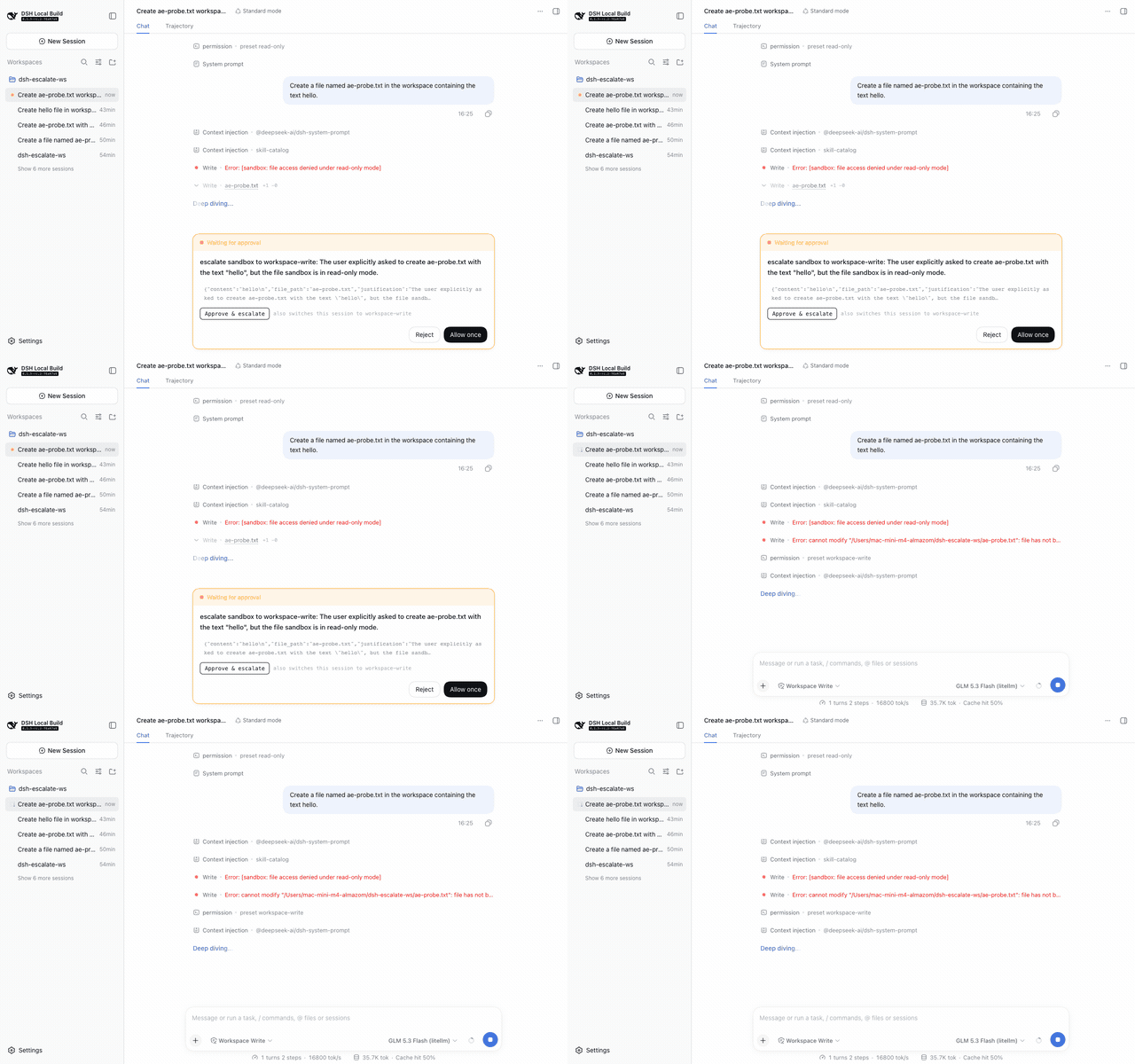
What you get
The approval card ("Waiting for approval") grows one extra action above the shipped Reject / Allow once row:
- Approve & full access — dispatches
/permission danger-full-accesson the live session (the same command the shipped/permissionpicker uses) and then answers the pending request as Allow once. A warning line spells out that future approval prompts are disabled. - /yolo — composer command (slash menu) that switches the session to full access without a pending request; the status chip flips to Full access.
- Both shipped buttons keep working; the plugin only composes two manual actions into one click. If the host lacks the
/permissioncommand, the button says so instead of answering blind.
Install
dsh plugin --profile web add dsh-almazom-approve-escalate
(or from git: dsh plugin --profile web add git+https://github.com/almazom/dsh-almazom-approve-escalate.git)
After installing, hard-refresh the browser so the client bundle picks up the new rev.
Then restart the web app (dsh web / your service manager) and hard-refresh the browser.
Configure
Override the preset or the label in the profile patch layer (~/.dsh/profiles/web/cordis.patch.yml or $DSH_HOME/cordis.patch.yml):
- insert:
    - id: almazom-approve-escalate
      name: 'dsh-almazom-approve-escalate'
      config:
        preset: 'workspace-write'   # any permission preset your host offers
        label: 'Approve & escalate'
Updates & versioning
- The plugin is versioned in
package.json(semver) and deployed as git commits in this repo; the profile mounts it vialink:so new code is served live at a fresh client-bundle rev. - Reload rule: already-open app pages keep the module graph they booted with. After any deploy, hard-refresh the DSH tab (PWA on iPhone: close from multitask, reopen). The deploying agent must announce every client-affecting change via Delta Chat ("обнови вкладки DSH").
- Rollback:
dsh plugin --profile web remove dsh-almazom-approve-escalateor delete the patch row — features disappear without touching the host.
Rollback
dsh plugin --profile web remove dsh-almazom-approve-escalate
(or delete the insert row above). No host files besides the profile's own node_modules and patch layers are touched.
Security & trust
- Plugins hold full host privileges — review the source before installing. It is two hand-written files:
lib/index.js(host: serves the config JSON above) andlib/client.js(browser: the button). - The client bundle uses the official plugin surfaces only: the documented
conversation.approval.detailslot, theslots/sessionsclient services, and the live-session command API. It never touches the network beyond same-origin config/config fetches; there is no outbound traffic. - The escalation reuses the operator-auditable
/permissioncommand path — the switch is logged like a manual one.
Compatibility
Built and verified against DeepSeek Harness 0.1.5-rc.x. The client contract it relies on (loader wrapper, slot key, seats) is documented for third-party plugins; a shipped-bundle refactor of the approval card may require a plugin update.
Provenance
- Developed against upstream
deepseek-ai/deepseek-harnessatc291e79; live-verified on a0.1.5-rc.2host with a real approval flow (seedocs/for the recording). - No model round is involved in the plugin itself; the verification recording used one model round to trigger a genuine approval request.
- Related: discussion #6616 (the /permission picker fix this plugin's escalation path builds on).
License
MIT
链接
同类插件
kenryu42/cc-safety-net★ 1900
执行前守卫,在工具调用运行前拦截破坏性 Git 与文件系统命令,以及对 SSH 密钥、.env 等机密文件的访问。
ADWMC/helm-d#helmd★ 984
DeepSeek Harness 的安全分析插件:33 个工具覆盖六大安全域、证据/报告与工具集,并提供案件生命周期、路由和工具账本;按会话绑定的案件工作区支持证据链、E 编号校验与可复现结论(repro_cmd);内置 362 篇按需参考、三档可热切换人设,以及带案件状态恢复的破甲 / Case / 拦截 / 关于四页工作台。
toby-bridges/api-relay-audit★ 904
从 DeepSeek Harness 对 AI API 中转站和 LLM 代理运行本地安全审计,生成 Markdown 报告,覆盖提示词注入、模型替换信号、工具调用改写、错误泄漏、流完整性和按 profile 启用的 Web3 风险。
SeaOf0/dsh-redteam-model★ 807
面向授权安全研究的 DSH 合集:九个工作模式(redteam 总控、渗透测试、代码审计、二进制分析、攻防评估、免杀对抗、应急溯源、云安全攻防、CTF 解题)与十五个运行时插件,设置页管理台支持一键部署、安装、更新与卸载。
howmp/dsh-pentest★ 616
面向 DeepSeek Harness 的授权渗透模式:以探索链路记录目标、线索、资产与漏洞,并在 Web 中可视化展示。
PerryLink/dsh-auto-review★ 244
审批链上的第二模型自动审查:只读审查子代理返回带理由的 allow/deny 结构化裁决,默认 fail-closed。
社区评论
评论公开保存在 GitHub Discussions。加载评论会连接 GitHub 和 Giscus;发表内容需要 GitHub 账号。