dsh Web GUI 内的社区插件市场:浏览 awesome-dsh-plugin.com 目录,从 设置 → 插件 → 插件市场 安装/卸载插件到 profile。
安装
# npm 包(预构建)
dsh plugin --profile web add @sanqi-normal/dsh-webui-market-plugin
# GitHub 源码(首次需按提示配置 allowBuilds 构建授权后重试)
dsh plugin --profile web add github:Sanqi-normal/dsh-webui-market-plugin
装任何插件都等于在你的机器上跑第三方代码,权限和你本人一样大——能读你的文件、用你的凭据、访问网络,工具审批管不到它。GitHub 来源的插件还会在安装时执行构建脚本——pnpm 默认拦截,所以安装可能停在 ERR_PNPM_GIT_DEP_PREPARE_NOT_ALLOWED 或 ERR_PNPM_IGNORED_BUILDS;dsh 会打印出需要添加的确切键名,把它加进该 profile 的 pnpm-workspace.yaml 的 allowBuilds 下,重跑一次即可装上。放行构建本身就是一次信任判断:请只安装可信来源,并尽量锁定 commit(github:owner/repo#sha)。
README
English | 中文
在 dsh web GUI 内部的社区插件市场:浏览 awesome-dsh-plugin.com 的插件目录,直接在 设置 → 插件 → 插件市场 里安装 / 卸载插件到 profile。界面风格与 harness 前端一致(跟随系统深浅色主题),支持中英文(按系统语言自动切换)。
推荐 awesome-dsh-plugin.com 网站的实现 dsh-market。
效果展示
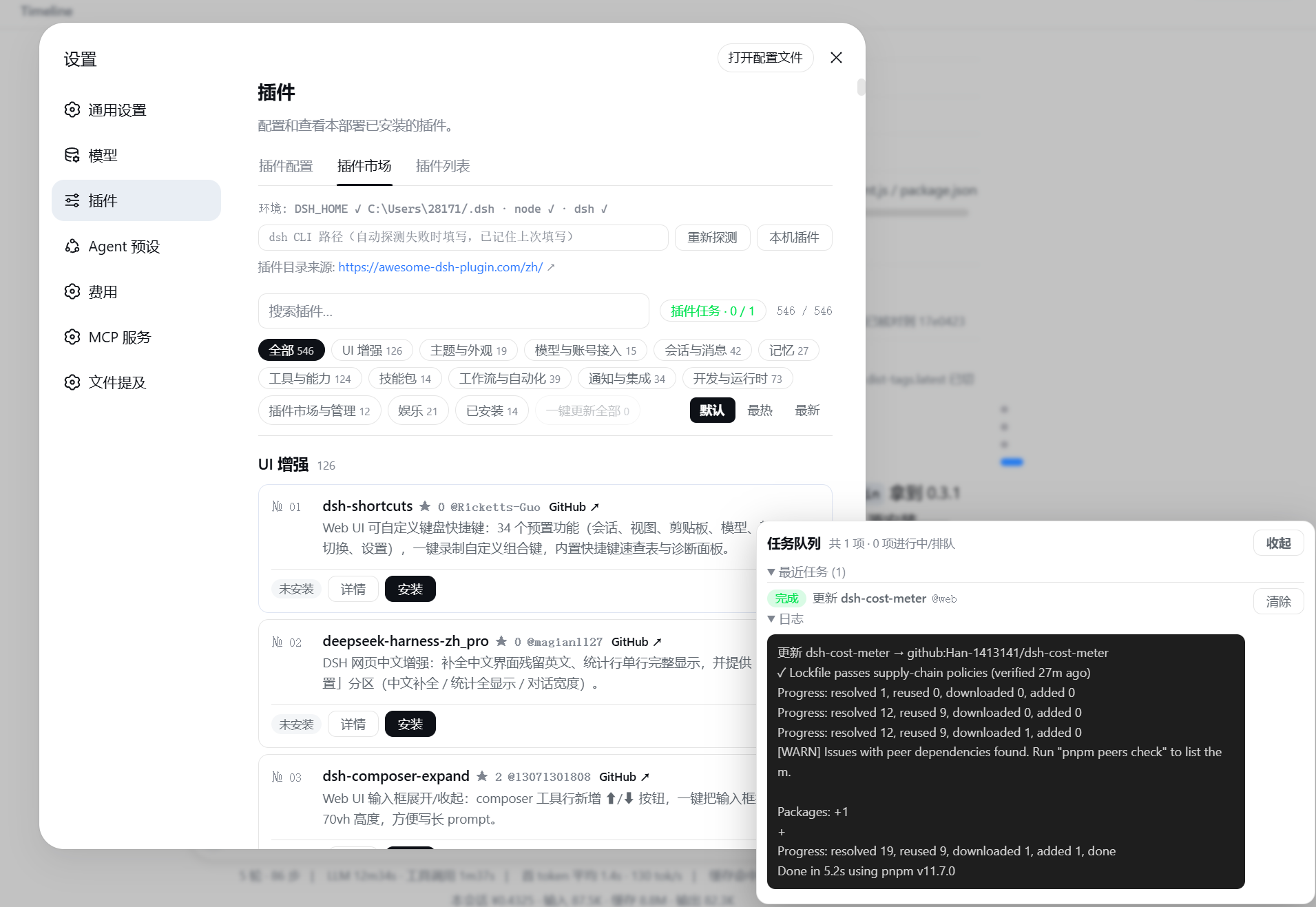
安装
方式一:从 npm registry 安装(推荐,无 git 克隆 / prepare 脚本步骤):
dsh plugin --profile web add @sanqi-normal/dsh-webui-market-plugin
方式二:从 GitHub 源码安装:
dsh plugin --profile web add github:Sanqi-normal/dsh-webui-market-plugin
安装后重启 web 服务生效:
pnpm dsh web
GitHub 源安装会执行包内 prepare 脚本,如被 pnpm 拦截,把提示的包名加入 profile 的 pnpm-workspace.yaml 的 allowBuilds 后重试。
pnpm 11 起,依赖树中"构建脚本未在 allowBuilds 中显式放行或拒绝"的包会直接导致 ERR_PNPM_IGNORED_BUILDS。若该包在当前 profile 不需要执行构建脚本,可把对应项写成 false(明确拒绝)而不是 true(放行执行);市场插件的试装验证会继承真实 web profile 的 pnpm-workspace.yaml,因此这里的 true/false 决策也会作用于试装环境。
宿主依赖说明
本插件是 DSH web profile 内运行的插件,不是独立 npm 应用。以下 peer 依赖由 DSH 宿主环境提供,用户无需手动安装:
@deepseek-ai/cordis@deepseek-ai/dsh-client-runtime@deepseek-ai/dsh-client-ui-slots
当前版本面向 DSH 0.0.1-rc.2+(不含已知解析问题的 0.0.1-rc.1)及 0.1.0-rc.2+ 环境。若使用纯 npm registry 工具解析本包,可能因为 DSH 上游部分 host 包未发布而提示依赖图不完整,这属于 DSH 宿主依赖的发布问题。
使用
打开 设置(Settings)→ 插件(Plugins)→ 插件市场(Plugin Market):
- 目录按分类分组,支持搜索与"已安装"过滤;每个卡片显示 GitHub Star 数(无数据不显示),可一键按 最热(Star 降序,无 Star 的排最后)/ 最新(收录日期) 排序,或恢复官网默认顺序;大目录分批渐进渲染,避免打开瞬间一次性插入数百卡片造成卡顿
- 点 详情 查看该插件的官方安装命令(含目标 profile)
- 跨 Profile 安装 / 一键同步(desktop 等):官网目录只发布
--profile web命令,而桌面端(desktop shell)启动的是自己独立的 profile(如desktop),市场装进 web 的插件桌面应用不会自动加载。面板顶部有 安装设置(含说明)与 跨 Profile 同步 区,自动列出本机已初始化的 profile:- 默认「有什么装什么」:
安装设置里的「自动同步到其它 profile」默认开启——安装插件时自动装到本机所有已初始化的 profile(有 web 装 web,有 desktop 也装 desktop;在确认框直接选了 desktop 的也会自动补装到 web);关闭后仅装到安装时选择的 profile - 安装确认框可选目标 profile(默认 web);跨 Profile 同步 区把 web 里已装的插件一键补装到目标 profile(只新增缺失项)
- 同步是本地复制:源已在源 profile 安装过(syncFrom 校验),所以不再受目录白名单限制——装在 web 但不在精选目录的插件(如 aegis)也能同步;每个补装任务照常做安装前快照 + FIFO 队列,装完后重启对应应用生效
- 默认「有什么装什么」:
- 安装 / 更新 / 卸载 组成 FIFO 任务队列:多个插件可以连续排队提交,任务面板固定在右下角、不随页面滚动隐藏,实时显示「排队中 / 校验中 / 执行中 / 完成 / 失败 / 已终止 / 超时」,可取消排队项、终止执行项、查看每个任务的 pnpm 日志;每个任务默认超过 120 秒自动超时(可用环境变量
DSH_MARKET_OP_TIMEOUT_MS调大,如300000);遇到 pnpm 的临时网络错误(GET ... error/ETIMEDOUT/ECONNRESET等)会自动重试一次,持续失败时给出代理/镜像排查提示;一键更新全部会把所有可更新插件依次加入队列;队列头部「清空」可一键清除全部已完成/失败记录(逐条清除也支持),清除会同步到服务端,刷新或重新打开面板后不会再次出现 - 失败后询问 DSH:安装 / 更新 / 卸载失败(含超时、已终止、已拒绝)后,失败弹窗和任务队列的失败行会出现 询问 DSH 按钮;点击后前端会新建一个对话,并把操作目标、状态、环境信息和完整错误日志作为 prompt 自动发送给 AI,方便直接排查或解释状况
- pnpm ≥11 默认开启 24 小时 minimumReleaseAge 供应链策略:依赖里刚发布(24 小时内)的包会让所有安装/更新/卸载被 pnpm 拦截。遇到 ERR_PNPM_MINIMUM_RELEASE_AGE_VIOLATION 时市场会自动把违规的 name@version 合并进 profile 的 pnpm-workspace.yaml 的 minimumReleaseAgeExclude(同名多版本写成 name@v1||v2 联合,避免 pnpm 只认首条同名规则)并自动重试一次,无需手动改配置
- 停用 / 启用:停用保留依赖与磁盘文件,只把插件移出激活的 bundle 层(重启后仍保持停用);启用按原顺序恢复,免删装;卡片操作区横向排列在卡片底部,避免右侧按钮拥挤
- 本机插件:列出所有由依赖管理的插件(含在市场之外安装的、以及未进 bundle 层的 client-only/普通依赖),标注目录内/目录外、已停用、来源类型,可直接停用、启用或卸载(内置 bundle 与本地 link/file 源不会提供删除)
- 每个插件卡片显示真实的已安装状态(与 profile 的
package.json同步):安装状态按「作者 + 仓库」(owner/repo)识别,目录里有同名插件(如两个作者的dsh-memory)时,装了哪个作者就只显示哪个已安装,不会误标另一位作者的卡片;「本机插件」列表也会显示解析出的owner/repo身份 - 顶部显示插件目录来源官网链接,可直接打开
工作原理
持久化 bundle(package.json 的 dsh.bundle.patch → cordis.patch.yml),由 dsh plugin add 的 reconcile 自动加入 profile 的 dsh.profile.bundles 层:
- Host 半(
lib/host.js):注册/api/dsh-market路由,提供list(读取官网 JSON APIplugins.json,失败回退内置离线快照,含 stars/added;与官方 dsh-market 一致:先试官网 JSON,再用过期缓存,最后落离线快照,不解析官网 HTML)、probe(环境探测,含本机已初始化 profile 列表)、installed/installedAll(读取 profile package.json 与已装包 manifest)、syncPlan(跨 profile 只读差异:web 已装、目标 profile 缺失的插件清单)、install/update/updateAll/uninstall(FIFO 队列 + 后台 spawndsh pluginCLI,白名单在队列头对所有 profile 执行、试装验证仅对 web 执行)、disable/enable(停用/启用并持久化到dsh.market.disabled)、op(队列快照)、kill(终止/取消任务) - Client 半(
lib/client.js):通过exports["./client"]+dsh.client声明被 web 前端加载,注册到settings.plugins.tab槽位
安全与限制
- 来源白名单:安装只接受精选目录(awesome-dsh-plugin.com curated registry)收录的
github:源,目录外的一律拒绝,与 dsh-market 的白名单策略一致(目录抓取失败或 registry/link 源不做此限制);该白名单对所有目标 profile(含 desktop 同步)生效,勾选"跳过安全检查"才可绕过 - npm 优先(官方同款镜像策略):目录条目带
npm映射时,优先用 npm 包名安装/更新(npm tarball 走 CDN/镜像,不依赖 GitHub 下载);只有未发布 npm 的 GitHub-only 插件才走 GitHub 源。用户可在 npm/pnpm 配置中设置国内 registry 镜像(如registry=https://registry.npmmirror.com),npm 源的安装/更新会自动走该镜像 - 试装验证(trial boot):白名单通过后,若插件未声明 web client 半端(
dsh.client.platform === 'web'),会先做试装验证:在临时 DSH_HOME 里按 web profile 模板重建组合,用同一套dsh plugin add装入候选插件,再以--port 0(系统空闲端口)实际启动一次,只有出现dsh web:就绪行(Loader 树成功结算后才打印)才判定可装。验证失败会给出真实的启动错误(如重复 api-gateway / webserver 等)并拒绝安装,此时真实 profile 从未被写入、试装目录自动清理,无需任何回退操作。试装验证仅对 web profile 执行:非 web profile(如 desktop)的组合由对应桌面壳定义、市场无法在临时环境复刻,其安装由「来源白名单 + 安装前快照」把关(同样无破坏性,只是没有启动判定)。试装环境会继承真实 web profile 的pnpm-workspace.yaml(allowBuilds/minimumReleaseAgeExclude),因此已在真实 profile 中显式拒绝(false)的构建脚本不会在试装时被重新放行或执行。 - 跨 profile 同步只增不删:
syncPlan只计算「web 已装、目标缺失」的插件,且要求目标 profile 已初始化(避免误建空 profile);同步仅补装、绝不删除或降级目标 profile 里已有的任何内容。同步安装携带syncFrom来源校验:仅当目标源确为源 profile 已装依赖时才放行(本地复制,不视为新的远端信任决策),未通过校验的仍走目录白名单;装到 desktop 等 profile 后需重启对应应用生效 - 同源校验:
install/uninstall/update/kill写操作只接受同源 POST(Origin 头与 Host 一致),跨源请求一律 403 - 热挂载(免重启):安装成功后,若新插件的
cordis.patch.yml是纯id/name插入行,会尝试挂入运行中的组合并自动刷新页面生效(无需手动操作);patch 复杂或环境不支持时回退"重启生效"。热挂载输入存于<profile>/.dsh-market/,每次启动自动清理;热挂载、热卸载与 Loader 停用/启用只作用于运行中的 web profile,desktop 等其它 profile 的操作不会触碰 web 的运行态 - 更新检测与更新:已安装插件卡片自动显示"更新"按钮(github 源对比 lockfile 锁定 commit 与 GitHub HEAD;registry 源对比 npm latest 与已装版本;本地 link/file 源不检测),点击即重新解析最新版本并作为后台任务执行,完成后下次重启生效;检测失败静默降级为"无更新",不会阻塞列表。github 源更新时会把检测到的 HEAD commit 写成
github:owner/repo#<sha>再执行,避免 pnpm 走git ls-remote(SSH)解析 HEAD 时因未配置 SSH key 报Permission denied (publickey) - 离线目录快照:
data/catalog-snapshot.json作为官网抓取失败时的离线兜底,可用pnpm run snapshot从官网 JSON API 直接抓取刷新(不走回退链,官网不可达时会失败而非复制旧数据) - 安装前自动快照:写入任一 profile 前会把
package.json备份为同目录.mkts-snapshot-<时间戳>.json(跨 profile 同步与"跳过安全检查"的安装同样备份),配合dsh plugin --profile <name> remove <包名>可手工回退 - CI=true:pnpm 子进程以 CI 模式运行,避免无 TTY 时静默卡在交互提示
- 网络超时控制:pnpm 子进程默认使用较短的
fetch-timeout(30s)和fetch-retries(1),避免弱网下"GET 链接 error 一直 retry"拖到任务超时;可用DSH_MARKET_FETCH_TIMEOUT_MS、DSH_MARKET_FETCH_RETRIES、DSH_MARKET_FETCH_RETRY_MINTIMEOUT_MS、DSH_MARKET_FETCH_RETRY_MAXTIMEOUT_MS覆盖;前端/api/dsh-market请求默认 30 秒超时,防止面板因外部网络卡死 - 停用持久化:停用状态写入 profile
package.json的dsh.market.disabled(保留依赖、移出dsh.profile.bundles);市场在启动时和每次 pnpm 操作后会重新应用该集合。注意:在命令行手工执行dsh plugin add/remove/update会触发 reconcile 短暂恢复停用项,重启或下一次市场操作会再次停用 - 安装 / 卸载后需重启 web 服务生效(热挂载成功的除外,本插件不做自动重启)
- 目录数据来自官网 JSON API(
plugins.json,与 dsh-market 同源,含 Star 数),抓取失败时按「过期缓存 → 内置离线快照」回退(与官方 dsh-market 策略一致,不再解析官网 HTML 静态页);插件数量与分类以官网为准
链接
同类插件
zhu1090093659/dsh-web#packages/dsh-plugin-manager★ 8076
设置 → 插件 分区里的插件管理 Tab:从 npm/git 安装带进度、下次启动生效的启停开关、安装冲突对账可撤销、失败一键转交修复会话。
dsh-market/dsh-market★ 4713
在 DeepSeek Harness 设置页内浏览、搜索并安装社区插件,支持分类筛选、一键更新与停用,以及主题切换与配置备份。
bradeGithub/DSH-Plugins-Marketplace★ 168
面向 GitHub dsh-plugin 话题的插件与技能市场:设置页内逛自动收录的全量索引(CI 每 2 小时刷新),一键安装带类型识别、安装脚本与宿主依赖遮蔽安全检查、环境变量密钥管理,并附 STANDARD.md 识别层规范。
kingOfSoySauce/dsh-skin-market★ 162
原生皮肤市场与生命周期管理器,发现社区皮肤、展示预览与兼容状态,并提供已验证的一键安装或手动安装入口。
awesome-dsh-plugin/dsh-find-plugin★ 151
会话内直接找插件:按关键词/分类搜索本精选 registry,返回描述与可直接执行的安装命令。
vlln/plugin-registry#console★ 58
插件生态基建:浏览器面板管理官方 repository 插件(0 patch)+ make-dsh-plugin 插件开发引导技能。
社区评论
评论公开保存在 GitHub Discussions。加载评论会连接 GitHub 和 Giscus;发表内容需要 GitHub 账号。