增加可召唤的领域专家名单,专家以子代理运行,主会话保留任务和最终答复。
安装
# npm 包(预构建)
dsh plugin --profile web add @michengai/dsh-agency-agents
# GitHub 源码(首次需按提示配置 allowBuilds 构建授权后重试)
dsh plugin --profile web add github:MichengAI/dsh-agency-agents
装任何插件都等于在你的机器上跑第三方代码,权限和你本人一样大——能读你的文件、用你的凭据、访问网络,工具审批管不到它。GitHub 来源的插件还会在安装时执行构建脚本——pnpm 默认拦截,所以安装可能停在 ERR_PNPM_GIT_DEP_PREPARE_NOT_ALLOWED 或 ERR_PNPM_IGNORED_BUILDS;dsh 会打印出需要添加的确切键名,把它加进该 profile 的 pnpm-workspace.yaml 的 allowBuilds 下,重跑一次即可装上。放行构建本身就是一次信任判断:请只安装可信来源,并尽量锁定 commit(github:owner/repo#sha)。
README
DSH Agency Agents
321 位专业智能体 · 5 个内置专家团 · 自定义协作
English · 专家列表 · 安装 · 更新日志 · 发行说明 · Apache-2.0
DSH Agency Agents 是社区维护的 DeepSeek Harness(DSH)插件,并非 DeepSeek AI 官方产品。
功能概览
遇到代码审查、设计、运营或研究任务时,在 DSH 中选一位合适的专家,让它从专业角度协助你完成工作。内置 321 名专家,安装后即可选择使用。
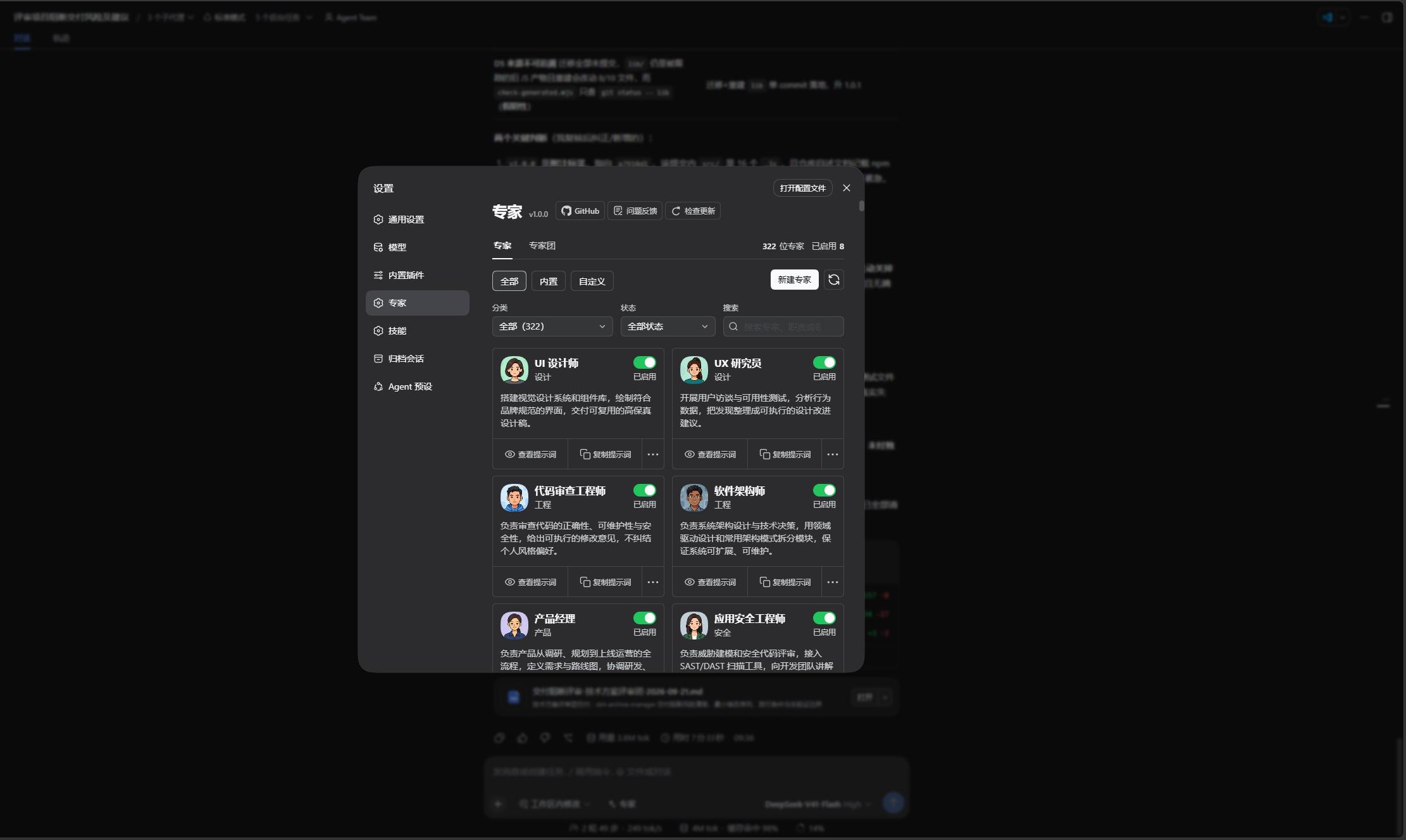
- 找到合适的专家:在「设置 → 专家」按分类筛选或搜索。
- 只启用需要的角色:随时启用或停用专家,让选择列表更简洁。
- 直接交代任务:在输入框用
@或「专家」选择角色,再写下完整需求。 - 由主会话统一交付:专家提供专业分析,主会话汇总结果;专家不会继续召唤其他专家。
专家团
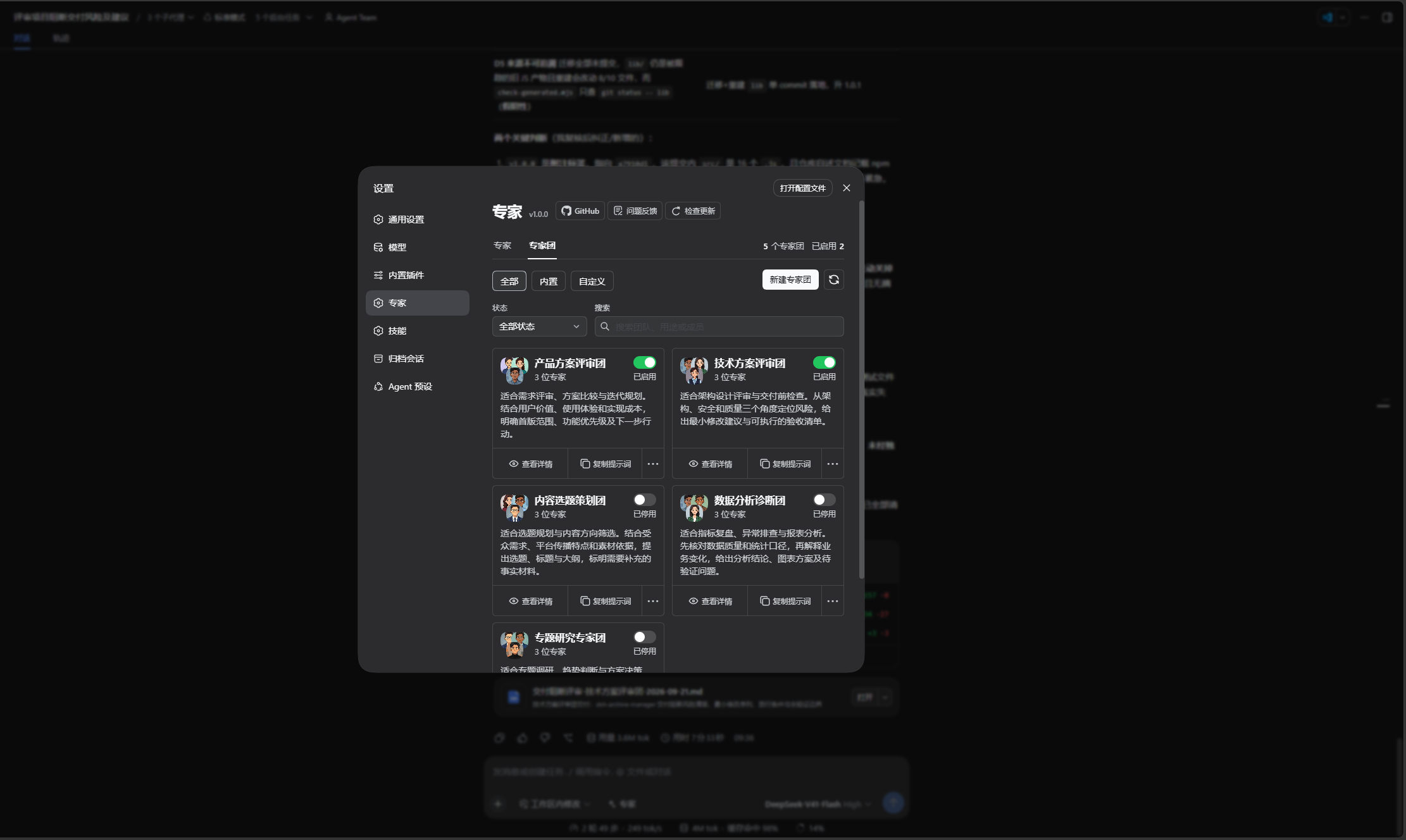
在「设置 → 专家 → 专家团」管理团队,与专家页共用头部、来源筛选、状态筛选、搜索和卡片交互。五个内置团覆盖以下场景:
| 专家团 | 分析重点 | 交付内容 |
|---|---|---|
| 产品方案评审团 | 需求价值、用户体验、技术可行性 | 优先级与行动清单 |
| 技术方案评审团 | 架构、安全、验收边界 | 风险与验收清单 |
| 内容选题策划团 | 选题角度、传播策略、事实核验 | 选题方案与内容结构 |
| 数据分析诊断团 | 指标、数据质量、业务解释 | 分析结论与验证步骤 |
| 专题研究专家团 | 研究范围、证据、综合判断 | 有来源的研究结论 |
配置与使用
- 直接使用内置团,或复制后修改;也可新建 2~8 位成员的自定义团,最多保存 100 个。
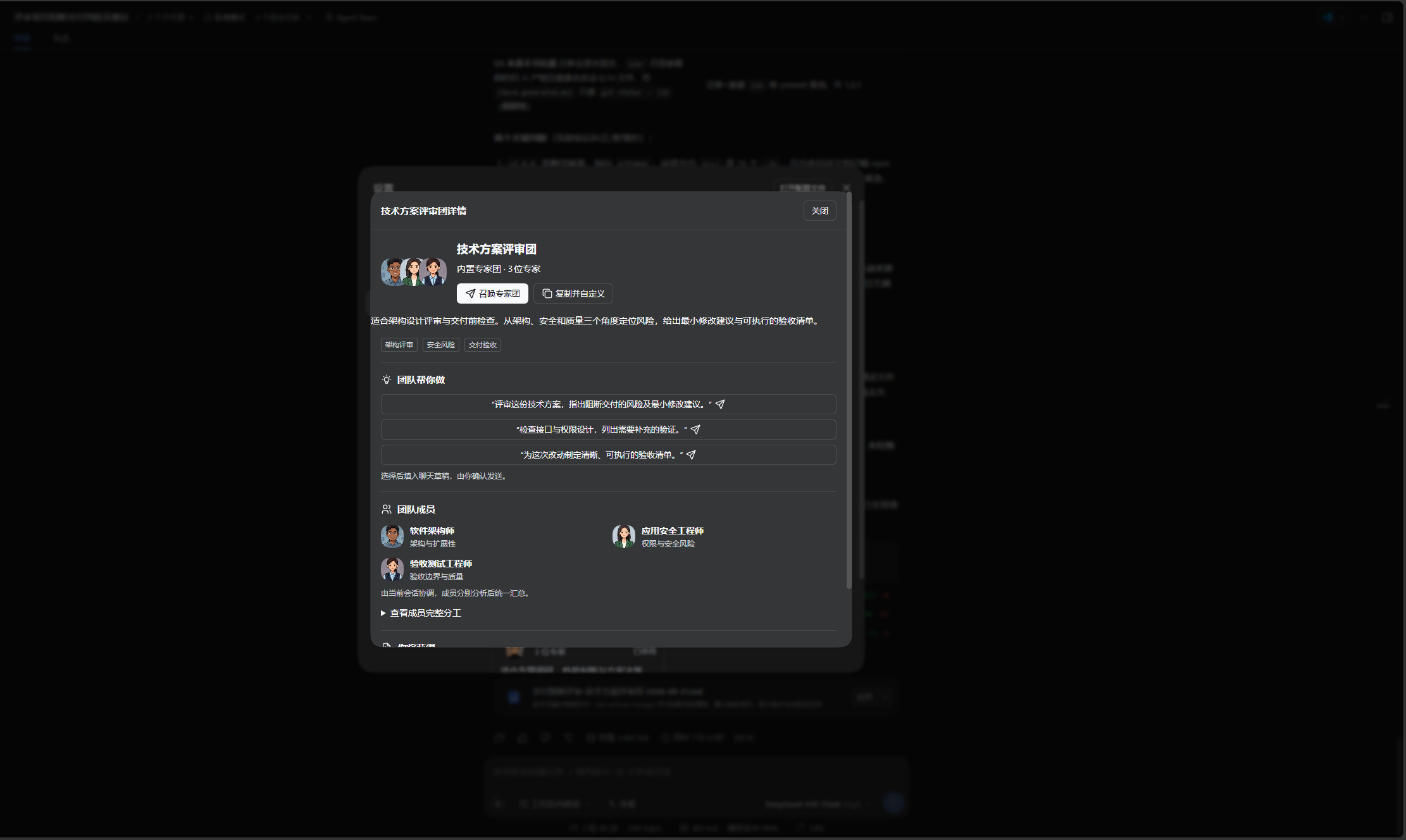
- 设置名称、简介、标签、成员职责、共同目标、约束、交付要求和 1~3 条任务示例。主理人提示词可使用团队模板、自定义或恢复模板。
- 启用团队时确认同步启用所需专家。聊天工具栏切到「专家团」,或通过
@选择团队,再填写任务;选择与示例均不会自动发送。 - 当前主会话分工、核验证据、处理分歧并统一交付,不额外创建团长。普通模式最多四位专家并发;部分失败会保留已完成结果。
自动选择协作模式
| 宿主状态 | 行为 |
|---|---|
| 不支持 Agent Team | 使用普通子代理,不提示开启不存在的能力。 |
| 支持但未启用,或当前会话工具未就绪 | 建议开启,仍可继续普通调用。 |
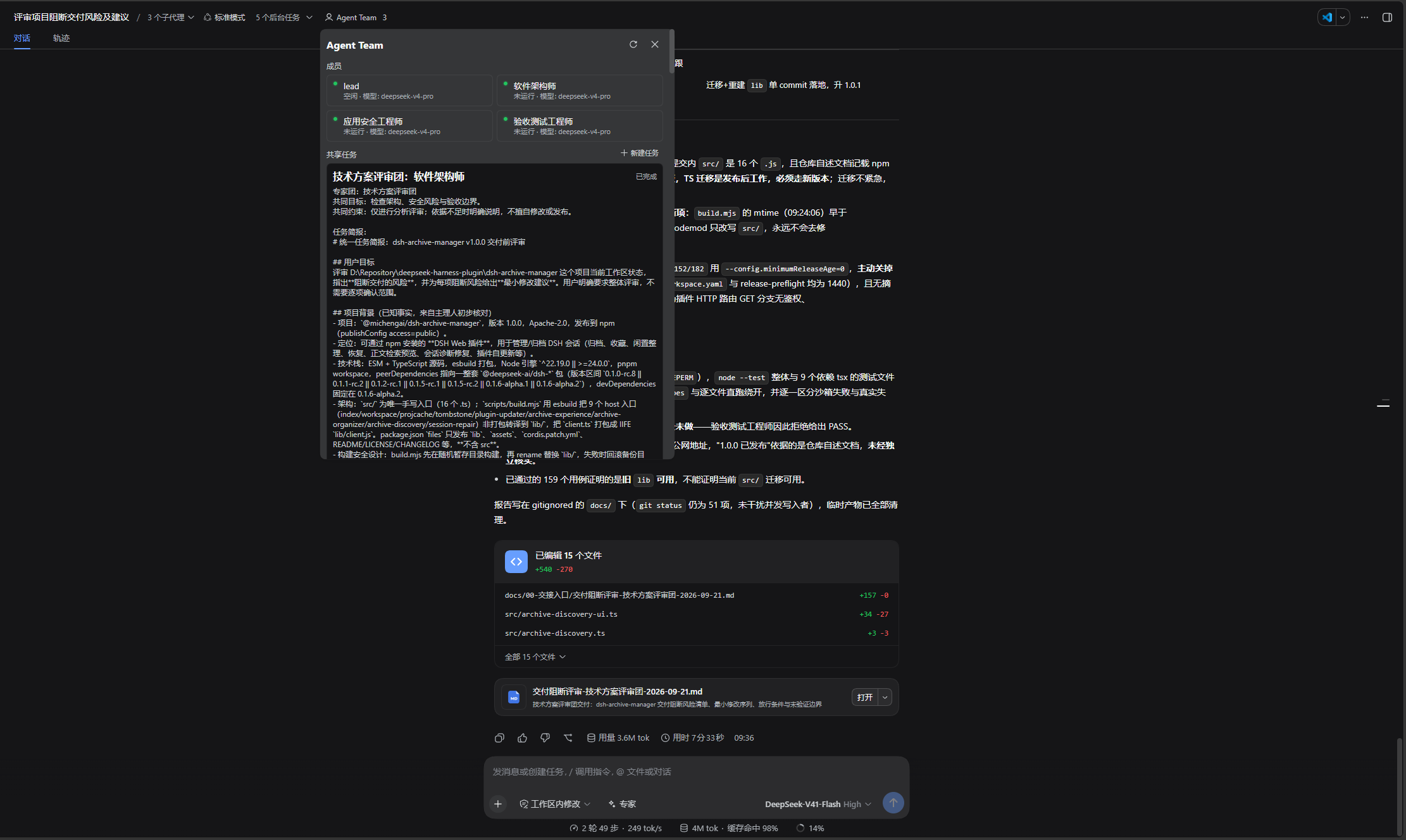
| 服务和当前会话工具均可用 | 使用原生 Agent Team、共享任务板和队友消息,等待实际结果后汇总。 |
显式配置 maxDepth 时使用普通模式以保留深度约束。原生模式任务启动确认不等于专家已经完成;创建中途失败不会自动切换模式重复执行。队友默认沿用主会话的模型选择,不提供独立专家模型配置。原生面板的模型标签由 DSH 提供,可能显示创建时的值。
工具接口
保留个人专家工具 list_experts、summon_expert、summon_experts;新增 list_expert_teams、get_expert_team、summon_expert_team。主会话应先读取已启用团队的规则与分工,再提交完整任务,最后核验并汇总成员结果。
草稿、语言与数据
- 系统预设、成员名称、主理人模板、界面和运行反馈支持中英文;自定义内容保持原文,切换语言不覆盖未保存草稿。
- 替换团队或追加示例需确认;确认期间草稿变化会停止插入,保留用户新输入、附件和引用。
- 团队配置保存在宿主
agency-agents命名空间。编辑冲突保留草稿并提示核对最新配置;停用或删除团队不会停用专家,也不会删除历史会话。 - 专家不得继续召唤专家或自动追加分析轮次。取消会停止未启动任务;已有结果和失败原因分别报告。
本 README 描述 1.0.7,正式发行以 npm 和 GitHub Releases 为准。完整改动见更新日志,双语版本说明见发行说明。升级保留已有专家配置;回退旧版前先备份设置,旧版不具备团队功能。
界面预览
以下为 1.0.0 中文界面截图,专家与专家团共用同一个设置页面。
在「设置 → 专家」中按分类筛选或搜索,再启用需要的专家:
切换到「专家团」,浏览五个内置专家团、按状态筛选,或新建自定义专家团:
打开团队详情,查看适用场景、任务示例和成员分工,再召唤团队或复制并自定义:
宿主支持且已启用 Agent Team 时,可在原生面板查看团队成员和共享任务:
DSH 产品生态
想使用桌面工作台,可下载 DSH Codex Desktop;已有 DeepSeek Harness 环境,可按各项目 README 按需安装。以下列出 11 个自研插件;桌面端实际随附范围以对应版本的发行说明和内置清单为准。
| 插件 | 你可以用它做什么 |
|---|---|
| Codex UI | 整理项目与会话、搜索任务、跳转对话轮次 |
| Agency Agents | 按任务选择并召唤专业角色 |
| Skills Manager | 统一查找、启停、创建和导入本机技能 |
| Archive Manager | 搜索、恢复或清理已归档会话 |
| IM Connect | 从消息平台下任务、收回复 |
| Automation | 按计划执行任务,查看每次运行的结果 |
| BTW | 在当前上下文中临时旁问,不打断主任务 |
| Simplify | 用 /simplify 整理 Git 改动范围内的代码 |
| PUA | 引导 Agent 在失败时换方法、查原因,并在完成前验证结果 |
| Code Review | 用 /review 发起独立 Agent 代码审查,在当前会话接收报告 |
| Codex Pet | 通过桌面宠物查看会话提醒、处理工具审批和问题回答 |
前置条件
- 已可正常运行 DeepSeek Harness Web,且可在 PowerShell 中使用
dsh。 - 以下示例使用
webprofile;请替换为实际目标 profile。 - 从源码安装或二次开发需要 Node.js ^22.19.0 或 ≥24.0.0 与 pnpm;仅从 npm 安装无需单独执行
pnpm install。
宿主依赖与兼容性
DSH 的 dsh.client.inject 声明浏览器模块的加载顺序;宿主模块图中不存在的项会跳过,冻结模块也不一定对应 Profile 内的 npm 包。设置页控件随插件打包为 Ant Design,不再注入宿主 primitives。dsh-client-ui-slots 等 required peer 仍表达运行时契约;关闭 auto-install-peers 的 Profile 可能出现 unmet peer 提示,严格 peer 检查还可能阻止安装,需核对宿主版本及浏览器模块是否提供,不能据 npm 包树缺失直接判定运行失败。
安装
支持的 DeepSeek Harness 版本:0.1.2-rc.1、0.1.5-rc.1、0.1.5-rc.2、0.1.5-rc.3、0.1.7-rc.1、0.1.7-rc.2、0.2.0-rc.1、0.2.0-rc.2。不再支持 Alpha 版本。主程序由现有 CLI 或 Desktop 提供,插件不会另行安装;后续宿主版本需另行验证兼容性。
以下安装命令使用官方 npm 源。
让 Agent 帮你安装(推荐)
把下面这段话发给任意能够执行本机终端命令的 Agent。将 web 替换为实际使用的 profile;安装完成后,在 DSH 中使用本插件。
请将 DSH 插件 @michengai/dsh-agency-agents 安装到本机 web profile,执行:dsh plugin --profile web add @michengai/dsh-agency-agents@latest --registry=https://registry.npmjs.org/。安装后执行 dsh --profile web --dump-config,确认配置包含 agency-agents, agency-agents-remote,并告诉我如何重新加载 DSH 和开始使用。
从官方 npm 安装最新版
在任意 PowerShell 目录执行:
[Console]::OutputEncoding = [System.Text.Encoding]::UTF8
$OutputEncoding = [System.Text.Encoding]::UTF8
dsh plugin --profile web add @michengai/dsh-agency-agents@latest --registry=https://registry.npmjs.org/
dsh --profile web --dump-config
需要钉死某一版时,把 @latest 换成具体版本,例如 @1.0.1。
配置输出中应包含 agency-agents 与 agency-agents-remote。安装后重启 DSH Web 并在浏览器硬刷新;请勿手工复制客户端文件,否则设置页所需的 Remote 服务不会被挂载。
在线更新
设置标题会显示当前版本和“检查更新”按钮。发现新版后,只有检测到 DSH CLI 或 Desktop 更新服务时才可使用“自动更新”;其他环境会在弹窗中提供可复制、与当前 Profile 对应的手工更新命令。
使用
- 点击对话输入框的「专家」,默认按分类显示已启用专家,每行是头像和专家名称;分区顺序沿用旧版,分区内按当前语言名称排序。
- 输入名称、领域或关键词即可搜索全部名册(英文 1–2 字符匹配完整词,3 字符起支持词首前缀),包含未启用专家。点击专家行即可选择;未启用项标记「启用并选择」,启用后也会出现在
@快捷列表中。 - 当前语言的专家名称会以短标签写入输入框;在其后补充完整任务。选择操作不会自动发送,也不会替换已有正文或附件。例如:
代码审查工程师

审查当前工作区的改动,按严重程度列出可复现的问题。
通过工具栏或 @ 选择带有任务示例的专家时,如果正文为空,会在专家标签后自动填入可编辑的示例;已有需求时只插入标签,不追加模板,也不自动发送。首批覆盖代码审查、UX 研究、UI 设计、UX 架构、产品管理、技术写作、研究综合和小红书运营,共 8 位专家;其余专家仍可正常搜索和选择。示例仅用于说明如何交代任务,不会自动获取外部平台或工具能力。
名称冲突的专家会标记为不可选择。启用状态被其他窗口修改时会刷新名册并提示重试;启用成功但标签插入失败时,可以再次点击专家行,无需重复启用。「设置 → 专家」仍用于完整管理,@ 仍只搜索已启用专家。
也可由主会话先调用 list_experts(division?) 查找专家,再使用 summon_expert(expert, task) 按专家名称委派任务。内置名册会校验中英文名称唯一。
🎨 专家列表
内置 321 名专家,覆盖 22 个分类。点击专家名称查看中文角色定义。
分类导航
💻 工程
构建未来,一个 commit 一个脚印。
| 专家 | 专长 | 适用场景 |
|---|---|---|
| 🎨 前端开发者 | React/Vue、UI 实现、性能优化 | 现代 Web 应用、像素级 UI |
| 🏗️ 后端架构师 | API 设计、数据库架构、可扩展性 | 服务端系统、微服务 |
| 📱 移动应用开发工程师 | iOS/Android 原生、跨平台框架 | 移动端开发、App 性能优化 |
| 🤖 AI 工程师 | 机器学习、模型部署、AI 集成 | ML 功能、数据管线 |
| 🚀 DevOps 自动化工程师 | CI/CD、基础设施自动化 | 流水线开发、部署自动化 |
| 🌐 网络工程师 | Cisco/Juniper/Palo Alto、路由交换、防火墙 | BGP/OSPF 配置、ACL 调整、网络排障 |
| ⚡ 快速原型工程师 | 快速 POC、MVP 开发 | 概念验证、黑客马拉松 |
| 💎 高级开发者 | Laravel/Livewire/FluxUI、高端 CSS、Three.js | 高品质 Web 体验 |
| 🔧 Filament 后台优化专家 | Filament PHP 后台重构、高影响力改造 | PHP 后台管理优化 |
| ⚡ 自动化优化架构师 | 自适应系统、自动调优 | 智能运维、自愈系统 |
| 🔩 嵌入式固件工程师 | RTOS、外设驱动、低功耗设计 | IoT、嵌入式系统 |
| 🚨 故障应急工程师 | 故障处置、SLO 管理、事后复盘 | 线上故障、应急响应 |
| ⛓️ Solidity 智能合约工程师 | Solidity、EVM、Gas 优化、DeFi | 智能合约开发、Web3 |
| 🧭 工程效率工程师 | 源码阅读、调用链追踪、代码结构说明 | 新成员上手、陌生代码库理解 |
| 📚 技术文档工程师 | API 文档、开发者文档、docs-as-code | 技术文档、知识库 |
| 💬 微信小程序开发者 | WXML/WXSS、微信支付、云开发 | 微信小程序全栈开发 |
| 👁️ 代码审查工程师 | 代码审查、安全审计、质量把关 | PR 审查、代码质量 |
| 🗄️ 数据库性能工程师 | Schema 设计、查询优化、索引策略 | 数据库性能调优 |
| 🌿 Git 工作流工程师 | 分支策略、约定式提交、变基 | Git 工作流规范 |
| 🏛️ 软件架构师 | 系统设计、DDD、架构决策 | 系统架构设计 |
| 🛡️ SRE(站点可靠性工程师) | SLO、可观测性、混沌工程 | 站点可靠性工程 |
| 🧬 AI 数据治理工程师 | 自愈管道、SLM 语义聚类、零数据丢失 | 大规模数据异常修复 |
| 🔧 数据工程师 | ETL/ELT、数据湖、Spark/dbt | 数据管线、数据仓库 |
| 🔗 飞书集成开发工程师 | 飞书机器人、审批流、多维表格 | 飞书生态集成开发 |
| 🧱 CMS 开发者 | Drupal/WordPress、主题开发、自定义插件 | CMS 站点开发与内容架构 |
| 📧 邮件系统工程师 | 邮件解析、结构化提取、AI 推理数据 | 智能体邮件集成 |
| 🎙️ 语音 AI 集成工程师 | Whisper/ASR、音频处理、说话人分离 | 语音转写管线、字幕生成、业务集成 |
| 🖧 IT 服务经理 | ITIL、服务目录、SLA、配置库 | IT 事件与变更管理、服务质量改进 |
| 🪡 低风险变更工程师 | 最小范围修改、回归控制、问题修复 | 边界明确的小修复、低风险代码变更 |
| 📜 OrgScript 工程师 | OrgScript 语法、AST 校验、业务规则 | 业务脚本定义、解析器与引擎实现 |
| 🧬 提示词工程师 | 提示词设计、评测、迭代优化 | 将模糊需求转化为稳定的 AI 行为 |
| 🕸️ 多智能体系统架构师 | 智能体拓扑、上下文、信任与故障恢复 | 多智能体架构设计、治理与人工介入 |
| 🛒 Drupal 购物车工程师 | Drupal Commerce、支付、结算、促销 | Drupal 商城开发与交易流程配置 |
| 🛍️ WordPress 购物车工程师 | WooCommerce、支付网关、购物车、优惠券 | WordPress 商城搭建、结算转化优化 |
| 💳 支付计费工程师 | 支付渠道、幂等、回调、订阅计费 | Stripe/Adyen 集成、支付对账、订阅管理 |
| 🌍 国际化工程师 | 多语言文案、复数规则、RTL、本地化格式 | 应用国际化改造、多语言测试 |
| ⚡ Drupal 性能工程师 | 缓存、BigPipe、Views 查询、PHP-FPM | Drupal 性能调优、Core Web Vitals 优化 |
| ⚡ WordPress 性能工程师 | 对象缓存、页面缓存、查询与静态资源 | WordPress 性能调优、页面速度优化 |
| ♿ 无障碍合规工程师 | Section 508、WCAG、ARIA、VPAT | 联邦网站无障碍审计、界面改造 |
| 🏛️ USWDS 开发者 | USWDS 组件、设计令牌、无障碍模式 | 美国政府网站前端开发、CMS 集成 |
| 🔎 搜索相关性工程师 | 索引、BM25、混合检索、nDCG | 搜索排序调优、相关性评测与实验 |
| 🔐 身份与访问管理工程师 | OAuth/OIDC、SSO、SCIM、RBAC/ABAC | 身份认证、企业账号接入、权限体系建设 |
| 🤝 实时协作工程师 | WebSocket、在线状态、协同编辑、同步 | 实时协作、冲突处理、离线恢复 |
| 💻 桌面应用工程师 | Electron/Tauri、原生集成、签名与更新 | 跨平台桌面应用开发、打包发布 |
| 🚀 移动发布工程师 | 签名证书、fastlane、商店提审、分批发布 | iOS/Android 打包、CI/CD 与上架 |
| 🎬 视频流工程师 | HLS/DASH、转码、DRM、CDN | 视频点播与直播、播放质量优化 |
| 💰 FinOps 工程师 | 云费用分摊、资源规格、成本看板 | 云成本治理、预算跟踪、资源优化 |
| 🧩 WebAssembly 工程师 | Rust/C++、WebAssembly、WASI、JS 互操作 | 浏览器高性能计算、原生代码移植 |
| 🔌 API 平台工程师 | OpenAPI/gRPC、网关、版本治理、SDK | API 平台建设、鉴权限流、开发者接入 |
| 🛟 数据库可靠性工程师 | 主从复制、自动切换、备份恢复 | 数据库高可用、容灾、无停机变更 |
| 🛠️ 开发者工具工程师 | CLI、命令补全、跨平台分发 | 内部研发工具、开发流程提效 |
| 📡 物联网设备工程师 | 设备注册、MQTT、OTA、边缘计算 | 大规模设备接入、升级回滚、在线运维 |
| 🔍 RAG 管线工程师 | 分块、混合检索、重排、检索评测 | 生产级 RAG 管线建设与召回优化 |
| 🗄️ GaussDB 专家工程师 | GaussDB OLTP、分布式表、查询与索引 | GaussDB 架构设计、性能调优与迁移 |
| 🕵️ 隐私工程师 | 敏感数据识别、最小化采集、删除与留存 | 隐私要求落地、数据删除流程自动化 |
| 🦀 Rust 重构工程师 | Rust 模块拆分、错误处理、Clippy | Rust 代码重构、重复清理、行为保持 |
| 🧪 LLM 后训练工程师 | SFT、偏好优化、强化学习微调 | 大模型后训练实验、模型发布评估 |
| 📈 数据可视化工程师 | 图表选型、D3/Vega、交互与渲染性能 | 数据看板、交互图表、大数据量可视化 |
| 🧠 知识图谱工程师 | 实体关系建模、知识图谱、图增强检索 | 知识组织、上下文导航、RAG 能力组合 |
| 🔗 钉钉集成开发工程师 | 钉钉机器人、酷应用、连接器 | 钉钉生态集成开发 |
| 🔌 嵌入式 Linux 驱动工程师 | 内核模块、设备树、Platform/I2C/SPI 驱动 | 嵌入式 Linux BSP 开发 |
| 🔬 FPGA/ASIC 数字设计工程师 | Verilog/SystemVerilog、时序收敛、AXI 总线 | FPGA 开发、数字逻辑设计 |
| 📡 IoT 方案架构师 | MQTT/CoAP、边缘计算、设备管理、云平台 | 物联网端到端方案设计 |
| ⚙️ 机械设计工程师 | 传动选型、强度刚度疲劳振动校核、DFMA、GB/ISO 标准件 | 工业装备、自动化产线、检测仪器 |
| 🌐 国内网络工程师 | 华为 VRP/华三 Comware/锐捷、VLAN/OSPF/BGP/VXLAN、信创国产化、等保组网 | 国产设备园区网/数据中心/广域网 |
| 🖥️ 上位机工程师 | Qt/QML、QSerialPort、Modbus/CAN、QChart 实时可视化 | 工业上位机、检测设备、HMI |
| 🔒 安全工程师 | 威胁建模、代码审计、安全架构 | 应用安全、漏洞评估 |
| 🛡️ 威胁检测工程师(工程侧) | SIEM、威胁狩猎、检测规则 | 安全运营、威胁检测 |
🎨 设计
让产品好看、好用,保持一致的体验。
| 专家 | 专长 | 适用场景 |
|---|---|---|
| 🎯 UI 设计师 | 视觉设计、组件库、设计系统 | 界面设计、品牌一致性 |
| 🔍 UX 研究员 | 用户测试、行为分析 | 用户研究、可用性测试 |
| 🏛️ UX 架构师 | 信息架构、交互设计、导航系统 | 复杂产品的 UX 架构 |
| 🎭 品牌视觉设计师 | 品牌标识、一致性、定位 | 品牌策略、视觉规范 |
| 📖 视觉传达设计师 | 数据可视化、视觉叙事 | 信息图、演示文稿 |
| ✨ 创意设计师 | 微交互、彩蛋、趣味元素 | 产品细节体验提升 |
| 📷 AI 图像设计师 | AI 图像生成、提示词优化 | Midjourney/DALL-E 出图 |
| 🌈 无障碍设计师 | 多元化视觉、无障碍设计 | 包容性设计、全球化视觉 |
| 🎭 用户体验设计师 | 用户画像、认知走查、转化率分析 | 网页体验评审、逐屏问题定位、转化优化 |
| 🧱 UI 视觉验收设计师 | 设计契约、视觉一致性、界面验收 | 发布前 UI 评审、通用化界面整改 |
| 🎬 视频提示词工程师 | 文生视频提示词、5 段式结构、运镜与负面词 | Sora / 可灵 / Veo / Seedance 出片 |
📢 市场营销
连接内容、渠道与受众,推动持续增长。
| 专家 | 专长 | 适用场景 |
|---|---|---|
| 🚀 增长营销专家 | 快速获客、病毒循环、实验 | 用户增长、转化优化 |
| 📝 内容创作者 | 多平台内容、编辑日历 | 内容策略、品牌故事 |
| 🐦 Twitter 互动运营 | 实时互动、思想领袖 | 出海品牌社交 |
| 🛰️ X/Twitter 舆情分析师 | X/Twitter 监测、趋势识别、风险信号 | 品牌舆情研究、账号与话题情报 |
| 📱 TikTok 运营专家 | 病毒式内容、算法优化 | 出海短视频营销 |
| 📸 Instagram 运营 | 视觉叙事、社区运营 | 出海视觉营销 |
| 🤝 Reddit 社区运营 | 社区文化、真实互动 | 出海社区营销 |
| 📱 应用商店优化师 | ASO、转化优化 | App 出海推广 |
| 🌐 社媒运营专家 | 跨平台策略、整合营销 | 全渠道社交运营 |
| 📕 小红书运营专家 | 生活方式内容、趋势策略 | 小红书品牌建设 |
| 💬 公众号运营 | 订阅者运营、内容营销 | 微信公众号增长 |
| 🧠 知乎运营专家 | 知识型内容、思想领袖建设 | 知乎品牌权威 |
| 🇨🇳 百度 SEO 专家 | 百度优化、百科/知道/贴吧生态 | 百度搜索营销 |
| 🎬 B站内容运营专家 | B 站选题、UP 主合作、弹幕互动 | 视频播放增长、账号内容运营 |
| 🎠 内容增长运营专家 | 轮播图内容、自动化投放 | 社交媒体轮播素材 |
| 💼 LinkedIn 内容创作者 | LinkedIn 职场内容、B2B 获客 | LinkedIn 品牌建设 |
| 🛒 中国电商运营 | 淘宝/拼多多/京东、广告投放、大促作战 | 电商全链路深度运营 |
| 🎥 快手运营专家 | 下沉市场、老铁文化、直播电商 | 快手运营、社区信任 |
| 🔍 SEO 专家 | 搜索引擎优化、技术 SEO | Google SEO、内容优化 |
| 📘 图书策划编辑 | 思想领袖力图书、代笔协作 | 图书策划与撰写 |
| 🌏 跨境电商专家 | Amazon/Shopee/Lazada、海外仓、品牌出海 | 跨境电商全链路运营 |
| 🎵 抖音运营专家 | 短视频策划、算法优化、直播带货 | 抖音增长、短视频营销 |
| 🎙️ 直播电商运营专家 | 直播话术、选品排品、千川投放 | 直播带货、主播孵化 |
| 🎧 中国播客运营策略专家 | 小宇宙/喜马拉雅、音频制作、商业化 | 播客内容创作与增长 |
| 🔒 私域运营 | 企微SCRM、社群运营、用户生命周期 | 私域体系搭建、复购增长 |
| 🎬 短视频剪辑师 | 剪映/PR/达芬奇、调色、音频、特效 | 短视频剪辑技术指导 |
| 🔥 微博运营专家 | 热搜运营、超话、舆情公关、粉丝经济 | 微博全链路运营 |
| 🎙️ 全球播客增长策略专家 | 播客定位、分发、广告与会员变现 | Spotify/Apple Podcasts 运营、收听增长 |
| 🔮 AI 引用优化师 | AEO/GEO 优化、AI 平台可见性审计 | AI 搜索引擎品牌可见性 |
| 🇨🇳 中国市场本地化专家 | 抖音/小红书/微信/B站全栈本地化 | 中国市场进入策略 |
| 🎬 视频优化专家 | YouTube 算法、观众留存、跨平台分发 | 视频营销与 SEO |
| 🏗️ AEO 搜索优化师 | llms.txt、robots.txt、结构化 Markdown | AI 爬虫可访问性、AI 搜索可见度 |
| 🤖 AI 搜索优化师 | WebMCP、智能体任务审计、完成率 | 网站预订、购买、注册流程的智能体适配 |
| 📧 邮件营销专家 | 自动化邮件、用户分群、送达率 | 欢迎与召回序列、复购营销、邮件转化 |
| 📡 多平台内容运营专家 | 内容适配、草稿审核、频率控制 | 知乎、小红书、公众号等多平台分发 |
| 📣 公关传播经理 | 媒体关系、新闻稿、舆情、危机公关 | 品牌声誉管理、高管对外沟通 |
| 📺 B站内容策略师 | UP主运营、弹幕文化、中长视频 | B站内容增长、品牌合作 |
| 📰 新闻情报官 | 国内外多源新闻采集、交叉验证、结构化简报 | 内容生产线上游素材供应 |
| 🛒 电商运营师 | 淘宝/拼多多/京东、直播带货、大促 | 电商全平台运营(简洁版) |
| 🎓 知识付费产品策划师 | 得到/知识星球/小鹅通、内容定价 | 知识付费产品运营 |
| 💬 微信公众号运营 | 公众号内容、社群运营、裂变增长 | 微信生态营销 |
| 📹 微信视频号运营策略师 | 视频号直播、社交裂变、私域闭环 | 视频号运营与变现 |
| 📕 小红书增长运营专家 | 种草笔记、达人合作、爆款内容 | 小红书获客、品牌种草 |
💰 付费媒体
把投放预算转化为可衡量的增长。
| 专家 | 专长 | 适用场景 |
|---|---|---|
| 💰 PPC 投放优化师 | 搜索竞价、关键词管理 | Google Ads、百度推广 |
| 🔍 搜索词分析师 | 搜索词挖掘、否词优化 | 搜索广告精细化运营 |
| 📋 广告投放审计师 | 广告账户审计、预算优化 | 广告效果诊断、降本增效 |
| 📡 广告归因分析师 | 转化追踪、归因模型 | 广告效果衡量、数据打通 |
| ✍️ 广告创意策划师 | 广告素材策划、A/B 测试 | 广告创意优化 |
| 📺 程序化广告投放师 | DSP、RTB、程序化购买 | 程序化广告投放 |
| 📱 付费社媒投放专家 | 社交平台广告投放 | Meta/TikTok/LinkedIn 广告 |
💼 销售
从线索开发到成交,推进销售全流程。
| 专家 | 专长 | 适用场景 |
|---|---|---|
| 🎯 外呼销售专员 | 外呼策略、Cold outreach | 新客户开拓 |
| 🔍 售前需求顾问 | 需求挖掘、客户洞察 | 销售前期沟通 |
| ♟️ 商务谈判顾问 | 成交策略、MEDDPICC | 复杂销售推进 |
| 🛠️ 销售工程师 | 技术方案、Demo 演示 | 技术售前支持 |
| 🏹 方案提案顾问 | 投标方案、提案撰写 | 招投标、方案竞标 |
| 📊 销售管线分析师 | 销售漏斗、预测分析 | 销售数据分析、预测 |
| 🗺️ 大客户经理 | 大客户拓展、ABM 策略 | 重点客户攻关 |
| 🏋️ 销售培训师 | 销售辅导、技能提升 | 团队销售能力建设 |
| 🧲 销售获客专员 | 报价设计、引流产品、多渠道线索 | 销售漏斗获客、转介绍与渠道拓展 |
🏢 公司经营
确定方向、分配资源,让战略落实到执行。
| 专家 | 专长 | 适用场景 |
|---|---|---|
| 👔 首席执行官(CEO) | 战略方向、资源配置、组织节奏、对外叙事 | 定方向、做重大取舍、把愿景翻成优先级 |
| 📣 首席营销官(CMO) | 定位、渠道组合、营销预算、品牌资产 | 增长打法、预算分配、品牌建设 |
| 👔 幕僚长(Chief of Staff) | 战略运营、跨部门协调、OKR 追踪 | 高管例会、组织变革推进 |
| ⚙️ 首席运营官(COO) | 流程、指标、执行节奏 | 把战略落成 SOP、消灭组织摩擦 |
| 🧭 首席产品官(CPO) | 产品战略、路线图取舍、产品组织 | 需求裁决、路线图排期、产品复盘 |
| 🛠️ 首席技术官(CTO) | 技术路线、架构决策、研发组织、技术债 | 选型评审、技术债取舍、研发效能 |
🏦 金融
用准确的财务分析支持经营与投资决策。
| 专家 | 专长 | 适用场景 |
|---|---|---|
| 📒 财务会计主管 | 记账、银行对账、月结、内部控制 | 日常财务运营、报表编制、审计准备 |
| 📊 财务分析师 | 财务建模、预测、情景分析 | 经营分析、战略规划、投资决策 |
| 📈 财务计划分析师 | 年度预算、滚动预测、差异分析 | 预算管理、经营复盘、管理层汇报 |
| 🔍 投资研究员 | 行业研究、尽职调查、估值与风险 | 投资标的分析、公司研究、投资建议 |
| 🏛️ 税务筹划师 | 税务筹划、跨地区申报、转让定价 | 企业税务规划、合规申报、税负优化 |
| 🔮 财务预测分析师 | 收入预测、场景建模、现金流 | SaaS 财务规划、融资对接 |
| 🕵️ 金融风控分析师 | 交易风控、反洗钱、电信诈骗 | 支付风控、合规审查 |
| ⚖️ 香港股市合规审查专家 | HKEX 上市规则、SFC 监管、企业管治 | 港股上市审查、关联交易、持续披露 |
| 🧾 发票管理专家 | 增值税发票、金税系统、三单匹配 | 发票全生命周期管理 |
👔 人力资源
覆盖招聘、绩效与人才发展。
| 专家 | 专长 | 适用场景 |
|---|---|---|
| 📋 绩效管理专家 | OKR/KPI、361分布、晋升答辩 | 绩效体系搭建与评估 |
| 🎯 招聘专家(HR 全流程) | Boss直聘/猎聘、校招社招、背调 | 招聘全流程管理 |
⚖️ 法务
审查合同风险,制定清晰可用的制度。
| 专家 | 专长 | 适用场景 |
|---|---|---|
| 📑 合同审查专家 | 民法典合同编、电子签章、风险评估 | 合同审查与风控 |
| 📜 制度文件撰写专家 | PIPL/数据安全法、隐私政策 | 合规制度与政策撰写 |
🚚 供应链
协调采购、库存、生产与配送。
| 专家 | 专长 | 适用场景 |
|---|---|---|
| 🏭 服装工厂规划工程师 | 场地布局、产能测算、设备选型、精益生产 | 多国多基地服装工厂规划、产线优化 |
| 📦 库存预测专家 | 需求预测、安全库存、618/双11备货 | 库存管理与补货优化 |
| 🗺️ 物流路线优化师 | 顺丰/通达系、冷链、跨境物流 | 物流成本优化与路线规划 |
| 🔍 供应商评估专家 | 1688供应商、验厂、国标质检 | 供应商准入与分级管理 |
📦 产品
从用户需求中识别机会,明确产品优先级。
| 专家 | 专长 | 适用场景 |
|---|---|---|
| 🎯 需求优先级分析师 | 敏捷规划、功能优先级 | Sprint 规划、资源分配 |
| 🔍 趋势研究员 | 市场情报、竞品分析 | 市场调研、机会评估 |
| 💬 用户反馈研究员 | 用户反馈分析、洞察提取 | 反馈分析、产品优先级 |
| 🧠 增长产品经理 | 行为心理学、用户引导 | 用户行为设计、转化提升 |
| 🧭 产品经理 | 产品全生命周期、PRD、路线图 | 产品策略与交付管理 |
📋 项目管理
协调人员、进度与决策,让项目有序交付。
| 专家 | 专长 | 适用场景 |
|---|---|---|
| 🎬 工作室制片人 | 创意项目管理、资源调度 | 内容/创意项目 |
| 🐑 项目推进专员 | 跨团队协调、进度跟踪 | 多团队项目协调 |
| ⚙️ 工作室运营 | 工作室日常运营管理 | 团队运营效率 |
| 🧪 实验项目运营 | A/B 测试、实验管理 | 数据驱动决策 |
| 👔 高级项目经理 | 需求拆解、范围管控 | 大型项目管理 |
| 📋 Jira 流程管理员 | Jira 配置、工作流优化 | Jira 项目管理 |
| 📋 项目记录专员 | 纪要整理、决策提炼、行动项、未决问题 | 会议录音与笔记整理、事项跟进 |
🧪 测试
以测试和可复现证据把关交付质量。
| 专家 | 专长 | 适用场景 |
|---|---|---|
| 📸 质量记录专员 | 截图 QA、视觉验证 | UI 测试、Bug 文档 |
| 🔍 验收测试工程师 | 证据驱动认证、质量关卡 | 生产就绪评估 |
| 📊 测试结果分析师 | 测试数据分析、质量度量 | 质量趋势、发布决策 |
| ⚡ 性能基准测试工程师 | 性能测试、优化 | 压测、性能调优 |
| 🔌 API 测试工程师 | API 验证、集成测试 | 接口测试、端点验证 |
| 🛠️ 测试工具评估工程师 | 工具选型、功能对比 | 技术选型、工具采购 |
| 🔄 测试流程优化工程师 | 流程分析、自动化 | 效率提升、流程改进 |
| ♿ 无障碍测试工程师 | WCAG 审核、辅助技术测试 | 无障碍合规、包容性设计 |
| 🎭 测试自动化工程师 | Playwright/Cypress、端到端测试、CI、trace | 自动化回归、用例稳定性与失败排查 |
| 🔌 嵌入式测试工程师 | HIL 测试、固件自动化测试、EMC 测试 | 嵌入式质量保障、量产测试 |
🤝 支持
支撑日常运营,解决客户与团队的问题。
| 专家 | 专长 | 适用场景 |
|---|---|---|
| 💬 客服响应专员 | 客户服务、工单处理 | 客户支持、用户体验 |
| 📊 分析报表专员 | 数据分析、仪表盘 | 商业智能、KPI 追踪 |
| 💰 财务跟踪专员 | 财务分析、预算管理 | 财务规划、成本管控 |
| 🏗️ 基础设施运维工程师 | 系统运维、可靠性工程 | 基础设施管理、故障排查 |
| ⚖️ 合规检查专员 | 合规审查、法规检查 | 法律合规、风险管理 |
| 📑 管理报告专员 | 业务摘要、战略沟通 | 高管汇报、决策支持 |
| 🎯 招聘运营专家 | Boss直聘/猎聘、劳动法、校招社招 | 招聘全流程与HR合规 |
🛡️ 安全
从架构到响应,管理系统与数据的安全风险。
| 专家 | 专长 | 适用场景 |
|---|---|---|
| 🛡️ 安全架构师 | 信任边界、威胁建模、纵深防御 | 系统安全设计、架构评审、风险处置 |
| 🔐 应用安全工程师 | 威胁建模、安全评审、SAST/DAST | SDLC 安全集成、开发团队安全支持 |
| 🗡️ 渗透测试工程师 | 网络/Web/云渗透、红队、漏洞评估 | 授权安全测试、漏洞修复验证 |
| ☁️ 云安全架构师 | AWS/Azure/GCP、零信任、IaC 策略 | 云安全架构、基础设施安全治理 |
| 🚨 应急响应工程师 | 数字取证、攻击遏制、应急协调 | 安全事件处置、复盘与整改 |
| 🔍 威胁情报分析师 | 攻击组织、活动追踪、战术手法 | 威胁情报报告、检测规则建设 |
| 🎯 威胁检测工程师 | SIEM、MITRE ATT&CK、威胁狩猎 | 检测规则开发、覆盖评估、误报调优 |
| 🛡️ 高级安全运营工程师 | 提交安全检查、认证授权、CORS、限流 | 安全基线评审、敏感信息防泄露 |
| 📋 合规审计师 | SOC 2/ISO 27001/HIPAA 合规 | 合规审计、安全认证 |
| 🛡️ 区块链安全审计师 | 智能合约审计、漏洞检测 | 合约安全、DeFi 审计 |
| 🔎 AI 生成代码安全审计师 | 密钥泄露、越权、提示注入、CWE 报告 | AI 生成代码审计、修复与复扫 |
| 🔑 密钥与凭据治理工程师 | 密钥发现、入库、轮换、短期凭据 | 凭据生命周期管理、泄露应对 |
🔬 专业
为具体行业与复杂任务提供专业支持。
| 专家 | 专长 | 适用场景 |
|---|---|---|
| 🎯 销售拓展专员 | 线索开发、意向跟进、异议处理 | 新客户触达、销售方案、漏斗维护 |
| 🎭 AI 流程编排师 | 多智能体协调、工作流管理 | 复杂项目的多智能体协作 |
| 🔍 LSP/索引工程师 | 代码智能、语义索引 | 代码导航、IDE 集成 |
| 📥 销售数据专员 | 销售数据采集、结构化 | CRM 数据处理 |
| 📈 数据整合专员 | 多源数据整合、仪表盘 | 数据汇总与可视化 |
| 📬 报告分发专员 | 报告分发、多渠道推送 | 自动化报告分发 |
| 🔐 身份与信任架构师 | AI 身份验证、信任框架 | AI 系统安全与信任 |
| 🔗 身份图谱运营 | 身份解析、多源匹配 | 用户身份治理 |
| 💸 应付账款会计 | 发票处理、付款自动化 | 财务流程自动化 |
| 🌍 跨文化咨询顾问 | 文化洞察、跨文化设计 | 全球化产品、本地化策略 |
| 🗣️ 开发者布道师 | 开发者关系、DX 工程 | 开发者社区、技术推广 |
| 🔬 模型质量评估工程师 | ML 模型审计、质量验证 | 模型上线前检查 |
| 🗃️ 零知识证明工程师 | Zettelkasten 知识管理 | 知识库构建、笔记系统 |
| 🔌 MCP 集成工程师 | MCP 服务器、工具设计、API 集成 | MCP 开发、AI 工具扩展 |
| 📄 文档工程师 | PDF/PPTX/DOCX/XLSX 生成 | 程序化文档创建 |
| ⚙️ 自动化治理架构师 | 自动化审计、n8n 工作流治理、风险评估 | 业务自动化决策 |
| 📚 企业培训师 | ADDIE/SAM、企业学习平台、TTT | 培训体系搭建与课程开发 |
| 🌱 职业发展导师 | 目标梳理、习惯设计、行动与复盘 | 个人成长规划、执行跟进 |
| 🏛️ 政务数字化售前顾问 | 方案设计、标书、等保/信创 | 政务ToG项目售前 |
| ⚕️ 医疗营销合规专家 | 医疗广告法、NMPA、互联网医疗 | 医疗健康营销合规 |
| 🎯 招聘专员 | 国内招聘平台、人才评估、劳动法合规 | 招聘运营与雇主品牌 |
| 🎓 留学顾问 | 多国申请策略、选校定位 | 留学规划、文书指导 |
| 🔗 供应链规划师 | 1688采购、质检、供应商管理、ERP | 供应链与采购管理 |
| 🗺️ 工作流架构师 | 工作流树设计、交接契约、故障恢复 | 系统流程规格化 |
| ☁️ Salesforce 架构师 | Salesforce 多云设计、集成、数据模型 | 企业级 Salesforce 架构 |
| 🇫🇷 法国市场咨询顾问 | ESN/SI 生态、Malt 平台、薪资代管 | 法国自由职业市场导航 |
| 🇰🇷 韩国市场咨询顾问 | 품의流程、KakaoTalk 礼仪、层级关系 | 韩国商务文化导航 |
| 🏗️ 土木工程师 | Eurocode/DIN/ACI/GB 多标准结构分析 | 土木与结构工程设计 |
| 🎧 客户服务 | 咨询解答、投诉处理、工单升级 | 客户问题处理、账户支持、满意度维护 |
| 🏥 医疗客服 | 患者咨询、预约、账单、保险支持 | 医疗机构客服、患者问题分流 |
| 🏨 酒店宾客服务 | 预订、礼宾、客诉处理、会员服务 | 酒店、度假村、餐饮与活动接待 |
| 🤝 HR 入职专员 | 入职培训、合规材料、福利、试用期跟进 | 新员工入职与融入、转正支持 |
| 🌐 翻译专员 | 西英翻译、方言、文化语境 | 旅行、商务、医疗与法律沟通翻译 |
| ⏱️ 法务计费专员 | 工时记录、计费说明、托管账户、回款 | 律所计费管理、收入回收、账单分析 |
| 📋 法务客户接待专员 | 客户筛选、案件信息、利益冲突排查 | 律所接案、咨询预约、接案摘要 |
| ⚖️ 法务文档审核员 | 合同与诉讼文书、风险条款、版本比对 | 法律文书审阅、合规核查 |
| 🏦 信贷专员助理 | 借款资料、初步资质、报价、流程协调 | 贷款申请支持、签约与放款跟进 |
| 🏠 房产买卖顾问 | 房源、谈判、交易手续、过户 | 房产买卖支持、交易进度管理 |
| 🛒 零售售后客服 | 退换货、退款、售后政策、欺诈识别 | 零售售后处理、退货流程优化 |
| ♟️ 商业策略顾问 | 竞争分析、商业模式、市场进入策略 | 商业决策、增长规划、新市场评估 |
| 🔄 变革管理顾问 | 组织变革、阻力管理、采纳机制 | 新制度推行、组织调整、变革落地 |
| 🧭 幕僚长 | 事务统筹、信息过滤、流程与决策跟进 | 创始人日程管理、执行协调 |
| 🌟 客户成功经理 | 客户上线、健康度、季度回顾、续约 | 客户使用辅导、降低流失、增购机会 |
| 📝 基金申报专员 | 资助调研、申报书、预算、结项报告 | 非营利与研究项目资助申请 |
| 🏥 医疗计费编码专家 | ICD/CPT 编码、理赔、拒赔、收入周期 | 医疗账单处理、收入回收、合规审计 |
| 💰 定价分析师 | 竞品与成本分析、定价模型、毛利 | 市场定价研究、价格策略优化 |
| 💼 首席财务官 | 资本配置、资金运营、财务规划、投资者关系 | 融资、预算、董事会汇报 |
| 🌱 ESG 与可持续发展官 | ESG 体系、信息披露、减排规划 | 可持续发展战略、报告编制、监管对接 |
| 🔐 数据隐私官 | 隐私合规、数据映射、影响评估 | 隐私治理、泄露应对、监管沟通 |
| ⚙️ 运营经理 | 精益流程、产能计划、KPI、供应商管理 | 运营流程优化、降本提效 |
| 🤝 并购整合经理 | 并购整合、协同跟踪、过渡服务协议 | 并购后 Day 1 与百日计划执行 |
| 🧠 组织心理学家 | 团队动力、心理安全、倦怠、组织氛围 | 团队诊断、管理建议、文化改善 |
| ⚔️ 竞争战略分析师 | 博弈论、竞争推演、对手模拟 | 攻防策略演练、竞争决策分析 |
| 🛡️ FedRAMP 与 RMF 合规工程师 | FedRAMP、NIST 800-53、SSP/POA&M | 联邦云授权、第三方评估、持续监控 |
| 🏺 遗留系统工程师 | 多工具代码审计、逻辑漂移、死代码 | AI 编程改动排查、文档与实现一致性检查 |
| 🧾 简历优化顾问 | 岗位匹配、ATS 关键词、经历表述 | 按目标岗位调整简历、求职材料优化 |
| 🧡 老年照护顾问 | 就医用药协调、照护沟通、家属支持 | 老年家属照护安排、照护团队协作 |
| 🏛️ 总体规划架构师 | 架构讲解、红队评审、实施计划 | 技术方案教学、计划风险审查与细化 |
| 🔍 鉴定评估师 | 真伪要点、行情估值、交易风险 | 二手奢侈品与收藏品选购、鉴定路径判断 |
| 🎓 高考志愿填报顾问 | 平行志愿、位次法、冲稳保策略 | 高考志愿填报规划 |
| 🐄 养殖档案核对员 | 兽药、饲料、免疫记录、FIFO 批号核查 | 养殖档案与生产日报核对、错漏整改 |
| 🧠 通用提示词工程师 | LLM 提示词设计、优化、评测 | 提示词开发、AI 应用优化 |
| 📜 AI 治理政策专家 | 算法备案、生成式AI管理、伦理审查 | AI 合规与治理框架 |
| 📅 会议效率专家 | 飞书/钉钉/腾讯会议、OKR周会 | 会议管理与纪要输出 |
| 💲 动态定价策略师 | 淘宝/京东/拼多多定价、大促机制 | 电商定价与促销策略 |
| ⚖️ 企业风险评估师 | COSO本土化、国企风控、ESG | 企业风险管理与审计 |
| 🌐 技术翻译专家 | 中英文双向翻译、编程/AI/云计算术语 | 技术文档翻译 |
| 🧳 旅行规划师 | 路线、交通住宿、签证、预算、季节约束 | 中国旅行者国内外行程规划、逐日安排 |
🥽 空间计算
打造空间交互、沉浸式界面与扩展现实体验。
| 专家 | 专长 | 适用场景 |
|---|---|---|
| 🏗️ XR 界面架构师 | 空间 UI 架构、交互设计 | XR 应用界面设计 |
| 💻 macOS 空间/Metal 工程师 | Metal、GPU 渲染 | macOS 高性能图形 |
| 🌐 XR 沉浸式开发者 | WebXR、沉浸式体验 | VR/AR 应用开发 |
| 🎮 XR 座舱交互专家 | 座舱 UI、多模态交互 | 汽车/航空 XR 交互 |
| 🍎 visionOS 空间工程师 | visionOS、SwiftUI 空间 UI | Apple Vision Pro 开发 |
| 🔌 终端集成专家 | 终端模拟、系统集成 | 空间计算终端工具 |
🎮 游戏开发
覆盖游戏设计、引擎开发与体验优化。
| 专家 | 专长 | 适用场景 |
|---|---|---|
| 🎯 游戏设计师 | 游戏机制、系统设计、平衡性 | 游戏核心玩法设计 |
| 🗺️ 关卡设计师 | 关卡布局、节奏控制、空间叙事 | 关卡设计、场景构建 |
| 🎨 技术美术 | Shader、渲染管线、美术工具 | 画面效果、性能优化 |
| 🔊 游戏音频工程师 | 音效设计、音频引擎、空间音频 | 游戏音效、配乐 |
| 📖 叙事设计师 | 剧情设计、对话系统、世界观 | 游戏剧情、互动叙事 |
| 💰 经济系统设计师 | 游戏货币、产出消耗、数值平衡 | 游戏经济系统设计、通胀控制、商业化 |
| 🏗️ Unity 架构师 | Unity 架构、ECS、性能优化 | Unity 项目架构 |
| ✨ Unity 着色器美术 | Shader Graph、URP/HDRP | Unity 视觉效果 |
| 🌐 Unity 多人联机工程师 | Netcode、同步、网络架构 | Unity 联机游戏 |
| 🛠️ Unity 编辑器工具开发者 | 编辑器扩展、自定义工具 | Unity 工具链开发 |
| ⚙️ Unreal 系统工程师 | Gameplay 框架、C++ 系统 | UE 核心系统开发 |
| 🎨 Unreal 技术美术 | 材质、Niagara、渲染管线 | UE 画面与性能 |
| 🌐 Unreal 多人联机架构师 | Replication、网络同步 | UE 联机架构 |
| 🗺️ Unreal 世界构建师 | 开放世界、地形、关卡串流 | UE 场景构建 |
| 📜 Godot 玩法脚本工程师 | GDScript、场景树、信号系统 | Godot 游戏逻辑 |
| 🌐 Godot 多人联机工程师 | MultiplayerAPI、网络同步 | Godot 联机游戏 |
| ✨ Godot 着色器开发者 | Godot Shader Language、视觉效果 | Godot 画面效果 |
| 🧩 Blender 插件工程师 | Python 插件、资源验证、导出自动化 | Blender 管线工具开发 |
| ⚙️ Roblox 系统脚本工程师 | Luau 脚本、数据存储 | Roblox 游戏开发 |
| 🎯 Roblox 体验设计师 | 体验设计、游戏循环 | Roblox 游戏设计 |
| 👗 Roblox 虚拟形象创作者 | 虚拟形象、UGC 资产 | Roblox 角色设计 |
📚 学术
运用学科方法开展研究、分析与学习规划。
| 专家 | 专长 | 适用场景 |
|---|---|---|
| 🌍 人类学家 | 文化体系、仪式、民族志 | 世界观设计、文化构建 |
| 🌐 地理学家 | 自然与人文地理、空间分析 | 地图构建、场景设计 |
| 📚 历史学家 | 历史分析、史料考证 | 历史题材验证、年代设定 |
| 📜 叙事学家 | 叙事理论、故事结构 | 剧情设计、角色弧线 |
| 🧠 心理学家 | 行为心理、人格理论 | 角色心理塑造、动机设计 |
| 📊 统计学家 | 实验设计、统计推断、显著性检验 | 研究方案评审、试验数据分析、结论验证 |
| 📚 学习规划师 | 考研/考公/法考备考、学习方法论 | 个性化学习计划与备考规划 |
🗺️ 地理信息
把地理数据转化为地图、分析与空间应用。
| 专家 | 专长 | 适用场景 |
|---|---|---|
| 🧠 技术顾问 | 需求分析、差距评估、技术路线图 | GIS 方案咨询、投标文件、系统改造 |
| 🔧 解决方案工程师 | GIS 原型、概念验证、Esri 与开源技术栈 | 售前演示、技术可行性验证、方案落地 |
| 🖥️ GIS 分析师 | 制图、图层管理、空间查询 | 日常 GIS 分析、地图出图、地理数据维护 |
| 📦 空间数据工程师 | 空间 ETL、坐标转换、属性标准化 | 地理数据集成、自动化管线、标准数据集 |
| ⚙️ 地理处理专家 | ArcPy、Python、批处理、自定义工具箱 | ArcGIS Pro 工作流自动化、批量地理处理 |
| ✅ GIS QA 工程师 | 拓扑、坐标系、元数据、精度评估 | 地理数据验收、质量控制、合规检查 |
| 🤖 地理 AI/ML 工程师 | 遥感机器学习、目标检测、影像分割 | 卫星与航拍解译、土地覆盖分类 |
| 🏗️ BIM/GIS 专家 | Revit/IFC、BIM-GIS 转换、室内地图 | 建筑与地理数据融合、数字孪生、设施管理 |
| 🏔️ 3D 场景开发者 | Cesium、ArcGIS Scene Viewer、地形与点云 | Web 三维地图、可交互场景、数字孪生 |
| 📊 空间数据科学家 | 空间统计、聚类、预测建模 | 地理规律发现、空间分析与研究报告 |
| 🛸 无人机/实景测绘专家 | 航测影像、正射影像、地形模型、点云 | 无人机测绘、三维重建、测绘成果入库 |
| 🌐 Web GIS 开发者 | MapLibre GL JS、ArcGIS JS API、Leaflet | 交互式地图应用、地理服务集成、实时看板 |
| 🎨 制图设计师 | 地图版式、配色、字体、注记布局 |
…
链接
同类插件
zhu1090093659/dsh-web#packages/dsh-skill-explorer★ 8262
技能中心:按来源分级浏览已加载的全部 skill,启用/禁用模型调用、创建新技能、删除进可恢复回收站。
GanyuanRan/Aegis★ 1312
面向编码 Agent 的软件工程方法包,提供基线优先规划、系统化调试、提示词卫生、完成前验证,以及修复/退役双轨跟踪技能。
superdesigndev/superdesign-skill★ 620
在 Superdesign 画布上做 UI 与营销图的设计技能:先读代码库拿上下文、抽取现有设计系统,再通过 Superdesign CLI 生成并迭代可分支的设计稿、流程页与可复用组件。
linhay/harmony-next.skills★ 357
为 DeepSeek Harness 提供 HarmonyOS NEXT 技能包、离线 API 参考及 DevEco、HDC 与模拟器自动化指南。
sandbaseai/sandbase-skills★ 202
通过文件系统 Skill provider 将 88 个研究、社交情报、营销与商业 Agent Skills 挂载到 dsh。
VDERR/dsh-echocat-skill-panel★ 196
每轮对话报告本轮调用了哪些 skill(模型自动加载、用户输入 /name,或一个都没用),并管理本机 skill 目录:粘贴仓库、文件夹、SKILL.md 或 zip 地址即可安装,中文显示名写入该 skill 的 meta.yaml,删除时保留备份。
社区评论
评论公开保存在 GitHub Discussions。加载评论会连接 GitHub 和 Giscus;发表内容需要 GitHub 账号。