Adds a summonable domain-expert roster that runs as subagents while the parent session keeps the task and final answer.
Install
# from npm (prebuilt)
dsh plugin --profile web add @michengai/dsh-agency-agents
# from GitHub (first run asks for allowBuilds approval — follow the hint, retry)
dsh plugin --profile web add github:MichengAI/dsh-agency-agents
Any plugin you install runs third-party code with your own permissions — it can read your files, use your credentials, and reach the network, and tool approvals don’t sandbox it. GitHub-sourced plugins also run build scripts at install time — pnpm blocks those until you allow them, so an install can stop with ERR_PNPM_GIT_DEP_PREPARE_NOT_ALLOWED or ERR_PNPM_IGNORED_BUILDS; dsh prints the exact key to add under allowBuilds in your profile’s pnpm-workspace.yaml, and the install works on the next run. Allowing a build is a trust decision: only install sources you trust, and pin a commit (github:owner/repo#sha).
README
DSH Agency Agents
321 specialists · 5 built-in teams · Custom collaboration
简体中文 · Expert roster · Installation · Changelog · Release notes · Apache-2.0
DSH Agency Agents is a community-maintained DeepSeek Harness (DSH) plugin, not an official DeepSeek AI product.
Features
Choose a specialist in DSH for code review, design, operations, or research. All 321 experts are bundled and ready to use after installation.
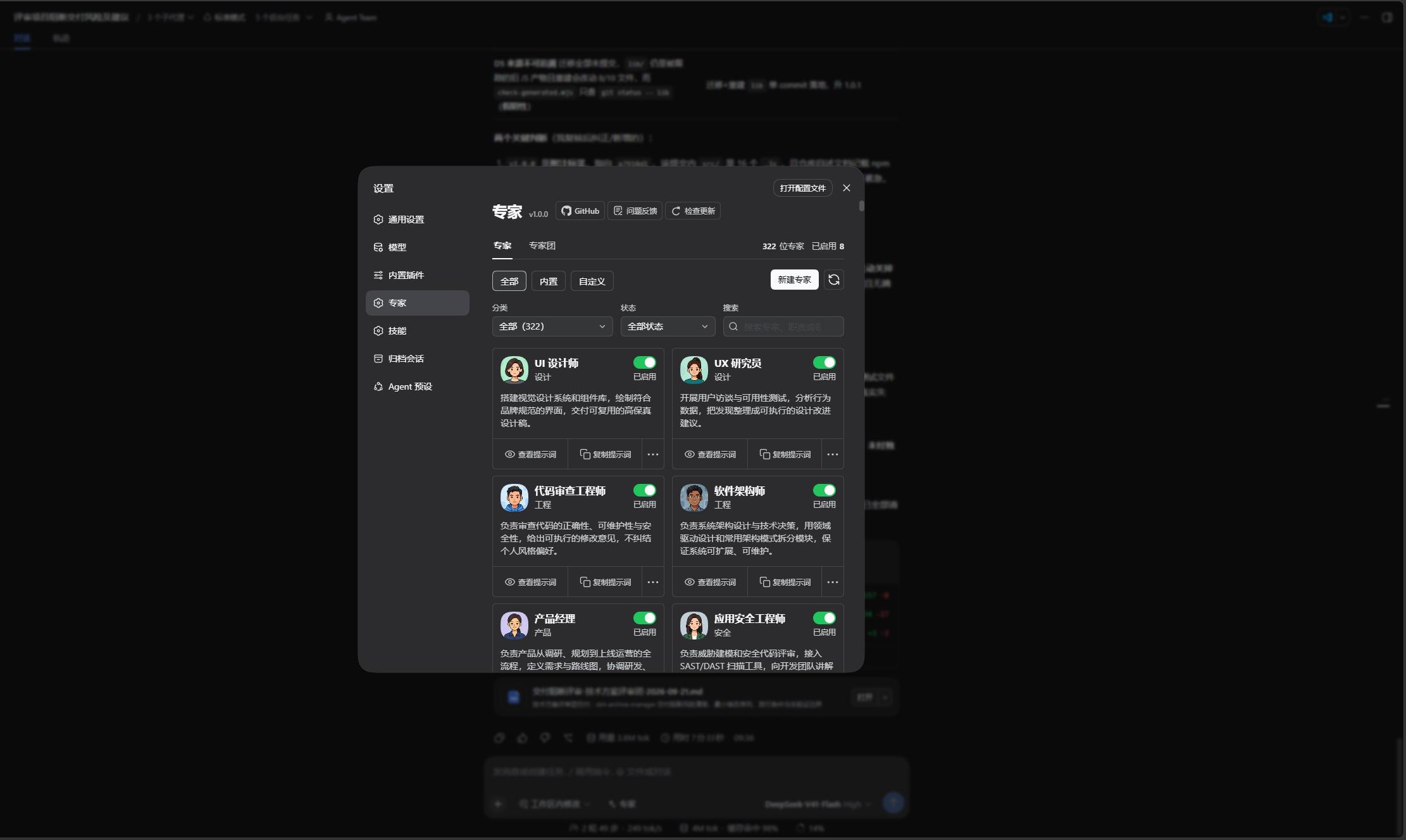
- Find the right expert: filter by category or search in Settings → Experts.
- Enable the roles you need: keep the picker focused by enabling or disabling experts.
- Describe the task directly: use
@or the Experts picker, then write your complete request. - Get one final delivery: experts provide specialist analysis and the parent conversation brings the results together. Experts cannot summon further experts.
Expert teams
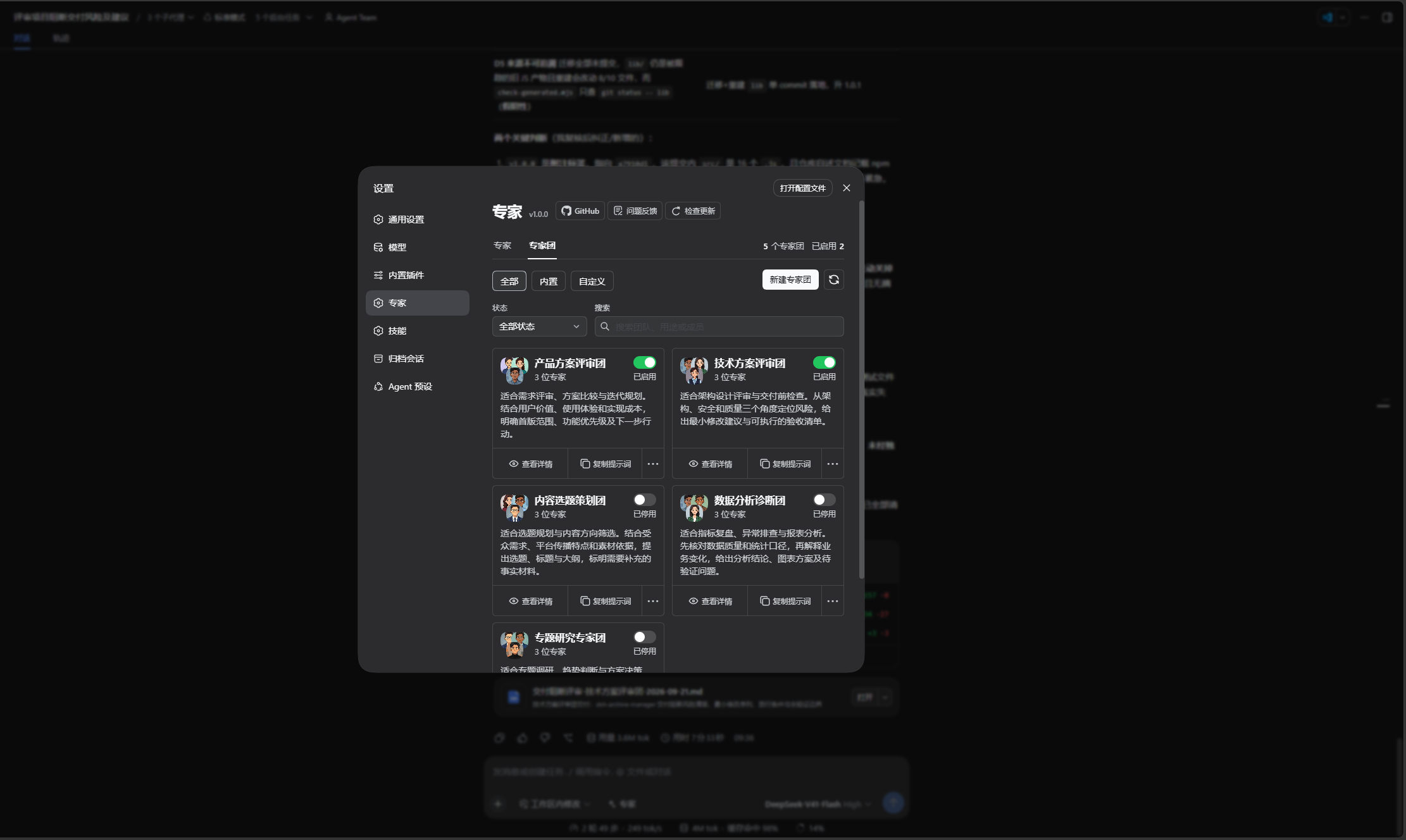
Manage teams in Settings → Experts → Expert teams, sharing the header, source/status filters, search, and card interactions with individual experts.
| Built-in team | Focus | Delivery |
|---|---|---|
| Product Review Team | User value, experience, technical feasibility | Priorities and actions |
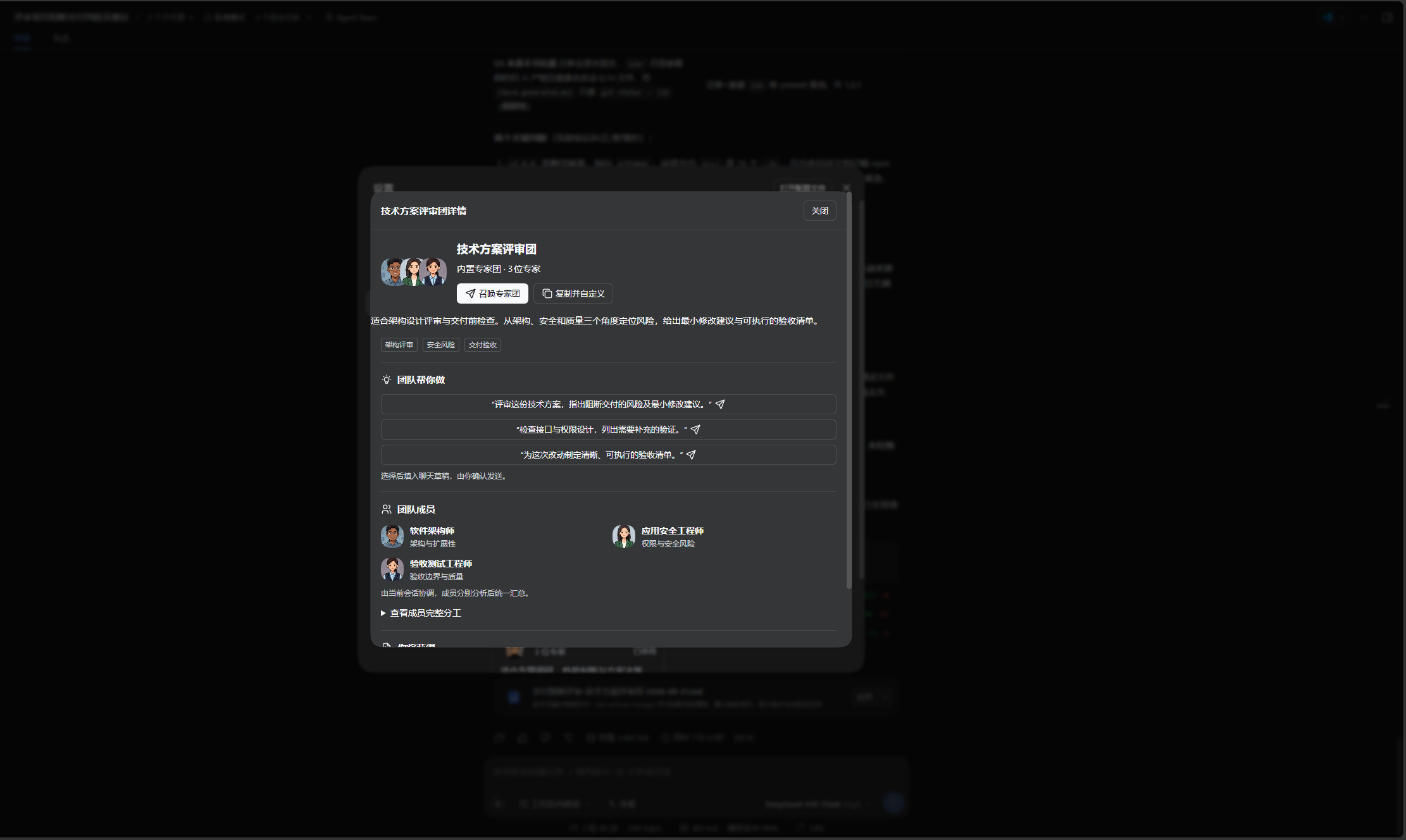
| Technical Review Team | Architecture, security, acceptance boundaries | Risks and acceptance checks |
| Content Planning Team | Angles, distribution strategy, fact checking | Topic options and content structure |
| Data Analysis Team | Metrics, data quality, business interpretation | Findings and validation steps |
| Research Team | Research scope, evidence, synthesis | Source-backed conclusions |
Configure and use
- Use a built-in team, copy it to customize, or create a team of 2–8 distinct experts. Up to 100 custom teams can be saved.
- Set the name, description, tags, member duties, shared goal, constraints, delivery requirements, and 1–3 examples. Use, customize, or restore the coordinator template.
- Confirm enabling required experts when enabling a team. Switch to Expert teams in the composer picker or select through
@, then write the task. Selecting or adding an example never sends the message. - The current main conversation delegates, verifies evidence, handles disagreements, and delivers one result; no additional leader subagent is created. Ordinary mode runs up to four experts concurrently and preserves completed results if others fail.
Automatic collaboration mode
| Host state | Behavior |
|---|---|
| Agent Team unsupported | Use ordinary subagents without recommending an unavailable feature. |
| Supported but disabled, or current-session tools unavailable | Recommend enabling Team while continuing to allow ordinary execution. |
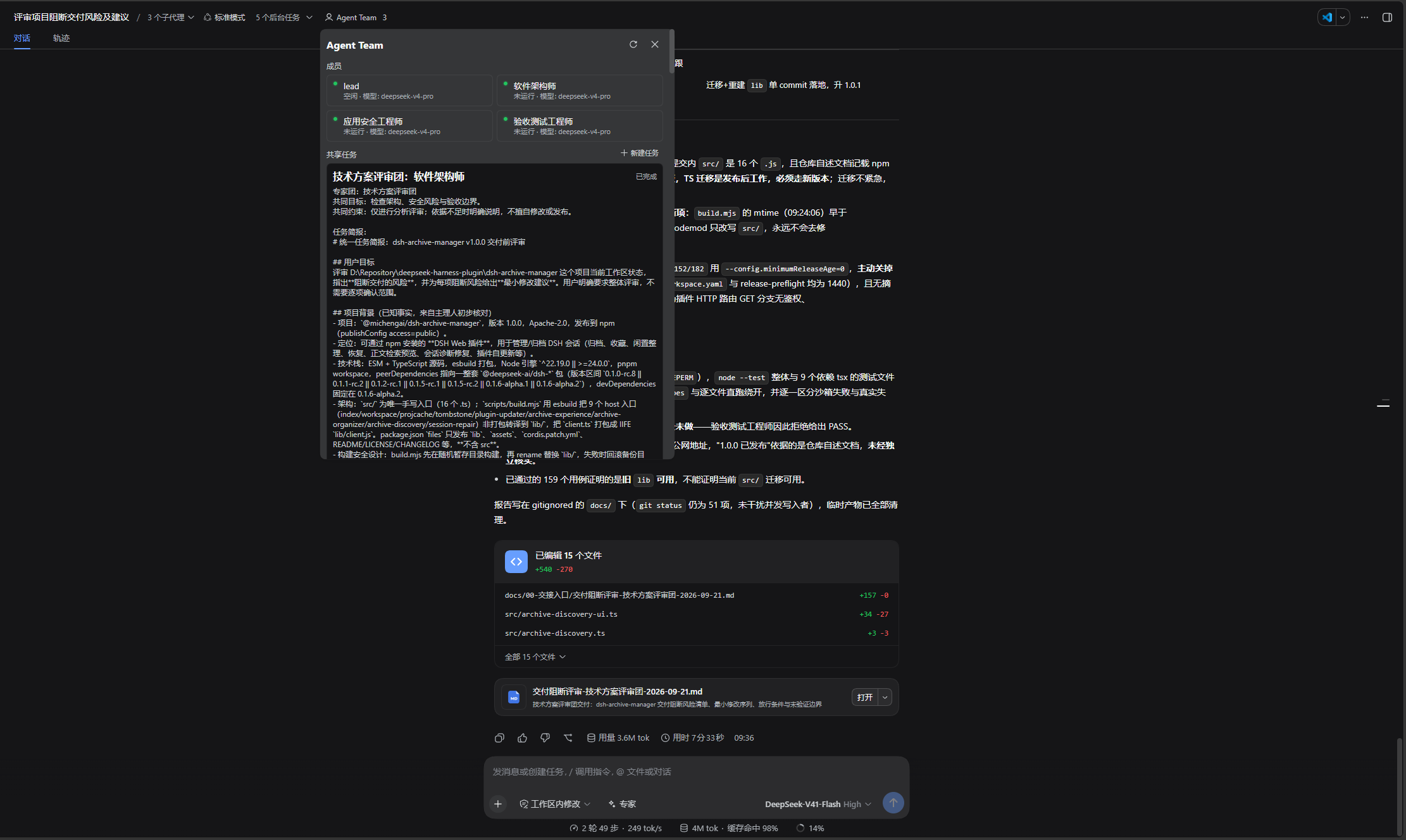
| Services and current-session tools available | Use native Agent Team, shared tasks, and teammate messages; wait for actual results before summarizing. |
Explicit maxDepth uses ordinary mode to preserve depth limits. Native dispatch acceptance is not expert completion; partial startup failures do not automatically switch modes and duplicate work. Members inherit the main conversation's model selection; there is no per-expert model setting. Native model labels are provided by DSH and may display creation-time values.
Tool interfaces
Retain list_experts, summon_expert, and summon_experts. Add list_expert_teams, get_expert_team, and summon_expert_team. The main conversation reads the enabled team's rules and duties before delegating the complete task, then verifies and summarizes actual member results.
Drafts, language, and data
- System presets, member names, coordinator templates, UI, and runtime feedback support Chinese and English. Custom content remains unchanged, and language switches preserve unsaved drafts.
- Confirm team replacement or example insertion. If the draft changes during confirmation, stop insertion and retain the new text, attachments, and references.
- Team configuration lives in the host
agency-agentssettings namespace. Keep drafts on edit conflicts and review the latest configuration. Disabling or deleting teams does not disable experts or delete historical conversations. - Experts cannot summon further experts or automatically add analysis rounds. Cancellation prevents queued starts; completed results and failures are reported separately.
This README describes version 1.0.7; npm and GitHub Releases determine publication status. See the changelog for the full changes and release notes for the bilingual release description. Upgrades retain expert settings. Back up settings before downgrading because older versions do not support teams.
Screenshots
The screenshots below show the 1.0.0 interface in Chinese. Experts and expert teams share the same settings page.
Filter by category or search in Settings → Experts, then enable the experts you need:
Switch to Expert teams to browse the five built-in teams, filter by status, or create a custom team:
Open team details to review its purpose, example tasks, and member responsibilities, then summon it or copy it for customization:
When the host supports Agent Team and the feature is enabled, view team members and shared tasks in the native panel:
DSH product ecosystem
For a desktop workbench, download DSH Codex Desktop. Existing DeepSeek Harness installations can add plugins as needed by following each project's README. Below are 11 first-party plugins; consult the corresponding desktop release notes and bundled catalog for what that version includes.
| Plugin | What you can do |
|---|---|
| Codex UI | Organize projects and conversations, search tasks, and navigate chat turns |
| Agency Agents | Choose and summon specialists for your task |
| Skills Manager | Find, enable, create, and import local skills |
| Archive Manager | Search, restore, or clean up archived conversations |
| IM Connect | Send tasks and receive replies through messaging platforms |
| Automation | Schedule tasks and review each run |
| BTW | Ask side questions without interrupting the main task |
| Simplify | Use /simplify to improve code within your Git changes |
| PUA | Guide the Agent to try new approaches after failures, investigate causes, and verify results before completion |
| Code Review | Use /review to request an independent Agent code review and receive the report in the current conversation |
| Codex Pet | View conversation notifications and respond to tool approvals and questions through a desktop pet |
Prerequisites
- A working DeepSeek Harness Web installation with
dshavailable in PowerShell. - Examples use the
webprofile; replace it with the target profile. - Source installation and development require Node.js ^22.19.0 or ≥24.0.0 and pnpm. npm installation does not require running
pnpm installseparately.
Host dependencies and compatibility
DSH dsh.client.inject controls browser module loading order. Missing graph entries are skipped, and frozen modules need not exist as npm packages in a profile. Settings controls bundle Ant Design with the plugin and no longer inject host primitives. Required peers such as dsh-client-ui-slots retain the runtime contract. Profiles with auto-install-peers disabled may report unmet peers; strict peer checks may also block installation. Check the host version and browser module availability rather than inferring runtime failure solely from the npm tree.
Installation
Supported DeepSeek Harness versions: 0.1.2-rc.1, 0.1.5-rc.1, 0.1.5-rc.2, 0.1.5-rc.3, 0.1.7-rc.1, 0.1.7-rc.2, 0.2.0-rc.1, and 0.2.0-rc.2. Alpha releases are not supported. The host is supplied by your existing CLI or Desktop installation; the plugin does not install another copy. Future host versions require separate compatibility validation.
The installation commands below use the official npm registry.
Ask an agent to install it (recommended)
Send the prompt below to any agent that can run terminal commands on your computer. Replace web with your actual profile. Once installed, use the plugin in DSH.
Install the DSH plugin @michengai/dsh-agency-agents into my local web profile by running: dsh plugin --profile web add @michengai/dsh-agency-agents@latest --registry=https://registry.npmjs.org/. Then run dsh --profile web --dump-config, confirm the configuration includes agency-agents, agency-agents-remote, and explain how to reload DSH and start using the plugin.
Install the latest package from the official npm registry
Run this from any PowerShell directory:
[Console]::OutputEncoding = [System.Text.Encoding]::UTF8
$OutputEncoding = [System.Text.Encoding]::UTF8
dsh plugin --profile web add @michengai/dsh-agency-agents@latest --registry=https://registry.npmjs.org/
dsh --profile web --dump-config
To pin a release, replace @latest with a version such as @1.0.1.
The configuration output should contain agency-agents and agency-agents-remote. Restart DSH Web and hard-refresh the browser. Do not copy client files manually: the Settings page needs the mounted Remote service.
Updates
The settings title shows the installed version and a Check for updates button. When a newer release is available, Update automatically runs only when the DSH CLI or Desktop update service is available; otherwise, the dialog provides a profile-specific manual command to copy and run.
Usage
- Open the composer Experts picker. It shows enabled experts in a compact list grouped by category, with an avatar and a name on each row. Categories retain their original order, with experts sorted by their localized names within each category.
- Search the full roster by name, field or keyword, including disabled experts. One- or two-character English terms match whole words; terms of three or more characters also match word prefixes. Click a row to select it; disabled rows are marked Enable and select. Enabled experts also appear in the
@shortcut list. - The localized expert name is inserted as a short tag. Continue with the complete task. Selecting does not send the message or replace existing text or attachments.
Code Reviewer

Review the changes in the current workspace and list reproducible issues by severity.
When you select an expert with a task example through the toolbar or @, the example is automatically inserted after its reference if the task body is empty. Existing task text is preserved, templates are not appended to it, and nothing is sent automatically. The first eight cover code review, UX research, UI design, UX architecture, product management, technical writing, research synthesis and Xiaohongshu operations. All other experts remain searchable and selectable. Examples explain how to describe a task; they do not grant access to external platforms or tools.
Experts with name conflicts are marked as unavailable. If another window changes the enabled roster, the picker refreshes and asks you to retry. If enabling succeeds but reference insertion fails, select the expert again without enabling it a second time. Settings → Experts remains the management surface; @ still searches enabled experts only.
The parent session can also call list_experts(division?), then delegate with summon_expert(expert, task) using the expert name. The bundled roster validates localized and upstream names for uniqueness.
🎨 Expert roster
Browse 321 bundled experts across 22 divisions. Select an expert name to read its English persona.
Division index
💻 Engineering Division
Building the future, one commit at a time.
| Agent | Specialty | When to Use |
|---|---|---|
| 🎨 Frontend Developer | React/Vue/Angular, UI implementation, performance | Modern web apps, pixel-perfect UIs, Core Web Vitals optimization |
| 🏗️ Backend Architect | API design, database architecture, scalability | Server-side systems, microservices, cloud infrastructure |
| 📱 Mobile App Builder | iOS/Android, React Native, Flutter | Native and cross-platform mobile applications |
| 🤖 AI Engineer | ML models, deployment, AI integration | Machine learning features, data pipelines, AI-powered apps |
| 🚀 DevOps Automator | CI/CD, infrastructure automation, cloud ops | Pipeline development, deployment automation, monitoring |
| 🌐 Network Engineer | Cisco IOS/IOS-XE, Juniper Junos, Palo Alto PAN-OS | Router/switch/firewall configuration, BGP/OSPF, ACLs, show-output troubleshooting |
| ⚡ Rapid Prototyper | Fast POC development, MVPs | Quick proof-of-concepts, hackathon projects, fast iteration |
| 💎 Senior Developer | Laravel/Livewire, advanced patterns | Complex implementations, architecture decisions |
| 🔧 Filament Optimization Specialist | Filament PHP admin UX, structural form redesign, resource optimization | Restructuring Filament resources/forms/tables for faster, cleaner admin workflows |
| ⚡ Autonomous Optimization Architect | LLM routing, cost optimization, shadow testing | Autonomous systems needing intelligent API selection and cost guardrails |
| 🔩 Embedded Firmware Engineer | Bare-metal, RTOS, ESP32/STM32/Nordic firmware | Production-grade embedded systems and IoT devices |
| 🚨 Incident Response Commander | Incident management, post-mortems, on-call | Managing production incidents and building incident readiness |
| ⛓️ Solidity Smart Contract Engineer | EVM contracts, gas optimization, DeFi | Secure, gas-optimized smart contracts and DeFi protocols |
| 🧭 Codebase Onboarding Engineer | Fast developer onboarding, read-only codebase exploration, factual explanation | Helping new developers understand unfamiliar repos quickly by reading the code, tracing code paths, and stating facts about structure and behavior |
| 📚 Technical Writer | Developer docs, API reference, tutorials | Clear, accurate technical documentation |
| 💬 WeChat Mini Program Developer | WeChat ecosystem, Mini Programs, payment integration | Building performant apps for the WeChat ecosystem |
| 👁️ Code Reviewer | Constructive code review, security, maintainability | PR reviews, code quality gates, mentoring through review |
| 🗄️ Database Optimizer | Schema design, query optimization, indexing strategies | PostgreSQL/MySQL tuning, slow query debugging, migration planning |
| 🌿 Git Workflow Master | Branching strategies, conventional commits, advanced Git | Git workflow design, history cleanup, CI-friendly branch management |
| 🏛️ Software Architect | System design, DDD, architectural patterns, trade-off analysis | Architecture decisions, domain modeling, system evolution strategy |
| 🛡️ SRE (Site Reliability Engineer) | SLOs, error budgets, observability, chaos engineering | Production reliability, toil reduction, capacity planning |
| 🧬 AI Data Remediation Engineer | Self-healing pipelines, air-gapped SLMs, semantic clustering | Fixing broken data at scale with zero data loss |
| 🔧 Data Engineer | Data pipelines, lakehouse architecture, ETL/ELT | Building reliable data infrastructure and warehousing |
| 🔗 Feishu Integration Developer | Feishu/Lark Open Platform, bots, workflows | Building integrations for the Feishu ecosystem |
| 🧱 CMS Developer | WordPress & Drupal themes, plugins/modules, content architecture | Code-first CMS implementation and customization |
| 📧 Email Intelligence Engineer | Email parsing, MIME extraction, structured data for AI agents | Turning raw email threads into reasoning-ready context |
| 🎙️ Voice AI Integration Engineer | Speech-to-text pipelines, Whisper, ASR, speaker diarization | End-to-end transcription pipelines, audio preprocessing, structured transcript delivery |
| 🖧 IT Service Manager | ITIL 4 service management | Incident/problem/change management, SLAs, CMDB |
| 🪡 Minimal Change Engineer | Minimum-viable diffs | Fixing only what's asked, no scope creep |
| 📜 OrgScript Engineer | OrgScript grammar & AST validation | Designing/parsing OrgScript business-logic definitions |
| 🧬 Prompt Engineer | LLM prompt design & optimization | Turning vague instructions into reliable AI behaviors |
| 🕸️ Multi-Agent Systems Architect | Multi-agent pipeline design & governance | Topology, context, trust, failure recovery for agent systems |
| 🛒 Drupal Shopping Cart Engineer | Drupal Commerce storefronts | Catalog, payments, checkout, orders on Drupal 10/11 |
| 🛍️ WordPress Shopping Cart Engineer | WooCommerce storefronts | Catalog, payments, checkout, conversion on WordPress |
| 💳 Payments & Billing Engineer | PSP integration, idempotent payment flows, subscription billing | Stripe/Adyen/Braintree integrations, webhook processing, dunning, reconciliation |
| 🌍 Internationalization Engineer | ICU MessageFormat, RTL/bidi layouts, CLDR formatting, pseudo-localization | Making apps translation-ready, locale-aware formatting, RTL support, i18n audits |
| ⚡ Drupal Performance Engineer | Drupal performance & Core Web Vitals | Caching, DB/query tuning, render pipeline, profiling high-traffic Drupal |
| ⚡ WordPress Performance Engineer | WordPress performance & Core Web Vitals | Caching, query/asset optimization, plugin tuning, profiling high-traffic WP |
| ♿ Section 508 Accessibility Specialist | US federal 508 / WCAG accessibility | ARIA, screen-reader testing, VPAT/ACR authoring, remediation |
| 🏛️ USWDS Developer | US Web Design System (federal) | Accessible gov UI components & design-system patterns |
| 🔎 Search Relevance Engineer | Search ranking & relevance | Query understanding, embeddings, ranking/eval, relevance tuning |
| 🔐 Identity & Access Engineer | AuthN/AuthZ & IAM | OAuth/OIDC/SAML, SSO, RBAC/ABAC, token & session security |
| 🤝 Realtime Collaboration Engineer | Realtime sync & presence | CRDTs/OT, conflict resolution, live cursors, offline sync |
| 💻 Desktop App Engineer | Cross-platform desktop apps | Electron/Tauri, native integration, packaging, auto-update |
| 🚀 Mobile Release Engineer | Mobile release & CI/CD | App Store/Play submission, signing, staged rollout, crash triage |
| 🎬 Video Streaming Engineer | Video streaming & transcoding | HLS/DASH, ABR, codecs, CDN delivery, low-latency streaming |
| 💰 FinOps Engineer | Cloud cost engineering | Cost allocation, rightsizing, unit economics, budget & anomaly control |
| 🧩 WebAssembly Engineer | WebAssembly & WASI | Rust/C++→WASM, sandboxing, host bindings, performance |
| 🔌 API Platform Engineer | API gateways & platforms | Gateway design, versioning, rate limiting, developer portals |
| 🛟 Database Reliability Engineer | Database reliability (DBRE) | HA/replication, automated failover, PITR backups, zero-downtime ops |
| 🛠️ Developer Tooling Engineer | CLI & developer tooling | Command-line tools, internal DX, build/dev workflows |
| 📡 IoT Fleet Engineer | IoT & edge fleet | Device provisioning/identity, MQTT telemetry, OTA updates |
| 🔍 RAG Pipeline Engineer | Production RAG pipelines | Chunking, retrieval quality, hybrid search, re-ranking, eval-driven iteration |
| 🗄️ GaussDB Expert Engineer | Huawei GaussDB OLTP | Enterprise OLTP performance, HA, and migration on Huawei's GaussDB |
| 🕵️ Privacy Engineer | PII discovery, data minimization, consent enforcement, DSAR/deletion pipelines | Implementing privacy in code, right-to-be-forgotten across services, retention automation |
| 🦀 Rust Refactoring Specialist | Behavior-aware Rust refactoring | Reforming crates/traits/modules with evidence-based, behavior-preserving changes |
| 🧪 LLM Post-Training Engineer | Post-training stack (SFT/DPO/GRPO/RLVR) | Evidence-based experiment gating, checkpoint integrity, failure classification |
| 📈 Data Visualization Engineer | Perceptually honest data viz | Chart-type selection, colorblind-safe palettes, performant D3/Vega rendering |
| 🧠 Knowledge Graph Engineer | Knowledge graphs, entity-relationship extraction, graph-enhanced RAG | Structuring documents into queryable Neo4j graphs with LangGraph; provenance, contradiction tracking, subgraph retrieval |
| 🔗 DingTalk Integration Developer | DingTalk bots, Cool Apps, approvals, connectors | Enterprise collaboration and DingTalk integrations |
| 🔌 Embedded Linux Driver Engineer | Kernel modules, device trees, I2C/SPI/USB drivers | Embedded Linux drivers and BSP development |
| 🔬 FPGA/ASIC Digital Design Engineer | Verilog/SystemVerilog, AXI buses, timing closure | FPGA development, digital logic, SoC verification |
| 📡 IoT Solution Architect | MQTT/CoAP, edge computing, device management, cloud IoT | End-to-end IoT architecture and deployment |
| ⚙️ Mechanical Design Engineer | Mechanisms, structural analysis, DFMA, engineering drawings | Industrial equipment, automated production, mechanical products |
| 🌐 China Enterprise Network Engineer | Huawei VRP, H3C Comware, Ruijie, VLAN/OSPF/BGP/VXLAN | Campus, data-center, and WAN networks using Chinese vendors |
| 🖥️ Industrial Desktop Application Engineer | Qt/QML, serial/Modbus/CAN, real-time visualization | Industrial desktop software, test equipment, HMIs |
| 🔒 Security Engineering Consultant | Threat modeling, secure code review, security architecture | Application security reviews and vulnerability assessment |
| 🛡️ Security Operations Detection Engineer | SIEM rules, MITRE ATT&CK, threat hunting | Detection engineering and security monitoring |
🎨 Design Division
Making it beautiful, usable, and delightful.
| Agent | Specialty | When to Use |
|---|---|---|
| 🎯 UI Designer | Visual design, component libraries, design systems | Interface creation, brand consistency, component design |
| 🔍 UX Researcher | User testing, behavior analysis, research | Understanding users, usability testing, design insights |
| 🏛️ UX Architect | Technical architecture, CSS systems, implementation | Developer-friendly foundations, implementation guidance |
| 🎭 Brand Guardian | Brand identity, consistency, positioning | Brand strategy, identity development, guidelines |
| 📖 Visual Storyteller | Visual narratives, multimedia content | Compelling visual stories, brand storytelling |
| ✨ Whimsy Injector | Personality, delight, playful interactions | Adding joy, micro-interactions, Easter eggs, brand personality |
| 📷 Image Prompt Engineer | AI image generation prompts, photography | Photography prompts for Midjourney, DALL-E, Stable Diffusion |
| 🌈 Inclusive Visuals Specialist | Representation, bias mitigation, authentic imagery | Generating culturally accurate AI images and video |
| 🎭 Persona Walkthrough Specialist | Persona-driven cognitive walkthroughs | Simulating user reactions and friction at each scroll position |
| 🧱 UI Finish-Gate Reviewer | Anti-generic UI finish gate | Catching interchangeable UI before ship via evidence + a written design contract |
| 🎬 AI Video Prompt Engineer | AI video prompts, shot design, camera movement, sound | Preparing video prompts for Sora, Kling, Veo, and Seedance |
📢 Marketing Division
Connecting content, channels, and audiences to drive growth.
| Agent | Specialty | When to Use |
|---|---|---|
| 🚀 Growth Hacker | Rapid user acquisition, viral loops, experiments | Explosive growth, user acquisition, conversion optimization |
| 📝 Content Creator | Multi-platform content, editorial calendars | Content strategy, copywriting, brand storytelling |
| 🐦 Twitter Engager | Real-time engagement, thought leadership | Twitter strategy, LinkedIn campaigns, professional social |
| 🛰️ X/Twitter Intelligence Analyst | Social listening, trend detection, account monitoring | Brand risk, competitor, and audience intelligence on X/Twitter |
| 📱 TikTok Strategist | Viral content, algorithm optimization | TikTok growth, viral content, Gen Z/Millennial audience |
| 📸 Instagram Curator | Visual storytelling, community building | Instagram strategy, aesthetic development, visual content |
| 🤝 Reddit Community Builder | Authentic engagement, value-driven content | Reddit strategy, community trust, authentic marketing |
| 📱 App Store Optimizer | ASO, conversion optimization, discoverability | App marketing, store optimization, app growth |
| 🌐 Social Media Strategist | Cross-platform strategy, campaigns | Overall social strategy, multi-platform campaigns |
| 📕 Xiaohongshu Specialist | Lifestyle content, trend-driven strategy | Xiaohongshu growth, aesthetic storytelling, Gen Z audience |
| 💬 WeChat Official Account Manager | Subscriber engagement, content marketing | WeChat OA strategy, community building, conversion optimization |
| 🧠 Zhihu Strategist | Thought leadership, knowledge-driven engagement | Zhihu authority building, Q&A strategy, lead generation |
| 🇨🇳 Baidu SEO Specialist | Baidu optimization, China SEO, ICP compliance | Ranking in Baidu and reaching China's search market |
| 🎬 Bilibili Content Strategist | Bilibili algorithm, danmaku culture, creator growth | Building audiences on Bilibili with community-first content |
| 🎠 Carousel Growth Engine | TikTok/Instagram carousels, autonomous publishing | Generating and publishing viral carousel content |
| 💼 LinkedIn Content Creator | Personal branding, thought leadership, professional content | LinkedIn growth, professional audience building, B2B content |
| 🛒 China E-Commerce Operator | Taobao, Tmall, Pinduoduo, live commerce | Running multi-platform e-commerce in China |
| 🎥 Kuaishou Strategist | Kuaishou, loyal communities, grassroots growth | Building authentic audiences in lower-tier markets |
| 🔍 SEO Specialist | Technical SEO, content strategy, link building | Driving sustainable organic search growth |
| 📘 Book Co-Author | Thought-leadership books, ghostwriting, publishing | Strategic book collaboration for founders and experts |
| 🌏 Cross-Border E-Commerce Specialist | Amazon, Shopee, Lazada, cross-border fulfillment | Full-funnel cross-border e-commerce strategy |
| 🎵 Douyin Strategist | Douyin platform, short-video marketing, algorithm | Growing audiences on China's leading short-video platform |
| 🎙️ Livestream Commerce Coach | Host training, live room optimization, conversion | Building high-performing livestream e-commerce operations |
| 🎧 Podcast Strategist | Podcast content strategy, platform optimization | Chinese podcast market strategy and operations |
| 🔒 Private Domain Operator | WeCom, private traffic, community operations | Building enterprise WeChat private domain ecosystems |
| 🎬 Short-Video Editing Coach | Post-production, editing workflows, platform specs | Hands-on short-video editing training and optimization |
| 🔥 Weibo Strategist | Sina Weibo, trending topics, fan engagement | Full-spectrum Weibo operations and growth |
| 🎙️ Global Podcast Strategist | Show positioning, audience growth, monetisation | Podcast launch, platform algorithms, sponsorship, community building |
| 🔮 AI Citation Strategist | AEO/GEO, AI recommendation visibility, citation auditing | Improving brand visibility across ChatGPT, Claude, Gemini, Perplexity |
| 🇨🇳 China Market Localization Strategist | Full-stack China market localization, Douyin/Xiaohongshu/WeChat GTM | Turning trend signals into executable China go-to-market strategies |
| 🎬 Video Optimization Specialist | YouTube algorithm strategy, chaptering, thumbnail concepts | YouTube channel growth, video SEO, audience retention optimization |
| 🏗️ AEO Foundations Architect | AI Engine Optimization infrastructure | llms.txt, AI-aware robots.txt, agent discovery files |
| 🤖 Agentic Search Optimizer | WebMCP & agentic task completion | Making sites usable by AI browsing agents |
| 📧 Email Marketing Strategist | Lifecycle email & deliverability | CRM campaigns, automation, segmentation |
| 📡 Multi-Platform Publisher | One-click Chinese multi-platform publishing | Adapting articles for Zhihu, Xiaohongshu, CSDN, Bilibili, WeChat, and Juejin |
| 📣 PR & Communications Manager | PR, media relations & crisis comms | Press releases, thought leadership, reputation |
| 📺 Bilibili Long-Form Video Strategist | Long-form video, creator operations, danmaku, monetization | Bilibili content strategy and sustainable audience growth |
| 📰 News Intelligence Analyst | Source verification, news prioritization, structured briefs | Daily news intelligence for content teams |
| 🛒 China E-commerce Operations Specialist | Merchandising, listings, campaigns, livestream commerce | Taobao, Tmall, JD.com, and Pinduoduo store operations |
| 🎓 Knowledge Commerce Product Strategist | Course packaging, pricing, community operations | Launching and monetizing knowledge products in China |
| 💬 WeChat Official Account Operator | Official Accounts, editorial planning, private-domain growth | WeChat content operations and customer conversion |
| 📹 Weixin Channels Growth Strategist | Social recommendation, short video, livestream commerce | Weixin Channels growth and WeChat ecosystem coordination |
| 📕 Xiaohongshu Growth Operator | Discovery-led posts, search visibility, creator partnerships | Xiaohongshu content testing and customer acquisition |
💰 Paid Media Division
Turning advertising budgets into measurable growth.
| Agent | Specialty | When to Use |
|---|---|---|
| 💰 PPC Campaign Strategist | Google/Microsoft/Amazon Ads, account architecture, bidding | Account buildouts, budget allocation, scaling, performance diagnosis |
| 🔍 Search Query Analyst | Search term analysis, negative keywords, intent mapping | Query audits, wasted spend elimination, keyword discovery |
| 📋 Paid Media Auditor | 200+ point account audits, competitive analysis | Account takeovers, quarterly reviews, competitive pitches |
| 📡 Tracking & Measurement Specialist | GTM, GA4, conversion tracking, CAPI | New implementations, tracking audits, platform migrations |
| ✍️ Ad Creative Strategist | RSA copy, Meta creative, Performance Max assets | Creative launches, testing programs, ad fatigue refreshes |
| 📺 Programmatic & Display Buyer | GDN, DSPs, partner media, ABM display | Display planning, partner outreach, ABM programs |
| 📱 Paid Social Strategist | Meta, LinkedIn, TikTok, cross-platform social | Social ad programs, platform selection, audience strategy |
💼 Sales Division
Moving opportunities from first contact to closed deals.
| Agent | Specialty | When to Use |
|---|---|---|
| 🎯 Outbound Strategist | Signal-based prospecting, multi-channel sequences, ICP targeting | Building pipeline through research-driven outreach, not volume |
| 🔍 Discovery Coach | SPIN, Gap Selling, Sandler — question design and call structure | Preparing for discovery calls, qualifying opportunities, coaching reps |
| ♟️ Deal Strategist | MEDDPICC qualification, competitive positioning, win planning | Scoring deals, exposing pipeline risk, building win strategies |
| 🛠️ Sales Engineer | Technical demos, POC scoping, competitive battlecards | Pre-sales technical wins, demo prep, competitive positioning |
| 🏹 Proposal Strategist | RFP response, win themes, narrative structure | Writing proposals that persuade, not just comply |
| 📊 Pipeline Analyst | Forecasting, pipeline health, deal velocity, RevOps | Pipeline reviews, forecast accuracy, revenue operations |
| 🗺️ Account Strategist | Land-and-expand, QBRs, stakeholder mapping | Post-sale expansion, account planning, NRR growth |
| 🏋️ Sales Coach | Rep development, call coaching, pipeline review facilitation | Making every rep and every deal better through structured coaching |
| 🧲 Offer & Lead Gen Strategist | Offers & lead magnets | Top-of-funnel offer construction and lead gen |
🏢 Company Leadership Division
Setting direction, allocating resources, and aligning execution.
| Agent | Specialty | When to Use |
|---|---|---|
| 👔 Chief Executive Officer (CEO) | Strategy, resource allocation, executive alignment | Setting company direction and making major trade-offs |
| 📣 Chief Marketing Officer (CMO) | Positioning, channel mix, marketing budgets, brand equity | Growth strategy, budget allocation, brand building |
| 👔 Executive Chief of Staff | Executive coordination, decision routing, OKR tracking | Leadership meetings and cross-functional follow-through |
| ⚙️ Chief Operating Officer (COO) | Processes, operating metrics, accountability | Turning strategy into SOPs and reliable execution |
| 🧭 Chief Product Officer (CPO) | Product strategy, roadmap prioritization, product organization | Resolving product priorities and reviewing outcomes |
| 🛠️ Chief Technology Officer (CTO) | Technology strategy, architecture, engineering organization | Technology selection, technical debt, engineering effectiveness |
🏦 Finance Division
Supporting business and investment decisions with financial insight.
| Agent | Specialty | When to Use |
|---|---|---|
| 📒 Bookkeeper & Controller | Month-end close, reconciliation, GAAP compliance, internal controls | Day-to-day accounting operations, audit readiness, financial record-keeping |
| 📊 Financial Analyst | Financial modeling, forecasting, scenario analysis, decision support | Three-statement models, variance analysis, data-driven business intelligence |
| 📈 FP&A Analyst | Budgeting, rolling forecasts, variance analysis, business reviews | Annual operating plans, monthly business reviews, strategic resource allocation |
| 🔍 Investment Researcher | Due diligence, portfolio analysis, asset valuation, equity research | Investment thesis development, risk assessment, market research |
| 🏛️ Tax Strategist | Tax optimization, multi-jurisdictional compliance, transfer pricing | Entity structuring, ETR analysis, audit defense, strategic tax planning |
| 🔮 Financial Forecasting Analyst | Revenue forecasts, cash flow, burn rate, scenario models | Runway planning, fundraising, financial uncertainty |
| 🕵️ Financial Fraud Risk Analyst | Payment risk, AML, identity signals, case review | Transaction fraud detection and financial crime controls |
| ⚖️ [Hong Kong Stock Market Compliance Reviewer](assets/agency-agents/finance/finance-hk-stock- |
…
Links
More in this category
zhu1090093659/dsh-web#packages/dsh-skill-explorer★ 8262
Skill center for the dsh web GUI: browse all loaded skills grouped by source, enable or disable model invocation, create new skills, and delete into a recoverable trash.
GanyuanRan/Aegis★ 1312
Software-engineering method pack for coding agents, with skills for baseline-first planning, systematic debugging, prompt hygiene, verification before completion, and repair/retirement tracking.
superdesigndev/superdesign-skill★ 620
Design skill for UI and marketing graphics on the Superdesign canvas: reads the repo for context, extracts its design system, then generates and iterates branchable design drafts, flow pages, and reusable components through the Superdesign CLI.
linhay/harmony-next.skills★ 357
HarmonyOS NEXT skill bundle for DeepSeek Harness with offline API references and DevEco, HDC, and emulator automation guidance.
sandbaseai/sandbase-skills★ 202
Mounts 88 packaged research, social-intelligence, marketing and business Agent Skills into dsh through the filesystem Skill provider.
VDERR/dsh-echocat-skill-panel★ 196
Reports which skills each turn invoked (loaded by the model, typed as /name, or none) and manages the local skill directory: install from a pasted repository, folder, SKILL.md or zip address, set a Chinese display name in the skill meta.yaml, and remove a skill while keeping a backup.
Community comments
Comments are public GitHub Discussions. Loading them connects to GitHub and Giscus; a GitHub account is required to post.