编辑自己的消息并在新分支中重发,回复过程中也能改(会先停止当前回复,被替换的对话归档而非删除)。
安装
# npm 包(预构建)
dsh plugin --profile web add dsh-edit-message
# GitHub 源码(首次需按提示配置 allowBuilds 构建授权后重试)
dsh plugin --profile web add github:2648782102/dsh-edit-message
装任何插件都等于在你的机器上跑第三方代码,权限和你本人一样大——能读你的文件、用你的凭据、访问网络,工具审批管不到它。GitHub 来源的插件还会在安装时执行构建脚本——pnpm 默认拦截,所以安装可能停在 ERR_PNPM_GIT_DEP_PREPARE_NOT_ALLOWED 或 ERR_PNPM_IGNORED_BUILDS;dsh 会打印出需要添加的确切键名,把它加进该 profile 的 pnpm-workspace.yaml 的 allowBuilds 下,重跑一次即可装上。放行构建本身就是一次信任判断:请只安装可信来源,并尽量锁定 commit(github:owner/repo#sha)。
README
该插件的 README 只有英文版本。
A DeepSeek Harness plugin: edit one of your own messages and resend it — even while the agent is still answering.
Install
dsh plugin --profile <profile> add dsh-edit-message
Or from the app: open Plugins > Discover, add the index source below, then Edit and resend > Install. Installing through Discover only adds the package — flip its switch on in Installed to activate it (the CLI route below enables it immediately). Remove it with dsh plugin --profile <profile> remove dsh-edit-message.
Requires DSH >=0.2.2-rc.3. Nothing is added on the Host: the bundle inserts one Client module and two slot entries.
Market index source (paste into Discover > Add index source):
https://raw.githubusercontent.com/2648782102/dsh-edit-message/main/market/index.json
Screenshots
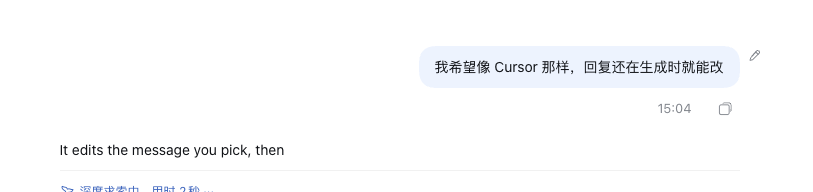
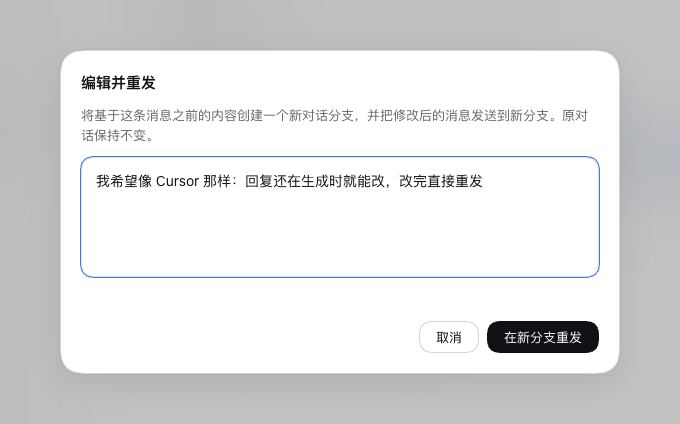
Where it appears
Hover (or tab into) one of your own messages. A small pencil appears in the gutter to the right of the bubble, level with its top edge. It is invisible until the row is hovered, sits entirely outside the message so it never covers text, and is styled as a plain icon like the host's own copy control rather than a floating card.
What confirming does
- The conversation is forked at the
turn/endof the turn before the edited message, so the new branch keeps everything that came before it. - The edited text is sent into the fork as a normal prompt.
- The new branch opens once the message is sent, with the resent message already in it;
- the replaced conversation is archived — it leaves the conversation list (the same surface Cursor gives you) but its events are kept, and Unarchive brings it back.
Editing while the reply is still streaming
The pencil is available as soon as the message is admitted, including while the agent is still answering. Confirming then:
- stops the in-flight turn, so the abandoned answer stops consuming tokens;
- creates the branch or Session described above;
- sends the edited text there.
This is the interrupt-and-redo flow: the original conversation keeps the stopped turn, the new branch never saw it.
Limits
- Only the first user message of a turn qualifies. Later messages in the same turn cannot be addressed without also discarding the earlier ones; the pencil is dimmed and names the reason.
- The first message of a conversation is resent into a new Session rather than a branch: a fork cannot cut before a turn's prompt, because that prompt lives in an
agent/inboxevent the seed would replay. The new Session keeps the source workspace, working directory, and agent preset. - Messages containing images, attachments, or references are refused, because only plain text is re-sent. Hovering the dimmed pencil states which condition blocked the action.
- A failed send keeps the editor open with its text intact and reuses the branch or Session it already created, so pressing resend again does not stack duplicates.
- The action is hidden when the current peer lacks the
session/forkpermission. - No agent tool or slash command is added: this is a user-only action.
Requirements
The Client half needs the sessions, uiConversation, slots, and locale services. It registers two slots: conversation.chat.user.before (the pencil) and shell.overlay (the editor modal).
Notes for contributors
This is a Client-only bundle. It deliberately avoids importing Host Client packages: the store, the modal, the focus handling, and the styles are local to client.js, and the interactive states use only --dsw-alias-* theme tokens.
Two Harness behaviours shaped the implementation and are worth knowing before changing it:
- A chain-slot entry must declare
select; without it the whole entry silently fails to activate (chain slot "…" requires options.select). ConversationLocation.turnis the resolvedTurnLocationrecord, not the turn number.- A fork cut immediately before a turn's
turn/startreplays the original prompt from the precedingagent/inboxsplice, which is why the first message takes the new-Session path instead.
License
MIT
链接
同类插件
zhu1090093659/dsh-web#packages/dsh-task-board★ 10458
侧边栏多列任务看板:卡片交给真实 DSH 智能体会话执行,支持 cron 定时(Host 侧到点执行,关浏览器也生效)。
zhu1090093659/dsh-web#packages/dsh-web-all★ 10458
DSH Web UI 插件与皮肤合集:任务看板、git 图、右侧面板、远程移动端 UI、桌宠、实时 token 统计与皮肤中心。
ccch1mneyyy/dsh-TUI★ 7797
Claude Code 风格全屏终端 UI:像素鲸鱼顶栏、实时工作状态行、思考流式展开。
MeteorNOX/DeepSeek-Balance-Whale-Widget★ 7271
右下角常驻的小鲸鱼挂件:余额、今日已用与每轮对话消耗(含峰谷价),余额预警与今日预算的泡泡内容都可编辑;泡泡点击序列模块化自定义,支持并列加权 A/B、随机台词与随机图片;内置 30+ 厂商模板(OpenAI / OpenRouter / Kimi / 硅基流动 / 方舟 / 智谱 / MiniMax 等),按模型查余额与订阅额度;另有任务结束音效、导入音频、自定义角色与资源管理。数据全在本机,无遥测。
omdsh-dev/DSH-better-sidebar★ 5191
侧边栏完整工作台:内置文件渲染编辑、终端、Git 与子代理,支持三方插件注册新 Tab。
omdsh-dev/dsh-genui★ 1007
助手回复内渲染交互式 UI 组件:布局、图表、表单、测验、mermaid、3D 场景与回传事件循环。
社区评论
评论公开保存在 GitHub Discussions。加载评论会连接 GitHub 和 Giscus;发表内容需要 GitHub 账号。