Edits one of your own messages and resends it on a new branch, including while the reply is still streaming; the running reply stops and the replaced conversation is archived, not deleted.
Install
# from npm (prebuilt)
dsh plugin --profile web add dsh-edit-message
# from GitHub (first run asks for allowBuilds approval — follow the hint, retry)
dsh plugin --profile web add github:2648782102/dsh-edit-message
Any plugin you install runs third-party code with your own permissions — it can read your files, use your credentials, and reach the network, and tool approvals don’t sandbox it. GitHub-sourced plugins also run build scripts at install time — pnpm blocks those until you allow them, so an install can stop with ERR_PNPM_GIT_DEP_PREPARE_NOT_ALLOWED or ERR_PNPM_IGNORED_BUILDS; dsh prints the exact key to add under allowBuilds in your profile’s pnpm-workspace.yaml, and the install works on the next run. Allowing a build is a trust decision: only install sources you trust, and pin a commit (github:owner/repo#sha).
README
A DeepSeek Harness plugin: edit one of your own messages and resend it — even while the agent is still answering.
Install
dsh plugin --profile <profile> add dsh-edit-message
Or from the app: open Plugins > Discover, add the index source below, then Edit and resend > Install. Installing through Discover only adds the package — flip its switch on in Installed to activate it (the CLI route below enables it immediately). Remove it with dsh plugin --profile <profile> remove dsh-edit-message.
Requires DSH >=0.2.2-rc.3. Nothing is added on the Host: the bundle inserts one Client module and two slot entries.
Market index source (paste into Discover > Add index source):
https://raw.githubusercontent.com/2648782102/dsh-edit-message/main/market/index.json
Screenshots
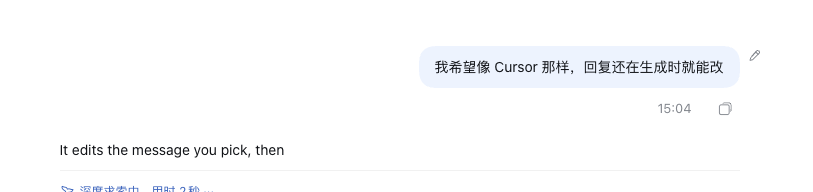
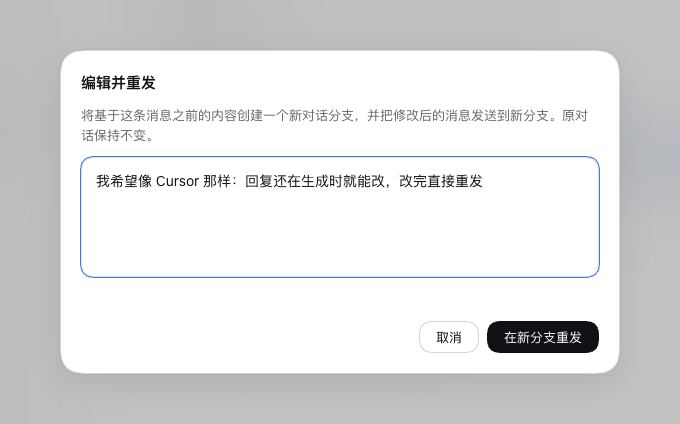
Where it appears
Hover (or tab into) one of your own messages. A small pencil appears in the gutter to the right of the bubble, level with its top edge. It is invisible until the row is hovered, sits entirely outside the message so it never covers text, and is styled as a plain icon like the host's own copy control rather than a floating card.
What confirming does
- The conversation is forked at the
turn/endof the turn before the edited message, so the new branch keeps everything that came before it. - The edited text is sent into the fork as a normal prompt.
- The new branch opens once the message is sent, with the resent message already in it;
- the replaced conversation is archived — it leaves the conversation list (the same surface Cursor gives you) but its events are kept, and Unarchive brings it back.
Editing while the reply is still streaming
The pencil is available as soon as the message is admitted, including while the agent is still answering. Confirming then:
- stops the in-flight turn, so the abandoned answer stops consuming tokens;
- creates the branch or Session described above;
- sends the edited text there.
This is the interrupt-and-redo flow: the original conversation keeps the stopped turn, the new branch never saw it.
Limits
- Only the first user message of a turn qualifies. Later messages in the same turn cannot be addressed without also discarding the earlier ones; the pencil is dimmed and names the reason.
- The first message of a conversation is resent into a new Session rather than a branch: a fork cannot cut before a turn's prompt, because that prompt lives in an
agent/inboxevent the seed would replay. The new Session keeps the source workspace, working directory, and agent preset. - Messages containing images, attachments, or references are refused, because only plain text is re-sent. Hovering the dimmed pencil states which condition blocked the action.
- A failed send keeps the editor open with its text intact and reuses the branch or Session it already created, so pressing resend again does not stack duplicates.
- The action is hidden when the current peer lacks the
session/forkpermission. - No agent tool or slash command is added: this is a user-only action.
Requirements
The Client half needs the sessions, uiConversation, slots, and locale services. It registers two slots: conversation.chat.user.before (the pencil) and shell.overlay (the editor modal).
Notes for contributors
This is a Client-only bundle. It deliberately avoids importing Host Client packages: the store, the modal, the focus handling, and the styles are local to client.js, and the interactive states use only --dsw-alias-* theme tokens.
Two Harness behaviours shaped the implementation and are worth knowing before changing it:
- A chain-slot entry must declare
select; without it the whole entry silently fails to activate (chain slot "…" requires options.select). ConversationLocation.turnis the resolvedTurnLocationrecord, not the turn number.- A fork cut immediately before a turn's
turn/startreplays the original prompt from the precedingagent/inboxsplice, which is why the first message takes the new-Session path instead.
License
MIT
Links
More in this category
zhu1090093659/dsh-web#packages/dsh-task-board★ 10458
Task board for the dsh web GUI: a sidebar multi-column kanban whose cards run in real DSH agent sessions and can also be scheduled with cron expressions, executed host-side even with the browser closed.
zhu1090093659/dsh-web#packages/dsh-web-all★ 10458
Plugin and skin collection for the DSH Web UI: task board, Git graph, right-side panel, remote mobile UI, pet, live token stats, and a skin center.
ccch1mneyyy/dsh-TUI★ 7797
Claude Code-style full-screen terminal UI: pixel-whale header, live status line, and streaming thought expansion.
MeteorNOX/DeepSeek-Balance-Whale-Widget★ 7271
A fixed-corner whale widget for the DSH web GUI — balance, today's usage and per-turn cost with peak/off-peak pricing, editable balance-alert and daily-budget bubbles, a module-based custom bubble queue with A/B weighted choices and random lines or images, 30+ vendor templates (OpenAI, OpenRouter, Kimi, SiliconFlow, Ark, Zhipu, MiniMax and more) with per-model balance and subscription quota, plus task-end sound, imported audio, custom roles and a resource manager. Local-only, no telemetry.
omdsh-dev/DSH-better-sidebar★ 5191
Full sidebar workbench with file rendering and editing, terminal, Git, and subagents; third-party plugins can register new tabs.
omdsh-dev/dsh-genui★ 1007
Interactive UI components rendered inline in replies: layout, charts, forms, quizzes, mermaid, 3D scenes, and an action event loop back to the model.
Community comments
Comments are public GitHub Discussions. Loading them connects to GitHub and Giscus; a GitHub account is required to post.