用免费 Edge TTS 或你自己的 RVC 音色朗读 AI 回复:消息朗读与自动朗读、长文自适应分块渐进播放(无缝衔接)、音色包仓库一键安装、便携 RVC 运行时。
安装
# npm 包(预构建)
dsh plugin --profile web add @memef1f1y/dsh-plugin-tts
# GitHub 源码(首次需按提示配置 allowBuilds 构建授权后重试)
dsh plugin --profile web add github:1624318455/dsh-plugin-tts
装任何插件都等于在你的机器上跑第三方代码,权限和你本人一样大——能读你的文件、用你的凭据、访问网络,工具审批管不到它。GitHub 来源的插件还会在安装时执行构建脚本——pnpm 默认拦截,所以安装可能停在 ERR_PNPM_GIT_DEP_PREPARE_NOT_ALLOWED 或 ERR_PNPM_IGNORED_BUILDS;dsh 会打印出需要添加的确切键名,把它加进该 profile 的 pnpm-workspace.yaml 的 allowBuilds 下,重跑一次即可装上。放行构建本身就是一次信任判断:请只安装可信来源,并尽量锁定 commit(github:owner/repo#sha)。
README
跳转
- English README(English,与本页逐节对应)
- 使用手册(执行手册)(第一次用,逐步骤上手)
- RVC 自定义音色指南(自定义音色 · 分块渐进播放 · 紧凑索引 · 音色包 · 便携运行时)
- Index-TTS2 指南(本机参考音频音色)
- CosyVoice 指南(本机提示音频零样本克隆,CosyVoice-2.0-0.5B)
- Cloud TTS 指南(谷歌付费音色 · API Key · 用量与计费口径)
- Edge TTS 指南(默认在线朗读)
- 自适应分块设计文档(长文无缝朗读的设计与实测)
dsh-plugin-tts — Edge TTS + RVC / Index-TTS2 / CosyVoice / Cloud 语音大集成
DeepSeek Harness 语音插件:给 AI 回复加朗读——开箱即用微软免费在线音色(Edge TTS), 也能用你自己训练的 RVC 音色、本机 Index-TTS2 参考音频音色、本机 CosyVoice 提示音频零样本克隆或谷歌 Cloud TTS 付费音色朗读;长回复自适应分块渐进播放、 段间无缝;音色可从音色包仓库一键安装;还提供免装 RVC WebUI 的便携运行时。
📖 第一次用?看《使用手册(执行手册)》——每一步都有 "做什么 / 怎么做 / 怎么算成功",从朗读、RVC 音色到音色包下载全覆盖。
功能
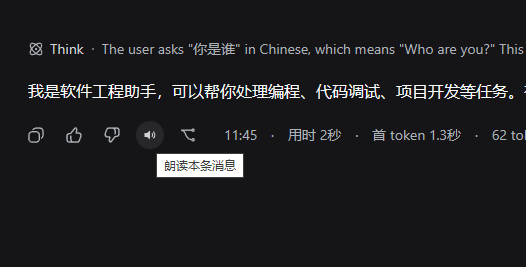
消息朗读按钮:每条 AI 回复左下角操作行新增「朗读」按钮,点击朗读该条消息 (按钮显示音柱跳动动画),再次点击停止。
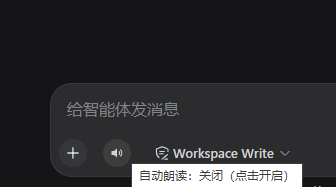
自动朗读开关:输入框左下角的喇叭按钮;开启后每条新完成的 AI 回复自动朗读 (按钮带圆形高亮),关闭则不自动朗读。
语音设置面板:侧边栏「设置 → 插件」新增「语音」标签页:
- TTS提供者:Edge TTS(免费在线)/ 自定义音色(RVC)/ 本地音色(Index-TTS2)/ 本地克隆(CosyVoice)/ Cloud TTS(谷歌付费)
- 朗读音色:22 个经实测可用的 Edge TTS 音色(默认 晓萱 zh-CN-XiaoxuanNeural); Cloud 组 8 个 cmn-CN 音色(默认 cmn-CN-Wavenet-A,也可手输 voice id)
- 声音调节:语速 / 音调 / 音量(0 = 默认,Edge 与 Cloud 共用)
- RVC 配置:服务地址 + 模型(.pth)/ 索引(.index)选择、原声音色、声音调节与高级参数——详见《RVC 指南》
- Index-TTS2 配置:服务地址(默认 7880)+ 参考音色选择/刷新/上传 + 朗读前清洗开关 + 情感控制 + 采样参数——详见《Index-TTS2 指南》
- CosyVoice 配置:服务地址(默认 7890)+ 提示音频选择/刷新/上传 + 提示文字稿(必填,按顺序全文填写)+ 语速(0.5–2.0)+ 随机种子(0 = 随机)——详见《CosyVoice 指南》
- Cloud 配置:API Key(只存本机 Host 文件,输入框写后即清)+ Project ID(可选)+ 测试连接 + 本月分档用量(Standard 400 万 / Wavenet·Neural2·Chirp3 各 100 万)——详见《Cloud 指南》
- 音色包:从音色包仓库一键下载安装音色
- 试听测试:输入文本 + 播放按钮(播放中显示旋转 loading,可点击停止;失败时红字提示)
RVC 自定义音色:用你自己训练的 RVC 模型朗读,全程本机计算,支持 免索引模式、高级参数(详见《RVC 指南》)。
长文本无缝朗读:自适应分块渐进播放——探测校准块大小、边播边合成、Web Audio 采样级拼接、段间无停顿(详见设计文档)。
朗读时 mini 播放器:暂停/继续 + 倍速(1x / 1.25x / 1.5x),分块长读显示可见的 「第 x/y 段」计数。
主题化 tooltip + RVC 首次引导:悬浮提示用主题 token(
--dsw-*)渲染;RVC 面板顶部 内嵌首次使用三步引导(分 OS 启动命令 + 一键诊断)。音频下载:每条消息操作行新增下载按钮保存合成音频——Edge/Cloud 读出 MP3, 本地链路(RVC/Index-TTS2/CosyVoice)读出 WAV;复用进程内缓存,刚读过的消息一点即下。 分段长文目前没有单个输出文件,会提示"暂不支持导出"而非做无用功的重合成。
朗读选中文本:在消息里选中文本会在选区上方出现「朗读选中」悬浮按钮,点按只朗读该选中片段。
长读流式(Edge 同样支持):纯 Edge 长文本也走自适应分块渐进播放——第一块先响、其余边播边合成, 不再干等整段合成完成。
审批语音提醒:可选地把 Agent 审批事件用语音播报。开启后:审批请求(
approval/asked)会 打断当前朗读(Agent 正在等这个决定),审批结果(approval/decided)仅在空闲时播报。 播报固定走 Edge TTS(不依赖 RVC 服务)、用自己的提醒音色、按审批 id 去重、默认关闭。 (范围说明:任务完成播报留待后续阶段——jobs 子系统目前没有本插件可观察的会话事件通道。)干净朗读、RVC 静默:朗读前清洗消息 Markdown(代码块、表格、链接、引用、任务列表), 不再读出一堆符号;可选「朗读原始 Markdown 符号」开关保留逐字朗读(适合读源码)。 Edge 模式下 RVC 面板完全隐藏,只留一行「需要克隆音色?」入口,普通朗读零配置零感知。
要求
- DeepSeek Harness
webprofile(dsh web) - Node.js ≥ 22(worker 使用原生
WebSocket) - 仅本地音色链路需要额外准备(Edge/Cloud 开箱即用):
- RVC 自定义音色:本机 RVC 推理环境(RVC WebUI 或便携运行时,
并在使用前启动
rvc-server.py)——见《RVC 指南》 「启动本地 RVC 服务」和《使用手册》 §4.2,macOS 用户同样先看这里。 - Index-TTS2 音色:本机
index-tts2-nvidia包的 API 服务 (启动api服务.bat,默认端口 7880)——见《Index-TTS2 指南》。 - CosyVoice 克隆:本机 CosyVoice-2.0-0.5B 包的
cosy-server.py(启动cosy服务.bat,默认端口 7890)——见《CosyVoice 指南》。
- RVC 自定义音色:本机 RVC 推理环境(RVC WebUI 或便携运行时,
并在使用前启动
安装
四种等价方式(任选其一):
# dsh-market 界面:在 market 里搜索插件名安装
# npm 包:
dsh plugin --profile web add "@memef1f1y/dsh-plugin-tts"
# GitHub 源码:
dsh plugin --profile web add "github:1624318455/dsh-plugin-tts#main"
# 或本地开发:
dsh plugin --profile web add "file:/path/to/dsh-plugin-tts/plugin"
重启 dsh web 后作为 profile bundle 自动加载,无需手动启用。
注意先卸载已有的再装另一种来源:它们注册的是同一个 loader 条目 id(tts),
安装器遇到重复 id 会直接回滚而不是覆盖。
可用音色(经实测,Edge TTS)
| 区域 | 音色 |
|---|---|
| 简体中文 | 晓萱 Xiaoxuan · 晓伊 Xiaoyi · 云希 Yunxi · 云扬 Yunyang · 晓晓 Xiaoxiao · 云健 Yunjian · 云夏 Yunxia · 晓北(辽宁) liaoning-Xiaobei · 晓妮(陕西) shaanxi-Xiaoni |
| 台湾 | 曉臻 HsiaoChen · 曉雨 HsiaoYu · 雲哲 YunJhe |
| 香港 | 曉佳 HiuGaai · 曉曼 HiuMaan · 雲龍 WanLung |
| 英文 | Aria · Jenny · Guy · Sonia(英) |
| 日/韩/法 | 七海 Nanami · SunHi · Denise |
注:Xiaohan / Xiaomeng / Xiaorui / Xiaoshuang 等旧音色已被 Edge 端点移除(返回
1007 Unsupported voice),未列入。
架构
| 层 | 位置 | 职责 |
|---|---|---|
| Host | lib/index.mjs |
注册 webServer 路由:/dsh-tts-api/speak(全链路合成/分块队列)、/dsh-tts-audio/<id>(音频字节)、/dsh-tts-api/rvc-next(取下一段/取消任务)、/dsh-tts-api/rvc-files + /rvc-compact-index + /rvc-packs*(RVC 服务代理/音色包)、/dsh-tts-api/index-* 与 /dsh-tts-api/cosy-*(本地服务代理+配置)、/dsh-tts-api/cloud-*(Cloud Key/用量/连通测试)、/dsh-tts-api/notify(审批提醒队列)、/dsh-tts-api/diagnose(一键诊断);用 node -e 运行零依赖 Edge worker |
| Client | lib/client.js |
shell.overlay 里的 Web Audio 分块播放器(采样级拼接,<audio> 降级)+ UI(朗读按钮 / 自动朗读开关 / 语音设置面板),通过 fetch 调 Host 路由 |
TTS 引擎:worker 协议镜像 node-edge-tts@1.2.10:
Sec-MS-GEC 查询参数(ticks 向下取整到 5 分钟边界)、
Sec-MS-GEC-Version=1-143.0.3650.75、二进制帧 Path:audio 前缀、
xml:lang 由音色 locale 推导、1006 异常关闭自动重试一次。音频输出
audio-24khz-48kbitrate-mono-mp3。
边界行为
- 自动朗读中点击同一消息朗读按钮 → 停止;点击另一消息 → 打断自动、改手动朗读。
- 手动朗读中关闭自动开关 → 不打断手动;自动朗读中关闭 → 停止自动朗读。
- 新消息完成(自动开启)→ 打断当前、朗读最新;无文本消息跳过;切换会话只停自动来源。
- 停止 / 换消息时立即取消当前分块 job(RVC job 会通知 Host),本地转换服务停止调度后续块、及时释放 GPU/内存 (不必等惰性回收)。
- 同一段文本+音色重复朗读 → 复用进程内音频缓存(不重复合成);若缓存底层文件已被系统清理, 会自动重新合成而非返回失效的 404 URL。
- Edge 音色被端点移除(
1007 Unsupported voice)→ 从选择列表剔除并自动回退默认音色。 - 分段播放严格按序号供应:后台预热绝不会超过按需请求,某段合成失败(重试一次仍失败)会弹 「某段音频加载失败,已跳过 (x/y)」toast 并继续播下一段,顺序永不错乱。
- 首次用户手势即解锁自动播放(resume Web Audio 上下文 + 播放静音片段),朗读不会因浏览器自动 播放策略被静默拦截。
Esc/S(非输入框内)停止当前朗读。- 合成/播放失败(消息朗读与自动朗读路径)→ 弹出主题化 toast 提示(不再静默失败; 试听面板仍保留内联红字)。RVC 模式下错误 toast 带一键「改用 Edge TTS 朗读」动作; 若在 RVC 设置里开启「RVC 失败时自动改用 Edge TTS」(默认关闭——RVC 为纯本地处理, 自动降级会把文本发送给微软在线端点),RVC 朗读失败会自动改用 RVC 底噪音色经 Edge 重读, 并弹 warn toast 提示。
- 智能分句:分块切分绝不切断 URL / 邮箱 / 小数 / 版本号(如"3.14");硬切会滑到 词/标点边界;末尾的极短句会并入前一块,避免听感像结巴。
- 审批语音提醒(opt-in):Host 订阅
session/event火线(approval/asked/approval/decided)并按审批 id 去重;客户端轮询/dsh-tts-api/notify?s=N—— 首次轮询只做基线同步(刷新不重播旧提醒);播报失败静默(不弹错误 toast,避免 Agent 循环期间刷屏)。
设置持久化
分层存储:
- Host 文件(
~/.dsh/tts-rvc/settings.json,{ version: 1, rvc: …, index: …, cosy: …, cloud: … }): 服务类配置——RVC 服务地址/模型与索引路径、Index-TTS2 与 CosyVoice 服务地址、 Cloud API Key(+ 可选 Project ID)。多浏览器共享,清浏览器数据、 无痕模式、换浏览器都不丢;经GET /dsh-tts-api/rvc-config+POST /dsh-tts-api/rvc-config-save(以及对应的index-config、cosy-config、cloud-config路由)读写,老localStorage值一次性上迁,之后以文件为准。 - localStorage(
dsh-tts-settings):只存 UI 偏好——音色、自动朗读开关、 提供者、声音调节、原始 Markdown 开关、审批提醒与其余 RVC 偏好。不再存 服务地址 / 模型 / 索引。
设置面板「恢复默认设置」一键复位并清除两层(Host 文件为 best-effort)。
RVC 自定义音色
用你本地训练的 RVC 模型做音色转换:设置面板把 TTS提供者切到「自定义音色(RVC)」 即可。第一次用 RVC 先做两件事:①准备模型文件(.pth);②启动本地 RVC 服务—— macOS/Windows/Linux 的启动命令见 《RVC 指南》 或 《使用手册》 §4.2。涵盖服务启动、面板配置、长文无缝播放、紧凑索引、 音色包一键安装、便携运行时、设置项详解与排查——完整内容见 《RVC 自定义音色指南》。
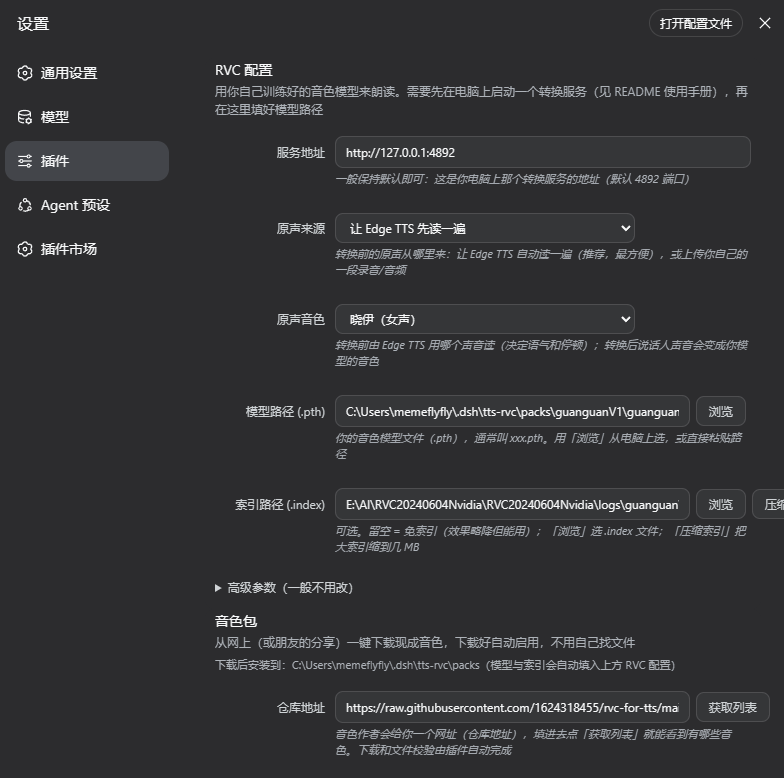
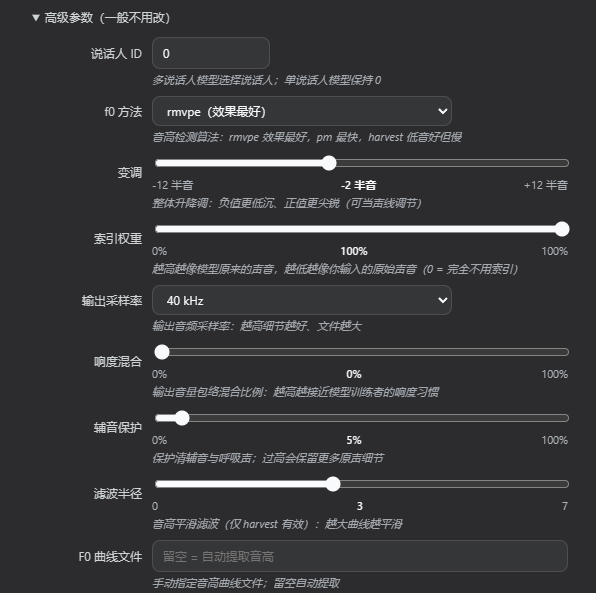
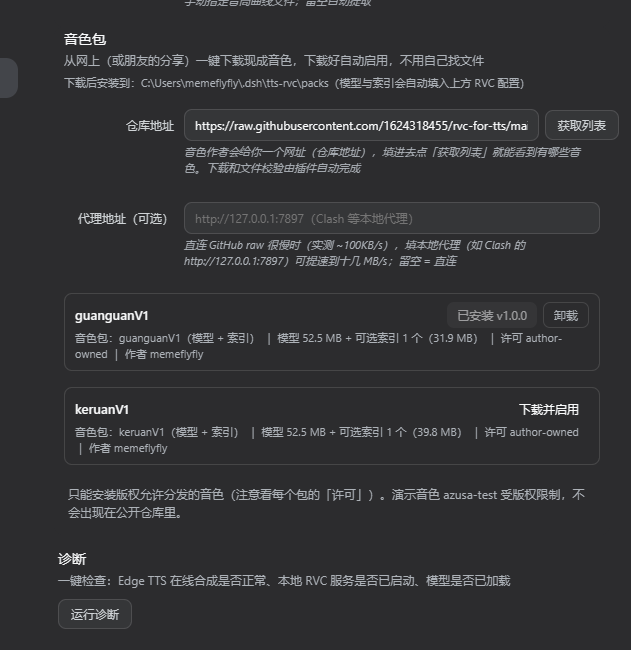
公开音色仓库示例:rvc-for-tts (设置 → 语音 → 音色包 → 仓库地址填
https://raw.githubusercontent.com/1624318455/rvc-for-tts/main)。
疑难排查(Edge TTS)
- 403 /
Sec-MS-GEC被拒:Edge 端点协议或版本校验变更,更新lib/index.mjs内 worker 的CHROMIUM_FULL_VERSION/TRUSTED_CLIENT_TOKEN。 1007 Unsupported voice:所选音色已被端点移除,换用上表列出的音色。- 无声音:确认系统音量、浏览器自动播放策略(先与页面交互一次)或合成日志
(
dsh web控制台[tts]前缀错误)。 - 分段朗读跳段/乱序:先确认控制台第一行构建号是最新的(含按序号供应修复的老版本会有 1/3/2 错序); 若新版仍跳并弹出「已跳过」toast,把设置 → 语音 → 诊断 →「导出诊断日志」发给开发者。
RVC 相关排查见 《RVC 指南》疑难排查。 Index-TTS2 / CosyVoice / Cloud 排查见各自指南的疑难排查节。
常见问题(FAQ)
Q:体积大吗?
- 默认体验(Edge TTS):插件本体很小(MB 级),不需要下载任何服务或模型。
- 想用自定义音色(RVC)才需要本地 RVC 便携包,体积主要来自自带的离线 Python 运行时 + 推理依赖 + 预训练模型:
平台 压缩包 解压后 macOS(Apple Silicon) ~660 MB ~1.3 GB Windows(纯 CPU 精简版) ~1–2 GB ~2–3 GB Windows(保留 NVIDIA GPU 加速) ~6 GB ~7 GB - 上面这些是自包含运行包的体积;完整版 RVC WebUI 有 7.8GB,本插件用不到的 WebUI/训练/实时变声都不会带。
- Index-TTS2 / CosyVoice 同样是本地包(体积随版本变,见各自指南的准备节)。
Q:依赖大吗?
- 不小,但完全不需要你安装:RVC 便携包自包含 Python、ffmpeg(Windows)/PyAV(macOS)以及全部推理依赖,解压即用,无编译、无环境配置。
- 插件本体依赖极简,只在确实用到时才加载。
Q:需要本地 TTS 模型吗?
- 用默认 Edge TTS 或 Cloud TTS:不需要本地模型(在线合成)。
- 用自定义音色(RVC):需要你自己的 RVC 音色模型(
.pth),可选加一个.index索引;预训练的 hubert / rmvpe 已随便携包带好,你只需提供自己训练的模型。 - 用 Index-TTS2 / CosyVoice:不用训练——给本地包准备参考/提示音频(几秒清晰人声)并在面板里选中即可,详见《Index-TTS2 指南》与《CosyVoice 指南》。
Q:好装吗?
- 插件按常规方式安装即可。
- 用 RVC 时:下载对应平台的便携包 → 解压 → 运行启动脚本(mac 双击
.command,Windows 双击.bat)→ 把.pth放进assets/weights→ 在插件面板里点「浏览」选模型即可。 - Index-TTS2 / CosyVoice 同样三步(备包 → 保持服务运行 → 面板选音色);Cloud 只需往设置里粘 API Key。各指南里都有 walkthrough。
- 无需编译、无需手动装 Python/ffmpeg。注意 mac 首次启动会慢几十秒(macOS 首次扫描解压出的运行库,一次性行为),之后启动只要几秒。
Q:需要付费 API 吗?
- 不需要:默认 Edge TTS 免费(无 API key),RVC / Index-TTS2 / CosyVoice 完全本地推理、免费(但各需自己的本地服务包先跑起来,见上文「要求」)。
- 谷歌 Cloud TTS 按量付费,需自备 API Key:中文标准音色每月前 400 万字符免费,Wavenet/Neural2/Chirp 每月前 100 万字符免费(本地计数,官方以 Google Cloud Billing 为准),详见《Cloud 指南》。
- 提示:Edge TTS 是微软公开的端侧免费能力,个人使用没问题;商用 / 高并发请留意微软服务条款。
Q:改动 DSH 本体了吗?
- 没改。这是一个独立插件,通过 dsh 的插件机制加载,不修改 DSH 主程序本体,可随时安装 / 停用 / 卸载,不影响 DSH 与其它插件。
其他常见疑问
- 需要显卡吗? 不需要,CPU 就能跑。要更快可用 Apple Silicon 的 MPS(macOS)或 NVIDIA GPU(Windows,需用 CUDA 版 torch,体积随之增大)。
- 隐私如何? RVC / Index-TTS2 / CosyVoice 转换完全在本地进行,音频不上传;Edge TTS 与 Cloud TTS 会把要朗读的文本发到在线端点合成(选择合适的音色前请注意)。
- 只支持 Apple Silicon 吗? macOS 版目前是 arm64,支持 M1–M5;Intel Mac 需另行提供 x86_64 版。
界面语言(i18n)
插件设置面板顶部有「界面语言」选择:自动(跟随浏览器)/ 中文 / English。
- 默认「自动」:按浏览器/系统语言显示(简体中文及其他 → 中文,其余 → English)。
- 切换后立即生效,并持久化到 localStorage(
dsh-tts-lang),刷新/重开面板不丢。 - 覆盖范围:整个设置面板 + 气泡/朗读按钮 + 诊断 + 音色包面板,以及 RVC 服务的报错/进度提示。
开发
node tests/smoke.mjs   # 冒烟测试:fake ctx 注册路由 + 真实 Edge TTS 合成 + 音频回放断言
npm run test:all       # 全量:smoke + live + patch + i18n + client-load
改 lib/ 后的热更新(Windows 下 file: 安装是复制而非符号链接,
运行中的 dsh 读的是 profile 副本):
Copy-Item lib/* $env:USERPROFILE\.dsh\profiles\web\node_modules\@memef1f1y\dsh-plugin-tts\lib\ -Recurse -Force
# 然后刷新浏览器即可(bundle 每次请求重新读盘;勿用 pnpm install --force 覆盖)
已知限制
- 音色 / 自动朗读开关 / TTS 提供者 / RVC 配置已分层持久化(服务类走 Host 文件, UI 偏好走 localStorage,见上文「设置持久化」)并跨刷新保留 (见上文「设置持久化」);但音频缓存本身仅进程内(音频写在 OS 临时目录,由系统清理), 完全重启后每段文本第一次朗读会重新合成。
- 合成音频写入 OS 临时目录,由系统清理。
- 中英文布局/视觉(英文文本较长可能换行/溢出,主题变量
--dsw-*适配)需在装有所插件的真实 dsh 界面里人工确认—— 本插件无独立 HTML,UI 由 dsh web 宿主注入 slots 渲染,无法脱离宿主做 headless 截图对比(tests/client-load.mjs只做内存渲染断言,不生成真实 DOM/CSS)。
License
MIT
链接
同类插件
PolinniZhong/dsh-omi-voice★ 74
DeepSeek Harness 对话内朗读:点一下即可朗读、暂停、继续 AI 回复,豆包 TTS 自然音色(BYOK),只读最终回答并过滤代码、表格与图形,本地引擎,插件零 Key。
PensiveFei/dsh-voice-scribe★ 34
面向 Web UI 的语音输入插件:点按 Alt(或 Alt+空格)开始/停止听写,支持浏览器内置 Web Speech(零配置)或 OpenAI 兼容云端 ASR,可选经 DSH 已配置模型润色,带设置页。
WizisCool/dsh-ears★ 21
面向 DeepSeek Harness (dsh) 的语音输入插件:输入框的麦克风按钮把语音转成草稿文本,支持多种语音识别后端,可选经 dsh 自有 LLM 路由润色,并带原生设置页。
qishuilalala/dsh-voice-mode#dsh-voice-mode★ 15
DeepSeek Harness Web UI 全双工语音对话:按钮或 Ctrl+Shift+V 进入,持续聆听(停顿自动发送)或按住说话,zipformer2 流式识别入可编辑草稿、可选唤醒词;回复按句 Edge TTS 朗读并显示实时字幕,开口即打断播放与回合(真 barge-in);识别模型本地推理、Edge TTS 在线合成,无需 API Key。
PerryLink/dsh-talk★ 14
DeepSeek Harness 的语音输入输出:麦克风语音转文字与文字转语音。
beiyege-01/dsh-voice-ai-girlfriend-plugin★ 12
Web UI 语音 AI 女友:FunASR 麦克风语音输入、Qwen3-TTS 语音回复、数字人动画窗、QQ 双向聊天(文本/语音/图片推送,经 NapCat)。
社区评论
评论公开保存在 GitHub Discussions。加载评论会连接 GitHub 和 Giscus;发表内容需要 GitHub 账号。