Windows only. Bilibili video summarizer: downloads the audio track, transcribes it locally with faster-whisper (Python + faster-whisper, about 725 MB of models on first run), then writes the analysis markdown and renders a one-page infographic PNG.
Install
# from GitHub (first run asks for allowBuilds approval — follow the hint, retry)
dsh plugin --profile web add github:zz12hui/dsh-bili-video-summary
Any plugin you install runs third-party code with your own permissions — it can read your files, use your credentials, and reach the network, and tool approvals don’t sandbox it. GitHub-sourced plugins also run build scripts at install time — pnpm blocks those until you allow them, so an install can stop with ERR_PNPM_GIT_DEP_PREPARE_NOT_ALLOWED or ERR_PNPM_IGNORED_BUILDS; dsh prints the exact key to add under allowBuilds in your profile’s pnpm-workspace.yaml, and the install works on the next run. Allowing a build is a trust decision: only install sources you trust, and pin a commit (github:owner/repo#sha).
README
This plugin publishes its README in Chinese only.
1. 它是什么
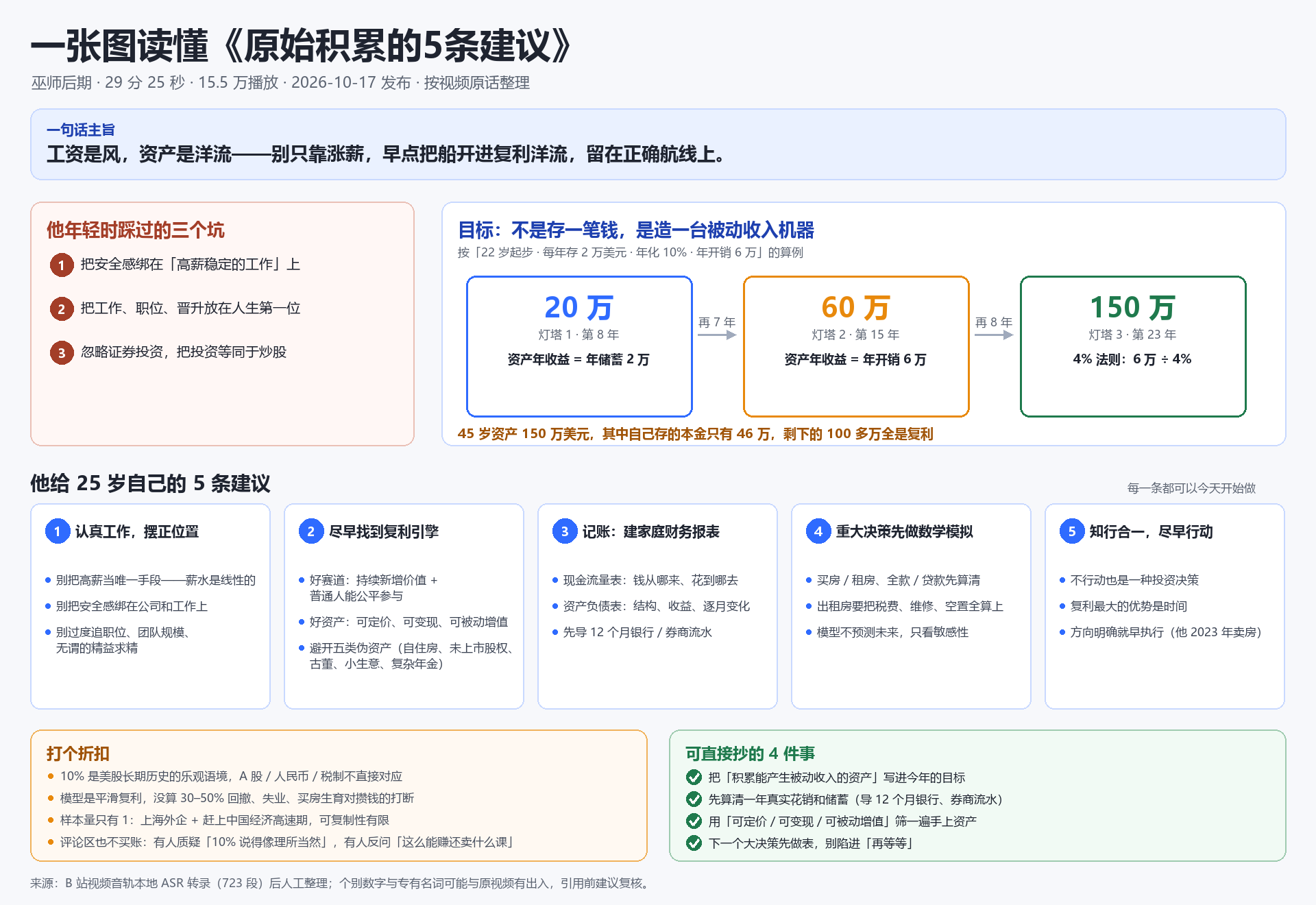
一个跑在 DSH 里的小插件:你在会话里丢一个 B 站视频链接,它把视频的语音转成文字,模型读完后写一份解析,再画一张 1920×1320 的「一图读懂」。
用一句话说清楚它替你省了什么:
- 30 分钟的视频,先看一张 1920×1320 的图,感兴趣再翻解析里的原话。
- 请求只走 B 站公开 JSON 接口(
view/playurl),带 UA 和 Referer,不碰 cookies。 - 官方字幕接口匿名请求返回 0 条,所以插件直接下音轨做本地 ASR。
- 下载、解码、转写都在你电脑上完成,音频只在本机缓存留一份。
- 同一个视频第二次问会直接读缓存,不重复下载和转写。
2. 效果预览
| 一图读懂(插件渲染) | 解析复盘图(同一条视频的手工流程记录) |
|---|---|
 |
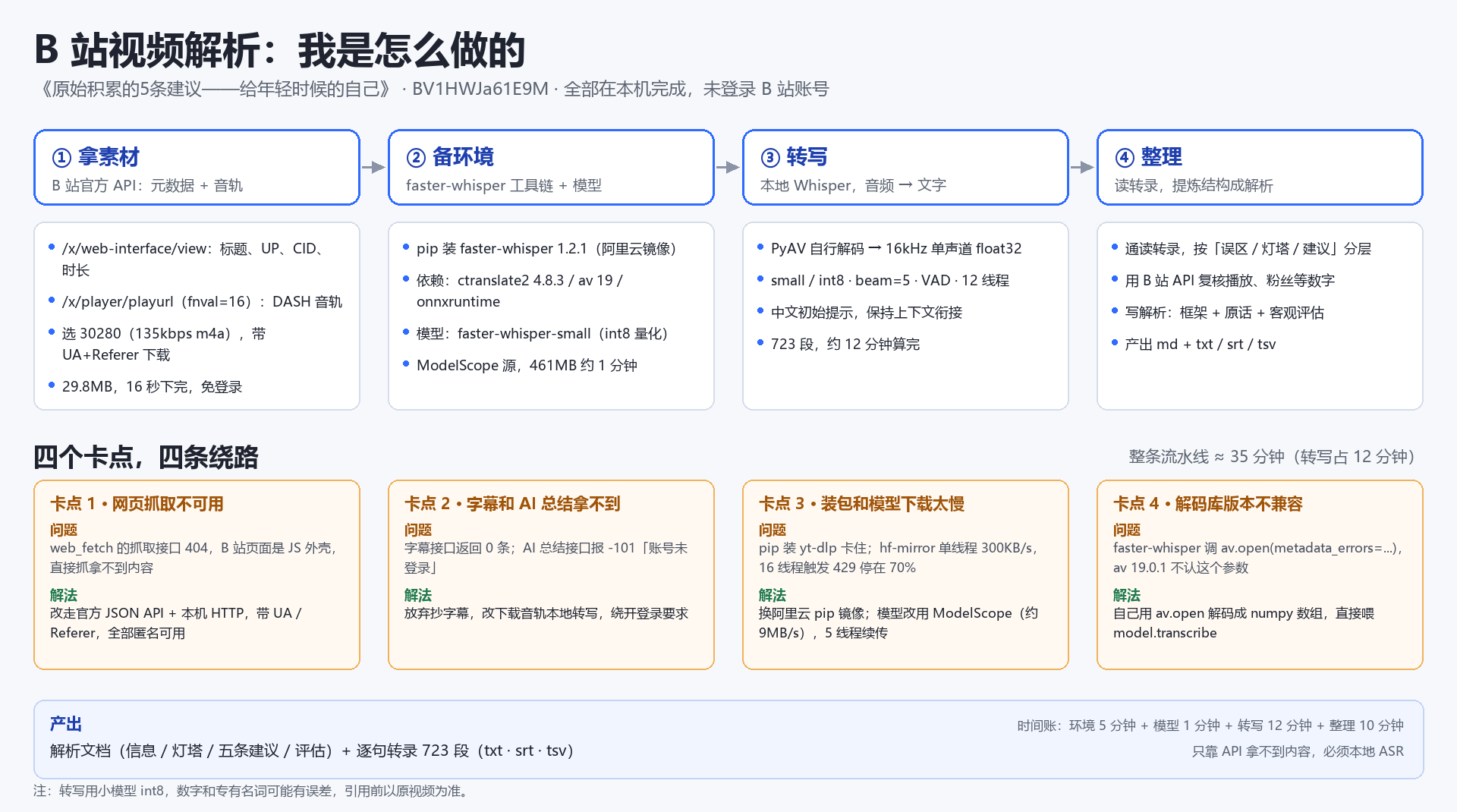 |
示例视频:《原始积累的 5 条建议》(BV1HWJa61E9M,29 分 25 秒)。
左图是插件直接产出的成品,右边那张是第一次手工解析时留下的流程复盘,插件已经把这张图里的步骤固化下来了。数字和专名以原视频为准——ASR 对低频词和数字会有误差,解析里会标注。
3. 解析过程
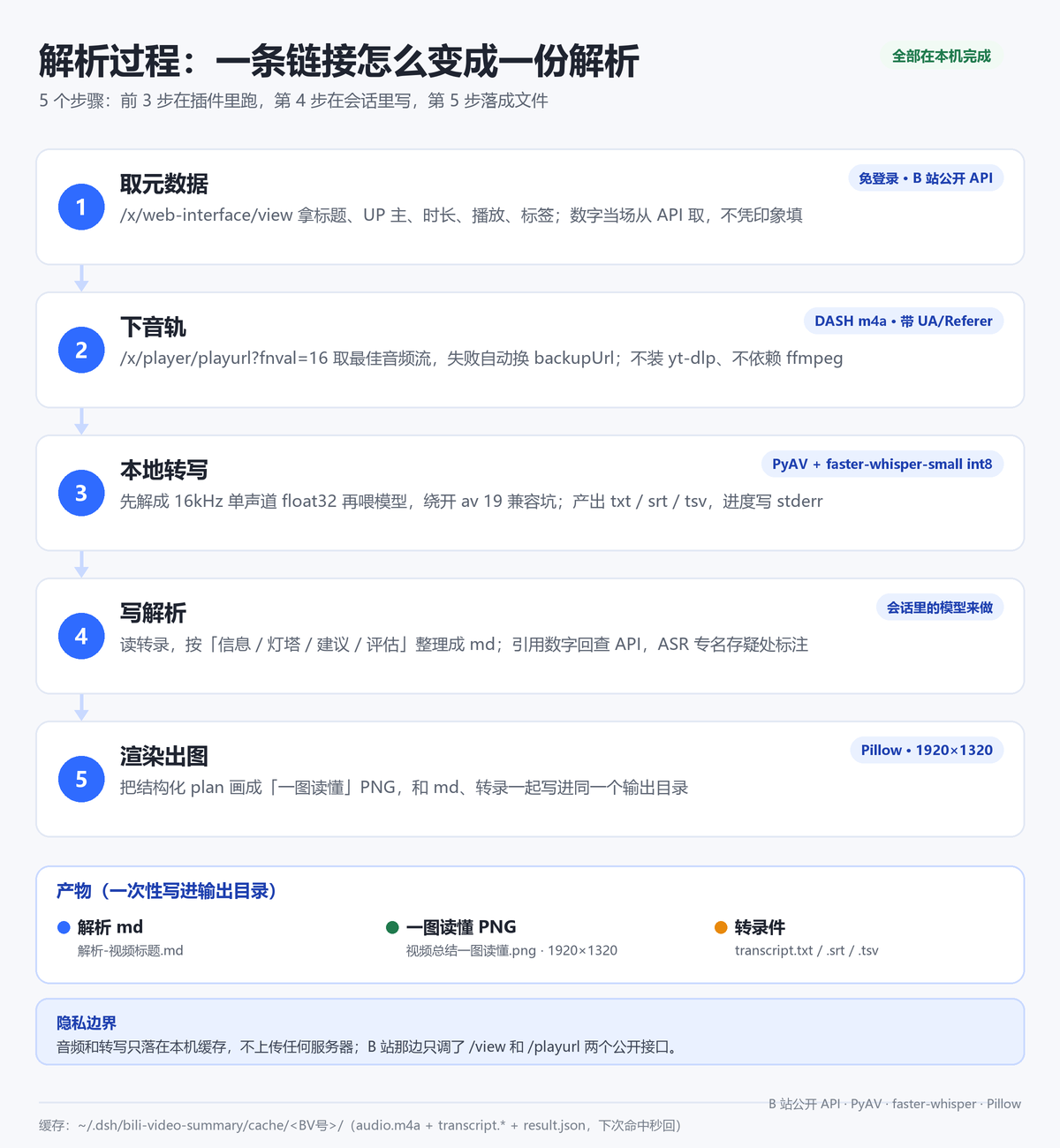
具体每一步做了什么:
- 取元数据:解析 BV 号,调
/x/web-interface/view拿标题、UP 主、时长、播放、点赞、标签。数字全部当场从接口取,不凭印象填。 - 下音轨:调
/x/player/playurl?fnval=16取 DASH 音轨(m4a),优先挑码率最高的一路,失败自动换 backupUrl。不装 yt-dlp,也不依赖 ffmpeg。 - 本地转写:用 PyAV 把音轨解成 16kHz 单声道 float32,再喂
faster-whisper-small(int8,CPU)。输出txt/srt/tsv,进度写 stderr,结果用一行RESULT_JSON:回传给 DSH。 - 写解析:这一步在会话里由模型完成,不是插件算的。模型读完整转录,按「信息 / 灯塔 / 建议 / 评估」组织成 md;引用到的数字回接口核对,ASR 专名存疑的地方直接标注。
- 渲染出图:把结构化内容交给 Pillow 画成「一图读懂」,同时把 md 和转录文件一起写进输出目录。
一次性产出:
| 产物 | 说明 |
|---|---|
解析-视频标题.md |
通读用的解析文档,含框架、原话和评估 |
视频总结一图读懂.png |
1920×1320,一页看完 |
transcript.txt / .srt / .tsv |
逐句转录,方便回查原话 |
耗时参考(CPU 推理,具体看机器):
| 环节 | 首次 | 同一个视频第二次 |
|---|---|---|
| 取元数据 + 下音轨 | 十几秒(10 分钟视频音轨约 20–30MB) | 命中缓存,0 |
| 本地转写 | 约视频时长 × 0.4(30 分钟约 12 分钟) | 命中缓存,0 |
| 写解析 + 渲染 | 取决于模型和内容长度,一般几十秒到几分钟 | 同左(解析要重写) |
4. 快速开始
4.1 前置条件
- Windows 10 / 11:一键装环境脚本是 PowerShell 写的;插件逻辑本身跨平台,但脚本目前只覆盖 Windows。
- DSH 桌面版:已实测 0.2.1-rc.2,需要支持
ctx.tools工具注册的版本。 - 磁盘约 725MB:模型 462MB + Python 依赖约 260MB,首次装环境要联网。
- 不需要 B 站账号,不需要 ffmpeg,不需要 yt-dlp。
4.2 安装插件
命令行走 profile 的插件管理器安装(DSH 桌面版一般用 desktop,dsh web 用 web):
dsh plugin --profile desktop add github:zz12hui/dsh-bili-video-summary
DSH 桌面版正在运行时,命令行不会改应用的 profile:先退出桌面版再执行,或等上架后在市场里一键安装。
装完重启 DSH(关闭窗口含托盘退出 → 重开 → 恢复会话)。首次使用还要装一次运行环境(模型 + Python 依赖,约 725MB),脚本位置见下面手动安装的第 3 条。
git clone https://github.com/zz12hui/dsh-bili-video-summary.git
把仓库内容复制到
%USERPROFILE%\.dsh\profiles\desktop\node_modules\dsh-local-bili-summary\。目录名要保持dsh-local-bili-summary(和package.json的name一致),否则 profile 解析不到。在
%USERPROFILE%\.dsh\profiles\desktop\cordis.patch.yml末尾追加:- insert: - id: bili-summary-panel name: 'dsh-local-bili-summary'装运行环境(模型 + Python 依赖):
powershell -ExecutionPolicy Bypass -File scripts\setup_env.ps1脚本会用阿里云镜像把 faster-whisper 装到独立的
pylibs,从 ModelScope 拉faster-whisper-small,最后校验依赖。可传-Python/-DataHome换解释器和数据目录。用dsh plugin add装的,脚本在%USERPROFILE%\.dsh\profiles\desktop\node_modules\dsh-local-bili-summary\scripts\setup_env.ps1。重启 DSH(关闭窗口含托盘退出 → 重开 → 恢复会话)。插件在启动时注册工具,刷新页面不会加载它。
4.3 验证
发一个 B 站视频链接,助手应该先调 bili_video_transcribe 转写,再调 bili_video_render 出图。看得到两个工具名,就说明装好了。
5. 两个工具
| 工具 | 做什么 | 关键参数 |
|---|---|---|
bili_video_transcribe |
下载音轨 + 本地转写,返回元数据、全文和 txt/srt/tsv 路径 | url(链接或 12 位 BV 号);force(忽略缓存重转) |
bili_video_render |
渲染一图读懂 PNG,并把 md 一起写进输出目录 | payload(内含 md、plan、outDir、copyTranscripts 等) |
正常调用顺序是固定的:transcribe → 模型读转录写解析 → render。render 的 plan 结构大致是这样(最多 5 条建议、4 个里程碑、5 条清单):
{
  "outDir": "输出目录",
  "md": "# 解析标题\n...",
  "plan": {
    "title": "一张图读懂《…》",
    "subtitle": "UP 主 · 时长 · 播放 · 日期",
    "quote": "一句话主旨",
    "pitfalls": ["…"],
    "goalTitle": "目标",
    "milestones": [{ "amount": "20 万", "tag": "灯塔 1 · 第 8 年", "desc": "…" }],
    "suggestions": [{ "title": "…", "bullets": ["…"] }],
    "caveats": ["…"],
    "todos": ["…"]
  }
}
6. 配置与目录
可选环境变量:
| 变量 | 默认值 | 作用 |
|---|---|---|
BILI_SUMMARY_HOME |
~/.dsh/bili-video-summary |
数据根目录 |
BILI_SUMMARY_PYLIBS |
$BILI_SUMMARY_HOME/pylibs |
Python 依赖目录 |
BILI_SUMMARY_MODEL |
$BILI_SUMMARY_HOME/model/faster-whisper-small |
模型目录 |
BILI_SUMMARY_PYTHON |
DSH 自带 Python 运行时 | Python 解释器 |
安装位置:
| 内容 | 路径 |
|---|---|
| 插件本体 | %USERPROFILE%\.dsh\profiles\desktop\node_modules\dsh-local-bili-summary\ |
| profile 补丁行 | %USERPROFILE%\.dsh\profiles\desktop\cordis.patch.yml 末尾 bili-summary-panel |
| 数据根目录 | %USERPROFILE%\.dsh\bili-video-summary\ |
| 缓存 | …\cache\<BV号>\(audio.m4a / transcript.* / result.json) |
仓库结构:
dsh-bili-video-summary/
├── index.js                 # 注册两个工具,spawn Python 子进程,解析 RESULT_JSON
├── cordis.patch.yml         # DSH 启动时的插件注册行
├── scripts/
│   ├── bili_pipeline.py     # 元数据 → 音轨 → PyAV 解码 → faster-whisper 转写
│   ├── render_summary.py    # plan → 1920×1320 PNG + md
│   └── setup_env.ps1        # 一键装依赖和模型(约 725MB)
├── references/踩坑清单.md    # 首次手工解析的 16 条问题复盘
├── docs/                    # 示例图
├── assets/readme/           # README 首图与过程图
├── locale/                  # 插件清单里的中文名和描述
├── icon.svg
└── package.json
7. 为什么这样设计
第一次手工解析踩了 16 个坑,能固化的都写进插件了。几个关键取舍:
- 不走网页抓取:B 站页面是 JS 外壳,直接 fetch 拿不到内容;插件只用公开 JSON API。
- 不等官方字幕:匿名请求字幕接口返回 0 条,AI 总结接口要登录(
-101),所以直接下音轨做本地 ASR。 - 不装 yt-dlp:
playurl直接给 DASH 音轨,少一个依赖少一个变量。 - 模型走 ModelScope:hf-mirror 单线程只有约 300KB/s,多线程还会触发 429;ModelScope 实测约 9MB/s。
- 绕开 av 19 的兼容问题:faster-whisper 1.2.1 调
av.open(metadata_errors=…)会报错,所以自己解成 float32 数组再喂模型。 - 长任务交给插件:Node
spawn管子进程,超时 60 分钟,一次调用跑完下载和转写,不被 shell 超时切碎。 - 按 BV 号缓存:同一视频第二次直接读缓存,不再重复下载和转写。
完整的 16 条问题清单(现象 → 根因 → 现在怎么做)见 references/踩坑清单.md。
8. 手动跑(排查用)
$py = "$env:USERPROFILE\.dsh\dsh-runtimes\dsh-primary-runtime\dependencies\python\python.exe"
$pl = "$env:USERPROFILE\.dsh\profiles\desktop\node_modules\dsh-local-bili-summary\scripts"

# 转写:--force 忽略缓存;--clip 60 只转前 60 秒(调试用,不写缓存)
& $py "$pl\bili_pipeline.py" transcribe --url "https://www.bilibili.com/video/BVxxxx"

# 渲染
& $py "$pl\render_summary.py" --plan-file plan.json
脚本最后会打印一行 RESULT_JSON:{...},排查时先看这一行和 stderr 里的进度。
9. 卸载与回滚
删掉 cordis.patch.yml 末尾的 bili-summary-panel 插入块和 node_modules\dsh-local-bili-summary 目录,重启 DSH 即可。数据目录 ~/.dsh/bili-video-summary 可以留着(换插件版本还能用),想清干净就整个删掉。
10. 常见问题
转写为什么这么慢? CPU 推理,速度约视频时长的 0.4 倍。30 分钟视频约 12 分钟,第一次用之前最好先知道这个数。
数字和专有名词不对? small int8 对低频词和数字不敏感,比如 T-Bill 会被听成「TBU」。插件会在解析里标注「ASR 可能有误差」;要更准就换更大的模型(改 BILI_SUMMARY_MODEL 指向 medium)。
报错找不到模型或依赖? 重跑 scripts\setup_env.ps1 会补齐并校验。
刷新页面后工具没出现? host 插件只在 DSH 启动时加载,必须重启(含托盘退出),刷新浏览器不算。
纯音乐视频能用吗? 不能,没有语音会直接报「没有识别到任何语音内容」。
macOS / Linux 能用吗? 插件逻辑和 Python 脚本是跨平台的,但一键装环境脚本只写了 Windows,其他系统要手动装依赖。
11. License
MIT © 2026 zz12hui
Links
More in this category
Tencent/WeKnora#dsh-weknora★ 35014
Four read-only tools over a WeKnora knowledge base: list knowledge bases, hybrid passage search, reassemble one document's chunks in order, and WeKnora's own cited RAG or ReAct-agent answer with a resumable session id.
superdesigndev/treg★ 5944
Tool catalog for agents: search ~2,600 external endpoints (SEO and SERP, backlinks, social, people and company enrichment, ad libraries, scraping) by the task you want done, read each one's parameters and per-call price, then call it with the credential injected server-side. Ships the skill plus an MCP row that stays disabled until TREG_TOKEN is set.
T-Auto/dsh-ops★ 3709
Provides bash, PowerShell 7, and high-performance Rust tools for DSH on Windows to reduce token usage.
TencentCloudBase/CloudBase-AI-Toolkit#dsh-plugin★ 1141
Tencent CloudBase backend for DeepSeek Harness — scaffold and deploy full-stack apps from chat, render query results as table cards with paging, sorting and CSV export, preview a deployment on its domain, and call the CloudBase MCP toolset (`mcp__cloudbase__*`) with device-code login.
sixtysevenlf/dsh-blender-plugin★ 1019
Lets a DSH agent drive a local Blender over a direct TCP channel with 16 tools: viewport frames, custom-angle renders, Python execution, headless and job offload, transaction rollback, and a planning layer of 186 ops across 28 families.
anysearch-team/anysearch-dsh★ 634
AnySearch-powered real-time web and vertical search provider for DeepSeek Harness.
Community comments
Comments are public GitHub Discussions. Loading them connects to GitHub and Giscus; a GitHub account is required to post.