Token cost monitoring, call-efficiency analysis and reversible tool-output caching for DeepSeek Harness.
Install
# from npm (prebuilt)
dsh plugin --profile web add dsh-token-manager
# from GitHub (first run asks for allowBuilds approval — follow the hint, retry)
dsh plugin --profile web add github:zhirai-tech/dsh-token-manager
Any plugin you install runs third-party code with your own permissions — it can read your files, use your credentials, and reach the network, and tool approvals don’t sandbox it. GitHub-sourced plugins also run build scripts at install time — pnpm blocks those until you allow them, so an install can stop with ERR_PNPM_GIT_DEP_PREPARE_NOT_ALLOWED or ERR_PNPM_IGNORED_BUILDS; dsh prints the exact key to add under allowBuilds in your profile’s pnpm-workspace.yaml, and the install works on the next run. Allowing a build is a trust decision: only install sources you trust, and pin a commit (github:owner/repo#sha).
README
English | 简体中文
Token cost monitoring, model-call efficiency analysis and reversible tool-output caching for DeepSeek Harness.
ZHIRAI · 智睿科技 · independent developer
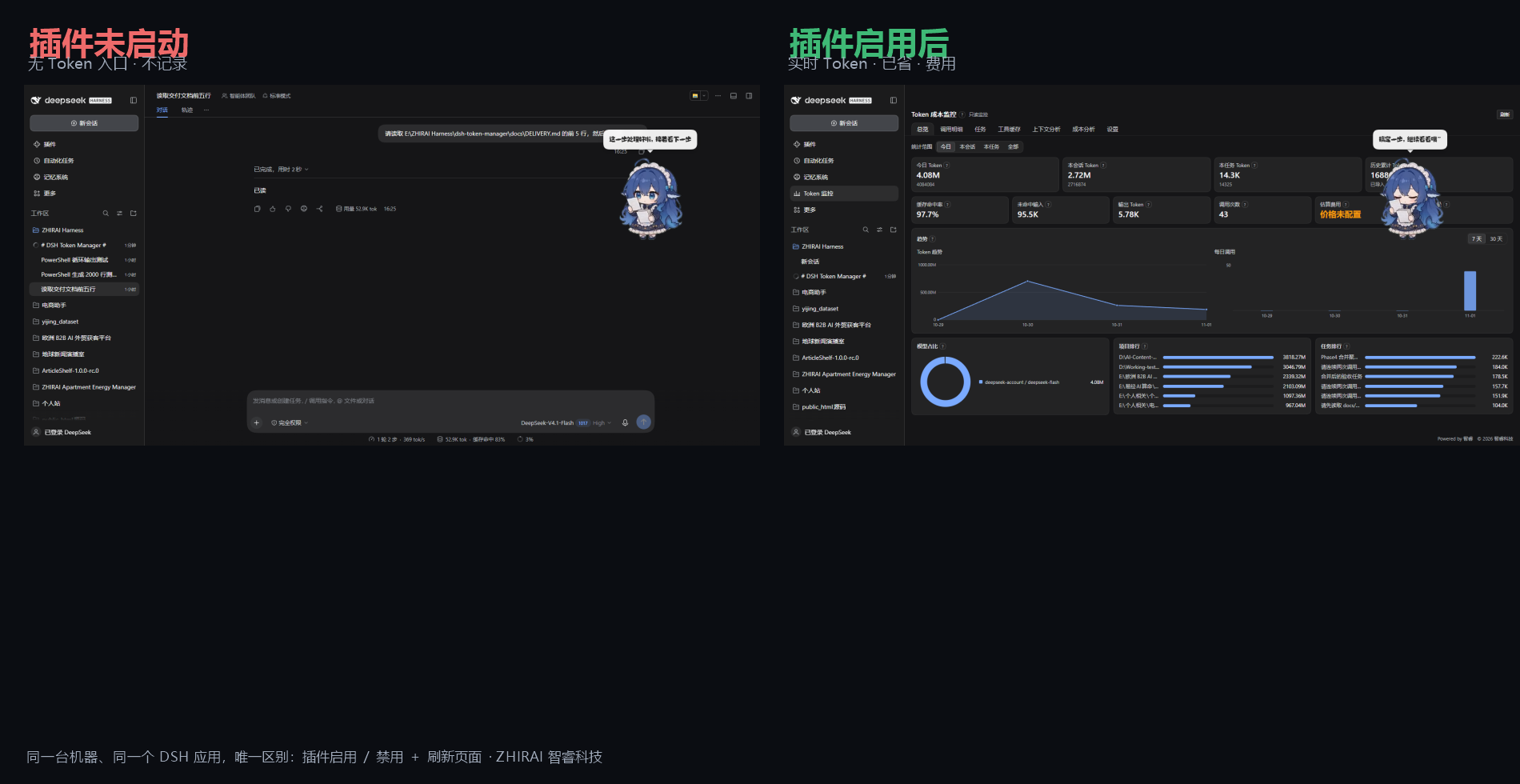
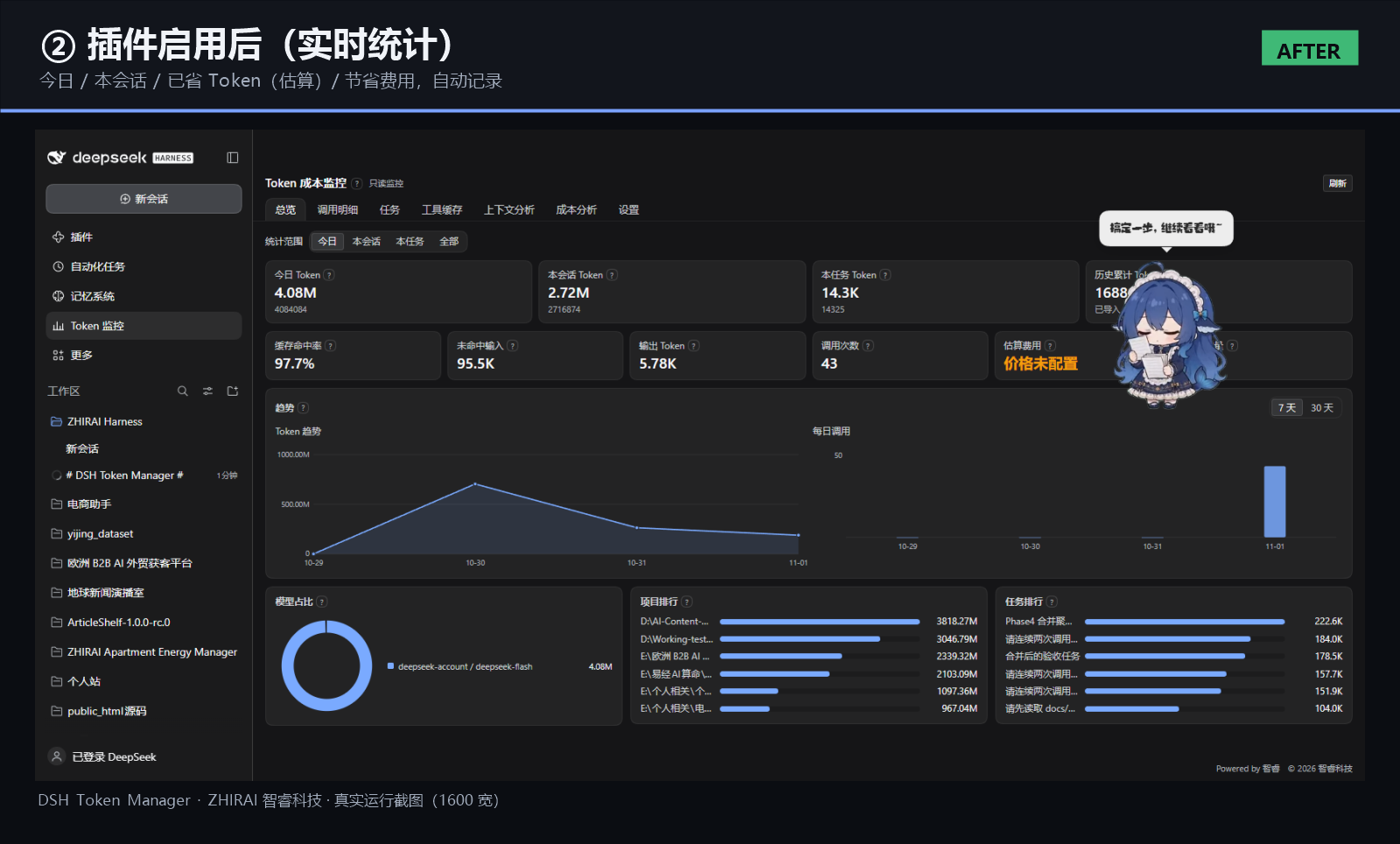
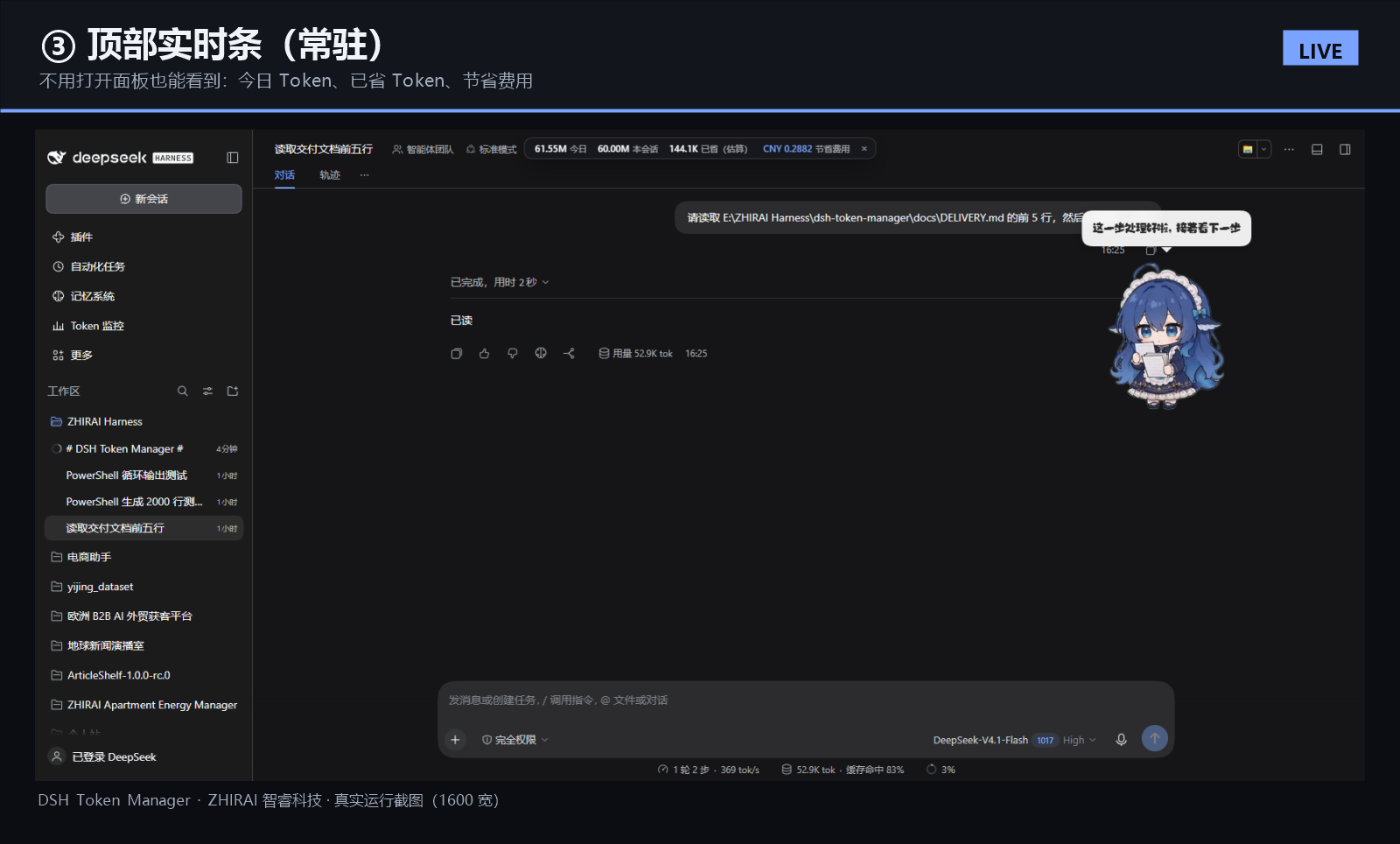
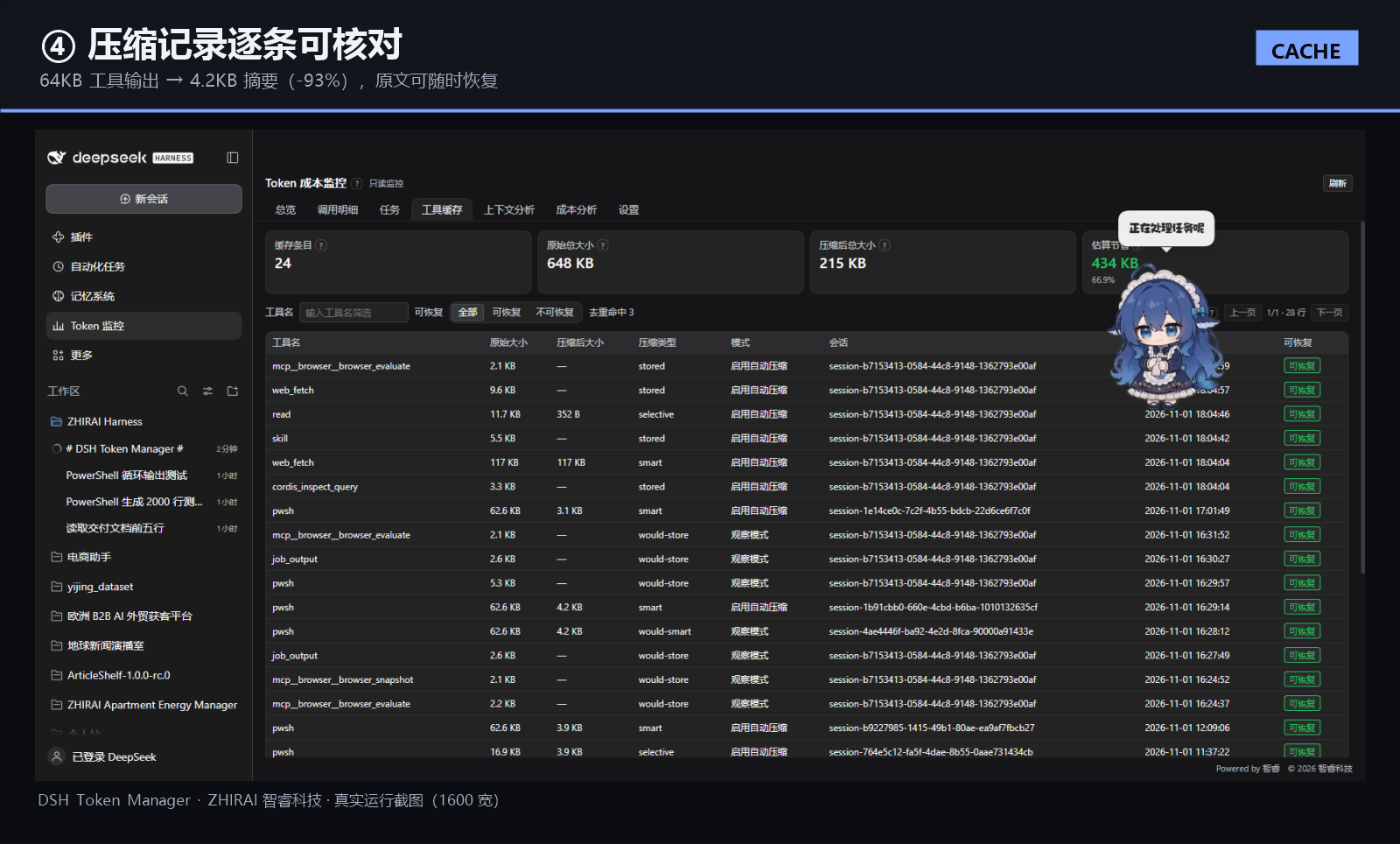
| Dashboard | Live top strip | Compression records |
|---|---|---|
 |
 |
 |
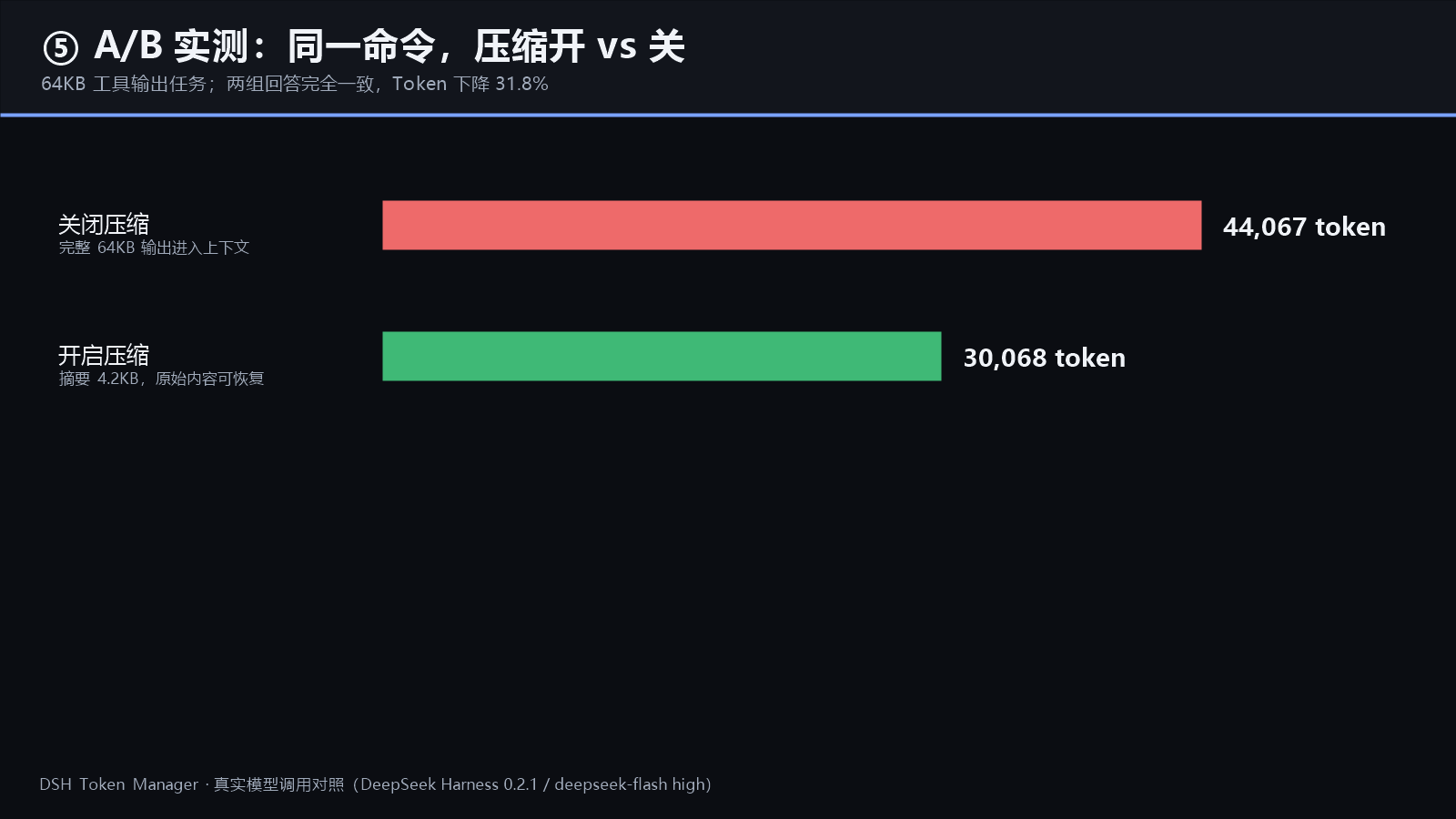
Real screenshots from a running DSH desktop app: left = plugin disabled, right = plugin enabled (same machine, only the plugin toggled). The A/B chart comes from a real model-call comparison: 44,067 → 30,068 tokens (−31.8%) with identical answers.
What it is
A Cordis plugin for DeepSeek Harness that answers four questions without touching the model, the reasoning level, the harness core or dsh-mnemon:
- Where did my tokens go? Per-call four-bucket ledger, per task, session, project, today and all-time.
- Which calls are wasteful? 11 finding types: repeated file reads, repeated tools, repeated build/test/deploy commands, redundant confirmations, repeated plans/summaries, simple-task step inflation, cache-hit drops, task-cost anomalies and more.
- What can be compressed safely? Large shell/build/test/log outputs are replaced by structured summaries; the original is always recoverable via
token_manager_read. - What did it cost and save? Cost per task with your price table, plus estimated tokens and money saved by compression.
| Area | Capability |
|---|---|
| Accounting | Per-call four buckets (uncached input / cache read / cache write / output), deduplicated by (session, turn, step, attempt); totals cross-checked field-by-field against DSH's own tokenUsage projection. |
| Efficiency analysis | 11 finding types with per-type switches and thresholds; 5 task types with same-type historical baselines (median / p80). |
| Compression 2.0 | Shell-output aware (file lists, JSON/JSONL, Markdown, git diff/log, build, test, logs); every error/warning line preserved with its original line number; read results and error results are never compressed; history/prefix is never rewritten. |
| Recovery | Content-addressed blobs; token_manager_read paginates the original by blob id or reads a file inside the session workspace. |
| Tasks & projects | Merge tasks, 9-field task summaries, versioned 8-section project summaries, JSON/Markdown/CSV export. |
| Interface | Chinese-first dark dashboard, live top strip, 1600 / 897 / 390 responsive, help text collapsed into ? icons. |
Measured (not marketing numbers)
| Scenario | Result |
|---|---|
| A/B, same command, compression off → on | 44,067 → 30,068 tokens (−31.8%), both answers identical |
| Accuracy check, 1500-line output, ask line count + exact error line | Both modes answered identically and correctly (1500 lines, exact L777 text, 1 ERROR / 1 WARNING) |
| Real 493k-token session (offline audit of 12 shell outputs) | 521,347 B → 169,738 B (−67.4%), error/warning lines preserved 20/20 |
| Historical projects, cumulative tokens avoidable (estimate) | large/long sessions 30%–50%, small projects 5%–15% |
Percentages for historical projects are an offline estimate (compressed tokens × how many later calls would carry them). The A/B row is a real model call. Costs depend on your plan; the built-in reference prices are public list prices, not a live bill.
Distribution build
This repository is a distribution build, not an open-source repository:
lib/contains the compiled, minified host and client bundles that DSH loads;src/andtests/contain README notes only — sources and tests are not published;scripts/contains two real, usable helpers;- the plugin is proprietary (UNLICENSED, all rights reserved).
| Path | Content |
|---|---|
lib/ |
index.js (host, 197 KB) and client.js (browser, 188 KB), minified |
src/ |
README only — source not published |
tests/ |
README only — test-suite summary (231 tests), no test sources |
scripts/ |
token-report.mjs (per-call token report), install-sandbox.ps1 (isolated profile install) |
locale/ |
Chinese and English dictionaries |
docs/ |
install, config, troubleshooting, compression 2.0 report, market guide, video script, screenshots |
.github/ |
issue templates |
Install
From npm:
dsh plugin --profile <profile> add dsh-token-manager@1.3.3
From GitHub (no market or npm needed):
dsh plugin --profile <profile> add github:zhirai-tech/dsh-token-manager
Then restart the profile. This installs the compiled release (v1.3.3) from this repository.
From this repository (local clone):
# from this repository (linked dev install)
dsh plugin --profile <profile> add "file:<absolute-path-to-this-repo>"

# or from the release zip
#   download dsh-token-manager-1.3.1.zip, unzip, then install the unzipped folder
dsh <profile> --no-open      # restart the GUI
Or in the DSH desktop app: Settings → Plugins → install from local directory.
Verify: the sidebar shows Token 监控 and /token-manager/api/health returns ok: true.
Full steps, upgrade and uninstall: docs/INSTALL.md.
Requirements
DeepSeek Harness 0.2.x (verified on 0.2.1-rc.5), Node.js 24.x bundled with DSH, no network access, no API keys.
Configuration
Everything lives in Token 监控 → 设置: collection switches, 11 analysis toggles and thresholds, price table (4 buckets, currency, unit), compression mode (off / observe / on) and thresholds, cache limits, context analysis (dry-run only).
Defaults are safe: monitoring on, compression in observe mode (records but never replaces), context analysis dry-run only. Auto-compression must be enabled explicitly.
Full reference: docs/CONFIG.md.
Compatibility and safety
- No core changes: no edits to DeepSeek Harness, dsh-mnemon, the model configuration or the reasoning level.
- dsh-mnemon coexistence: messages injected by mnemon (
source.kind = "dsh-mnemon") are classified as protected and never compressed, deduplicated or removed (verified with real conversations; message hashes unchanged). - Local-only data:
%DSH_HOME%\dsh-token-manager\(SQLite + content-addressed blobs); no telemetry, no network calls. - HTTP boundary: every request goes through DSH's connection fence;
token_manager_readvalidates session ownership and confines path reads to the session workspace. - Reversible: uninstall removes listeners, routes, tool and UI; data remains until you delete it.
Repository layout
See docs/, .github/ and the table above. Sources are not published; issues about behaviour, compatibility and security are welcome.
Market
DSH's plugin market is a JSON index any static host can serve. This repository ships a ready index:
https://raw.githubusercontent.com/zhirai-tech/dsh-token-manager/main/docs/market/index.json
Add it under Plugins → Discover → Add index source. See docs/MARKET.md for the format and how to get listed in community catalogs.
Development
The test suite (231 unit tests + real-history cross-check) is maintained privately and run before every release. The public repository intentionally contains no source or test files.
License
Proprietary / All rights reserved — UNLICENSED. See LICENSE. No permission is granted to copy, modify or redistribute without written permission.
Links
More in this category
bowenliang123/dsh-context★ 3973
DSH context insight panel: Context dashboard + /context command + Context browser — one-stop context lifecycle management with categorized composition, content details, evolution trends, compaction/injection events, and stats.
Han-1413141/dsh-cost-meter★ 597
Per-session and daily API cost, budget with usage %, official balance, history dashboard, and one-click official price sync with peak/off-peak pricing.
wssfk12138/dsh-damage-pulse★ 282
Tracks DeepSeek token usage, per-call and session costs, and account balance with cache-aware charge animations in the DSH Web UI.
zh667/TokenLedger★ 202
Sidebar usage panel that attributes tokens to the relay site that served each request, read from your existing provider config: today/month/all-time totals, per-site and per-model breakdowns, a year activity heatmap, and New API / Sub2API / DeepSeek balances.
Ychris12138/dsh-usage-stats★ 187
Multi-provider usage dashboard with provider/model token breakdowns, calendar drill-downs, account balances, and OpenCode Go / Z.ai subscription quota tracking.
PolinniZhong/dsh-personal-center★ 115
Personal center for DeepSeek Harness: cross-session usage statistics with per-provider and per-model breakdown (auto-discovers configured models), per-model cost estimation, global custom instructions, a data-driven desktop pet with bitmap & vector skins, and a conversation status overview, all local and offline.
Community comments
Comments are public GitHub Discussions. Loading them connects to GitHub and Giscus; a GitHub account is required to post.