A desktop pet in the DSH web GUI: floating, draggable sprite pet that animates with agent activity (thinking, idle, error, done, awaiting approval), with a settings page for size, switching, gallery search and one-click pet install. Ships 4 bundled Hunter x Hunter starter pets.
Install
# from GitHub (first run asks for allowBuilds approval — follow the hint, retry)
dsh plugin --profile web add github:zenglihunter/dsh-petdex-pet
Any plugin you install runs third-party code with your own permissions — it can read your files, use your credentials, and reach the network, and tool approvals don’t sandbox it. GitHub-sourced plugins also run build scripts at install time — pnpm blocks those until you allow them, so an install can stop with ERR_PNPM_GIT_DEP_PREPARE_NOT_ALLOWED or ERR_PNPM_IGNORED_BUILDS; dsh prints the exact key to add under allowBuilds in your profile’s pnpm-workspace.yaml, and the install works on the next run. Allowing a build is a trust decision: only install sources you trust, and pin a commit (github:owner/repo#sha).
README
📖 中文文档:README.md
dsh-petdex-pet
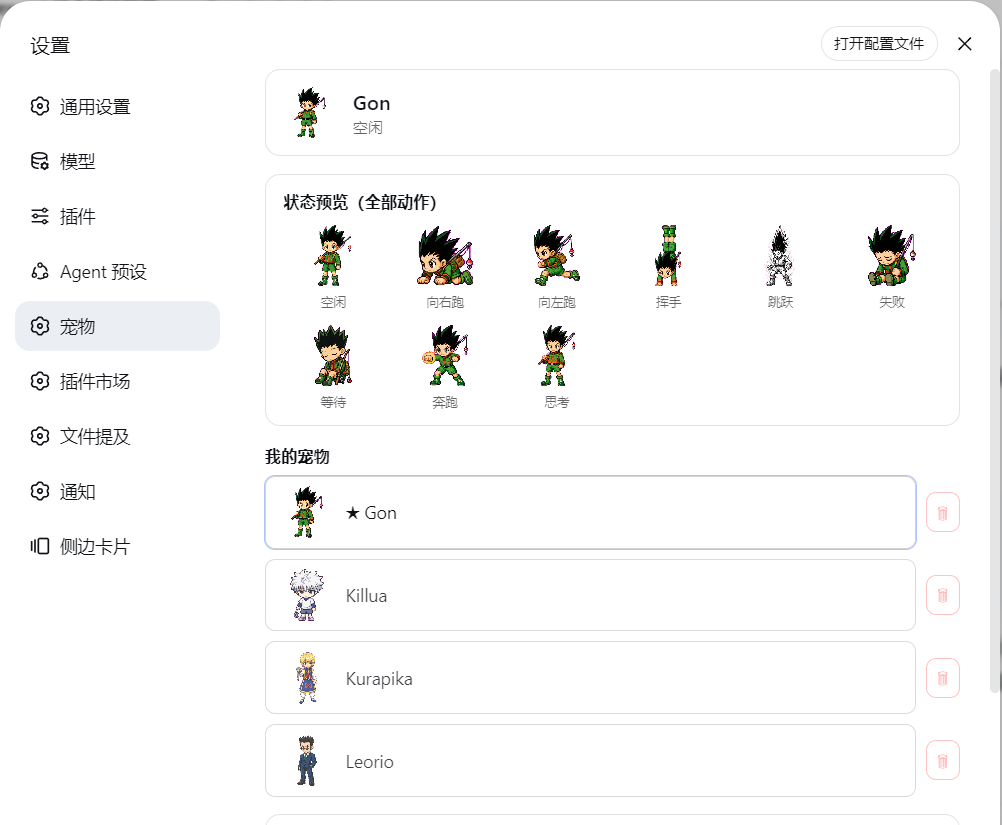
Bring Petdex desktop pets into the DeepSeek Harness Web UI: a floating, draggable pet in the bottom-right corner that switches sprite animations in real time following DSH agent activity (idle / running / jumping / waving / failed / waiting-for-approval…), with a full settings page and interactions.
Pure browser-side rendering — no Petdex desktop app required; pet data is read from ~/.petdex/pets/,
shared and compatible with the desktop version.
More screenshots:
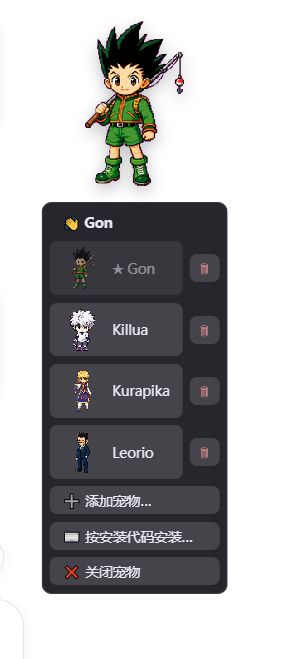
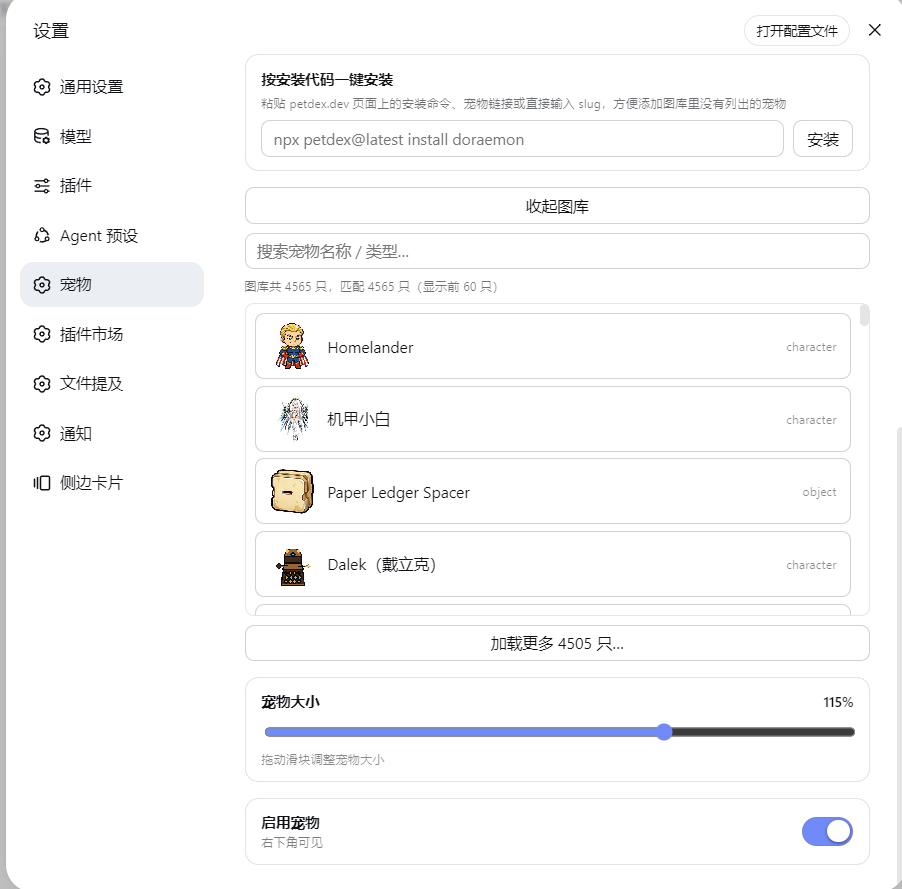
| Pet menu | One-click install & fetch pets online |
|---|---|
 |
 |
Bundled pets (out of the box)
The plugin ships 4 Hunter × Hunter protagonist pet packs
(Gon / Killua / Kurapika / Leorio, with spritesheets and pet.json).
After installation and a DSH restart, the plugin seeds them into ~/.petdex/pets/ on first activation —
so a fresh machine gets pets immediately, no need to add them one by one from the gallery.
- Seeding is once per pet (recorded by the marker file
~/.petdex/.dsh-petdex-bundled.json); - If a pet with the same name already exists on the target machine, it is not overwritten (existing files are kept);
- After you manually delete a bundled pet, it will not respawn (deletion is respected).
⚠️ Open-source redistribution note: the bundled sprites come from the Petdex community gallery. Before publishing, please confirm the asset license terms permit redistribution, and credit the source (see "Acknowledgements").
Feature overview
- 🐾 Bottom-right floating pet: draggable, click to expand the menu; the status bar syncs with DSH activity (tool calls, task completion, waiting for approval, failure, etc.), and auto-hides after 5 seconds of the same state.
- ✨ Interaction animations: on hover, randomly waves hello or shows the thinking pose; auto-cycles left/right running directions while running.
- ⚙️ Settings → Pets (standalone settings page):
- Adjust pet size (40%–150%) and enable/disable
- My Pets: thumbnail list, one-click switch, 🗑 delete
- Gallery: search (name/type), spritesheet preview, total count, load more
- One-click install by install code: paste
npx petdex@latest install doraemon, a pet link, or a slug to install - State preview: all 9 actions shown as row-by-row animations
- 🔌 Deep DSH integration: task start (jump), executing (run), complete (wave), failed, waiting for approval (wait)…
Sprite states (9-row spritesheet)
| State | Sprite row | Triggered when |
|---|---|---|
| idle | 0 | No activity |
| running-right | 1 | Cycles while running |
| running-left | 2 | Cycles while running |
| waving | 3 | Task complete / hover interaction (random) |
| jumping | 4 | Task execution starts |
| failed | 5 | Task failed |
| waiting | 6 | Waiting for approval / blocked |
| running | 7 | Tool call, workflow, step execution |
| review | 8 | Random on hover (no DSH event mapping yet) |
Installation (DSH web profile)
This plugin is for DeepSeek Harness (DSH) only and must be installed into DSH's web profile (default C:\Users\<you>\.dsh\profiles\web\).
Install from GitHub (recommended, one-step)
- Open the web profile directory and edit
package.json:- Add to
dependencies:"@dsh-external/dsh-petdex-pet": "github:zenglihunter/dsh-petdex-pet" - Append
"@dsh-external/dsh-petdex-pet"to thedsh.profile.bundlesarray;
- Add to
- Run
pnpm install(ornpm install) in that directory; - Restart DSH. A "Pets" item appears in settings and the pet shows up in the bottom-right.
DSH auto-combines the plugin's
cordis.patch.ymlviadsh.bundle.patch— no manual edit to the profile'scordis.patch.ymlis needed.
Other methods (optional)
- Local tgz: run
npm packin the plugin directory to generatedsh-external-dsh-petdex-pet-<version>.tgz, copy it into the profile directory, and set the dependency to"@dsh-external/dsh-petdex-pet": "file:./xxx.tgz". - npm publish: change
package.json'snameto your own scope, runnpm publish, and depend on the package name directly on the target machine.
Data & compatibility
- Pet files live in
~/.petdex/pets/<slug>/(pet.json+spritesheet.webp|png), shared with the Petdex desktop app; - The gallery manifest comes from
https://petdex.dev/api/manifest(5-minute cache); preview images go through an in-plugin proxy (/petdex-pet/preview/<slug>) to avoid blocked external links; - Installing pets uses the plugin's built-in downloader — no need to run
npx petdex.
Development
lib/index.js— DSH server-side half: routes (status / pets / gallery / install / delete / preview proxy / SSE), session events → pet state machine, settings persistence (owner-side settings scope);lib/client.js— browser-side bundle (__ModuleLoader__format): floating pet rendering / animation / drag / hover, settings → pets page (registerssettings.sectionslot).
Note: client changes use DSH's client HMR (stat-poll + SSE) — save
lib/client.jsfor hot reload;lib/index.jschanges require a DSH restart.
Acknowledgements
- Petdex — pet sprites, state definitions, and gallery; the bundled Hunter pets are high-quality Codex assets submitted by Petdex community authors (Gon / Killua / Kurapika / Leorio)
- DeepSeek Harness plugin system (client bundle / settings / slots)
License
MIT
Links
More in this category
PC2005-cloud/dsh-pet#dsh-pet★ 1530
Desktop pet for the DSH Web UI with 25 transparent animations, screen wandering, click reactions and drag, plus a reproducible asset-generation pipeline.
Nagi-ovo/dsh-ads★ 674
Parody ads in 2005-Chinese-web style: sidebar banners, in-chat feeds, corner popups, and a close button whose hit area is smaller than it looks. All fictional.
vlln/whale-girl★ 358
Desktop pet (QQ-pet style): floats in the corner, draggable, feedable, playable.
yyh-001/dsh-meme★ 201
Chat meme stickers: text-only send, mood auto-send, QQ/WeChat-style picker, auto-learn, custom packs.
a86582751/dsh-nexttavern★ 177
NextTavern is a long-form roleplay plugin for DeepSeek Harness 0.1.7-rc.2 Web, with character-card import and creation, worldlines, worldbooks, layered long-term memory, keyword/semantic/hybrid retrieval, character agents, and card or novel export. SillyTavern character-card import is supported; v0.2.9 fixes distribution and installation.
Sutera-Diffusus/dsh-whale-musume★ 130
A whale-girl companion for DeepSeek Harness with 45 achievements, daily quests and weekly check-ins, three mini-games, 92 artworks, 620 dialogue lines, a growth journal, weather and festival reactions, per-tool work poses, cross-device save export/import (JSON file or migration code), accessibility mode and an optional MiMo TTS bridge. Data stays in the host localStorage with no telemetry. Verified on DSH desktop 0.2.0-rc.2; compatible with 0.2.1-rc.1/rc.2 and legacy 0.1.x web.
Community comments
Comments are public GitHub Discussions. Loading them connects to GitHub and Giscus; a GitHub account is required to post.