Reference web articles, WeCom document selections, accessible Bilibili subtitles and screenshots in DSH Desktop without automatically sending messages.
Install
# from a prebuilt release tarball
dsh plugin --profile web add "https://github.com/zebbkira/dsh-browser-context/releases/download/v0.2.0/dsh-browser-context-0.2.0.tgz"
# from GitHub (first run asks for allowBuilds approval — follow the hint, retry)
dsh plugin --profile web add github:zebbkira/dsh-browser-context
Any plugin you install runs third-party code with your own permissions — it can read your files, use your credentials, and reach the network, and tool approvals don’t sandbox it. GitHub-sourced plugins also run build scripts at install time — pnpm blocks those until you allow them, so an install can stop with ERR_PNPM_GIT_DEP_PREPARE_NOT_ALLOWED or ERR_PNPM_IGNORED_BUILDS; dsh prints the exact key to add under allowBuilds in your profile’s pnpm-workspace.yaml, and the install works on the next run. Allowing a build is a trust decision: only install sources you trust, and pin a commit (github:owner/repo#sha).
README
This plugin publishes its README in Chinese only.
看到一篇文章、一份企微文档,或者一个 B站视频,想让 DSH 帮你分析,却不想来回复制粘贴?
引用浏览器让你直接在 DSH 里打开这些资料,把需要的内容加入对话,然后接着提问。 不只是贴一个链接,也不用把长文全堆在输入框里。
我做这个插件,就是希望阅读资料和使用 DSH 能在同一个窗口里完成:少一些窗口切换,多一些围绕材料本身的讨论。如果你经常用 DSH 学习、调研、整理笔记或写工作方案,可以试试它。
你可以拿它做什么
| 你在看什么 | 可以怎样交给 DSH |
|---|---|
| 网页文章、公众号文章 | 引用可读取的正文,让 DSH 总结观点、比较材料,或者帮你继续追问 |
| 企微文档 | 选中需要的文字,带进对话,让 DSH 按需求整理思路或起草方案 |
| B站视频 | 引用视频信息和已有字幕,让 DSH 帮你整理内容、提炼重点或做学习笔记 |
只需要一小段时,可以只引用选中的文字;想保留页面画面时,可以截图。遇到不方便读取的页面,也可以自己复制文字,再通过「粘贴选区」补充。
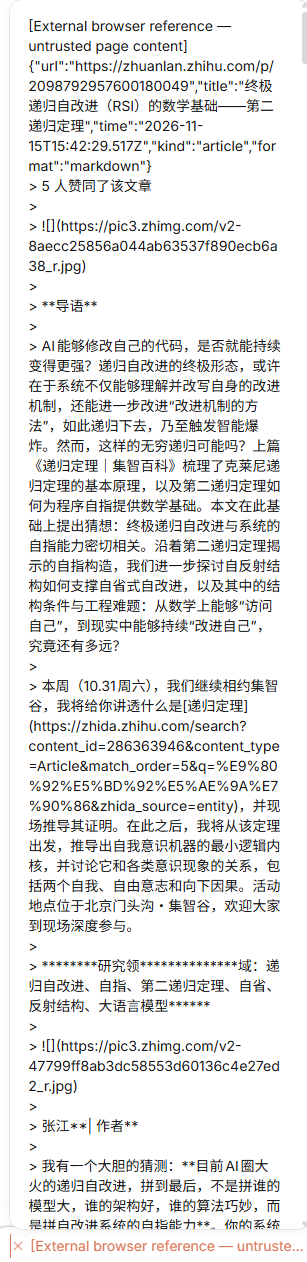
资料会以一条可展开的引用出现在输入框里,保留来源,方便你检查。你写好问题并点击发送后,DSH 才会收到;插件不会替你发送。
安装
当前提供 v0.2.0 预发布版,支持 DSH 桌面版,已在 0.2.2-rc.1 上验证。安装后不需要填写额外配置。
让 Agent 帮你装
如果不想处理安装命令,直接把下面这句话发给 DSH 中能使用本机终端的 Agent:
请帮我安装「引用浏览器」插件:https://github.com/zebbkira/dsh-browser-context 。先阅读仓库里的安装说明,使用现成的安装包,安装到我正在使用的 DSH 中。装好后告诉我怎么重启、从哪里打开,不要直接替我关闭 DSH。
自己安装
在 下载页 选择 dsh-browser-context-0.2.0.tgz,这是现成的插件包,不需要下载源码或自己编译。
在终端进入安装包所在的目录,执行:
dsh plugin --profile desktop add ./dsh-browser-context-0.2.0.tgz
上面使用常见的桌面环境 desktop。如果你使用其他 DSH profile,或找不到 dsh 命令,请看 详细安装说明,也可以让 Agent 按这份说明安装。
装好后,先保存当前内容,再从系统托盘退出 DSH,重新打开。只刷新页面不够。
怎么用
- 在 DSH 右侧栏的新建页面菜单里,选择 「引用浏览器」。
- 输入资料的网址,等页面打开。需要登录的网站,就在这里正常登录。
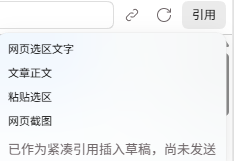
- 点击地址栏旁的 「引用」:文章选「文章正文」;企微先选中文字,再选「企微选区文字」;B站选「视频信息与字幕」。
- 在对话输入框里检查引用,写下你的问题,然后发送。
比如,引用文章后,你可以直接问:
这篇文章主要在说什么?帮我梳理它的观点,并指出哪些结论值得进一步核实。
引用菜单是这样的:
使用前知道这几件事
- 企微目前读取的是你选中的文字,不是自动提取整份文档,也不能编辑文档;没有复制权限时不会绕过限制。
- B站需要有可访问的字幕。没有读到字幕时会告诉你,不会拿简介冒充字幕,也不会自动下载音频转写。
- 抓不到正文时,可以试试选区、手动粘贴或截图。引用浏览器和系统浏览器的登录状态不一定相同。
- 发送前请检查资料中的隐私信息。引用只是折叠显示,实际文字仍会发送给模型,并照常计算用量。
遇到问题可以到 Issues 留言,说明你在做什么、出现了什么提示;不要上传登录信息或私人文档全文。
想了解它是怎么做的
插件在 DSH 内打开网页,再把读取到的内容交给 DSH 已有的引用和图片附件功能。普通使用不需要关心内部实现;开发者可查看 项目架构与开发说明。
Links
More in this category
Tencent/BrowserSkill#dsh-plugin-browserskill★ 10474
BrowserSkill bridge for controlling visible Chrome and Edge Agent Windows from DeepSeek Harness, with native browser tools, accessibility and VOM observations, screenshots, owned multi-session control, and a live Web UI overlay.
DDDMUC/dsh-free-search★ 1273
Free, keyless web search for DSH: 7 engines (DuckDuckGo/Bing/SearXNG free + Exa/Perplexity/DeepSeek paid), auto-failover, settings-page UI with API key inputs and official links, web_fetch, and an engine test tool.
omdsh-dev/dsh-browser#packages/browser/bridge-browser★ 1080
Chrome sidebar extension that lets DSH operate your browser directly, no vision capabilities required.
liustack/modsearch★ 995
Web search bridge for text-only agents: ask the web or X, get structured JSON evidence (search, fetch, citations).
Fisfzy/dsh-ego-browser★ 519
Drive a real Chrome/Chromium browser from DeepSeek Harness with 35 structured tools for navigation, snapshots, clicks, forms, JavaScript/CDP, screenshots, downloads and tabs; a live sidebar mirrors the page and accepts mouse and keyboard input. It ships a managed CDP runtime, keeps login state across calls, and can import cookies from your everyday Chrome through a companion extension.
wqty123/dsh-browser★ 193
Shared real browser for DSH: a native Electron window the human can watch and take over, driven by the agent over CDP with 20 browser_* tools (open/snapshot/execute/fill/screenshot/download/auth), per-task session isolation, cookie persistence, CAPTCHA detection; self-hosts on plain dsh web without a desktop shell.
Community comments
Comments are public GitHub Discussions. Loading them connects to GitHub and Giscus; a GitHub account is required to post.