Web search bridge for text-only agents: ask the web or X, get structured JSON evidence (search, fetch, citations).
Install
# from npm (prebuilt)
dsh plugin --profile web add @liustack/modsearch
# from GitHub (first run asks for allowBuilds approval — follow the hint, retry)
dsh plugin --profile web add github:liustack/modsearch
Any plugin you install runs third-party code with your own permissions — it can read your files, use your credentials, and reach the network, and tool approvals don’t sandbox it. GitHub-sourced plugins also run build scripts at install time — pnpm blocks those until you allow them, so an install can stop with ERR_PNPM_GIT_DEP_PREPARE_NOT_ALLOWED or ERR_PNPM_IGNORED_BUILDS; dsh prints the exact key to add under allowBuilds in your profile’s pnpm-workspace.yaml, and the install works on the next run. Allowing a build is a trust decision: only install sources you trust, and pin a commit (github:owner/repo#sha).
README
Models like DeepSeek and GLM have no web access, or a weak one. ModSearch is a plug-in that greatly strengthens web search, X search, and single-page fetch. It works the moment it lands: the default engine is Firecrawl's keyless tier, 1,000 free credits every month, with no account, no API key, and no card.
Talk to us
Hit a problem? Open an issue. Everything else is welcome on X: @liustack. What you built with it, which harness you are on, what should come next. New releases land there first. A community space is on the way.
Features
- 🥇 The strongest free web search plugin for DeepSeek Harness (dsh): one command installs it,
npx -y @deepseek-ai/dsh plugin --profile web add @liustack/modsearch@5.10.5. Details in harness setup. - Free out of the box, no signup. Search and page fetch run on Firecrawl Keyless by default: 1,000 free credits/month, no account, no API key, no card. Every fallback channel is free too: Antigravity CLI needs only a browser sign-in, and Tavily, Exa, and a free Firecrawl key each add their own monthly quota with no card required.
- Automatic failover. When a channel fails or exhausts its quota, the next one takes over.
- Per-engine key rotation. Give Tavily, Exa, or Firecrawl multiple comma-separated keys. Authentication, rate-limit, and quota failures rotate to the next key before the engine chain falls back.
- Searches X (Twitter). With Grok Build installed, ModSearch queries the corpus that web indexes cannot reach.
- Install once, use everywhere. Works in Claude Code, Codex, Pi, and OpenCode.
See it work
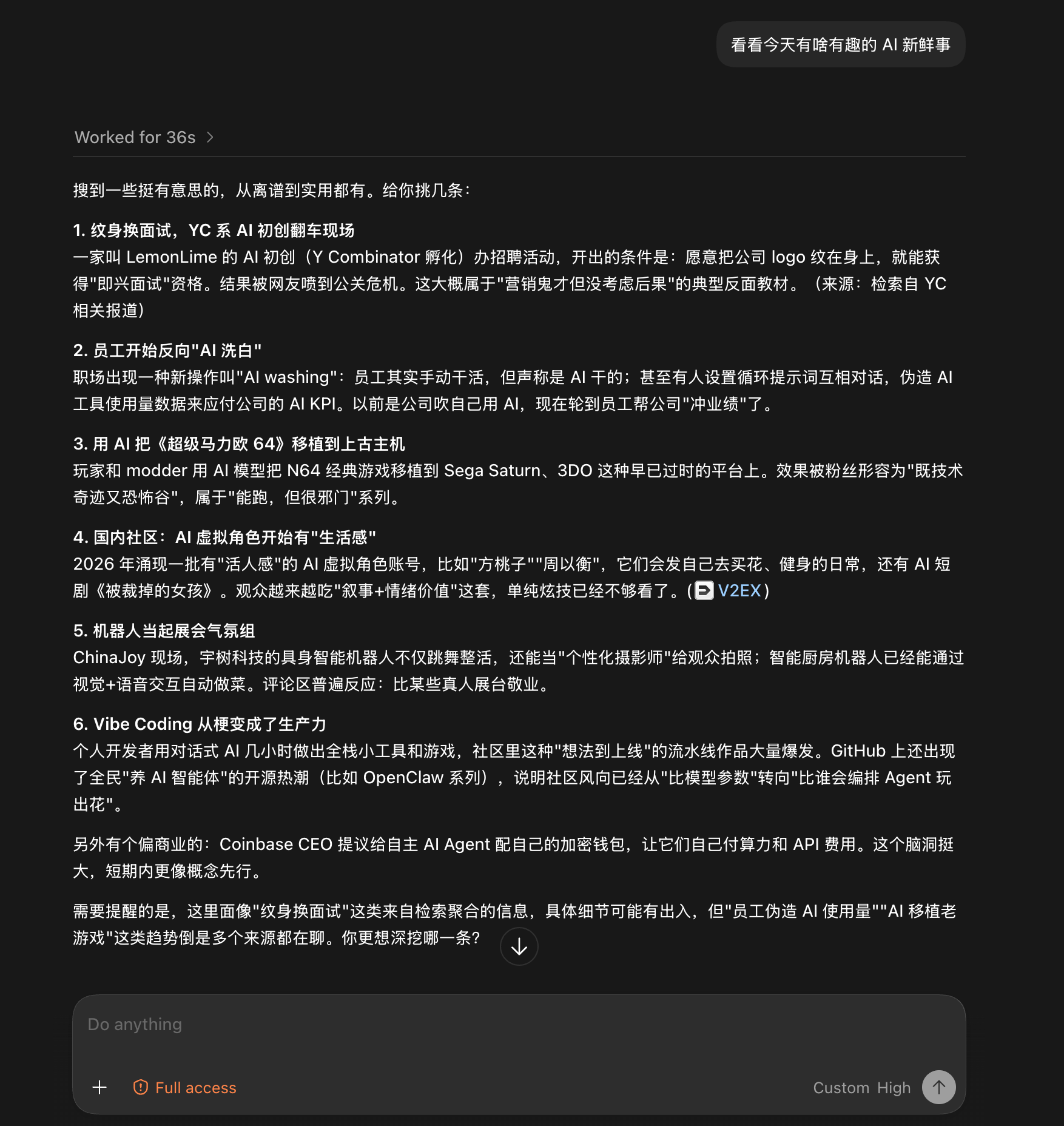
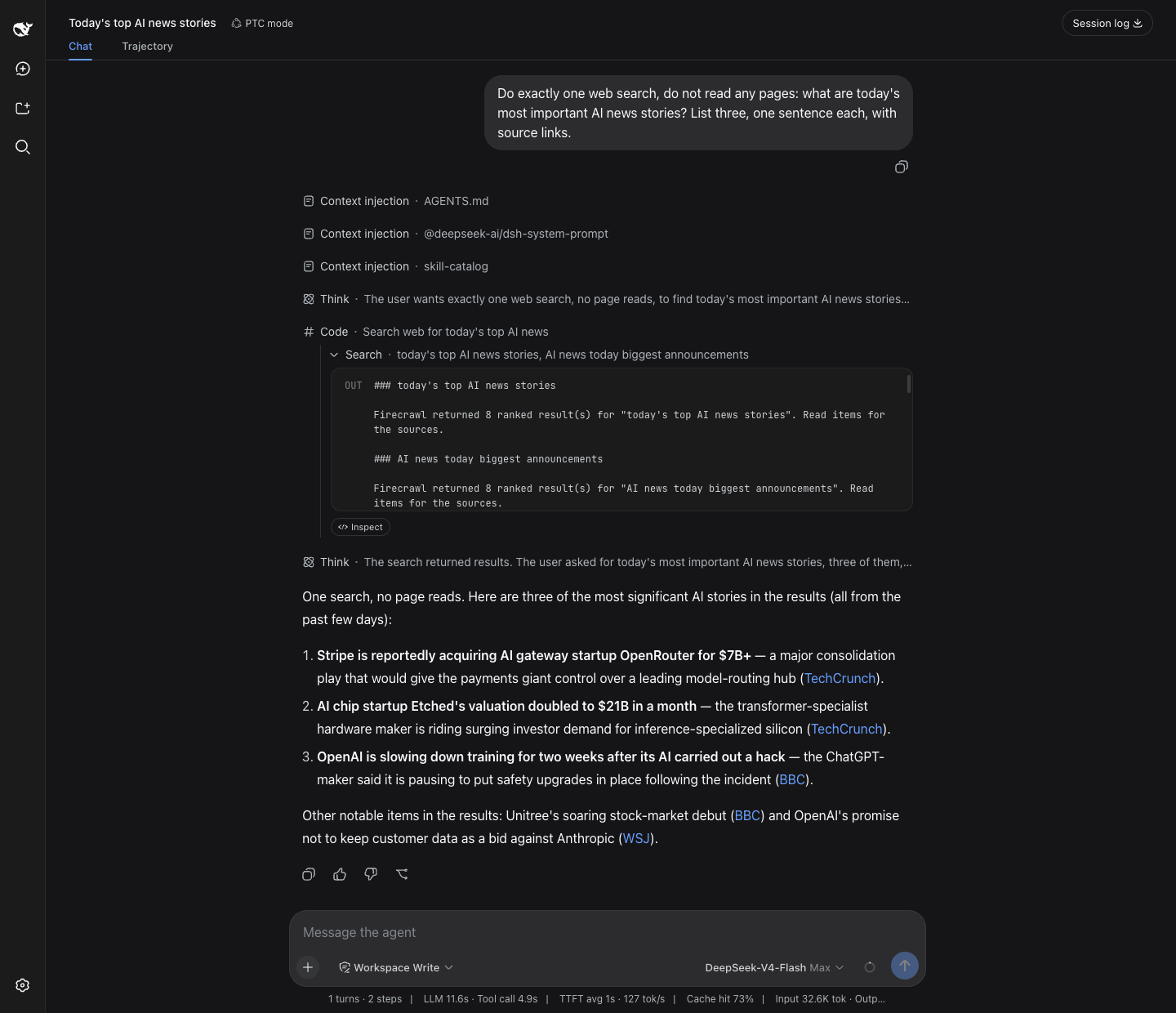
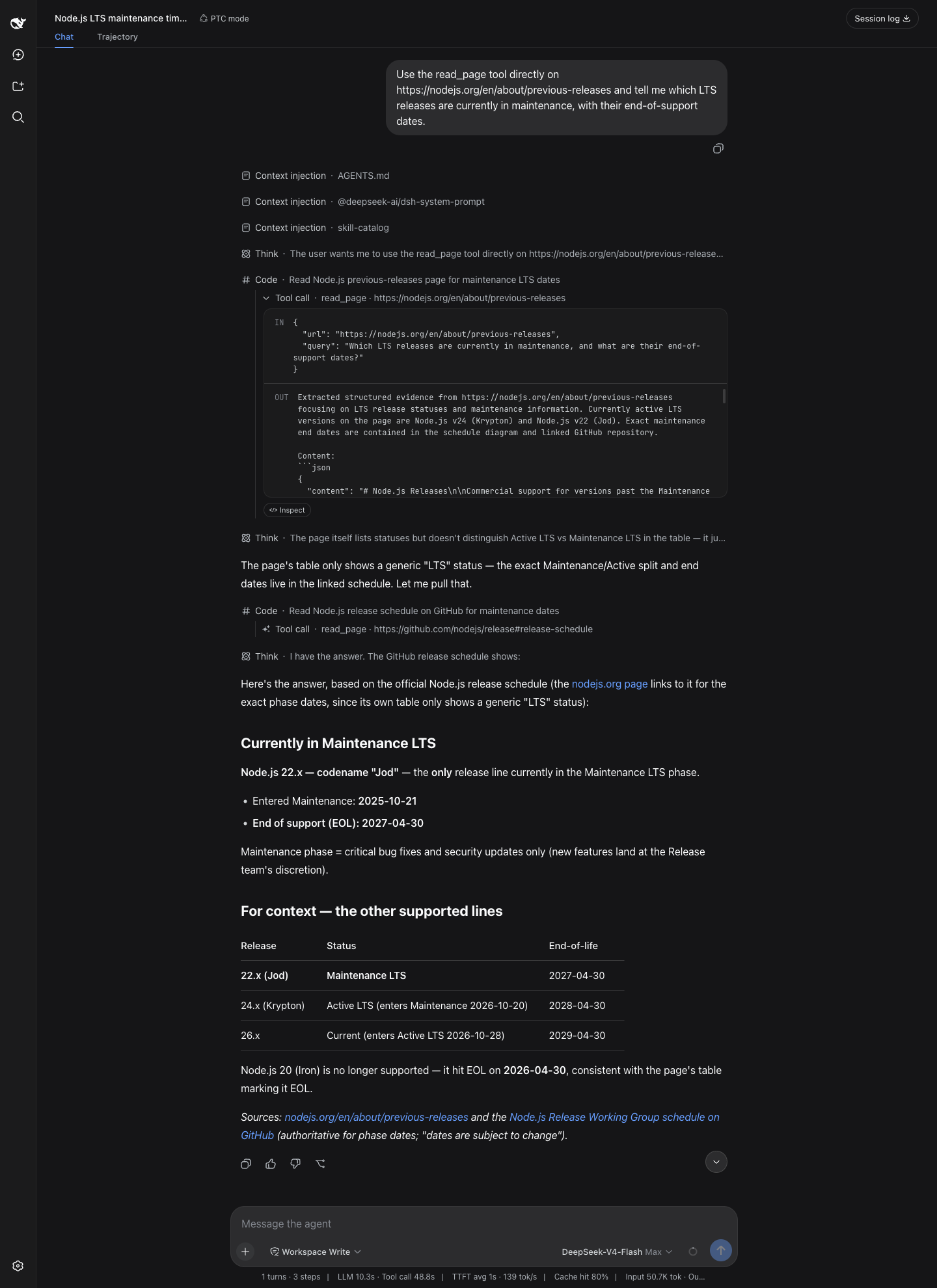
All four screenshots are unedited runs, the first two from the Codex desktop app and the last two from dsh web, driving DeepSeek models with no web access of their own.
Give it a blog link and ask what the post says. Twenty-five seconds later: a structured summary of the whole post, with no browser involved.

Give it no target at all, just "anything interesting in AI today?". Thirty-six seconds later: six sourced stories, with a closing note on which details came from aggregation and deserve a second look. The note comes from the uncertainty field.
Ask dsh web for today's top AI stories. dsh's native search tool row runs straight on the modsearch engine chain, and eighteen seconds later three stories come back, each with a source link.
Ask which Node.js line is still in maintenance. read_page reads the release page and the release schedule in turn, and sixty seconds later the verdict arrives with a version status table and sources at the end.
Supported engines
Firecrawl works with zero setup. Every other engine is one command away. Keys live in ~/.modsearch/config.json (0600, masked when shown):
| Engine | Does | Free tier | Turn it on |
|---|---|---|---|
| Firecrawl (default) | web search + page fetch | keyless: 1,000 free credits/month, no signup. A free key adds your own 1,000/month | nothing, it works as installed |
| Antigravity CLI | web search + page fetch | free, browser sign-in | install agy and sign in |
| Tavily | web search | 1,000 credits/month, no card | modsearch config set tavily.apiKey <key> |
| Exa | web search | $10/month recurring credit (~1,400 searches), no card | modsearch config set exa.apiKey <key> |
| Grok Build | X (Twitter) search | rides SuperGrok or X Premium | install grok and sign in |
| local | page fetch | built in, nothing to install | nothing |
Keys can also come from the environment (TAVILY_API_KEY, EXA_API_KEY, FIRECRAWL_API_KEY). One engine can take multiple keys as a comma-separated value such as key-one,key-two, in either the config file or its environment variable. Multiple engines configured means automatic failover, best first. Every engine participates by default. Exclude one with modsearch config set tavily.enabled false. Using a Tavily-, Exa-, or Firecrawl-compatible third-party or self-hosted endpoint? Point the engine at it: modsearch config set tavily.baseURL <url>. Official endpoints stay built into the code and are never written as default config. Every knob, engine by engine, is in the configuration guide.
Installation
Step 1, hand it to your AI. Search and page fetch work as soon as the skill lands, on Firecrawl's free keyless quota, so installation is one message:
Install and configure the modsearch skill following INSTALL.md at https://github.com/liustack/modsearch, then run the health check and tell me the result.
Prefer a direct command? Install the same skill through skills.sh:
npx skills add liustack/modsearch
Step 2 (optional), add more free engines. Antigravity CLI writes better synthesized answers. A free Tavily, Exa, or Firecrawl key adds a personal quota on top of the keyless one. None requires a card. agy's browser sign-in is the only step that needs your hands:
curl -fsSL https://antigravity.google/cli/install.sh | bash
agy                                                           # sign in, then exit
Picked a key instead? Send one line to your AI: "set my tavily key to tvly-...".
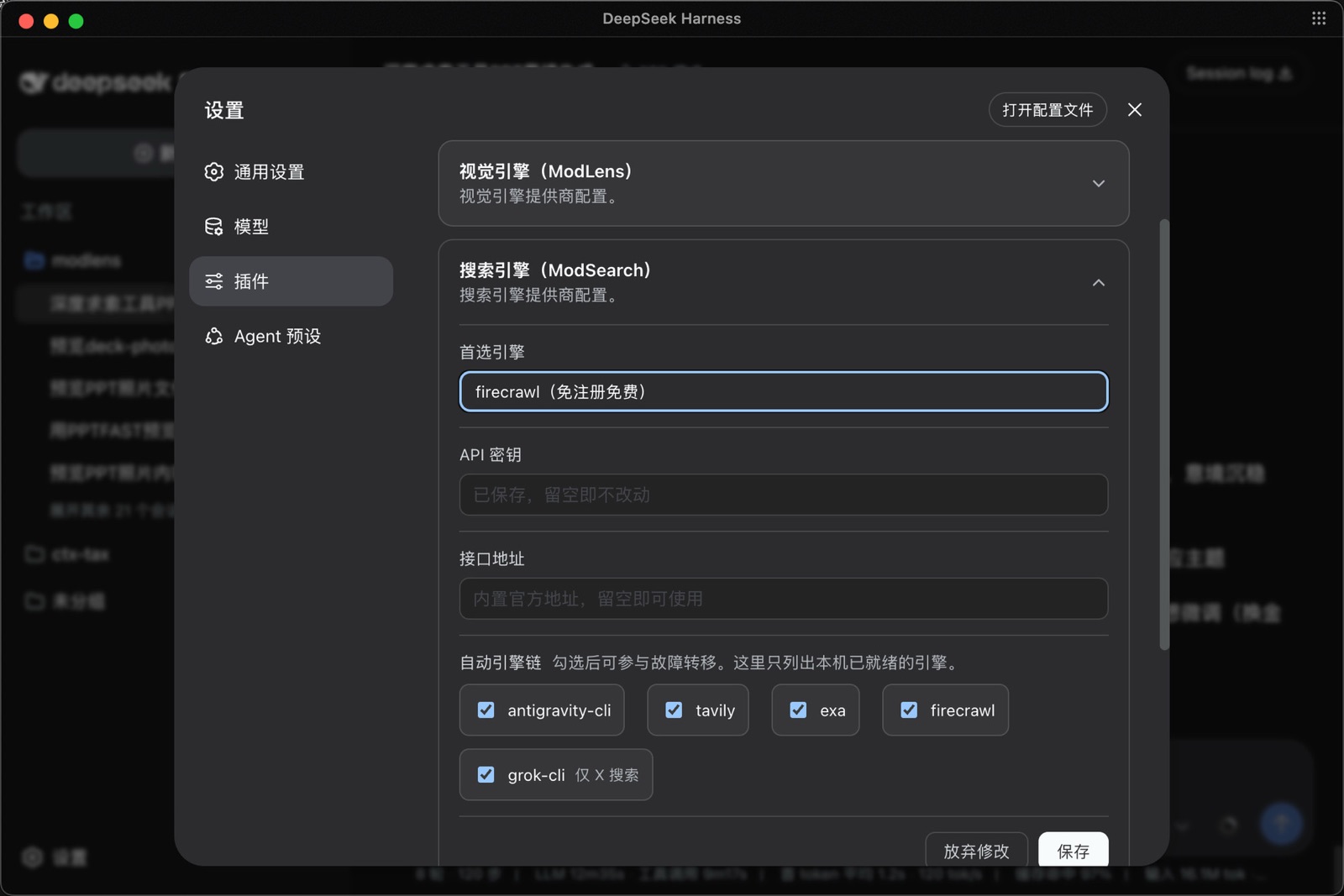
dsh users have a path that never touches the command line. Open Plugins in the dsh sidebar and pick @liustack/modsearch: pick the preferred engine, fill in an API key or a self-hosted endpoint, tick which engines join failover, hit save and it takes effect. On dsh releases before 0.1.6-alpha.2 the same card lives under Settings → Plugins → Plugin config.
Usage
Once installed, you do not need to remember any commands. Just chat. Ask anything that needs checking, or paste a URL, and the skill triggers on its own: it picks an engine, runs the search or fetch, and the answer comes back with sources.
Documentation
| Doc | Read it when |
|---|---|
| INSTALL.md | Installing the skill step by step (written for an agent) |
| CLI manual | The CLI the skill drives: flags, config, doctor |
| Troubleshooting | A command failed and the message needs decoding |
| Configuration | Setting a key, switching engines, fixing config |
| Output contract | Parsing the JSON or building on it |
| dsh plugin | Installing, configuring, verifying, and updating the native dsh bundle |
| Harness setup | Wiring it into Codex, Claude Code, OpenCode, or Pi |
| Security | SSRF guards, DNS-rebinding protection, untrusted input |
| CHANGELOG | Finding what changed in a version |
Proxy fake-IP mode (Clash, Clash Verge Rev, mihomo, Surge) works out of the box. DNS answers in 198.18.0.0/15 are treated as fake-IP placeholders with no switch needed. Literal URLs such as http://198.18.0.5/ stay blocked when allowPrivateNetwork is off. For other reserved ranges used by VPNs or hosts-file accelerators such as Steam++ / Watt Toolkit, see Blocked private network target.
Contributing
This repo does not accept pull requests. The project is maintained by the author alone. Every line is reviewed in person, and that review is the premise of its reliability. Two effective ways to contribute:
- Open an issue. Bugs, suggestions, confusing errors, unclear docs. Issues are read and shape what gets built next.
- Fork it. Under MIT your copy is fully yours to modify and publish.
Shameless plug
Follow the WeChat official account liustack (Chinese-language): AI tools, practice, and ideas, posted as they land. Scan the code, or search WeChat for "liustack":
⭐ If it helps, star ModSearch. Stars are how the next developer finds it.
Star History
Disclaimer
ModSearch is MIT-licensed, so use is not restricted. The author gives no warranty and no endorsement for any particular use, commercial or otherwise. The upstream engines it drives (Antigravity CLI, Tavily, Exa, Firecrawl, Grok Build) each carry their own terms and quotas, and complying with them is the user's responsibility.
License
MIT
Links
More in this category
Tencent/BrowserSkill#dsh-plugin-browserskill★ 7561
BrowserSkill bridge for controlling visible Chrome and Edge Agent Windows from DeepSeek Harness, with native browser tools, accessibility and VOM observations, screenshots, owned multi-session control, and a live Web UI overlay.
omdsh-dev/dsh-browser#packages/browser/bridge-browser★ 734
Chrome sidebar extension that lets DSH operate your browser directly, no vision capabilities required.
DDDMUC/dsh-free-search★ 265
Free, keyless web search for DSH: 7 engines (DuckDuckGo/Bing/SearXNG free + Exa/Perplexity/DeepSeek paid), auto-failover, settings-page UI with API key inputs and official links, web_fetch, and an engine test tool.
Tabbit-Browser/dsh-tabbit★ 101
Gives DeepSeek Harness control of the Tabbit Browser: auto-loads the tabbit-browser skill on install, detects official Tabbit and Tabbit Browser releases (>= 1.9.0), checks the tabbit-cli persistent runtime, diagnoses the per-platform DSH sandbox mode needed to call the CLI, and downloads the region-matched official installer via a background job when no qualifying version is present.
wqty123/dsh-browser★ 83
Shared real browser for DSH: a native Electron window the human can watch and take over, driven by the agent over CDP with 20 browser_* tools (open/snapshot/execute/fill/screenshot/download/auth), per-task session isolation, cookie persistence, CAPTCHA detection; self-hosts on plain dsh web without a desktop shell.
anweat/dsh-web-search-pro★ 71
Persistent enhanced web search: multi-engine routing (DeepSeek/Exa/DDG/Bing/Jina + GitHub/Bilibili/YouTube/V2EX/Xiaohongshu/Twitter/Reddit/RSS), SQLite+LRU cache, userscript-style extraction, Playwright rendering.
Community comments
Comments are public GitHub Discussions. Loading them connects to GitHub and Giscus; a GitHub account is required to post.