Registers Baidu, Doubao, Tavily, and Exa backends into ctx.web so official web_search can use them, and routes web_fetch through Tavily Extract or Exa Contents when that backend is active.
Install
# from npm (prebuilt)
dsh plugin --profile web add @yugasun/dsh-web-search
# from GitHub (first run asks for allowBuilds approval — follow the hint, retry)
dsh plugin --profile web add github:yugasun/dsh-plugins#path:/packages/dsh-web-search
Any plugin you install runs third-party code with your own permissions — it can read your files, use your credentials, and reach the network, and tool approvals don’t sandbox it. GitHub-sourced plugins also run build scripts at install time — pnpm blocks those until you allow them, so an install can stop with ERR_PNPM_GIT_DEP_PREPARE_NOT_ALLOWED or ERR_PNPM_IGNORED_BUILDS; dsh prints the exact key to add under allowBuilds in your profile’s pnpm-workspace.yaml, and the install works on the next run. Allowing a build is a trust decision: only install sources you trust, and pin a commit (github:owner/repo#sha).
README
Multi-provider web search for DeepSeek Harness. It registers Baidu, Doubao, Tavily, Exa, and Serper backends into ctx.web. The model-facing web_search / web_fetch tools stay the official @deepseek-ai/dsh-tool-web schema.
Compatible with DeepSeek Harness 0.1.0-rc.7.
Installing a plugin runs third-party code in the harness process with your permissions. Review the source before you install.
Install
From npm:
dsh plugin --profile web add @yugasun/dsh-web-search
From a clone of this monorepo (relative paths resolve against the profile directory, not your cwd — use $PWD. After a link: install the plugin resolves @deepseek-ai/* from the DSH profile / install, so repo node_modules is not required to boot):
dsh plugin --profile web add "$PWD/packages/dsh-web-search"
dsh plugin --profile desktop add "$PWD/packages/dsh-web-search"
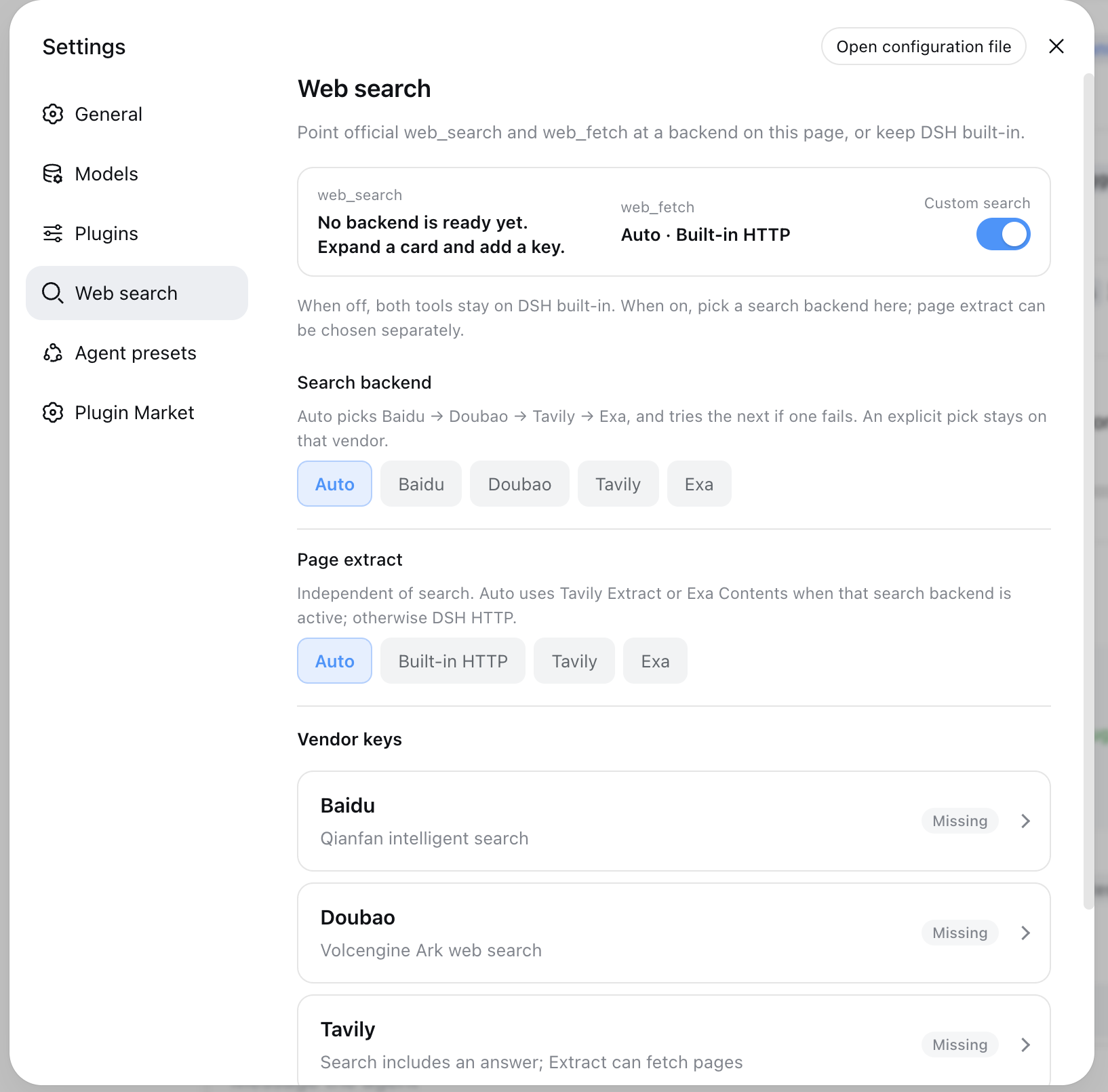
Restart dsh web. Settings has a Web search page. Turn Custom search off to keep DSH built-in web_search (deepseek-official) and web_fetch (http); turn it on to use Baidu / Doubao / Tavily / Exa / Serper. Page content is independent: auto follows Tavily/Exa search, or pin Tavily, Exa, or DSH http.
From Git (subdirectory):
dsh plugin --profile web add github:yugasun/dsh-plugins#path:packages/dsh-web-search
Uninstall:
dsh plugin --profile web remove @yugasun/dsh-web-search
Providers
| Id | Backend | Key | Notes |
|---|---|---|---|
baidu |
Qianfan web search POST /v2/ai_search/web_search (default) or intelligent search POST /v2/ai_search/chat/completions |
BAIDU_API_KEY or QIANFAN_API_KEY |
Default ordinary search returns titles, links, and snippets (faster, no model). Switch to AI search in Settings for a model summary; that path is slower, and knowledge-style queries often have no references — the plugin then recovers https?:// URLs from the summary when it can. |
doubao |
Doubao Search Custom POST /search_api/web_search (default) or Global POST /search_api/global_search |
DOUBAO_API_KEY or DOUBAO_SEARCH_API_KEY |
Create the key at the Doubao Search console. Custom is better for Chinese results; Global covers international pages. An old Ark endpoint in settings is remapped automatically. |
tavily |
Tavily Search POST /search and Extract POST /extract |
TAVILY_API_KEY |
LLM-oriented snippets plus an optional answer. Available as a web_fetch backend. |
exa |
Exa Search POST /search and Contents POST /contents |
EXA_API_KEY |
Search returns links only (no answer). Default provider id is exa; change exaProviderId if the official @deepseek-ai/dsh-web-search-exa is also installed. Available as a web_fetch backend. |
serper |
Serper Google Search POST /search |
SERPER_API_KEY |
Organic titles, links, and snippets. An answer box or knowledge-graph description is returned as content when present. Optional serperGl / serperHl set country and language. Not a web_fetch backend. |
Keys are read in this order: plugin settings (~/.dsh/settings.yaml), DSH credentials (TAVILY_API_KEY and friends), then the launch environment / ~/.dsh/.env. Settings secrets are never echoed back to the client. Clear in Settings, or emptying the field, unsets that key from the YAML document. A export TAVILY_API_KEY=… inside an agent bash tool does not reach the harness process.
Selection
Installing the plugin can retarget official web_search at this package's facade id dsh-web-search. Settings → Web search has a Custom search switch:
- Off:
web_searchuses DSH built-indeepseek-official;web_fetchuseshttp - On (default): pick the search backend below
- Auto (default): first configured backend in order Baidu → Doubao → Tavily → Exa → Serper. If that request fails with a recoverable error, the next configured backend is tried and the harness log records which one was skipped. An explicit backend does not fail over.
- Explicit: Baidu / Doubao / Tavily / Exa / Serper
- Page content (independent of search)
- Auto (default): Tavily or Exa when that search backend is active; otherwise DSH built-in
http - Built-in HTTP / Tavily / Exa: pin
web_fetchregardless of which search backend is active
- Auto (default): Tavily or Exa when that search backend is active; otherwise DSH built-in
- Each backend card has Test connection, which runs a one-result
web_searchagainst that vendor. Status "configured" still means a key is present; the probe tells you whether the key works.
Develop
pnpm --filter @yugasun/dsh-web-search test
pnpm --filter @yugasun/dsh-web-search build
License
Links
More in this category
Tencent/BrowserSkill#dsh-plugin-browserskill★ 8059
BrowserSkill bridge for controlling visible Chrome and Edge Agent Windows from DeepSeek Harness, with native browser tools, accessibility and VOM observations, screenshots, owned multi-session control, and a live Web UI overlay.
omdsh-dev/dsh-browser#packages/browser/bridge-browser★ 759
Chrome sidebar extension that lets DSH operate your browser directly, no vision capabilities required.
liustack/modsearch★ 584
Web search bridge for text-only agents: ask the web or X, get structured JSON evidence (search, fetch, citations).
DDDMUC/dsh-free-search★ 304
Free, keyless web search for DSH: 7 engines (DuckDuckGo/Bing/SearXNG free + Exa/Perplexity/DeepSeek paid), auto-failover, settings-page UI with API key inputs and official links, web_fetch, and an engine test tool.
Tabbit-Browser/dsh-tabbit★ 101
Gives DeepSeek Harness control of the Tabbit Browser: auto-loads the tabbit-browser skill on install, detects official Tabbit and Tabbit Browser releases (>= 1.9.0), checks the tabbit-cli persistent runtime, diagnoses the per-platform DSH sandbox mode needed to call the CLI, and downloads the region-matched official installer via a background job when no qualifying version is present.
wqty123/dsh-browser★ 98
Shared real browser for DSH: a native Electron window the human can watch and take over, driven by the agent over CDP with 20 browser_* tools (open/snapshot/execute/fill/screenshot/download/auth), per-task session isolation, cookie persistence, CAPTCHA detection; self-hosts on plain dsh web without a desktop shell.
Community comments
Comments are public GitHub Discussions. Loading them connects to GitHub and Giscus; a GitHub account is required to post.